2015 MITSUBISHI OUTLANDER Specifications
[x] Cancel search: SpecificationsPage 1 of 446

N09200102084
Thank you for buying a MITSUBISHI OUTLANDER. We are confident you will enjoy your
vehicle. It has
been engineered
for optimum performance, durability and comfort. By thoroughlyreading this Owner’s Manual, you w
ill gain an understanding of the
many features that are included in the OUTLANDER. The Owner’s Manual contains descripti
ons and illustrations that will assist in the
operation and maintenance of your vehicle. Your Authorized Mitsubishi Motors
Dealer will be
happy to assist you
with any further questions you ma
y have regarding the operation of
your vehicle.Please note that this manual appl
ies to all OUTLANDER models and
explains all features in
cluding options. Some feat
ures explained in this
manual may not be inst
alled on your vehicle.
Please leave this Owner’s Manual in the vehicle at the time of resale. The next owner will appreciate ha
ving access to the information con-
tained here. This manual includes instructions fo
r standard and optional equipment
available at the time of printing. Mitsubishi Motors Corporationreserves the right to make changes
in design and specifications and to
make additions or improvements in
its product without assuming any
obligation to install these on pr
eviously manufac
tured products.
Introduction
Throughout this manual the words
WARNING
and
CAUTION
appear.These are reminders to be especially careful. Failure to follow the instructions could result in persona
l injury or damage to your vehi-
cle. Indicates a strong possibility of se
vere personal injury or death if
instructions are not followed. Points out hazards or unsafe pr
actices that could cause minor
personal injury
or damage to your vehicle.
You will see another important symbol: NOTE Gives helpful information. As with other vehicles of
this type, failure to
operate this vehicle cor-
rectly may result in loss of contro
l or an accident. Be sure to read
“on-pavement” and “off-road” driv
ing guidelines in the “Driving
safety” and “Features an
d controls” sections.
WA R N I N GEngine exhaust, some of its constituents, and certain vehicle compo- nents contain or emit chemicals kn
own to the State of California to
cause cancer and birth defects and reproductive harm. In addition, certain fluids contained in vehicles and certain products of compo- nent wear contain or emit chemic
als known to the State of Califor-
nia to cause cancer and birth defects or other reproductive harm.
©2014 Mitsubishi Motors Corp
oration Printed in Japan
BK0211800US.book 1 ページ 2014年3月12日 水曜日 午後2時42分
Page 2 of 446
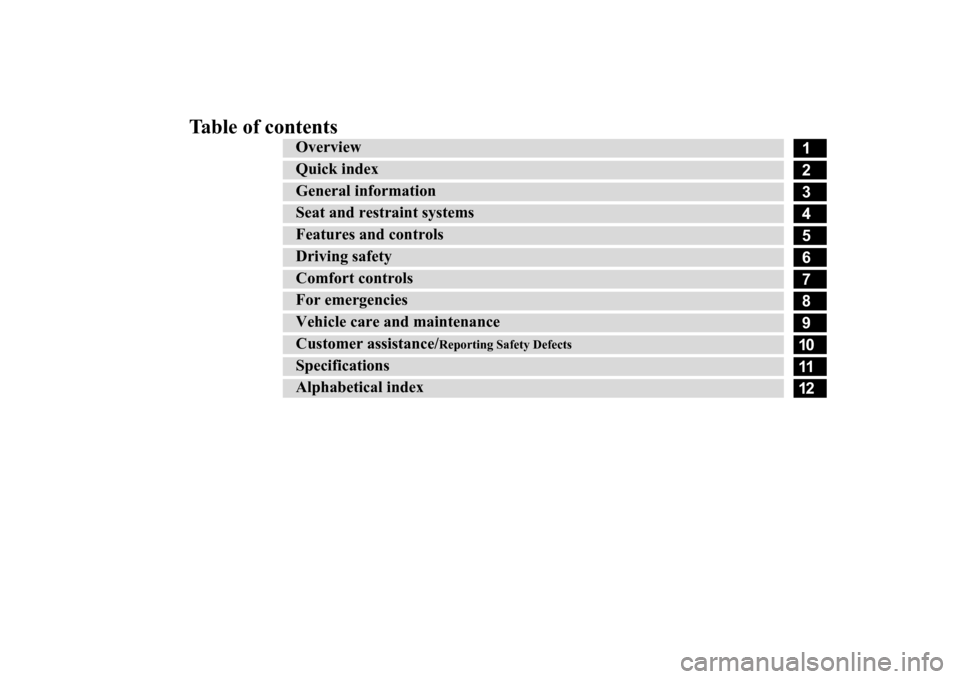
Table of contents
123456789101112
Overview Quick indexGeneral information Seat and restraint systems Features and controlsDriving safetyComfort controlsFor emergenciesVehicle care a
nd maintenance
Customer assistance/
Reporting Safety Defects
SpecificationsAlphabetical index
BK0211800US.book 1 ページ 2014年3月12日 水曜日 午後2時42分
Page 25 of 446
Genuine Mitsubishi Motors parts 3-6 General information
3
Modification of any onboard com- puter/control module, including repro-gramming, or replacing/adding chips to any onboard computer/control module
Review the Warranty and Maintenance Man- ual for further details
regarding warranty cov-
erage.
N00301701219
The installation of accessories, optional parts, etc., should only be performed within the limits prescribed by law, and inaccordance with the guidelines and warn- ings contained within the documents accompanying this vehicle.Only Mitsubishi Moto
rs approved acces-
sories should be fitt
ed to your vehicle.
Improper installation of
electrical parts
could cause a fire. Refer to the “Modifica- tion/alterations to the electrical or fuel systems” section with
in this owner’s man-
ual.
Using a cellular phone or radio set inside the vehicle without an
external antenna
may cause electrical system interference, which could lead to unsafe vehicle opera- tion. Tires and wheels whic
h do not meet spec-
ifications must not be used. Refer to the “Specifications” section forinformation regard
ing wheel and tire
sizes.
Due to the large number of accessory and replacement parts provided by different man- ufacturers in the market, it is not always pos-sible for an authorized Mitsubishi Motors dealer to check whether the attachment or installation of a non-Mi
tsubishi Motors genu-
ine parts affects the driving safety of your Mitsubishi-vehicle.
N00301800141
Mitsubishi Motors manu
factures high quality
vehicles with an emphasis on safety. It is important to consult an
authorized Mitsubishi
Motors dealer before
installation of any
accessory which may in
volve modification of
the electrical or fuel systems.
N00301400219
Mitsubishi Motors Genuine Parts aredesigned and manufactured to meet high stan-dards of performance, and are recommended for all of your maintenance needs. Also avail-
Installation of accessories
CAUTION Before any electrical or electronic accesso- ries are installed, cons
ult an authorized Mit-
subishi Motors dealer.
WA R N I N G While driving, do not use a cellular phone in a way that hinder
s safe driving. Any-
thing, including cell
ular phone usage, that
distracts you from the safe operation of your vehicle incr
eases your risk of an acci-
dent.Refer to and follow al
l state and local laws
in your area regardi
ng cellular phone
usage while driving.
Important point!
Modification/alterations to the electrical or fuel systems
CAUTION Please consult an authorized Mitsubishi Motors dealer concer
ning any such acces-
sory fitment or modification.If the wires interfere
with the vehicle body or
improper installation me
thods are used (pro-
tective fuses not included, etc.), electronicdevices may be adversel
y affected, resulting
in a fire, vehicle dama
ge, or other accident.
Genuine Mitsubishi Motors parts
BK0211800US.book 6 ページ 2014年3月12日 水曜日 午後2時42分
Page 282 of 446
Bluetooth® 2.0 interface (if so equipped)
Features and controls 5-205
5
6. When the transfer is complete, the voice guide will say “Import complete” andthen the system will return to the main menu.
N00566301092
MODEL: MMC FCC ID: CB2MDGMY10IC: 279B-MDGMY10 Your Bluetooth
® 2.0 interface operates on a
radio frequency subject to Federal Communi- cations Commission (FCC)
Rules (For vehi-
cles sold in U.S.A.
) and Industry Canada
Rules (For vehicles so
ld in Canada). This
device complies with Part 15 of the FCCRules and RSS-210 of the Industry Canada Rules. Operation is subject to the following two conditions: This device may not
cause harmful inter-
ference. This device must ac
cept any interference
received, including interference that maycause undesired operation.
The term “IC:” before
the radio certification
number only signifies th
at Industry Canada
technical specifications were met. The antenna used for this transmitter must not be co-located or operating in conjunctionwith any other antenna
or transmitter. End-
users and installers must be provided with installation instructions
and transmitter oper-
ating conditions for sa
tisfying RF exposure
compliance. FCC Notice: This equipment has been tested and found to comply with the limits for a Class B digital device, pursuant to part 15 ofthe FCC Rules. These limits are designed to provide reasonable prot
ection against harmful
interference in a residential installation.This equipment generate
s, use and can radiate
radio frequency energy and, if not installed and used in accordance with the instructions,may cause harmful interf
erence to radio com-
munications. However, there is no guarantee that interfer-ence will not occur in a particular installation. If this equipment does
cause harmful interfer-
ence to radio or tele
vision reception, which
can be determined by turning the equipment off and on, the user is encouraged to try to correct the interference by one or more of thefollowing measures: Reorient or relocate the receiving antenna. Increase the separation between the equipment and receiver.
General information
CAUTION Changes or modifica
tions made to this
equipment not expressly approved by the manufacturer may void the FCC authoriza- tion to operate this equipment.
Connect the equipment into an outlet on a circuit different from that to which thereceiver is connected. Consult the dealer or an experienced radio/TV technician for help.
ICES Notice: This Class B digital apparatus complies with Canadian ICES-003.
N00566401080
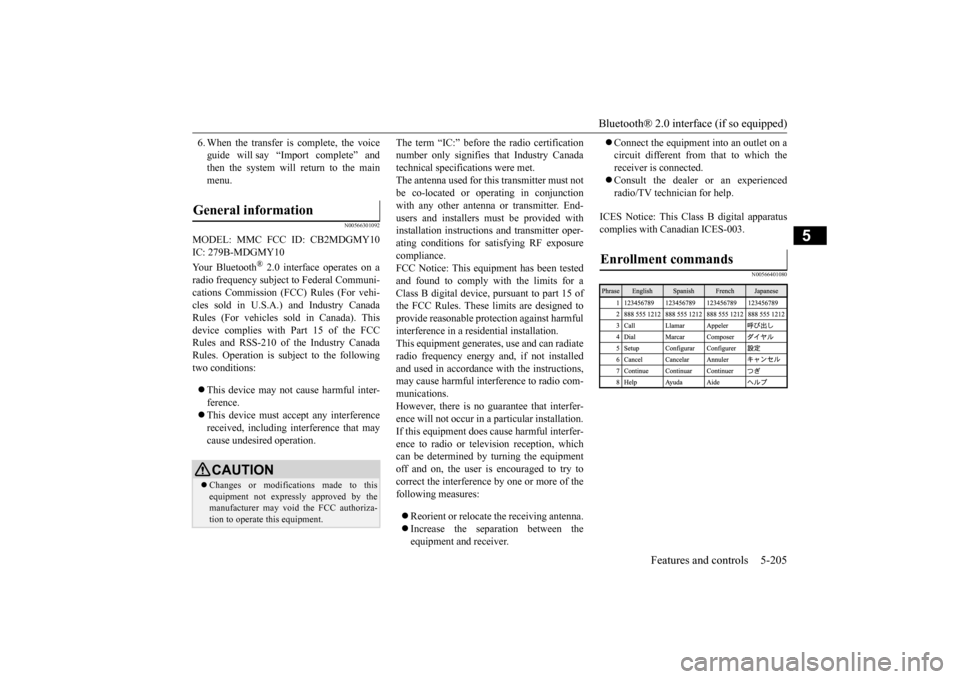
Enrollment commands
BK0211800US.book 205 ページ 2014年3月12日 水曜日 午後2時42分
Page 284 of 446
USB input terminal (if so equipped)
Features and controls 5-207
5
N00566901102
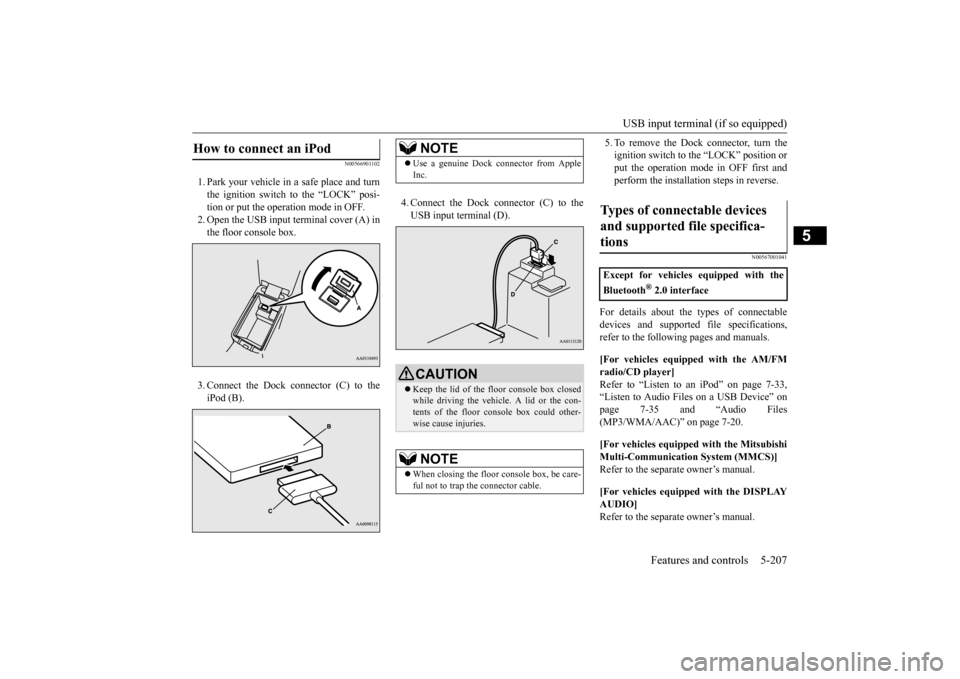
1. Park your vehicle in
a safe place and turn
the ignition switch to the “LOCK” posi-tion or put the opera
tion mode in OFF.
2. Open the USB input
terminal cover (A) in
the floor console box. 3. Connect the Dock connector (C) to the iPod (B).
4. Connect the Dock connector (C) to the USB input terminal (D).
5. To remove the Dock connector, turn the ignition switch to the “LOCK” position orput the operation mode in OFF first and perform the installation steps in reverse.
N00567001041
For details about the
types of connectable
devices and supported fi
le specifications,
refer to the following pages and manuals. [For vehicles equipped with the AM/FM radio/CD player] Refer to “Listen to an
iPod” on page 7-33,
“Listen to Audio File
s on a USB Device” on
page 7-35 and “Audio Files (MP3/WMA/AAC)” on page 7-20. [For vehicles equipped with the Mitsubishi Multi-Communication
System (MMCS)]
Refer to the separa
te owner’s manual.
[For vehicles equipped with the DISPLAY AUDIO] Refer to the separa
te owner’s manual.
How to connect an iPod
NOTE
Use a genuine Dock connector from Apple Inc.CAUTION Keep the lid of the floor console box closed while driving the vehicle. A lid or the con- tents of the floor console box could other-wise cause injuries.NOTE
When closing the floor console box, be care- ful not to trap the connector cable.
Types of connectable devices and supported file specifica-tions
Except for vehicles equipped with the Bluetooth
® 2.0 interface
BK0211800US.book 207 ページ 2014年3月12日 水曜日 午後2時42分
Page 285 of 446
USB input terminal (if so equipped) 5-208 Features and controls
5
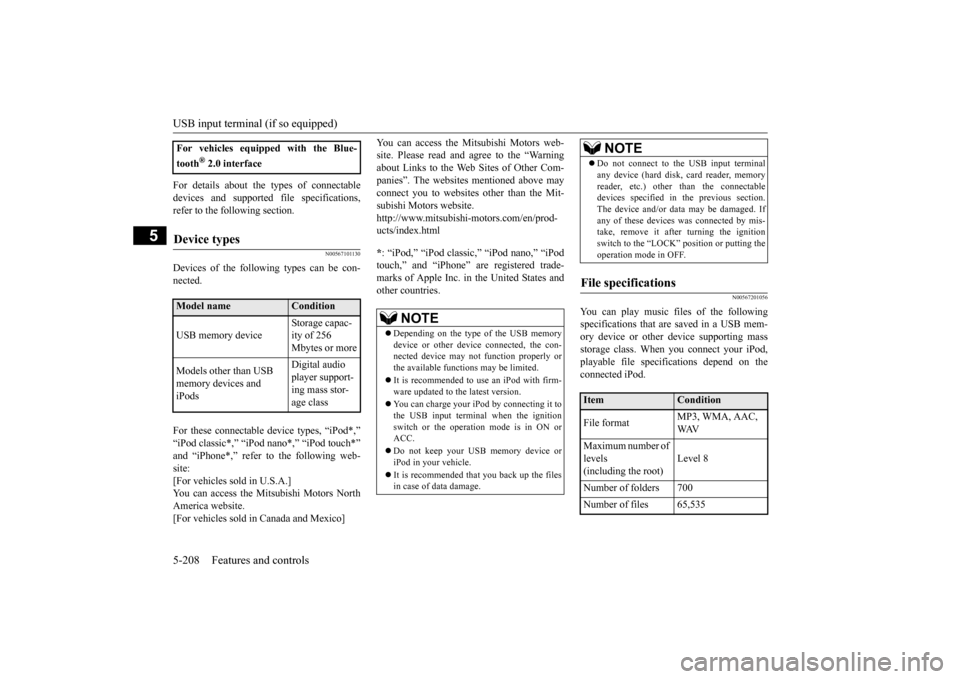
For details about the types of connectable devices and supported fi
le specifications,
refer to the following section.
N00567101130
Devices of the follow
ing types can be con-
nected. For these connectable de
vice types, “iPod*,”
“iPod classic*,” “iP
od nano*,” “iPod touch*”
and “iPhone*,” refer to the following web- site: [For vehicles sold in U.S.A.]You can access the Mitsubishi Motors North America website. [For vehicles sold in Canada and Mexico]
You can access the Mi
tsubishi Motors web-
site. Please read and agree to the “Warningabout Links to the Web Sites of Other Com- panies”. The websites
mentioned above may
connect you to websites
other than the Mit-
subishi Motors website. http://www.mitsubishi-
motors.com/en/prod-
ucts/index.html * : “iPod,” “iPod classic,” “iPod nano,” “iPod touch,” and “iPhone” are registered trade- marks of Apple Inc. in the United States and other countries.
N00567201056
You can play music files of the followingspecifications that are saved in a USB mem- ory device or other device supporting mass storage class. When you connect your iPod,playable file specifications depend on the connected iPod.
For vehicles equipped with the Blue- tooth
® 2.0 interface
Device types
Model name
Condition
USB memory device
Storage capac- ity of 256 Mbytes or more
Models other than USB memory devices and iPods
Digital audio player support-ing mass stor- age class
NOTE
Depending on the type of the USB memory device or other devi
ce connected, the con-
nected device may not
function properly or
the available functi
ons may be limited.
It is recommended to use an iPod with firm- ware updated to th
e latest version.
You can charge your iP
od by connecting it to
the USB input terminal
when the ignition
switch or the operation mode is in ON or ACC. Do not keep your USB memory device or iPod in your vehicle. It is recommended that you back up the files in case of data damage.
Do not connect to the USB input terminal any device (hard disk, card reader, memoryreader, etc.) other than the connectabledevices specified in the previous section. The device and/or data
may be damaged. If
any of these devices
was connected by mis-
take, remove it afte
r turning the ignition
switch to the “LOCK”
position or putting the
operation mode in OFF.
File specifications
Item
Condition
File format
MP3, WMA, AAC, WAV
Maximum number of levels (including the root)
Level 8
Number of folders 700 Number of files 65,535
NOTE
BK0211800US.book 208 ページ 2014年3月12日 水曜日 午後2時42分
Page 337 of 446
Audio Files (MP3/WMA/AAC) 7-22 Comfort controls
7
N00715900020
MP3 is an abbreviation of “MPEG-1 Audio Layer 3”. MPEG is an abbreviation of “Motion Picture Experts Group”, and this is avideo compression standard used in video CDs, etc. MP3 is one of the audio compression meth-ods contained in the MPEG audio standard, and reduces the quality
of sounds that are
beyond the auditory resolution of the human ear and that are hidden by louder sounds, thus creating high-qua
lity data with a lower data
size. Because this can co
mpress CD audio to
approximately 1/10 its orig
inal data size with-
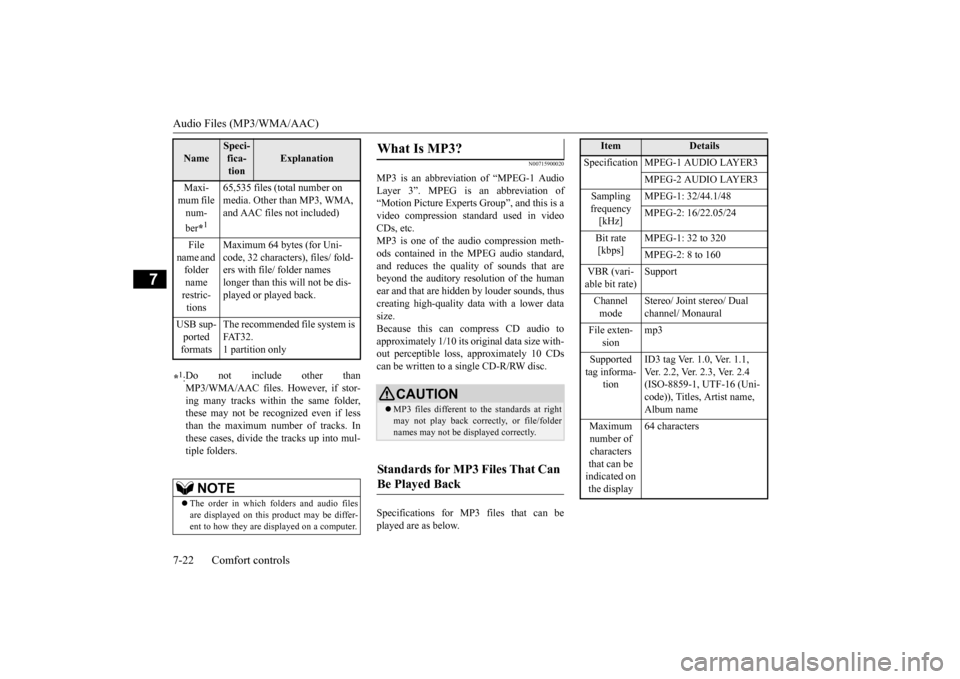
out perceptible loss, approximately 10 CDs can be written to a single CD-R/RW disc. Specifications for MP3 files that can be played are as below.
Maxi- mum file num- ber
*1
65,535 files (total number on media. Other than MP3, WMA, and AAC files not included)
File
name and folder name restric-tions
Maximum 64 bytes (for Uni- code, 32 characters), files/ fold-ers with file/ folder names longer than this will not be dis- played or played back.
USB sup- ported formats
The recommended file system is FAT32. 1 partition only
*1: Do not include other than MP3/WMA/AAC files. However, if stor- ing many tracks within the same folder,these may not be recognized even if less than the maximum number of tracks. In these cases, divide the tracks up into mul-tiple folders.
NOTE
The order in which folders and audio files are displayed on this product may be differ- ent to how they are displayed on a computer.Name
Speci- fica- tion
Explanation
What Is MP3?
CAUTION MP3 files different to the standards at right may not play back corr
ectly, or file/folder
names may not be di
splayed correctly.
Standards for MP3 Files That Can Be Played Back
Item
Details
Specification MPEG-1 AUDIO LAYER3
MPEG-2 AUDIO LAYER3
Sampling frequency [kHz]
MPEG-1: 32/44.1/48 MPEG-2: 16/22.05/24
Bit rate [kbps]
MPEG-1: 32 to 320 MPEG-2: 8 to 160
VBR (vari- able bit rate)
Support
Channel mode
Stereo/ Joint stereo/ Dual channel/ Monaural
File exten-
sion
mp3
Supported tag informa-
tion
ID3 tag Ver. 1.0, Ver. 1.1, Ver. 2.2, Ver. 2.3, Ver. 2.4 (ISO-8859-1, UTF-16 (Uni-code)), Titles, Artist name, Album name
Maximum number of characters that can be indicated on the display
64 characters
BK0211800US.book 22 ページ 2014年3月12日 水曜日 午後2時42分
Page 338 of 446

Audio Files (MP3/WMA/AAC)
Comfort controls 7-23
7
N00716000028
WMA is an abbreviation of Windows Media Audio, and this is an
audio compression for-
mat from Microsoft. This is a compressionformat that has a higher compression ratio than MP3. Specifications for WMA files that can be played are as below.
N00716100029
AAC is an abbreviation of Advanced Audio Coding, and this is
an audio compression
standard used in “MPEG-2” and “MPEG-4”. This features 1.4x th
e compression of MP3,
with comparable audio quality.
Specifications for AAC files that can be played are as below.
What Is WMA?
NOTE
Microsoft, Windows Media, and Windows are registered trademarks of Microsoft Cor- poration (USA) and in
other countries.
CAUTIONWMA supports digita
l rights management
(DRM). This product cannot play back WMA files protected
using this system.
WMA files different to the standards at right may not play back correctly, or file/folder names may not be displayed correctly. “Pro”, “Lossless”, and “Voice” are not sup- ported.
Standards for WMA Files That Can Be Played Back
Item
Details
Specification Windows Media Audio
Version7.0/8.0/9.0
Sampling fre- quency [kHz]
32/44.1/48
Bit rate [kbps] 48 to 320
VBR
(variable bit rate)
Support
Channel mode Stereo/Monaural File extension wma Supported tag information
WMA tags Title name, Artist name, Album name
Maximum num- ber of characters that can be indi- cated on the dis-
play
64 characters
What Is AAC?
CAUTION AAC supports digita
l rights management
(DRM). This product cannot play back AACfiles protected using this system. AAC files different to
the standards at right
may not play back correctly, or file/foldernames may not be displayed correctly.
Standards for AAC Files That Can Be Played Back
Item
Details
Specification Advanced Audio
CodingMPEG4/AAC-LC MPEG2/AAC-LC
Sampling
fre- quency [kHz]
MPEG4 8/11.025/12/16/22.05/
24/32/44.1/48
MPEG2 8/11.025/12/16/22.05/
24/32/44.1/48
Bit rate [kbps]
MPEG4 8 to 320 MPEG2 8 to 320
VBR
(variable bit rate)
Support
Channel mode Stereo/Monaural
BK0211800US.book 23 ページ 2014年3月12日 水曜日 午後2時42分