2015 MITSUBISHI OUTLANDER III change
[x] Cancel search: changePage 155 of 446
S-AWC (Super-All Wheel Control) (if so equipped) 5-78 Features and controls
5
The left-right differen
tial limiting function is
a function that enhanc
es driving performance
and vehicle stability by preventing idle spin- ning of a wheel when driving on slipperyroad or when the road surfaces of left and right wheels are different. The yaw control function is a function that enhances vehicle corn
ering performance and
vehicle stability with
management of vehicle
turning power (yaw moment) by controlling the drive power difference of the left andright wheels and the braking force when the vehicle does not turn
in response to steering
input, such as when the steering wheel isturned quickly or when driving on slippery road.
N00542401073
Select the control mode from the followingfour types to suit the driving conditions.
4-wheel drive operation requires special driv- ing skills.Carefully read the “4-wheel drive operation” section on page 5-80 and take care to drive safety.
N00583000039
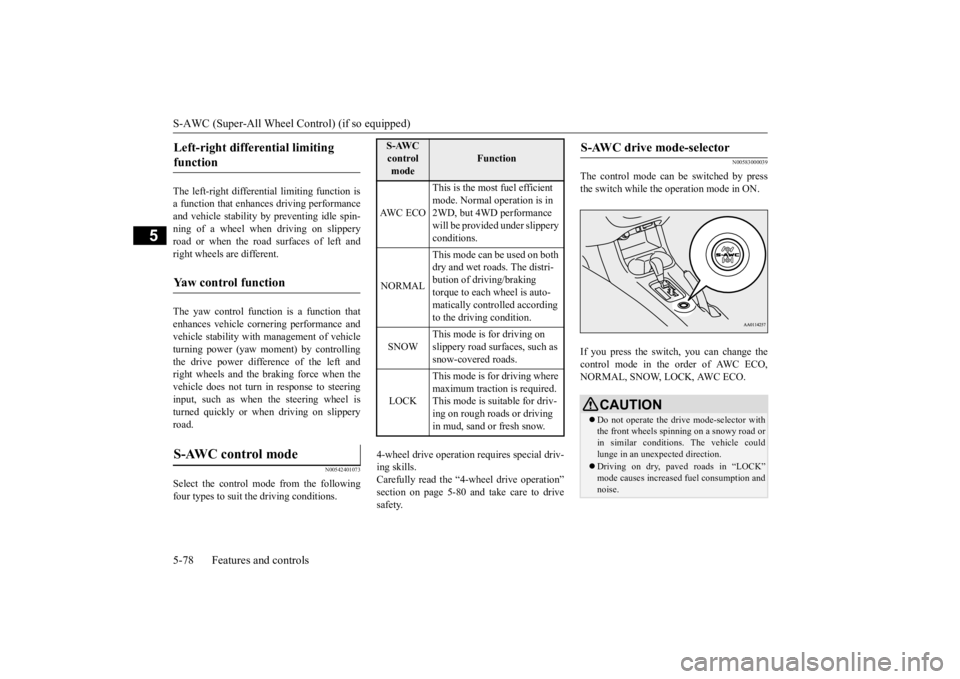
The control mode can
be switched by press
the switch while the operation mode in ON. If you press the switch, you can change the control mode in the order of AWC ECO,NORMAL, SNOW, LOCK, AWC ECO.
Left-right differential limiting function
Yaw control function
S-AWC control mode
S-AWC control mode
Function
AW C E C O
This is the most fuel efficient mode. Normal operation is in 2WD, but 4WD performance will be provided under slippery conditions.
NORMAL
This mode can be used on both dry and wet roads. The distri- bution of driving/braking torque to each wheel is auto-matically controlled according to the driving condition.
SNOW
This mode is for driving on slippery road surfaces, such as snow-covered roads.
LOCK
This mode is for driving where maximum traction is required. This mode is suitable for driv-ing on rough roads or driving in mud, sand or fresh snow.
S-AWC drive mode-selector
CAUTION Do not operate the dr
ive mode-selector with
the front wheels spinning on a snowy road or in similar conditions
. The vehicle could
lunge in an unexpected direction. Driving on dry, paved roads in “LOCK” mode causes increased fuel consumption andnoise.
BK0211800US.book 78 ページ 2014年3月12日 水曜日 午後2時42分
Page 156 of 446

S-AWC (Super-All Wheel Co
ntrol) (if so equipped)
Features and controls 5-79
5
N00583100027
The currently selected control mode is dis- played on the multi-
information display.
In addition, when the control mode ischanged, the selected mode appears on the interrupt display screen of the information screen in the multi-information display.The control mode displa
y will appear on the
information screen for a few seconds, and then the original screen will return.
Warning display Warning display
N00542501058
The S-AWC operation stat
us can be displayed
on the information screen in the multi-infor- mation display. To display the status, press the multi-informa-tion meter switch to change the information screen. Refer to “Information
screen (when the oper-
ation mode in ON)” on page 5-126. The S-AWC operation st
atus is displayed.
NOTE
The control mode can be switched while driving or stopped.
S-AWC control mode display
Example: “AWC ECO” mode is selected.
CAUTION If the selected drive
mode indicator begins
blinking, the drive m
ode will automatically
switch to protect the drive-system compo-nents. A warning will
also be displayed in
the information screen in the multi informa- tion display.Reduce speed and, if the indicator stops blinking, you may resume normal driving.CAUTION If the selected drive mode indicator (4WD) is blinking, a problem has occurred with theelectronically
controlled 4WD. A warning
will also be displayed in the information screen in the multi information display. Haveyour vehicle inspected
by an authorized Mit-
subishi Motors dealer.
CAUTION Make sure that all four tires are the same specified size, type, a
nd brand, and have no
significant difference in the amount of wearfor all 4 wheels. Otherwise, the S-AWC sys- tem may not work properly, and a 4WD sys- tem warning (overheating or servicerequired) may
be displayed.
S-AWC operation display
Display example
BK0211800US.book 79 ページ 2014年3月12日 水曜日 午後2時42分
Page 157 of 446
4-wheel drive operation 5-80 Features and controls
5
N00576700021
While the drive mode is in the “NORMAL” position, if the ECO mode switch is switchedON, the drive mode
will be changed to
“AWC ECO” mode. If the ECO mode switch is switched OFF, thedrive mode will be returned to “NORMAL” mode. Refer to the “ECO mode switch” on page 5-177.
N00530601179
Your vehicle has been
designed primarily for
use on pavement. But its unique 4 -wheel drive system allowsyou to occasionally travel on unpaved roads, to campgrounds, picnic
sites, and similar
locations.Not only does this ensure better handling on dry, paved roads but al
so permits better trac-
tion when driving on slippery, wet or snow- covered roads and when moving out of mud.But it is not suitable for heavy off road use or towing in rough conditions. It is particularly im
portant to note that 4-
wheel drive may not gi
ve sufficient hill
climbing ability and e
ngine braking on steep
slopes. You should try to avoid driving onsteep slopes. Also, you must exercise caution when driving on sand and mud and when driving through water because sufficient traction may not be available in certain circumstances.Please avoid driving the vehicle through areas where the tires may get stuck in deep sand or mud.
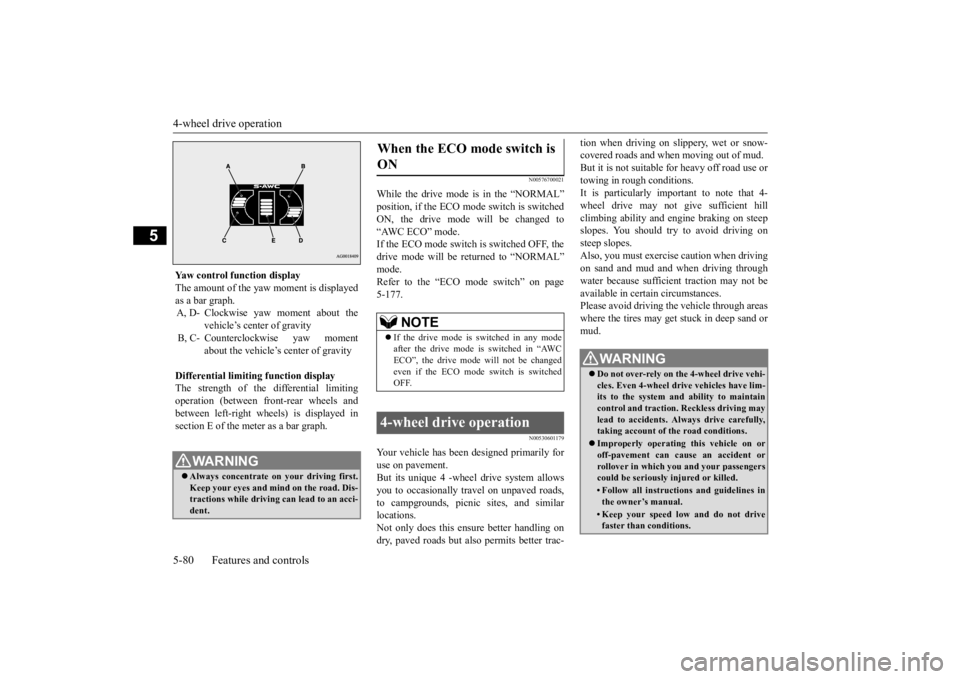
Yaw control function display The amount of the yaw moment is displayed as a bar graph. A, D- Clockwise yaw moment about the
vehicle’s center of gravity
B, C- Counterclockwise yaw moment
about the vehicle’s
center of gravity
Differential limiting
function display
The strength of the differential limitingoperation (between front-rear wheels and between left-right whee
ls) is displayed in
section E of the me
ter as a bar graph.
WA R N I N GAlways concentrate on
your driving first.
Keep your eyes and mi
nd on the road. Dis-
tractions while driving
can lead to an acci-
dent.
When the ECO mode switch is ON
NOTE
If the drive mode is switched in any mode after the drive mode is switched in “AWCECO”, the drive mode will not be changed even if the ECO mode switch is switched OFF.
4-wheel drive operation
WA R N I N G Do not over-rely on th
e 4-wheel drive vehi-
cles. Even 4-wheel drive vehicles have lim- its to the system and ability to maintaincontrol and traction.
Reckless driving may
lead to accidents. Al
ways drive carefully,
taking account of the road conditions. Improperly operating
this vehicle on or
off-pavement can cause an accident orrollover in which you
and your passengers
could be seriously
injured or killed.
• Follow all instructions and guidelines in the owner’s manual.• Keep your speed low and do not drivefaster than conditions.
BK0211800US.book 80 ページ 2014年3月12日 水曜日 午後2時42分
Page 158 of 446
4-wheel drive operation
Features and controls 5-81
5
When turning a sharp corner in “4WD LOCK” or “LOCK” position at low speed, a slight difference in
steering may be experi-
enced similar to feeling as if the brakes wereapplied. This is called tight corner braking and results from each of the four tires being at a different distance from the corner. The phe-nomenon is typical of 4-
wheel drive vehicles.
If this occurs, either straighten out the steer- ing wheel or change to another mode. Set the drive mode-selector to “4WD AUTO”, “4WD LOCK” or “SNOW” inaccordance with the road conditions, and then gradually depress the accelerator pedal for a smooth start.
Set the drive mode-selector to “4WD LOCK” or “LOCK” and then gradually depress theaccelerator pedal for a
smooth start. Keep the
pressure on the accelera
tor pedal as constant
as possible, and drive at low speed.
NOTE
Driving on rough roads can be hard on a vehicle. Before you le
ave the pavement, be
sure all scheduled ma
intenance and service
has been done, and that
you have inspected
your vehicle. Pay spec
ial attention to the
condition of the ti
res, and check the tire pres-
sures. Mitsubishi Motors is not responsible to the operator for any damage or injury caused or liability incurred by improper and negligent operation of a vehicl
e. All techniques of
vehicle operation depend on the skill and experience of the opera
tor and other partici-
pating parties. Any de
viation from the rec-
ommended operating instru
ctions above is at
their own risk. Note that the stopping distance required of the 4-wheel drive vehicle differs very little from that of the front-wheel drive vehicle.When driving on a snow-covered road or a slippery, muddy surface, make sure that you keep a sufficient dist
ance between your vehi-
cle and the one ahead of you. The driving posture s
hould be more upright;
adjust the seat to a good position for easy steering and pedal operati
on. Be sure to wear
the seat belt. After driving on rough roads, check each part of the vehicle
and wash it thoroughly
with water. Refer to the “Inspection and maintenance followi
ng rough road opera-
tion” section and “Vehicle care and Mainte-nance” sections.
CAUTION Setting the drive mode-selector to “4WD LOCK” or “LOCK” position to drive on drypaved road will increa
se fuel consumption,
with possible noise generation.
Turning sharp corners On snowy or icy roads
NOTE
The use of snow tires is recommended.
Maintain a safe distan
ce between
vehicles,
avoid sudden braking, and use engine brak-ing (downshifting).CAUTION Avoid sudden braking,
sudden acceleration
and sharp turning. Sk
idding occurs and con-
trol of the vehicle could be lost.
Driving on sandy or muddy roads
CAUTION Do not force the vehicle or drive recklessly on sandy surfaces. In comparison with nor- mal road surfaces, the engine and otherdrive-system components are put under excessive strain when driving on such a sur- face. This could lead to accidents. If any of the follow
ing conditions occur
while the vehicle is
being driven, immedi-
ately park your vehicle in a safe place and follow these procedures:NOTE
BK0211800US.book 81 ページ 2014年3月12日 水曜日 午後2時42分
Page 159 of 446
Inspection and maintenance following rough road operation 5-82 Features and controls
5
Your vehicle may not provide sufficient hill climbing ability and engine braking on steep slope. Avoid driving on steep slopes even though the vehicle is an 4-wheel drive vehi-cle.
N00537800085
If the electrical circuits become wet, furtheroperation of the vehicl
e will be impossible;
therefore, avoid drivi
ng through water unless
absolutely necessary. If driving through wateris unavoidable, use the following procedure: Check the depth of the water and the terrain before attempting to drive through it. Drive
slowly to avoid creating excessive water splashing.
N00530700085
After operating the vehicle in rough road con-ditions, be sure to perform the following inspection and maintenance procedures: Check that the vehicle has not been dam- aged by rocks, gravel, etc.
• If the engine coolan
t temperature display
flashes on the information screen in the multi-information di
splay or the engine
power drops suddenly. Refer to “Engine overh
eating” on page 8-4.
• If the “ ” warning display and “SLOW DOWN” or the “ ” wa
rning display and
“SERVICE REQUIRED” appear on the information screen in the multi-information display. Refer to “Warning disp
lay” on page 5-62,
5-69.WA R N I N G When attempting to rock your vehicle out of a stuck position, be sure that the area around the vehicle is clear of people and physical objects. The rocking motion maycause the vehicle to suddenly launch for- ward/backward, caus
ing injury or dam-
age to nearby people or objects.NOTE
Avoid sudden braking,
sudden ac
celeration
and sharp turning; such operations couldresult in the vehicle becoming stuck.CAUTION
If the vehicle become
s stuck in sandy or
muddy roads, it can often be moved with arocking motion. Move the selector leveralternately between the “D” (DRIVE) and “R” (REVERSE) positi
ons while pressing
lightly on the ac
celerator pedal.
Driving on rough road can cause rust on the vehicle; wash the vehi
cle thoroughly as soon
as possible after such use.
Climbing/descending sharp grades Driving through water
NOTE
CAUTION Never drive through water that is deep enough to cover wheel hubs, axles or exhaust pipe. Do not change th
e selector lever posi-
tion while driving through water.Frequent driving through water can adversely affect the life
span of the vehicle;
consult an authorized Mitsubishi Motorsdealer or a repair fac
ility of your choice and
take the necessary measures to prepare, inspect, and repair the vehicle. After driving through water, apply the brakes to be sure they are
functioning properly. If
the brakes are wet and not functioning prop- erly, dry them out by driving slowly while lightly depressing the brake pedal. Inspecteach part of the vehicle carefully.
Inspection and maintenance following rough road opera-tion
BK0211800US.book 82 ページ 2014年3月12日 水曜日 午後2時42分
Page 174 of 446
Adaptive Cruise Control System (ACC) (if so equipped)
Features and controls 5-97
5
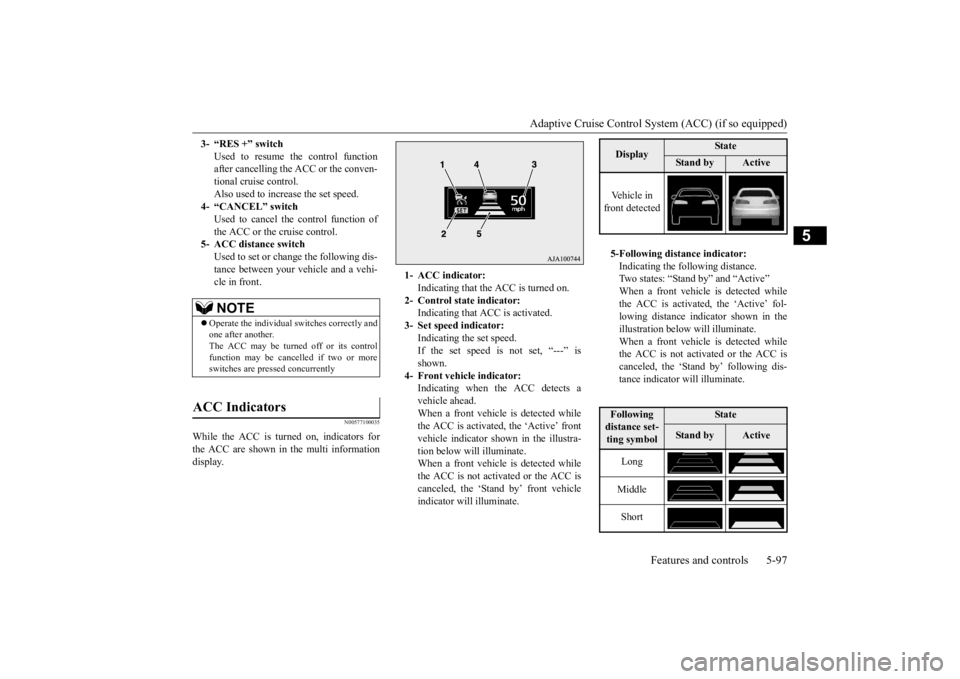
N00577100035
While the ACC is turned on, indicators for the ACC are shown in the multi information display. 3- “RES +” switch
Used to resume the control function after cancelling the ACC or the conven-tional cruise control. Also used to increase the set speed.
4- “CANCEL” switch
Used to cancel the control function of the ACC or the cruise control.
5- ACC distance switch
Used to set or change the following dis- tance between your
vehicle and a vehi-
cle in front.NOTE
Operate the individual
switches correctly and
one after another. The ACC may be turned off or its control function may be canc
elled if two or more
switches are pressed concurrently
ACC Indicators
1- ACC indicator:
Indicating that the ACC is turned on.
2- Control state indicator:
Indicating that A
CC is activated.
3- Set speed indicator:
Indicating the set speed. If the set speed is not set, “---” isshown.
4- Front vehicle indicator:
Indicating when the ACC detects avehicle ahead. When a front vehicle is detected while the ACC is activated, the ‘Active’ frontvehicle indicator shown in the illustra- tion below will illuminate. When a front vehicle is detected whilethe ACC is not activated or the ACC is canceled, the ‘Stand by’ front vehicle indicator will illuminate.
Display
State
Stan d b y
Active
Vehicle in front detected 5-Following distance indicator: Indicating the following distance.Two states: “Stand
by” and “Active”
When a front vehicle is detected while the ACC is activated, the ‘Active’ fol-lowing distance indi
cator shown in the
illustration below will illuminate. When a front vehicle is detected whilethe ACC is not activated or the ACC is canceled, the ‘Stand by’ following dis- tance indicator will illuminate.Following distance set- ting symbol
State
Stan d b y
Active
Long Middle Short
BK0211800US.book 97 ページ 2014年3月12日 水曜日 午後2時42分
Page 175 of 446
Adaptive Cruise Control System (ACC) (if so equipped) 5-98 Features and controls
5
N00577200023
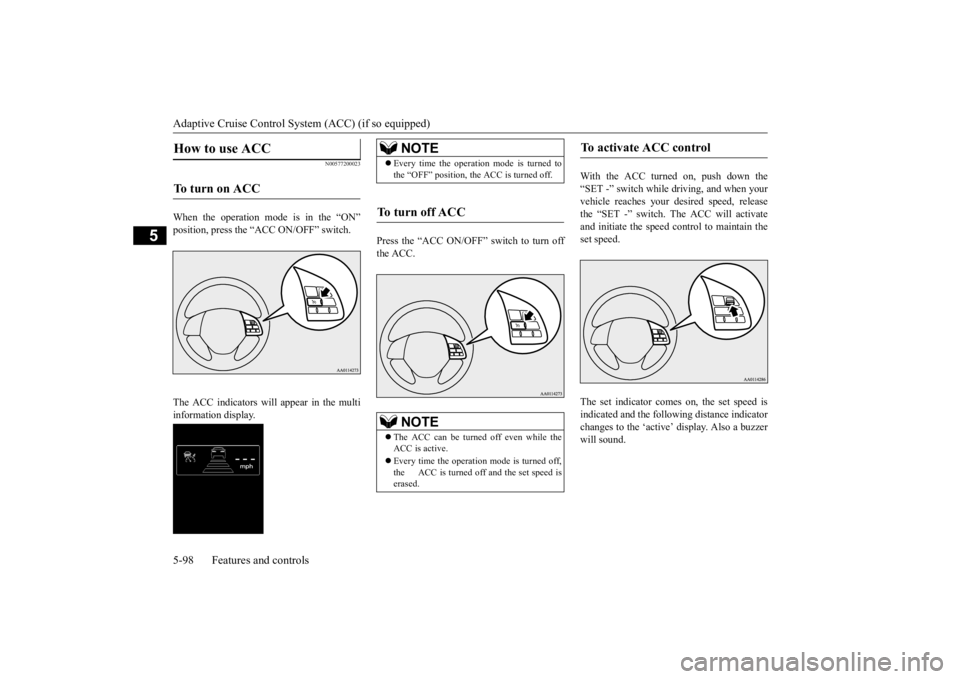
When the operation mode is in the “ON” position, press the “ACC ON/OFF” switch. The ACC indicators will appear in the multi information display.
Press the “ACC ON/OFF” switch to turn off the ACC.
With the ACC turned on, push down the “SET -” switch while
driving, and when your
vehicle reaches your de
sired speed, release
the “SET -” switch. The ACC will activate and initiate the speed control to maintain the set speed. The set indicator come
s on, the set speed is
indicated and the follow
ing distance indicator
changes to the ‘active’
display. Also a buzzer
will sound.
How to use ACC
To turn on ACC
NOTE
Every time the operation mode is turned to the “OFF” position, the ACC is turned off.
To turn off ACC
NOTE
The ACC can be turned off even while the ACC is active. Every time the operation mode is turned off, the ACC is turned off and the set speed is erased.
To activate ACC control
BK0211800US.book 98 ページ 2014年3月12日 水曜日 午後2時42分
Page 177 of 446
Adaptive Cruise Control System (ACC) (if so equipped) 5-100 Features and controls
5
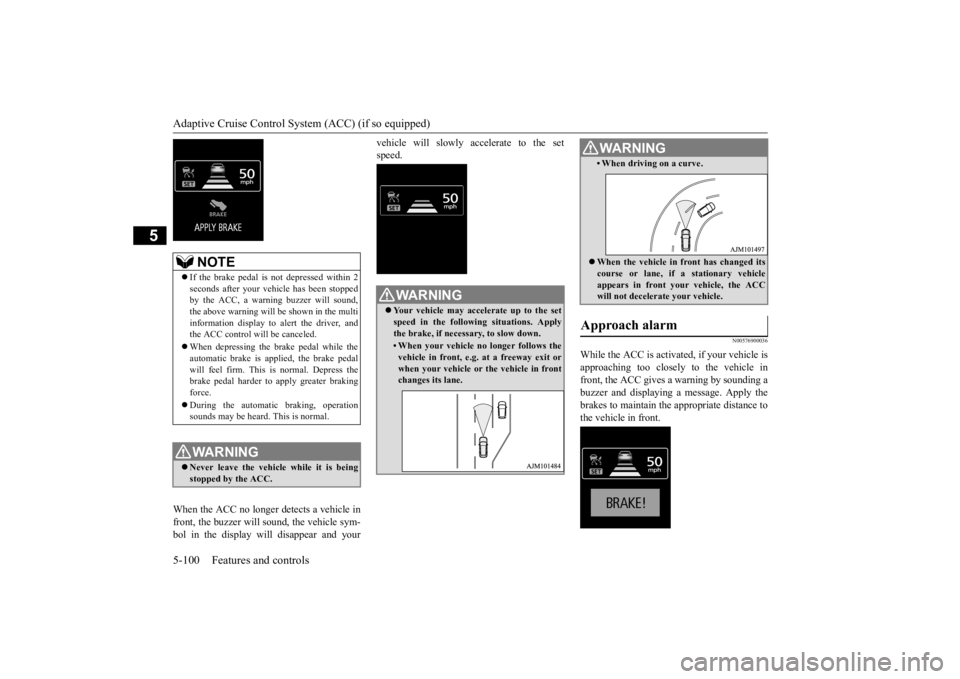
When the ACC no longer detects a vehicle in front, the buzzer will sound, the vehicle sym-bol in the display will disappear and your
vehicle will slowly accelerate to the set speed.
N00576900036
While the ACC is activated, if your vehicle is approaching too closely to the vehicle in front, the ACC gives a warning by sounding abuzzer and displaying
a message. Apply the
brakes to maintain the appropriate distance to the vehicle in front.
NOTE
If the brake pedal is not depressed within 2 seconds after your vehi
cle has been stopped
by the ACC, a warni
ng buzzer will sound,
the above warning will be shown in the multi information display to alert the driver, and the ACC control will be canceled. When depressing the brake pedal while the automatic brake is applied, the brake pedalwill feel firm. This is normal. Depress the brake pedal harder to
apply greater braking
force. During the automatic
braking, operation
sounds may be heard. This is normal.WA R N I N G Never leave the vehicle while it is being stopped by the ACC.
WA R N I N G Your vehicle may accelerate up to the set speed in the following situations. Applythe brake, if necessary, to slow down.• When your vehicle no longer follows thevehicle in front, e.g. at a freeway exit or when your vehicle or
the vehicle in front
changes its lane.
• When driving on a curve. When the vehicle in
front has changed its
course or lane, if a stationary vehicleappears in front you
r vehicle, the ACC
will not decelerate your vehicle.
Approach alarm
WA R N I N G
BK0211800US.book 100 ページ 2014年3月12日 水曜日 午後2時42分