2015 MITSUBISHI OUTLANDER III change
[x] Cancel search: changePage 95 of 446
Free-hand Advanced
Security Transmitter (F.A.S
.T.-key) (if so equipped)
5-18 Features and controls
5
N00568101023
After approximately 30
minutes has elapsed
with the operation mode in ACC, the function automatically cuts out the power for the audiosystem and other electr
ic devices that can be
operated with that mode. When the engine switch is pressed while theoperation mode is in ACC, the power is sup- plied again to
those devices.
N00503501213
With the F.A.S.T.-key, warnings are given through buzzers and di
splays on the information screen in the multi information displ
ay in order to pre-
vent mistaken operati
ons or vehicle theft.
When a warning operates, be sure to check the vehicle and the F.
A.S.T.-key. A warning is also di
splayed if there is a problem i
n the F.A.S.T.-key.
CAUTIONWhen the engine is not running, put the oper- ation mode in OFF. Leaving the operationmode in ON or ACC for a long time whenthe engine is not running may cause the bat- tery to be discharged
, making it impossible
to start the engine. When the battery is disconnected, the current operation mode is memorized. After recon-necting the battery, the memorized mode is selected auto
matically. Before disconnect-
ing the battery for repair or replacement,make sure to put the operation mode in OFF. Be careful if you are not sure which opera- tion mode the vehicle is in when the batteryis run down. The operation mode cannot be changed from OFF to ACC or ON if the F.A.S.T.-key is not detected to be in the vehicle. Refer to “Oper- ating range for starting the engine andchanging the operation mode” on page 5-14.
ACC power auto-cutout function
NOTE
It is possible to modify functions as follows: • The time until the power cuts out can be changed to approxi
mately 60 minutes.
• The ACC power auto
-cutout function can
be deactivated.
For details, we recommend you to consult anauthorized Mitsubishi Motors dealer.On vehicles equippe
d with Mitsubishi
Motors Multi-Communication System, screen operations can be
used to make the
adjustment.Refer to the separate Mitsubishi Multi-Com- munications System manual for details.NOTE
Warning activation
BK0211800US.book 18 ページ 2014年3月12日 水曜日 午後2時42分
Page 96 of 446
Free-hand Advanced Securi
ty Transmitter (F.A.S.T.-key) (if so equipped)
Features and controls 5-19
5
Type 1: Color liquid crystal display type
Type 2: Mono-color
liquid crystal display type
Item
Ty p e 1
Ty p e 2
Solution
Note
Display
Buzzer
Indicator
Buzzer
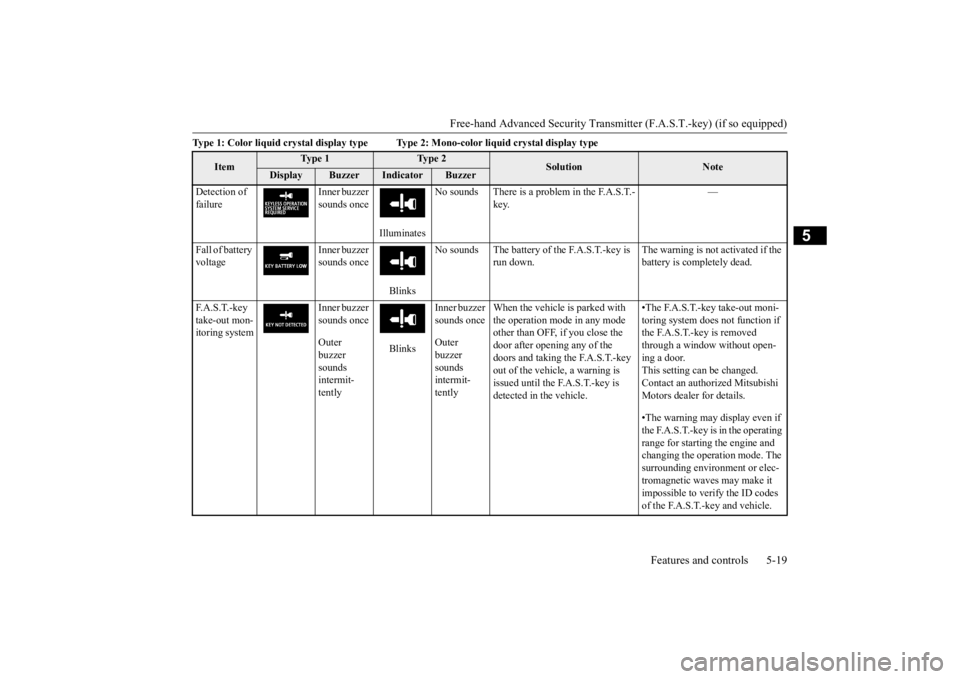
Detection of failure
Inner buzzer sounds once
Illuminates
No sounds There is a problem in the F.A.S.T.-
key.
—
Fall of battery voltage
Inner buzzer sounds once
Blinks
No sounds The battery of the F.A.S.T.-key is
run down.
The warning is not activated if the battery is completely dead.
F. A . S . T. - k e y take-out mon-itoring system
Inner buzzer sounds once Outer buzzer sounds intermit-tently
Blinks
Inner buzzer sounds once Outer buzzer sounds intermit-tently
When the vehicle is parked with the operation mode in any mode other than OFF, if you close the door after opening any of the doors and taking the F.A.S.T.-key out of the vehicle, a warning is issued until the F.A.S.T.-key is detected in the vehicle.
•The F.A.S.T.-key take-out moni- toring system does
not function if
the F.A.S.T.-key is removed through a window without open- ing a door.This setting can be changed. Contact an authorized Mitsubishi Motors dealer for details. •The warning may display even if the F.A.S.T.-key is in the operating range for starting the engine and changing the operation mode. The surrounding environment or elec- tromagnetic waves may make it impossible to verify the ID codes of the F.A.S.T.-key and vehicle.
BK0211800US.book 19 ページ 2014年3月12日 水曜日 午後2時42分
Page 102 of 446
Free-hand Advanced Securi
ty Transmitter (F.A.S.T.-key) (if so equipped)
Features and controls 5-25
5
1. Stop the vehicle. 2. Fully engage the parking brake while depressing the brake pedal. 3. Move the selector lever to the “P”(PARK) position, and then press the engine switch to
stop the engine.
N00568301041
Insert the F.A.S.T.-key into the key slot in the instrument panel. St
arting the engine and
changing the operation
mode should be now
possible.
Remove the F.A.S.T.-key from the key slot after starting the engine or changing the oper-ation mode.
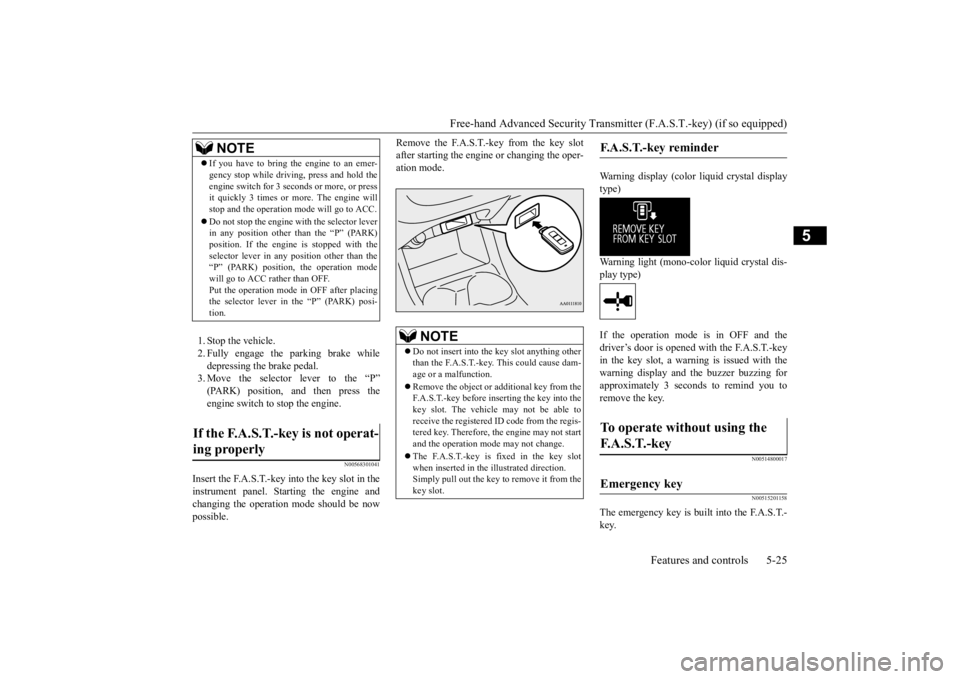
Warning display (color liquid crystal display type) Warning light (mono-color liquid crystal dis- play type) If the operation mode is in OFF and the driver’s door is opened with the F.A.S.T.-key in the key slot, a warning is issued with thewarning display and the buzzer buzzing for approximately 3 seconds to remind you to remove the key.
N00514800017 N00515201158
The emergency key is built into the F.A.S.T.- key.
NOTE
If you have to bring the engine to an emer- gency stop while drivi
ng, press and hold the
engine switch for 3 sec
onds or more, or press
it quickly 3 times or more. The engine will stop and the operation mode will go to ACC. Do not stop the engine wi
th the selector lever
in any position other than the “P” (PARK) position. If the engine
is stopped with the
selector lever in any
position other than the
“P” (PARK) position, the operation mode will go to ACC rather than OFF.Put the operation mode
in OFF after placing
the selector lever in the “P” (PARK) posi- tion.
If the F.A.S.T.-key is not operat- ing properly
NOTE
Do not insert into the
key slot anything other
than the F.A.S.T.-key. This could cause dam- age or a malfunction. Remove the object or
additional key from the
F.A.S.T.-key before inserting the key into the key slot. The vehicle may not be able toreceive the registered ID code from the regis- tered key. Therefore, the engine may not start and the operation mode
may not change.
The F.A.S.T.-key is fixed in the key slot when inserted in the illustrated direction.Simply pull out the key to
remove it from the
key slot.
F.A.S.T.-key reminder
To operate without using the F. A . S . T. - k e y
Emergency key
BK0211800US.book 25 ページ 2014年3月12日 水曜日 午後2時42分
Page 105 of 446
Free-hand Advanced
Security Transmitter (F.A.S
.T.-key) (if so equipped)
5-28 Features and controls
5
N00515501210
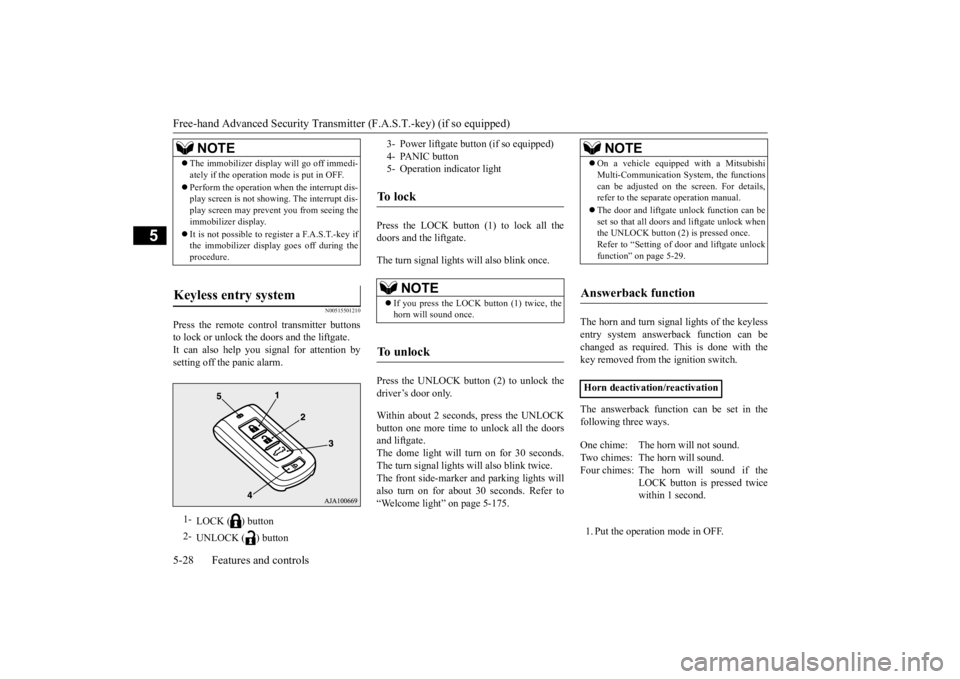
Press the remote control transmitter buttons to lock or unlock the doors and the liftgate.It can also help you
signal for attention by
setting off the panic alarm.
Press the LOCK button (1) to lock all the doors and the liftgate. The turn signal lights
will also blink once.
Press the UNLOCK button (2) to unlock the driver’s door only. Within about 2 seconds, press the UNLOCK button one more time to unlock all the doorsand liftgate. The dome light will turn on for 30 seconds. The turn signal lights will also blink twice.The front side-marker
and parking lights will
also turn on for about 30 seconds. Refer to “Welcome light” on page 5-175.
The horn and turn signal lights of the keyless entry system answerback function can be changed as required. This is done with the key removed from the ignition switch. The answerback function can be set in the following three ways. 1. Put the operation mode in OFF.
NOTE
The immobilizer displa
y will go off immedi-
ately if the operation
mode is put in OFF.
Perform the operation when the interrupt dis- play screen is not show
ing. The interrupt dis-
play screen may prevent you from seeing theimmobilizer display. It is not possible to register a F.A.S.T.-key if the immobilizer displa
y goes off during the
procedure.
Keyless entry system
1-
LOCK ( ) button
2-
UNLOCK ( ) button
3- Power liftgate button (if so equipped) 4- PANIC button 5- Operation indicator lightTo l o c k
NOTE
If you press the LOCK button (1) twice, the horn will sound once.
To u n l o c k
NOTE
On a vehicle equippe
d with a Mitsubishi
Multi-Communication System, the functionscan be adjusted on the screen. For details,refer to the separate operation manual. The door and liftgate
unlock function can be
set so that all doors and liftgate unlock when the UNLOCK button (2) is pressed once. Refer to “Setting of door
and liftgate unlock
function” on page 5-29.
Answerback function
Horn deactivation/reactivation One chime: The horn will not sound. Two chimes: The horn will sound. Four chimes: The hor
n will sound if the
LOCK button is pressed twicewithin 1 second.
BK0211800US.book 28 ページ 2014年3月12日 水曜日 午後2時42分
Page 107 of 446

Free-hand Advanced
Security Transmitter (F.A.S
.T.-key) (if so equipped)
5-30 Features and controls
5
N00579500020
After unlocking the doors and the liftgate, the power liftgate can be operated by pressing the power liftgate button (3). Refer to “Power lift
gate” on page 5-36.
N00544701067
If you are near your vehicle and feel threat- ened, you can activate the alarm to call atten-tion as follows: 1. Press the PANIC button (4) for more than 1 second. 2. The headlights will blink on and off andthe horn will sound intermittently for about 3 minutes. 3. To turn off the alarm, press any button onthe remote control transmitter.
N00562001062
NOTE
On a vehicle equippe
d with a Mitsubishi
Multi-Communication System, the functionscan be adjusted on the screen. For details,refer to the separate operation manual.
Operating the power liftgate
Using the panic alarm
NOTE
The indicator light (5) comes on each time a button is pressed.
The F.A.S.T.-key can be used from about 40 feet (12 m) away. However, this distancemay change if your vehicle is near a TVtransmitting tower, a power station, or a radio station. If the UNLOCK button (2) is pressed when all doors and the liftgate are locked and no doors or the liftgate are opened within about30 seconds, the doors and the liftgate will automatically re-lock. On a vehicle equippe
d with a Mitsubishi
Multi-Communication System, the functions can be adjusted on the screen. For details, refer to the separa
te operation manual.
If the following conditi
ons are observed after
pressing the LOCK (1) or UNLOCK (2) but-ton on the remote control transmitter, the battery in the F.A.S.T.-key may need to be replaced. • The doors and the liftgate cannot be locked or unlocked. • The panic alarm cannot be operated. • The indicator light
(5) is dim or does not
come on.
If you lose your F.A.S.T.-key, please contact an authorized Mitsubishi Motors dealer for a replacement. If you wish to obtain an additional F.A.S.T.- key, please contact an
authorized Mitsubishi
Motors dealer. A maximum of four F.A.S.T.- key can be programmed for your vehicle.NOTE
To use the new remote control transmitters, it is necessary to register
the key with both the
electronic immobilizer
and keyless entry sys-
tem. Also refer to “Electronic immobilizer (Anti- theft starting system): Customer F.A.S.T.-key programming” on page 5-27.
General information
Your F.A.S.T.-key operates on a radio fre- quency subject to Fe
deral Communications
Commission (FCC) Rules (For vehicles soldin U.S.A.) and Industr
y Canada Rules (For
vehicles sold in Cana
da). This device com-
plies with Part 15 of FCC Rules and IndustryCanada licence-exem
pt RSS standard(s).
Operation is subject to
the following two con-
ditions.
•This device may
not cause harmful
interference. •This device must ac
cept any interference
received, including interference that may cause undesired operation.NOTE
BK0211800US.book 30 ページ 2014年3月12日 水曜日 午後2時42分
Page 108 of 446
Door locks
Features and controls 5-31
5
N00562101076
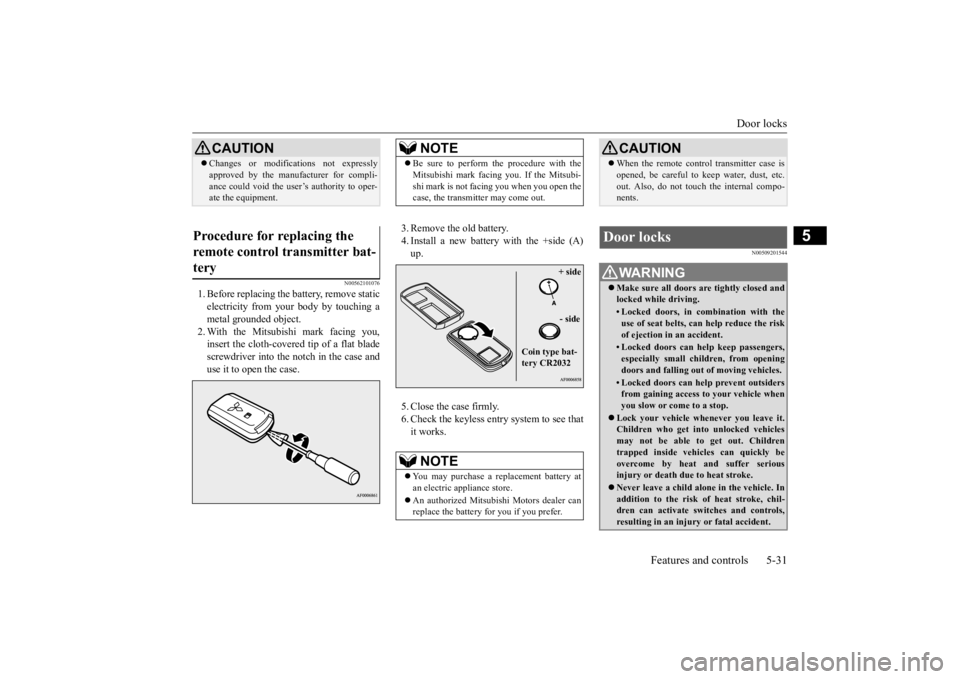
1. Before replacing the battery, remove static electricity from your body by touching ametal grounded object. 2. With the Mitsubishi mark facing you, insert the cloth-covered tip of a flat bladescrewdriver into the notch in the case and use it to open the case.
3. Remove the old battery. 4. Install a new battery with the +side (A) up. 5. Close the case firmly. 6. Check the keyless entry system to see that it works.
N00509201544
CAUTION Changes or modifica
tions not expressly
approved by the manufacturer for compli-ance could void the user’s authority to oper-ate the equipment.
Procedure for replacing the remote control transmitter bat- tery
NOTE
Be sure to perform the procedure with the Mitsubishi mark facing you. If the Mitsubi-shi mark is not facing you when you open thecase, the transmitter may come out.NOTE
You may purchase a replacement battery at an electric appliance store. An authorized Mitsubishi Motors dealer can replace the battery for you if you prefer.
+ side - side
Coin type bat- tery CR2032
CAUTION When the remote control transmitter case is opened, be careful to keep water, dust, etc.out. Also, do not touch the internal compo-nents.
Door locks
WA R N I N G Make sure all doors are tightly closed and locked while driving.• Locked doors, in co
mbination with the
use of seat belts, can help reduce the risk of ejection in
an accident.
• Locked doors can help keep passengers, especially small children, from openingdoors and falling out
of moving vehicles.
• Locked doors can help
prevent outsiders
from gaining access to your vehicle when you slow or come to a stop.
Lock your vehicle when
ever you leave it.
Children who get into unlocked vehicles may not be able to get out. Childrentrapped inside vehicles can quickly beovercome by heat
and suffer serious
injury or death due to heat stroke. Never leave a ch
ild alone in the vehicle. In
addition to the risk
of heat stroke, chil-
dren can activate switches and controls,resulting in an injury
or fatal accident.
BK0211800US.book 31 ページ 2014年3月12日 水曜日 午後2時42分
Page 133 of 446
Ignition switch 5-56 Features and controls
5
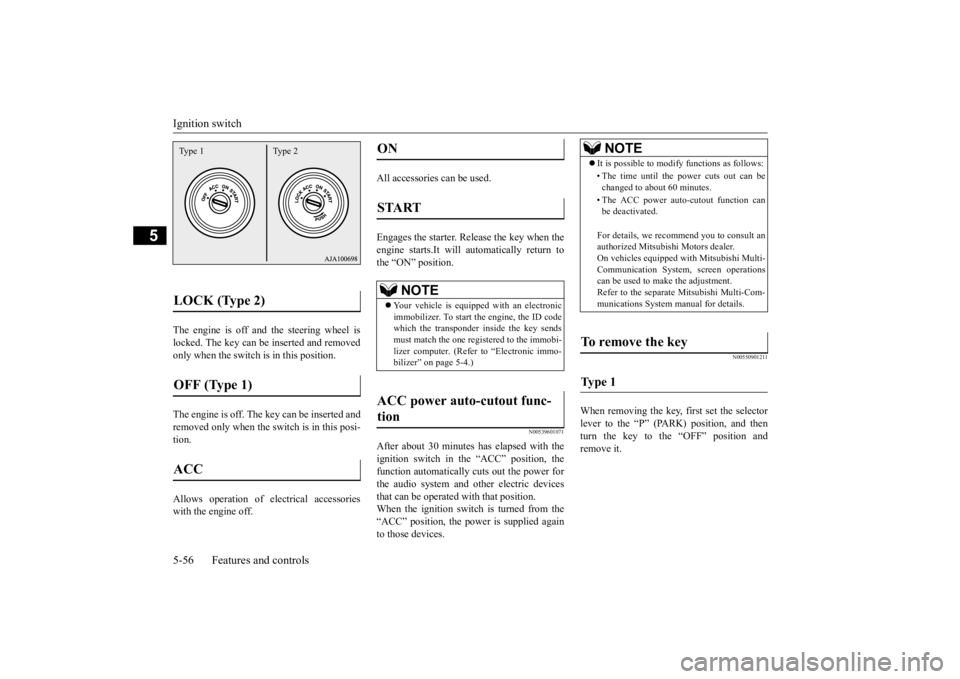
The engine is off a
nd the steering wheel is
locked. The key can be inserted and removed only when the switch is in this position. The engine is off. The
key can be inserted and
removed only when the sw
itch is in this posi-
tion. Allows operation of electrical accessories with the engine off.
All accessories can be used. Engages the starter. Release the key when the engine starts.It will automatically return to the “ON” position.
N00539601071
After about 30 minutes has elapsed with the ignition switch in the “ACC” position, thefunction automatically cuts out the power for the audio system and ot
her electric devices
that can be operated with that position.When the ignition switch is turned from the “ACC” position, the pow
er is supplied again
to those devices.
N00550901211
When removing the key, first set the selectorlever to the “P” (PARK) position, and then turn the key to the “OFF” position and remove it.
LOCK (Type 2) OFF (Type 1) ACC Type 1 Type 2
ON START
NOTE
Your vehicle is equippe
d with an electronic
immobilizer. To start the engine, the ID code which the transponder inside the key sendsmust match the one registered to the immobi- lizer computer. (Refer to “Electronic immo- bilizer” on page 5-4.)
ACC power auto-cutout func- tion
NOTE
It is possible to modify functions as follows: • The time until the power cuts out can be changed to about 60 minutes. • The ACC power auto
-cutout function can
be deactivated. For details, we recommend you to consult an authorized Mitsubishi Motors dealer. On vehicles e
quipped with Mitsubishi Multi-
Communication System, screen operations can be used to ma
ke the adjustment.
Refer to the separate Mitsubishi Multi-Com-munications System manual for details.
To remove the key Ty p e 1
BK0211800US.book 56 ページ 2014年3月12日 水曜日 午後2時42分
Page 137 of 446

Automatic transaxle (if so equipped) 5-60 Features and controls
5
N00513200216
Automatic transaxle will automatically change its gear depe
nding on road and driv-
ing conditions. This
helps achieve smooth
driving and excellent fuel efficiency. Also you can manually shift up and shiftdown the transaxle. Refer to “Sports mode” on page 5-64. The transaxle prevents
unnecessary upshifts
even when the accelerator pedal is releasedand ensures smooth driving. According to the condi
tions, the transaxle
will automatically shift to a lower gear to achieve stronger engine braking. This may help reduce your need to use the servicebrake.
N00513801408
As an additional safe
ty precaution, models
equipped with an automatic transaxle have a shift-lock device that holds the selector lever in the “P” (PARK) position. To move theselector lever from the “P” (PARK) position to another position, follow the steps below. 1. Press and hold the brake pedal down. 2. Move the selector lever to the desiredposition.
The transaxle has 6 forward gears and 1 reverse gear.
The individual gears are selected automati- cally, depending on the position of the gearselector lever, the speed of the vehicle and the position of the ac
celerator pedal.
Automatic transaxle
(if so
equipped)DRIVING UPHILL
DRIVING DOWNHILL
NOTE
During the break-in pe
riod or immediately
after reconnecting the
battery, your vehicle
may not shift smoothly.
This does not indi-
cate a problem in the transaxle. Shifting will become smoother once the transaxle has been shifted several
times by the electronic
control system.
Selector lever operation
NOTE
The selector lever cannot
be moved from “P”
(PARK) to another po
sition if the operation
mode is put in OFF or ACC, or if the brake pedal is not pressed and held down.
Set the selector lever in the gate to operate while the brake pedal is depressed.
BK0211800US.book 60 ページ 2014年3月12日 水曜日 午後2時42分