2015 MITSUBISHI LANCER ignition
[x] Cancel search: ignitionPage 222 of 434

Hazard warning flasher switch Features and controls 5-153
5
does not return to the neutral position. This usually happens when the steering wheel is turned only slightly. You can easily return the lever by hand.Also, when you move the lever to (1) slightly then release it, the turn signal lights and indi- cator light in the instrument cluster will flashthree times.
N00522700217
If you press the flasher switch, the front andrear turn signals will flash intermittently, andso will the hazard warning lights. This is an emergency warning system and should not be
used when the vehicle is in motion, except for emergencies. If you need to leave your vehicle, the flashers will keep working afte
r the ignition key is
removed.
N00522800377
The front fog lights illuminate only when the headlights are on low beam. Turning the knob in the direction of the “ON”position turns on the front fog lights as well as the indicator in the instrument cluster. To turn them off, turn the knob in the direction ofthe “OFF” position. The knob will return to the neutral position when it is released.
NOTE
A light in the instrument panel flashes to show when the front and rear turn signal lights are working properly. If this light flashes faster than usual, checkfor a burned out light bulb or malfunctioning connection. If the panel light does not come on when thelever is moved, check for a blown fuse or a burned out bulb in the panel. Have the vehicle inspected by an authorizedMitsubishi Motors dealer or a repair facility of your choice.
The turn signal light 3-flash function for lane changes can be deactivated. See your authorized Mitsubishi Motors dealer for details. You can adjust the time required to operate the lever for the 3-flash function. See your authorized Mitsubishi Motorsdealer for details.
Hazard warning flasher switch
NOTE
NOTE
If you keep the flashers on for several hours with the engine turned off, the battery will run down.
Front fog light switch
(if so
equipped)
BK0210300US.book
153 ページ 2014年4月8日 火曜日 午前10時46分
Page 223 of 434
Wiper and washer switch 5-154 Features and controls
5
N00523000608 N00542900013 N00569100010
The windshield wiper and washer can be operated with the ignition switch in the “ON”or “ACC” position. If the blades are frozen to the windshield, do not operate the wipers until the ice has meltedand the blades are freed, otherwise the wiper motor may be damaged.
N00569201034
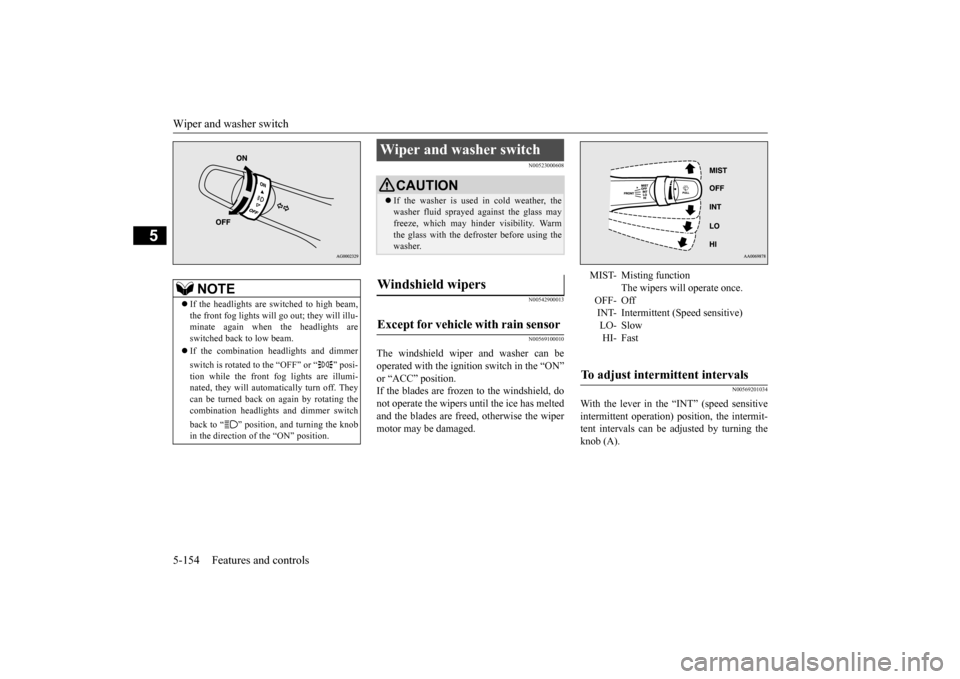
With the lever in the “INT” (speed sensitiveintermittent operation) position, the intermit- tent intervals can be adjusted by turning theknob (A).
NOTE
If the headlights are switched to high beam, the front fog lights will go
out; they will illu-
minate again when the headlights areswitched back to low beam. If the combination headlights and dimmer switch is rotated to the “OFF” or “ ” posi- tion while the front fog lights are illumi-nated, they will automatically turn off. They can be turned back on again by rotating the combination headlights and dimmer switch back to “ ” position, and turning the knob in the direction of the “ON” position.
Wiper and washer switch
CAUTION If the washer is used in cold weather, the washer fluid sprayed against the glass may freeze, which may hinder visibility. Warm the glass with the defroster before using thewasher.
Windshield wipers Except for vehicle with rain sensor
MIST- Misting function
The wipers will operate once.
OFF- Off INT- Intermittent (Speed sensitive) LO- SlowHI- Fast
To adjust intermittent intervals
BK0210300US.book
154 ページ 2014年4月8日 火曜日 午前10時46分
Page 224 of 434

Wiper and washer switch
Features and controls 5-155
5
N00569300012
The misting function can be used when the ignition switch is in the “ON” or “ACC” position.
The wipers will operate once if the wiper lever is raised to the “MIST” position and released. This operation is useful when it isdrizzling, etc. The wipers will continue to operate while the lever is held in the “MIST” position.
N00569400013
The windshield wipers can be operated with the ignition switch in the “ON” or “ACC” position.If the blades are frozen to the windshield or rear window, do not operate the wipers until the ice has melted and the blades are freed,otherwise the wiper motor may be damaged.
N00569500014
Can only be used when the ignition switch is“ON” position. If the lever is put in the “AUTO” position, the rain sensor (B) will detect the extent of rain(or snow, other moisture, dust, etc.) and the wipers will operate automatically.
1- Fast 2- Slow
NOTE
The speed-sensitive-operation function of the windshield wipers can be deactivated. For further information, please contact yourauthorized Mitsubishi Motors dealer or a repair facility of your choice.
Misting function
A
Vehicle with rain sensor
MIST- Misting function
The wipers will operate once.
OFF- Off AUTO- Auto-wiper control
Rain sensorThe wipers will automatically operate depending on the amount of moisture on the windshield.
LO- SlowHI- Fast
Rain sensor
(if so equipped)
BK0210300US.book
155 ページ 2014年4月8日 火曜日 午前10時46分
Page 225 of 434

Wiper and washer switch 5-156 Features and controls
5
Keep the lever in the “OFF” position if the windshield is dirty and the weather is dry. Wiper operation under these conditions can scratch the windshield and damage the wip-ers.
N00569601038
With the lever in the “AUTO” (rain sensor)position, it is possible to adjust the sensitivityof the rain sensor by turning the knob (C).
CAUTION With the ignition switch in the “ON” posi- tion and the lever in the “AUTO” position, the wipers may automatically operate in thesituations described below.• When cleaning the outside surface of thewindshield, if you touch the rain sensor.• When cleaning the outside surface of thewindshield, if you wipe with a cloth the rain sensor.• When using an automatic car wash.• A physical shock is applied to the wind- shield.• A physical shock is applied to the rain sen-sor.
If your hands get trapped, you could suffer injuries or the wipers could malfunction. To deactivate the rain sensor, place the lever in the “OFF” position.NOTE
To protect the rubber parts of the wipers, this operation of the wipers does not take placewhen the vehicle is stationary and the ambi- ent temperature is about 32 °F (0 °C) or lower. Do not cover the sensor by affixing a sticker or label to the windshield. Also, do not putany water-repellent coating on the wind- shield. The rain sensor would not be able to detect the extent of rain, and the wipersmight stop working normally. In the following cases, the rain sensor may be malfunctioning. Have the vehicle checked at an authorized Mitsubishi Motors dealer or a repair facility of your choice. • When the wipers operate at a constant inter- val despite changes in the extent of rain. • When the wipers do not operate even though it is raining.CAUTION
The wipers may automatically operate when things such as insects or foreign objects are affixed to the windshield on top of the rain sensor or when the windshield is frozen. Objects affixed to the windshield will stopthe wipers when the wipers cannot remove them. To operate the wipers again, move the lever to the “LO” or “HI” position. Also, thewipers may operate automatically due to strong direct sunlight or electromagnetic wave. To stop the wipers, move the lever tothe “OFF” position. Contact an authorized Mitsubishi Motors dealer or a repair
facility of your choice
when replacing the windshield glass.
To adjust the sensitivity of the rain sensor
NOTE
BK0210300US.book
156 ページ 2014年4月8日 火曜日 午前10時46分
Page 226 of 434

Wiper and washer switch
Features and controls 5-157
5
N00569700016
Move the lever in the direction of the arrow and release, to operate the wipers once. Use this function when you are driving inmist or drizzle.
The wipers will operate once if the lever is raised to the “MIST” position and released when the ignition switch is in the “ON” or“ACC” position. The wipers will continue to operate while the lever is held in the “MIST” position. The wipers will operate once if the lever is moved to the “AUTO” position and the knob
(D) is turned in the “+” direction when the ignition switch is “ON” position.
N00504601325
To turn on the windshield washer, pull thelever toward you with the ignition switch in either the “ON” or “ACC” position. The washer fluid will be sprayed onto thewindshield by pulling the lever toward you. When the wipers are not in operation or in intermittent operation, by pulling the lever toward you, the wipers will operate severaltimes while the washer fluid is being sprayed. Also, by releasing the lever soon after pulling it toward you, the washer fluid will besprayed several times while the wipers are operating several times. (Intelligent washer) Intelligent washer will stop operating withany operation of the lever.
“+”- Higher sensitivity to rain “-”- Lower sensitivity to rain
NOTE
It is possible to activate the following func- tions. • Automatic operation (rain droplet sensitive) can be changed to intermittent operation (vehicle speed-sensitive, or at adjustableintervals). For further information, please contact your authorized Mitsubishi Motors dealer or a repair facility of your choice.
Misting function
C
D
Windshield washer
BK0210300US.book
157 ページ 2014年4月8日 火曜日 午前10時46分
Page 229 of 434

Bluetooth® 2.0 interface (if so equipped) 5-160 Features and controls
5
The system is equipped with a voice recogni- tion function, which allows you to make hands-free calls by simple switch operations and voice command operations using adefined voice tree. The Bluetooth
® 2.0 interface can be used
when the ignition switch is in the “ON” or “ACC” position. Before you can use the Bluetooth
® 2.0 inter-
face, you must pair the Bluetooth
® device
and Bluetooth
® 2.0 interface. Refer to “Con-
necting the Bluetooth
® 2.0 interface and
Bluetooth
® device” on page 5-166.
Bluetooth
® is a registered trademark of
BLUETOOTH SIG, INC.
Steering control switch and microphone
P.5-161 Voice recognition function
P.5-163
Useful voice commands
P.5-163
Speaker enrollment function
P.5-165
Connecting the Bluetooth
® 2.0 interface and
the Bluetooth
® device
P.5-166
Operating a music player connected via Blue- tooth
® P.5-170
How to make or receive hands-free calls
P.5-171 Phonebook function
P.5-173
WA R N I N GAlthough the Bluetooth
® 2.0 interface
allows you to make hands-free calls, if you choose to use the cellular phone whiledriving, you must not allow yourself to be distracted from the safe operation of your vehicle. Anything, including cellularphone usage, that di
stracts you from the
safe operation of your vehicle increases your risk of an accident. Refer to and comply with all state and local laws in your area regarding cellularphone usage while driving.
NOTE
If the ignition switch is left in the “ACC” position, the accessory power will automati- cally turn off after a
certain period of time
and you will no longer be able to use the Bluetooth
® 2.0 interface. The accessory
power comes on again if the ignition switch is turned from the “ACC” position. Refer to “ACC power auto-cutout function” on page5-54. The Bluetooth
® 2.0 interface cannot be used
if the Bluetooth
® device has a dead battery
or the device power is turned off. Hands-free calls will not be possible if your phone does not have service available. Some Bluetooth
® devices are not compatible
with the Bluetooth
® 2.0 interface.
You can confirm the Link System software version by pressing the HANG-UP button 3 times (press and hold 2 times and then press briefly) within 10 seconds.
For detail of the Bluetooth
® 2.0 interface,
refer to the following website:[For vehicles sold in U.S.A.] You can access the Mitsubishi Motors North America website.[For vehicles sold in Canada and Mexico] You can access the Mitsubishi Motors web- site.Please read and agree to the “Warning about Links to the Web Sites of Other Companies”, the websites mentioned above may connectyou to websites other
than the Mitsubishi
Motors website. http://www.mitsubishi-motors.com/en/prod-ucts/index.html Software updates by cellular phone/digital audio device manufacturers may change/alter device connectivity.NOTE
BK0210300US.book
160 ページ 2014年4月8日 火曜日 午前10時46分
Page 233 of 434

Bluetooth® 2.0 interface (if so equipped) 5-164 Features and controls
5
With the confirmation function activated, you are given more opportunities than normal to confirm a command when making various settings to the Bluetooth
® 2.0 interface. This
allows you to decrease the possibility that a setting is accidentally changed. The confirmation function can be turned onor off by following the steps below. 1. Press the SPEECH button (except for vehicles with Mitsubishi Multi-Commu- nication System) or PICK-UP button (forvehicles with Mitsubishi Multi-Commu-nication System). 2. Say “Setup.” 3. Say “Confirmation prompts.”4. The voice guide will say “Confirmation prompts are
N00564601118
It is possible to use a passcode as a securityfunction by setting a passcode of your choice for the Bluetooth
® 2.0 interface.
When the security function is turned on, it is necessary to make a voice input of a 4-digit
passcode in order to use all functions of the Bluetooth
® 2.0 interface, except for recep-
tion. Use the following procedure to turn on the security function by setting a passcode. 1. Press the SPEECH button (except for vehicles with Mitsubishi Multi-Commu- nication System) or PICK-UP button (forvehicles with Mitsubishi Multi-Commu-nication System). 2. Say “Setup.” 3. Say “Passcode.”4. The voice guide will say “Passcode is dis- abled. Would you like to enable it?” Answer “Yes.”Answer “No” to cancel the setting of the passcode and return to the main menu. 5. The voice guide will say “Please say a 4-digit passcode. Remember this passcode. It will be required to use this system.” Say a 4-digit number which you want toset as a passcode. 6. For confirmation purposes, the voice guide will say “Passcode <4-digit pass-code>. Is this correct?” Answer “Yes.” Answer “No” to return to the passcode input in Step 5.
7. When the registration of the passcode is completed, the voice guide will say “Pass- code is enabled” and the system will return to the main menu.
If a passcode has been set and the security function is enabled, the voice guide will say “Hands-free system is locked. State the pass- code to continue” when the SPEECH button(except for vehicles with Mitsubishi Multi- Communication System) or PICK-UP button (for vehicles with Mitsubishi Multi-Commu-nication System) is pressed to enter voice rec- ognition mode. Say the 4-digit passcode number to enter the passcode. If the entered passcode is wrong, the voice guide will say “<4-digit passcode>, Incorrect
Security function
Setting the passcode
NOTE
Passcode will be required to access the sys- tem after the next ignition cycle. It is required for a little time after engine stop that the entered passcode is actuallyrecorded in the system. If the ignition switch is made to “ACC” or “ON” or the engine is started immediately after engine stop, thereis a case when the entered passcode is not recorded in the system. At this time, please try to enter the passcode again.
Entering the passcode
BK0210300US.book
164 ページ 2014年4月8日 火曜日 午前10時46分
Page 242 of 434

Bluetooth® 2.0 interface (if so equipped)
Features and controls 5-173
5
You can redial the last number called, based on the history of dialed calls in the paired cel- lular phone. Use the following procedure to redial. 1. Press the SPEECH button (except for vehicles with Mitsubishi Multi-Commu-nication System) or PICK-UP button (for vehicles with Mitsubishi Multi-Commu- nication System).2. Say “Redial.”
N00565700018
During a call, press the SPEECH button toenter voice recognition mode, then say “
response to an automated system, press the SPEECH button and speak “1 2 3 4 pound send” and the 1234# will be sent via your cel- lular phone.
N00565800019
If an incoming phone call is received whilethe ignition switch is in the “ACC” or “ON”position, the audio system will be automati-cally turned on and switched to the incoming call, even when the audio system was origi- nally off.The voice guide announcement for the incoming call will be output from the front passenger’s seat speaker.If the CD player or radio was playing when the incoming call was received, the audio sys- tem will mute the sound from the CD playeror radio and output only the incoming call. To receive the call, press the PICK-UP button on the steering wheel control switch.When the call is over,
the audio system will
return to its previous state.
N00565900010
At any time during a call, you can mute thevehicle microphone.
Pressing the SPEECH button and then saying “Mute” during a call will turn ON the mute function and mute the microphone. Saying “Mute off” in the same way will turnoff the mute function and cancel the mute on the microphone.
N00566600014
The Bluetooth
® 2.0 interface can switch
between hands-free mode (hands-free calls)and private mode (calls using cellular phone). If you press the SPEECH button and say “Transfer call” during a hands-free call, youcan stop the hands-free mode and talk in pri- vate mode. To return to hands-free mode, press theSPEECH button again and say “Transfer call.”
N00566000018
The Bluetooth
® 2.0 interface has 2 types of
unique phonebooks that are different from the phonebook stored in the cellular phone. Theyare the vehicle phonebook and the mobile phonebook.
NOTE
When the confirmation function is on, the system will check if the name and location of the receiver are correct. If the name is cor- rect, answer “Yes.” To change the name or location to call,answer “No.” The system will return to Step 3.
RedialingSend function
Receiving calls
Mute function
Switching between hands-free mode and private mode
Phonebook function
BK0210300US.book
173 ページ 2014年4月8日 火曜日 午前10時46分