2015 MITSUBISHI LANCER ignition
[x] Cancel search: ignitionPage 212 of 434

Indicators
Features and controls 5-143
5
The rest time can be set.
N00519900127 N00520000216
The arrows will flash in
time with the corre-
sponding exterior turn signals when the turnsignal lever is used. Both arrows will flas
h when the hazard warn-
ing flasher switch is pressed.
N00520100086
A blue light comes on when the headlightsare on high beam.
N00520200205
This indicator comes on while the front fog lights are on.
N00551300026
This indicator light illuminates while theposition lights are on.
Screen type 1
Screen type 2
Do this
Park the vehicle in a safe place, turn off the engine, and take a rest. Use this display as rough guide for taking rests during a long drive. The interval from the start of your trip un
til this message is displayed can be set.
Refer to “Changing the function settings (With
ignition switch in the “ON” position)” on
page 5-123. The display and buzzer alert the driver when the set time is reached. If you continue to drive without having a rest, the buzzer sounds
about every 5 minutes to encourage you to
take a rest. In the following cases, the time driven is re
set and the display returns to the previous
display screen. After this, when the set time
is reached again, the display and buzzer
encourage you to take a rest. • The buzzer sounds 3 times.• The ignition switch is turned to the “OFF” position. • The multi-information meter switch is
held (for about 2 seconds or more).
Indicators Turn signal indicators/Hazard warning lights
NOTE
If the indicator flashes faster than usual or if the indicator stays on without flashing, checkfor a malfunctioning turn signal light bulb or turn signal connection.
High beam indicator
Front fog light indicator
(if so
equipped)Position indicator
BK0210300US.book
143 ページ 2014年4月8日 火曜日 午前10時46分
Page 213 of 434

Warning lights 5-144 Features and controls
5
N00520300147 N00520400467
When the ignition switch is turned to the “ON” position, this indicator normally comeson and goes out a few seconds later. A warn- ing is also displayed in the multi-information display.The warning light also illuminates after start-ing the engine under the following condi- tions: When the parking brake is still applied. When the brake fluid level is low. When the brake force distribution func- tion is not operating correctly.
Before driving, be sure that the parking brake is fully released and brake warning light isoff.
N00520500774
This indicator is a part of the onboard diag- nostic (OBD) system which monitors the emissions, engine contro
l system or continu-
ously variable transmission (CVT) control system / Twin Clutch SST control system. If a problem is detected in one of these systems,this indicator illuminates or flashes. When theignition switch is turned to the “ON” posi- tion, this indicator normally comes on and goes off after the engine has started. This indicator will come on if the fuel tank filler cap is not properly tightened. If this indicator comes on and stays on after refuel- ing, stop the engine and check that the cap isproperly tightened. (Turn the cap clockwise until you hear clicking sounds.) If this indicator does not go off after severalseconds or lights up while driving, have the system checked as soon as possible at an authorized Mitsubishi Motors dealer or arepair facility of your choice.
Warning lights Brake warning light
CAUTION If the brake warning light and the anti-lock braking system warning light are illuminated at the same time, the braking force distribu-tion function will not operate, so the vehicle may be destabilized during sudden braking under the following conditions.
• When the brake warning light does not go out even when the parking brake is released.• When the brake warning light stays onwhile driving.• If the above occurs, avoid sudden brakingand high-speed driving. Park the vehicle in a safe place, and contact an authorized Mit- subishi Motors dealer or a repair facility ofyour choice as soon as possible.
The vehicle should be brought to a halt in the following manner when brake performance is deteriorated.• Confirm that the vehicle slows down whenyou press down on the brake pedal harder than usual. In some cases, the brake pedalmay go all the way to the floor.• Should the brakes fail, use engine brakingto reduce your speed and slowly apply the parking brake. Depress the brake pedal to illuminate thestop lights to alert the vehicles behind you.
Do not suddenly apply the parking brake while driving. This may cause the rear wheels to lock and cause an accident.CAUTION
Engine malfunction indicator (“SERVICE ENGINE SOON” or “Check engine light”)
BK0210300US.book
144 ページ 2014年4月8日 火曜日 午前10時46分
Page 214 of 434

Information screen display
Features and controls 5-145
5
N00520600296
This light comes on in the event of a malfunc- tion in the charging system or when the igni- tion switch is turned to the “ON” position (engine off). A warning is also displayed inthe multi-information display. When the engine is started,
the light should go out.
Check to make sure that the light has goneout before driving.
N00558300025 N00558400084
Type 1 Type 2 This warning is displayed if the vehicle is being driven with the parking brake still applied. The warning light in the instrumentcluster only comes on when the parking brake is applied.
CAUTION Driving for a long time with the engine mal- function indicator on may cause more dam- age to the emission control system. This could also affect fuel economy and drivabil- ity. If this indicator does not come on when the ignition key is turned to the “ON” position,have the system checked at an authorized Mitsubishi Motors dealer or a repair facility of your choice. If the engine malfunction indicator comes on while the engine is running, avoid driving athigh speeds. During vehicle operation with the indicator on, the vehicle may not accelerate when youdepress the accelerator pedal. When the vehicle is stationary with the indi- cator on, you must depress the brake pedalmore firmly than usual since the engine idling speed is higher than usual and a vehi- cle with a CVT or a Twin Clutch SST has astronger tendency to creep forward.
NOTE
Do not disconnect the battery cable when the engine malfunction indicator (“SERVICE ENGINE SOON” or “Check engine light”) is on. The engine electronic control module storescritical OBD information (especially exhaust emission data), which may be lost if the bat- tery cable is disconnected while the enginemalfunction indicator is on. This will make it difficult to diagnose the cause of future prob- lems.
Charging system warning light
CAUTION If the warning light stays on while the engine is running, park your vehicle in a safe place as soon as possible and contact an authorizedMitsubishi Motors dealer or a repair facility of your choice to have the system checked.
Information screen display Brake warning display
CAUTION If a vehicle is driven without releasing the parking brake, the brakes will overheat, resulting in ineffective braking and possible brake failure.If this warning is displayed while driving, release the parking brake.
BK0210300US.book
145 ページ 2014年4月8日 火曜日 午前10時46分
Page 215 of 434

Information screen display 5-146 Features and controls
5
Ty p e 1 Ty p e 2 When the ignition switch is turned to the “ON” position, if the brake fluid is low, thiswarning is displayed. The warning light in the instrument cluster also illuminates.
N00558600057
Ty p e 1
Ty p e 2 If there is a fault in the charging system, the warning display is displayed on the informa- tion screen in the multi-information display.The warning light in the instrument cluster also illuminates.
N00558700045
Ty p e 1
CAUTION If this warning stays on and does not go out while driving, there is a danger of ineffectivebraking. If this happens, park the vehicle in a safe place, and contact an authorized Mit- subishi Motors dealer or a repair facility ofyour choice.
If the brake warning display, brake warning light, and the Anti-lock braking system warning light are illuminated at the same time, the braking force distribution function will not operate, so the vehicle may be desta-bilized during sudden braking. Avoid sudden braking and high-speed driving. Park the vehicle in a safe place, and contact an autho-rized Mitsubishi Motors dealer or a repair facility of your choice. The vehicle should be brought to a halt in the following manner when brake performance is deteriorated.• Confirm that the vehicle slows down whenyou press down on the brake pedal harderthan usual. In some cases, the brake pedal may go all the way to the floor.• Should the brakes fail, use engine brakingto reduce your speed and slowly apply the parking brake.Depress the brake pedal to illuminate the stop lights to alert the vehicles behind you.
Charging system warning dis- play
CAUTION
CAUTION If warnings are displayed while the engine is running, park your vehicle in a safe place assoon as possible and contact an authorized Mitsubishi Motors dealer or a repair facility of your choice to have the system checked.
Oil pressure warning display
BK0210300US.book
146 ページ 2014年4月8日 火曜日 午前10時46分
Page 218 of 434
Combination headlights and dimmer switch
Features and controls 5-149
5
N00532601607
If the ignition key is turned to “LOCK” or “ACC” position or removed from the ignition switch and the driver’s door is opened with the combination headlights and dimmer switch in the “ ” or “ ” [When using a key to start the engine] • If the driver’s door is opened after the key is removed from the ignition switch, a high-pitched constant tone will soundto remind you to turn off the lights. • If the driver’s door is opened with the key in the ignition switch, a low-pitchedtone will sound to remind you to remove the key. [When using the F.A.S.T.-key to start the engine]• If the ignition switch is turned to the “LOCK” position and the driver’s door is opened, a high-pitched constantbuzzer will sound to remind you to turn off the lights. • If the ignition switch is turned to anyposition other than “LOCK” and the driver’s door is opened, a low-pitched constant buzzer will sound to remindyou to return the ignition switch.
If the ignition switch is turned to “LOCK” or “ACC” position with the driver’s door closed and the combination headlights and dimmer switch in the “ ” or “ ”minutes and then turn off automatically.
If the combination headlights and dimmer switch is turned to the “ ” or “ ” posi- tion again after the engine is turned off, the about 3 minutes auto-cutout functiondescribed above will not work. The lights (the parking lights, tail lights and license plate lights) will stay on and will not turn off auto-matically.
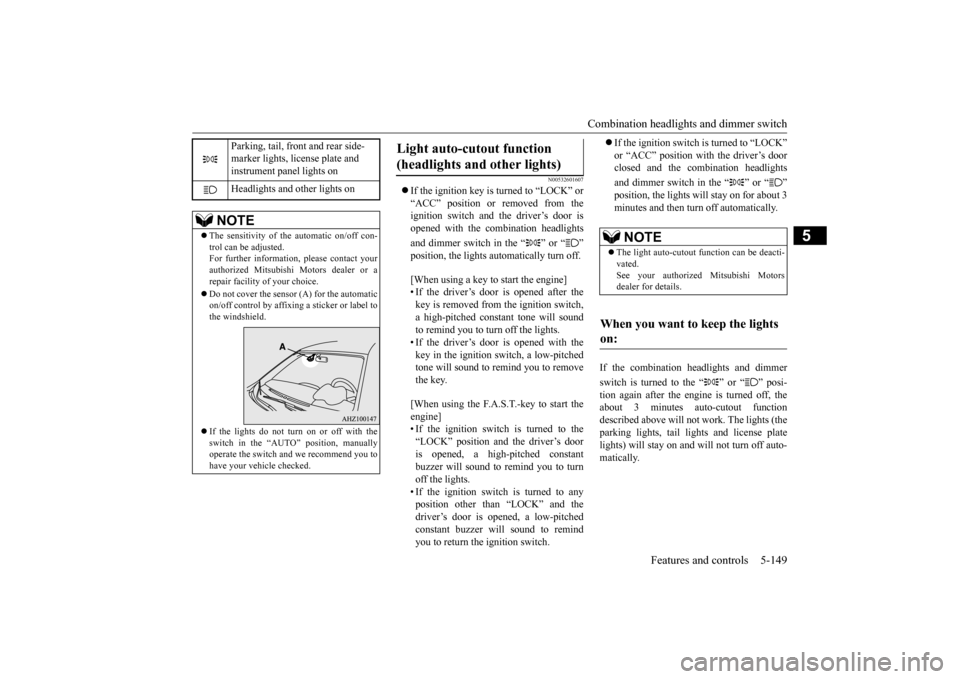
Parking, tail, front and rear side- marker lights, license plate and instrument panel lights on Headlights and other lights on
NOTE
The sensitivity of the automatic on/off con- trol can be adjusted.For further information, please contact your authorized Mitsubishi Motors dealer or a repair facility of your choice. Do not cover the sensor (A) for the automatic on/off control by affixing a sticker or label tothe windshield. If the lights do not turn on or off with the switch in the “AUTO” position, manually operate the switch and we recommend you to have your vehicle checked.
Light auto-cutout function (headlights and other lights)
NOTE
The light auto-cutout function can be deacti- vated. See your authorized Mitsubishi Motorsdealer for details.
When you want to keep the lights on:
BK0210300US.book
149 ページ 2014年4月8日 火曜日 午前10時46分
Page 219 of 434

Combination headlights and dimmer switch 5-150 Features and controls
5
N00549800196
If the driver’s door is opened with the key in the “LOCK” or “ACC” position or removed
from the ignition switch while the lights are on, the buzzer will sound to remind you to turn off the lights. If the driver’s door is opened with the ignition switch in the “LOCK” or “ACC” position, or if the ignition switch is moved to the “LOCK” position while the lights are on, thebuzzer will sound to remind you to turn offthe lights. In either case, the lights and buzzer will turn off automatically. Or you can turn the combination headlightsand dimmer switch to the “OFF” position to stop the buzzer.
N00549900155
To change the headlights from high beam to low beam and vice versa, pull the turn signallever to fully toward you (1). Switch the headlights to low beam as a courtesy when- ever there are oncoming vehicles, or whenthere is traffic moving ahead of you. An illu- minated blue light in the instrument cluster
indicates when the headlights are on high beam.
N00550000198
You can flash the high beams by pulling thelever gently toward you (2). The lights will go back to normal when you let go. While the high beam is on, you will see a blue light onthe instrument panel.
NOTE
When the engine is started using the key, if the driver’s door is opened and the key is removed, the headlight reminder buzzer intermittently emits a high-pitched sound. If the key is still in the ignition the keyreminder buzzer intermittently emits a low- pitched sound. The buzzer stops when the driver’s door isclosed. (A warning is also displayed in the multi-information display.) operation function, if the driver’s door is opened and the ignition switch is in the“LOCK” position, the headlight reminder buzzer intermittently emits a high-pitched sound. If the ignition sw
itch is in any posi-
tion other than “LOCK”, the ignition switch on reminder buzzer intermittently emits a low-pitched sound.The buzzer stops when the driver’s door is closed. (A warning is also displayed in the multi-information display.)
When using a key to start the engine
When using the F.A.S.T.-key to start the engine Dimmer (high/low beam change)
Headlight flasher
NOTE
You can flash the high beams by pulling the lever toward you, even if the combination headlights and dimmer switch is off.
BK0210300US.book
150 ページ 2014年4月8日 火曜日 午前10時46分
Page 220 of 434

Combination headlights and dimmer switch
Features and controls 5-151
5
N00563201133
This function turns on the front side-marker and parking lights for about 30 seconds after the UNLOCK button (A) on the remote con-trol transmitter is pressed when the combina- tion headlights and dimmer switch is in the “OFF” or “AUTO” position (for vehiclesequipped with the automatic light control). On vehicles equipped with the automatic light control, the welcome light function will oper-ate only when it is dark outside the vehicle.
N00547300054
This function turns on the headlights in thelow beam setting for about 30 seconds afterthe ignition switch is turned to the “LOCK” position. 1. Turn the combination headlights and dim- mer switch to the “OFF” or “AUTO” automatic light control). 2. Turn the ignition switch to the “LOCK”position. Also, if a key was used to start the engine, remove the key from the igni- tion switch.3. Within 60 seconds of turning the ignition switch to the “LOCK” position, pull the turn signal lever toward you.
If you turn the lights off with the headlights set to high-beam illumination, the headlights are automatically returned to their low-beam setting when the combination headlights and dimmer switch is next turned to the “ ”
Welcome light (for vehicles with the theft-alarm system)
NOTE
NOTE
While the welcome light function is operat- ing, perform one of the following operations to cancel the function. • Push the LOCK button (B) on the remote control transmitter. • Turn the combination headlights and dim- mer switch to the “ ” or “ ” position. • Turn the ignition switch to the “ON” posi- tion.
It is possible to modify functions as follows: • The headlights can be set to come on in the low beam setting.
• The welcome light function can be deacti- vated. For details, consult a Mitsubishi Motors dealer.
Coming home light
NOTE
BK0210300US.book
151 ページ 2014年4月8日 火曜日 午前10時46分
Page 221 of 434

Headlight leveling switch (if so equipped) 5-152 Features and controls
5
4. The headlights will come on in the low beam setting for about 30 seconds. Afterthe headlights go off, the headlights can be turned on again in the low beam setting for about 30 seconds by pulling the turnsignal lever toward you within 60 seconds of turning the ignition switch to the “LOCK” position. To turn on the head-lights again after 60 seconds of turningthe ignition switch to the “LOCK” posi- tion, repeat the process from step 1.
N00537100088
The direction of the headlight beam (thedirection in which the light shines) alters according to the number of people and theload in the vehicle. Lower the headlight angle if it is too high due to the number of people and/or the load in the vehicle so that the head-lights’ glare does not distract the drivers of approaching vehicles. First set the combina- tion headlights and di
mmer switch to the
“ ” position, then turn the headlight level- ing switch knob to lower the beam. The greater the number on the headlight leveling switch knob, the lower the beam will point.Set the switch to the appropriate position so that the headlight beam is level with the road.
N00522601545
When changing lanes, or to making a gradual turn, hold the lever in the “lane change” posi- tion (1). It will return to the neutral position when you let go. Use the full position (2)when making a normal turn. The lever will return to the neutral position when the turn is complete. There may be times when the lever
NOTE
While the coming home light function is operating, perform one of the followingoperations to cancel the function. • Pull the turn signal lever toward you.• Turn the combination headlights and dim- mer switch to the “ ” or “ ” position. • Turn the ignition switch to the “ON” posi- tion.
It is possible to modify functions as follows: • The time that the headlights remain on can be changed. • The coming home light function can be deactivated. For details, consult a Mitsubishi Motors dealer.
Headlight leveling switch
(if
so equipped)
NOTE
NOTE
Start adjusting when the knob is at the “0” position (when the beam is at its highest). Keep the knob in the “0” position except when using the knob to lower the headlight beam angle. Always return the knob to the “0” position when the load is removed and the people have left the vehicle.
Turn signal lever
BK0210300US.book
152 ページ 2014年4月8日 火曜日 午前10時46分