2015 MITSUBISHI LANCER ignition
[x] Cancel search: ignitionPage 250 of 434

USB input terminal (if so equipped)
Features and controls 5-181
5
Connect the equipment into an outlet on a circuit different from that to which the receiver is connected. Consult the dealer or an experienced radio/TV technician for help.
ICES Notice: This Class B digital apparatus complies with Canadian ICES-003.
N00566401093 N00566701070
You can connect your USB memory device or iPod
* to play music files stored in the USB
memory device or iPod. The following explains how to connect andremove a USB memory device or iPod.
N00566800074
1. Park your vehicle in a safe place and turnthe ignition switch to the “LOCK” posi-tion.2. Open the USB input terminal cover (A) in the glove compartment. 3. Connect a commercially available USB connector cable (C)
to the USB memory
device (B).
4. Connect the USB connector cable (C) to the USB input terminal (D).
Enrollment commands
USB input terminal
(if so
equipped)
* :“iPod” is a registered trademark of Apple Inc. in the United States and other coun-tries.
How to connect a USB memory device
WA R N I N G An open glove compartment door can cause a serious injury or death to the front passenger in an accident, even if the pas- senger is wearing his/her seat belt. Alwayskeep the glove compartment door closed when driving.
BK0210300US.book
181 ページ 2014年4月8日 火曜日 午前10時46分
Page 251 of 434
USB input terminal (if so equipped) 5-182 Features and controls
5
5. To remove the USB connector cable, turn the ignition switch to the “LOCK” posi- tion first and perform the installation stepsin reverse.
N00566900020
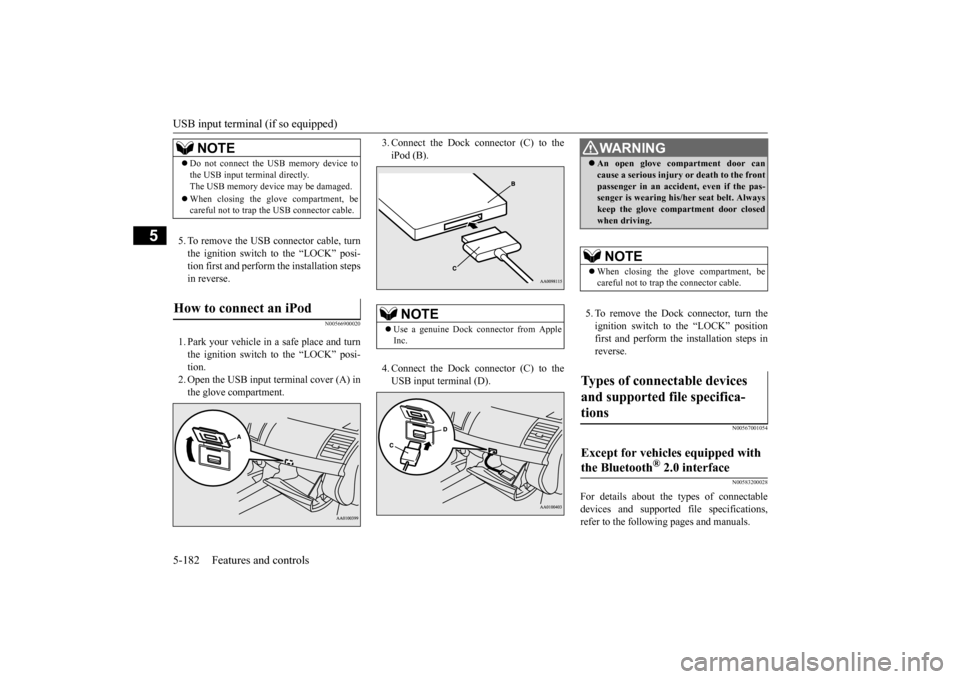
1. Park your vehicle in a safe place and turnthe ignition switch to the “LOCK” posi- tion. 2. Open the USB input terminal cover (A) inthe glove compartment.
3. Connect the Dock connector (C) to the iPod (B). 4. Connect the Dock connector (C) to the USB input terminal (D).
5. To remove the Dock connector, turn the ignition switch to the “LOCK” position first and perform the installation steps inreverse.
N00567001054 N00583200028
For details about the types of connectable devices and supported file specifications, refer to the following pages and manuals.
NOTE
Do not connect the USB memory device to the USB input terminal directly. The USB memory device may be damaged. When closing the glove compartment, be careful not to trap the USB connector cable.
How to connect an iPod
NOTE
Use a genuine Dock connector from Apple Inc.
WA R N I N G An open glove compartment door can cause a serious injury or death to the front passenger in an accident, even if the pas- senger is wearing his/her seat belt. Always keep the glove compartment door closedwhen driving. NOTE
When closing the glove compartment, be careful not to trap the connector cable.
Types of connectable devices and supported file specifica- tions
Except for vehicles equipped with the Bluetooth
® 2.0 interface
BK0210300US.book
182 ページ 2014年4月8日 火曜日 午前10時46分
Page 252 of 434

USB input terminal (if so equipped)
Features and controls 5-183
5
Refer to “Listen to an iPod” on page 7-47, “Listen to Audio Files on a USB Device” on page 7-49 and “Audio Files(MP3/WMA/AAC)” on page 7-34. Refer to the separate owner’s manual. Refer to the separate owner’s manual.
N00583300029
For details about the types of connectable devices and supported file specifications, refer to the following section.
N00583400020
Devices of the following types can be con- nected.
For these connectable device types, “iPod*,” “iPod classic*,” “iPod nano*,” “iPod touch*”and “iPhone*,” refer to the following web- site: [For vehicles sold in U.S.A.]You can access the Mitsubishi Motors North America website. [For vehicles sold in Canada and Mexico]You can access the Mitsubishi Motors web-site. Please read and agree to the “Warning about Links to the Web Sites of Other Com- panies”. The websites mentioned above mayconnect you to websites other than the Mitsubishi Motors website. http://www.mitsubishi-motors.com/en/prod-ucts/index.html
N00583500021
You can play music files of the followingspecifications that are saved in a USB mem-ory device or other device supporting mass storage class. When you connect your iPod, playable file specifications depend on theconnected iPod.
For vehicles equipped with the AM/FM radio/CD player For vehicles equipped with the DISPLAY AUDIO For vehicles equipped with the Mitsubishi Multi-Communication Sys-temFor vehicles equipped with the Bluetooth
® 2.0 interface
Device types
Model name
Condition
USB memory device
Storage capacity of 256 Mbytes or more
Models other than USB memory devices and iPods
Digital audio player supporting mass storage class
* : “iPod,” “iPod classic,” “iPod nano,” “iPod touch,” and “iPhone” are regis- tered trademarks of Apple Inc. in the United States and other countries.
NOTE
Depending on the type of the USB memory device or other device connected, the con- nected device may not function properly or the available functions may be limited. It is recommended to us
e an iPod with firm-
ware updated to the latest version. You can charge your iPod by connecting it to the USB input terminal when the ignition switch is in the “ACC” or “ON” position. Do not keep your USB memory device or iPod in your vehicle. It is recommended that
you back up the files
in case of data damage. Do not connect to the USB input terminal any device (hard disk, card reader, memoryreader, etc.) other than the connectable devices specified in
the previous section.
The device and/or data may be damaged. Ifany of these devices was connected by mis- take, remove it after turning the ignition switch to the “LOCK” position.
File specifications
BK0210300US.book
183 ページ 2014年4月8日 火曜日 午前10時46分
Page 255 of 434

Interior lights 5-186 Features and controls
5
N00525801261
The dome light can be turned on by sliding the dome light switch.
N00553800067
Regardless of the dome light switch position, when you press the lens, the light on the sidethat is pressed illuminates; when you press the lens again, the light goes off.
N00525401485
The dome light can be turned on by sliding the dome light switch.
Dome light (Front)/Reading lights
(if so equipped)
Dome light (Front)
1- (DOOR) The dome light comes on when any door is opened. When all
the doors are closed,
the dome light illuminates for about 30 seconds then goes off. However, the light goes off immediately if: The door is closed while the ignition switch is in the “ON” position.
The driver’s door is closed after all the other doors are closed while the lockknob of the driver’s door is in the lock position. The door is closed and the power door lock switch is used
to lock the doors.
In vehicles equipped with the keyless entry system, the keyless entry systemremote control transmitter is used to lock the doors. In vehicles equipped with the F.A.S.T.-key, the doors are lockedusing the F.A.S.T.-key.NOTE
When the engine is started using the key while the doors are closed, if you remove the key, the dome light will illuminate for about 30 seconds before going off. When the engine is started using the F.A.S.T.-key while the doors are closed, ifthe ignition switch is moved to the “LOCK” position, the dome light will illuminate for about 30 seconds before going off. The time until the light goes off can be adjusted. See your au
thorized Mitsubishi
Motors dealer for details.2- (OFF) The dome light goes off.
Reading lights
Dome light (Rear)
(if so equipped)
BK0210300US.book
186 ページ 2014年4月8日 火曜日 午前10時46分
Page 256 of 434

Storage spaces
Features and controls 5-187
5
N00526301465
If any of the interior lights are left on with the ignition switch in the “LOCK” position, the lights go off automatically after about 30 minutes.
The lights come on again if the ignition switch is turned to the “ON” or “ACC” posi- tion, any door or the tru
nk lid is opened and
closed, or the keyless entry system orF.A.S.T.-key is operated.
N00526400485
1- (ON) The dome light comes on. 2- (
)
The dome light comes on when any dooris opened. When all the doors are closed, the dome light illuminates for about 30 seconds then goes off. However, the lightgoes off immediately if: The door is closed while the ignition switch is in the “ON” position. The driver’s door is closed after all the other doors are closed while the lock knob of the driver’s door is in the lock position. The door is closed and the power door lock switch is used to lock the doors. In vehicles equipped with the keyless entry system, the keyless entry sys- tem remote control transmitter is usedto lock the doors.
In vehicles equipped with the F.A.S.T.-key, the doors are lockedusing the F.A.S.T.-key.NOTE
When the engine is started using the key while the doors are closed, if you remove the key, the dome light will illuminate for about30 seconds before going off. When the engine is started using the F.A.S.T.-key while the doors are closed, if the ignition switch is moved to the “LOCK” position, the dome light will illuminate forabout 30 seconds before going off. The time until the light goes off can be adjusted. See your authorized Mitsubishi Motors dealer for details.3- (OFF) The dome light goes off.
Interior light auto-cutout func- tion (dome light and other lights)
NOTE
The interior light auto-cutout function can be deactivated. The time until the lights auto- matically go off can be adjusted. See yourauthorized Mitsubishi Motors dealer for details.
Storage spaces
CAUTION Never leave lighters, carbonated drink cans, or spectacles in the cabin when parking the vehicle in hot sunshine. The cabin will become extremely hot, so lighters and otherflammable items may catch fire and unopened drink cans (including beer cans) may rupture. The heat may also deform or crack plastic spectacle parts. Keep the lids of storage spaces closed while driving the vehicle. A lid or the contents of a storage space could otherwise cause injuriesduring a sudden stop.
BK0210300US.book
187 ページ 2014年4月8日 火曜日 午前10時46分
Page 279 of 434

Heater without air conditioni
ng function (if so equipped)
7-4 Comfort controls
7
Air flows mainly to the windshield and the door windows.
N00737700031
The heater can only be used while the engineis running.
N00737800029
N00737900020
When the ignition switch is in the “ON” posi- tion, select the blower speed by turning theblower speed selection dial. Turning the dial clockwise will increase the blower speed; turning the dial counterclock-wise will decrease it. When the dial is set to the “OFF” position, all fan-driven airflow will stop.
NOTE
With the mode selection dial between the “ ” and “ ” positions, air flows mainly to the leg area. With the mode selection dial between the “ ” and “ ” positions, air flows mainly to the windshield and the door windows.
Defroster position
Heater without air condi- tioning function
(if so equipped)
Control panel
1- Temperature control dial 2- Air selection switch 3- Blower speed selection dial 4- Mode selection dial5- Electric rear window defogger switch
P. 5-158
NOTE
Button (A) is not available for use. The indi- cator below the button doesn’t come on even if it is pushed.
Blower speed selection dial
BK0210300US.bo
ok 4 ページ 2014年4月8日 火曜日 午前10時46分
Page 282 of 434

Manual air conditioning with
MAX A/C mode (if so equipped)
Comfort controls 7-7
7
1. Set the mode selection dial to the “ ” 2. Select your desired blower speed by turn- ing the blower speed selection dial.3. Select your desired temperature by turn- ing the temperature control dial.
For quick defrosting 1. Set the mode selection dial to the “ ”
2. Set your blower to the maximum speed. 3. Set the temperature to the highest posi- tion.
N00730300256
The air conditioning can only be used while the engine is running.
N00730500216
N00736500146
When the ignition switch is in the “ON” posi- tion, select the blower speed by turning the blower speed selection dial. Turning the dial clockwise will increase theblower speed; turning the dial counterclock- wise will decrease it. When the dial is set to the “OFF” position, all fan-driven airflowwill stop.
NOTE
To defog quickly, direct
the air flow from the
side vents toward the door windows.
Manual air conditioning with MAX A/C mode
(if so
equipped)Control panel
1- Temperature control dial
2- Air selection switch 3- Blower speed selection dial4- Air conditioning switch 5- Mode selection dial 6- Electric rear window defogger switch
P.5-158
Blower speed selection dial
BK0210300US.bo
ok 7 ページ 2014年4月8日 火曜日 午前10時46分
Page 288 of 434

Manual air conditioning withou
t MAX A/C mode (if so equipped)
Comfort controls 7-13
7
N00730500229 N00736500133
When the ignition switch is in the “ON” posi- tion, select the blower speed by turning the blower speed selection dial.Turning the dial clockwise will increase the blower speed; turning the dial counterclock- wise will decrease it. When the dial is set tothe “OFF” position, all fan-driven airflow will stop.
N00736600176
Turn the temperature control dial clockwise to make the air warmer. Turn it counterclock-wise to make the air cooler.
N00736700177
To change the amount of air flowing from thevents, turn the mode selection dial. Refer to “Changing the mode selection” on page 7-2.
N00736800279
Normally, use the outside air position to keepthe windshield and side windows clear and to
Control panel
1- Temperature control dial2- Air selection switch 3- Blower speed selection dial4- Air conditioning switch 5- Mode selection dial 6- Electric rear window defogger switch
P.5-158
Blower speed selection dial
Temperature control dial
NOTE
While the engine coolant temperature is low, the temperature of the air from the heater will be cool/cold until the engine warms up, even if you have selected warm air with the dial.
Mode selection dial
Air selection switch
BK0210300US.bo
ok 13 ページ 2014年4月8日 火曜日 午前10時46分