2015 MERCEDES-BENZ E-CLASS SALOON warning light
[x] Cancel search: warning lightPage 218 of 497
R
on vehicles with manual transmission, you
shift to agear that is too high, and as a
result the engine speed is too low
R on vehicles with automatic transmission,
you shift to position Nwhile driving
If cruise control is deactivated, you will hear a warning tone. You will see the Cruise con‐
Cruise con‐
trol off
trol off message in the multifunction dis-
play for approximately five seconds.
i The last speed stored is cleared when you
switch off the engine. SPEEDTRONIC
Important safety notes SPEEDTRONIC brakes automatically so that
you do not exceed the set speed. Change into
al ower gear in good time on long and steep
downhill gradients. Take particular noteof
this when driving aladen vehicle. By doing so,
you will make use of the braking effect of the engine. This relieves the load on the brake
system and prevent sthe brakes from over-
heating and wearing too quickly. If you need
additional braking, depress the brake pedal
repeatedly rather than continuously.
If you fail to adapt your driving style, SPEED-
TRONIC can neither reduce the risk of an
accident nor override the laws of physics.
SPEEDTRONIC cannot take into account
road, weather or traffic conditions. SPEED-
TRONIC is only an aid. You are responsible for
the distance to the vehicle in front,f or vehicle
speed, for braking in good time, and for stay- ing in lane.
If there is achange of drivers, advise the new
driver of the speed stored.
You can set avariable or permanent limit
speed:
R variable for speed limits, e.g. in built-up
areas
R permanent for long-term speed restric-
tions, e.g. when driving with winter tyres
fitted i
The speed indicated in the speedometer
may differ slightly from the limit speed
stored.
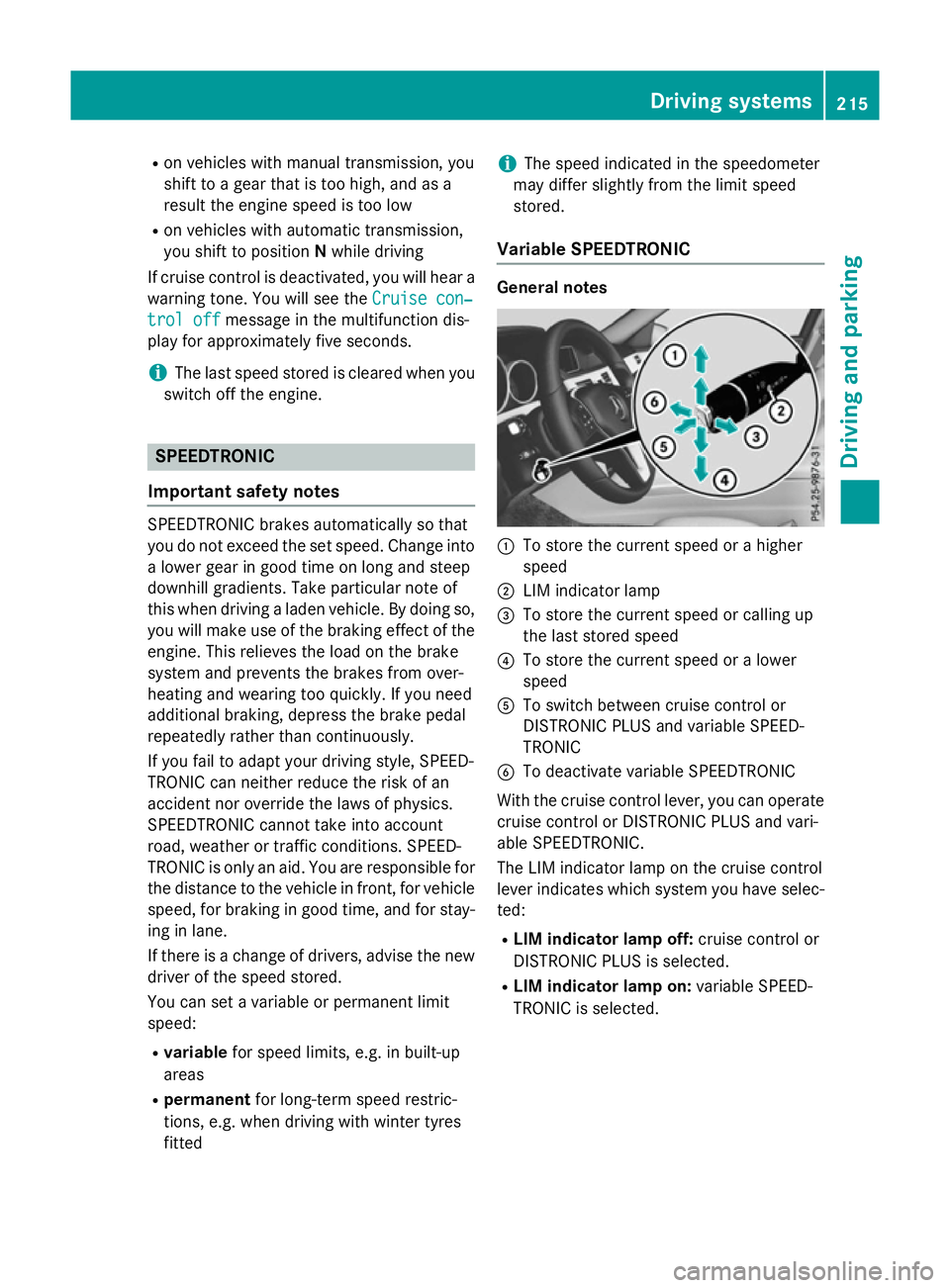
Variable SPEEDTRONIC General notes
:
To store the current speed or ahigher
speed
; LIM indicator lamp
= To store the current speed or calling up
the last stored speed
? To store the current speed or alower
speed
A To switch between cruise control or
DISTRONIC PLUS and variable SPEED-
TRONIC
B To deactivate variable SPEEDTRONIC
With the cruise control lever, you can operate
cruise control or DISTRONIC PLUS and vari-
able SPEEDTRONIC.
The LIM indicator lamp on the cruise control
lever indicates which system you have selec- ted:
R LIM indicator lamp off: cruise control or
DISTRONIC PLUS is selected.
R LIM indicator lamp on: variable SPEED-
TRONIC is selected. Driving systems
215Driving and parking Z
Page 219 of 497

Selecting variable SPEEDTRONIC
If there is
achange of drivers, advise the new
driver of the limit speed stored.
X Check whether LIM indicator lamp :is on.
If it is on, variable SPEEDTRONIC is already
selected.
If it is not, press the cruise control lever in
the direction of arrow ;.
LIM indicator lamp :in the cruise control
lever lights up. Variable SPEEDTRONIC is
selected.
Storing the current speed X
Briefly press the cruise control lever up :
or down ;.
The current speed is stored and shown in
the multifunction display.
The segments in the multifunction display
light up from the start of the scale up to the
stored speed.
You can use the cruise control lever to limit
the speed to any speed above 30 km/hw hile
the engine is running. Storing the current speed or calling up the
last stored speed G
WARNING
If you call up the stored speed and it is lower
than the current speed, the vehicle deceler-
ates. If you do not know the stored speed, the vehicle could decelerate unexpectedly. There
is ar isk of an accident.
Pay attention to the road and traffic condi-
tions before calling up the stored speed. If you do not know the stored speed, store the
desired speed again. X
Briefly pull the cruise control lever towards
you :.
Setting aspeed X
To adjust the set speed in 10 km/h
increments: briefly press the cruise con-
trol lever up :beyond the pressure point
for ahigher speed, or down ;for alower
speed.
or X Keep the cruise control lever pressed
beyond the pressure point until the desired 216
Driving systemsDriving and parking
Page 228 of 497
There are several ways to deactivate
DISTRONIC PLUS:
X Briefly press the cruise control lever for-
wards :.
or
X Brake, unless the vehicle is stationary.
or X Briefly press the cruise control lever in the
direction of arrow =.
Variable SPEEDTRONIC is selected. LIM
indicator lamp ;in the cruise control lever
lights up.
When you deactivate DISTRONIC PLUS, you
will see the DISTRONIC
DISTRONIC PLUS PLUSoff
offmessage in
the multifunction display for approximately
five seconds.
i The last speed stored remains stored until
you switch off the engine.
i DISTRONIC PLUS is not deactivated if you
depress the accelerator pedal.
DISTRONIC PLUS is automatically deactiva-
ted if: R you apply the parking brake
R ESP ®
intervenes or you deactivate ESP ®
R the transmission is in the P,Ror Nposition
R you pull the cruise control lever towards
you in order to pull away and the front-
passenger door or one of the rear doors is
open
R the vehicle is skidding
R you activat eActive Parking Assist
If DISTRONIC PLUS is deactivated, you will
hear awarning tone. You will see the
DISTRONIC PLUS off DISTRONIC PLUS off message in the multi-
function display for approximately five sec-
onds. Tips for driving with DISTRONIC PLUS General notes
Pay particular attention in the following traffic
situations:
R cornering, entering and exitin gabend
R vehicles which are not driving in the middle
of their lane
R other vehicles changin glane
R narrow vehicles
R obstructions and stationary vehicles
R crossin gvehicles
In such situations, brake if necessary.
DISTRONIC PLUS is then deactivated.
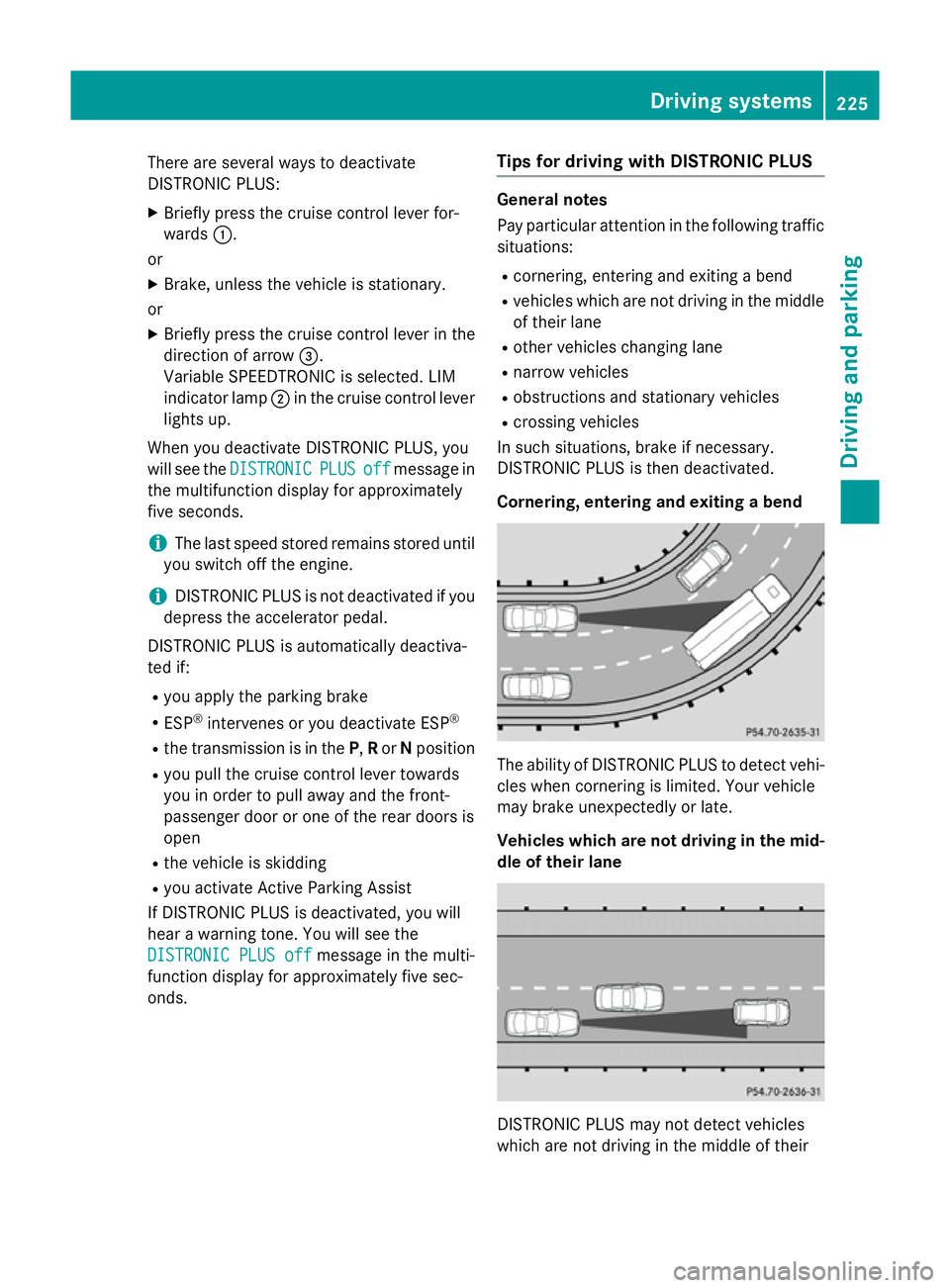
Cornering, entering and exiting abend The ability of DISTRONIC PLUS to detect vehi-
cles when cornering is limited. Your vehicle
may brake unexpectedly or late.
Vehicles which are not driving in the mid- dle of their lane DISTRONIC PLUS may not detect vehicles
which are not driving in the middle of their Driving systems
225Driving and parking Z
Page 234 of 497
The
RACE
RACE START
START active
active message appears
in the multifunction display.
RACE START is deactivated when the vehicle
reaches aspeed of approximately 50 km/h.
Drive program S+is activated. SPORT han-
dling mode remains activated.
RACE START is deactivated immediately if
you release the accelerator pedal during
RACE START or if any of the activation condi-
tions are no longer fulfilled. The RACE RACESTART
START
not possible See Owner's Manual
not possible See Owner's Manual mes-
sage appears in the multifunction display.
i After using it several times in short suc-
cession, RACE START will be unavailable
until acertain distanc ehas been driven. AIRMATIC
Vehicle level Important safety notes
G
WARNING
People's limbs may become trapped if they
are located underneat hthe vehicle or
between the vehicle body and the tyres when the vehicle is lowering. There is adanger of
injury.
When lowering the vehicle, make sure no one
is underneat hthe vehicle or in the immediate
vicinit yofthe wheel arches. G
WARNING
Vehicles with level control:
The vehicle is slightly lowered if you:
R have selected comfor tsuspension tuning
and
R you lock the vehicle within approximately
60 seconds of switchin goff the engine
You and people in the vicinit yofthe wheel
arch or the underbody may thus become trap- ped. There is arisk of injury.
Make sure that nobody is in the vicinit yofthe
wheel arch or the underbody when you lock
the vehicle. !
The vehicle is lowered by about 15 mm if:
R you have selected "Comfort tuning"
R you switch off the engine and
R you lock the vehicle within approximately
60 seconds
When parking, position your vehicle so that it does not make contact with the kerb as
the vehicle is lowered. Your vehicle could
otherwise be damaged.
If you unlock the vehicle within 60 seconds of
having switched the engine off, the vehicle is
lowered slightly when Comfort suspension
mode is selected.
Observe the notes on driving with atrailer
(Y page 267).
Your vehicle regulates its height automati-
cally. All-roun dlevel control ensures the best
possible suspension and constant ground
clearance, even with aladen vehicle. When
you drive fast, the vehicle is lowered auto-
matically to improve driving safety and to
reduce fuel consumption.
The following vehicle levels are possible:
R Normal
R Raised (vehicles without 4MATIC): the vehi-
cle is raised by approximately 25 mm when compared with the normal level
R Raised (vehicles with 4MATIC): the vehicle
is raised by approximately 35 mm when
compared with the normal level
R Lowered: the vehicle is lowered by approx-
imately 10 mm when compared with the
normal level
The "Normal" and "Raised" vehicle levels can be set manually.
The "Lowered" vehicle level is set automati-
cally:
R at speeds above 140 km/h
R if you have selected "Sport mode"
(Y page 232) Driving systems
231Driving and parking Z
Page 236 of 497
X
Press button :.
Indicator lamp =lights up. You have selec-
ted "Comfort mode".
The AIRMATIC COMFORT
AIRMATIC COMFORT message appears
in the multifunction display. AMG RIDE CONTROL sport
ssuspen-
sion
Important safety notes G
WARNING
People's limbs may become trapped if they
are located underneat hthe vehicle or
between the vehicle body and the tyres when the vehicle is lowering. There is adanger of
injury.
When lowering the vehicle, make sure no one
is underneat hthe vehicle or in the immediate
vicinit yofthe wheel arches. G
WARNING
Vehicles with level control:
The vehicle is slightly lowered if you:
R have selected comfor tsuspension tuning
and
R you lock the vehicle within approximately
60 seconds of switchin goff the engine
You and people in the vicinit yofthe wheel
arch or the underbody may thus become trap- ped. There is arisk of injury.
Make sure that nobody is in the vicinit yofthe
wheel arch or the underbody when you lock
the vehicle.
! The vehicle is lowered by about 20 mm if:
R you have selected "Comfort tuning"
R you switch off the engine and
R you lock the vehicle within approximately
60 seconds
When parking, position your vehicle so that it does not make contact with the kerb as
the vehicle is lowered. Your vehicle could
otherwise be damaged. Suspension setting General notes
The electronically controlled damping system
works continuously. This improves driving
safety and ride comfort.
The damping is tuned individually to each
wheel and depends on:
R your driving style, e.g. sporty
R the road surface condition, e.g. bumps
R your individual selection of Sport ,Sport +
or Comfort
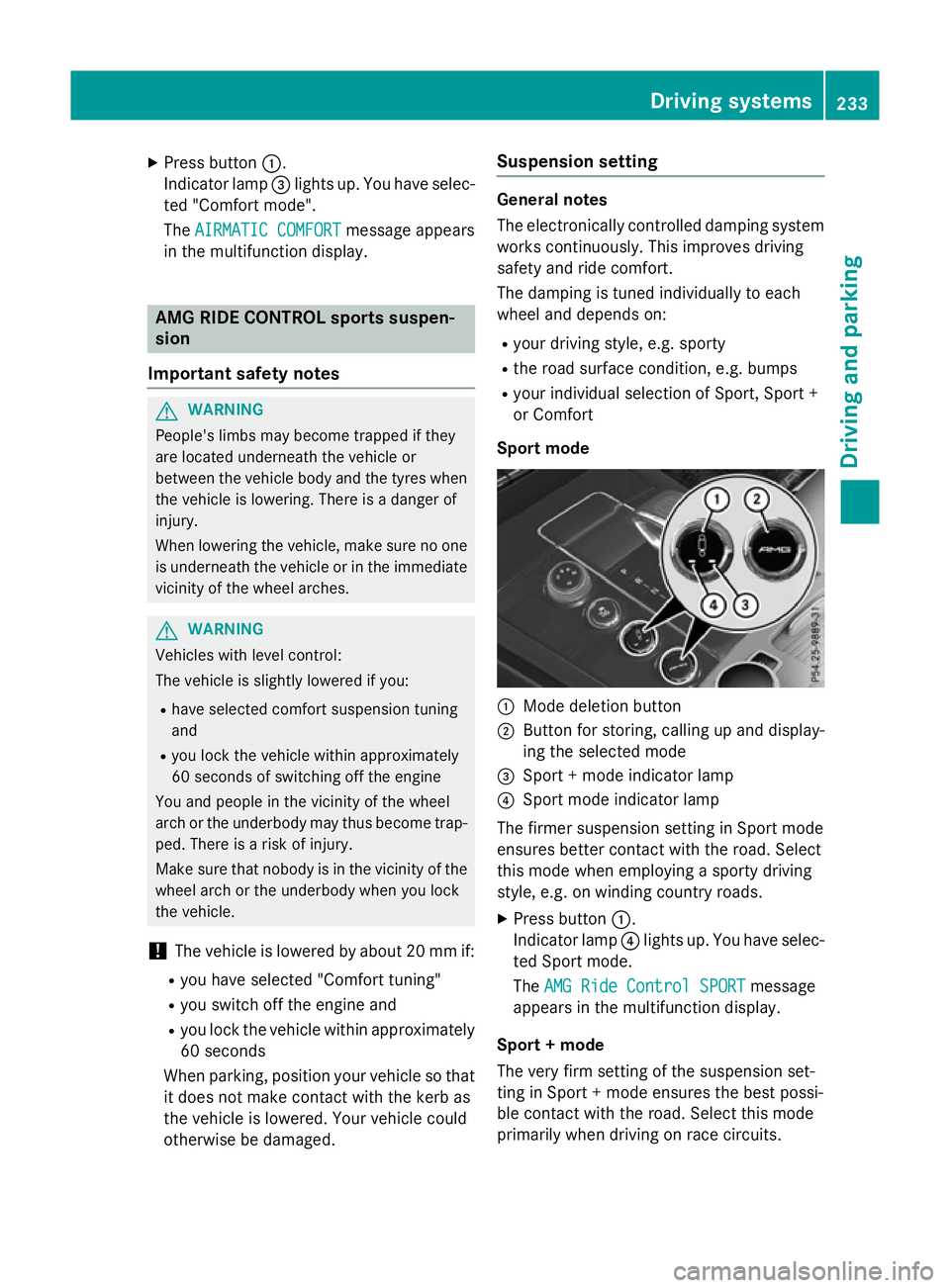
Sport mode :
Mode deletion button
; Button for storing, calling up and display-
ing the selected mode
= Sport +mode indicator lamp
? Sport mode indicator lamp
The firmer suspension setting in Sport mode
ensures better contact with the road. Select
this mode when employing asporty driving
style, e.g. on winding country roads.
X Press button :.
Indicator lamp ?lights up. You have selec-
ted Sport mode.
The AMG Ride Control SPORT AMG Ride Control SPORT message
appears in the multifunction display.
Sport +mode
The very firm setting of the suspension set-
ting in Sport +mode ensures the best possi-
ble contact with the road. Select this mode
primarily when driving on race circuits. Driving systems
233Driving and parking Z
Page 237 of 497
If indicator lamps
=and ?are off:
X Press button :twice.
Indicator lamps =and ?lightu p. You
have selected Sport +mode.
The AMG
AMG Ride
Ride Control
Control SPORT +
SPORT +message
appears in the multifunction display.
If indicator lamp ?lights up:
X Press button :once.
Second indicator lamp =lights up. You
have selected Sport +mode.
The AMG
AMG Ride
Ride Control
Control SPORT +
SPORT +message
appears in the multifunction display.
Comfort mode
When Comfort mode is selected, the handling
characteristics of yourv ehicle are more com-
fortable .Select this mode if you prefer amore
comfortable driving style. Select Comfort
mode also when driving fast on straight roads, e.g. on straight stretches of motorway.
X Press button :repeatedly until indicator
lamps =and ?go out.
You have selected Comfort mode.
The AMG Ride Control COMFORT
AMG Ride Control COMFORT mes-
sage appears in the multifunction display.
Storing and calling up settings
Once the suspension setting and drive pro-
gram have been selected, you can store and
call up yours ettings using AMG button ;.
X To store: press and hold AMG button ;
until you hear atone.
X To call up: press AMG button ;.
The stored suspension setting and drive
program are selected.
X To display: brieflypress AMG button ;.
Yours election appears in the multifunction
display. Vehicl
elevel Important safety notes
G
WARNING
People's limbs may become trapped if they
are located underneath the vehicle or
betwee nthe vehicle body and the tyres when
the vehicle is lowering. There is adanger of
injury.
When lowering the vehicle ,make sure no one
is underneath the vehicle or in the immediate vicinity of the wheela rches.
The vehicle may be lowered if you press the
suspension setting selector button or the
AMG button. The vehicle is lowered even if the
vehicle is at astandstill.
! If Sport or Sport
+suspension tuning has
been selected, the vehicle's ground clear-
ance decreases. Make sure that no objects
become trapped or that the vehicle has not
been damaged, for example, on the kerb.
i The vehicle level at the rear axle may
change visibly if you park the vehicle and
the outsid etemperature changes. If the
temperature drops, the vehicle level low-
ers; with an increase in temperature ,the
vehicle level rises.
Changing the rear axle level
This function is only available for the E63
AMG 4MATIC.
The vehicle level at the rear axle depends on
the selected suspension mode and the vehi-
cle speed.
The vehicle level at the rear axle changes
whiled riving depending on which suspension
mode is selected:
R Comfort: +10 mm
R Sport +and Sport: -15 mm
When changing from Comfort to Sport or
Sport +, the axle is lowered approximately
25 mm. When changing from Sport or Sport +
to Comfort, the axle is raiseda pproximately234
Driving systemsDriving and parking
Page 239 of 497

PARKTRONIC is activated automatically when
you:
R switch on the ignition
R shift to position D,Ror Non vehicles with
automatic transmission
R release the parking brake
PARKTRONIC is deactivated at speeds above
18 km/h. It is reactivated at lower speeds.
Range of the sensors General notes
PARKTRONIC does not take into account
obstacles located:
R below the detection range, e.g. persons,
animals or objects
R above the detection range, e.g. overhang-
ing loads, tail sections or loading ramps of
goods vehicles :
Example: sensors in the frontb umper,
left-hand side
The sensors must be free of dirt, ice and
slush. Otherwise, they may not function cor-
rectly. Clean the sensors regularly, taking
care not to scratch or damage them
(Y page 389). Range
Example: top view
Fronts
ensors Centre Approx
.100 cm Corners Approx
.60cm Rear sensors
Centre Approx
.120 cm Corners Approx
.80cm Minimum distance
Centre Approx
.20cm Corners Approx
.15cm If there is an obstacle within this range, the
relevant warning displays light up and awarn-
ing tones ounds. If the distanc efalls below
the minimum, the distanc emay no longer be
shown. 236
Driving systemsDriving and parking
Page 240 of 497

Warning displays
Warning display for the front area
: Segments on the left-hand side of the
vehicle
; Segments on the right-hand side of the
vehicle
= Segments showing operational readiness
The warning displays show the distance
between the sensors and the obstacle. The
warning displayf or the front area is located
on the dashboard above the centre airv ents.
The warning displayf or the rear area is loca-
ted on the roof lining in the rear compart-
ment.
The warning displayf or each side of the vehi-
cle is divided into five yellow and two red seg- ments. PARKTRONIC is operational if yellow
segments showing operational readiness =
light up.
The gea rleve rposition or the transmission
position of the automatic transmission and
the direction in which the vehicl eisrolling
determine which warning displayisa ctive
whe nthe engine is running.
Manual transmission: Gear lever posi-
tion Warning display
Forward gear
or
Neutral
Front area activated
Reverse gear
Rea
rand front areas
activated Automati
ctransmission: Transmission
position Warning display
D
Front area activated
R
or N Rea
rand front areas
activated P
No area
sactivated One or more segments light up as the vehicle
approache sanobstacle, depending on the
vehicle's distance from the obstacle.
From the:
R sixth segment onwards, you wil lhearan
intermittent warning tone for approx-
imately two seconds.
R seventh segment onwards, you wil lheara
warning tone for approximately two sec-
onds. This indicates that you have now
reache dthe minimu mdistance.
Deactivating/activating PARKTRONIC :
To deactivate/activate PARKTRONIC
; Indicator lamp
If indicator lamp ;lights up, PARKTRONIC is
deactivated. Active Parking Assist is then also
deactivated.
i PARKTRONIC is automatically activated
whe nyou turn the key to position 2in the
ignition lock. Driving systems
237Driving and parking Z