2015 MERCEDES-BENZ E-CLASS SALOON warning light
[x] Cancel search: warning lightPage 242 of 497

Problems with PARKTRONIC
Problem
Possible causes/consequences and
M
MSolutions Only the red segments
in the PARKTRONIC
warning displaysa
re lit.
You also hear awarning
tone for approximately
two seconds.
PARKTRONIC is then
deactivated and the
indicator lamp on the
PARKTRONIC button
lights up. PARKTRONIC has malfunctioned and has switched off.
X If problems persist, have PARKTRONIC checked at aqualified
specialist workshop. Only the red segments
in the PARKTRONIC
warning displaysa
re lit.
PARKTRONIC is then
deactivated. The PARKTRONIC sensors are dirty or there is interference.
X Cleant he PARKTRONIC sensors (Y page 389).
X Switch the ignition back on. The problem may be caused by an external source of radio or
ultrasound waves.
X See if PARKTRONIC functions in adifferent location. Active Parking Assist
General notes Active Parking Assist is an electronic parking
aid with ultrasound. It measures the road on
both sides of the vehicle. Aparking symbol
indicates asuitable parking space. Active
steering intervention and brake application
can assist you during parking. You may also
use PARKTRONIC (Y page 235).
i The active braking application is only
available on vehicles with automatic trans- mission.
Important safety notes Active Parking Assist is only an aid. It is not a
substitute for your attention to the immediate surroundings. The responsibility for safe
manoeuvring and parking remains with you.
Make sure that no persons, animals or
objectsa re in the manoeuvring range. When PARKTRONIC is switched off, Active
Parking Assist is also unavailable. G
WARNING
While parking or pulling out of aparking
space, the vehicle swings out and can drive
onto areas of the oncomingl ane. This could
cause you to collide with other road users.
There is arisk of an accident.
Pay attention to other road users. Stop the
vehicle if necessary or cancel the Active Park- ing Assist parking procedure.
! If unavoidable, you should drive over
obstacles such as kerbs slowly and not at a
sharp angle. Otherwise, you may damage
the wheels or tyres.
Active Parking Assist may also display spaces not suitable for parking, e.g.:
R parking or stopping prohibitions
R in front of drivewaysore ntrances and exits
R unsuitable surfaces Driving systems
239Driving and parking Z
Page 247 of 497
Once you have exited the parking space com-
pletely,t he steering wheel is moved to the
straight-ahead position. You hear atone and
the Park Assist switched off
Park Assist switched off message
appears in the multifunction display. You will
then have to steer and merge into traffic on
your own. PARKTRONIC is still available. You
can take over the steering before the vehicle has exited the parking space completely. This
is useful,f or example when you recognise
that it is already possibletop ull out of the
parking space.
Cancelling Active Parking Assist You can cancel Active Parking Assist at any
time.
X Stop the movement of the multifunction
steering wheel or steer yourself.
Active Parking Assist will be cancelled at
once. The Park Assist cancelled
Park Assist cancelled mes-
sage appears in the multifunction display
and you hear atone.
or X Press the PARKTRONIC button on the
centre console (Y page 237).
PARKTRONIC is switched off and Active
Parking Assist is immediately cancelled.
The Park Assist cancelled
Park Assist cancelled message
appears in the multifunction displaya nd
you hear atone.
Active Parking Assist is cancelled automati-
cally if:
R the transmission is shifted too early
R transmission position Pis selected
R parking using Active Parking Assist is no
longer possible
R you are driving faster than 10 km/h
R aw heel spins and ESP ®
intervenes or fails.
In such cases the ÷warning lamp lights
up in the instrument cluster.
Aw arning tone sounds. The parking symbol
disappears and the multifunction display
shows the Park Assist cancelled Park Assist cancelled mes-
sage. When Active Parking Assist is cancelled, you
must steer and brake againy
ourself.
Vehiclesw ith automatic transmission: if a
system malfunction occurs, the vehicle is
braked to astandstill. To drive on, depress the
accelerator pedal again.
Towing atrailer For vehicles with
atrailer tow hitch, the min-
imum length for parking spaces is slightly
increased.
If you have attached atrailer to your vehicle,
you should not use Active Parking Assist.
Once the electrical connection is established between your vehicle and the trailer, Active
Parking Assist is no longer available.
PARKTRONIC is deactivated for the rear area. Reversing camera
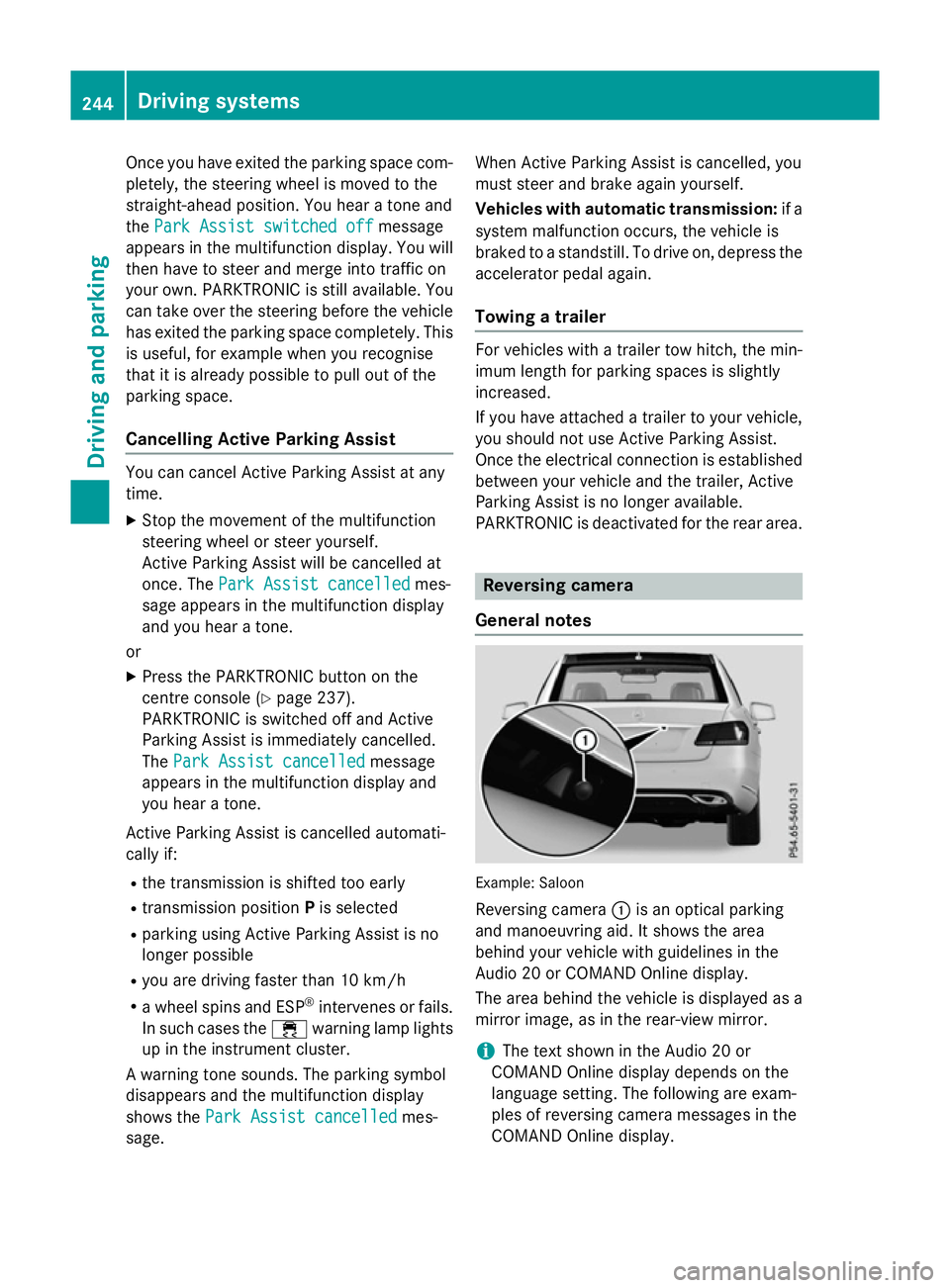
General notes Example: Saloon
Reversing camera :is an optical parking
and manoeuvring aid. It shows the area
behind your vehicle with guidelines in the
Audio 20 or COMAND Online display.
The area behind the vehicle is displayed as a
mirror image, as in the rear-view mirror.
i The text shown in the Audio 20 or
COMAND Online displayd epends on the
language setting. The following are exam-
ples of reversing camera messages in the
COMAND Online display. 244
Driving systemsDriving and parking
Page 249 of 497
Display
sintheAudio 20/COMAND
Online display The reversin
gcamera may sho wadistorted
vie wofo bstacles or sho wthemi ncorrectly or
no tata ll. Obstacles are no tshown by the
reversin gcamera in th efollowing locations:
R ver yclose to th erearb umper
R under th erearb umper
R in th eareai mmediately abov ethe tailgate
handle
! Objects no
tatgroun dlevel may appear to
be further away than they actually are ,e.g.:
R theb umper of aparke dvehicle
R thed rawbar of atrailer
R theb all couplin gofatrailer to whitch
R ther ears ection of an HGV
R as lante dpost
Use th eguidelines only fo rorientation.
Approach objects no further than th ebot-
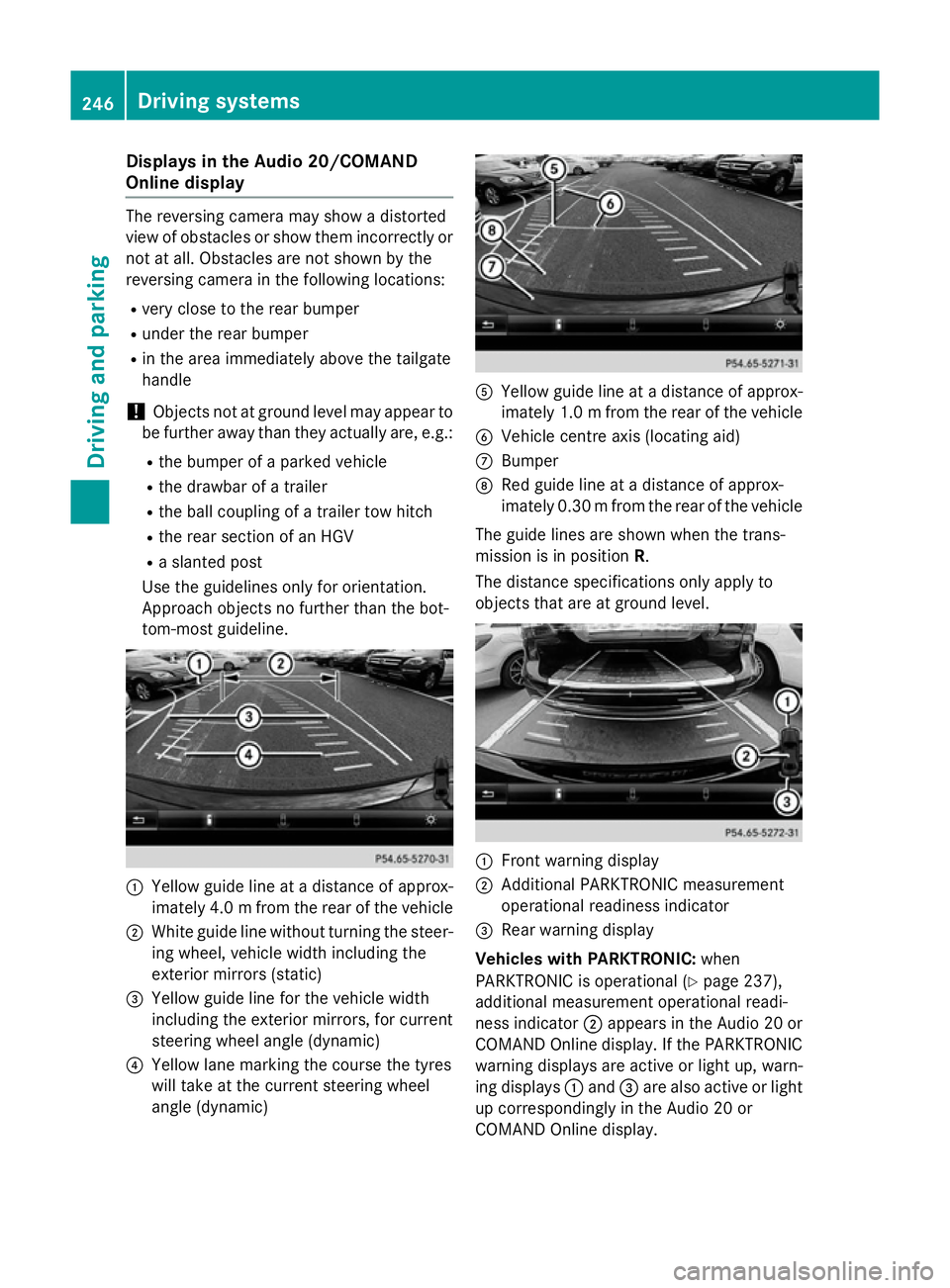
tom-most guideline. :
Yello wguidelineatad istanceofapprox-
imately 4. 0mfrom the rear of the vehicle
; White guide line without turning the steer-
ing wheel, vehicl ewidth including the
exterior mirrors (static)
= Yellow guide line for the vehicl ewidth
including the exterior mirrors, for current
steering whee langle (dynamic)
? Yellow lane marking the course the tyres
willt ake at the current steering wheel
angle (dynamic) A
Yellow guide line at adistance of approx-
imatel y1.0mf rom the rear of the vehicle
B Vehicle centre axis (locating aid)
C Bumper
D Red guide line at adistance of approx-
imatel y0.30 mfrom the rear of the vehicle
The guide lines are show nwhen the trans-
mission is in position R.
The distance specifications only apply to
objects that are at ground level. :
Front warning display
; Additional PARKTRONIC measurement
operational readiness indicator
= Rearw arning display
Vehicles with PARKTRONIC: when
PARKTRONIC is operational (Y page237),
additiona lmeasurement operational readi-
ness indicator ;appears in the Audi o20or
COMAND Online display.Ift he PARKTRONIC
warning displaysa re active or light up, warn-
ing displays :and =are alsoa ctive or light
up correspondingly in the Audi o20or
COMAND Online display. 246
Driving systemsDriving and parking
Page 261 of 497

Monitoring range of the sensors
In particular, the detection of obstacles can
be impaired in the case of:
R dirt on the sensors or obscured sensors
R poor visibility, e.g. due to fog, heavy rain,
snow or spray
R narrow vehicles, e.g. motorcycle sorbicy-
cles
R very widel anes
R narrow lanes
R vehicles not driving in the middle of their
lane
R barriers or other road boundaries
Vehicles in the monitoring range are then not
indicated. Example
:Saloon
Blind Spot Assist monitors the area up to
3.0 mbehind your vehicle and directly nextto
your vehicle, as shown in the diagram.
If the lanes are narrow, vehicles driving in the
lane beyond the lane nexttoy our vehicle may
be indicated, especially if the vehicles are not
driving in the middle of their lane. This may be the case if ther eare vehicles at the edge of
their lane nearest your vehicle. Due to the nature of the system:
R warnings may be issued in error when driv-
ing close to crash barriers or similar solid
lane borders
R warnings may be interrupted when driving
alongside long vehicles, for example lor-
ries, for aprolonged time
The two radar sensor sfor Blind Spot Assist
are integrated intot he sides of the rear
bumper. Make sure that the bumper is free of dirt, ice or slush in the vicinity of the sensors.
The sensor smust not be covered, for exam-
ple by cycle rack soroverhanging loads. Fol-
lowing asevere impact or in the event of dam-
age to the bumpers, have the function of the
sensor schecked at aqualified specialist
workshop. Blind Spot Assist may otherwise
not work properly.
Indicator and warning display :
Indicator lamp (yellow)
Warnin glamp (red)
Blind Spot Assist is not activ eatspeeds below
approximately 30 km/h. Vehicles in the mon- itorin grange are then not indicated.
If Blind Spot Assist is activated, indicator
lamp :in the exterior mirror slights up yel-
low up to aspeed of 30 km/h. At speeds
above 30 km/h, the indicator lamp goes out
and Blind Spo tAssist is operational.
If av ehicl eisd etecte dwithi nt he monitoring
range of Blind Spo tAssist at speeds above
30 km/h ,warning lamp :on the corre-
sponding side lights up red .Thisw arning
always occurs when avehicl eenters the blind 258
Driving systemsDriving an
dparking
Page 262 of 497

spot monitoring range from behind or from
the side. When you overtake avehicle, the
warning only occurs if the difference in speed
is less than 12 km/h.
The yellow indicator lamp goes out if reverse gear is engaged. Blind Spot Assist is then
deactivated.
The brightness of the indicator or warning
lamps is adjusted automaticallya ccording to
the ambient light.
Collision warning
If av ehicle is detected in the monitoring range
of Blind Spot Assist and you switch on the
corresponding turn signal, adoublew arning
tone sounds. Red warning lamp :flashes. If
the turn signal remains on, detected vehicles
are indicated by the flashing of red warning
lamp :.There are no further warning tones.
Activating Blind Spot Assist X Make sure that Blind Spot Assist is activa-
ted in the on-board computer
(Y page 288).
X Turn the key to position 2in the ignition
lock.
Warning lamps :in the exterior mirrors
light up red for approximately 1.5 seconds
and then turn yellow.
Towing atrailer
If you couple up atrailer, make sure that you
have correctly established the electrical con- nection. This can be accomplished by check-
ing the trailer lighting. Blind Spot Assist is
then deactivated. The indicator lamps in the
exterior mirrors light up yellow and the
Blind
Blind Spot SpotAssist
Assist not
notavailable
available when
when
towing atrailer See Owner's Manual
towing atrailer See Owner's Manual
message appears in the multifunction dis-
play.
i You can deactivate the indicator lamps in
the exterior mirrors. To do so, you will need to deactivate Blind
Spot Assist if:
R the key is in position 2in the ignition lock
R the engine is not running
R the electrical connection to the trailer
has been established
Lane Keeping Assist General notes
Lane Keeping Assist monitors the area in
front of your vehicle by means of camera
:
at the top of the windscreen. Lane Keeping
Assist detects lane markings on the road and
can warn you before you leave your lane unin-
tentionally.
This function is available within aspeed range
between 60 km/h and 200 km/h.
Aw arning may be given if afront wheel
passes over alane marking. It will warn you by
means of intermittent vibration through the
steering wheel for up to 1.5 seconds.
Important safety notes G
WARNING
Lane Keeping Assist cannot always clearly
identify lane markings.
In these cases, Lane Keeping Assist may:
R give an unnecessary warning
R not give awarning
There is arisk of an accident.
Always pay particular attention to the traffic
situation and keep in lane, especiallyifL ane
Keeping Assist alerts you. Driving systems
259Driving and parking Z
Page 265 of 497

Activ
eBlind Spo tAssist monitors the area up
to 3.0 mbehind your vehicle and directly next
to your vehicle, as shown in the diagram.
The detection of vehicles may be impaired in the case of:
R dirt on the sensor sorobscured sensors
R poor visibility, e.g. due to rain, snow or
spray
Vehicles in the monitoring range will then be
indicated late or not at all.
Active Blind Spot Assist may not detec tnar-
row vehicles, such as motorcycles or bicy-
cles, or may only detec tthem too late.
If the lanes are narrow, vehicles driving in the
lane beyond the lane nexttoy our vehicle may
be indicated, especially if the vehicles are not
driving in the middle of their lane. This may be the case if ther eare vehicles at the edge of
their lane.
Due to the nature of the system:
R warnings may be issued in error when driv-
ing close to crash barriers or similar solid
lane borders
R warnings may be interrupted when driving
alongside long vehicles, for example lor-
ries, for aprolonged time
Warning display :
Warnin gdisplay
Active Blind Spot Assist is not active at
speeds below approximately 30 km/h. Vehi-
cles in the monitoring range are then not indi-
cated. If Active Blind Spot Assist is activated, indi-
cator lamp
:in the exterior mirror slights up
yellow up to aspeed of 30 km/h. At speeds
above 30 km/h, the indicator lamp goes out
and Active Blind Spot Assist is operational.
If av ehicle is detected within the monitoring
range of Blind Spot Assist at speeds above
30 km/h, warning lamp :on the corre-
spondin gside lights up red. Awarning is
alway sissued when avehicle enters the mon-
itorin grange of Blind Spot Assist from behind
or from the side. When you overtake avehicle,
the warning only occur sifthe difference in
speed is less than 12 km/h.
The yellow indicator lamp goes out if reverse gear is engaged. Active Blind Spot Assist is
not operational.
The brightness of the warning lamps is auto-
matically adapted to the brightness of the
surroundings.
Visua land acoustic collision warning
If you switch on the turn signals to change
lanes and avehicle is detected in the side
monitoring range, you receive avisual and
acoustic collision warning. You then hear a
double warning tonea nd red warning lamp:
flashes. If the turn signal remains on, detec-
ted vehicles are indicated by the flashing of
red warning lamp :.There are no further
warning tones.
Course-correcting brak eapplication
If Active Blind Spot Assist detects arisk of a
side impact in the monitoring range, acourse-
correcting brake application is carried out.
This is designed to help you avoid acollision. G
WARNING
Ac ourse-correcting brake application cannot
alway spreven tacollision. There is arisk of an
accident.
Always steer ,brake or accelerat eyourself,
especially if Active Blind Spot Assist warns
you or makes acourse-correcting brake appli-
cation .Always maintain asafe distanc eatthe
sides. 262
Driving systemsDriving and parking
Page 266 of 497
Example: Saloon
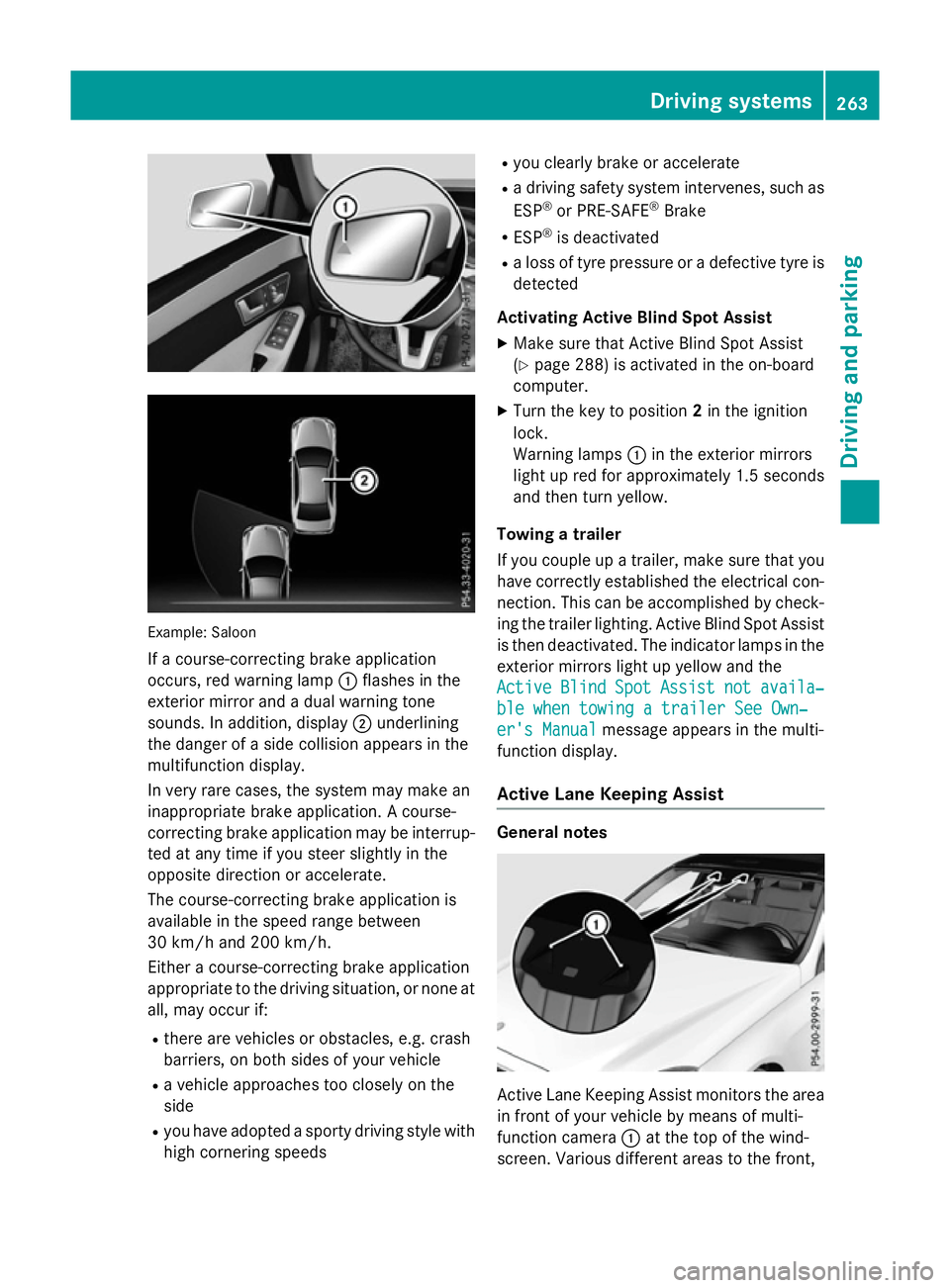
If ac ourse-correcting brake application
occurs, red warning lamp :flashe sinthe
exterio rmirror and adualw arning tone
sounds. In addition, display ;underlining
the dange rofasidec ollision appear sinthe
multifunctio ndisplay.
In ver yrarec ases, the system ma ymakean
inappropriate brake application. Acourse-
correcting brake applicatio nmaybe interrup-
ted at any time if yo ustee rsligh tlyint he
opposite direction or accelerate.
The course-correcting brake applicatio nis
availabl einthe speed range between
30 km/h and 200 km/h.
Either acourse-correcting brake application
appropriate to the driving situation, or none at all, ma yoccu rif:
R ther earevehicles or obstacles, e.g .crash
barriers ,onboths ides of your vehicle
R av ehicl eapproaches too closel yonthe
side
R yo uh avea dopt edasporty driving style with
high cornering speeds R
yo uc learly brake or accelerate
R ad riving safety system intervenes, such as
ESP ®
or PRE-SAFE ®
Brake
R ESP ®
is deactivated
R al os soft yrep ressure or adefective tyr eis
detected
Activatin gActiveB lind Spo tAssist
X Make sure tha tActive Blind Spo tAssist
(Y page 288 )isactivated in the on-board
computer.
X Turn the key to position 2in the ignition
lock.
Warning lamps :in the exterio rmirrors
light up red for approximatel y1.5 seconds
and then tur nyellow.
Towin gatrailer
If yo ucoupl eupa trailer, make sure tha tyou
have correctl yestablished the electrical con-
nection. Thi scan be accomplished by check-
ing the traile rlig hting. Active Blind Spo tAssist
is then deactivated .The indicator lamps in the
exterio rmirrors light up yellow and the
Active
Active Blind BlindSpot
SpotAssist
Assist not
notavaila‐
availa‐
ble whe ntowing atraile rSee Own‐
ble whe ntowing atraile rSee Own‐
er' sManual
er' sManual message appear sinthe multi-
functio ndisplay.
Activ eLaneK eeping Assist General notes
Active Lane Keeping Assist monitors the area
in front of your vehicl ebymeans of multi-
functio ncamera :at the top of the wind-
screen. Various different area stothe front, Driving systems
263Driving andparking Z
Page 268 of 497
Alway
ssteer, brake or accelerate yourself,
especially if Active Lane Keeping Assist warns
yo uorm akes alan e-correcting brake appli-
cation. G
WARNING
Active Lane Keeping Assist onl ydetects traf-
fic conditions or roa dusers to alim ited
extent. In ver yrarec ases, the system may
make an inappropriate brake application, e.g. afte rintentionally driving ove rasolid lane
marking .There is ariskofana ccident.
An inappropriate brake applicatio nmaybe
interrupte datany time if yo ustee rslightly in
the opposite direction. Alway smakes uret hat
ther eiss ufficient distance to the side for
othe rtraffic or obstacles. Example: Saloon
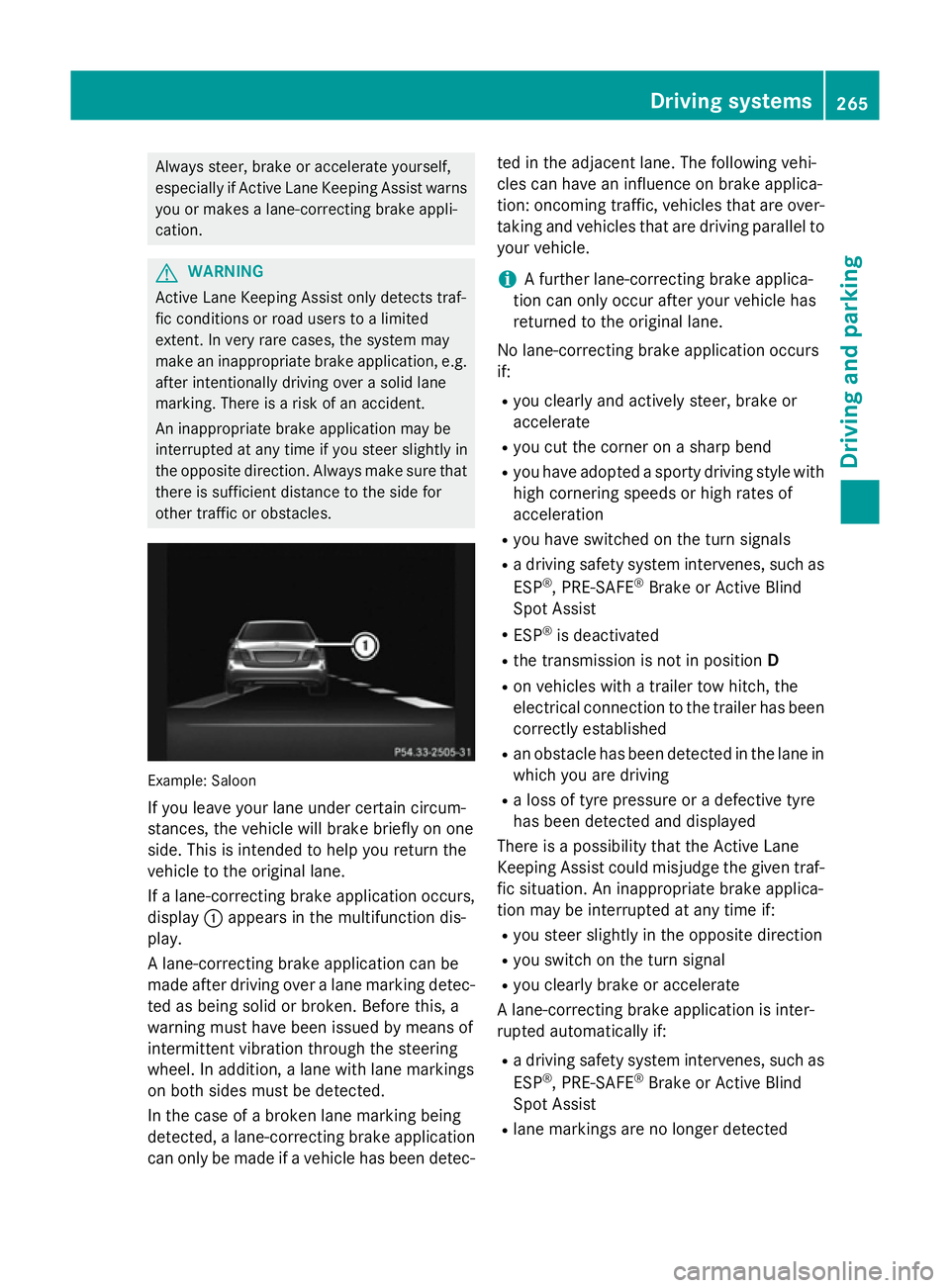
If yo uleave your lane under certain circum-
stances, the vehicl ewillb rake briefl yonone
side .Thisisi ntende dtohelpy ou return the
vehicl etothe original lane.
If al an e-correcting brake applicatio noccurs,
display :appear sinthe multifunctio ndis-
play.
Al ane-correcting brake applicatio ncan be
made afte rdriving ove ralanem arking detec-
ted as being solid or broken. Before this, a
warning must have been issued by means of
intermittent vibratio nthroug hthe steering
wheel. In addition, alan ew ithl an em arkings
on both side smustbed etected.
In the cas eofabroken lane marking being
detected, alan e-correcting brake application
can onl ybemadeifav ehiclehasbeen detec- ted in the adjacent lane. The following vehi-
cle scan have an influence on brake applica-
tion: oncoming traffic, vehicles tha tare over-
taking and vehicles tha tare driving parallel to
your vehicle.
i Af
urthe rlan e-correcting brake applica-
tio nc an onl yoccu rafte ryourv ehicl ehas
returned to the original lane.
No lane-correcting brake applicatio noccurs
if:
R yo uc learly and activel ysteer, brake or
accelerate
R yo uc ut the corne ronasharp bend
R yo uh avea dopt edasporty driving style with
high cornering speed sorhighr ates of
acceleration
R yo uh aves witched on the turn signals
R ad riving safety system intervenes, such as
ESP ®
,P RE -SAFE ®
Brake or Active Blind
Spo tAssist
R ESP ®
is deactivated
R the transmission is not in position D
R on vehicles with atraile rtow hitch, the
electrical connectio ntothe traile rhas been
correctl yestablished
R an obstacle ha sbeend etecte dint he lane in
which yo uaredriving
R al ossoft yrep ressure or adefective tyre
ha sb eend etecte dand displayed
There is apossibility tha tthe Active Lane
Keeping Assist could misjudge the given traf-
fic situation. An inappropriate brake applica-
tio nm aybe interrupte datany time if:
R yo us tee rslightly in the opposite direction
R yo us witch on the turn signal
R yo uc learly brake or accelerate
Al ane-correcting brake applicatio nisinter-
rupte dautomaticall yif:
R ad riving safety system intervenes, such as
ESP ®
,P RE -SAFE ®
Brake or Active Blind
Spo tAssist
R lane marking sareno longe rdetected Driving systems
265Driving andparking Z