Page 246 of 886
2462-4. Using other driving systems
Display
When the sensors detect an obstacle, a graphic is shown on the multi-
information display and screen (vehic les with the Lexus Display Audio
system) depending on the position and distance to the obstacle.
■ Multi-information display
Front corner sensor operation
Front center sensor operation
Rear corner sensor operation
Rear center sensor operationPress the “ENTER” switch to
change to “ON”. The intuitive parking assist indi-
cator will be displayed.
Each pressing of the switch
turns the intuitive parking assist
on and off.
When on, the buzzer sounds to
inform the driver that the system
is operational.
Press the menu switch to
change to the normal display.STEP 2
Page 247 of 886
2472-4. Using other driving systems
2
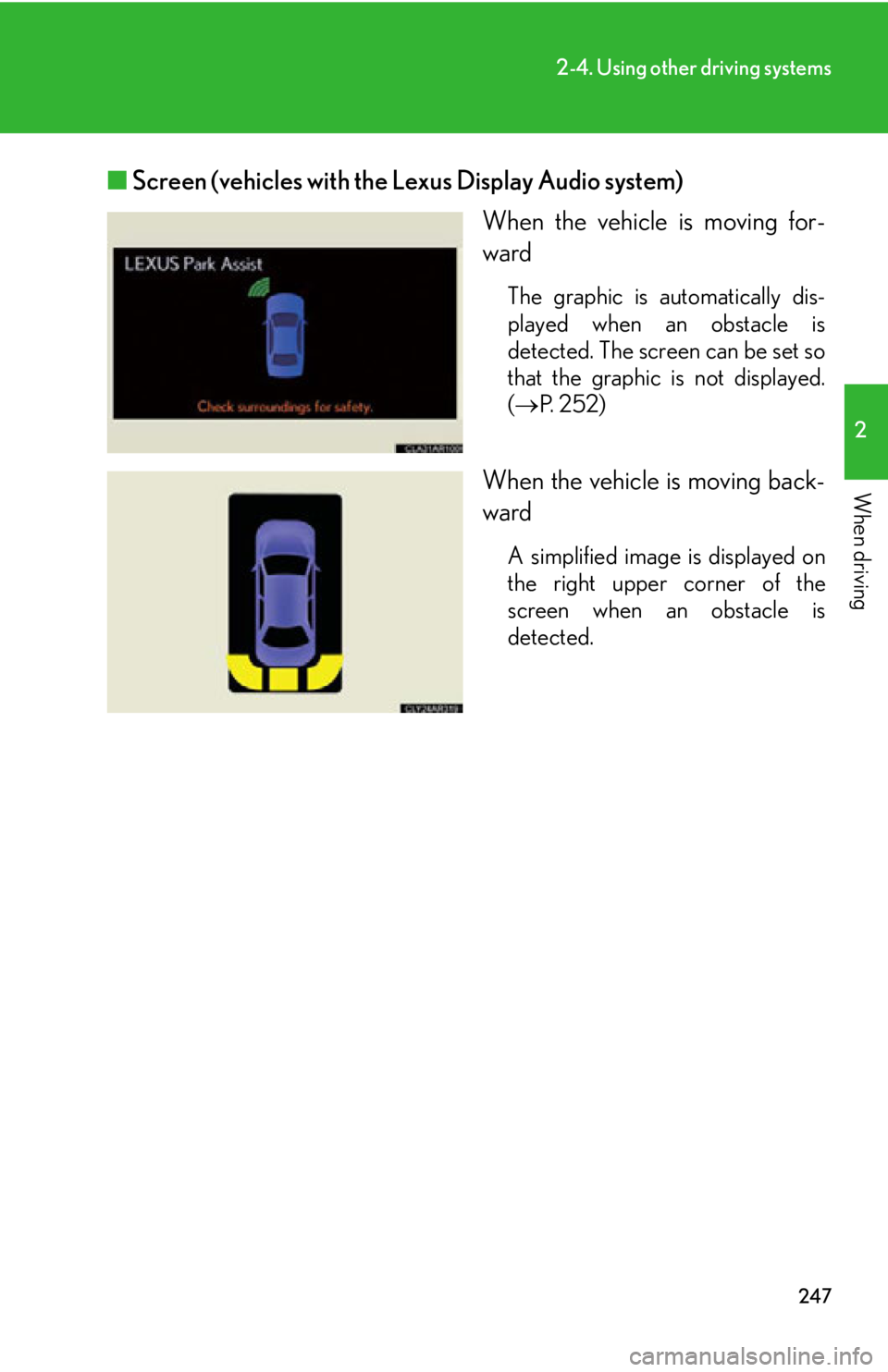
When driving ■ Screen (vehicles with the Lexus Display Audio system)
When the vehicle is moving for-
ward The graphic is automatically dis-
played when an obstacle is
detected. The screen can be set so
that the graphic is not displayed.
( P. 252)
When the vehicle is moving back-
ward A simplified image is displayed on
the right upper corner of the
screen when an obstacle is
detected.
Page 248 of 886
2482-4. Using other driving systems
The distance display and buzzer
When a sensor detects an obstacle, the direction of and the approximate
distance to the obstacle are di splayed and the buzzer sounds.The site of the obstacle will flash (detection level 4 only).
■ Front corner sensors Detection
level Multi-information
display Approximate dis-
tance to obstacle Buzzer
2 1.6 to 1.2 ft.
(50 to 37.5 cm) Medium
3 1.2 to 0.8 ft.
(37.5 to 25 cm) Fast
4 0.8 f t. (25 cm) or
less Continuous
Page 249 of 886
2492-4. Using other driving systems
2
When driving ■ Front center sensors
■ Rear corner sensors Detection
level Multi-information
display Approximate dis-
tance to obstacle Buzzer
1 3.3 to 1.6 ft.
(100 to 50 cm) Slow
2 1.6 to 1.3 ft.
(50 to 40 cm) Medium
3 1.3 to 1.0 ft.
(40 to 30 cm) Fast
4 1.0 ft. (30 cm) or
less Continuous
Detection
level Multi-information
display Approximate dis-
tance to obstacle Buzzer
2 1.6 to 1.2 ft.
(50 to 37.5 cm) Medium
3 1.2 to 0.8 ft.
(37.5 to 25 cm) Fast
4 0.8 f t. (25 cm) or
less Continuous
Page 250 of 886
2502-4. Using other driving systems
■ Rear center sensors Detection
level Multi-information
display Approximate dis-
tance to obstacle Buzzer
1 4.9 to 2.0 ft.
(150 to 60 cm) Slow
2 2.0 to 1.5 ft.
(60 to 45 cm) Medium
3 1.5 to 1.2 ft.
(45 to 35 cm) Fast
4 1.2 ft. (35 cm) or
less Continuous
Page 252 of 886

2522-4. Using other driving systems
Customization of the intuitive parkin g assist (vehicle with the Lexus
Display Audio system)
The buzzer volume, display and buzzer timing and display of the graphic
on the screen can be customized.
Press the “MENU” button on the Lexus Display Audio controller.
Select “Setup” on the “Menu” screen.
Select “Vehicle” on the “Setup” screen.
Select “LEXUS Park Assist” on the “Vehicle Settings” screen.
Alert volume setting
Display on/off
Alert distance setting
When you complete settings, select “Save”.STEP 1
STEP 2
STEP 3
STEP 4
■
The intuitive parking assist can be operated when ●
Front corner sensors:
• The “ENGINE START STOP” switch is in IGNITION ON mode.
• The shift lever is in a position other than P.
• The vehicle speed is less than about 6 mph (10 km/h).●
Front center sensors:
• The “ENGINE START STOP” switch is in IGNITION ON mode.
• The shift lever is in a position other than P or R.
• The vehicle speed is less than about 6 mph (10 km/h).
●
Rear corner and center sensors:
• The “ENGINE START STOP” switch is in IGNITION ON mode.
• The shift lever is in R. STEP 5
Page 253 of 886

2532-4. Using other driving systems
2
When driving ■
Sensor detection information ●
Certain vehicle conditions and the su rrounding environment may affect the
ability of a sensor to correctly detect an obstacle. Particular instances where this
may occur are listed below.
• There is dirt, snow or ice on a sensor.
• A sensor is frozen.
• A sensor is covered in any way.
• The vehicle is leaning considerably to one side.
• On an extremely bumpy road, on an incline, on gravel, or on grass
• The vicinity of the vehicle is noisy due to vehicle horns, motorcycle engines,
air brakes of large vehicles, or other loud noises producing ultrasonic waves.
• There is another vehicle equipped with parking assist sensor s in the vicinity.
• A sensor is coated with a sheet of spray or heavy rain.
• The vehicle is equipped with a fender pole or radio antenna.
• Towing eyelets are installed.
• A bumper or sensor receives a strong impact.
• The vehicle is approaching a tall or right-angled curb.
• In harsh sunlight or intense cold weather.
• A non-genuine Lexus suspension (low ered suspension, etc.) is installed.
In addition to the examples above, there are instances in which, because of their
shapes, signs and other objects may be judg ed by a sensor to be closer than they
are. ●
The shape of the obstacle may prevent a sensor from detecting it. Pay particular
attention to the following obstacles:
• Wires, fences, ropes, etc.
• Cotton, snow and other materi als that absorb sound waves
• Sharply-angled objects
•Low obstacles
• Tall obstacles with upper sections projec ting outwards in the direction of your
vehicle
■
If a message is displayed
P. 7 5 4
Page 254 of 886
2542-4. Using other driving systems
■
Certification (Canada only)
This ISM device complies with Canadian ICES-001.■
Customization
Settings (e.g. buzzer volume) can be changed.
(Customizable features P. 8 3 4 )
CAUTION■
Caution when using the intuitive parking assist
Observe the following precautions.
Failing to do so may result in the vehicle being unable to be driven safely and possi-
bly cause an accident. ●
Do not use the sensor at speeds in excess of 6 mph (10 km/h).●
Do not attach any accessories within the sensor range.
NOTICE■
Notes when washing the vehicle
Do not apply intensive bursts of water or steam to the sensor area.
Doing so may result in the sensor malfunctioning.■
Conditions possibly indicating system malfunctions
If any of the following occurs, the system ma y be malfunctioning due to a sensor fail-
ure etc. Have the vehicle insp ected by your Lexus dealer.●
The buzzer does not sound when the in tuitive parking assist mode is set.●
The sensor operation display flashes and the buzzer sounds even when no obsta-
cle is detected.
●
An area of the sensors is hit or subjected to a strong impact.
●
Either bumper is hit.
●
The sensor operation display remains on even though no buzzer sounds.