Page 153 of 886

When driving
2
1532-1. Driving procedures
Driving the vehicle.................. 154
Engine (ignition) switch ......... 165
Automatic transmission
(6-speed models) .................. 171
Automatic transmission
(8-speed models) ................. 178
Turn signal lever ....................... 187
Parking brake ........................... 189
Horn ............................................ 190
2-2. Instrument cluster
Gauges and meters ................. 191
Indicators and warning
lights ......................................... 194
Multi-information
display .................................... 200
Head-up display ..................... 206
2-3. Operating the lights and
windshield wipers
Headlight switch....................... 211
Fog light switch ........................ 215
Windshield wipers and
washer ..................................... 217
Rear window wiper and
washer .................................... 224
Headlight cleaner switch..... 226 2-4. Using other driving
systems
Cruise control......................... 227
Dynamic radar cruise
control .................................... 232
Intuitive parking assist .......... 245
Rear view monitor system
(rear view mirror-attached
type) ........................................ 255
Rear view monitor system
(vehicles with the Lexus
Display Audio system) ....... 264
Driving assist systems ........... 269
All-wheel drive lock
switch ....................................... 275
Hill-start assist control .......... 276
Pre-Collision System ............ 278
BSM
(Blind Spot Monitor) .......... 286
2-5. Driving information
Utility vehicle
precautions ........................... 292
Cargo and luggage ............... 296
Vehicle load limits ................... 301
Winter driving tips ................. 302
Trailer towing .......................... 306
Dinghy towing ......................... 323
Page 168 of 886

1682-1. Driving procedures
■
If the engine does not start
The engine immobilizer system may not have been deactivated. ( P. 1 1 0 )
Contact your Lexus dealer.■
Steering lock
After turning the “ENGINE START STOP” switch off and opening and closing the
doors, the steering wheel will be locked due to the steering lock function. Operat-
ing the “ENGINE START STOP” switch again automatically cancels the steering
lock.■
When the steering lock cannot be released
■
Steering lock motor overheating prevention
To prevent the steering lock motor from overheating, the motor may be suspended
if the engine is turned on and off repeatedly in a short period of time. In this case,
refrain from operating the engine. After about 2 seconds, the steering lock motor
will resume functioning.■
When the “ENGINE START STOP” switch indicator flashes in amber
The system may be malfunctioning. Have the vehicle inspected by your Lexus
dealer immediately.■
If the electronic key battery is depleted
P. 7 0 1 The green indicator light on the “ENGINE
START STOP” switch will flash and a mes-
sage will be shown on the multi-information
display. Press the “ENGINE START STOP”
switch again while turning the steering wheel
left and right.
Page 173 of 886
1732-1. Driving procedures
2
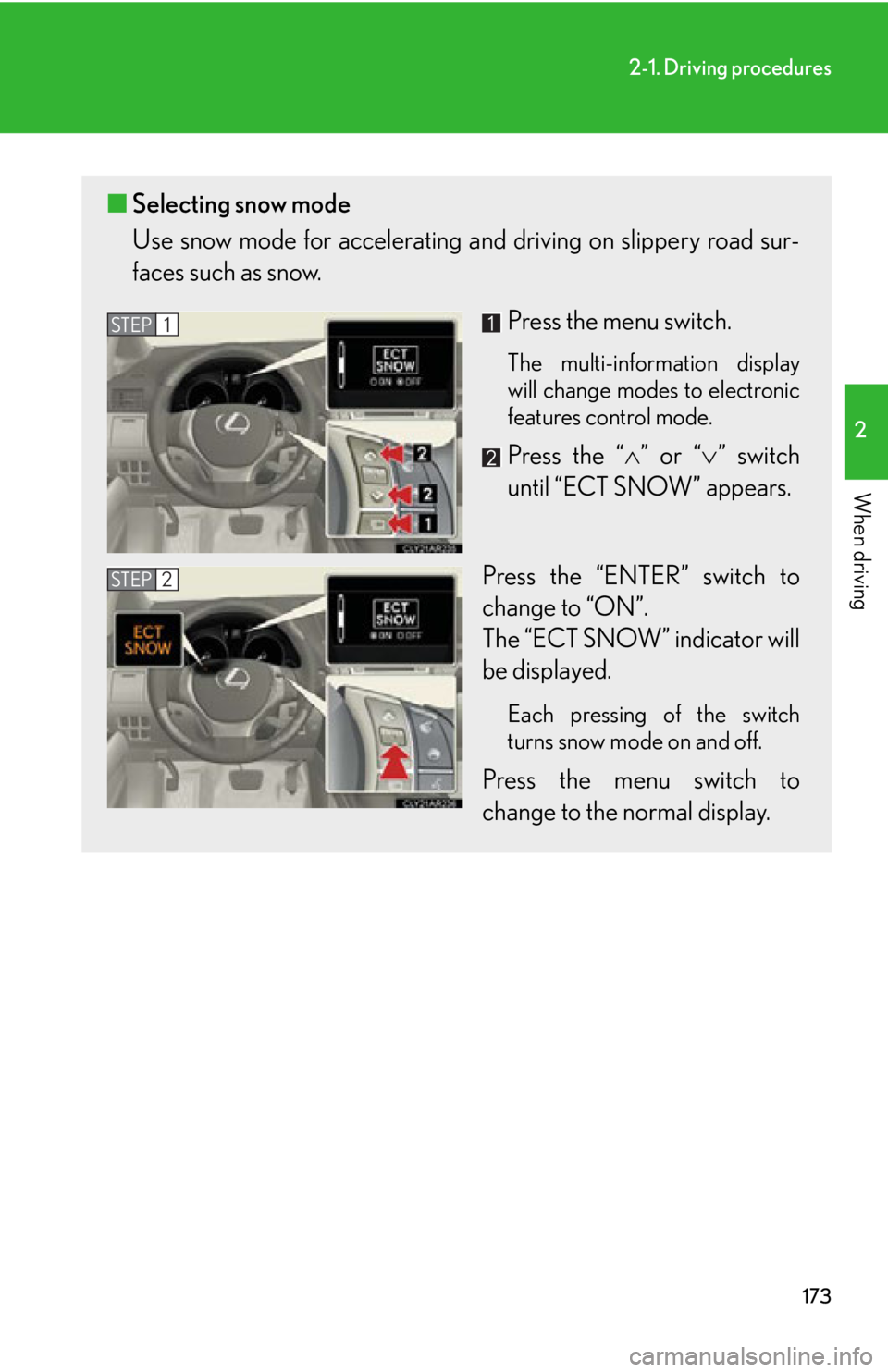
When driving ■ Selecting snow mode
Use snow mode for accele rating and driving on slippery road sur-
faces such as snow.
Press the menu switch. The multi-information display
will change modes to electronic
features control mode.
Press the “ ” or “ ” switch
until “ECT SNOW” appears.
Press the “ENTER” switch to
change to “ON”.
The “ECT SNOW” indicator will
be displayed. Each pressing of the switch
turns snow mode on and off.
Press the menu switch to
change to the normal display.STEP 1
STEP 2
Page 179 of 886
1792-1. Driving procedures
2
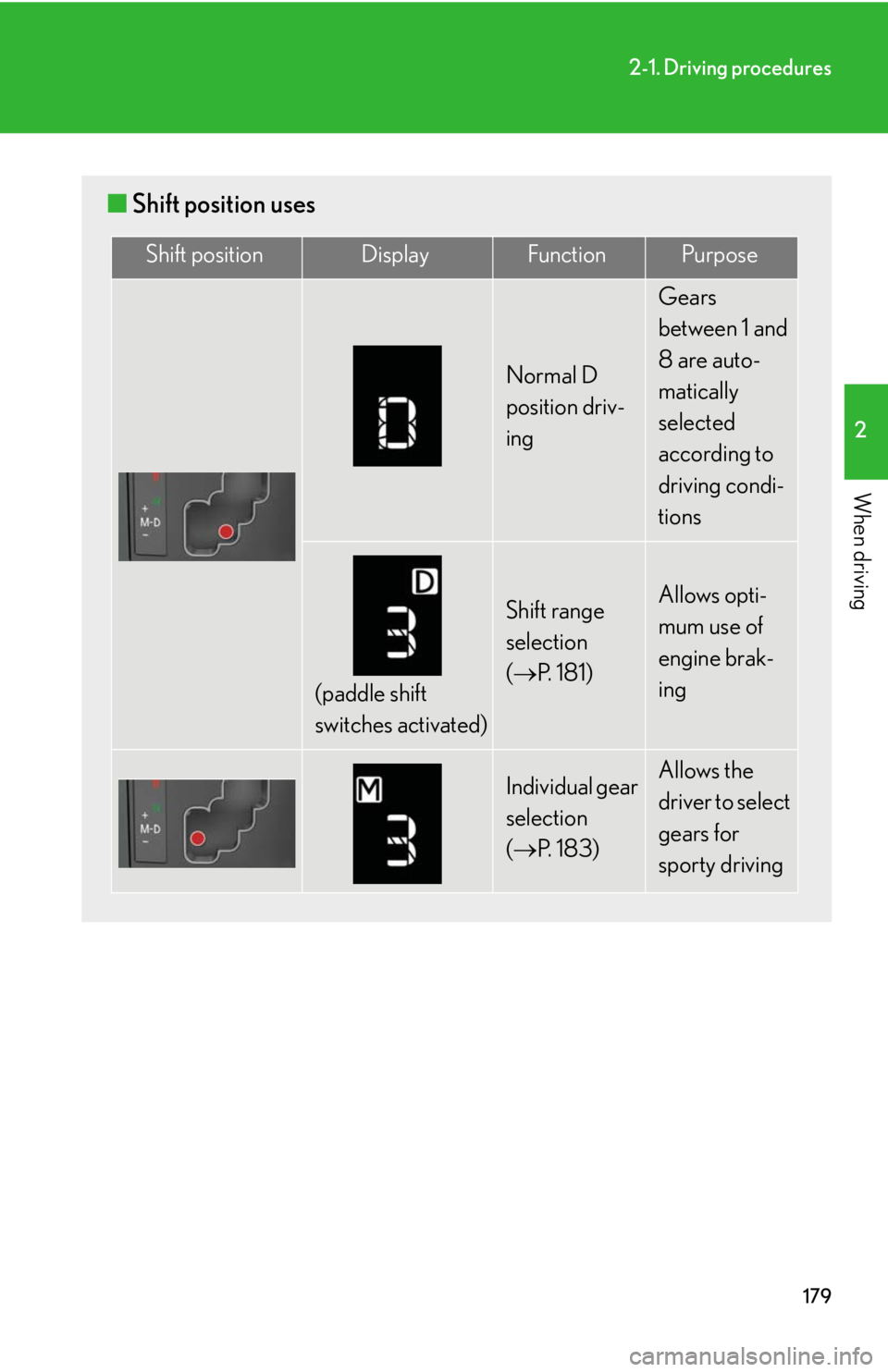
When driving ■ Shift position uses Shift position Display Function Purpose
Normal D
position driv-
ing Gears
between 1 and
8 are auto-
matically
selected
according to
driving condi-
tions
(paddle shift
switches activated) Shift range
selection
( P. 1 8 1 ) Allows opti-
mum use of
engine brak-
ing
Individual gear
selection
( P. 1 8 3 ) Allows the
driver to select
gears for
sporty driving
Page 180 of 886
1802-1. Driving procedures
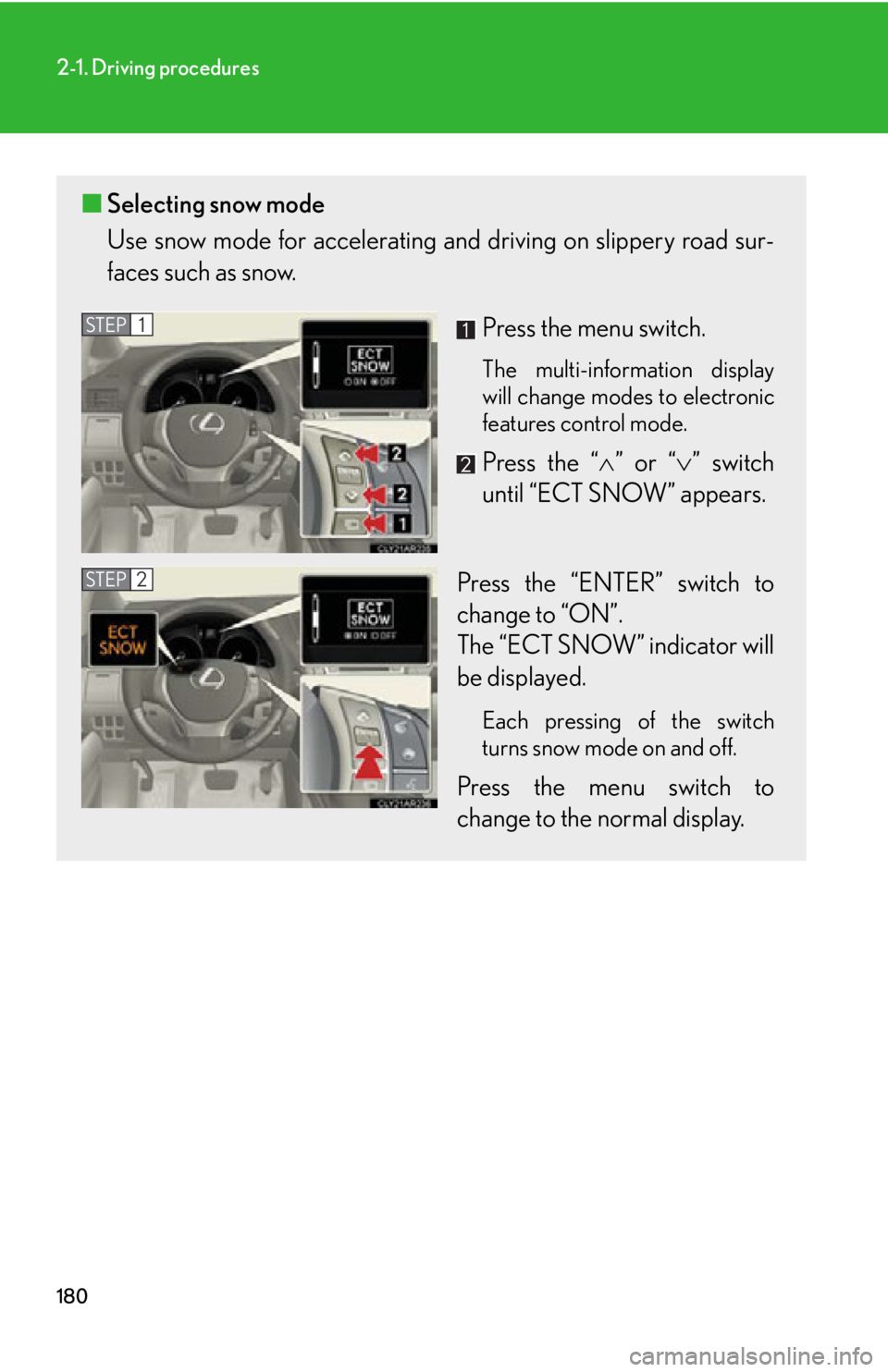
■ Selecting snow mode
Use snow mode for accele rating and driving on slippery road sur-
faces such as snow.
Press the menu switch. The multi-information display
will change modes to electronic
features control mode.
Press the “ ” or “ ” switch
until “ECT SNOW” appears.
Press the “ENTER” switch to
change to “ON”.
The “ECT SNOW” indicator will
be displayed. Each pressing of the switch
turns snow mode on and off.
Press the menu switch to
change to the normal display.STEP 1
STEP 2
Page 181 of 886
1812-1. Driving procedures
2
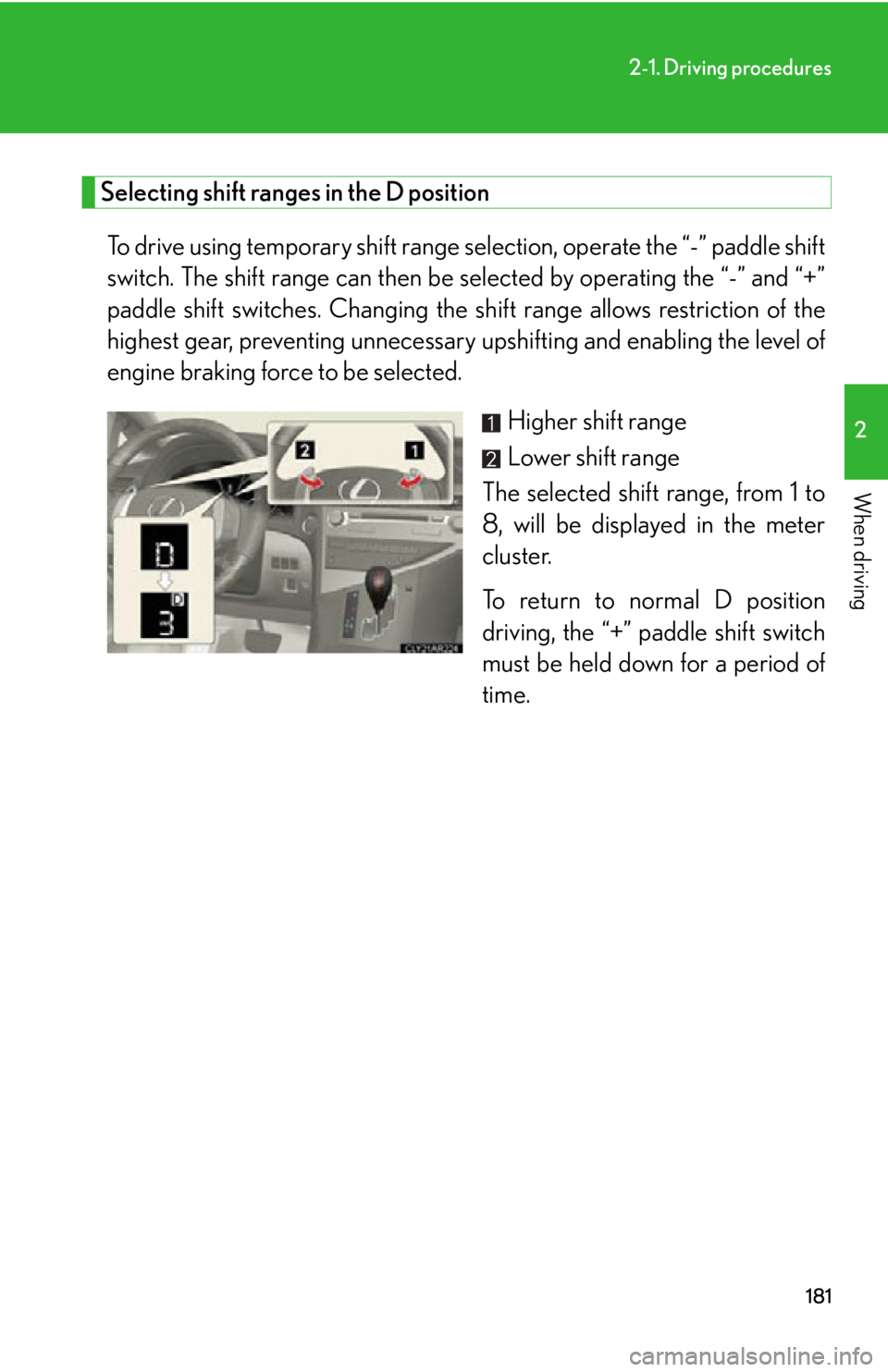
When driving Selecting shift ranges in the D position
To drive using temporary shift range sele ction, operate the “-” paddle shift
switch. The shift range can then be selected by operating the “-” and “+”
paddle shift switches. Changing the sh ift range allows restriction of the
highest gear, preventing unnecessary upshifting and enabling the level of
engine braking force to be selected.
Higher shift range
Lower shift range
The selected shift range, from 1 to
8, will be displayed in the meter
cluster.
To return to normal D position
driving, the “+” paddle shift switch
must be held down for a period of
time.
Page 182 of 886
1822-1. Driving procedures
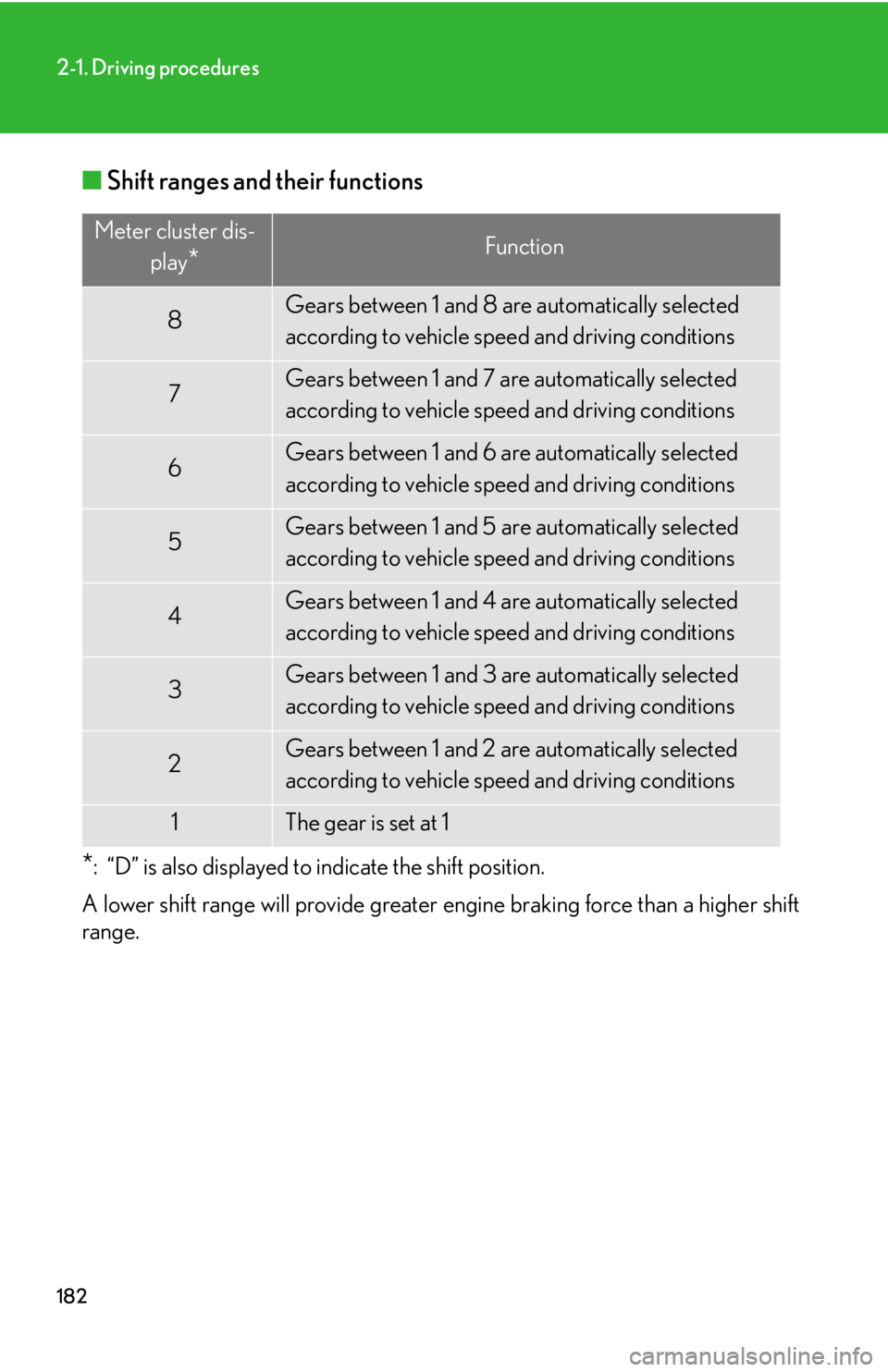
■ Shift ranges and their functions
* : “D” is also displayed to indicate the shift position.
A lower shift range will provide greater engine braking force than a higher shift
range. Meter cluster dis-
play
* Function
8 Gears between 1 and 8 are automatically selected
according to vehicle speed and driving conditions
7 Gears between 1 and 7 are automatically selected
according to vehicle speed and driving conditions
6 Gears between 1 and 6 are automatically selected
according to vehicle speed and driving conditions
5 Gears between 1 and 5 are automatically selected
according to vehicle speed and driving conditions
4 Gears between 1 and 4 are automatically selected
according to vehicle speed and driving conditions
3 Gears between 1 and 3 are automatically selected
according to vehicle speed and driving conditions
2 Gears between 1 and 2 are automatically selected
according to vehicle speed and driving conditions
1 The gear is set at 1
Page 184 of 886
1842-1. Driving procedures
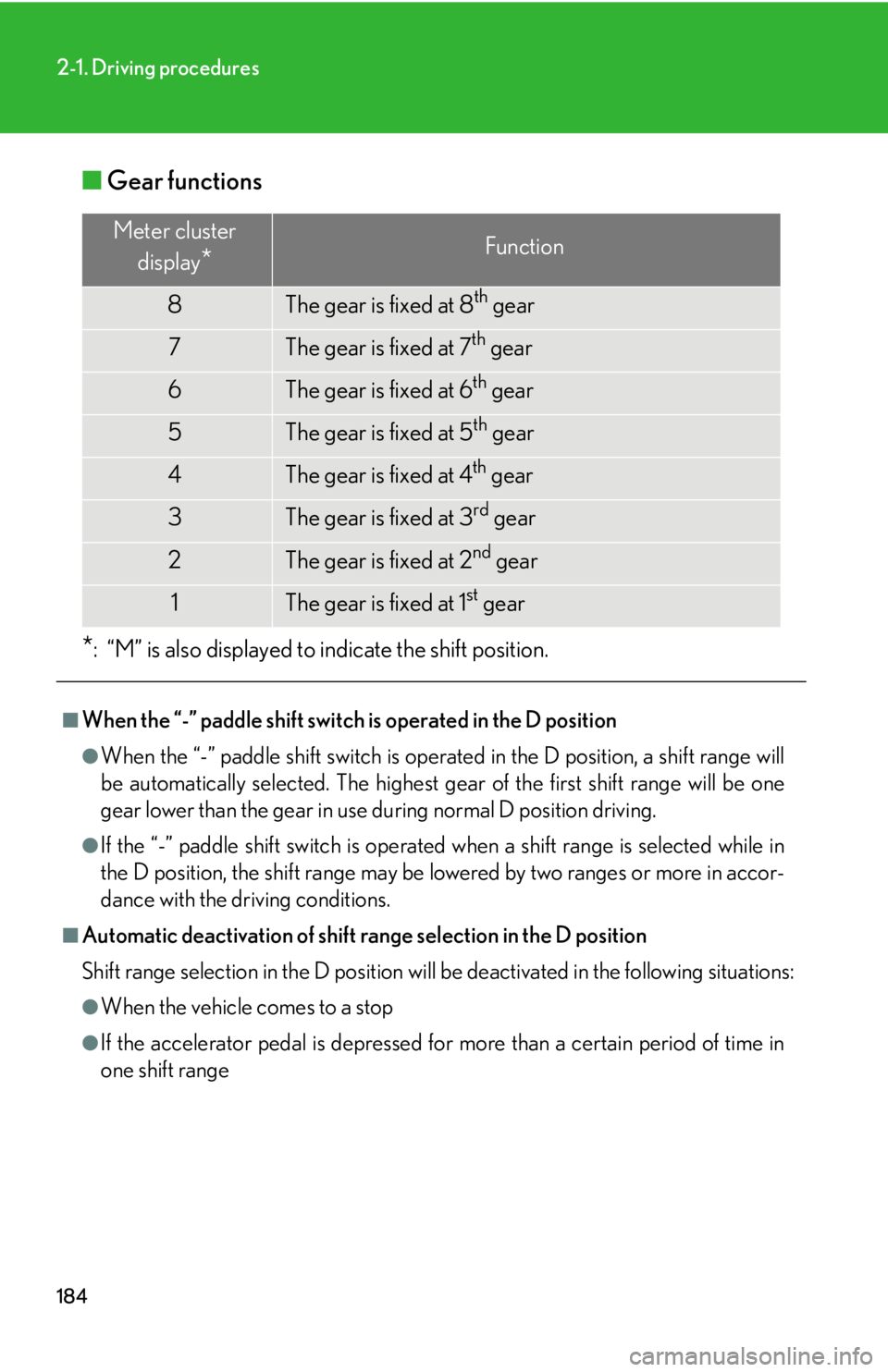
■ Gear functions
* : “M” is also displayed to indicate the shift position.■
When the “-” paddle shift switch is operated in the D position ●
When the “-” paddle shift switch is operated in the D position, a shift range will
be automatically selected. The highest gear of the first shift range will be one
gear lower than the gear in use during normal D position driving.●
If the “-” paddle shift switch is operated when a shift range is selected while in
the D position, the shift range may be lowered by two ranges or more in accor-
dance with the driving conditions.■
Automatic deactivation of shift range selection in the D position
Shift range selection in the D position will be deactivated in the following situations: ●
When the vehicle comes to a stop
●
If the accelerator pedal is depressed for more than a certain period of time in
one shift range Meter cluster
display
* Function
8 The gear is fixed at 8 th
gear
7 The gear is fixed at 7 th
gear
6 The gear is fixed at 6 th
gear
5 The gear is fixed at 5 th
gear
4 The gear is fixed at 4 th
gear
3 The gear is fixed at 3 rd
gear
2 The gear is fixed at 2 nd
gear
1 The gear is fixed at 1 st
gear