2015 FORD FOCUS ELECTRIC audio
[x] Cancel search: audioPage 5 of 369
Steering Wheel
Adjusting the Steering Wheel....................67
Audio Control...................................................67
Voice Control
...................................................68
Cruise Control.................................................68
Information Display Control
......................68
Wipers and Washers
Windshield Wipers
.........................................70
Windshield Washers.....................................70
Rear Window Wiper and Washers
............71
Lighting
General Information
......................................72
Lighting Control
...............................................72
Autolamps
.........................................................73
Instrument Lighting Dimmer......................74
Headlamp Exit Delay
....................................74
Daytime Running Lamps
.............................74
Direction Indicators
........................................75
Interior Lamps..................................................75
Ambient Lighting
............................................76
Windows and Mirrors
Power Windows...............................................77
Exterior Mirrors
................................................78
Interior Mirror
....................................................79
Sun Visors
.........................................................80
Instrument Cluster
Gauges................................................................81
Warning Lamps and Indicators.................83
Audible Warnings and Indicators.............85
Information Displays
General Information.....................................86
Information Messages
..................................92 Climate Control
Automatic Climate Control......................100
Hints on Controlling the Interior
Climate..........................................................101
Heated Windows and Mirrors..................102
Cabin Air Filter...............................................103
Remote Start
.................................................103
Seats
Sitting in the Correct Position
.................104
Head Restraints............................................104
Manual Seats
.................................................106
Power Seats
...................................................106
Rear Seats
.......................................................107
Heated Seats.................................................109
Auxiliary Power Points
Auxiliary Power Points.................................110
Storage Compartments
Center Console................................................111
Overhead Console
..........................................111
Starting and Stopping the Electric Motor
Starting the Electric Motor.........................112
Switching Off the Electric Motor..............113
High Voltage Battery
General Information
.....................................115
Charging the High Voltage Battery.........115
High Voltage Battery Cut-Off Switch...........................................................120
Transmission
Automatic Transmission............................122
Brakes
General Information
....................................124
2
Focus (CDH), enUSA, First Printing Table of Contents
Page 7 of 369
Vehicle Care
General Information....................................182
Cleaning Products
........................................182
Cleaning the Exterior...................................182
Waxing..............................................................183
Cleaning the Engine.....................................183
Cleaning the Windows and Wiper Blades...........................................................184
Cleaning the Interior
....................................184
Cleaning the Instrument Panel and Instrument Cluster Lens........................184
Cleaning Leather Seats..............................185
Repairing Minor Paint Damage...............186
Cleaning the Alloy Wheels........................186
Vehicle Storage
.............................................186
Wheels and Tires
Temporary Mobility Kit
...............................189
Tire Care...........................................................201
Using Snow Chains
......................................216
Tire Pressure Monitoring System
............216
Changing a Road Wheel
...........................220
Lug Nuts
...........................................................221
Capacities and Specific- ations
Motorcraft Parts
...........................................222
Vehicle Identification Number
................223
Vehicle Certification Label
.......................223
Transmission Code Designation............224
Capacities and Specifications
................225
Audio System
General Information
....................................227
Audio Unit -
Vehicles With: Sony Audio
System.........................................................228
Media Hub
......................................................230
MyFord Touch ™
General Information
....................................231 Settings...........................................................240
Entertainment..............................................254
Phone................................................................271
Electric Vehicle Information.....................278
Information....................................................292
Climate.............................................................301
Navigation......................................................304
MyFord Touch
™ Troubleshooting
..........314
Accessories
Accessories.....................................................321
Appendices
End User License Agreement..................323
Extended Service Plan (ESP)
Extended Service Plan (ESP).................345
Scheduled Maintenance
General Maintenance Information
........347
Normal Scheduled Maintenance
..........350
Scheduled Maintenance Record............351
4
Focus (CDH), enUSA, First Printing Table of Contents
Page 18 of 369
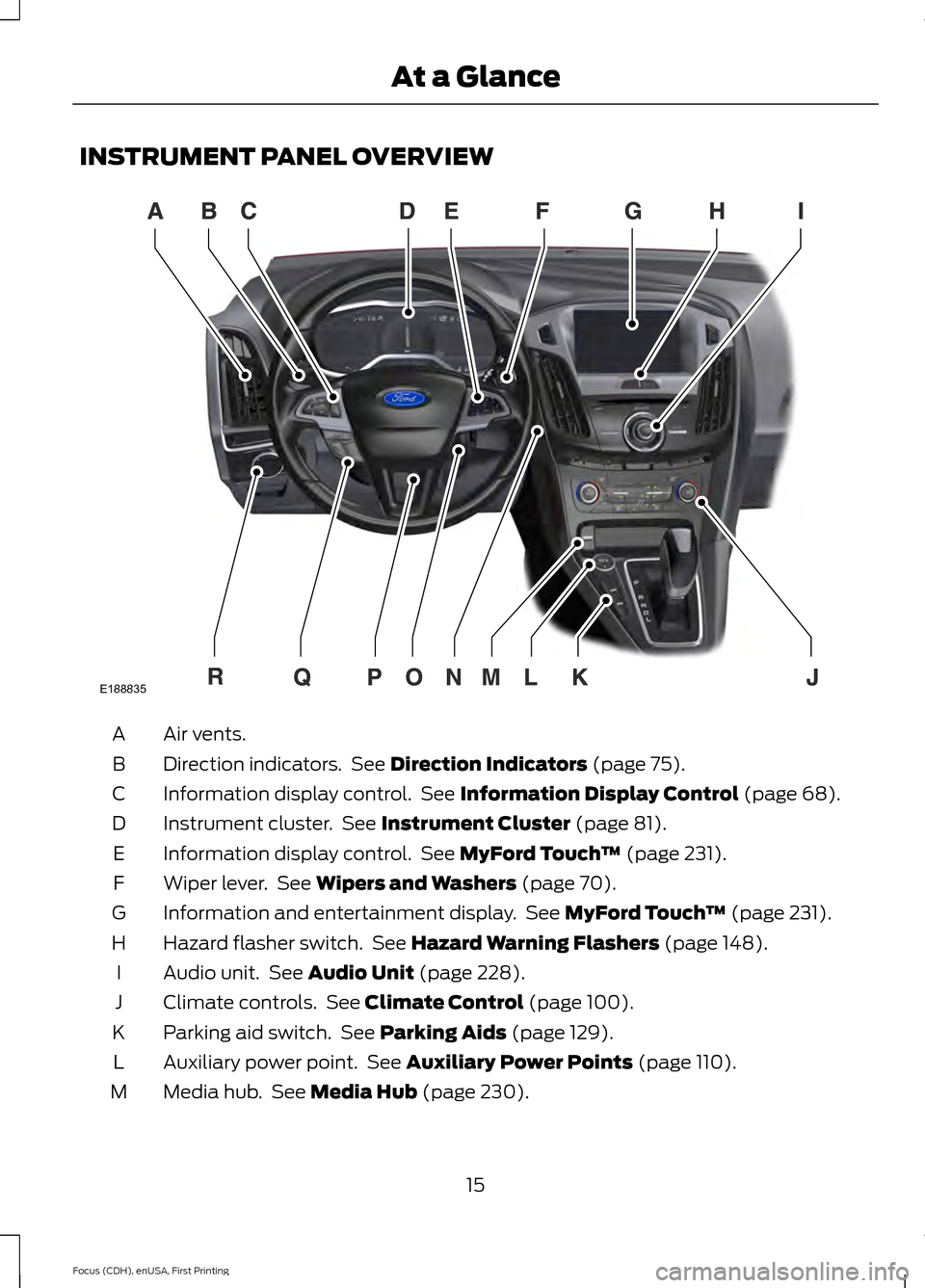
INSTRUMENT PANEL OVERVIEW
Air vents.
A
Direction indicators. See Direction Indicators (page 75).
B
Information display control. See
Information Display Control (page 68).
C
Instrument cluster. See
Instrument Cluster (page 81).
D
Information display control. See
MyFord Touch ™ (page 231).
E
Wiper lever. See
Wipers and Washers (page 70).
F
Information and entertainment display. See
MyFord Touch ™ (page 231).
G
Hazard flasher switch. See
Hazard Warning Flashers (page 148).
H
Audio unit. See
Audio Unit (page 228).
I
Climate controls. See
Climate Control (page 100).
J
Parking aid switch. See
Parking Aids (page 129).
K
Auxiliary power point. See
Auxiliary Power Points (page 110).
L
Media hub. See
Media Hub (page 230).
M
15
Focus (CDH), enUSA, First Printing At a GlanceE188835
Page 19 of 369
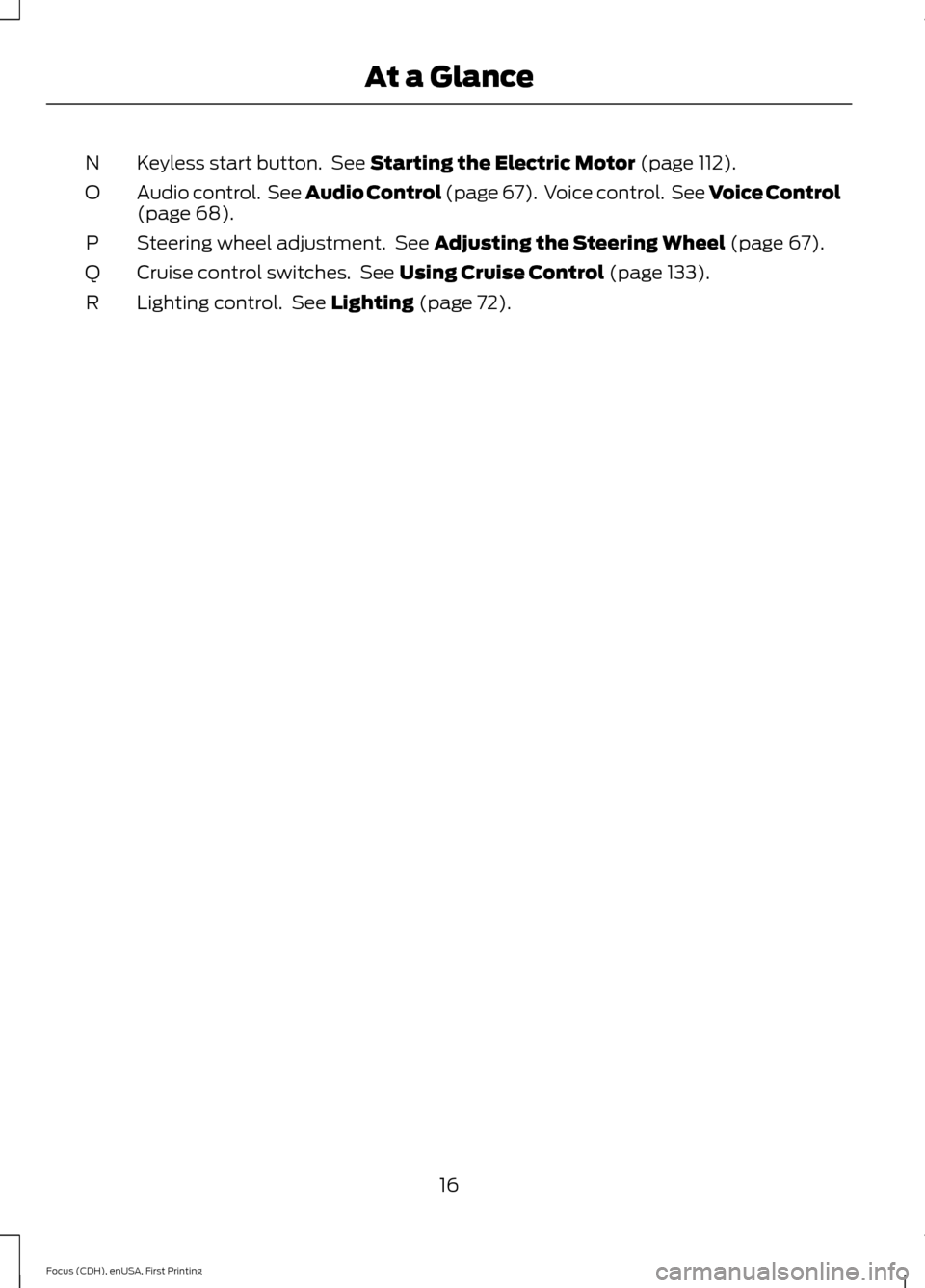
Keyless start button. See Starting the Electric Motor (page 112).
N
Audio control. See Audio Control (page 67). Voice control. See Voice Control
(page
68).
O
Steering wheel adjustment. See
Adjusting the Steering Wheel (page 67).
P
Cruise control switches. See
Using Cruise Control (page 133).
Q
Lighting control. See
Lighting (page 72).
R
16
Focus (CDH), enUSA, First Printing At a Glance
Page 53 of 369
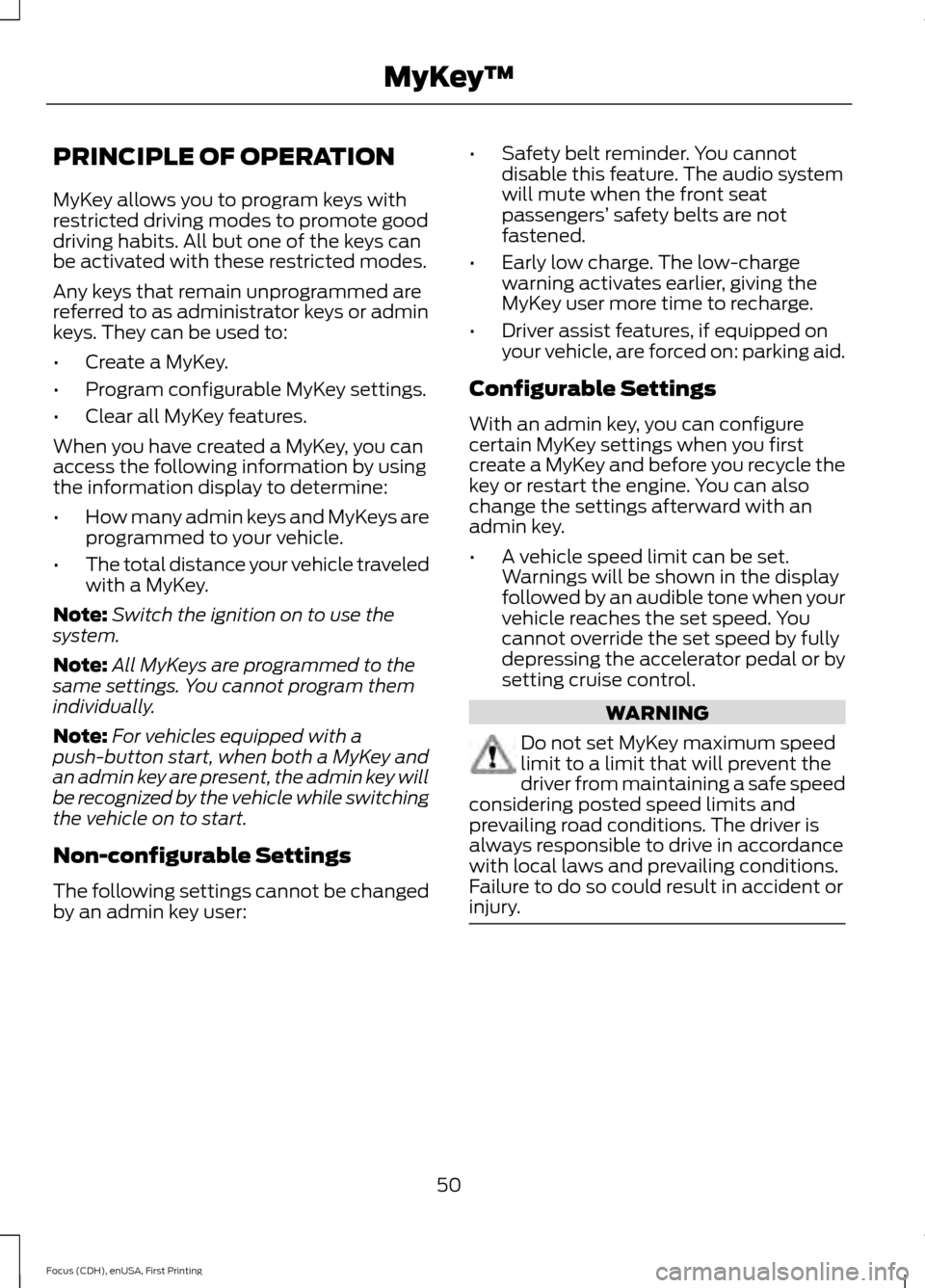
PRINCIPLE OF OPERATION
MyKey allows you to program keys with
restricted driving modes to promote good
driving habits. All but one of the keys can
be activated with these restricted modes.
Any keys that remain unprogrammed are
referred to as administrator keys or admin
keys. They can be used to:
•
Create a MyKey.
• Program configurable MyKey settings.
• Clear all MyKey features.
When you have created a MyKey, you can
access the following information by using
the information display to determine:
• How many admin keys and MyKeys are
programmed to your vehicle.
• The total distance your vehicle traveled
with a MyKey.
Note: Switch the ignition on to use the
system.
Note: All MyKeys are programmed to the
same settings. You cannot program them
individually.
Note: For vehicles equipped with a
push-button start, when both a MyKey and
an admin key are present, the admin key will
be recognized by the vehicle while switching
the vehicle on to start.
Non-configurable Settings
The following settings cannot be changed
by an admin key user: •
Safety belt reminder. You cannot
disable this feature. The audio system
will mute when the front seat
passengers’ safety belts are not
fastened.
• Early low charge. The low-charge
warning activates earlier, giving the
MyKey user more time to recharge.
• Driver assist features, if equipped on
your vehicle, are forced on: parking aid.
Configurable Settings
With an admin key, you can configure
certain MyKey settings when you first
create a MyKey and before you recycle the
key or restart the engine. You can also
change the settings afterward with an
admin key.
• A vehicle speed limit can be set.
Warnings will be shown in the display
followed by an audible tone when your
vehicle reaches the set speed. You
cannot override the set speed by fully
depressing the accelerator pedal or by
setting cruise control. WARNING
Do not set MyKey maximum speed
limit to a limit that will prevent the
driver from maintaining a safe speed
considering posted speed limits and
prevailing road conditions. The driver is
always responsible to drive in accordance
with local laws and prevailing conditions.
Failure to do so could result in accident or
injury. 50
Focus (CDH), enUSA, First Printing MyKey
™
Page 54 of 369
•
Various vehicle speed minders can be
set. Once you select a speed, it will be
shown in the display, followed by an
audible tone when the preselected
vehicle speed is exceeded.
• Audio system maximum volume of
45%. A message will be shown in the
display when you attempt to exceed
the limited volume. Also, the
speed-sensitive or compensated
automatic volume control will be
disabled.
• Always on setting. When this is
selected, you will not be able to turn
off AdvanceTrac or traction control (if
your vehicle is equipped with these
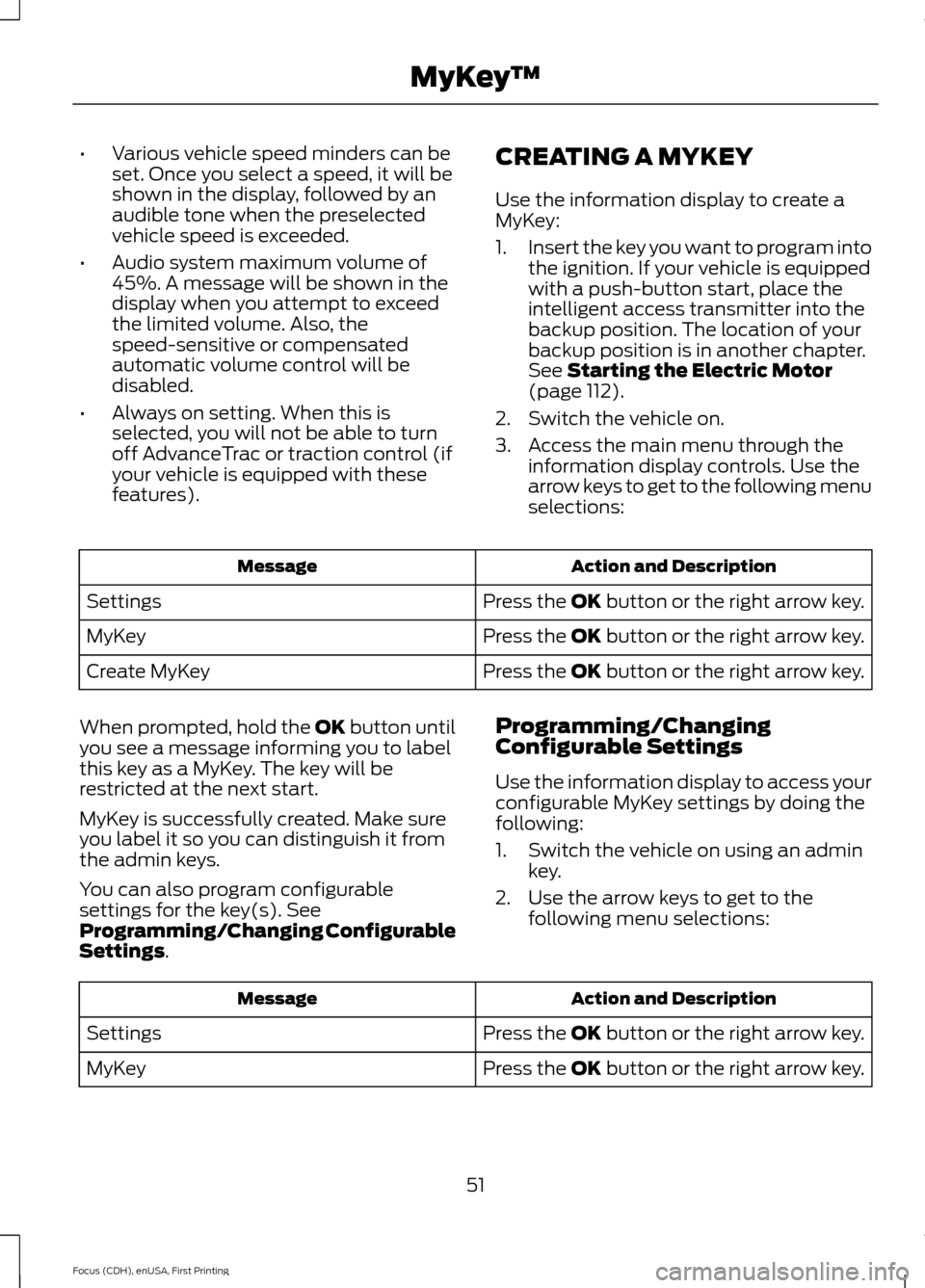
features). CREATING A MYKEY
Use the information display to create a
MyKey:
1.
Insert the key you want to program into
the ignition. If your vehicle is equipped
with a push-button start, place the
intelligent access transmitter into the
backup position. The location of your
backup position is in another chapter.
See Starting the Electric Motor
(page 112).
2. Switch the vehicle on.
3. Access the main menu through the information display controls. Use the
arrow keys to get to the following menu
selections: Action and Description
Message
Press the OK button or the right arrow key.
Settings
Press the OK button or the right arrow key.
MyKey
Press the OK button or the right arrow key.
Create MyKey
When prompted, hold the OK button until
you see a message informing you to label
this key as a MyKey. The key will be
restricted at the next start.
MyKey is successfully created. Make sure
you label it so you can distinguish it from
the admin keys.
You can also program configurable
settings for the key(s). See
Programming/Changing Configurable
Settings
. Programming/Changing
Configurable Settings
Use the information display to access your
configurable MyKey settings by doing the
following:
1. Switch the vehicle on using an admin
key.
2. Use the arrow keys to get to the following menu selections: Action and Description
Message
Press the OK button or the right arrow key.
Settings
Press the OK button or the right arrow key.
MyKey
51
Focus (CDH), enUSA, First Printing MyKey
™
Page 70 of 369
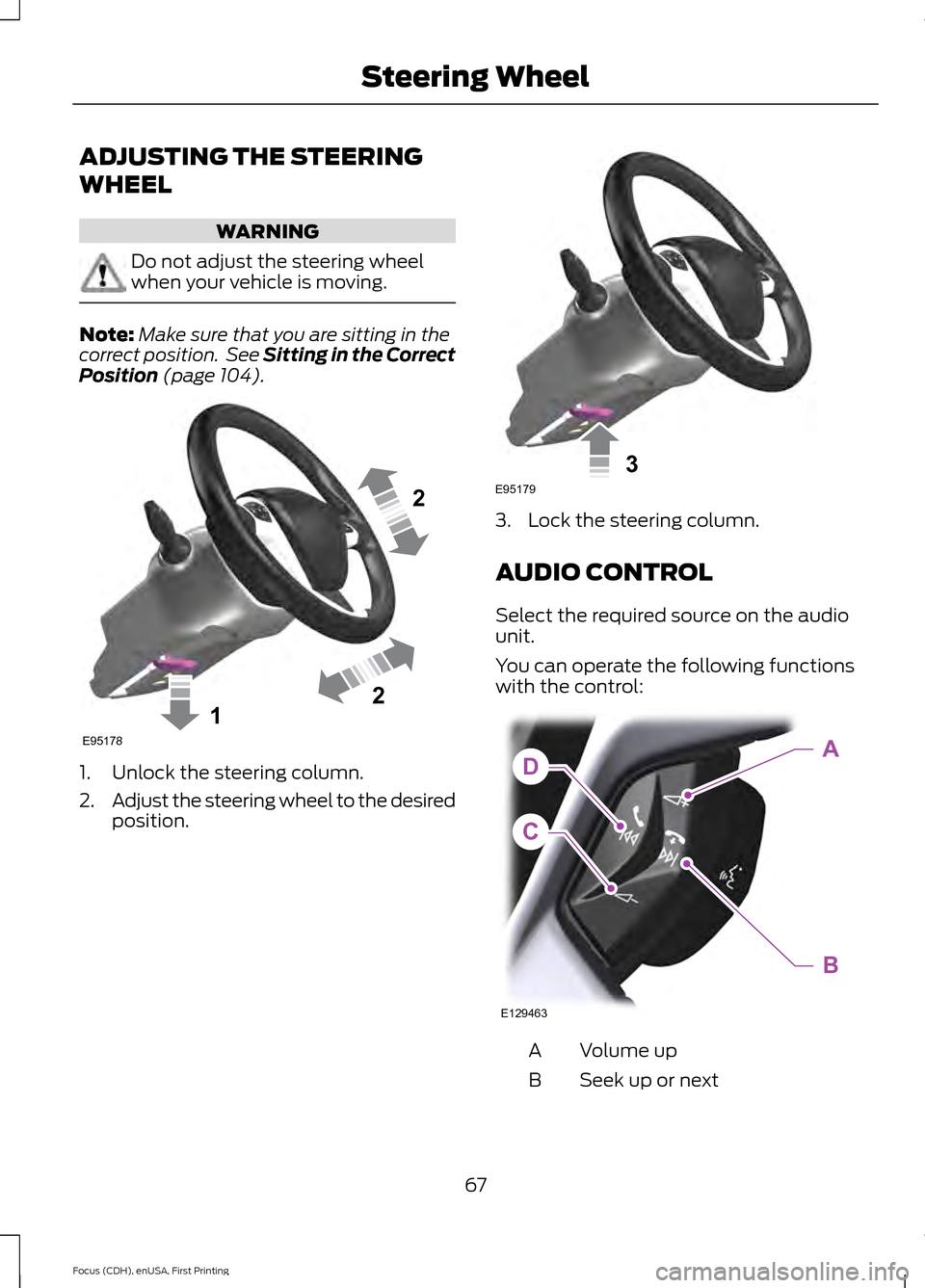
ADJUSTING THE STEERING
WHEEL
WARNING
Do not adjust the steering wheel
when your vehicle is moving.
Note:
Make sure that you are sitting in the
correct position. See Sitting in the Correct
Position (page 104). 1. Unlock the steering column.
2.
Adjust the steering wheel to the desired
position. 3. Lock the steering column.
AUDIO CONTROL
Select the required source on the audio
unit.
You can operate the following functions
with the control:
Volume up
A
Seek up or next
B
67
Focus (CDH), enUSA, First Printing Steering Wheel122E95178 3E95179 C
DA
B
E129463
Page 100 of 369
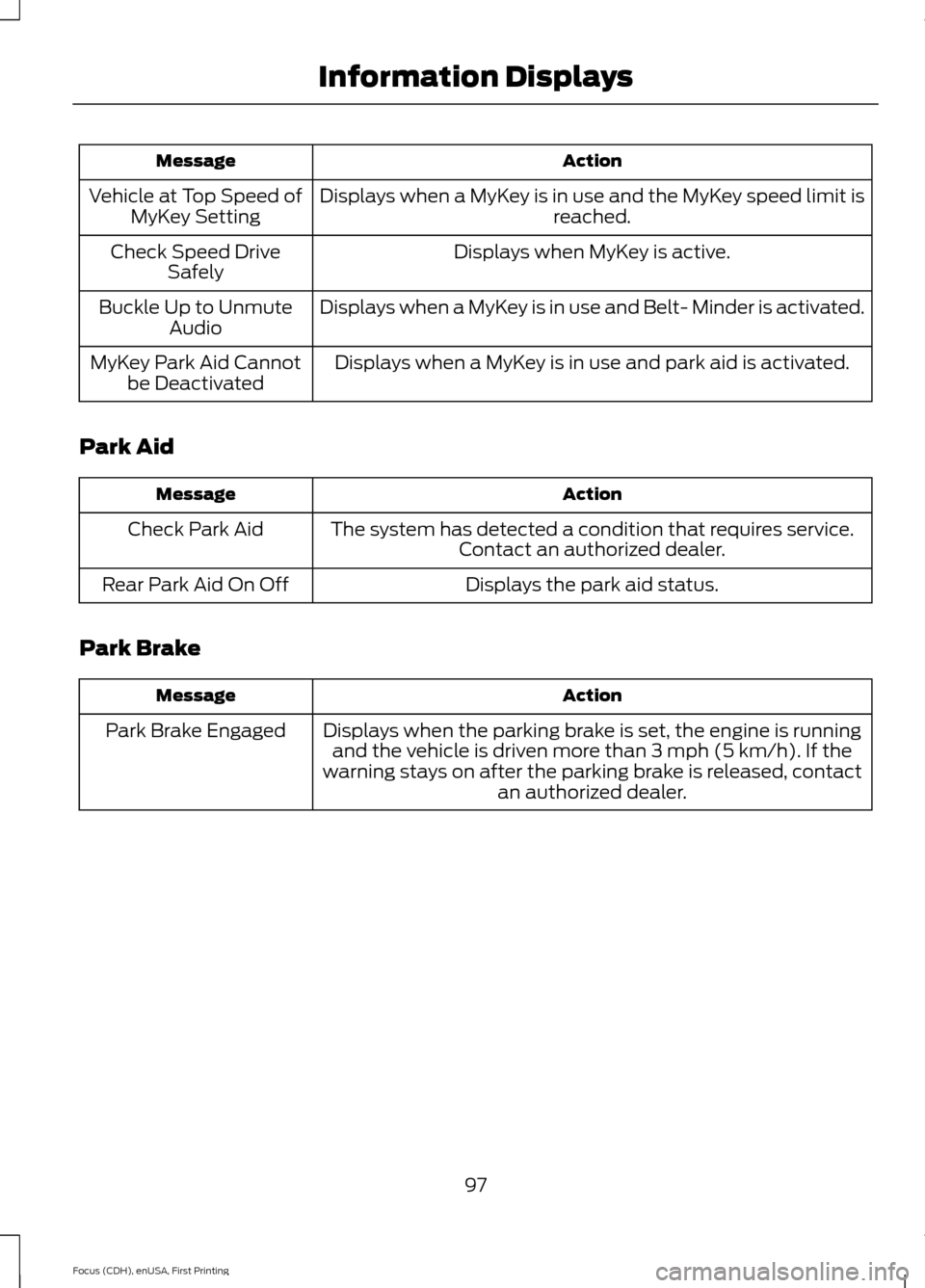
Action
Message
Displays when a MyKey is in use and the MyKey speed limit is reached.
Vehicle at Top Speed of
MyKey Setting
Displays when MyKey is active.
Check Speed Drive
Safely
Displays when a MyKey is in use and Belt- Minder is activated.
Buckle Up to Unmute
Audio
Displays when a MyKey is in use and park aid is activated.
MyKey Park Aid Cannot
be Deactivated
Park Aid Action
Message
The system has detected a condition that requires service.Contact an authorized dealer.
Check Park Aid
Displays the park aid status.
Rear Park Aid On Off
Park Brake Action
Message
Displays when the parking brake is set, the engine is runningand the vehicle is driven more than 3 mph (5 km/h). If the
warning stays on after the parking brake is released, contact an authorized dealer.
Park Brake Engaged
97
Focus (CDH), enUSA, First Printing Information Displays