2015 AUDI TT ROADSTER lock
[x] Cancel search: lockPage 51 of 244

light sensor checked as soon as possible at a
dealership.
Adaptive light *
The benefit of adaptive l ight is that the curve
and the edge of the road are better i llum inat
ed . The adaptive light is contro lled automati
cally, depending on vehicle speed and steering
wheel angle.
When driving a round bends, the head lights
are contro lled according to steering wheel an
g le . So that there is no black area ahead of the
ve hic le, the two main beams pivot at different
angles. The system works above a speed of
about 6 mph (10 km/h).
Com ing home /le avi ng home function *
The function is swit ched on when the switch is
in the AUTO* position and the function is
shown as active in the driver information sys
tem.
The
coming hom e function illuminates the
area around the vehicle when the ign ition is
switched off and the driver's door is ope ned.
The length of time the lights remain on can be
set in the menu display
( Illumination > Exte
rior lights > coming home ).
The leavi ng home function i lluminates the
area around the vehicle when unlocking it.
A WARNING
- Never use dayt ime running l ights to see
where you are going. They are not bright
enough and w ill not let you see far
enough ahead for safety, especially at
dusk or when it is dar k. Always switch on
the low beams at dusk or when i t is dar k.
- Automatic headlights a re only intended
to assist the dr iver. They do not re lieve
t he driver of his responsibi lity to check
t he headlights and to turn them on man
ually according to the current light and
visibility conditions. For example, fog
and rain cannot be detected by the light
sensors. So a lways switch on the head
lights under these weather cond itions
and when driving in the dark
jO .
Clear vis ion 49
- Crashes can happen when you cannot see
the road ahead and when you cannot be
seen by other motorists.
- Always turn on the headlights so that
youcanseeahe adandsothatothe ~
can see your car from the back .
- Please observe legal regulat ions w hen
using the ligh ting systems des cribed.
(D Tips
- T he light sensor for head light control is
located in the rear view mirror mount.
Do not apply any stickers to t he wind
shield in th is area to preven t malfunc
tions or fa ilures.
- Some exter io r l ighting funct ions can be
adjusted in t he driver i nformat ion sys
t em
~page 24.
- I f you remove the igni tion from t he igni
t ion lock while the headligh ts are s till
on, a buzzer wi ll sound as long as the
driver's door is o pen to remind yo u to
t u rn off the lights.
- Always observe the specific local regula
tions for your area as to when to use your
lights.
- With automatic headlights, the high
beam f unction is also available, but w ith
one restrict ion: If you have not sw itched
the high beams back to low beams dur
ing automatic headlight operation (for
example, after d riving throug h a tunnel),
only the low beams come on the next
t ime au tomati c headlights a re swi tched
on. To use the high beams , you firs t have
t o pull the hig h beam lever back and
then push the lever fo rward again .
- In coo l or damp weather, the inside of
the headlights, turn signals an d tail
lights can fog over due to the tempera
t u re difference between the inside and
outside. They w ill clear shortly after
switching them on. This does not affect
the se rv ice life of the lighting.
Page 53 of 244
Emergency flasher
The emergency flasher makes other motorists
a w are that you or your vehicle are in an emer
gency situation.
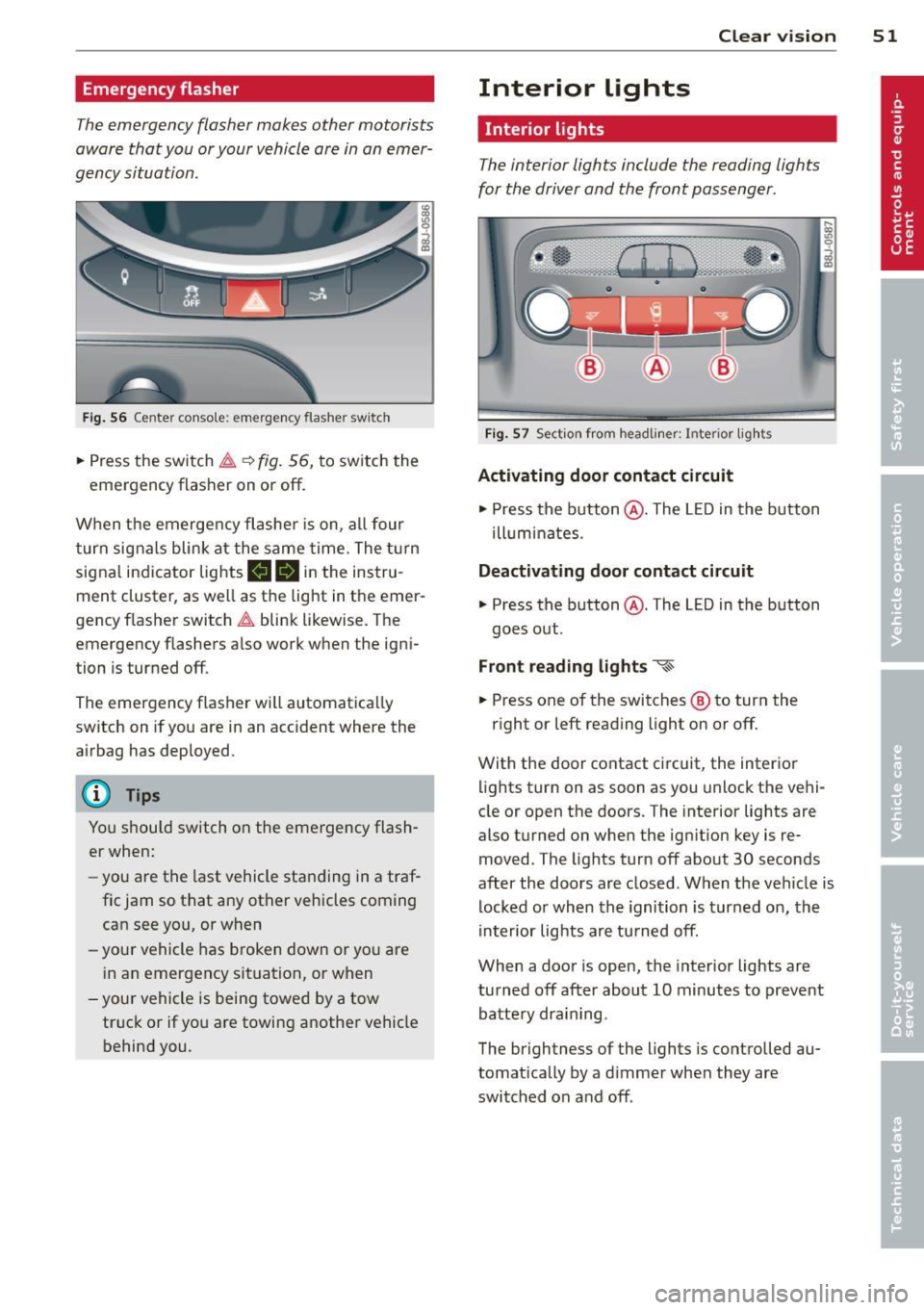
Fi g. 56 Center console: em ergency flasher sw itch
.. Press the switch ~~ fig. 56, to switch the
emergency flasher on or off.
When the emerge ncy flashe r is on, al l four
turn signals blink at the same time. The t urn
signal indicator lights
mlll in the instru
ment cluster, as well as the light in the emer
gency f lasher switch ~ blink likewise. The
emergency flashers a lso work when the igni
tion is turned off.
The emergency flasher will automatica lly
switch on if you are in an acc ident where the
airbag has deployed.
@ Tips
You should switch on the emergency flash
er when:
- you are the last vehicle sta nding in a traf
fic jam so that any other vehicles coming can see you, or when
- your vehicle has broken down or yo u are
i n an emergency situation, or when
-you r vehicle is being towed by a tow
truck or if you are towing a nothe r vehicle
behind you. Clear vi
sion 51
Interior lights
Interior lights
The interior lights include the reading lights
for the driver and the front passenger .
Fig. 57 Section fro m headli ner: Interior light s
Activating door contact circuit
.. Press the button @. The L ED in the button
ill um inates.
Deactivating door contact circuit
.. Press the button @. The LED in the button
goes out .
Front read ing lights ~
.. Press one of the switches ® to turn the
r ight or left reading light on or off.
With the door contact ci rcuit, the inter ior
lights turn on as soon as you unlock the vehi
cle or open the doors. The interior lights are
also turned on when the ignition key is re
moved. The lights turn off about 30 seconds
after the doors are closed . When the veh icle is
locked or when the ignition is turned on, the
in terior lig hts are tu rned off.
When a door is open, the inte rior lights are
tu rned off after about 10 minutes to preve nt
batte ry dra in ing.
The brightness of the lights is controlled au
tomat ica lly by a d immer when they are
switched on and off .
Page 64 of 244
62 Seats and storage
-To reduce the risk of injury in the case of
sudden braking or accident, front pas
sengers must never ride in a moving ve
hicle with the seatback reclined. Safety
belts and the airbag system offer maxi
mum protection only when the seatback
is upright and the safety belts are prop
erly posit ioned on the body. The more
the seatback is reclined, the greater the
risk of personal injury from an incorrect
seating position and improperly posi
tioned safety belts!
- Always make sure the front seatbacks are
in the upright position and securely
locked in place when driving.
Head restraints
Adjusting head restraints, front seats
The head restraints must be adjusted proper
ly to provide protection .
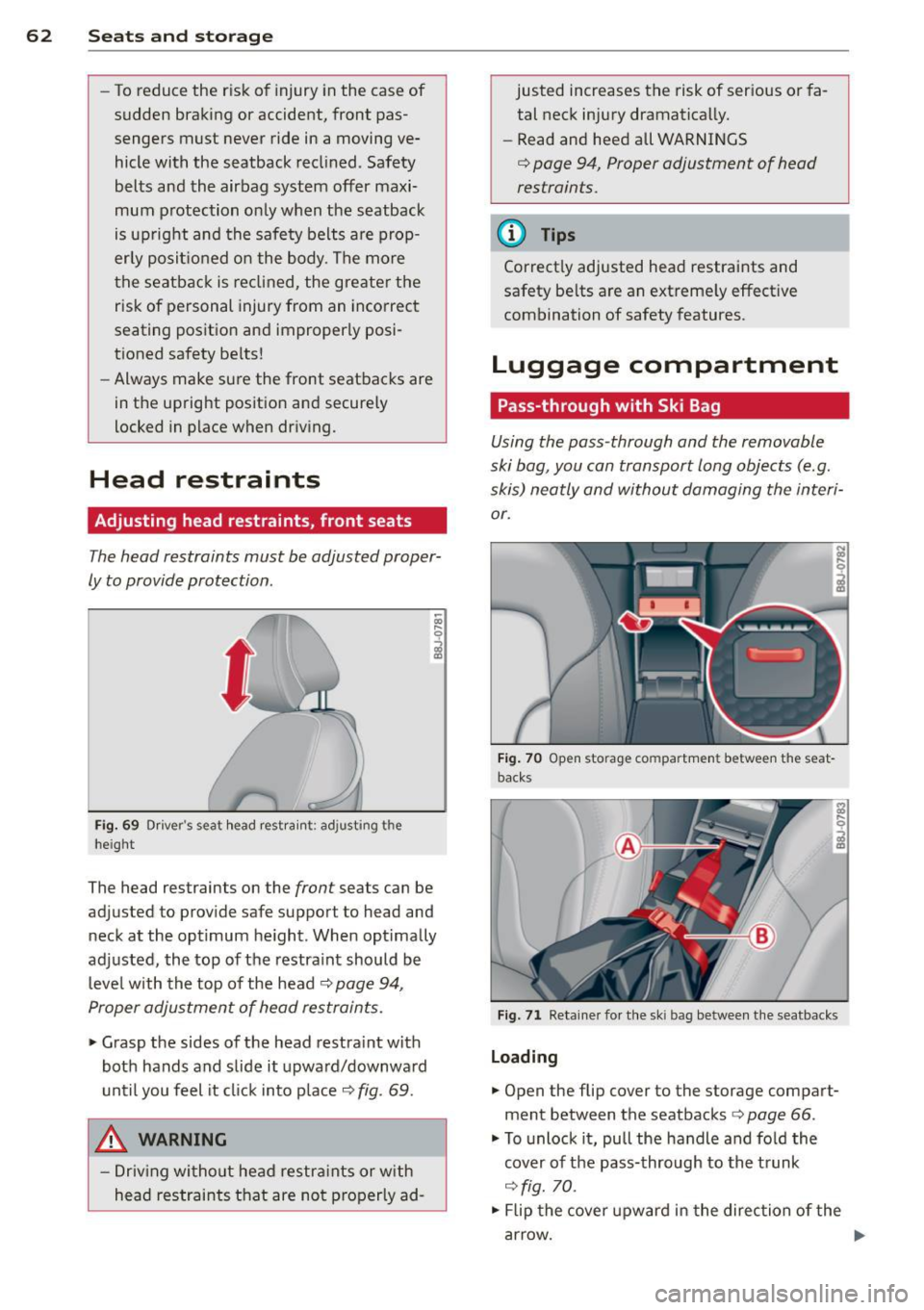
Fig. 69 Dr iver's seat head rest rain t: adjusting the
heigh t
The head restraints on the front seats can be
adjusted to provide safe support to head and
neck at the optimum he ight . When optimally
adjusted, the top of the restra int should be
leve l with the top of the head
q page 94,
Proper adjustment of head restraints.
.,. Grasp the sides of the head restra int with
both hands and slide it upward/downward
until you feel it click into place
c> fig. 69 .
_&, WARNING
-Driving without head restraints or with
head restraints that are not properly ad-
-
justed increases the risk of serious or fa
tal neck injury dramatically.
- Read and heed all WARNINGS
q page 94, Proper adjustment of head
restraints.
t@ Tips
Correctly adjusted head restraints and
safety belts are an extreme ly effective
combination of safety features.
Luggage compartment
Pass-through with Ski Bag
Using the pass-through and the removable
ski bag, you can transport long objects (e .g.
skis) neatly and without damaging the interi
or.
Fig. 70 Open storage compartme nt between the seat
backs
Fig. 71 Retainer fo r the ski bag between the seatbacks
Loading
.,. Open the flip cover to the storage compart
ment between the seatbacks
c> page 66.
.,. To unlock it, pull the handle and fold the
cover of the pass-through to the trunk
c> fig. 70.
.,. Flip the cover upward in the direction of the
arrow.
Page 67 of 244
_& WARNING
The outlet plus any appliances plugged in
to it remain functional
even if the ignition
is switched off or the ignition key is re
moved. Never leave children inside the
ve
hicle without supervision.
(D Note
To avo id damag ing the socket, only use
plugs that fit properly.
@ Tips
When the engine is off and accessories are
still plugged in and are on, the vehicle bat
tery can still be dra ined.
Storage
General
_& WARNING
- Always remove objects from the instru
ment panel. Any items not put away
could slide around inside the vehicle
wh ile driving or when accelerating or
when applying the brakes or when driv
ing around a corner.
-
- When you are driving make sure that
anything you may have placed in the cen
ter console or other storage locations
cannot fall o ut into the footwells . In case
of sudden braking you would not be able
to brake or accelerate.
Seats and storage 65
Glove compartment
The glove compartment is illuminated and
can be locked .
i
----------- i
•
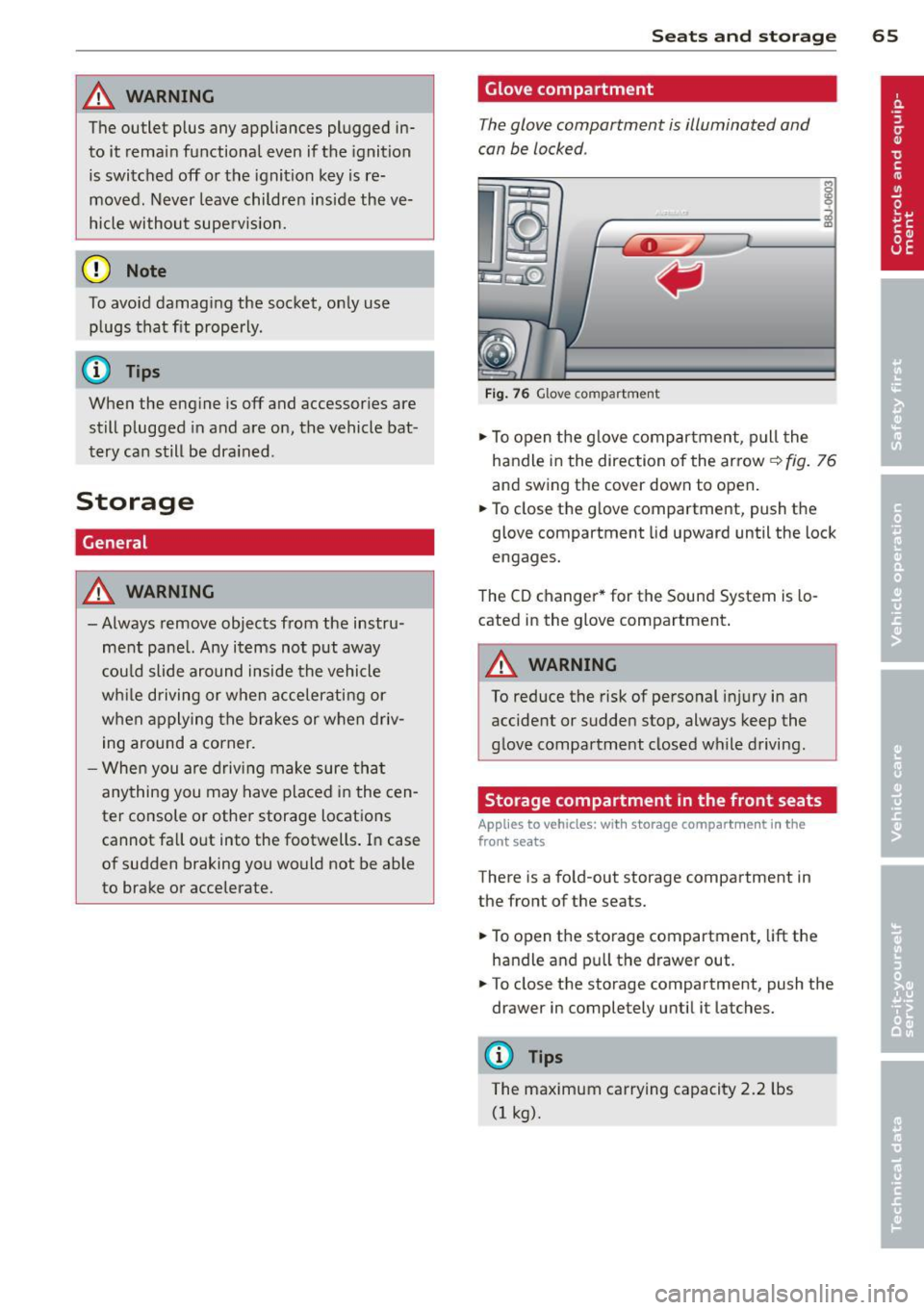
Fig . 76 Glove compartme nt
.,.. To open the glove compartment, pull the
handle in the direction of the arrow~
fig. 76
and swing the cover down to open .
.. To close the glove compartment, push the
glove compartment lid upward until the lock
engages.
The CD changer * for the Sound System is lo
cated in the glove compartment .
A WARNING
To reduce the risk of personal i njury in an
accident or sudden stop, always keep the
glove compartment closed while driving.
Storage compartment in the front seats
Applies to vehicles: with storage compartment in the
front seats
There is a fold-out storage compartment in
the front of the seats .
.. To open the storage compartment,
lift the
handle and pull the drawer out .
-
.. To close the storage compartment, push the
drawer in completely until it latches.
('.I) Tips
The maximum carrying capacity 2.2 lbs
(1 kg).
Page 74 of 244

7 2 On the road
On the road
Steering
Adjusting the steering wheel column
The steering wheel position can be continu
ously adjusted in height and distance .
Fig. 80 Lever under the steer ing colu mn
~ Push the lever Q fig. 80 -Arrow- ¢&_ .
~ Move the steer ing whee l to the desired posi
tion.
~ Push the lever against the steering column
until it locks.
There must be at least 10 inches (25 cm) be
tween your chest and the center of the steer ing wheel. If you cannot sit more than 10 in
ches (25 cm) from the steering wheel, see if
adaptive equipment is available to help you
reach the pedals and increase the distance
from the steering wheel.
For detai led informat ion on how to adjust the
driver's seat, see
Q page 61.
A WARNING
Improper use of steering wheel adjust
ment and improper seating position can
cause serious personal injury .
- Adjust the steering wheel column only
when the veh icle is not moving to pre
vent loss of veh icle control.
-
- Adjust the driver's seat or steering wheel
so that there is a min imum of 10 inches
(25 cm) between your chest and the
steering wheel¢
page 92, fig . 99. If
you can not maintain this min imum dis
tance, the airbag system cannot protect
you properly.
- If physical limitations prevent you from
sitt ing 10 inches (25 cm) or more from
the steering wheel, check with your au
thorized Audi dealer to see if adaptive equ ipment is ava ilable .
- If the steer ing wheel is aligned with your
face, the supplemental dr iver's airbag
cannot provide as much protection in an
accident. Always make sure that the
steer ing whee l is aligned with your
chest.
- Always hold the steering wheel w ith your
hands at the 9 o'clock and 3 o' clock posi
tions to reduce the risk of persona l injury
if the driver's airbag dep loys .
- Never ho ld the steering wheel at the 12
o'clock position or with your hands inside
the steering wheel rim or on the steering
wheel hub . Holding the steering wheel
the wrong way can cause serious injuries
to the hands, arms and head if the driv
er's airbag deploys.
Ignition lock and ignition switch
Ignition lock
The ignition key starts or stops the engine.
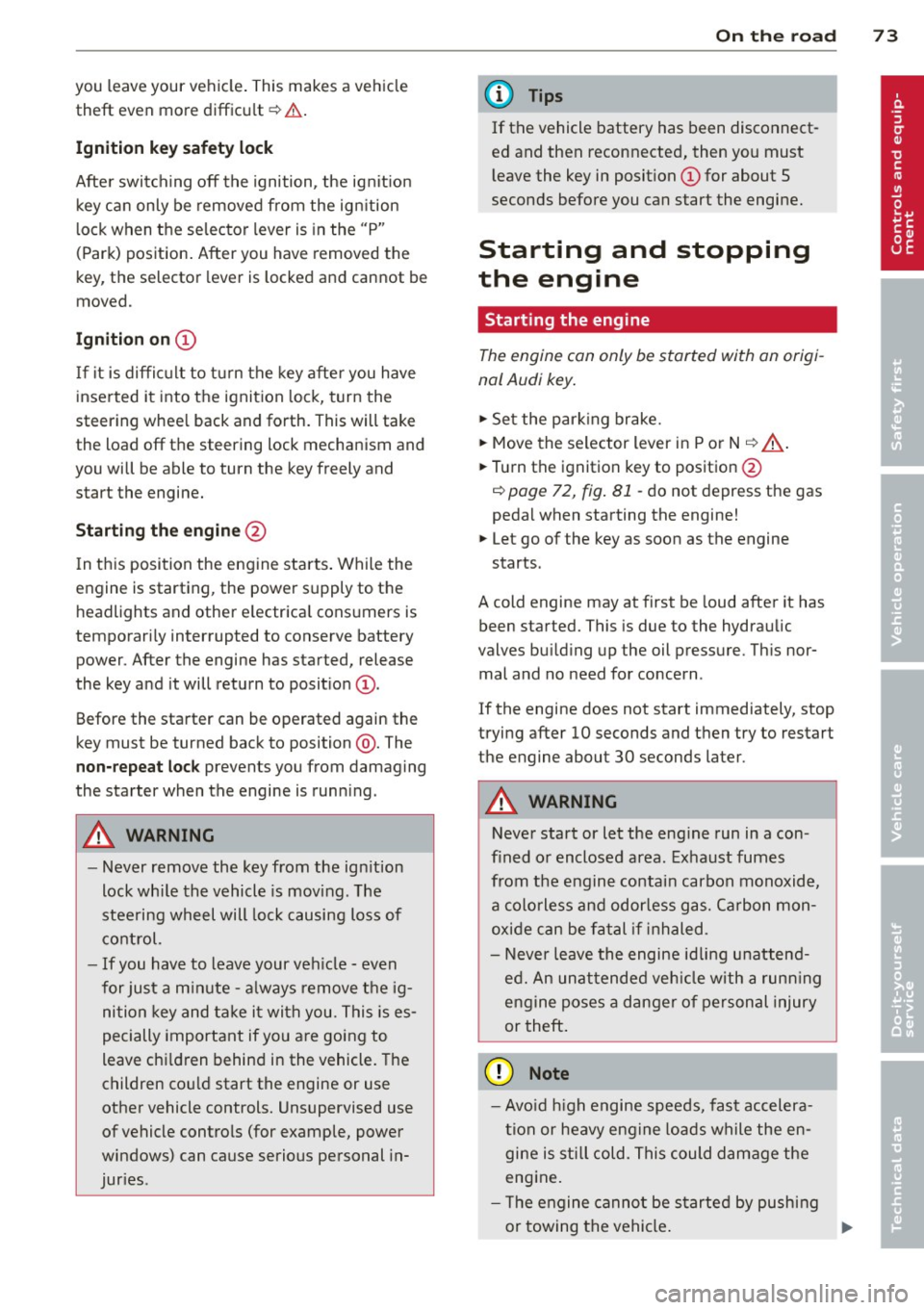
F ig . 81 Ign it ion lock pos it ions
Igniti on off @
In position Q fig. 81 @ both the ignition and
engine are off, and the steering is locked .
T o
lo ck th e steering after yo u have removed
the ignition key, turn the steering whee l in ei
ther direction unti l you hear it lock into place .
You should a lways lock the steering whenever
II>
Page 75 of 244
you leave your vehicle. This makes a vehicle
theft even more difficult ¢ .&. .
Ign ition key safety lock
Afte r switch ing off the ignition, the ig nit ion
key ca n only be removed from the ig nition
l ock when the se lector lever is in the "P"
(Park) position . After you have removed the
key, the selector lever is locked and cannot be
moved.
Ign ition on (D
If it is diffic ult to turn the key afte r you have
inse rted it into the ignition lock, turn the
steering whee l back and forth. This will take
the load
off the steering lock mechanism and
you will be able to turn the key freely and start the engine.
Starting th e engine @
In this position the engine starts . While the
engine is starting, the power supply to the headlights and other e lectrica l consumers is
temporari ly interrupted to conserve battery
power. After the engine has started, release
the key and it will return to posit io n
(D .
Before the starter can be operated again the
key must be turned back to position @. The
non-repeat lock prevents you from damaging
the starter when the engine is runn ing .
A WARNING
-Never remove the key from the ign ition
lock whi le the vehicle is mov ing . The
steering wheel will lock causing loss of
co ntrol.
- If you have to leave your veh icle - even
for just a m inute - a lways remove t he ig
ni tion key and take it with you. This is es
pecially important if you are going to
leave ch ildren behind in the vehicle. The
children co uld start the engine or use
other vehicle controls. Unsupervised use
of vehicle controls (for example, power
windows) can cause serious personal in
jur ies .
-
On th e ro ad 73
(D Tips
If the vehicle battery has been disconnect
ed and then reconnected, then yo u must
l eave the key in posit ion
(D for about 5
seconds before you can start the engine.
Starting and stopping
the engine
' Starting the engine
The engine can only be started with an origi
nal Audi key .
.,. Se t the par king brake.
.,. Move the selector lever in P or
N q .&_ .
.,. Turn the ignition key to position @
~ page 72, fig. Bl -do not depress the gas
peda l when starting the engine!
.,. Let go of the key as soon as the engine
starts .
A cold engine may at first be loud after it has
been started. This is due to the hydraulic
valves bu ild ing up the oil pressure. Th is nor
mal and no need for concern .
If the engine does not start immediately, stop
trying after 10 seconds and then try to restart
the engine about 30 seconds later.
A WARNING
-Never start or let the eng ine run in a con-
fined o r enclosed area . Exhaust fumes
from the engine co ntain carbon monoxide,
a colorless and odo rless gas. Ca rbon mon
oxide can be f atal if inhaled.
- Never leave the engine id ling unattend
ed. An una ttended veh icle w ith a runn ing
engine poses a danger o f personal injury
or theft .
(D Note
-Avo id high engine speeds, fast accelera
tion or heavy engine loads while the en
gine is still cold. This could damage the
engine.
- The e ngine cannot be started by pushing
or towing the vehicle . .,..
Page 77 of 244
(D Note
On ly after the vehi cle has come to com
plete stop, should you f irm ly set the park
ing brake and either move the selector lev
er into "P".
Parking
P ar kin g
"' Stop the vehicle using the brake pedal.
"' Set the parking brake firmly .
"' Switch
off the eng ine .
"' Move the se lector lever into the P pos ition
i=> & .
"'When on incl ines or declines, turn the steer
ing wheel so that the vehicle w ill roll into
the curb if it begins to move .
A WARNING
This is how you can reduce the risk of in
jury when leaving your veh icle.
- Never park the vehicle where it can come
in contact with dry grass, spilled f uel or
any other flammable mater ials.
- Never allow anyone -especially small
children -to remain in the vehicle when
it is locked . Locked doors make it more
difficult for rescuers to access the pas
senger compartment in the event of an
eme rgency. Danger to life!
- Never leave ch ild ren unsupervised in the
vehicle . Children co uld re lease the park
ing brake. The vehicle co uld start to roll
away and cause an accident.
- No matter what the season is, the tem
perature in a par ked vehicle can reach
dange ro us levels.
Starting on hills
App lies to vehicles : wit h hill hold assist
Hill hold ass ist makes it easier to start on
hill s.
-
The system is act ivated when the brake pedal
i s depressed for a few second s.
On the ro ad 75
After releasing the brake pedal, the b rake
power is held for a
brief moment to p revent
the ve hicle from rolling back when starting . At
th is time, you can easi ly beg in to move your
vehicle.
A WARNING
- If you did not begin moving immed iate ly
after releasing the brake pedal, under
certain ci rc u mstances, the vehicle would
beg in to rol l backwa rd. Dep ress the
bra ke peda l immedi ate ly o r engage the
hand brake .
- Should the e ngine sta ll, dep ress the
brake peda l immedi ate ly or engage the
hand brake .
- I n order to prevent the vehicle from roll
i n g back unintentionally when s tarting in
stop -and -go traffic, keep the brake pedal
depressed for a few seconds before driv
ing off.
(D Tips
You can find o ut if yo ur vehicle is eq uipped
with "Hill hold assist" at an authorized
A udi dealership.
Speed warning system
Overv iew
The speed warning system helps you to keep
your driving speed below a set speed limit.
The speed warning system warns the driver if
he exceeds a previous ly stored max imum
speed . A warning tone will sound as soon as
the ve hicle speed exceeds the set speed by
about 3 mph (3 km/h). At the same time, a
warning symbo l appea rs in the disp lay.
The speed warning system has two warning
thre sholds that function independently of
each other and that have somewhat different
purposes:
Speed warning 1
You can use speed warning 1 to set the maxi mum speed while you are driving . This setting
will remai n in effect until yo u tur n
off the .,..
Page 79 of 244
Speed warning 2: setting a speed limit
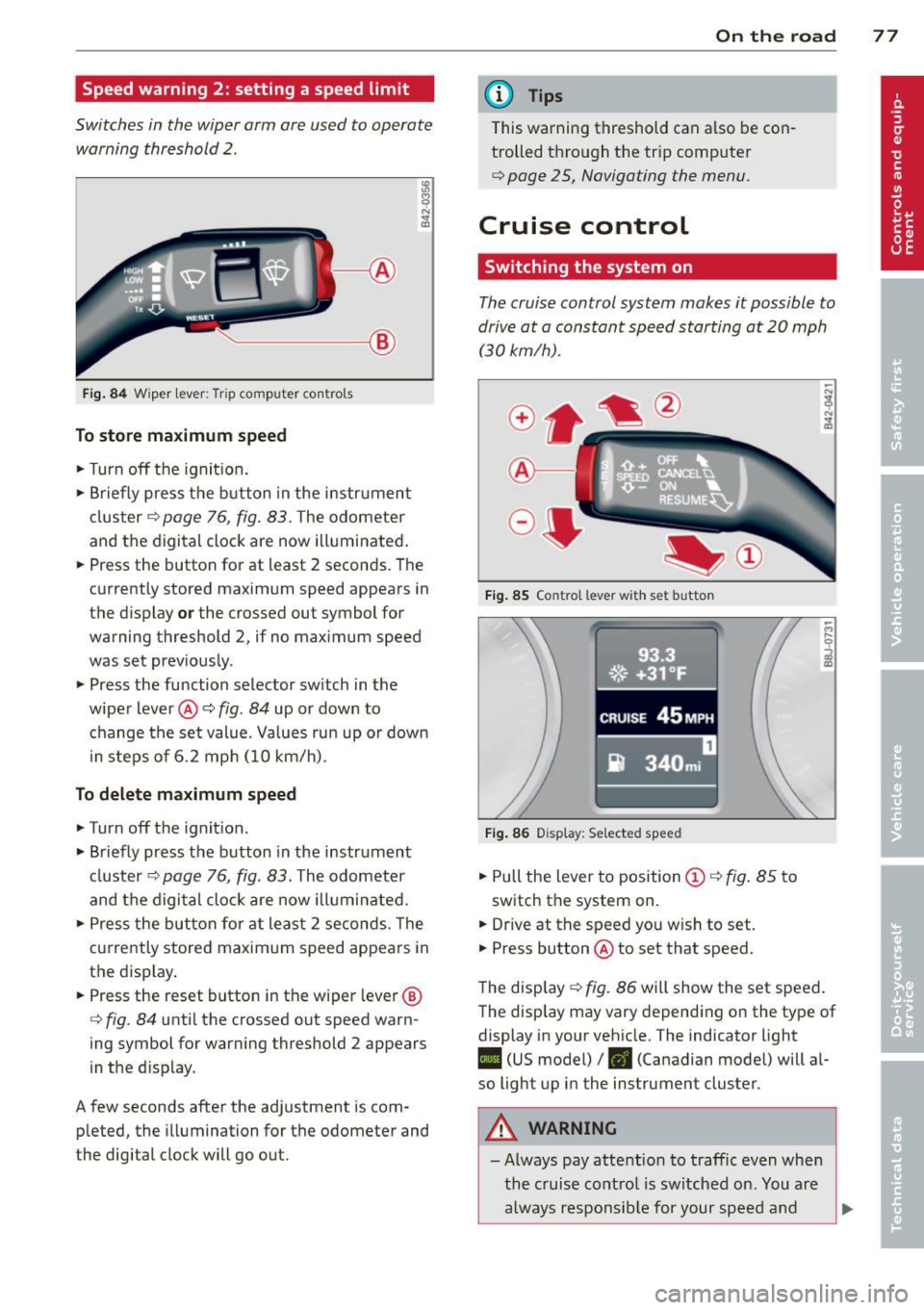
Switches in the wiper arm are used to operate warning threshold
2 .
'----I ®
Fig. 84 W iper lever: Trip computer controls
To store maximum speed
.. Turn off the ignit ion .
.. Briefly press the button in the instrument
cluster¢
page 76, fig. 83. The odometer
and the digital clock are now illuminated .
.. Press the button for at least 2 seconds. The
currently stored maximum speed appears in
the display
or the crossed out symbol for
warning threshold 2, if no maximum speed
was set previously .
.. Press the function selector switch in the
wiper lever@¢
fig. 84 up or down to
change the set value. Values run up or down
i n steps of 6.2 mph (10 km/h).
To delete maximum speed
.. Turn off the ignition.
.. Briefly press the button in the instrument
cluster ¢
page 76, fig. 83. The odometer
and the digital clock are now illuminated.
.. Press the button for at least 2 seconds. The
currently stored maximum speed appears in
the display.
.. Press the reset button in the wiper lever®
¢
fig . 84 until the crossed out speed warn
ing symbol for warning threshold 2 appears
in the d isplay.
A few seconds after the adjustment is com pleted, the illumination for the odometer and
the digital clock will go out.
On the road 77
@ Tips
This warning threshold can a lso be con
trolled through the trip computer
¢ page 25, Navigating the menu.
Cruise control
Switching the system on
The cruise control system makes it possible to
drive at a constant speed starting at
20 mph
(30kmlh).
®-
Fig. 85 Co ntro l leve r w ith set b utto n
Fig. 86 Display : Se lected speed
.. Pull the lever to position @¢ fig. 85 to
switch the system on .
.. Dr ive at the speed you w ish to set .
.. Press button @ to set that speed.
The display ¢
fig. 86 will show the set speed .
The display may vary depending on the type of
display in your vehicle. The indicator light
II (US model) /. (Canadian model) will al
so light up in the instrument cluster .
A WARNING
-Always pay attention to traffic even when
the cruise control is switched on. You are
always responsible for your speed and