2015 AUDI TT ROADSTER service
[x] Cancel search: servicePage 30 of 244

28 Driver information system
-The fuel economy messages are not dis
played in every instance, but rather in in
terva ls over a period of ti me.
Service interval display
The service interval display reminds you when
your nex t service is due.
Fig. 19 Sect ion of instrument cluster: Serv ice in terva l
d isp lay
The schedule for the next oil change or inspec
tion is calculated automatically and displayed
accordingly. The display works in two stages :
Service reminder
30 days before the next service is due, a serv
ice reminder appears in the display when you
turn on the ignition.
After about
5 seconds the display switches
back to normal. The distance and time re
maining are updated each time the ignition is
turned on until the date due for service is
reached.
Service due
When the due date for service is reached , the
message
Service due! appears in the instru
ment cluster immediately after you turn on
the ignition. Additionally, a warning tone
sounds . After about
5 seconds the display
switches back to normal.
Calling up the service schedules
If or when an oil change or inspection is due,
can be shown in the instrument cluster by se
lecting the serv ice interval display. Select
Check > Service > Oil change or Service by us
ing the
! R ES ET I button and the rocker switch
c> page 25 , fig . 12.
Resetting the service interval display
Your authorized Audi dealer will reset the cor
responding service schedule after performing
the appropriate service on your veh icle. You
also have the possibility to reset the oil
change schedule after having performed an
o il change according to Audi specifications.
- Switch the ignition on.
- Pull the knob
c> fig. 19. The message. Serv-
ice due!
appears.
- Pull the knob until the display
Oil change in
-----mi (km)---day s appears . If the I RESET I
button is not pulled within 5 seconds, the
disp lay reset mode closes.
(D Note
If you disconnect the battery terminals, no
ca lculations can be made for the service
interval display during this time and no
service reminder will appear. Remember
that observing the proper service intervals
i s vitally important to extending the life of
your vehicle, particularly the engine, and
maintain ing its value . Even if the mileage
driven is low, the maximum period of one
year from one service to the next must not
be exceeded.
'
(D Tips
-Do not reset the display between oil
changes, otherwise the display w ill be in
correct.
- Th e information in the Service Reminder
remains stored even when the vehicle
battery is disconnected.
Lap timer
I ntrod ucti on
App lies to vehicles: wit h lap timer
You can record and evaluate lap times with
the lap timer in the display c>page
29,
fig. 21. The time is measured in minutes, sec
onds and
1/10 seconds. The hours are also
shown when the lap t ime exceeds
60 min utes .
T he maximum individual measurement is 99
hours. ..,.
Page 32 of 244
30 Driver information system
@ Tips
-Saved lap times cannot be individually
deleted from the total results.
- The saved lap timer values will not be
lost after turning the ignition off .
On-Board Diagnostic
system (OBD)
Malfunction Indicator Lamp (MIL)
The Malfunction Indicator Lamp (MIL) Ill in
the instrument cluster is part of the On-Board
Diagnostic (OBD II) system.
The warning/indicator light illuminates when
the ignition is switched on and goes o ut after
the engine starts and the idle has stabilized.
This indicates that the MIL is working proper
ly.
If the light does not go out after the engine
is started, or illuminates whi le you are driv
ing, a ma lfunction may exist in the engine sys
tem. If the light illuminates, the catalytic con
verter could be damaged.
Continue driving
with reduced power (avoid
ing sustained high speeds and/or rapid accel
erations) and have the condition corrected.
Contact your authorized Audi dealer .
If the light illuminates, the electronic speed limiter may also be malfunctioning. For more
information ¢
page 30, Electronic speed
limiter.
An improperly closed fuel filler cap may also
cause the MIL light to illuminate
¢page 162.
On-Board Diagnostics
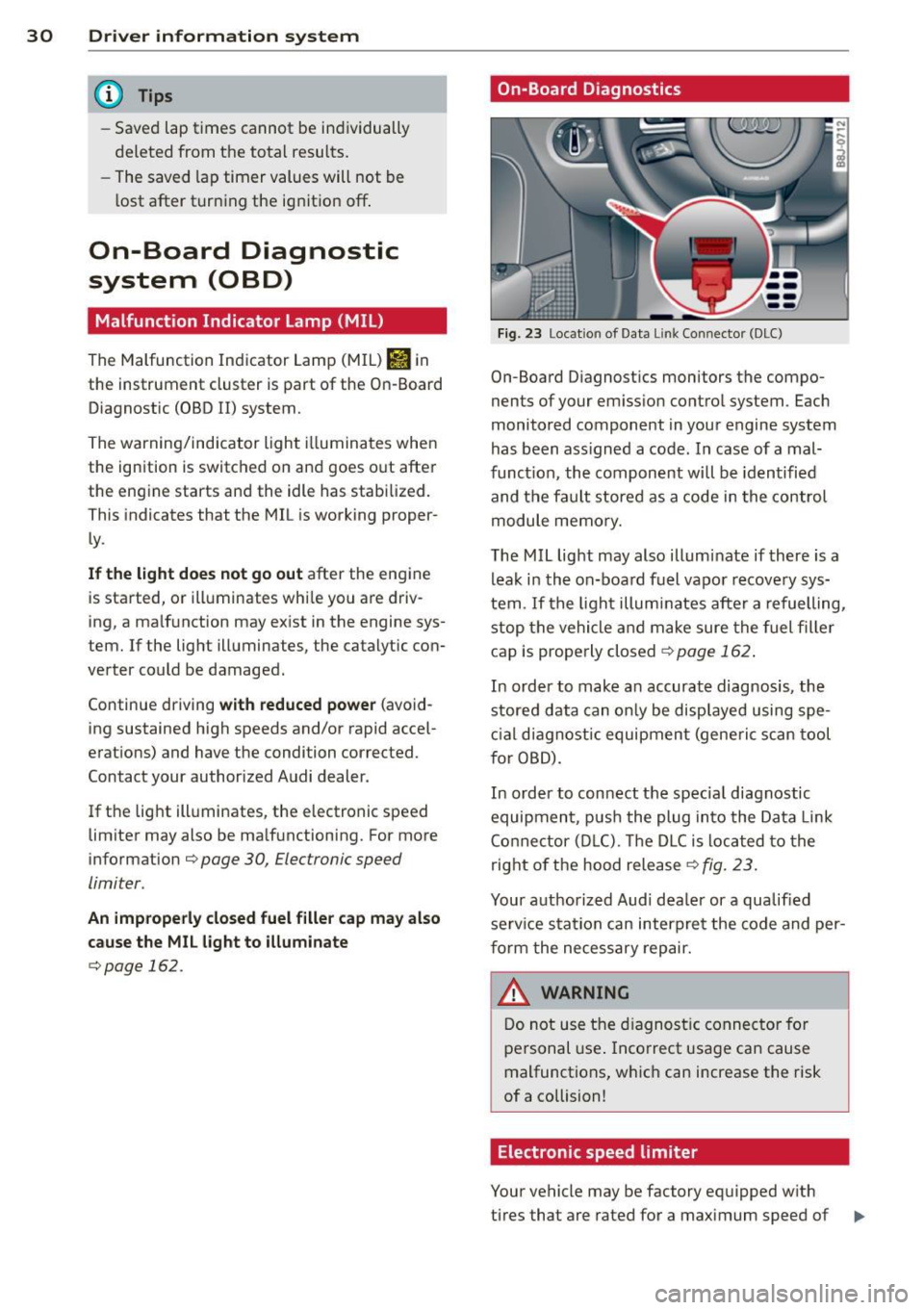
Fig. 23 Location of Data Lin k Co nn ector (DLC)
On-Board D iagnostics monitors the compo
nents of your emission control system . Each
monitored component in your engine system
has been ass igned a code. In case of a mal
funct ion, the component will be identified
and the fault stored as a code in the control
module memory.
The MIL light may also illuminate if there is a
leak in the on-board fuel vapor recovery sys
tem .
If the light illuminates after a refuelling,
stop the vehicle and make sure the fuel filler
cap is properly closed¢
page 162 .
In order to make a n accurate diagnosis, the
stored data can only be displayed using spe
cial diagn ostic equipment (generi c scan tool
f or OBD).
In order to connect the spec ial diagnostic
equipment , push the plug into the Data Link
Connector (DLC). Th e DLC is located to the
right of the hood release
¢fig. 23.
Your authorized Audi dealer or a qualified
service s ta tion can interpret the code and per
form the necessary repair.
~ARNING
Do not use the diagnostic connector for
personal use . Incorrect usage can cause
malfunctions, which can increase the risk
of a collision!
Electronic speed limiter
Your vehicle may be factory equipped w ith
-
tires that are rated for a maximum speed of .,..
Page 58 of 244
56 Clear vis ion
The washer jets extend forward out o f the
front bumper driven by water pressure to
spray the front headlights with water.
You shou ld inspect the headlights regularly
(for example when refueling) and clean
off
any solid dirt or insects from the lenses .
To ensure the system wo rks properly in wi nter,
keep the washer jets free of snow and remove
any ice using a de-icing spray.
Service position
It is only possible to change wiper blades if
you move the wiper arms to the service posi
tion .
In o rder to use the windsh ield wipers, t he
front lid mus t be comp lete ly closed.
Moving w iper blades to the service
position
• When there is a risk of frost, make s ure that
the wiper b lades a re not frozen to the wind
shield .
.. Switch the ignition on.
.. Move the wiper lever to position
0
c> page 54, fig. 62.
.. Press the I Reset I button until the Displa y
typ e
menu appears in the Driver Informa
t ion System display .
.. Us ing the rocker switch and the
! Reset ! but
ton, select the
S et > W iper s > Front > Serv
ice positi on on
function. The winds hield
wiper arms move to the service position.
Moving wiper blades to park position
.. Make certain that the wiper arms are lying
against the windshie ld .
.. Switch the ign ition on and move t he wiper
l ever from posi tion
O to 4 c> page 54,
fig . 62 .
The wiper arms will move back to
the park position.
«I) Note
Never drive yo ur vehicle when the w ind
shie ld w iper arms are in the service pos i
tion and pulled away from the windshie ld .
When you dr ive faste r than 4 mp h (6 km/ h), the wiper a
rms automatically return to
the park position and cou ld cause paint
damage to the front lid!
(D Tips
- Yo u can also turn on the se rvice posit ion,
for example, if yo u want to protect the
w indshield from icing by using a cover .
- The service posit ion moves to
off a uto
matically when you operate the w ind
shield wiper lever, or speed exceeds
4 mph (6 km/h).
Cleaning windshield wiper blades
Clean the windshie ld w iper blades when they
begin to leave streaks. Use a soft cloth and
glass cleaner to clean the windshield wiper
blades.
.. Place the windshie ld w iper arms in the serv
ice pos it ion . Refer to
c::> page 56 .
"' Lift the wiper arm away from the front win
dow.
_&. WARNING
Di rty windsh ield wiper b lades can impair
your view. This can lead to accidents .
-
Page 59 of 244
Replacing windshield wiper blades
Wiper blades in good condition help keep the
windshield clear .
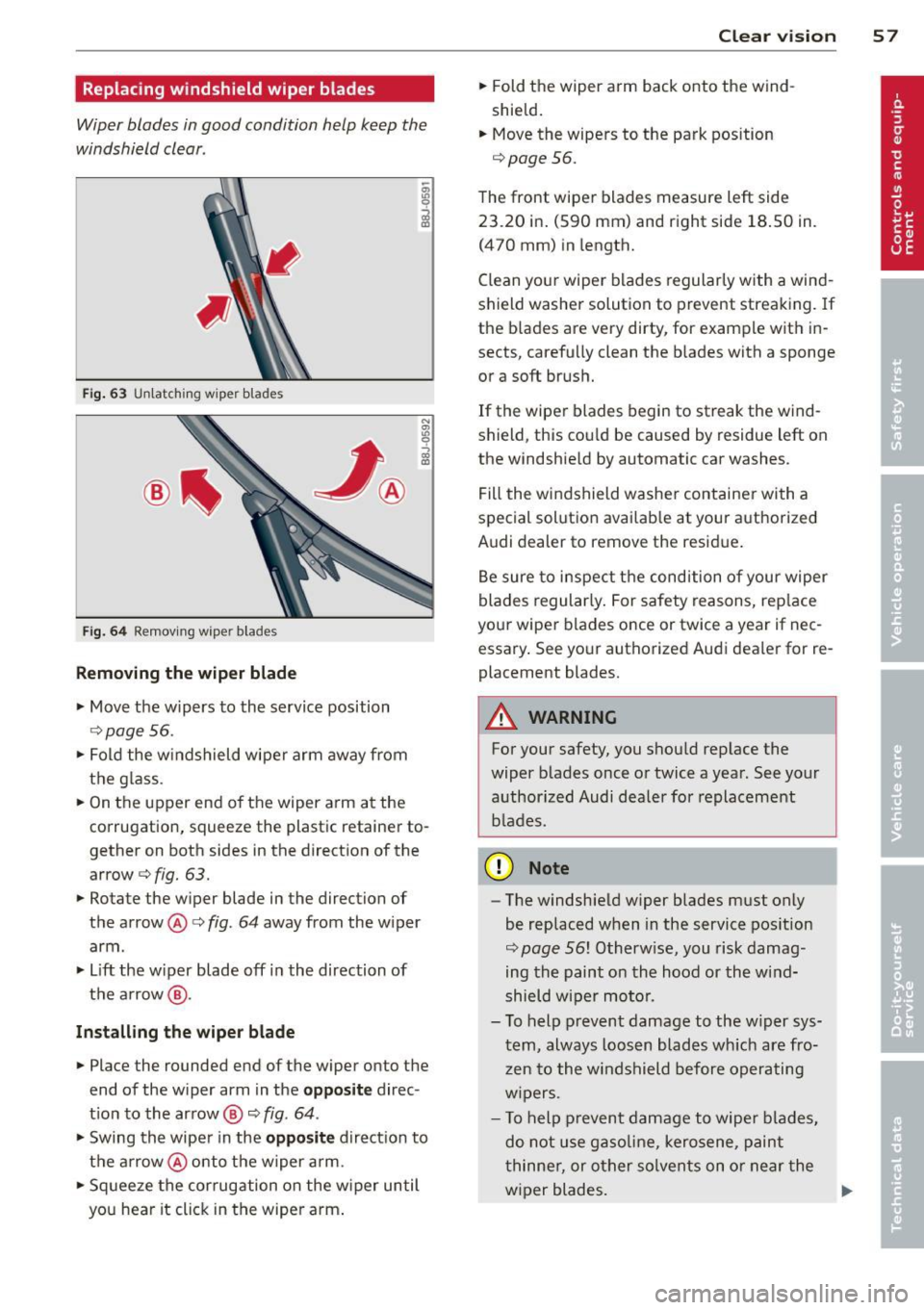
Fig. 63 U nl atc hing wiper bla des
Fi g. 6 4 Remov ing wipe r bla des
Removing the wip er blade
• Move the wipers to the service position
c::> page 56.
• Fold the w indshield wiper arm away from
the g lass.
• On the upper end of the wiper a rm at the
corrugation, squeeze the plastic retainer to
gether on both sides in the direction of the
arrow c::>
fig. 63.
• Rotate the w iper blade in the direction of
the arrow @c::>
fig. 64 away from the w iper
arm .
• Lift the w iper blade off in the direction of
the a rrow @.
Inst alling the wiper blade
• Place the rounded end of the wiper onto the
end of the wiper arm in the
opposit e direc
t ion to the arrow @ c::>
fig. 64 .
• Swing the wiper in the opposite direction to
the a rrow @onto the wiper arm.
• Sq ueeze the corrugation on the w iper until
you hear it click in the wipe r arm .
Clear vi sion 5 7
• Fold the wiper arm back onto the wind
shield.
• Move the wipers to the park position
c::>
page 56.
The front wipe r blades measure left side
23 .20 in . (590 mm) and right side 18 .50 in.
(470 mm) in length.
C lean you r wiper blades regularly with a wind
shield washer solution to prevent streaking. If
the b lades are very dirty, for examp le with in
sects, carefully clean the b lades with a sponge
or a soft brush.
If the wiper blades begin to streak the wind
shield, this cou ld be caused by residue left on
the windshie ld by automatic car washes.
Fill the wi ndshield washe r container with a
spec ial solutio n availab le at your aut horized
Audi dealer to remove the resid ue .
Be sure to inspect t he condition of your wiper
blades regularly. For safety reasons, rep lace
your wiper blades once or twice a year if nec
essary . See yo ur authorized Aud i dealer for re
placement blades.
A WARNING
For your safety, you shou ld rep lace the
wiper b lades once or twice a yea r. See your
a uthorized Audi dealer for replacement
b lades.
(D Note
- The w indshie ld w iper blades must only
be replaced w hen in the service pos ition
c::>
page 56! Otherw ise, you risk damag
ing the paint on the hood or the wind
shield wiper mo to r.
- T o help p revent damage to the w iper sys
tem, always loos en blades wh ich are fro
z en to the windshield before operating
w ipers.
- T o help p revent damage to wiper blades,
do not use gaso line, kero sene, paint
t hinne r, or other solvents on o r near the
w iper blades.
Page 70 of 244
68 Warm and cold
The LE D in the buttons ill uminates when the
function is active .
Button(s) Meaning
Rotary Temperature selection
knob
(D ¢ page 68
Rotary Switch air conditioning on/off
knob @lil (
F an) ¢
page 68
Rotary Air distribution ¢ page 69
knob @
~ Defrost ¢ page 70
~
Rear window defogger
¢page 70
Heated seat* driver/passenger
I-..i +I side ¢ page 71
~ Recircu lation ¢ page 70
IA/Cl Switch on cooling system
¢page 70
Pollutant filt er
The pollutant filter (particle filter) ensures
that contaminants in the outside air (such as
d ust or pollen) are greatly reduced or stop
ped. The air is also filtered in recircu lation
mode.
The po llutant filter element must be changed
according to the intervals specified in the
maintenance schedule so that the air condi
tioning system's performance is not adversely
affected .
If the filter's effectiveness is weakened by
driving the vehicle in areas with heavily pollut
ed outside air, the filter element should also
be changed in between the listed services.
A WARNING
For safety reasons, it is important that all
w indows are free of ice, snow, and conden
sation. Only then is good visib ility ensured.
Please fam iliari ze yourse lf with the co rrec t
operation of the air conditioning and how
to de humidify/defrost the windows .
([) Note
-If you suspect that the clima te controls
have been damaged, swi tch the system off to avoid damaging it, and have it in
spected by an authorized Audi dea
ler .
- Audi climate control system repairs re
quire special expertise and the proper
tools . You should contact an authorized
Audi dealer in the event of malfunctions.
(D Tips
- To avoid adversely affecting heating and
cooling performance and to prevent con
densation on the windows, the air intake
in front of the windshield must be free of
ice, snow, and leaves.
- The a ir coming from the vents and circu
lat ing through the entire interior is ex
tracted through the out let slots in the
side pane ls in the luggage compartment .
Make sure that the outlet slots are not
covered by clothing, etc.
- Climate contro l works most effectively if
the windows are closed. However, if the
inter io r of a par ked veh icle is ext reme ly
hot from the sun's rays, briefly opening
the windows can speed up the cooling process .
Setting temperature
.,. Turn the rotary knob (D ¢ page 67, fig. 78
to the desired temperature setting.
T o set a lower temperature, turn the rotary
knob to the left. To set a higher temperature,
turn the rotary knob to the r ight. There are
additional intermediate settings available to
adjust the temperature as needed.
Switching climate control on and off
Switching the climat e control sy stem on
and off
.,. Tu rn the knob@¢ page 67, fig. 78 to the
r ight to switch climate cont ro l on. The LED
next to the word O FF goes out.
.,. Turn the knob@¢
page 67, fig. 78 to the
left to switch the climate control system off.
The LED next to the word OFF comes on.
Iii>
Page 108 of 244
106 Safety belts
_& WARNING
Improperly worn safety belts increase the
risk of serious personal injury and death
whenever a veh icle is being used .
- Always make sure that all vehicle occu-
pants are cor rect ly restrained and stay in
a correct seating posit ion whenever the
vehicle is be ing used.
- Always read and heed all WARNINGS and
other important informat ion
c::>page 102.
Safety belt preten
sioners
How safety belt pretensioners work
In front and side collisions above a particular
severity , safety belts in use are tensioned au
tomatically .
The safe ty belts are equippe d with safety be lt
pretensioners. The sys tem is activated by sen
sors in front and side collisions of great se
verity. This tightens the belt and takes up belt
slack
c::> .&. in Service and disposal of safety
belt pretensioner on page 106.
Tak ing up the
slack helps to reduce forward occupant move
ment during a co llision .
(D Tips
The safety be lt pretensioner can only be
activated once.
- In m inor frontal and side coll isions, in
rear-end collisions, in a rollover and in
accidents involving very little impact
fo rce , the safety belt pretens io ner are
not act ivated.
- When the safety be lt pretensioner is ac
tivated, a fine dust is released . This is
no rma l and is not caused by a fi re in the
vehicle.
- The rel eva nt safety requirements must
be obse rved when t he vehicle or compo
nen ts of the system are scr ap ped . A
q ualified dea le rship is famili ar wi th
these re gulations and w ill be pleased to
p ass on the informat io n to you. - Be sure to observe all safety, env
iron
menta l and other regu lations if the ve hi
cle or individual parts of the system, par
ticu larly the safety belt or airbag, are to
be disposed. We recommend you have
your authorized Audi dealer perform this service fo r you.
Service and disposal of safety belt
pretensioner
T he safety belt pretens ioners a re parts o f the
safety belts on your Audi . Insta lling, remov
ing, servicing or repairing of be lt pretension
ers can damage the safety belt system and
prevent it from working correctly in a co lli
s io n.
There are some important t hings yo u have to
know to make sure that the effectiveness o f
the system w ill not be impaired and that dis
ca rded components do not cause injury o r pol
l u te the environment .
_& WARNING
-Improper care, serv ic ing and repair p roce-
dur es ca n increase the risk of pe rsonal in
jur y and death by prevent ing a safety belt
pr etensioner from activ at ing w hen neede d
or ac tiva ting i t unexpectedly:
- T he belt pretensione r system can be a ct i
vated only once . If be lt pre tensioners
have been activated , the system m ust be
replaced .
- Never repair, adjus t, or change any parts
of the safety be lt system .
- Safety belt systems incl uding safety belt
p retens ioners cannot be repaired. Spe
cial procedures are require d for removal,
installation and disposa l of th is system.
- For any wo rk on the safety belt system,
we strong ly recommend t hat you see
your author ized Audi dealer or qualified
technician who has an Audi approved re pa ir manua l, train ing and special eq uip
ment necessary.
Page 124 of 244

122 Airbag sys te m
- Never modify t he front bumper or parts
of the veh icle body .
- Always make sure that the side airbag
can inflate without interference:
- Never install seat covers or replace
ment upholstery ove r the front seat
backs that have not been spec ifi cally
approved by A udi.
- Never use add itiona l seat cushions that
cover the areas whe re the side airbags
inflate .
- D amage to the o rigina l seat covers or
to the seam in the area of the side air
bag module must always be repaired
immediately by an authorized Audi
dealer.
- The airbag system can be activated only once . Afte r an airbag has inf lated, it
must be replaced by an author ized Audi
dealer or qualified technic ian who has
the techn ica l information, tra ining and
special equipment necessary.
- The airbag system can be deployed only
once. After an a irbag has been deployed,
it must be replaced w ith new replace
ment parts designed and approved espe
cially for your Aud i model version. Re
placement of complete a irbag systems
or airbag componen ts must be per
formed by qualified workshops only .
Make sure that any airbag service act ion
is entered in your Audi Warranty
& Main
tenance booklet under
AIRBAG REPLACE
MENT RECORD.
-For safety reasons in severe accidents,
the a lternator and starter are separated
from the vehicle battery with a pyrotech
nic circuit interrupter.
- Work on the pyrotechnic cir cuit inter
rupter must on ly be performed by a
qua lified dealer - risk of an accident !
- If the vehicle or the c ircuit interrupter
is sc rapped, all applicable safety pre
cautions must be followed.
{® For the sake of the environment
Undeployed airbag modules and preten
s ioners might be classif ied as Perchlorate
Materia l -special handling may app ly, see
www .dtsc.ca.gov/hazardouswaste/per
ch lorate . When the veh icle or parts of the
restraint system including airbag modu les
and safety belts with pretensioners are
scra pped, all applicab le laws and regu la
tions must be obse rved. Your authorized
A udi dealer is familia r with these require
ments and we recommend that you have
your dealer perform this service fo r you .
· Other things that can affect Advanced
Airbag performance
Chang ing the veh icle's suspens io n system can
change the way that the Advanced Airbag Sys
tem perfo rms in a c rash. For examp le, using
t ir e- rim combinat ions not approved by A udi ,
lower ing the veh icle, c hanging the st iffness of
the suspens ion, including the spr ings, suspen
sio n struts, shock absorbers etc . can change
the forces that ar e measured by the airbag
sensors and sent to the electronic contro l
unit. Some suspension changes can, for exam
ple, increase the force levels measured by the
senso rs and make the airbag system deploy in
c rashes in which it wou ld no t deploy if the
c h anges had not been made. Other kinds of
c h anges may reduce the fo rce leve ls meas
u red by the sensors and p reven t the airbag
from dep loying when it should.
A WARNING
Changing the vehicle's suspension includ
i ng use of unapproved tire-rim combina
tions can change Advanced Airbag per
fo rmance and increase the r isk of serious
personal injury in a crash .
- Never install suspension components
that do not have the same performance characterist ics as the components origi
na lly installed on your vehicle .
- Never use tire-rim combinations that
have no t been approved by Audi.
Page 153 of 244
the exhaust system and this could cause
the catalytic converter to overheat.
- Do not turn off the ignition while the ve
hicle is moving .
- Do not continue to operate yo ur vehicle
under these conditions, as otherwise fuel
can reach the cata lytic converter. This
could result in overheating of the con
verter, requ iring its replacement.
- To assure efficient operation of the Emis
sion Control System:
- Have your veh icle ma inta ined properly
and in acco rdance with the service rec
ommendations in your Warranty
&
Ma intenan ce booklet.
- Lac k of proper maintenance as well as
improper use of the vehicle will impa ir
t he funct ion of the emission control
system and cou ld lead to damage.
@ For the sake of the environment
Even when the Emission Contro l System is
operating p roperly, the exhaust gas can
have a s ulfu r- like exhaust gas smell under
some operating states. This depends on
the s ulfur content of the fue l being used.
Using a different brand of fuel may help,
or filling the tank w ith lead-free super
grade gasoline .
Shutting down vehicle
If you would like your veh icle to remain inop
erat ive for a longer period of time, contact an
Aud i or other specialized deale r. T hey can ad
vise you on necessary precautions e.g . corro
sion prevention, ma intenance and storage.
Pay attention to add itiona l information con
cerning the battery . Re fer to~
page 175.
Dri vin g and en vironm ent 151
Operate your vehicle
economically and
minimize pollution
General
Your personal style of driving will determine
the economy of your vehicle, as well as ex
haust and noise levels.
Fuel economy, environmenta l impact, and
wear on your eng ine, brakes and tires largely
depend on three factors:
- your personal d riving s tyle
- operati ng conditions
- technical limitat ions
If you ant ic ipate what you need to do next and
drive economically, you can easily cut you r
fuel consumpt io n by 1O-lS percent . T his sec
tion w ill give you some tips on how you can
help the env ironment and your po cketbook.
@ Tips
The consumption estimates as published
by ENVIRONME NTAL PROT ECTI ON AGENCY
( E PA) a nd Tra nsp o rt Canada may no t corre
spond to your actual consump tion on the
r oad, which will va ry depending upon vehi
cle load and speed, road and weather con
ditions, trip length, etc.
Drive smoothly and keep a lookout
ahead
Vehicles use the most fuel when they are ac
celerating.
Avoid unnecessary acce lerating and braking .
Vehicles use the most f ue l when they are ac
ce le rat ing. If you ant icipate what is going to
happen next, you will need to brake less and,
thus, acce lerate less . Let the vehicle coast
whenever possible - for examp le when you see
that the next traff ic light is red.
•
•