2015 AUDI S3 SEDAN ignition
[x] Cancel search: ignitionPage 47 of 282

....,
N
0 > co
rl I.O
"'
"'
"'
rl
You can indicate a lane change or a turn when the
emergency flashers are switched on by using the
turn signal lever. The emergency flashers stop
temporari ly.
The emergency flashers also work when the igni
tion is turned off.
@ Tips
Yo u should switch the emergency flashers on
if:
- You are the last car in a traffic jam so that
all other vehicles approaching from behind
can see you, or if
- Your vehicle has broken down or you are
having an emergency, or if
- Your vehicle is being towed or if yo u are
towing another vehicle.
Turn signal and high beam lever
The Lever operates the turn signals, the high
beams and the headlight flasher.
Fig. 33 Turn signal a nd high beam leve r
Turn signals ¢i 9
The turn signals activate when you move the lev
er into a turn s ignal position when the ignition is
switched on.
CD -Turn signal
@ -Turn sig nal
The turn s ignal blinks three times if you tap the
l eve r (convenience tu rn signal) .
High beams and headlight flasher ~D
Move the lever to the correspond ing position :
@-high beams on
Light and Vision
@-high beams off or headlight flasher
Th e
El indicator light in the inst rument cl uste r
turns on.
_& WARNING
High beams can cause glare for other drivers,
which increases the risk of an accident . For
this reason, only use the high beams or the
headlight flasher when they will not create
glare for other drivers.
Adjusting the exterior lighting
The settings are adjusted in the MMI.
.. Select: the I MENU I button > Car> Systems*
cont rol button > Vehicle settings > Exterior
lighting.
Automatic headlights
You can adjust the following sett ings in the Auto
matic headlights
menu:
Activation sensitivity -You can adjust if the
headlights switch on
Early, Medium or Late ac
cording to the sens itiv ity of the light sensor .
Audi adaptive light * -you can switch adaptive
light
On and Off .
Coming home, Leaving home*
The coming home function illuminates the area
outside the vehicle when you turn the ignit ion off
and open the driver's door. To turn the function
on, select
Lights when leaving car > On .
The leaving home illuminates the area outside
the vehicle when you un lock the vehicle. To turn
the function on, select
Lights when unlocking
car > On .
The coming home and leaving home functions
on ly operate when it is dark and the light switch
is in the
AUTO position.
Daytime running lights*
USA models:
the daytime running lights can be
switched on or off using the MMI. Select
On or
Off. ...
45
Page 48 of 282
Light and Vision
Canada models: This function can not be switch
ed off . They activate automatically each time the
ignit ion is switched on . Th is menu item is shown
with a "gray background".
Travel mode*
T he headlig ht beam is asymme trical. This p ro
vides stronger illum ination on the s ide of the
road on w hich you are drivi ng . In vehicles with
Xenon headlights* wit h turning light* or LED
headl ights* ,
you must adjust the headlights
when yo u are driving in a cou ntry whe re the traf
f ic direction is opposite from your own country .
Othe rwise, o ncom ing traff ic wi ll be blinded by
t he glare from th e headlights . An adjustm ent is
not needed in veh icles with Xenon he adlig hts
wi thout turni ng lig hts.
To prevent glare:
- Travel mode must be activated in vehicles with
Xenon headlig hts* and turning light* or LED
headlights*. Select: the
I M ENU I button> Car >
Sy stems *
contro l button > V ehicle settings >
Exterior lighting > Light for driving on left ,
for
example.
After you have adjusted the headlights, the fol
low ing message will appear:
II Headlight converter active for driving on
left. Range reduced!
(D Tips
When trave l mode is activated , a display in
the driver information system in dicates this
e ach t ime you switch the ignition on.
46
Interior lighting
Front and rear inter ior lighting front
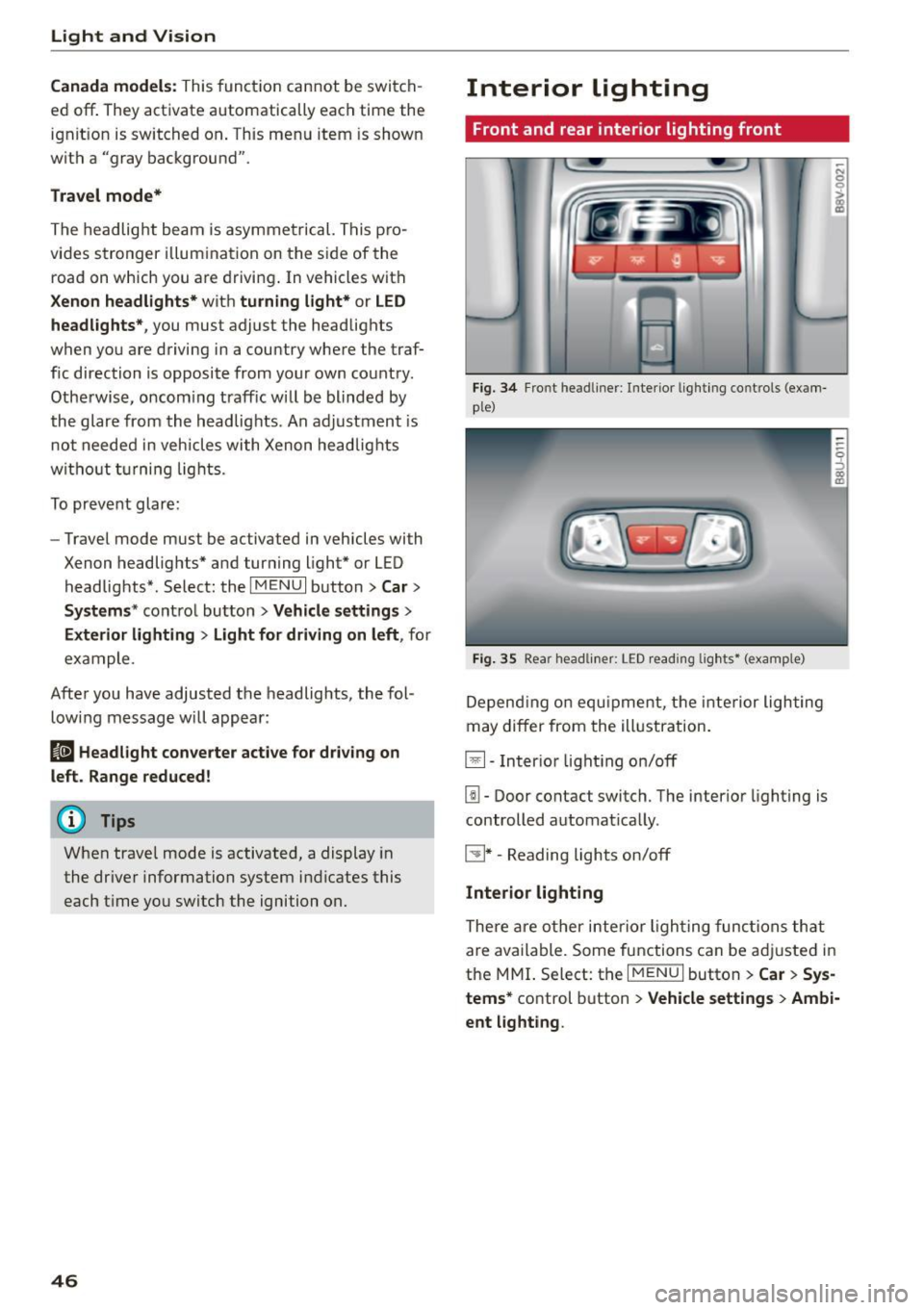
Fi g. 34 Fro nt head liner : In te rior lig htin g co ntrols (exam
p le)
Fig. 35 Rear headli ner: L ED read ing lig hts • (examp le)
De pend ing o n equ ipme nt, th e interior ligh ting
m ay differ from the ill ustration.
El-Inter io r li ght ing on/off
[!I -Door contact switch. The interio r lighting is
controlled automat ica lly.
~ * -Reading lights on/off
Interior lighting
The re a re o ther inter ior ligh ting func tions th at
a re available. Some functions can be adju sted in
the MMI. S elect: th e
I MENU I button > Car > Sys
tems*
co ntrol button > Vehicle settings > Ambi·
ent light ing .
Page 49 of 282
....,
N
0 > co
rl I.O
"'
"'
"'
rl
Instrument illumination
The brightness of the instrument cluster and the
center console can be adjusted .
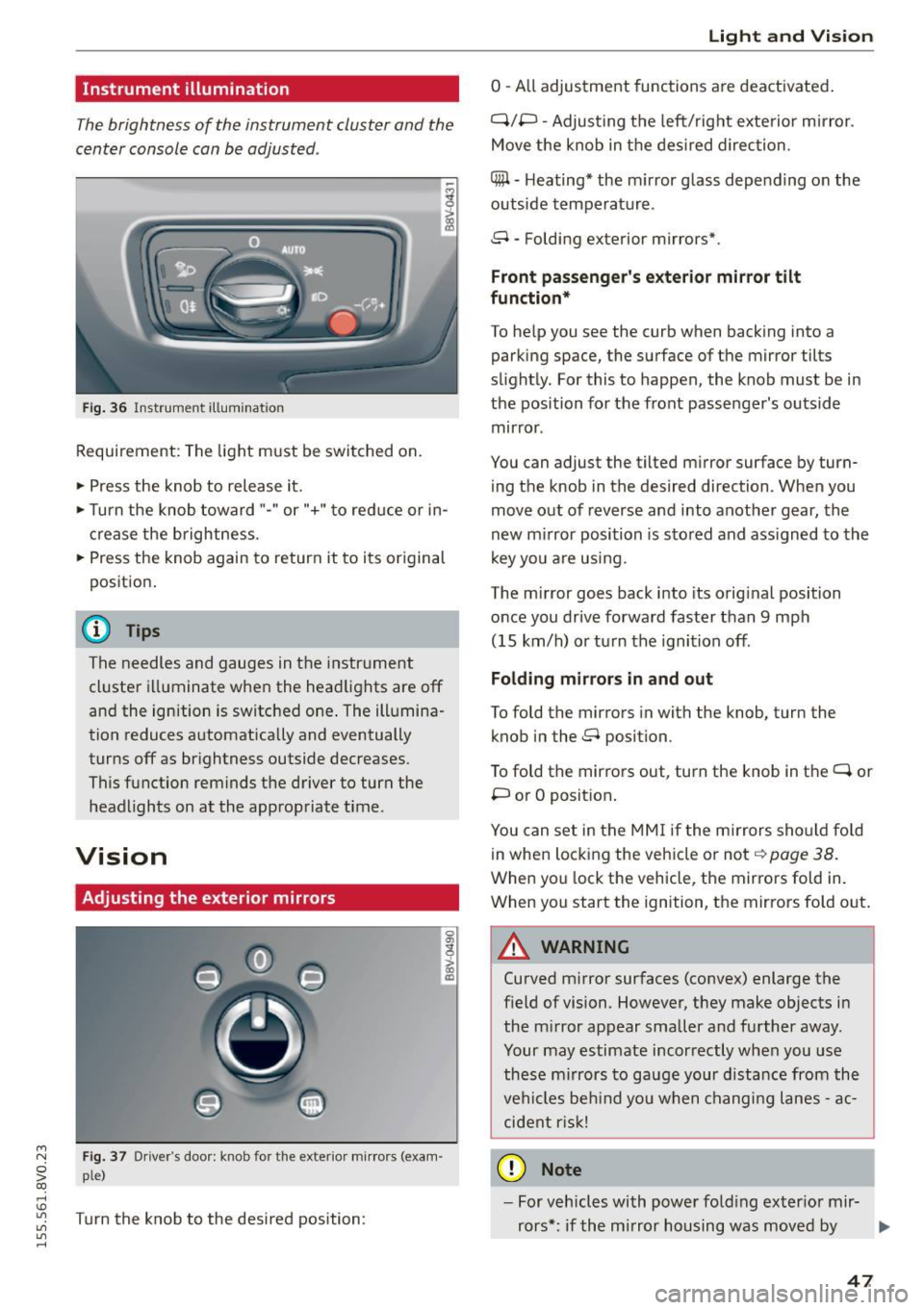
Fig. 36 Instrument illum ination
Requirement: The light must be switched on.
.. Press the knob to release it.
.. Turn the knob toward"-" or"+" to red uce or in
crease the brightness.
.. Press the knob again to return it to its original
posit ion .
@ Tips
The needles and gauges in the instrument
cluster illuminate when the headlights are off
and the ignition is switched one . The illumina·
tion reduces automatically and eventually
turns off as br ightness outside decreases.
This function reminds the driver to turn the
headlights on at the appropriate time .
Vision
Adjusting the exterior mirrors
Fig. 37 Driver's door: knob for the exterior mirrors (exam
ple)
Turn the knob to the desired position:
0
g
> a, (X)
Light and Visio n
0 -A ll adjustment functions are deactivated .
Q/P -Adjusting the left/rig ht exterior mirror.
Move the knob in the des ired direction.
C@ · Heating* the m irror glass depending on the
outside temperature.
8 • Folding exterior mirrors*.
Front pa ss e ng er's ex te rior mirror tilt
functio n*
To help you see the curb when backing into a
parking space, the surface of the mirror tilts
slight ly. For this to happen, the knob must be in
the position for the front passenger's outside
mirror .
You can adjust the tilted mirror surface by turn·
i ng the knob in the desired direction . When you
move out of reverse and into another gear, the
new m irror position is stored and ass igned to the
key yo u are us ing .
The mirror goes back into its orig inal position
once you drive forward faster than 9 mph
(15 km/h) o r turn the ignition off.
Folding m ir rors in and out
To fold the mirrors in with the knob, turn the
knob in the 8 position.
To fold the mirrors out, turn the knob in the
q or
P or O posit ion .
You can set in the MM I if the mirrors sho uld fo ld
in when locking the vehicle or not
q page 38.
When you lock the vehicle, the mirrors fold in.
When you start the ignition, the mirrors fold out.
A WARNING -,.
Curved m irror surfaces (convex) enlarge the
field of vision. However, they make objects in
the m irror appear smaller and further away.
Your may estimate incorrectly when you use
these m irrors to gauge your d istance from the
vehi cles be hind you when changi ng lanes -ac·
cident risk!
@ Note
- For vehicles with power fo ld ing exter ior mir·
rors*: if the mirror housing was moved by
IJI,-
47
Page 51 of 282
....,
N
0 > co
rl I.O
"'
"'
"'
rl
Sun visors
C1o... ___ J
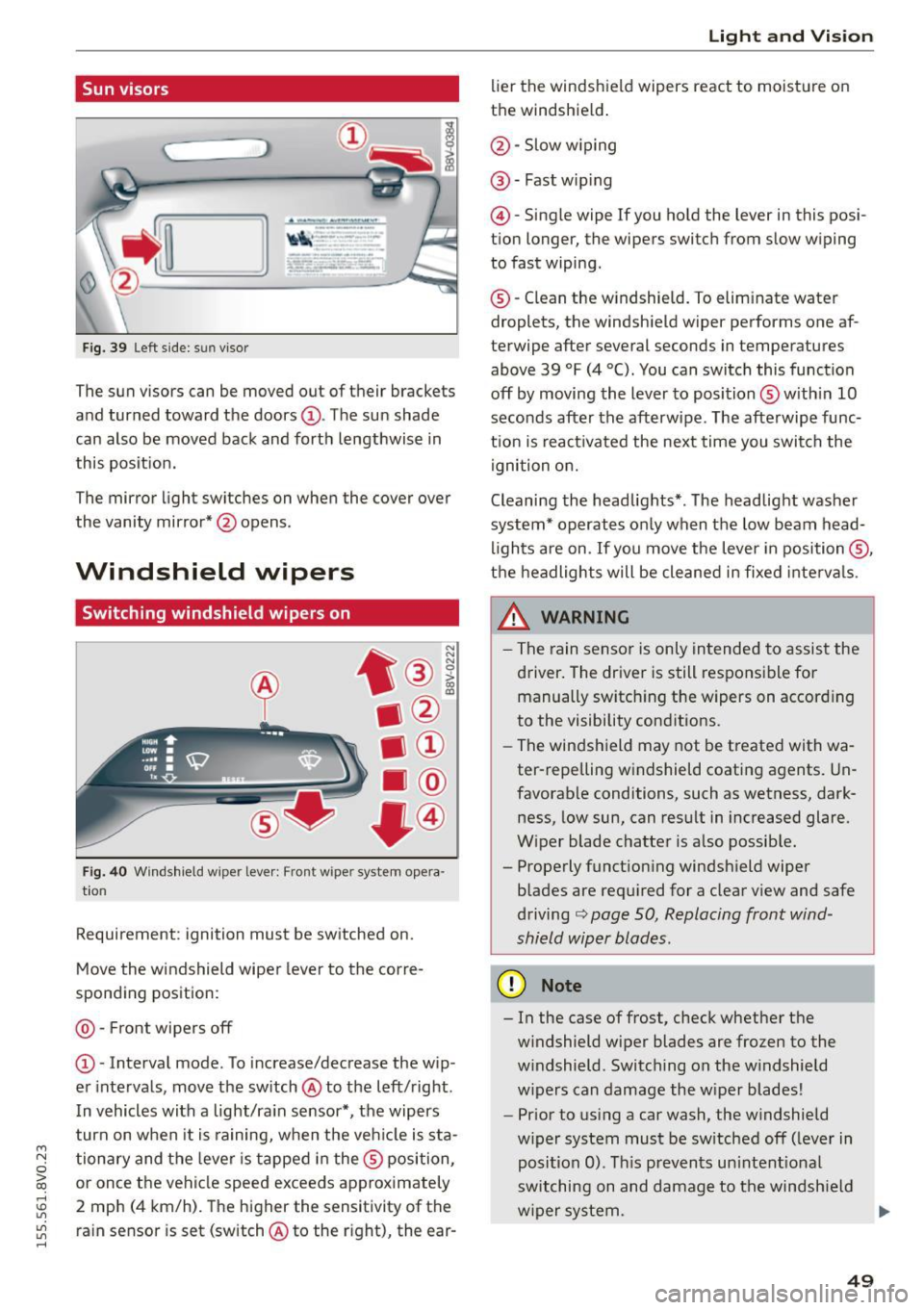
Fig. 39 Left side: su n viso r
The sun visors can be moved out of their brackets
and turned toward the doors@. The sun shade
can also be moved back and forth lengthwise in
this posit ion.
The mirror light switches on when the cover over
the vanity mirror* @opens .
Windshield wipers
Switching windshield wipers on
Fig. 40 Windshield wiper leve r: Front wiper system opera
tion
Requirement : ignition must be switched on.
Move the windshield wiper lever to the corre
sponding position:
@ -Front wipers off
@ -Interval mode. To increase/decrease the w ip
er intervals, move the switch @to the left/right .
I n vehicles with a light/ra in sensor*, the wipers
turn on when it is ra ining, when the veh icle is sta
tionary and the lever is tapped in the ® position,
or once the vehicle speed exceeds approximately
2 mph (4 km/h). The higher the sensitivity of the ra in sensor is set (switch @to the r ight), the ear-
Light and Visio n
lier the windshield wipers react to moisture on
the windshield .
@-Slow w iping
@ -Fast wip ing
@ -Single wipe If you ho ld the lever in this posi
tion longer, the wipers switch from slow wiping
to fast wiping.
® -C lean the w indshield. To elim inate water
droplets, the windsh ield wiper performs one af
terwipe after several seconds in temperatures
above 39 °F (4 °(). You can switch this function
off by moving the lever to position ® with in 10
seconds after the afterwipe. The afterwipe func
t ion is react ivated the nex t time you switch the
ignition on.
Cleaning the headlights*. The headlight washer
system* operates only when the low beam head
li ghts are on . If you move the lever in position @,
t h e headlights will be cleaned in fixed interva ls .
_& WARNING
- The rain sensor is only intended to assist the
driver. The driver is still responsible for manually switch ing the w ipers on according
to the visibility cond itions.
- The windshield may not be treated with wa
ter-repelling w indshield coat ing agents. Un
favorable conditions, such as wetness, dark
ness, low sun, can result in increased glare.
W iper blade chatter is also possib le.
- Properly function ing windsh ield wiper
b lades are req uired for a clear v iew and safe
driving
c::> page 50, Replacing front wind
shield wiper blades .
(D Note
- In the case of frost, check whether the
windshield wiper blades are fr ozen to the
w indshield. Switching on the w indshield
w ipers can damage the w iper blades!
- Prior to using a car wash, the windshield
w iper system must be sw itched off (leve r in
posit ion 0). T his prevents un intent ional
switching on and damage to the windsh ield
w iper system. .,.
49
Page 52 of 282
Light and Vi sion
- Do not use the wipers to remove ice from
the windows. Using windshie ld wipers as ice
scrapers destroys the wiper blades.
(D Tips
- The windshield wipers are switched off
when the ignition is turned off. Activate the
windsh ield wipers after the ignition is
switched back on by moving the windsh ield
wiper lever to any pos it ion.
- Worn or dirty windshie ld wiper b lades result
i n streaking. This can affect the rain sensor
funct ion. Check your windshield wiper
blades regularly .
- The washer fluid nozzles in the w indshield
washer system are heated* at low tempera
tures when the ignit io n is on.
- When stopp ing temporarily, such as at a
traffic light, the speed of the windsh ield
wipers automatically reduces by one level.
- In vehicles with an MMI, you can switch the
rain sensor or off in the
Dri ver ass istanc e
menu.
Cleaning windshield wiper blades
Clea n the wiper blades when you see wipe r
s treaks. Use a soft cloth and a glass cleaner.
.., Place the w indshield wiper arms in the serv ice
pos ition ¢
page 50 .
.., Fo ld the windshield wipe r arms away from the
winds hield .
A WARNING
Dirty windshie ld wiper blades can impai r vi
sion , which increases the risk of an accident.
(D Note
If you see streaks aga in after cleaning the
w iper blades, the b lades must be replaced
¢page SO.
so
-
Replacing front windshield wiper blades
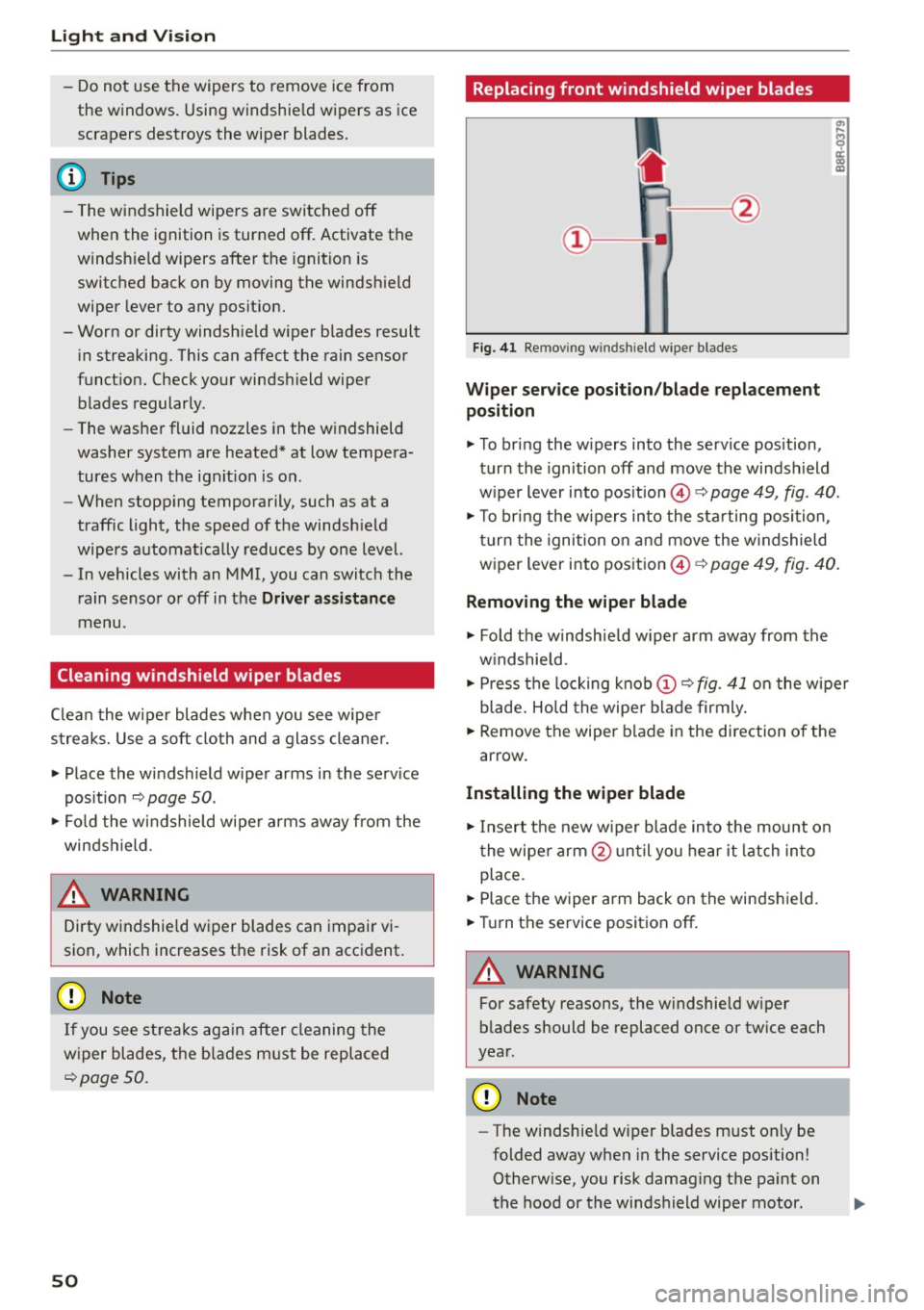
F ig. 41 Re mov ing wind shi eld w iper blades
Wiper service po sit ion /blade repl acement
position
.., To br ing the w ipers into the service pos ition,
turn the ignition off and move the windsh ield
w iper lever into position @¢
page 49, fig. 40.
.., To br ing the w ipers into the sta rting position ,
turn the ignition on and move the w indshield
wiper lever into position ©¢
page 49, fig. 40.
Removing the wiper blade
... Fold the windshie ld w iper arm away from the
w indshield.
.., Press the locking knob
(D C? fig . 41 o n the wiper
blade . Hold the wipe r blade firmly.
... Remove the wiper blade in the direction of the
arrow .
Installing the wipe r blade
.., Insert the new wiper blade into the mount on
the wiper arm @unt il you hear it latch in to
place.
... Place the wiper arm back on the windshield.
... Turn th e service position off .
A WARNING
-
For safety reasons, the w indshie ld w iper
b lades should be replaced once or tw ice each
year .
Q) Note
-The windshie ld w iper blades must only be
folded away when in the service position!
Otherw ise, you risk damag ing the pa int on
the hood or the windshield wiper motor .
Page 57 of 282
....,
N
0 > co
rl I.O
"'
"'
"'
rl
Power seat adjustment
Applies to vehicles: with power adjustable seats
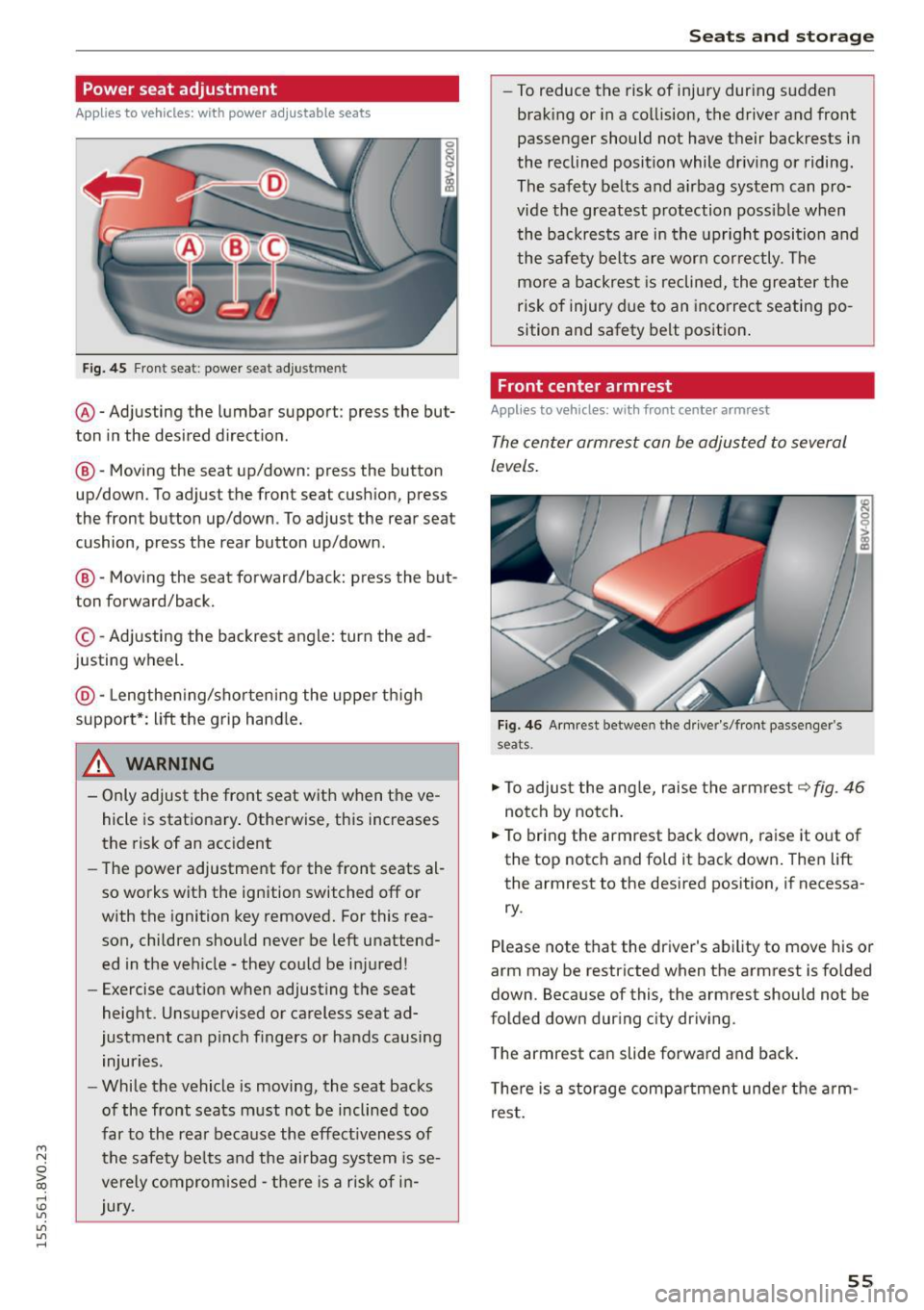
Fig. 45 Front seat: power seat adjus tment
@ -Adjusting the lumbar support: press the but
ton in the desired direction .
®-Moving the seat up/down: press the button
up/down. To adjust the front seat cush ion, press
the front button up/down . To adjust the rear seat
cushion, press the rear button up/down.
@ -Moving the seat forward/back: press the but
ton forward/back.
© -Adjusting the backrest angle: turn the ad
justing wheel.
@ -Lengthening/shortening the upper thigh
support*: lift the grip hand le.
A WARNING
- Only adjust the front seat with when the ve
hicle is stationary . Otherwise, this increases
the risk of an accident
- The power adjustment for the front seats al
so works with the ignition switched off or
with the ignition key removed. For this rea
son, children should never be left unattend ed in the vehicle - they could be injured!
- Exercise caution when adjusting the seat
height. Unsupervised or careless seat ad
justment can pinch fingers or hands causing
injuries.
- While the vehicle is moving, the seat backs
of the front seats must not be inclined too
far to the rear because the effect iveness of
the safety be lts and the airbag system is se
verely compromised -there is a risk of in
jury.
Seats and storage
- To reduce the risk of injury during sudden
braking or in a collision, the driver and front
passenger should not have their backrests in
the reclined position while driving or riding.
The safety belts and airbag system can pro
vide the greatest protection possible when
the backrests are in the upright position and
the safety belts are worn correctly. The
more a backrest is reclined, the greater the
risk of injury due to an incorrect seating po
sition and safety belt position.
Front center armrest
Applies to vehicles: wit h front center armrest
The center armrest can be adjusted to several
levels.
Fig. 46 Armrest between the driver's/front passenger's
seats .
.,.. To adjust the angle, raise the armrest ~fig. 46
notch by notch.
.,.. To bring the armrest back down, raise it out of
the top notch and fold it back down. Then lift
the armrest to the desired position, if necessa
ry.
Please note tha t the driver's ability to move his or
arm may be restricted when the armrest is folded
down. Because of this, the armrest should not be
folded down during city driving.
The armrest can slide forward and back.
There is a storage compartment under the arm
rest.
55
Page 70 of 282
Warm and col d
Adjusting the air vents
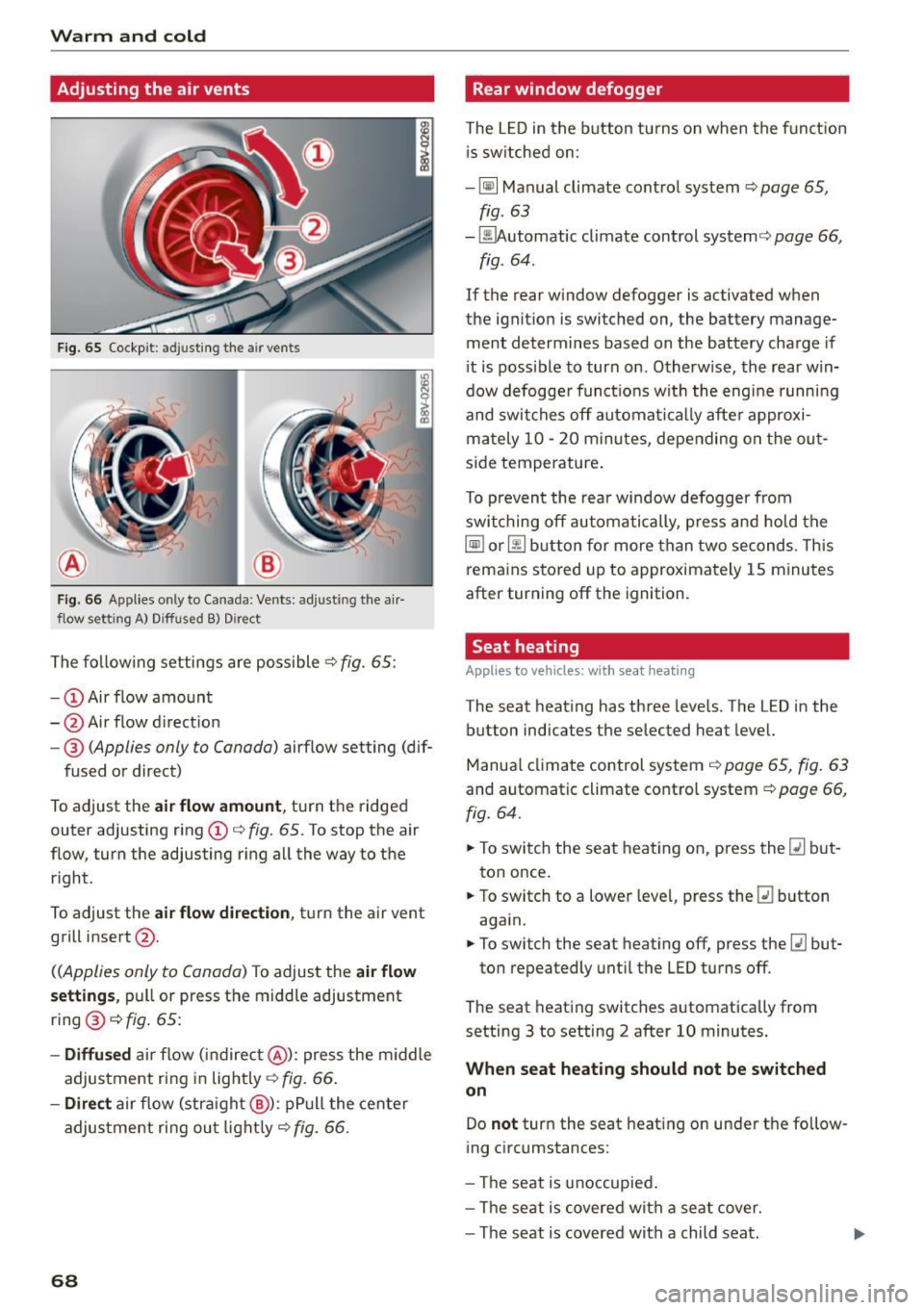
Fig. 65 Cockp it: adjusting the air vents
®
Fig. 66 Applies on ly to Canada: Ven ts: adjusting the air
flow setting A) Diffused B) Dire ct
The fo llow ing settings are possible .:;> fig. 65:
- CD Air flow amount
- @ Air flow d irection
- @
(Applies only to Canada) airflow setting (dif-
fused or direct)
To adjust the
air flow amount , turn the ridged
outer adjusting ring CD¢
fig. 65. To stop the air
flow, turn the adjusting r ing all the way to the
right .
To adjust the
air flow di rection , tu rn the air vent
grill insert @.
((Applies only to Canada) To adjust the air flow
s etting s,
pull or press the midd le adjustment
ring @¢
fig. 65:
-Diffu sed ai r flow (indirec t@ ): press the m iddle
adjustment ring in lightly¢
fig. 66 .
-Direct air flow (stra ight @): pP ull the center
adjus tment ri ng ou t light ly¢
fig. 66 .
68
Rear window defogger
The L ED in the button tu rns on when the funct ion
i s sw itched on:
- ~ Manual climate contro l system ¢
page 65,
fig. 63
- ~ utomatic climate control system¢ page 66,
fig . 64 .
If the rear window defogger is activated when
the ignit ion is switched on, the battery manage
ment determines based on the battery charge if
i t is possible to turn on . Otherw ise, the rear win
dow defogge r funct ions w ith the eng ine runni ng
and swit ches off automat ically afte r approxi
mately 10 -20 m inu tes, depending o n the ou t
s ide temperature .
To p revent the rear window defogger from
swi tching off automatically, p re ss and hold t he
~ or~ button fo r more than two seconds. Th is
rema ins stored up to approximately 1 5 minutes
after turning off the ignition .
Seat heating
Applies to vehicles: with seat heating
The seat heat ing has three leve ls. The LED in the
button indicates the selected heat level.
Manua l climate control system ¢
page 65, fig. 63
and automatic climate control system ¢ page 66,
fig. 64.
.. To swi tch the seat heat ing on, press the~ but
ton once.
.. To switch to a lowe r leve l, p ress the ~ button
aga in.
.. To switch the seat heating off, press the~ but-
ton repeatedly unti l the LED turns off.
The seat heating switches automatically from
setting 3 to setting 2 after 10 minutes .
When seat heating should not be switched
on
Do not turn the seat heating on under t he fo llow
ing circumstances:
- The seat is unoccupied .
- The se at is covered wit h a seat cover.
- The seat is covered with a child seat.
Page 71 of 282
M N
0 > co ,...., \!) ,.,.,
,.,.,
,.,., ,....,
-The seat is damp or wet.
~ WARNING
Individuals with reduced sensitivity to pain or
temperature could develop burns when using
the seat heating function. To reduce the risk
of injury, these individuals should not use seat
heating.
(D Note
To avoid damage to the heating elements in the seats, do not kneel on the seats or place
heavy loads on a small area of the seat.
(D Tips
- The setting for the seat heating on the driv
er's side is assigned to the key that is in use.
- If the front passenger's seat heating is
turned on, it will not turn on again automat
ically if more than 10 minutes have passed
between switching the ignition
off and
switching it on again.
Auxiliary heater
Appl ies to vehicles: with diesel engine
In cool outside temperatures, the electric auxili
ary heater helps the vehicle interior to warm
more quickly. The auxiliary heater switches on
and
off automatically according to the vehicle
heating settings.
The "auxiliary heater" function can be switched
on and
off in the MMI. Select: the !MENUI button
> Car > Systems* control button > AC > Auxiliary
heater.
Warm and cold
69