Page 443 of 872
443
3-2. Using the audio system
3
Interior features
SIENNA_OM_OM45483U_(U)
Repeat play
■ Repeating a track
Press or that corresponds to “RPT”.
To cancel, press the button again.
■Repeating all of the tracks on a CD (type C only)
Press that corresponds to “RPT” twice.
To cancel, press the button again.
Switching the display
Press .
Each time is pressed, the display changes in the following order:
Ty p e A
Track no./Elapsed time CD title Track name.
Ty p e B a n d C
Track title Track name/Artist name Track name/Elapsed time.
■Display (type A only)
Up to 12 characters can be displayed at a time.
If there are 13 characters or more, pressing and holding for 1 second
or more will display the remaining characters.
A maximum of 24 characters can be displayed.
If is pressed for 1 second or more again or has not been pressed for 6
seconds or more, the display will return to the first 12 characters.
Depending on the contents recorded, the characters may not be displayed
properly or may not be displayed at all.
Page 451 of 872
451
3-2. Using the audio system
3
Interior features
SIENNA_OM_OM45483U_(U)
Fast forwarding and reversing files
Ty p e A
Press or .
Type B and C
Press and hold “
” or “ ” on .
Playing and pausing files (type B and C)
Press .
Random playback■ Playing files from a particular folder in random order
Press or that corresponds to “RDM”.
To cancel, press the button again.
■Playing all of the files on a disc in random order
Press and hold or that corresponds to “RDM” until you
hear a beep.
To cancel, press the button again.
Page 452 of 872
452 3-2. Using the audio system
SIENNA_OM_OM45483U_(U)
Repeat play■ Repeating a file
Press or that corresponds to “RPT”.
To cancel, press the button again.
■Repeating all of the files in a folder
Ty p e A
Press and hold until you hear a beep.
To cancel, press the button again.
Type B and C
Press that corresponds to “RPT” twice.
To cancel, press the button again.
■Repeating all of the files in a disc (type C only)
Press that corresponds to “RPT” three times.
To cancel, press the button again.
Switching the display
Press .
Each time is pressed, the display changes in the following order:
Ty p e A
Folder no./File no./Elapsed time Folder name File name Album
title (MP3 only) Track title Artist name.
Ty p e B a n d C
Track title Track title/Artist name Track title/Album name Track
title/Elapsed time.
Page 459 of 872
459
3-2. Using the audio system
3
Interior features
SIENNA_OM_OM45483U_(U)
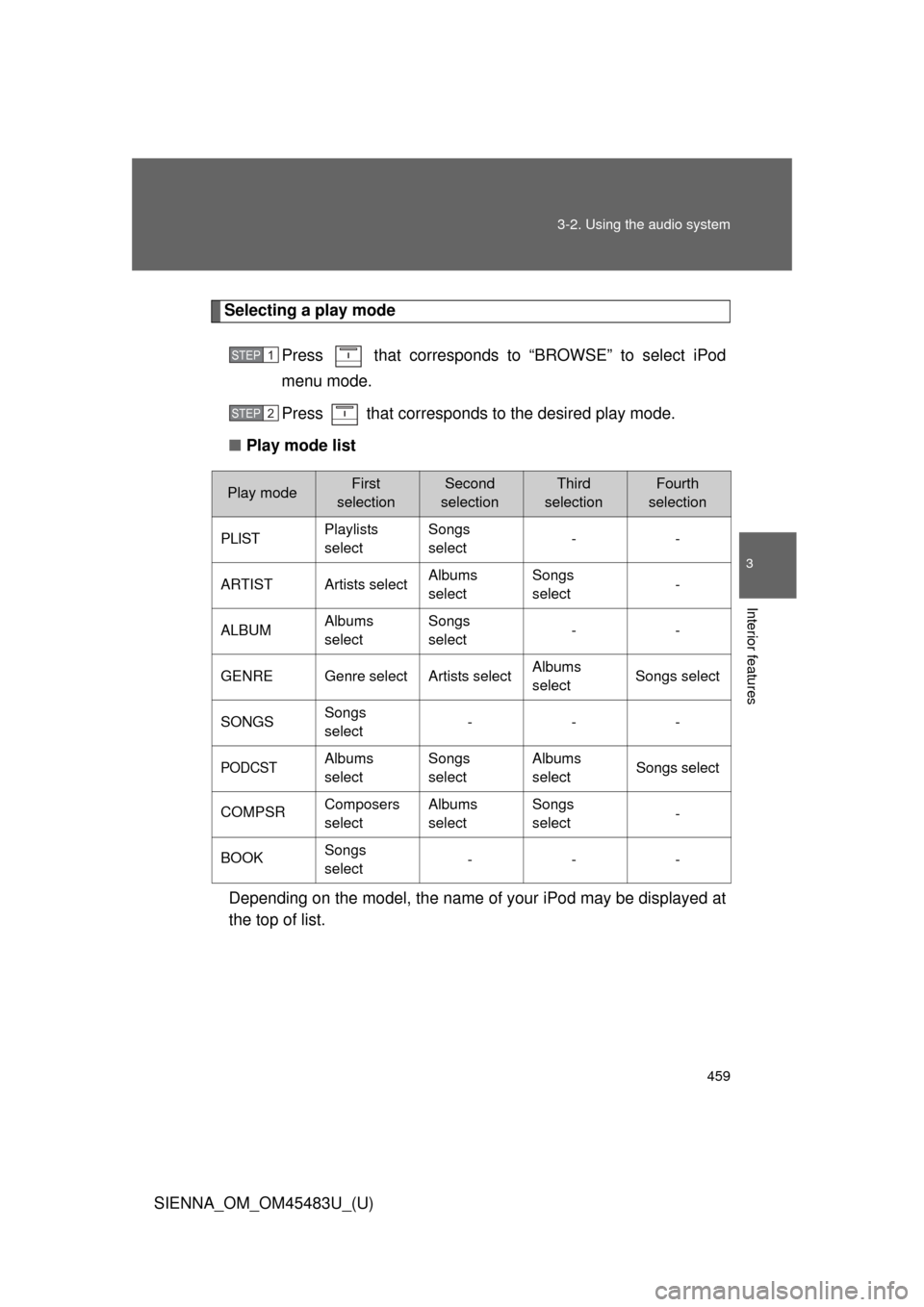
Selecting a play mode
Press that corresponds to “BROWSE” to select iPod
menu mode.
Press that corresponds to the desired play mode.
■ Play mode list
Depending on the model, the name of your iPod may be displayed at
the top of list.
STEP1
STEP2
Play modeFirst
selectionSecond
selectionThird
selectionFourth
selection
PLISTPlaylists
selectSongs
select--
ARTISTArtists selectAlbums
selectSongs
select-
ALBUMAlbums
selectSongs
select--
GENREGenre selectArtists selectAlbums
selectSongs select
SONGSSongs
select---
PODCSTAlbums
selectSongs
selectAlbums
selectSongs select
COMPSRComposers
selectAlbums
selectSongs
select-
BOOKSongs
select---
Page 460 of 872
460 3-2. Using the audio system
SIENNA_OM_OM45483U_(U)■
Selecting a list
Turn to display the first selection list.
Press to select the desired item.
Pressing that corresponds to “MORE” changes to the
second selection list.
Repeat the same procedure to select the desired song name.
To return to the previous selection list, press that corresponds
to “ ”.
Selecting songs from a song list
Press that corresponds to “LIST”.
The current playlist is displayed.
Turning to select the desired song.
Press returns the screen from list display to the previous
screen.
Selecting songs
Turn or press “ ” or “ ” on to select the desired song.
STEP1
STEP2
STEP3
STEP1
STEP2
Page 461 of 872
461
3-2. Using the audio system
3
Interior features
SIENNA_OM_OM45483U_(U)
Playing and pausing songs
Press the .
Fast-forwarding and rewinding songs
Press and hold “
” or “ ” on .
Shuffle playback
■ Playing songs from one playlis t or album in random order
Press that corresponds to “RDM”.
To cancel, press the button twice.
■ Playing songs from a ll the playlists or albums in random order
Press that corresponds to “RDM” twice.
To cancel, press the button again.
Repeat play
Press that corresponds to “RPT”.
To cancel, press the button again.
Even when the repeat play option has not been selected, playback will
automatically continue from the first song in the current play list once the
last song has ended.
Page 462 of 872
462 3-2. Using the audio system
SIENNA_OM_OM45483U_(U)
Switching the displayPress .
Each time the button is pressed, the display changes in the following
order: Track title Track title/Artist name Track title/Album name
Track title/Elapsed
■ About iPod
●Apple is not responsible for the operation of this device or its compliance
with safety and regulatory standards.
● iPod is a trademark of Apple Inc., registered in the U.S. and other coun-
tries.
■ iPod functions
●When an iPod is connected and the audio source is changed to iPod
mode, the iPod will resume play from the same point in which it was last
used.
● Depending on the iPod that is connected to the system, certain functions
may not be available. Disconnecting the device and reconnecting it once
again may resolve some malfunctions.
■ iPod problems
To resolve most problems encountered when using your iPod, disconnect
your iPod from the vehicle iPod connection and reset it.
For instructions on how to reset your iPod, refer to your iPod Owner’s Man-
ual.
■ Error messages
“iPod ERROR”: This indicates a problem in the iPod, inside the USB ECU
in the vehicle or the connection between them.
“NO SONGS”: This indicates that there is no music data in the iPod.
“UPDATE YOUR iPod”: This indicates that the version of the iPod is not compatible.
Page 468 of 872
468 3-2. Using the audio system
SIENNA_OM_OM45483U_(U)
Random playback■ Playing files from a folder in random order
Press that corresponds to “RDM”.
To cancel, press the button twice.
■Playing all the files from a USB memory in random order
Press that corresponds to “RDM” twice.
To cancel, press the button again.
Repeat play
■ Repeating a file
Press that corresponds to “RPT”.
To cancel, press the button twice.
■Repeating all the files in a folder
Press that corresponds to “RPT” twice.
To cancel, press the button again.
Switching the display
Press .
Each time the button is pressed, the display changes in the following
order: Track title Track title/Artist name Track title/Album name
Track title/Elapsed time