Page 1 of 872
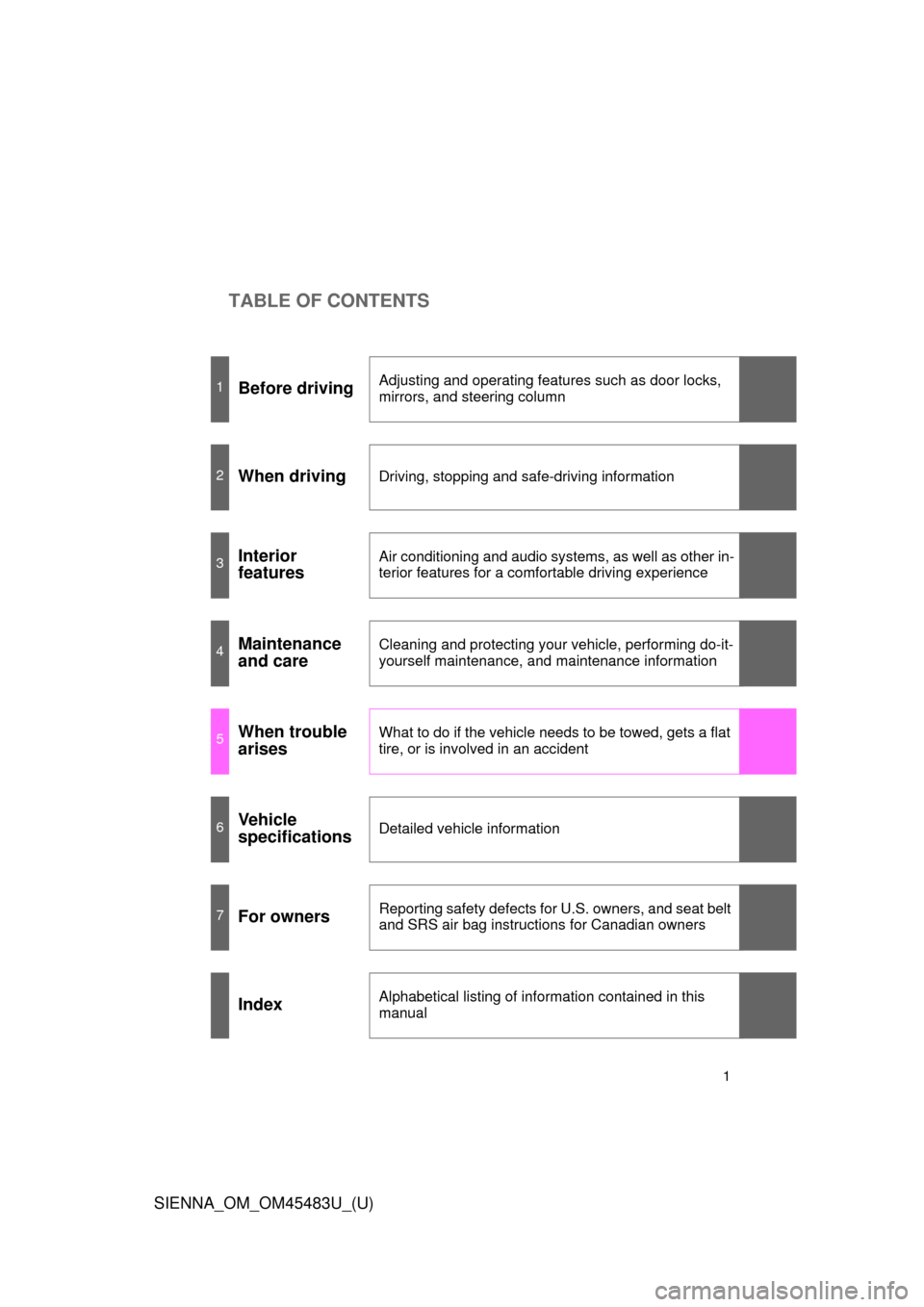
TABLE OF CONTENTS
SIENNA_OM_OM45483U_(U)
1
1Before drivingAdjusting and operating features such as door locks,
mirrors, and steering column
2When drivingDriving, stopping and safe-driving information
3Interior
featuresAir conditioning and audio systems, as well as other in-
terior features for a comfortable driving experience
4Maintenance
and careCleaning and protecting your vehicle, performing do-it-
yourself maintenance, and maintenance information
5When trouble
arisesWhat to do if the vehicle needs to be towed, gets a flat
tire, or is involved in an accident
6Vehicle
specificationsDetailed vehicle information
7For ownersReporting safety defects for U.S. owners, and seat belt
and SRS air bag instructions for Canadian owners
IndexAlphabetical listing of information contained in this
manual
Page 4 of 872

TABLE OF CONTENTSIndex
4
SIENNA_OM_OM45483U_(U)
3-1. Using the air conditioning system and defogger
Front manual air conditioning system.......... 396
Front automatic air conditioning system.......... 404
Rear manual air conditioning system.......... 414
Rear automatic air conditioning system.......... 417
Rear window and outside rear view mirror defoggers,
and windshield wiper
de-icer .............................. 421
3-2. Using the audio system Audio system type .............. 423
Using the radio ................... 428
Using the CD player ........... 438
Playing MP3 and WMA discs ....................... 447
Operating an iPod .............. 458
Operating a USB memory ............................ 465
Optimal use of the audio system .............................. 473
Using the AUX port ............ 478
Using the steering switches ........................... 479
Detachable pole antenna ............................ 483 3-3. Using the Bluetooth
® audio
system
Bluetooth
® audio
system .............................. 486
Using the Bluetooth
®
audio system .................... 490
Operating a Bluetooth
®
enabled portable player .... 496
Setting up a Bluetooth
®
enabled portable player .... 498
Bluetooth
® audio system
setup ................................. 503
3-4. Using the rear audio system Rear seat entertainment system features ................ 504
Using the DVD player (DVD video) ...................... 515
Using the DVD player (video CD) ........................ 525
Using the DVD player (audio CD/CD text) ........... 529
Using the DVD player (WMA/MP3 discs) ............. 530
Using the video mode ......... 532
Changing the DVD initial setting ............................... 534
3Interior features
Page 16 of 872
SIENNA_OM_OM45483U_(U)
16
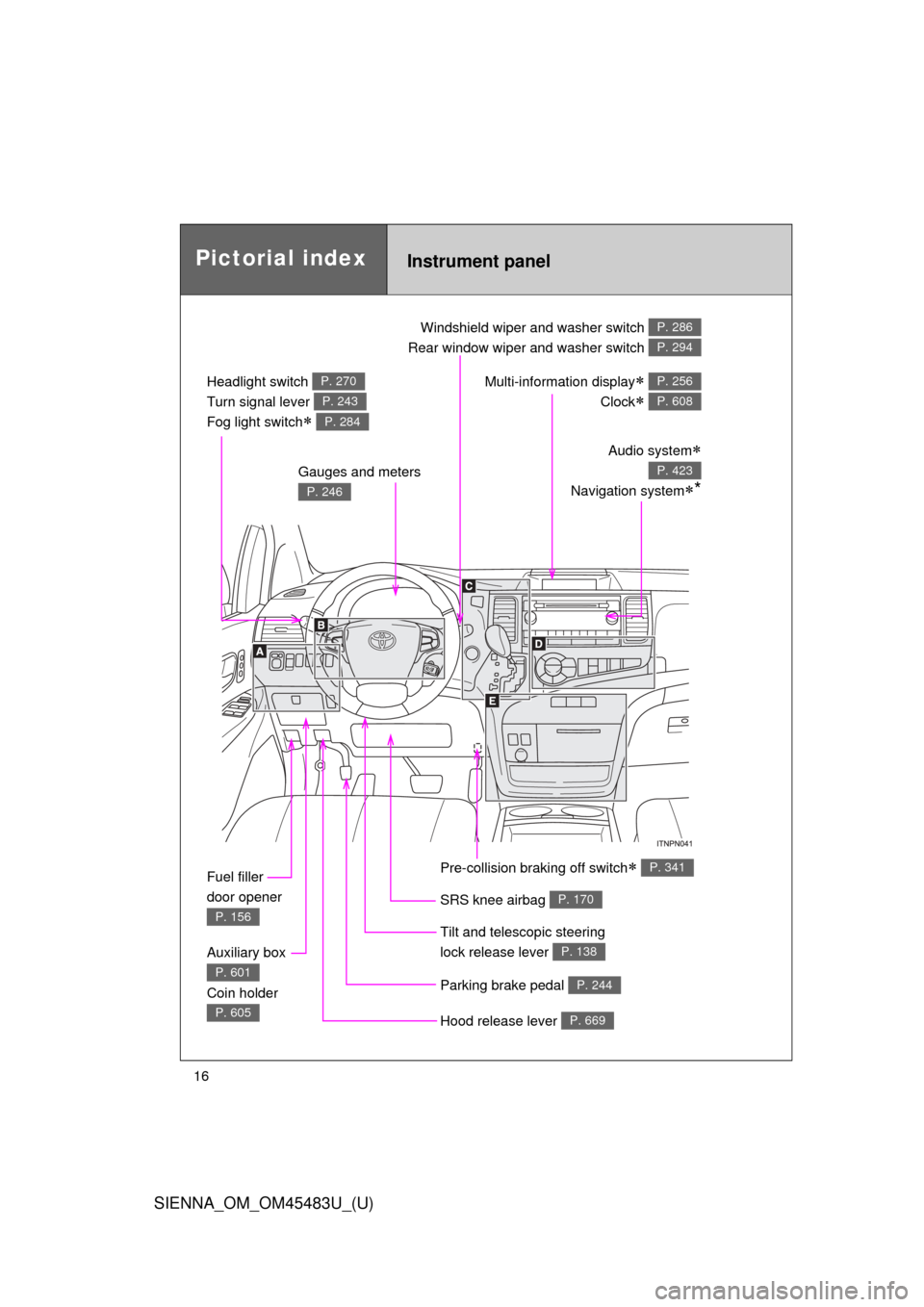
Pictorial indexInstrument panel
Headlight switch
Turn signal lever
Fog light switch
P. 270
P. 243
P. 284
Windshield wiper and washer switch
Rear window wiper and washer switch P. 286
P. 294
Gauges and meters
P. 246
Audio system
Navigation system*
P. 423
Multi-information display
Clock
P. 256
P. 608
Fuel filler
door opener
P. 156
Auxiliary box
Coin holder
P. 601
P. 605Hood release lever P. 669
Parking brake pedal P. 244
Tilt and telescopic steering
lock release lever
P. 138
SRS knee airbag P. 170
Pre-collision braking off switch P. 341
Page 18 of 872
SIENNA_OM_OM45483U_(U)
18
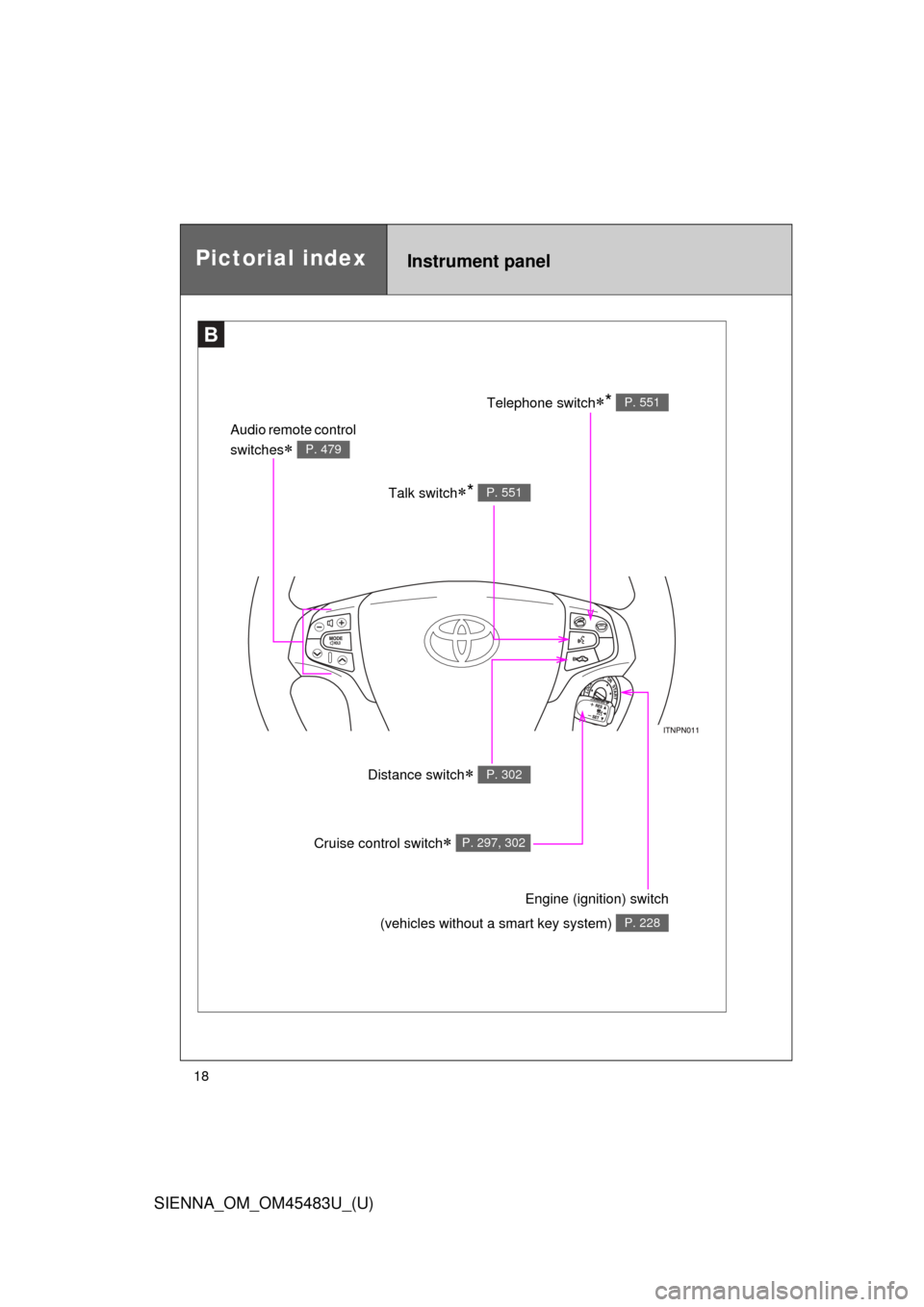
Pictorial indexInstrument panel
B
Talk switch* P. 551
Audio remote control
switches
P. 479
Telephone switch* P. 551
Distance switch P. 302
Engine (ignition) switch
(vehicles without a smart key system)
P. 228
Cruise control switch P. 297, 302
Page 35 of 872
35
1-1. Key information
1
Before driving
SIENNA_OM_OM45483U_(U)
NOTICE
■
To prevent key damage
Observe the following:
●Do not drop the keys, subject them to strong shocks or bend them.
● Do not expose the keys to high temperatures for a long periods of time.
● Do not get the keys wet or wash them in an ultrasonic washer etc.
● Do not attach metallic or magnetic materials to the keys or place the keys
close to such materials.
● Do not disassemble the keys.
● Do not attach a sticker or anything else to the surface of the electronic key.
● Do not place the keys near objects that produce magnetic fields, such as
TVs, audio systems, induction cookers, or medical electrical equipment,
such as low-frequency therapy equipment.
■ Carrying the electronic key on your person (vehicles with a smart key
system)
Carry the electronic key 3.9 in. (10 cm) or more away from electric appli-
ances that are turned on.
■ In case of a smart key system malf unction or other key-related prob-
lems (vehicles with a smart key system)
Take your vehicle with all the electronic keys provided with your vehicle to
your Toyota dealer.
■ When a vehicle key is lost (vehicles with a smart key system)
If the key remains lost, the risk of vehicle theft increases significantly. Visit
your Toyota dealer immediately with all remaining electronic keys that were
provided with your vehicle.
Page 46 of 872

46 1-2. Opening, closing and locking the doors
SIENNA_OM_OM45483U_(U)
■Conditions affecting operation
The smart key system uses weak radio waves. In the following situations,
the communication between the electronic key and the vehicle may be
affected, preventing the smart key system and wireless remote control from
operating properly. (Way of coping P. 781)
● When the electronic key battery is depleted
● Near a TV tower, electric power plant, gas station, radio station, large dis-
play, airport or other facility that generates strong radio waves or electri-
cal noise
● When carrying a portable radio, ce llular phone, cordless phone or other
wireless communication devices
● When the electronic key is in contact with, or is covered by the following
objects
• Cards to which aluminum foil is attached
• Cigarette boxes that have aluminum foil inside
• Metallic wallets or bags
• Coins
• Hand warmers made of metal
• Media such as CDs and DVDs
● When multiple electronic keys are in the vicinity
● When another wireless key (that emits radio waves) is being used nearby
● When carrying or using the electronic key together with the following
devices that emit radio waves
• Another vehicle’s electronic key
• A wireless key that emits radio waves
• Personal computers or personal digital assistants (PDAs)
• Digital audio players
• Portable game systems
Page 228 of 872
228
2-1. Driving procedures
SIENNA_OM_OM45483U_(U)
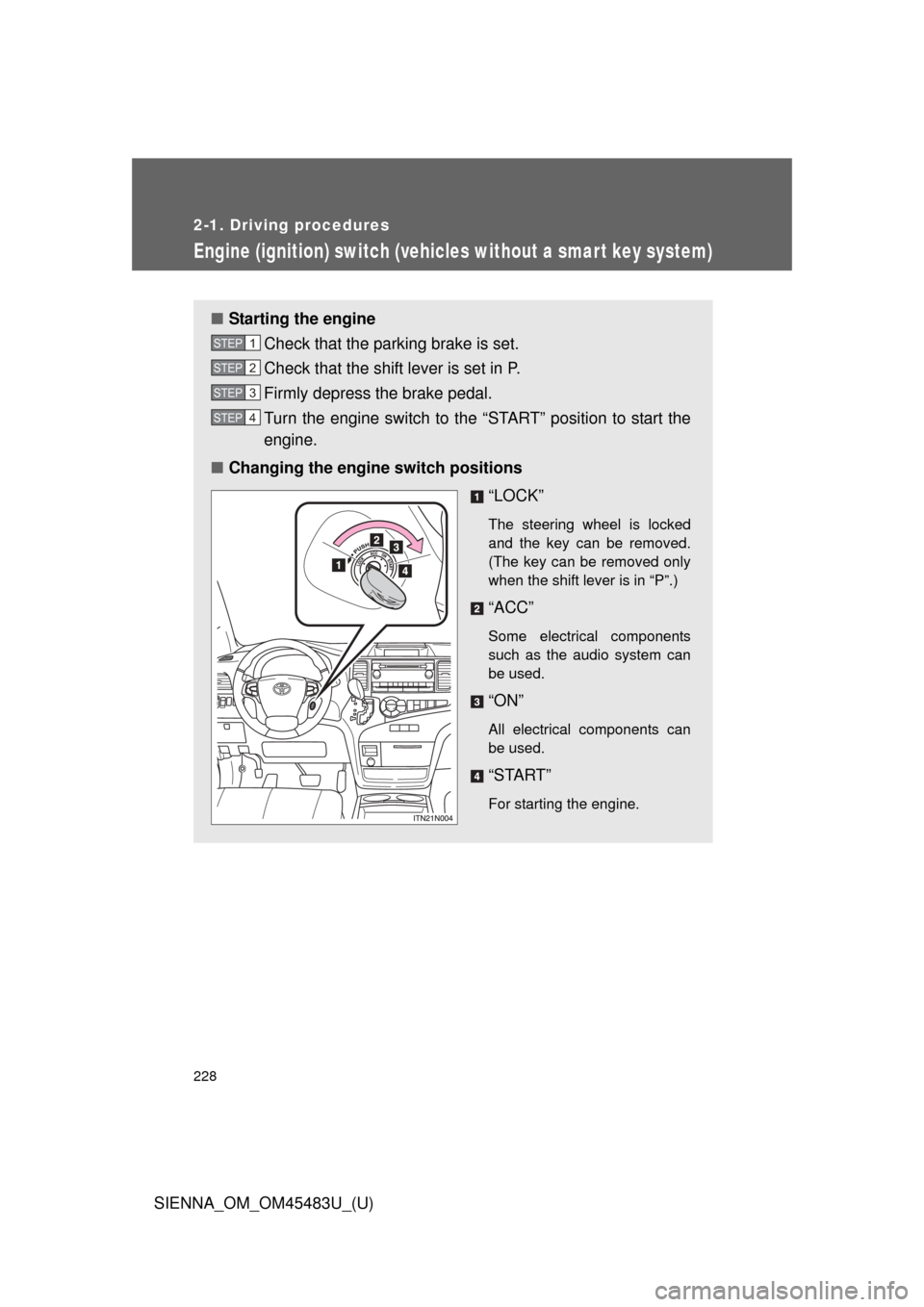
Engine (ignition) switch (vehicles without a smar t key system)
■Starting the engine
Check that the parking brake is set.
Check that the shift lever is set in P.
Firmly depress the brake pedal.
Turn the engine switch to the “START” position to start the
engine.
■ Changing the engine switch positions
“LOCK”
The steering wheel is locked
and the key can be removed.
(The key can be removed only
when the shift lever is in “P”.)
“ACC”
Some electrical components
such as the audio system can
be used.
“ON”
All electrical components can
be used.
“START”
For starting the engine.
STEP1
STEP2
STEP3
STEP4
Page 233 of 872
233
2-1. Driving procedures
2
When driving
SIENNA_OM_OM45483U_(U)
■
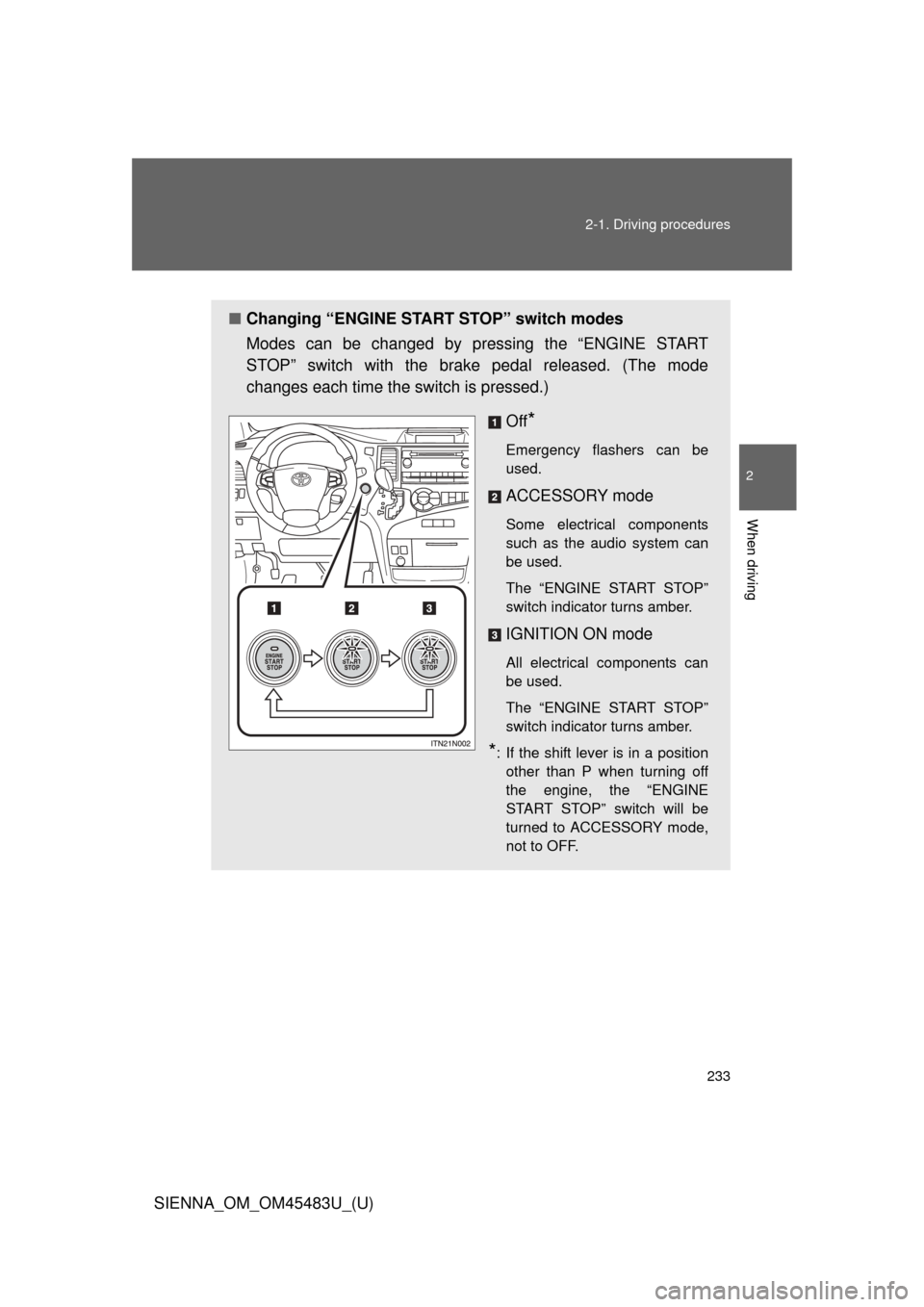
Changing “ENGINE START STOP” switch modes
Modes can be changed by pressing the “ENGINE START
STOP” switch with the brake pedal released. (The mode
changes each time the switch is pressed.)
Off
*
Emergency flashers can be
used.
ACCESSORY mode
Some electrical components
such as the audio system can
be used.
The “ENGINE START STOP”
switch indicator turns amber.
IGNITION ON mode
All electrical components can
be used.
The “ENGINE START STOP”
switch indicator turns amber.
*: If the shift lever is in a positionother than P when turning off
the engine, the “ENGINE
START STOP” switch will be
turned to ACCESSORY mode,
not to OFF.