Page 66 of 872
66 1-2. Opening, closing and locking the doors
SIENNA_OM_OM45483U_(U)
■When all the doors are locked with the wireless remote control or key
The doors cannot be unlocked with the door lock switch.
The door lock switch can be reset by unlocking all the doors with the wire-
less remote control or key.
■ Using the mechanical key (vehicles with a smart key system)
The doors can also be locked and unlocked with the mechanical key.
(P. 781)
■ Customization that can be co nfigured at Toyota dealer
Settings (e.g. unlocking function using a key) can be changed.
(Customizable features: P. 828)
CAUTION
■To prevent an accident
Observe the following precautions while driving the vehicle.
Failing to do so may result in a door opening and an occupant falling out,
resulting in death or serious injury.
●Always use a seat belt.
● Always lock all the doors.
● Ensure that all doors are properly closed.
● Do not pull the inside handle of the doors while driving.
The doors may be opened and the passengers could be thrown out of the
vehicle which may result in serious injury or death.
Be especially careful for the front doors, as the doors may be opened even
if the inside lock buttons are in the locked position.
Page 73 of 872
73
1-2. Opening, closing and locking the doors
1
Before driving
SIENNA_OM_OM45483U_(U)
■
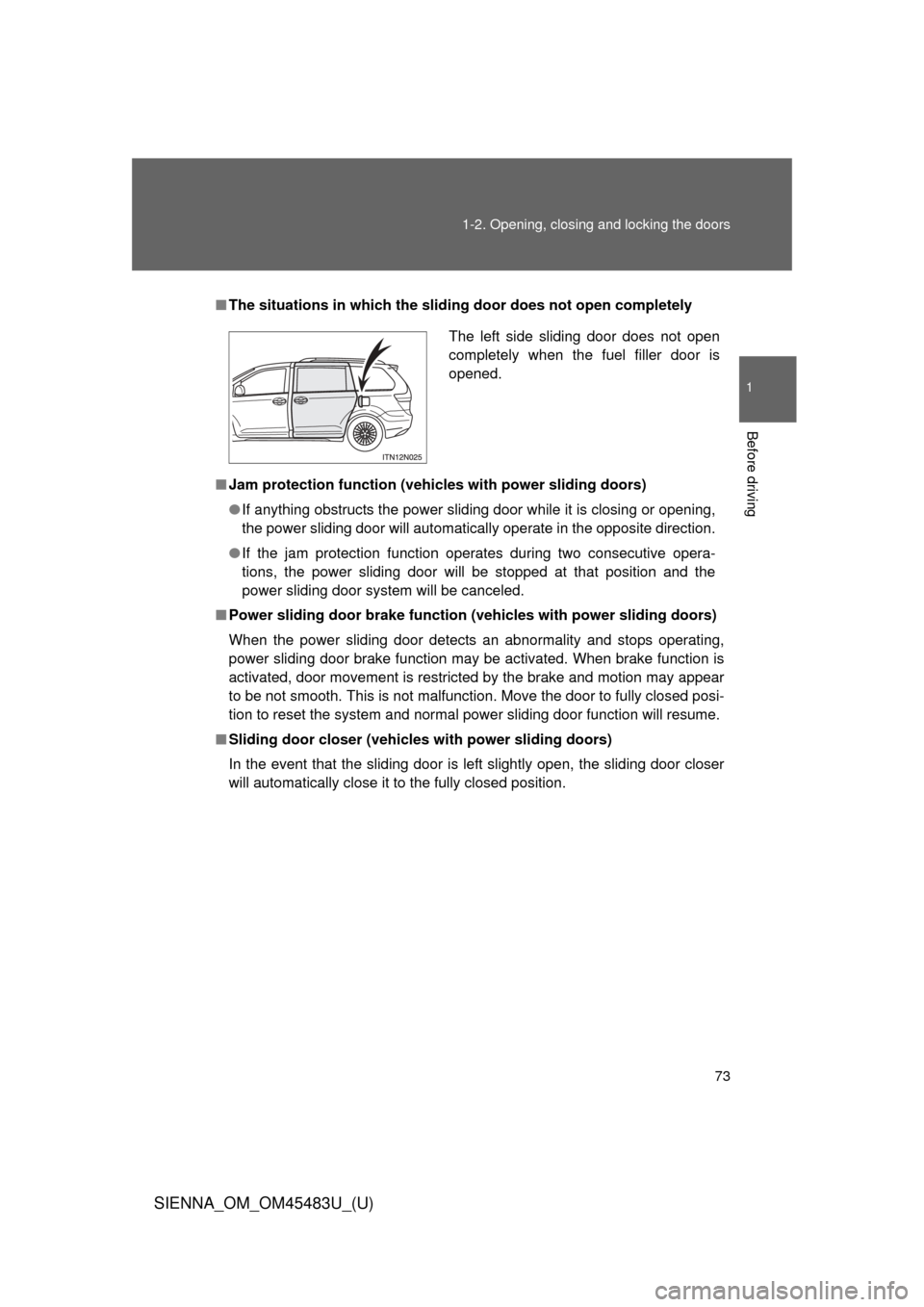
The situations in which the slid ing door does not open completely
■ Jam protection function (vehicles with power sliding doors)
●If anything obstructs the power sliding door while it is closing or opening,
the power sliding door will automatically operate in the opposite direction.
● If the jam protection function operates during two consecutive opera-
tions, the power sliding door will be stopped at that position and the
power sliding door system will be canceled.
■ Power sliding door brake function (v ehicles with power sliding doors)
When the power sliding door detects an abnormality and stops operating,
power sliding door brake function may be activated. When brake function is
activated, door movement is restricted by the brake and motion may appear
to be not smooth. This is not malfunction. Move the door to fully closed posi-
tion to reset the system and normal power sliding door function will resume.
■ Sliding door closer (vehicl es with power sliding doors)
In the event that the sliding door is left slightly open, the sliding door closer
will automatically close it to the fully closed position.
The left side sliding door does not open
completely when the fuel filler door is
opened.
Page 121 of 872
121
1
1-3. Adjustable components (seats, mirrors, steering wheel)
Before driving
SIENNA_OM_OM45483U_(U)
Driving position memor y
: If equipped
Your preferred driving position (the position of the driver’s seat and
outside rear view mirrors) can be memorized and recalled with the
touch of a button. It is also possi ble to set this function to activate
automatically when th e doors are unlocked.
Two different driving positions can be entered into memory.
■ Entering a position to memory
Vehicles without a smart key system
Turn the engine switch to the “ON” position.
Vehicles with a smart key system
Turn the “ENGINE START STOP” switch to IGNITION ON
mode.
Adjust the driver’s seat and outside rear view mirrors to the
desired positions. Press the “SET” button, then
within 3 seconds press button
“1” or “2” until the signal
beeps.
If the selected button has
already been preset, the previ-
ously recorded position will be
overwritten.
STEP1
STEP2
STEP3
Page 246 of 872
246
SIENNA_OM_OM45483U_(U)
2-2. Instrument cluster and information display
Gauges and meters
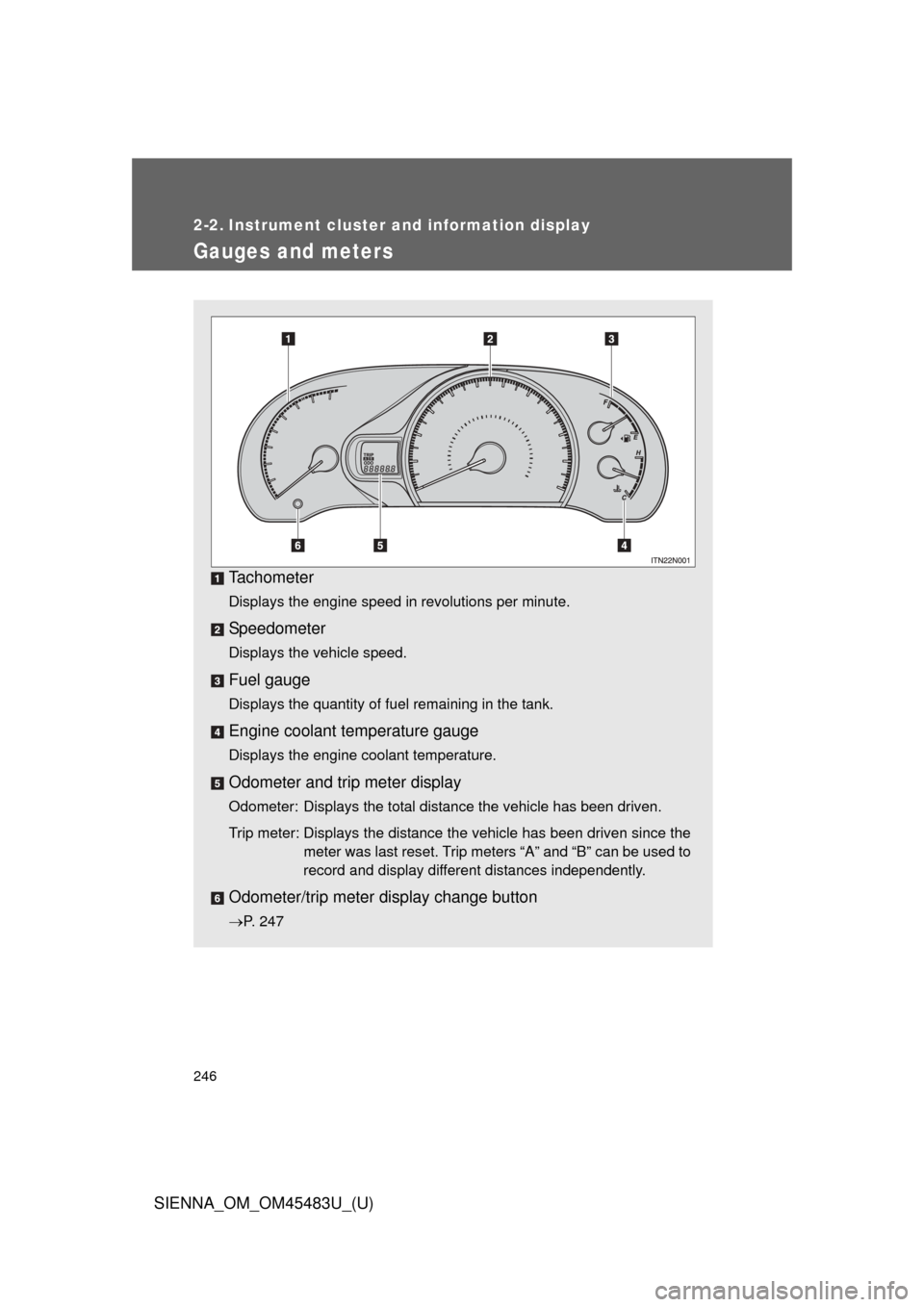
Tachometer
Displays the engine speed in revolutions per minute.
Speedometer
Displays the vehicle speed.
Fuel gauge
Displays the quantity of fuel remaining in the tank.
Engine coolant temperature gauge
Displays the engine coolant temperature.
Odometer and trip meter display
Odometer: Displays the total distance the vehicle has been driven.
Trip meter: Displays the distance the vehicle has been driven since themeter was last reset. Trip meters “A” and “B” can be used to
record and display different distances independently.
Odometer/trip meter display change button
P. 247
Page 247 of 872
247
2-2. Instrument cluster and information display
2
When driving
SIENNA_OM_OM45483U_(U)
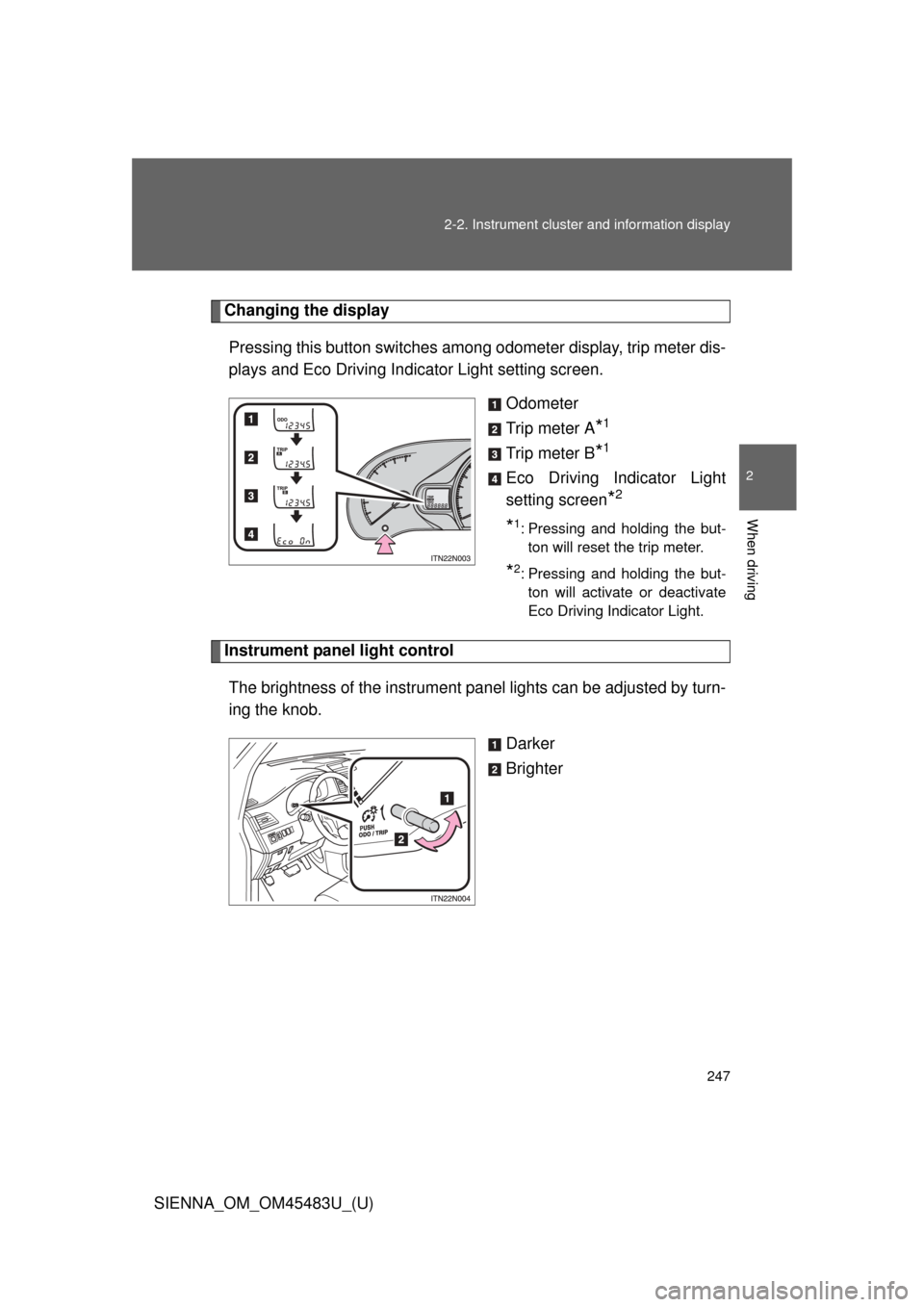
Changing the display
Pressing this button switches amon g odometer display, trip meter dis-
plays and Eco Driving Indicator Light setting screen.
Odometer
Trip meter A
*1
Trip meter B*1
Eco Driving Indicator Light
setting screen
*2
*1: Pressing and holding the but-ton will reset the trip meter.
*2: Pressing and holding the but-ton will activate or deactivate
Eco Driving Indicator Light.
Instrument panel light control
The brightness of the instrument pa nel lights can be adjusted by turn-
ing the knob.
Darker
Brighter
Page 257 of 872
257
2-2. Instrument cluster and information display
2
When driving
SIENNA_OM_OM45483U_(U)
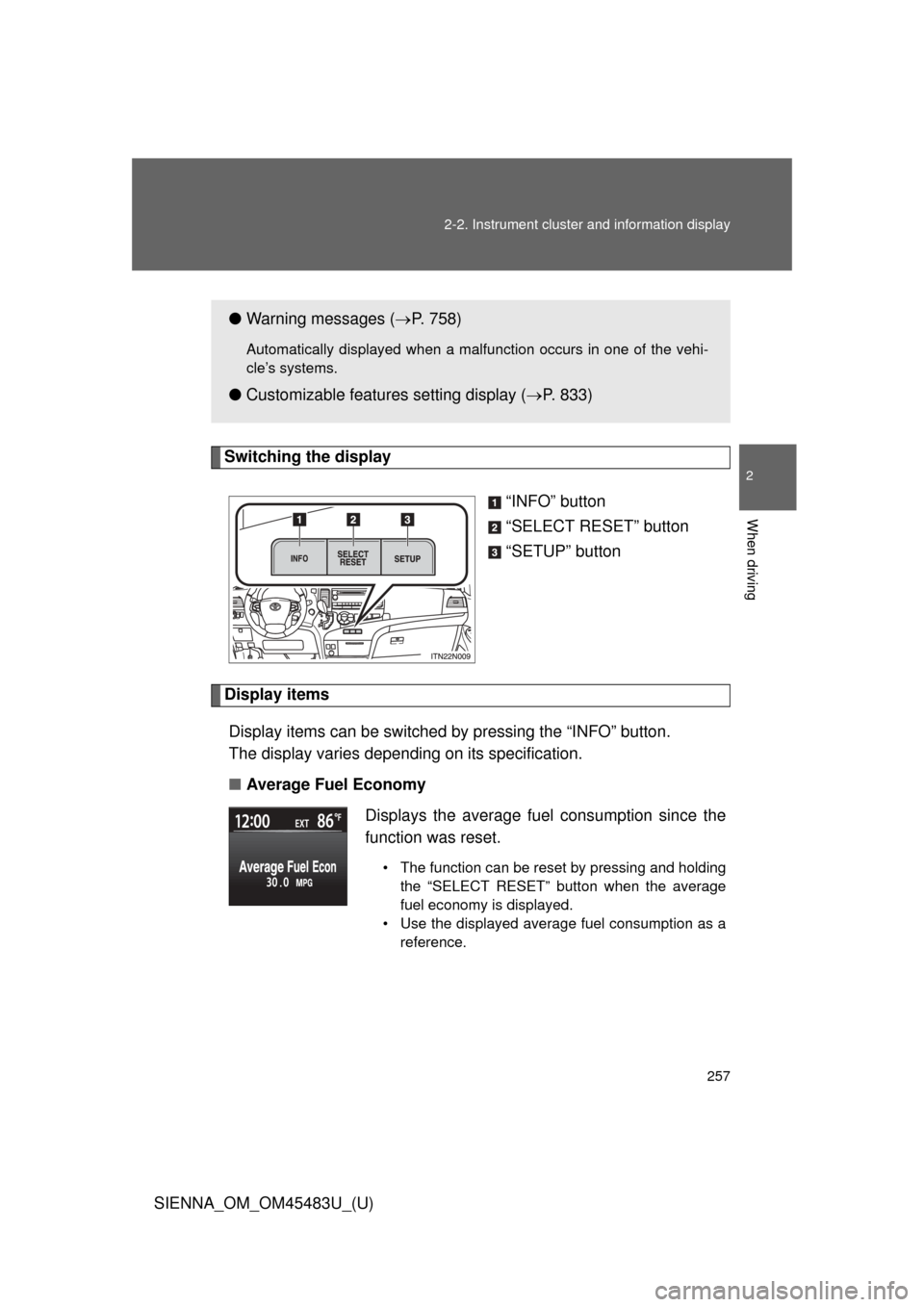
Switching the display
“INFO” button
“SELECT RESET” button
“SETUP” button
Display itemsDisplay items can be switched by pressing the “INFO” button.
The display varies depending on its specification.
■ Average Fuel Economy
●Warning messages ( P. 758)
Automatically displayed when a malfunction occurs in one of the vehi-
cle’s systems.
● Customizable features setting display ( P. 833)
Displays the average fuel consumption since the
function was reset.
• The function can be reset by pressing and holding the “SELECT RESET” button when the average
fuel economy is displayed.
• Use the displayed average fuel consumption as a reference.
Page 258 of 872
258 2-2. Instrument cluster and information display
SIENNA_OM_OM45483U_(U)■
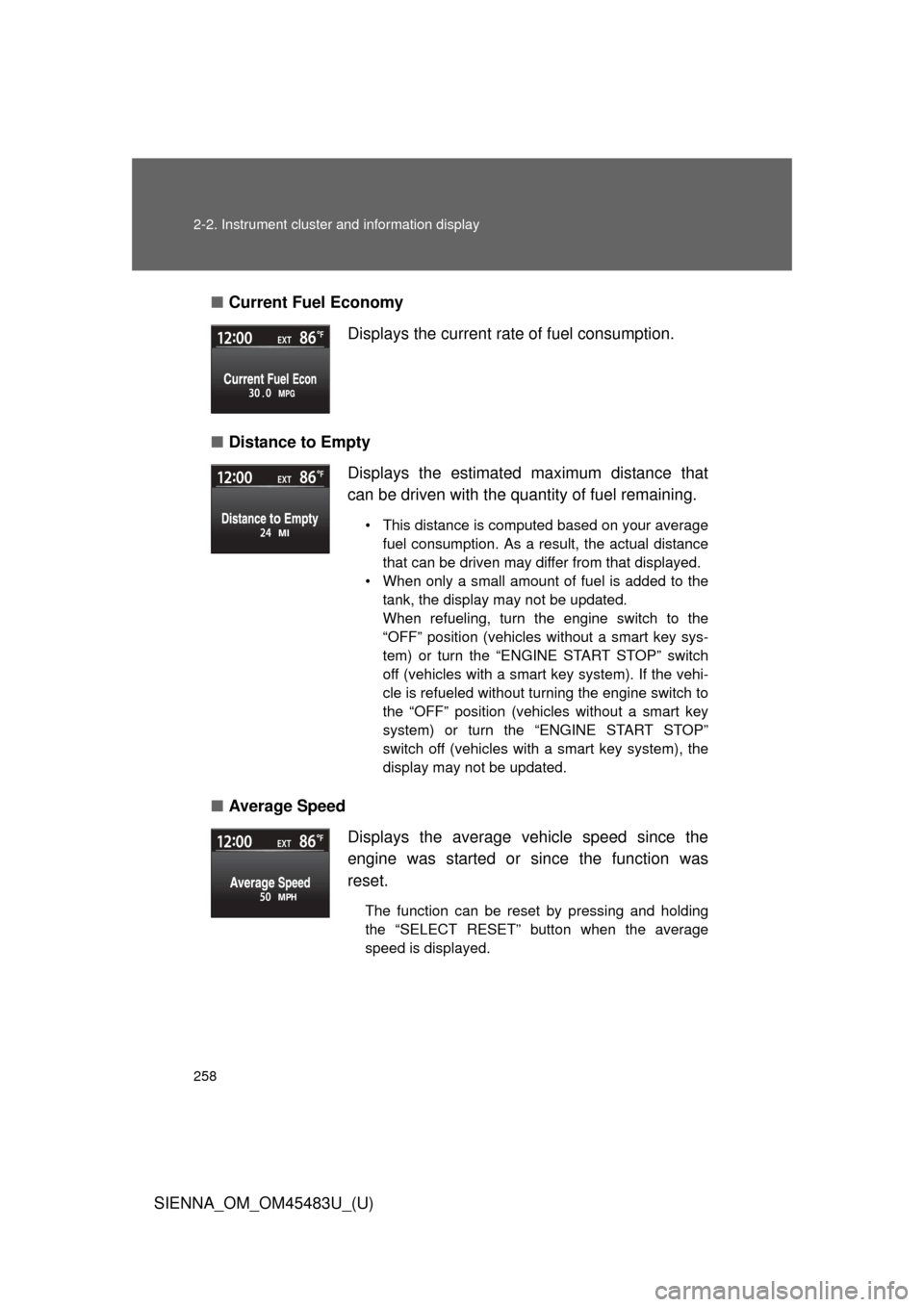
Current Fuel Economy
■ Distance to Empty
■ Average Speed Displays the current rate of fuel consumption.
Displays the estimated maximum distance that
can be driven with the quantity of fuel remaining.
• This distance is computed based on your average
fuel consumption. As a result, the actual distance
that can be driven may differ from that displayed.
• When only a small amount of fuel is added to the tank, the display may not be updated.
When refueling, turn the engine switch to the
“OFF” position (vehicles without a smart key sys-
tem) or turn the “ENGINE START STOP” switch
off (vehicles with a smart key system). If the vehi-
cle is refueled without turning the engine switch to
the “OFF” position (vehicles without a smart key
system) or turn the “ENGINE START STOP”
switch off (vehicles with a smart key system), the
display may not be updated.
Displays the average vehicle speed since the
engine was started or since the function was
reset.
The function can be reset by pressing and holding
the “SELECT RESET” button when the average
speed is displayed.
Page 259 of 872
259
2-2. Instrument cluster and information display
2
When driving
SIENNA_OM_OM45483U_(U)
■
Tr i p Ti m e r
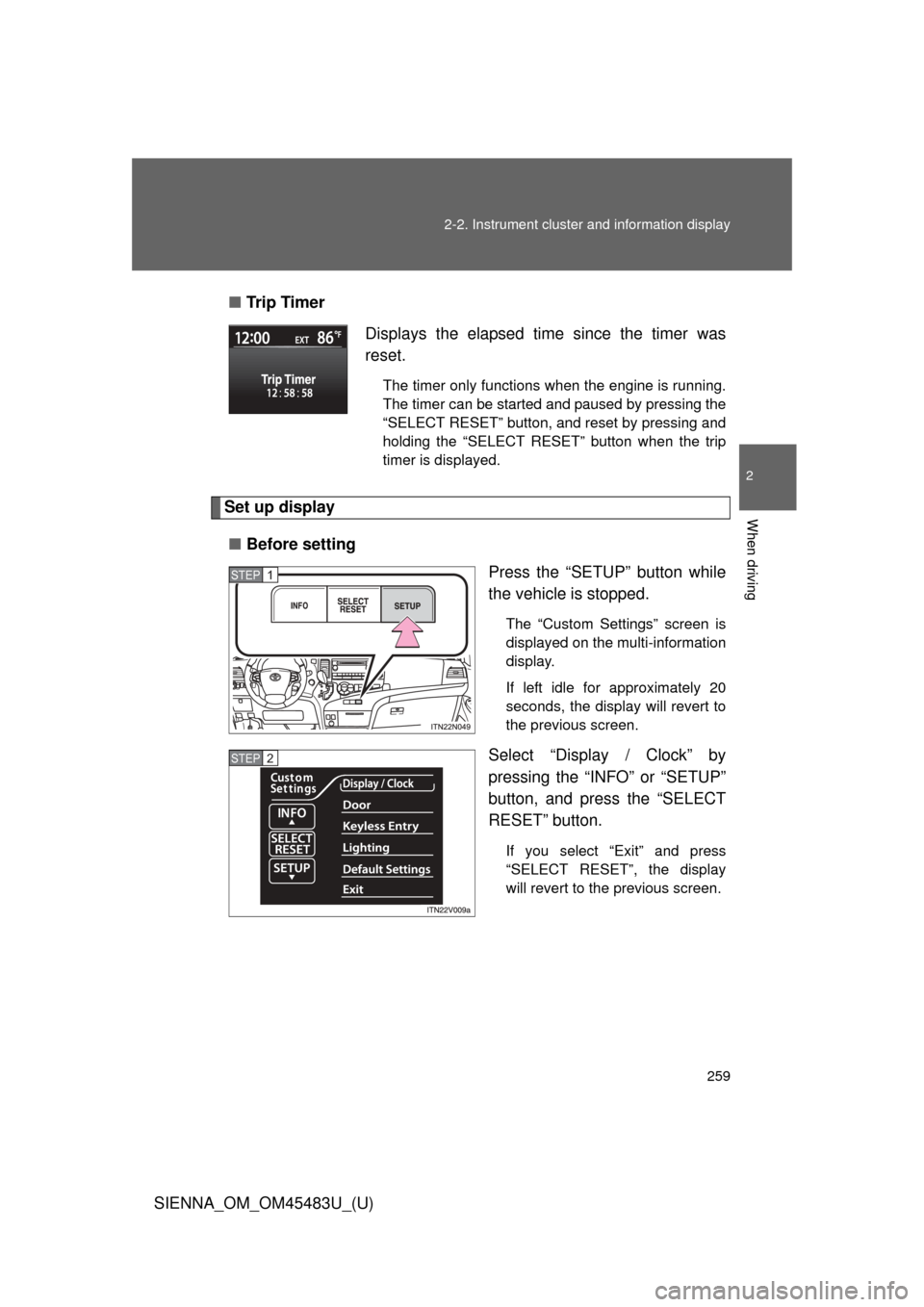
Set up display
■ Before setting
Press the “SETUP” button while
the vehicle is stopped.
The “Custom Settings” screen is
displayed on the multi-information
display.
If left idle for approximately 20
seconds, the display will revert to
the previous screen.
Select “Display / Clock” by
pressing the “INFO” or “SETUP”
button, and press the “SELECT
RESET” button.
If you select “Exit” and press
“SELECT RESET”, the display
will revert to the previous screen.
Displays the elapsed time since the timer was
reset.
The timer only functions when the engine is running.
The timer can be started and paused by pressing the
“SELECT RESET” button, and reset by pressing and
holding the “SELECT RESET” button when the trip
timer is displayed.
STEP1
STEP2