Page 250 of 612
2505-5. Using an external device
COROLLA_TMMMS_TMMC_U (OM12F00U)
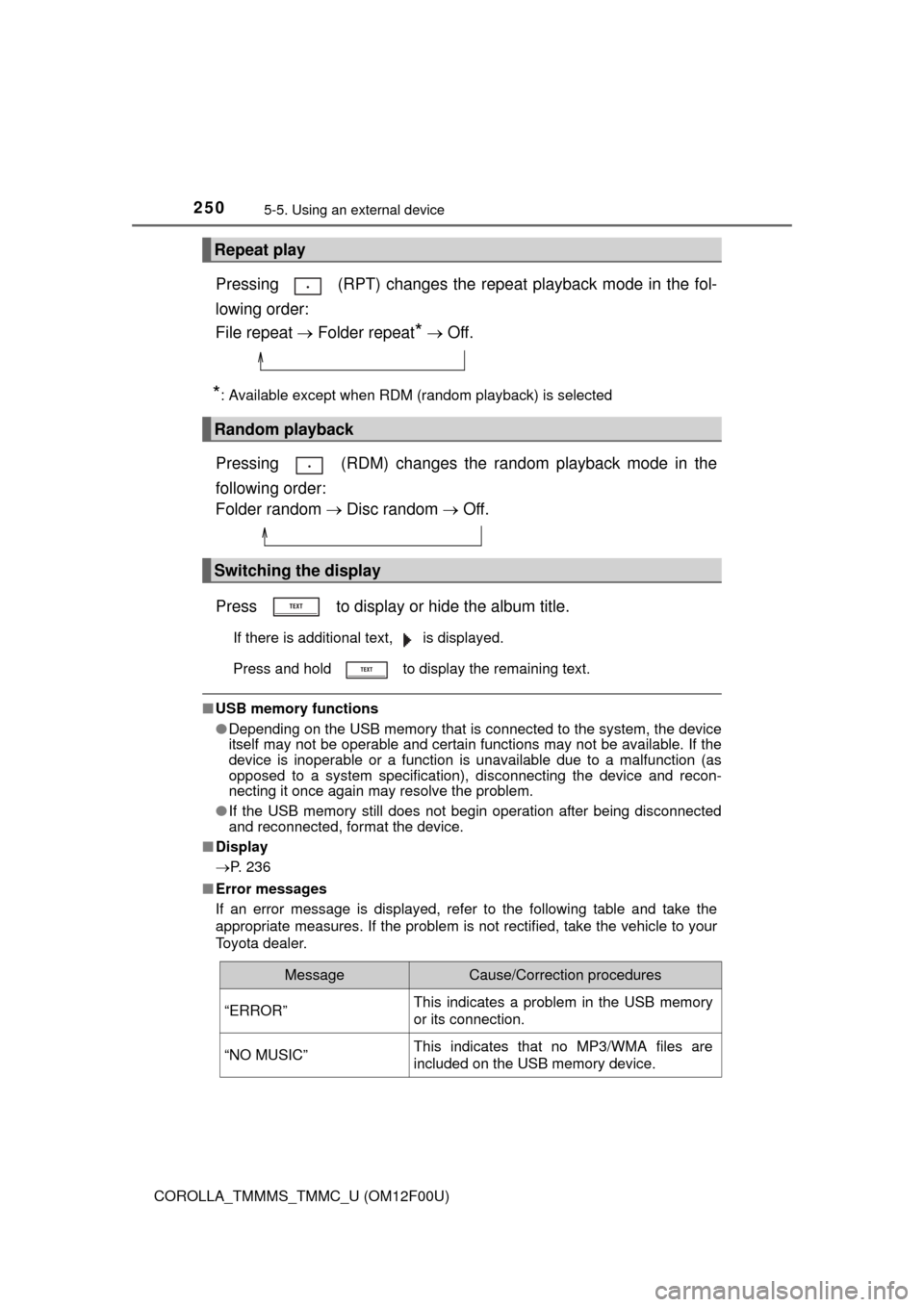
Pressing (RPT) changes the repeat playback mode in the fol-
lowing order:
File repeat Folder repeat
* Off.
*: Available except when RDM (random playback) is selected
Pressing (RDM) changes the random playback mode in the
following order:
Folder random Disc random Off.
Press to display or hide the album title.
If there is additional text, is displayed.
Press and hold to display the remaining text.
■USB memory functions
●Depending on the USB memory that is connected to the system, the device
itself may not be operable and certain functions may not be available. If the
device is inoperable or a function is unavailable due to a malfunction (as
opposed to a system specification), disconnecting the device and recon-
necting it once again may resolve the problem.
●If the USB memory still does not begin operation after being disconnected
and reconnected, format the device.
■Display
P. 236
■Error messages
If an error message is displayed, refer to the following table and take the
appropriate measures. If the problem is not rectified, take the vehicle to your
Toyota dealer.
Repeat play
Random playback
Switching the display
MessageCause/Correction procedures
“ERROR”This indicates a problem in the USB memory
or its connection.
“NO MUSIC”This indicates that no MP3/WMA files are
included on the USB memory device.
Page 252 of 612

2525-5. Using an external device
COROLLA_TMMMS_TMMC_U (OM12F00U)●WMA file compatibility
• Compatible standards
WMA Ver. 7, 8, 9
• Compatible sampling frequencies
HIGH PROFILE 32, 44.1, 48 (kHz)
• Compatible bit rates
HIGH PROFILE 48-320 (kbps, CBR)
●File names
The only files that can be recognized as MP3/WMA and played are those
with the extension .mp3 or .wma.
●ID3 and WMA tags
ID3 tags can be added to MP3 files, making it possible to record the track
title, artist name, etc.
The system is compatible with ID3 Ver. 1.0, 1.1, and Ver. 2.2, 2.3, 2.4 ID3
tags. (The number of characters is based on ID3 Ver. 1.0 and 1.1.)
WMA tags can be added to WMA files, making it possible to record the
track title and artist name in the same way as with ID3 tags.
●MP3 and WMA playback
• When a device containing MP3 or WMA files is connected, all files in the
USB memory are checked. Once the file check is finished, the first MP3
or WMA file is played. To make the file check finish more quickly, we rec-
ommend that you do not include any files other than MP3 or WMA files or
create any unnecessary folders.
• When the USB memory is connected and the audio source is changed to
USB memory mode, the USB memory will start playing the first file in the
first folder. If the same device is removed and reinserted (and the con-
tents have not been changed), the USB memory will resume play from
the same point in which it was last used.
●Extensions
If the file extensions .mp3 and .wma are used for files other than MP3 and
WMA files, they will be skipped (not played).
●Playback
• To play MP3 files with steady sound quality, we recommend a fixed bit
rate of at least 128 kbps and a sampling frequency of 44.1 kHz.
• There is a wide variety of freeware and other encoding software for MP3
and WMA files on the market, and depending on the status of the encod-
ing and the file format, poor sound quality or noise at the start of playback
may result. In some cases, playback may not be possible at all.
• Microsoft, Windows, and Windows Media are registered trademarks of
Microsoft Corporation in the U.S.A. and other countries.
Page 253 of 612
2535-5. Using an external device
5
Interior features
COROLLA_TMMMS_TMMC_U (OM12F00U)
CAUTION
■Caution while driving
Do not connect USB memory or operate the controls.
NOTICE
■To prevent damage to USB memory
●Do not leave USB memory in the vehicle. The temperature inside the vehi-
cle may become high, resulting in damage to the device.
●Do not push down on or apply unnecessary pressure to the USB memory
while it is connected.
●Do not insert foreign objects into the port.
Page 258 of 612
2585-6. Using Bluetooth® devices
COROLLA_TMMMS_TMMC_U (OM12F00U)
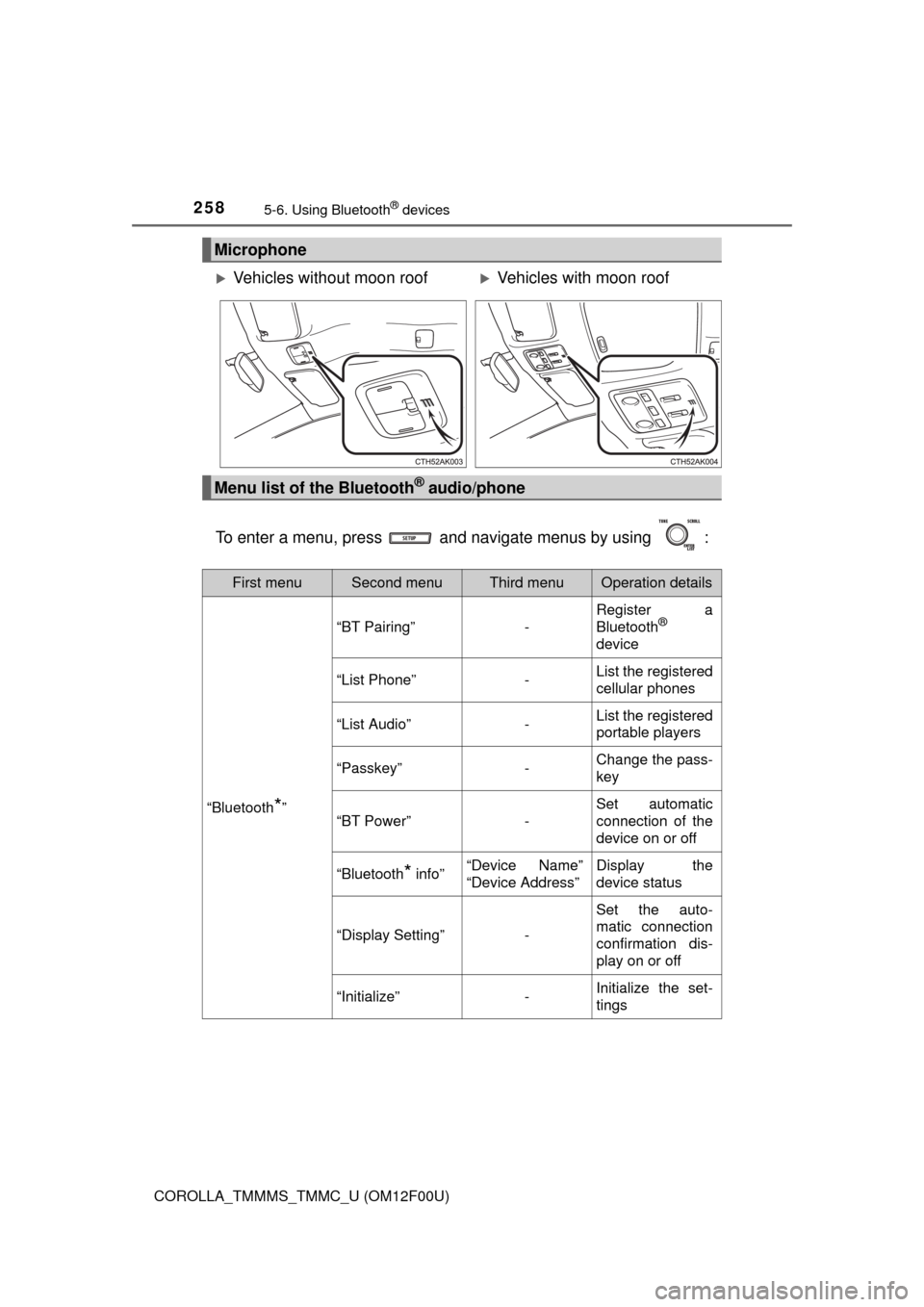
To enter a menu, press and navigate menus by using :
Microphone
Vehicles without moon roofVehicles with moon roof
Menu list of the Bluetooth® audio/phone
First menuSecond menuThird menuOperation details
“Bluetooth*”
“BT Pairing”-
Register a
Bluetooth®
device
“List Phone”-List the registered
cellular phones
“List Audio”-List the registered
portable players
“Passkey”-Change the pass-
key
“BT Power”-
Set automatic
connection of the
device on or off
“Bluetooth* info”“Device Name”
“Device Address”Display the
device status
“Display Setting”-
Set the auto-
matic connection
confirmation dis-
play on or off
“Initialize”-Initialize the set-
tings
Page 259 of 612
2595-6. Using Bluetooth® devices
5
Interior features
COROLLA_TMMMS_TMMC_U (OM12F00U)
*: Bluetooth is a registered trademark of Bluetooth SIG, Inc.
■Bluetooth® audio/phone system functions
Depending on the Bluetooth® device, certain functions may not be available.
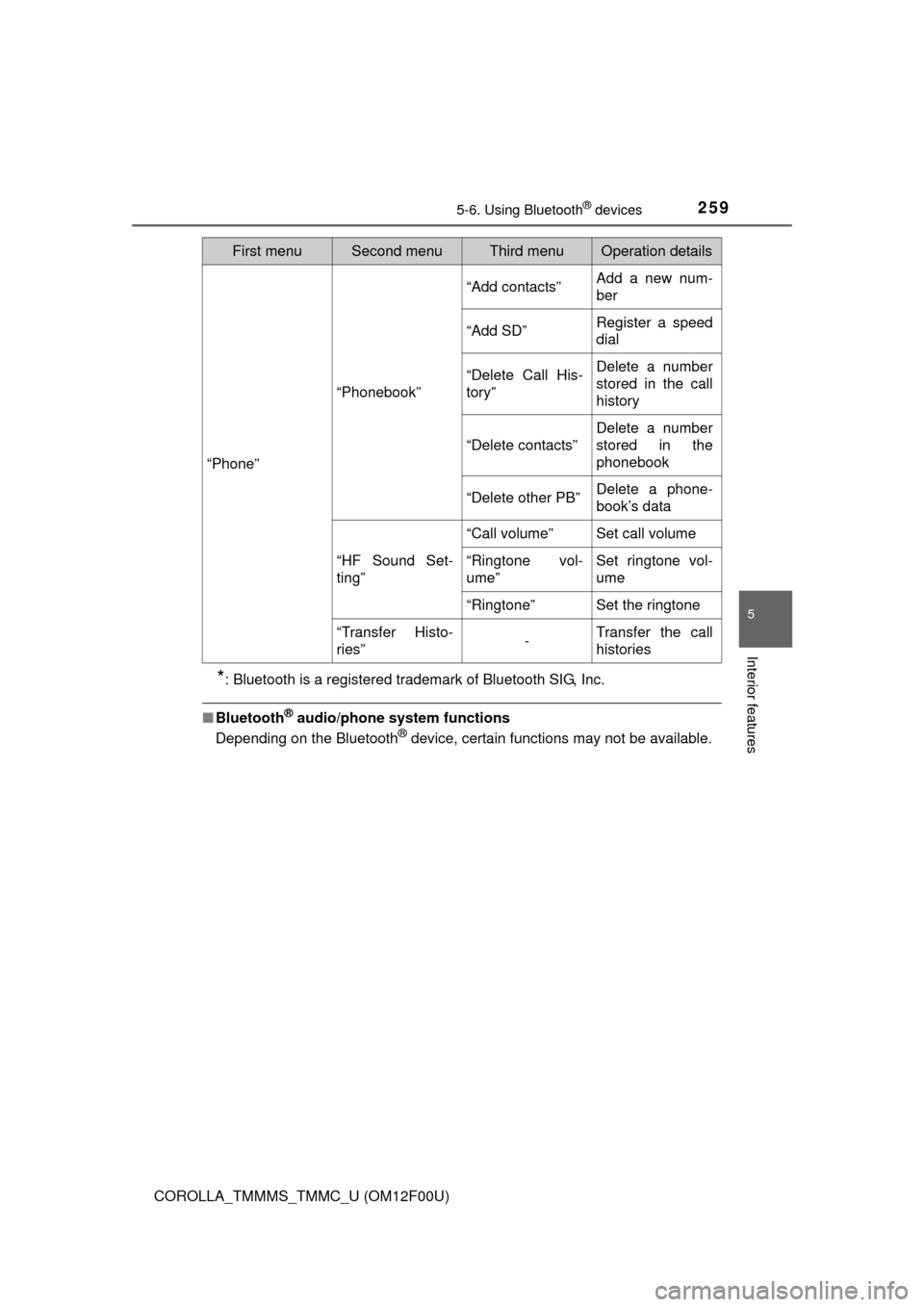
“Phone”
“Phonebook”
“Add contacts”Add a new num-
ber
“Add SD”Register a speed
dial
“Delete Call His-
tory”Delete a number
stored in the call
history
“Delete contacts”
Delete a number
stored in the
phonebook
“Delete other PB”Delete a phone-
book’s data
“HF Sound Set-
ting”
“Call volume”Set call volume
“Ringtone vol-
ume”Set ringtone vol-
ume
“Ringtone”Set the ringtone
“Transfer Histo-
ries”-Transfer the call
histories
First menuSecond menuThird menuOperation details
Page 273 of 612
2735-8. Bluetooth® Audio
5
Interior features
COROLLA_TMMMS_TMMC_U (OM12F00U)
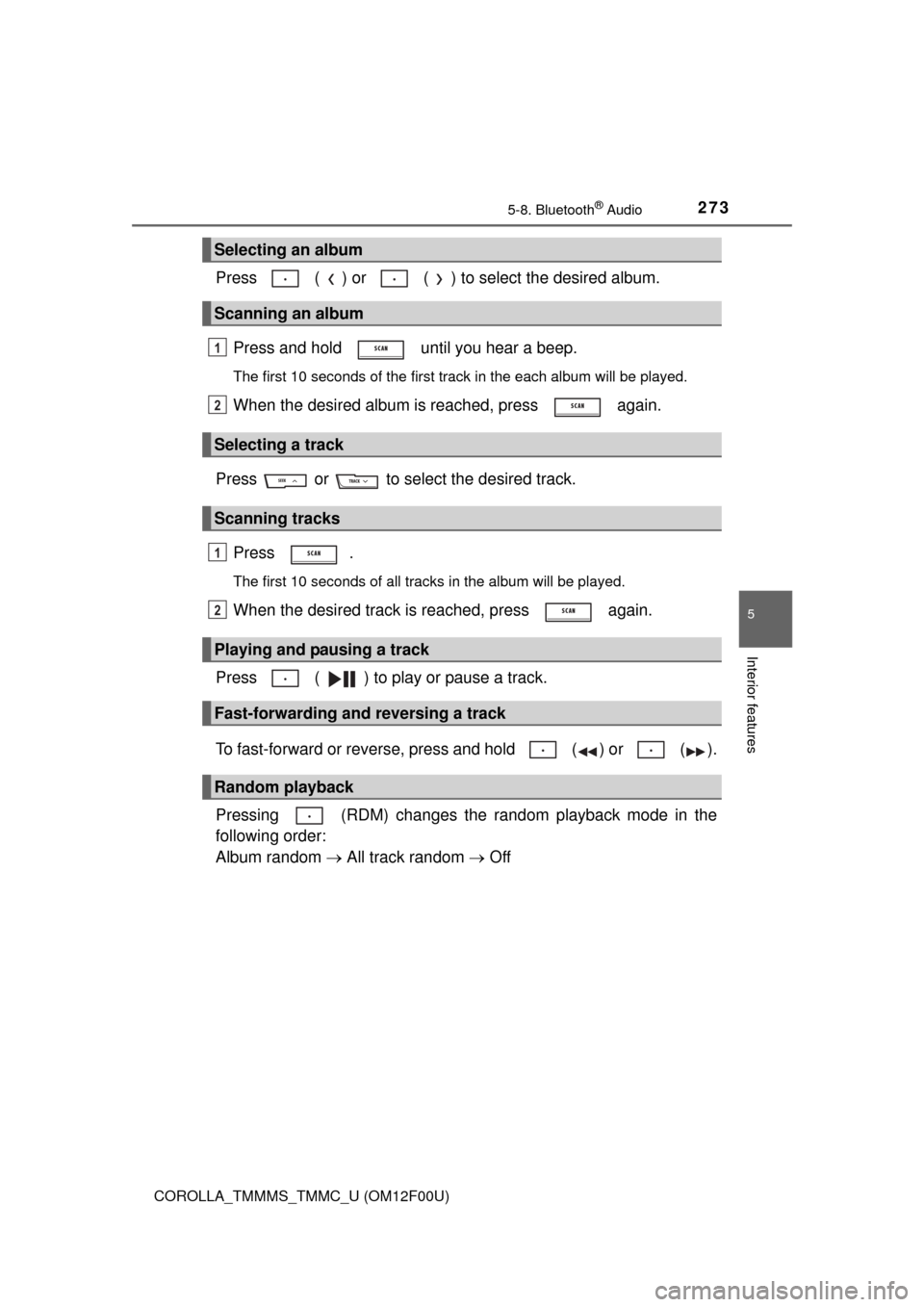
Press ( ) or ( ) to select the desired album.
Press and hold until you hear a beep.
The first 10 seconds of the first track in the each album will be played.
When the desired album is reached, press again.
Press or to select the desired track.
Press .
The first 10 seconds of all tracks in the album will be played.
When the desired track is reached, press again.
Press ( ) to play or pause a track.
To fast-forward or reverse, press and hold ( ) or ( ).
Pressing (RDM) changes the random playback mode in the
following order:
Album random All track random Off
Selecting an album
Scanning an album
Selecting a track
Scanning tracks
Playing and pausing a track
Fast-forwarding and reversing a track
Random playback
1
2
1
2
Page 280 of 612
2805-9. Bluetooth® Phone
COROLLA_TMMMS_TMMC_U (OM12F00U)
■When talking on the phone
●Do not talk at the same time as the other party.
●Keep the volume of the received voice down. Otherwise, voice echo will
increase.
■Automatic volume adjustment
When vehicle speed is 50 mph (80 km/h) or more, the volume automatically
increases. The volume returns to the previous volume setting when vehicle
speed drops to 43 mph (70 km/h) or less.
■Phone call system functions
Depending on the cellular phone, certain functions may not be available.
■Situations where the system may not recognize your voice
●When driving on a rough road
●When driving at high speeds
●When air is blowing out of the vents onto the microphone
●When the air conditioning fan emits a loud noise
Page 281 of 612
281
5
Interior features
COROLLA_TMMMS_TMMC_U (OM12F00U)
5-10. Bluetooth®
■When using the Bluetooth® audio system
●In the following situations, the system may not function.
• The portable player does not support Bluetooth
®
• The cellular phone is located outside the service area
• The Bluetooth® device is switched off
• The Bluetooth® device has a low battery
• The Bluetooth® device is not connected to the system
• The Bluetooth® device is behind the seat or in the glove box or console
box, or is touching or covered by metal objects
●There may be a delay if a cellular phone connection is made during
Bluetooth
® audio playback.
●Depending on the type of portable audio player that is connected to the sys-
tem, operation may differ slightly and certain functions may not be available.
■When transferring ownership of the vehicle
Be sure to initialize the system to prevent personal data from being improp-
erly accessed. (P. 266)
■About Bluetooth
®
■Compatible models
●Bluetooth® specifications:
Ver. 1.1, or higher (recommended: Ver. 2.1 + EDR or higher)
●Following Profiles:
• A2DP (Advanced Audio Distribution Profile) Ver. 1.0, or higher (recom-
mended: Ver. 1.2 or higher)
• AVRCP (Audio/Video Remote Control Profile) Ver. 1.0 or higher (recom-
mended: Ver. 1.3 or higher)
Portable players must correspond to the above specifications in order to be
connected to the Bluetooth
® audio system. However, please note that some
functions may be limited depending on the type of portable player.
●Cellular phone
• HFP (Hands Free Profile) Ver. 1.0 or higher (recommended: Ver. 1.5)
• OPP (Object Push Profile) Ver. 1.1
• PBAP (Phone Book Access Profile) Ver. 1.0
Bluetooth®
Bluetooth is a registered trademark of
Bluetooth SIG. Inc.