2014 SUBARU TRIBECA battery
[x] Cancel search: batteryPage 223 of 426
6-2Interior equipment
Interior light
When leaving your vehicle, make sure thelights are turned off to avoid batterydischarge.
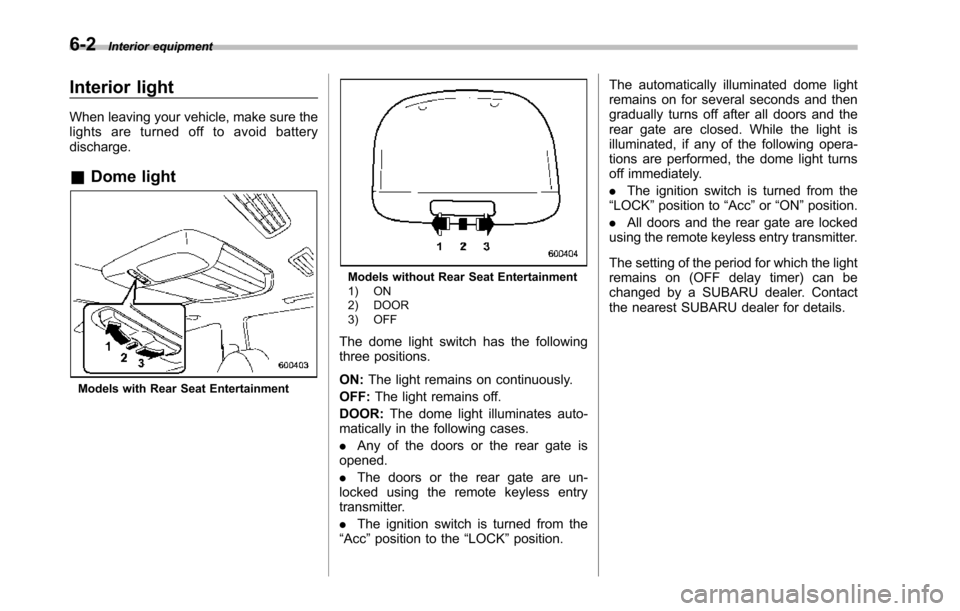
&Dome light
Models with Rear Seat Entertainment
Models without Rear Seat Entertainment1) ON2) DOOR3) OFF
The dome light switch has the followingthree positions.
ON:The light remains on continuously.
OFF:The light remains off.
DOOR:The dome light illuminates auto-matically in the following cases.
.Any of the doors or the rear gate isopened.
.The doors or the rear gate are un-locked using the remote keyless entrytransmitter.
.The ignition switch is turned from the“Acc”position to the“LOCK”position.
The automatically illuminated dome lightremains on for several seconds and thengradually turns off after all doors and therear gate are closed. While the light isilluminated, if any of the following opera-tions are performed, the dome light turnsoff immediately.
.The ignition switch is turned from the“LOCK”positionto“Acc”or“ON”position.
.All doors and the rear gate are lockedusing the remote keyless entry transmitter.
The setting of the period for which the lightremains on (OFF delay timer) can bechanged by a SUBARU dealer. Contactthe nearest SUBARU dealer for details.
Page 224 of 426
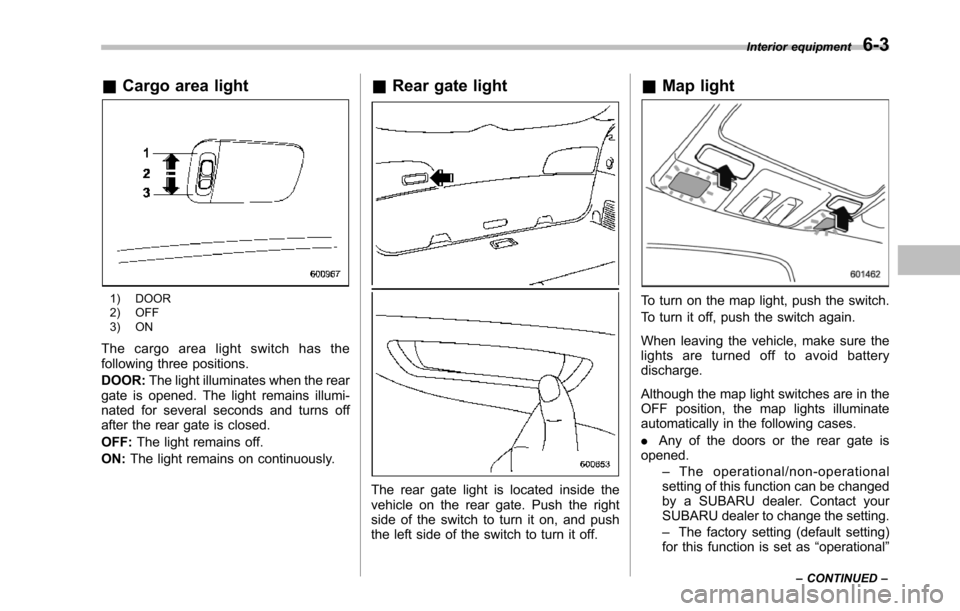
&Cargo area light
1) DOOR2) OFF3) ON
The cargo area light switch has thefollowing three positions.
DOOR:The light illuminates when the reargate is opened. The light remains illumi-nated for several seconds and turns offafter the rear gate is closed.
OFF:The light remains off.
ON:The light remains on continuously.
&Rear gate light
The rear gate light is located inside thevehicle on the rear gate. Push the rightside of the switch to turn it on, and pushthe left side of the switch to turn it off.
&Map light
To turn on the map light, push the switch.
To turn it off, push the switch again.
When leaving the vehicle, make sure thelights are turned off to avoid batterydischarge.
Although the map light switches are in theOFF position, the map lights illuminateautomatically in the following cases.
.Any of the doors or the rear gate isopened.–The operational/non-operationalsetting of this function can be changedby a SUBARU dealer. Contact yourSUBARU dealer to change the setting.–The factory setting (default setting)for this function is set as“operational”
Interior equipment6-3
–CONTINUED–
Page 225 of 426

6-4Interior equipment
(automatic illumination - ON)..The doors are unlocked using theremote keyless entry transmitter.
.The ignition switch is turned from the“Acc”position to the“LOCK”position.
The automatically illuminated map lightsremain illuminated for several secondsand then gradually turn off after all doorsare closed.
While the lights are illuminated, if any ofthe following operations are performed,the map lights turn off immediately.
.The ignition switch is turned from the“LOCK”position to the“Acc”or“ON”position.
.All doors and the rear gate are lockedusing the remote keyless entry transmitter.
The setting of the period for which the lightremains illuminated (OFF delay timer) canbe changed by a SUBARU dealer. Con-tact your SUBARU dealer for details.
NOTE
If any of the doors or the rear gate isnot completely closed, the map lightswill remain illuminated as a result.However, the map lights are automati-cally turned off by the battery drainageprevention function to prevent thebattery from discharging. For details,
refer to“Battery drainage preventionfunction”F2-6.
&Automatic ambient light for
center console area (if
equipped)
The automatic ambient light illuminateswhen the ignition switch is in the“ON”position and the light control switch is inthe“”position or“”position. Thelight dimly illuminates the area around thecenter console. The light turns off whenthe light control switch is in the“OFF”position. Also, the brightness of the light isadjusted by the illumination brightnesscontrol dial.
Sun visors
To block out glare, swing down the visors.
To use the sun visor at a side window,swing it down and move it sideways.
Page 226 of 426
&Sun visor extension plate
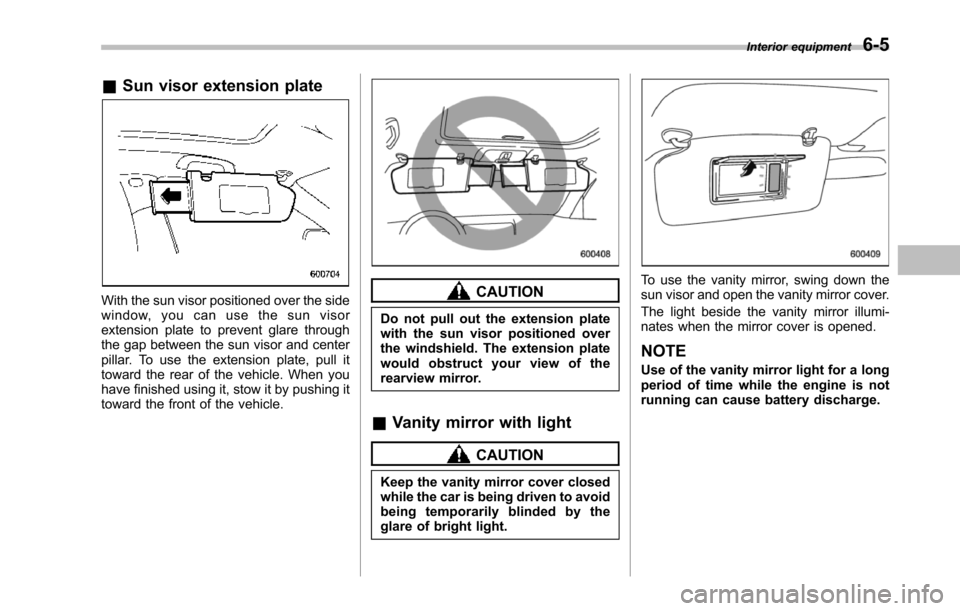
With the sun visor positioned over the sidewindow, you can use the sun visorextension plate to prevent glare throughthe gap between the sun visor and centerpillar. To use the extension plate, pull ittoward the rear of the vehicle. When youhave finished using it, stow it by pushing ittoward the front of the vehicle.
CAUTION
Do not pull out the extension platewith the sun visor positioned overthe windshield. The extension platewould obstruct your view of therearview mirror.
&Vanity mirror with light
CAUTION
Keep the vanity mirror cover closedwhile the car is being driven to avoidbeing temporarily blinded by theglare of bright light.
To use the vanity mirror, swing down thesun visor and open the vanity mirror cover.
The light beside the vanity mirror illumi-nates when the mirror cover is opened.
NOTE
Use of the vanity mirror light for a longperiod of time while the engine is notrunning can cause battery discharge.
Interior equipment6-5
Page 231 of 426
6-10Interior equipment
trim can be used to hold beverage bottlesand other items.Accessory power outlets
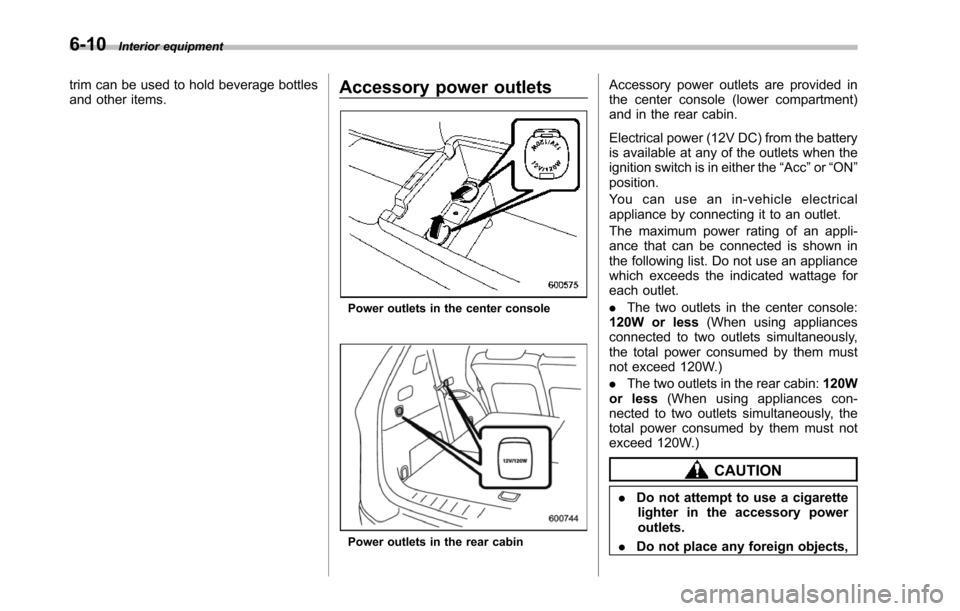
Poweroutlets in the center console
Power outlets in the rear cabin
Accessory power outlets are provided inthe center console (lower compartment)and in the rear cabin.
Electrical power (12V DC) from the batteryis available at any of the outlets when theignition switch is in either the“Acc”or“ON”position.
Yo u c a n u s e a n i n - v e h i c l e e l e c t r i c a lappliance by connecting it to an outlet.
The maximum power rating of an appli-ance that can be connected is shown inthe following list. Do not use an appliancewhich exceeds the indicated wattage foreach outlet.
.The two outlets in the center console:120W or less(When using appliancesconnected to two outlets simultaneously,the total power consumed by them mustnot exceed 120W.)
.The two outlets in the rear cabin:120Wor less(When using appliances con-nected to two outlets simultaneously, thetotal power consumed by them must notexceed 120W.)
CAUTION
.Do not attempt to use a cigarettelighter in the accessory poweroutlets.
.Do not place any foreign objects,
Page 232 of 426
especially metal ones such ascoins or aluminum foil, into theaccessory power outlet. Thatcould cause a short circuit. Al-ways put the cap on the acces-sory power outlet when it is notin use.
.Use only electrical applianceswhich are designed for 12V DC.
The maximum power rating of anappliance that can be connectedis shown in the following list. Donot usean appliance which ex-ceeds the indicated wattage foreach outlet.
–The two outlets in the centerconsole: 120W or less (Whenusing appliances connectedto two outlets simultaneously,the total power consumed bythem must not exceed 120W.)
–The two outlets in the rearcabin: 120W or less (Whenusing appliances connectedto two outlets simultaneously,the total power consumed bythem must not exceed 120W.)
Overloading the accessorypower outlet cancause a shortcircuit. Do not use dual adaptersor more than one electrical appli-
ance.
.If the plug on your electric appli-ance is either too loose or tootight for the accessory poweroutlet, this can result in a poorcontact or cause the plug to getstuck. Only use plugs that fitproperly.
.Use of an electric appliance in theaccessory power outlet for a longperiod of time while the engine isnot running can cause batterydischarge.
.Before driving your vehicle, makesure that the plug and the cordon your electrical appliance willnot interfere with your shiftinggears and operating the accel-erator and brake pedals. If theydo, do not use the electricalappliance while driving.
NOTE
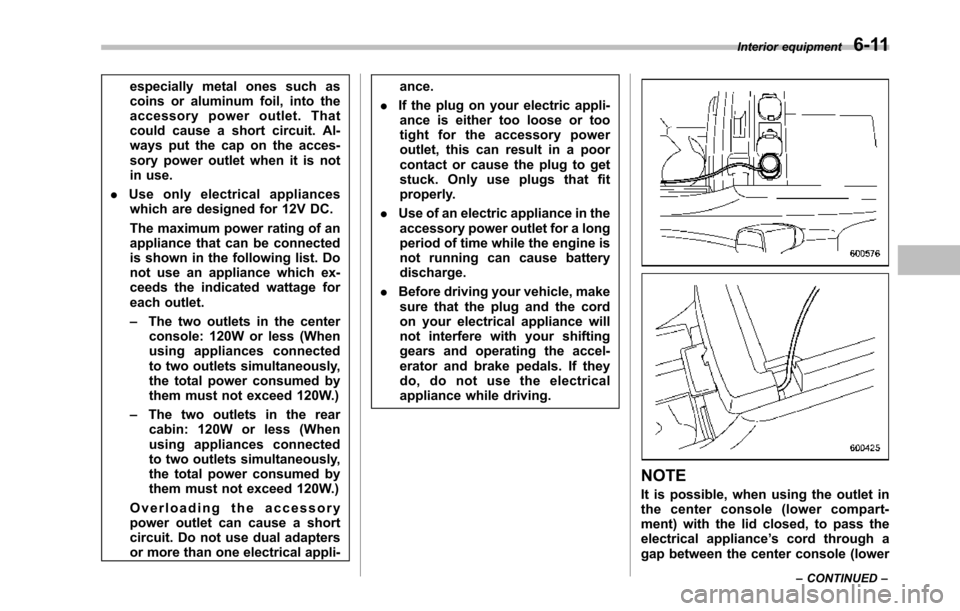
It is possible, when using the outlet inthe center console (lower compart-ment) with the lid closed, to pass theelectrical appliance’s cord through agap between the center console (lower
Interior equipment6-11
–CONTINUED–
Page 239 of 426
6-18Interior equipment
garage door opener or otherdevice. Make sure that peopleand objects are out of the wayof the garage door opener orother device to prevent potentialharm or damage.
.Do not use the HomeLink®Wire-less Control System with anygarage door opener that lacksthe safety stopand reverse fea-ture as required by applicablesafety standards. A garage dooropener which cannot detect anobject, signaling the door to stopand reverse, does not meet thesesafetystandards. Using a garagedoor opener without these fea-tures increases risk of seriousinjury or death. For more infor-mation, consult the HomeLinkwebsite at www.homelink.comor call 1-800-355-3515.
CAUTION
When programming the HomeLink®WirelessControl System to operatea garage door opener or an entrancegate, unplug the device’smotorfrom the outlet during programmingto prevent motor burnout.
NOTE
.After programming your HomeLink®Wireless Control System for the de-sired devices, retain the hand-heldtransmitters for further programmingor device testing in the event of aproblem..It is recommended that you insert anew battery in the hand-held transmit-ter of a device to ensure correctprogramming.
&Garage door opener pro-
gramming in the U.S.A.
NOTE
When programming the HomeLink®Wireless ControlSystem for a garagedoor opener, it is suggested that youpark the vehicle outside the garage.
1. Unplug the motor of the garage dooropener from the outlet.
NOTE
When reprogramming any of theHomeLink®buttons that are alreadyprogrammed for other devices, performthe procedure in step 2.
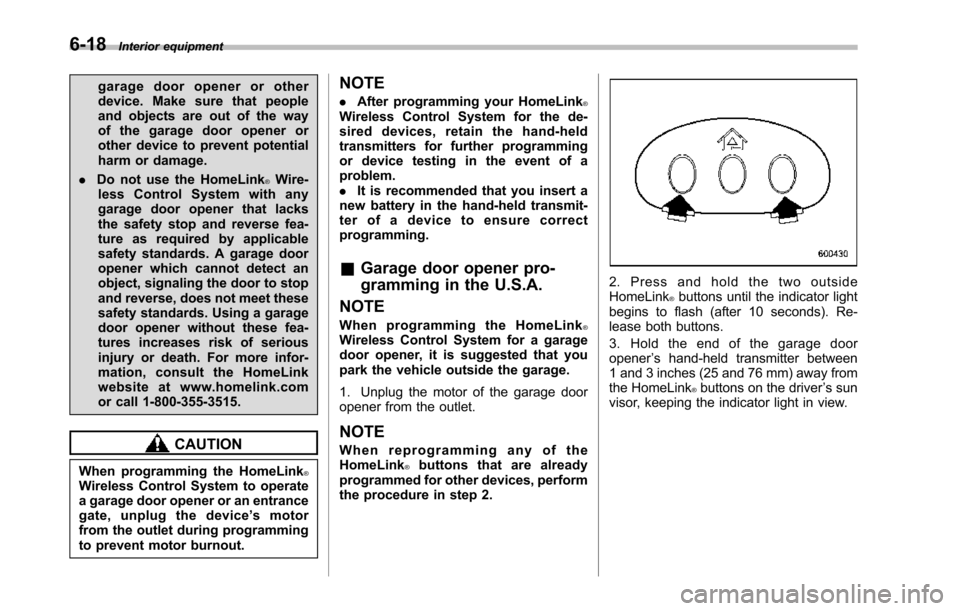
2. Press and hold the two outsideHomeLink®buttons until the indicator lightbegins to flash (after 10 seconds). Re-lease both buttons.
3. Hold the end of the garage dooropener’s hand-held transmitter between1 and 3 inches (25 and 76 mm) away fromthe HomeLink®buttons on the driver’s sunvisor, keeping the indicator light in view.
Page 243 of 426
6-22Interior equipment
the surrounding area with youreyes and mirrors, and movebackward at a slow speed. Mov-ing backward only by checkingthe rear view image from thecamera could cause an accident.
.Do not disassemble or modify thecamera, switch or wiring. Ifsmoke comes out or you smella strange odor, stop using therear view camera immediately.Contact your SUBARU dealerfor an inspection. Continued usemay result in accident, fire orelectric shock.
CAUTION
.If your vehicle is washed with ahigh-pressure washer, do notallow water to contact the cameradirectly. Entry of water in thecamera lens may result in con-densation, malfunction, fire orelectric shock.
.Since the camera is a precisiondevice, do not subject it to strongimpacts. Otherwise, malfunction,fire or electric shock may occur.
.If mud or snow sticks to or isfrozen on the camera, you must
be very careful removing it.Otherwise, damage done to thecamera may cause a fire orelectric shock. Pour water orlukewarm water over the camerato remove mud and ice, and wipeit with a soft, dry cloth.
.Do not put a flame close to thecamera or wiring. Otherwise, da-mage or fire may occur.
.When replacing the fuse, be sureto use a fuse with the specifiedrating. Use of a fuse with adifferent rating may result in amalfunction.
.If the rear view camera is used fora long time while the engine isnot operated, the battery maybecome completely discharged.
NOTE
.Do not wipe the camera with alcohol,benzine or paint thinner. Otherwise,discoloration may occur. To removecontamination, wipe the camera with acloth moistened with a diluted neutraldetergent and then wipe it with a soft,dry cloth..When waxing the vehicle, be carefulnot to apply the wax to the camera. If itcomes in contact with the camera,
moisten a clean cloth with a dilutedneutral detergent to remove the wax..The camera lens has hard coating tohelp prevent scratches. However, whenwashing the vehicle or cleaning thecamera lens, be careful not to scratchthe camera lens. Do not use a washingbrush directly on the camera lens. Themonitorscreen may be adversely af-fected..Strong light shined on the cameralens may develop white light stripesaround the light source. This is not amalfunction..Under the fluorescent light, the dis-play may flicker. However, this is not amalfunction..The image of the rear view cameramay be slightly different from theactual color of the objects.
&How to use the rear view
camera
When the select lever is set to“R”, the rearview camera automatically displays therear view image from the vehicle. Whenthe lever is set to other positions, theimage before setting to“R”is displayed.
1. Set the ignition switch to“ON”.
2. Set the select lever to“R”.