2014 SUBARU TRIBECA change time
[x] Cancel search: change timePage 123 of 426
2-18Keys and doors
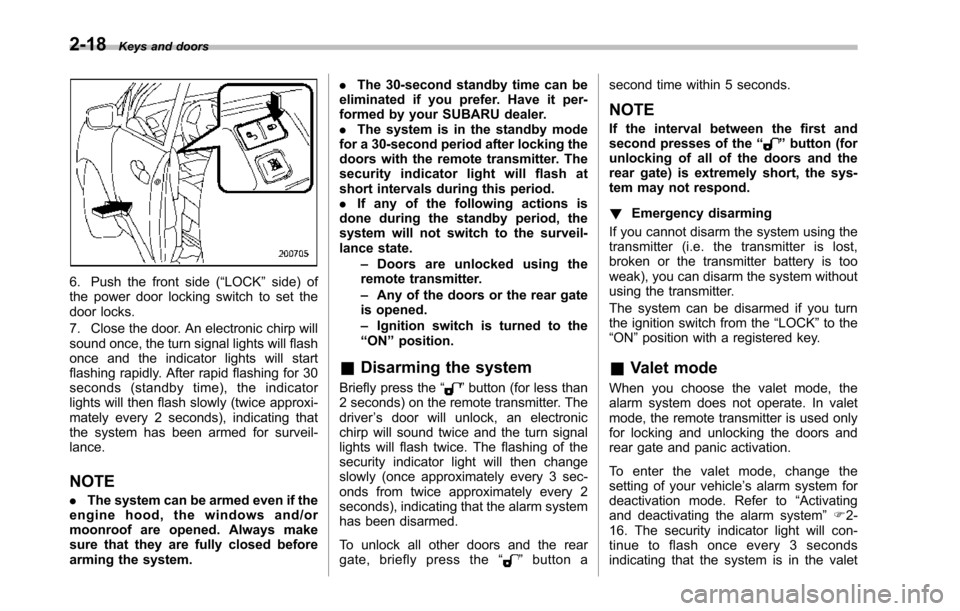
6. Push the front side (“LOCK”side) ofthe power door locking switch to set thedoor locks.
7. Close the door. An electronic chirp willsound once,the turn signal lights will flashonce and the indicator lights will startflashing rapidly. After rapid flashing for 30seconds (standby time), the indicatorlights will then flash slowly (twice approxi-mately every 2 seconds), indicating thatthe system has been armed for surveil-lance.
NOTE
.The system can be armed even if theengine hood, the windows and/ormoonroof are opened. Always makesure that they are fully closed beforearming the system.
.The 30-second standby time can beeliminated if you prefer. Have it per-formed by your SUBARU dealer..The system is in the standby modefor a 30-second period after locking thedoors with the remote transmitter. Thesecurity indicator light will flash atshort intervals during this period..If any of the following actions isdoneduring the standby period, thesystem will not switch to the surveil-lance state.–Doors are unlocked using theremote transmitter.–Any of the doors or the rear gateis opened.–Ignition switch is turned to the“ON”position.
&Disarming the system
Briefly press the“”button (for less than2 seconds) on the remote transmitter. Thedriver’s door will unlock, an electronicchirp will sound twice and the turn signallights willflash twice. The flashing of thesecurity indicator light will then changeslowly (once approximately every 3 sec-onds from twice approximately every 2seconds), indicating that the alarm systemhas been disarmed.
To unlock all other doors and the reargate, briefly press the“”button a
second time within 5 seconds.
NOTE
If the interval between the first andsecond presses of the“”button (forunlocking of all of the doors and therear gate) is extremely short, the sys-tem may not respond.
!Emergency disarming
If you cannot disarm the system using thetransmitter (i.e. the transmitter is lost,broken or the transmitter battery is tooweak), you can disarm the system withoutusing the transmitter.
The system can be disarmed if you turnthe ignition switch from the“LOCK”to the“ON”position with a registered key.
&Valet mode
When you choose the valet mode, thealarm system does not operate. In valetmode, the remote transmitter is used onlyfor locking and unlocking the doors andrear gate and panic activation.
To enter the valet mode, change thesetting of your vehicle’s alarm system fordeactivation mode. Refer to“Activatingand deactivatingthe alarm system”F2-16. The security indicator light will con-tinue to flash once every 3 secondsindicating that the system is in the valet
Page 135 of 426
Instruments and controls
Multi function display (vehicles without agenuine SUBARU navigation system)........... 3-24Current fuel consumption................................... 3-25Average fuel consumption.................................. 3-25Driving range on remaining fuel.......................... 3-26Journey time...................................................... 3-27
Light control switch........................................... 3-27Headlights.......................................................... 3-28High/low beam change (dimmer)......................... 3-28Headlight flasher................................................ 3-28Daytime running light system............................. 3-29
Turn signal lever................................................ 3-29
Illumination brightness control......................... 3-29
Headlight beam leveler (if equipped)................ 3-30
Parking light switch........................................... 3-32
Front fog light switch........................................ 3-32
Wiper and washer.............................................. 3-33Windshield wiper and washer switches.............. 3-34Rear window wiper and washer switch............... 3-35
Windshield wiper deicer.................................... 3-36
Rear window defogger button.......................... 3-37
Mirrors................................................................ 3-38Type A inside mirror (if equipped) ...................... 3-38Type B inside mirror (if equipped) ...................... 3-38Type C inside mirror (if equipped) ...................... 3-41Outside mirrors................................................. 3-42
Tilt steering wheel............................................. 3-44
Horn.................................................................... 3-44
Page 156 of 426
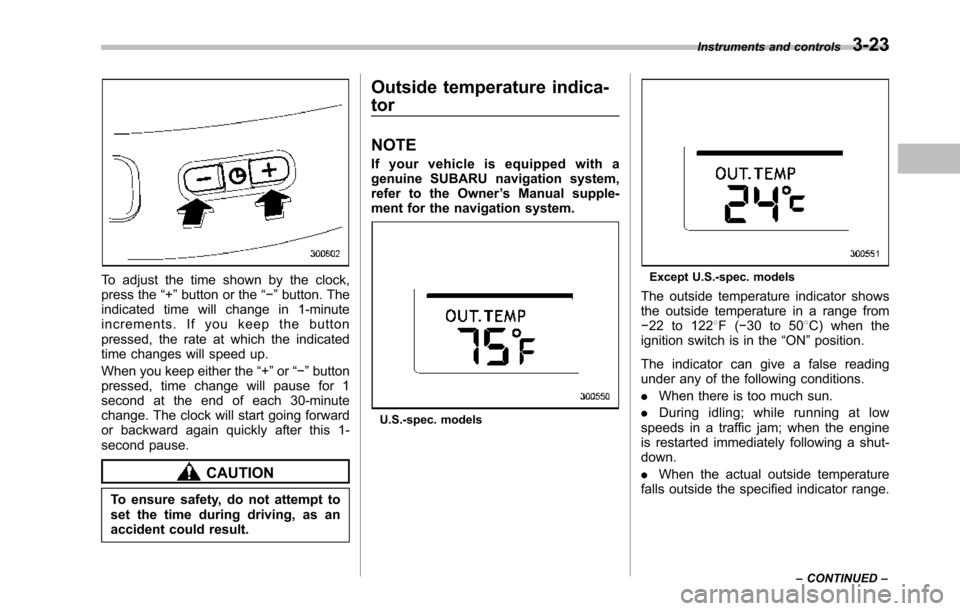
To adjust the time shown by the clock,press the“+”button or the“!”button. Theindicated time will change in 1-minuteincrements. If you keep the buttonpressed, the rate at which the indicatedtime changes will speed up.
When you keepeither the“+”or“!”buttonpressed,time change will pause for 1second at the end of each 30-minutechange. The clock will start going forwardor backward again quickly after this 1-second pause.
CAUTION
To ensure safety, do not attempt toset the time during driving, as anaccident could result.
Outside temperature indica-
tor
NOTE
If your vehicle is equipped with agenuine SUBARU navigation system,refer to the Owner’s Manual supple-ment for the navigation system.
U.S.-spec. models
Except U.S.-spec. models
Theoutside temperature indicator showsthe outside temperature in a range from!22 to 1228F(!30 to 508C) when theignition switch is in the“ON”position.
The indicator can give a false readingunder any of the following conditions.
.When there is too much sun.
.During idling; while running at lowspeeds in a traffic jam; when the engineis restarted immediately following a shut-down.
.When the actual outside temperaturefalls outside the specified indicator range.
Instruments and controls3-23
–CONTINUED–
Page 162 of 426
&Daytime running light system
WARNING
The brightness of the illumination ofthe high beam headlights is reducedby the daytime running light system.The light switch must always beturned to the“”position when itis dark outside.
The high beam headlights will automati-cally illuminate at reduced brightnesswhen the engine has started, under thefollowing conditions.
.The select lever is in a position otherthan the“P”position.
.The parkingbrake is fully released.
.The light switch is in the“OFF”or“”position.
NOTE
When the light switch is in the“”position,the front side marker lights,parking lights and license plate lightsare also illuminated.
Turn signal lever
To activate the right turn signal, push theturn signal lever up. To activate the leftturn signal, push the turn signal leverdown. When the turn is finished, the leverwill return automatically. If the lever doesnot return after cornering, return the leverto the neutral position by hand.
To signal a lane change, push the turnsignal lever up or down slightly and hold itduring the lane change. The turn signalindicator lights will flash in the direction ofthe turn or lane change. The lever willreturn automatically to the neutral positionwhen you release it.
Illumination brightness con-
trol
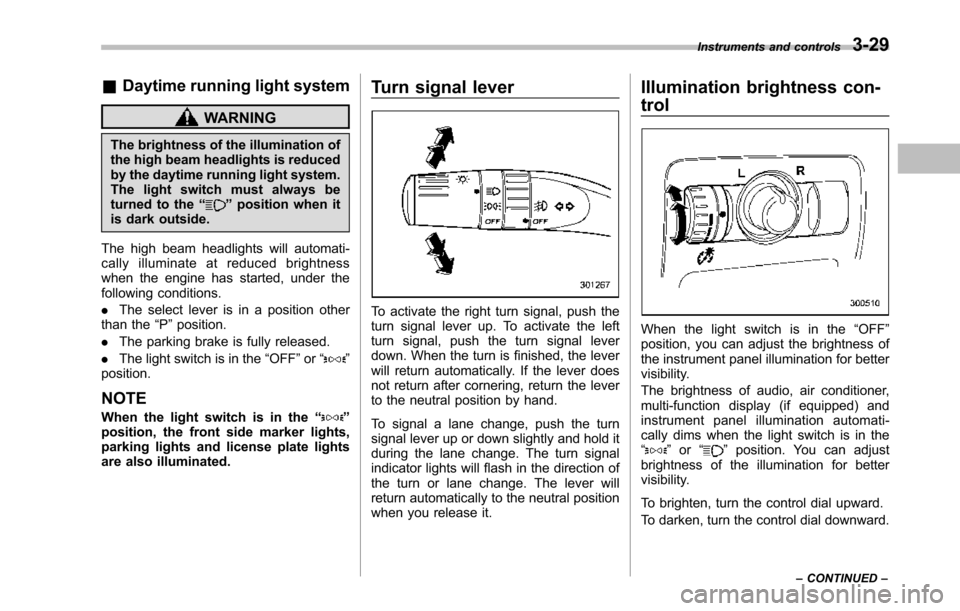
When the light switch is in the“OFF”position, you can adjust the brightness ofthe instrument panel illumination for bettervisibility.
The brightnessof audio, air conditioner,multi-function display (if equipped) andinstrument panel illumination automati-cally dims when the light switch is in the“”or“”position. You can adjustbrightness of the illumination for bettervisibility.
To brighten, turn the control dial upward.
To darken, turn the control dial downward.
Instruments and controls3-29
–CONTINUED–
Page 190 of 426

10. Secure the glove box with the one clip.
11. Install the instrument panel side cover.
CAUTION
Contact your SUBARU dealer if thefollowingoccurs, even if it is not yettime to change the filter.
–Reduction of the airflow throughthe vents.
–Windshield gets easily fogged ormisted.
NOTE
The filter can influence the air condi-tioning, heating and defroster perfor-mance if not properly maintained.
Climate control4-13
Page 197 of 426

5-6Audio
Control mode (range of le-vels)
Turn counterclockwise Turn clockwise
Bass control (!6 to +6) For less bass sound For more bass sound
Midrange control(!6 to +6) For less midrange sound For more midrange sound
Treble control (!6 to +6) For less treble sound For more treble sound
Fader control (R9 to F9)To increase rear speaker vo-lume and decrease front speak-er volume
To increase front speaker vo-lume and decrease rear speakervolume
Balance control(L9 to R9)To increase left speaker volumeand decrease right speaker vo-lume
To increase right speaker vo-lume and decrease left speakervolume
Volume control (0 to 40) For less volume For more volume
AUX volume control* (0 to40)For less volumeFor more volume
*: Only when an AUX audio product is connected.
!FM/AM radio
!FM/AM selection button
Push the“FM AM”button (2) when theradio is off to turn on the radio.
Push the“FM AM”button when the radiois on to select FM1, FM2 or AM reception.
!Stereo indicator
The stereo indicator“ST”will illuminatewhen an FM stereo broadcast is received.
!Manual tuning
Press the“”side of the“TUNE TRACK”button(4) to increase the tuning frequencyand press the“”side of the button todecrease it.
Each time the button is pressed, thefrequencyinterval can be changed be-tween 10 kHz in the AM mode and 0.2MHz in the FM mode.
If you hold down the“”side of thebutton, the tuningfrequency will increasecontinuously, and if you hold down the“”side of the button, the tuning frequencywill decrease continuously. Release thebutton when your desired frequency isreached.
Page 203 of 426
5-12Audio
!Repeating
!To repeat the currently playingtrack
To repeat a track, briefly press the“RPT”button (6) while the track is playing. Thedisplay will show“RPT”, and the track willbe repeated.
To cancel the track repeat-play mode:
Press the“RPT”button once (non-MP3disc)
Press the“RPT”button twice (MP3 disc)The“RPT”indication will turn off, and thenormal playback mode will be resumed.
NOTE
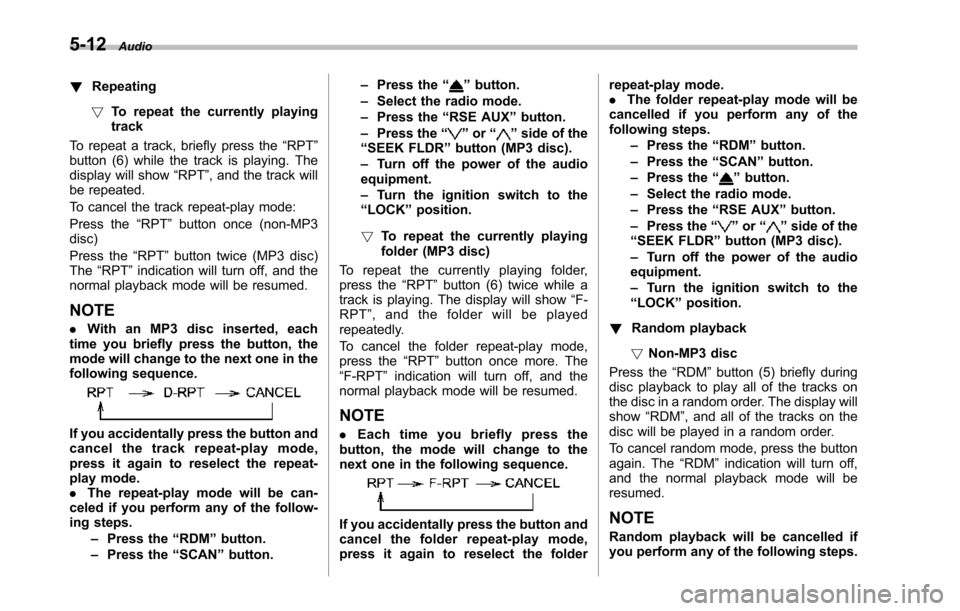
.With an MP3 disc inserted, eachtime you briefly press the button, themode willchange to the next one in thefollowing sequence.
If you accidentally press the button andcancel the track repeat-play mode,press it again to reselect the repeat-play mode..The repeat-play mode will be can-celed if you perform any of the follow-ing steps.–Press the“RDM”button.–Press the“SCAN”button.
–Press the“”button.–Select the radio mode.–Press the“RSE AUX”button.–Press the“”or“”side of the“SEEK FLDR”button (MP3 disc).–Turn off the power of the audioequipment.–Turn the ignition switch to the“LOCK”position.
!To repeat the currently playingfolder (MP3 disc)
To repeat the currently playing folder,press the“RPT”button (6) twice while atrack is playing. The display will show“F-RPT”,andthefolderwillbeplayedrepeatedly.
To cancel the folder repeat-play mode,press the“RPT”button once more. The“F-RPT”indication will turn off, and thenormal playback mode will be resumed.
NOTE
.Each time you briefly press thebutton, the mode will change to thenext one in the following sequence.
If you accidentally press the button andcancel the folder repeat-play mode,press it again to reselect the folder
repeat-play mode..The folder repeat-play mode will becancelled if you perform any of thefollowing steps.–Press the“RDM”button.–Press the“SCAN”button.–Press the“”button.–Select the radio mode.–Press the“RSE AUX”button.–Press the“”or“”side of the“SEEK FLDR”button (MP3 disc).–Turn off the power of the audioequipment.–Turn the ignition switch to the“LOCK”position.
!Random playback
!Non-MP3 disc
Press the“RDM”button (5) briefly duringdiscplayback to play all of the tracks onthe disc in a random order. The display willshow“RDM”, and all of the tracks on thedisc will be played in a random order.
To cancel random mode, press the buttonagain. The“RDM”indication will turn off,and the normal playback mode will beresumed.
NOTE
Random playback will be cancelled ifyou performany of the following steps.
Page 204 of 426

.Press the“RPT”button..Press the“SCAN”button..Press the“”button..Select the radio mode..Press the“RSE AUX”button..Press the“”or“”side of the“SEEK FLDR”button..Tu r n o f f t h e p o w e r o f t h e a u d i oequipment..Tu r n t h e i g n i t i o n s w i t c h t o t h e“LOCK”position.
!MP3 disc
Press the“RDM”button (5) during discplayback to play all of the tracks in thefolder currently being played in randomorder. Press the“RDM”button again toplay all of the tracks on the disc in randomorder. The display will show“RDM”duringthe random mode.
To cancel the random mode, press the“RDM”button during“in-disc”randomplayback. The“RDM”indication will turnoff, and the normal playback mode will beresumed.
NOTE
.Each time you briefly press thebutton, the mode will change to thenext one in the following sequence.
If you accidentally press the button andcancel the random mode, press it againto reselect the random mode..Random playback will be cancelledif you perform any of the followingsteps.–Press the“RPT”button.–Press the“SCAN”button.–Press the“”button.–Select the radiomode.–Press the“RSE AUX”button.–Press the“”or“”side of the“SEEK FLDR”button.–Turn off the power of the audioequipment.–Turn the ignition switch to the“LOCK”position.
!Scan
The scan mode lets you listen to the first10 seconds of each track on the disc/folder in succession. Press the“SCAN”button (7) to start scanning through alltracks upward beginning with the trackfollowing the currently selected one. Afterall tracks on the disc/folder has been
scanned, normal playback mode is re-stored.
To cancel a scan, press the button again.
NOTE
The scan mode will be cancelled if youperform any of the following opera-tions.
.Press the“RPT”button..Press the“RDM”button..Press the“”button..Press the“”or“”side of the“TUNE TRACK”button..Press the“”or“”side of the“SEEK FLDR”button (MP3 disc)..Select the radio mode..Press the“RSE AUX”button..Tu r n o f f t h e p o w e r o f t h e a u d i oequipment..Tu r n t h e i g n i t i o n s w i t c h t o t h e“LOCK”position.
!To eject a disc from the player
Whena disc is being played back or whena disc is in the player, press the“”button(8). The disc will be ejected.
NOTE
.Avoid driving the vehicle with a CDsticking out, because vibration mightmake it fall out..If the disc is left ejected for more
Audio5-13
–CONTINUED–