2014 PORSCHE 911 TURBO wheel
[x] Cancel search: wheelPage 124 of 300

122 Instrument Panel and Multi-Function Display
Adjusting reversing options
You can configure the exterior mirror to lower automatically when reverse gear is engaged.
Lowering exterior mirror on passenger’s side when parking
You can configure the door mirror on the passenger’s side to tilt downwards automatically when reverse gear is engaged to provide a better view of the curb.
Locking settings
The locking and unlocking settings on the vehicle can be adjusted.The Easy Entry function can be switched on and off.
Setting door unlocking
You can configure specific doors to unlock when the vehicle is unlocked.
Available setting options: –“ All doors” All doors are unlocked when the vehicle is unlocked.–“ Driver’s door” The driver’s door is unlocked when the vehicle is unlocked.
Setting door locking
You can configure the doors to remain unlocked or lock automatically after a delay on entering the vehicle.
Available setting options: –“ Off” The doors are not locked automatically after entering the vehicle.–“ After ign. on” The doors are locked automatically when the ignition is switched on.–“ After drive-off” The doors are locked automatically after driving off.
Switching Comfort Entry on and off
You can configure the driver’s seat and steering wheel to move back automatically and allow the driver to get in and out of the vehicle more easily.
1. Main menu “Vehicle” > “ Settings” > “ Light & Visibility” > “ Revers. opt.” and confirm.
1. Main menu “Vehicle” > “ Settings” > “ Light & Visibility” > “ Revers. opt.” and confirm.
2. Select “Lowering mirr.”. in the main menu.
3. Confirm your selection.
Exterior mirror is lowered.
Exterior mirror is not lowered.
1. Main menu “Vehicle” > “ Settings” > “ Locking” and confirm.
1. Main menu “Vehicle” > “ Settings” > “ Locking”
2.“Door unlock” and confirm.
3. Select the desired setting and confirm.
1. Main menu “Vehicle” > “ Settings” > “ Locking”
2.“Door lock” and confirm.
3. Select the desired setting and confirm.
1. Main menu “Vehicle” > “ Settings” > “ Locking”
2.Select “Comfort Entry”. in the main menu.
3. Confirm your selection.
Comfort Entry is activated.
Comfort Entry is deactivated.
14_991_Turbo_21.book Seite 122 Mittwoch, 9. April 2014 2:19 14
Page 129 of 300

Instrument Panel and Multi-Function Display 127
Adjusting volume of warning tones
The volume of the warning tones can be adjusted individually.
Available setting options: –“ Loud” –“ Medium” –“ Low”
Changing button assignment on multi-function steering wheel
The assignment of the ◊ button on the multi-function display can be changed individually.Functions from the multi-function display or PCM/CDR can be assigned to the ◊ button.
Available PCM functions: –“ Source change” Change audio source.–“ Voice control” Activate voice control.–“ Dri. instr. (Rep)” Repeat voice instruction from the navigation system.–“ Station/track <” Previous radio station/title.–“ Station/track >” Next radio station/track.–“ Map” Display navigation map in PCM.–“ Menu change” Change main menu area.
Available instrument cluster functions: –“ Start/Stop Chr.” Start/stop timing.–“ Vehicle menu” Display vehicle menu.–“ Trip menu” Display trip menu.–“ TPMS menu” Display TPMS menu.–“ Chrono menu” Display Chrono menu.–“ Audio menu” Display audio menu.–“ Phone menu” Display telephone menu.–“ Navi menu” Display navigation menu.–“ Map menu” Display navigation map on the multi-function display.
1. Main menu “Vehicle” > “ Settings” > “ Volume”
2.Select “Warn. tones”. in the main menu.
3. Select the desired setting and confirm.
1. Main menu “Vehicle” > “ Settings” > “ Steering wheel op.”
2.Select “◊ button” and confirm.
3. Select “PCM function” or “ Inst. clus. fun.” and confirm.
4. Select the desired function assignment and confirm.
14_991_Turbo_21.book Seite 127 Mittwoch, 9. April 2014 2:19 14
Page 137 of 300

Instrument Panel and Multi-Function Display 135
Replace ignition key batteryReplace the battery in the driver's key.
Fault of Porsche Entry&DriveHave the fault corrected at an authorized Porsche dealer.
Multiple keys recognized in vehicle Information message: Several driver's keys in the vehicle, e.g. in the possession of a passenger.
Close doors to lock vehicle Close all doors and luggage compartment lids before locking the vehicle.
Operating device: turn left, pull off, insert key No key detected in the vehicle, ignition cannot be switched on or engine cannot be started. Turn control unit back to ignition lock position 0 and remove it from the ignition lock. Switch the ignition on with the ignition key (not emergency key).
PADM deactivatedService requiredDriving permitted
Have the fault corrected at an authorized Porsche dealer.
Chassis system fault Adapteddriving permitted
Vehicle handling may be affected. Adapt your speed to the changed conditions. Have the fault corrected at an authorized Porsche dealer.
Chassis system failure Stop immediately in a suitable place. Do not drive off or continue driving. Have the fault corrected at an authorized Porsche dealer.
Chassis system fault Adapteddriving permitted
Vehicle handling may be affected. Adapt your speed to the changed conditions. Have the fault corrected at an authorized Porsche dealer.
Suspension system fault Adapteddriving permitted
The lateral inclination of the vehicle is significantly greater when cornering. Drive carefully at an appropriate speed to the nearest authorized Porsche dealer.
No all-wheel sys. Only rear-wh driveAdapted
driving permitted
Temporary failure of Porsche Traction Management. Reduce load.
All-wheel system temperature limitReduce load
Porsche Traction Management is overloaded. Reduce load.
Light in instrument panel
Warning and information message on the multi-function display Meaning/Action required
14_991_Turbo_21.book Seite 135 Mittwoch, 9. April 2014 2:19 14
Page 138 of 300

136 Instrument Panel and Multi-Function Display
All-wheel overload Only rear-wh driveReduce load Driving permitted
Temporary failure of Porsche Traction Management. Reduce load.
All-wheel function restrictedAdapted driving permitted
Have the fault corrected at an authorized Porsche dealer.
All-wheel drive system faultAdapted driving permitted
Have the fault corrected at an authorized Porsche dealer.
Fault differential lockPossible to drive on
Have the fault corrected at an authorized Porsche dealer.
Check tires Tire Pressure Monitoring System detects a pressure loss of more than 20% below the required pressure or more than 7 psi (0.5 bar) at a speed of less than 100 mph (160 km/h), more than 6 psi (0.4 bar) at a speed greater than 100 mph (160 km/h) and more than 4 psi (0.3 bar) at a speed greater than 165 mph (270 km/h).Stop in a suitable place and check the tires indicated for damage.If necessary, fill in tire sealant and set the correct tire pressure.
Top off air Tire Pressure Monitoring System detects a pressure loss of more than 4 psi (0.3 bar). Correct the tire pressure at the next opportunity.
Restricted monitoring Fault on one or both wheel transmitters. Have the fault corrected at an authorized Porsche dealer.
No tire pressure monitoring System is learning Tire Pressure Monitoring System requires a certain amount of time to learn the wheels. During this time, the current tire pressures are not available on the multi-function display.
Tire pressure monitoring faultService required
Fault in Tire Pressure Monitoring System. Tire pressure is not monitored. Have the fault corrected at an authorized Porsche dealer.
Tire pressure monitoring temporarily deactivated Temporary fault in the Tire Pressure Monitoring System. Tire pressure is not monitored.
Light in instrument panel
Warning and information message on the multi-function display Meaning/Action required
14_991_Turbo_21.book Seite 136 Mittwoch, 9. April 2014 2:19 14
Page 139 of 300
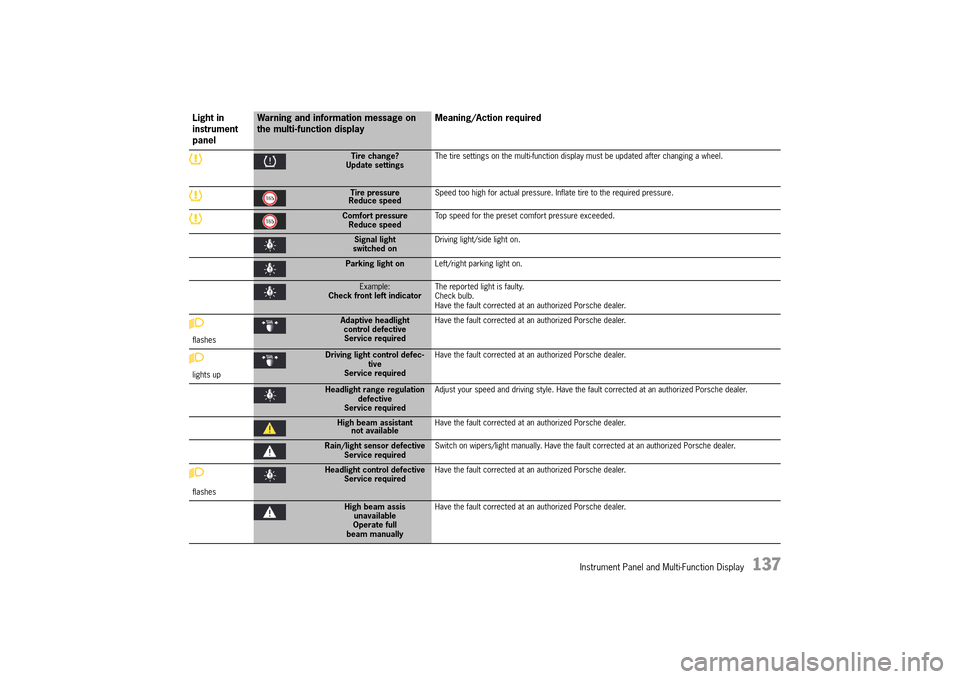
Instrument Panel and Multi-Function Display 137
Tire change? Update settings The tire settings on the multi-function display must be updated after changing a wheel.
Tire pressure Reduce speed Speed too high for actual pressure. Inflate tire to the required pressure.
Comfort pressure Reduce speed Top speed for the preset comfort pressure exceeded.
Signal light switched on Driving light/side light on.
Parking light on Left/right parking light on.
Example: Check front left indicator The reported light is faulty. Check bulb.Have the fault corrected at an authorized Porsche dealer.
flashes
Adaptive headlight control defectiveService required
Have the fault corrected at an authorized Porsche dealer.
lights up
Driving light control defec- tiveService required
Have the fault corrected at an authorized Porsche dealer.
Headlight range regulation defectiveService required
Adjust your speed and driving style. Have the fault corrected at an authorized Porsche dealer.
High beam assistant not available Have the fault corrected at an authorized Porsche dealer.
Rain/light sensor defective Service required Switch on wipers/light manually. Have the fault corrected at an authorized Porsche dealer.
flashes
Headlight control defective Service required Have the fault corrected at an authorized Porsche dealer.
High beam assis unavailableOperate fullbeam manually
Have the fault corrected at an authorized Porsche dealer.
Light in instrument panel
Warning and information message on the multi-function display Meaning/Action required
14_991_Turbo_21.book Seite 137 Mittwoch, 9. April 2014 2:19 14
Page 148 of 300

146 Driving and Driving Safety
Diagnostic Socket
External equipment or devices (e.g. navigation units, head-up displays, etc.) connected to the diagnostic socket can impair the function of the vehicle systems.fDo not connect any equipment or devices to the diagnostic socket.
Loose equipment/devices or hanging cables in the driver's footwell can obstruct clearance around the pedals or become caught between the pedals when braking or changing direction.fDo not place any equipment/devices or cables in the driver's footwell.
The diagnostic socket is for connecting diagnostic equipment in qualified specialist workshops.
Operating external equipment or devices (e.g. navigation units, head-up displays, etc.) from the diagnostic socket when the ignition is switched off will run down the battery. If the vehicle is parked for an extended period, the battery can discharge fully and be damaged (exhaustive discharge).fDo not connect any equipment or devices to the diagnostic socket.
Ignition Lock
The ignition key is inserted into the ignition lock to the right of the light switch at the left of the steering wheel.
On vehicles with Porsche Entry & Drive, you no longer have to insert the key into the ignition lock, but merely keep it with you. The ignition key is replaced by a control unit in the ignition lock, which always remains in the ignition lock, unless the vehicle is being towed.
The ignition lock has three key positions.
Key positions 0 - Initial position 1 - Ignition on 2 - Start engine
Information
The vehicle battery discharges if the ignition key is left inserted.
If the vehicle battery is dead, the key can only be removed from the ignition lock if the emergency operation is performed: fPlease see the chapter “EMERGENCY OPERATION – UNLOCKING THE IGNITION KEY/CONTROL UNIT” on page 28.
Improper interventions in the vehicle electrical system
Loose equipment/ devices or hanging cables in the driver's footwell
WARNINGh
WARNINGh
NOTICE
14_991_Turbo_21.book Seite 146 Mittwoch, 9. April 2014 2:19 14
Page 151 of 300

Driving and Driving Safety 149
Auto Start Stop function
The engine stops automatically when the vehicle is
stopped, e.g. at traffic lights or in a traffic jam, if all the preconditions for stopping the engine automatically are met. The engine can also stop automatically
during a stop at walking pace. The Auto Start Stop function thus helps to save fuel.
The ignition stays on even when the engine switches off automatically. All safety functions are still available.
Preconditions for stopping the engine automatically
– Auto Start Stop function switched on. – Engine compartment lid closed.– Brake pedal pressed– Move PDK selector lever to the D, N or P position, or to a manually selected transmission range 1 or 2. – Engine, transmission and air conditioning are at operating temperature.– Battery has reached its target voltage.– Vehicle was driven at a speed of more than approx. 1 mph (2 km/h) for at least 1.5 seconds since the engine last stopped automatically.
Information
When the ignition is on, the battery is discharged. If the vehicle is parked for an extended period, the battery can discharge fully and be damaged (exhaustive discharge).
Stopping the engine
The Auto Start Stop function stops the engine once the vehicle stops moving or during the stopping process.1. Use the footbrake to stop the vehicle. 2. Keep the footbrake pressed. orMove PDK selector lever to position P.
Information
– The engine can also be stopped subsequently (not immediately after the vehicle comes to a stop) if the exceptions are set aside and the preconditions for stopping the engine automatically continue to be met.fPlease see the chapter “EXCEPTIONS FOR THE AUTO START STOP FUNCTION” on page 150.– When adaptive cruise control is switched on, the engine stops automatically when the vehicle is stationary if the vehicle in front also comes to a stop.
Starting the engine
The Auto Start Stop function starts the engine:fIn PDK selector-lever position D, N or manually selected transmission range 1 or 2: Release the footbrake.orPress the accelerator.orMove the steering wheel.orMove PDK selector lever to position R.
You can drive off normally.
Information
When adaptive cruise control is switched on, the engine starts automatically if the following preconditions are met:– The vehicle in front drives off.orThe accelerator is pressed.orSpeed and distance control is resumed using the control stalk (position 4, RESUME).fPlease see the chapter “INTERRUPTING AND RESUMING CRUISE CONTROL AND DISTANCE CONTROL” on page 164.– Switching off adaptive cruise control starts the engine automatically and the vehicle moves (crawls) when in gear.
14_991_Turbo_21.book Seite 149 Mittwoch, 9. April 2014 2:19 14
Page 153 of 300

Driving and Driving Safety 151
Auto Start Stop function display
If the engine was stopped automatically by the Auto Start Stop function, the indicator light on the multi-function display in the instrument panel will light up green.
If the Auto Stop function is not available or if no driver is detected in the vehicle after the engine has stopped automatically (driver’s seat belt not fastened or driver’s door open), the indicator light on the multi-function display in the instrument panel will light up yellow when the vehicle is stationary.
The Auto Start Stop system has detected that: – At least one precondition for stopping the engine automatically is not met.
or – There is at least one exception for the Auto Start Stop function.fPlease see the chapter “PRECONDITIONS FOR STOPPING THE ENGINE AUTOMATICALLY” on page 149.fPlease see the chapter “EXCEPTIONS FOR THE AUTO START STOP FUNCTION” on page 150.
Information
If the indicator light in the multi-function display continuously lights up yellow when the vehicle is stopped and if the engine does not stop regularly when the vehicle is stopped despite the fact that the preconditions for stopping the engine automatically are met, have the Auto Start Stop system checked the next time you visit the workshop.
Fault reporting
If there is a fault, the warning message “ Start/ Stop operation deactivated ” will appear on the multi-function display in the instrument panel.fHave the fault corrected at an authorized Porsche dealer.
Electric Parking Brake
The electric parking brake acts on the rear wheels and serves to secure the vehicle while parked.
Applying the parking brake
fPress switch .The brake warning light on the instrument panel lights up.
For information on indicator lights and warning lights on the instrument panel: fPlease see the chapter “INSTRUMENT PANEL USA MODELS” on page 90.
Automatic engine stop and restart readiness
No engine stop or restart readiness
14_991_Turbo_21.book Seite 151 Mittwoch, 9. April 2014 2:19 14