2014 NISSAN JUKE display
[x] Cancel search: displayPage 86 of 402
Average fuel consumption (mpg or l
(liter)/100 km)
The average fuel consumption mode shows the
average fuel consumption since the last reset.
Resetting is done by pushing the trip computer
mode switch
*Afor approximately 1 second.
The display is updated every 30 seconds. At
about the first 1/3 mile (500 m) after a reset, the
display shows “---”.
Elapsed time
The elapsed time mode shows the time since
the last reset. The displayed time can be reset
by pushing the trip computer mode switch
*Afor approximately 1 second.
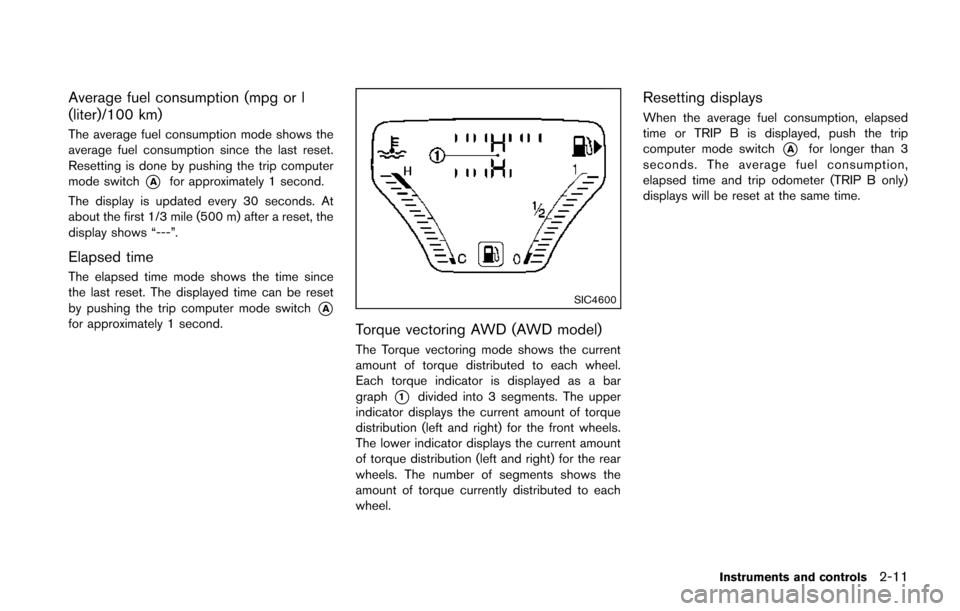
SIC4600
Torque vectoring AWD (AWD model)
The Torque vectoring mode shows the current
amount of torque distributed to each wheel.
Each torque indicator is displayed as a bar
graph
*1divided into 3 segments. The upper
indicator displays the current amount of torque
distribution (left and right) for the front wheels.
The lower indicator displays the current amount
of torque distribution (left and right) for the rear
wheels. The number of segments shows the
amount of torque currently distributed to each
wheel.
Resetting displays
When the average fuel consumption, elapsed
time or TRIP B is displayed, push the trip
computer mode switch
*Afor longer than 3
seconds. The average fuel consumption,
elapsed time and trip odometer (TRIP B only)
displays will be reset at the same time.
Instruments and controls2-11
Page 90 of 402
.The light blinks in yellow when the door is
closed with the Intelligent Key left outside
the vehicle and the ignition switch in the
ACC or ON position. Make sure that the
Intelligent Key is inside the vehicle.
. The light blinks in green when the Intelligent
Key battery is running out of power. Replace
the battery with a new one. (See “Key
battery replacement” (P.8-22) .)
. The light illuminates in yellow when it warns
of a malfunction with Intelligent Key system.
If the warning light illuminates in yellow while the
engine is stopped, it may be impossible to start
the engine. If the light comes on while the engine
is running, you can drive the vehicle. However in
these cases, contact a NISSAN dealer for repair
as soon as possible.
Low fuel warning light
This light illuminates when the fuel in the tank is
getting low. Refuel as soon as it is convenient,
preferably before the fuel gauge reaches the 0
(empty) position.
There will be a small reserve of fuel
remaining in the tank when the fuel gauge
reaches the 0 position.
Low tire pressure warning light
Your vehicle is equipped with a Tire Pressure
Monitoring System (TPMS) that monitors the tire
pressure of all tires except the spare.
The low tire pressure warning light warns of low
tire pressure or indicates that the TPMS is not
functioning properly.
After the ignition switch is placed in the ON
position, this light illuminates for about 1 second
and turns off.
Low tire pressure warning:
If the vehicle is being driven with low tire
pressure, the warning light will illuminate. A
CHECK TIRE PRES (pressure) warning mes-
sage is also displayed in the vehicle information
display.
When the low tire pressure warning light
illuminates, you should stop and adjust the tire
pressure to the recommended COLD tire
pressure shown on the Tire and Loading
Information label. The low tire pressure warning
light does not automatically turn off when the tire
pressure is adjusted. After the tire is inflated to
the recommended pressure, the vehicle must be
driven at speeds above 16 MPH (25 km/h) to
activate the TPMS and turn off the low tire
pressure warning light. Use a tire pressure
gauge to check the tire pressure. The low tire pressure warning light remains
illuminated until the tires are inflated to the
recommended COLD tire pressure. The CHECK
TIRE PRES warning message is displayed each
time the ignition switch is placed in the ON
position as long as the low tire pressure warning
light remains illuminated.
For additional information, see “Check tire
pressure warning message” (P.2-7) , “Tire Pres-
sure Monitoring System (TPMS)” (P.5-4) and
“Tire Pressure Monitoring System (TPMS)” (P.6-
3) .
TPMS malfunction:
If the TPMS is not functioning properly, the low
tire pressure warning light will flash for approxi-
mately 1 minute when the ignition switch is
placed in the ON position. The light will remain
on after 1 minute. The CHECK TIRE PRES
warning message is not displayed if the low tire
pressure warning light illuminates to indicate a
TPMS malfunction. Have the system checked by
a NISSAN dealer.
For additional information, see “Tire Pressure
Monitoring System (TPMS)” (P.5-4) .
Instruments and controls2-15
Page 94 of 402
warning message is displayed on the twin
trip odometer. If the fuel-filler cap is loose or
missing, tighten or install the cap and
continue to drive the vehicle. The
light
should turn off after a few driving trips. If the
light does not turn off after a few driving
trips, have the vehicle inspected by a
NISSAN dealer. You do not need to have
your vehicle towed to the dealer.
. Malfunction indicator light blinking — An
engine misfire has been detected which may
damage the emission control system.
To reduce or avoid emission control system
damage:
1) Do not drive at speeds above 45 MPH
(72 km/h).
2) Avoid hard acceleration or deceleration.
3) Avoid steep uphill grades.
4) If possible, reduce the amount of cargo being hauled or towed.
The malfunction indicator light may stop
blinking and remain on.
Have the vehicle inspected by a NISSAN
dealer. You do not need to have your vehicle
towed to the dealer.
CAUTION
Continued vehicle operation without
having the emission control system
and/or CVT system checked and re-
paired as necessary could lead to poor
driveability, reduced fuel economy, and
possible damage to the emission con-
trol system.
Security indicator light
The light blinks when the ignition switch is in the
ACC, OFF or LOCK position. This function
indicates the security system equipped on the
vehicle is operational.
If the security system is malfunctioning, this light
will remain on while the ignition switch is in the
ON position. For additional information, see
“Security systems” (P.2-29) .
Turn signal/hazard indicator lights
The light flashes when the turn signal switch
lever or hazard switch is turned on.
Vehicle Dynamic Control (VDC) off
indicator light
The light comes on when the Vehicle Dynamic
Control (VDC) off switch is pushed to OFF. This
indicates that the VDC system and traction
control system are not operating.
AUDIBLE REMINDERS
Key reminder chime
Models with Intelligent Key system:
A chime will sound if the driver side door is
opened while the ignition switch is pushed to
the ACC position.
Make sure the ignition switch is pushed to the
OFF position, and take the Intelligent Key with
you when leaving the vehicle.
Models without Intelligent Key system:
The key reminder chime sounds if the driver’s
side door is opened while the key is left in the
ignition switch and the ignition switch is in the
ACC, OFF or LOCK position. Remove the key
and take it with you when leaving the vehicle.
Instruments and controls2-19
Page 96 of 402
The Integrated Control System is located below
the audio system or navigation system (if so
equipped) . Two Integrated Control System
modes can be selected: Drive mode and
Climate Control mode.
Depending on which Integrated Control System
mode is selected (Drive mode or Climate
Control mode) , the screen display and some
button functions will change.
.Drive mode
In the Drive mode, three types of driving
modes can be selected: NORMAL, SPORT
and ECO. See “Drive mode” (P.5-25). In
addition, while in the Drive mode, SETUP,
Drive information and ECO information can
be displayed and adjusted. See “Drive
mode” (P.2-21) .
. Climate Control mode
In the Climate Control mode, the climate
control can be set and adjusted. See
“Automatic air conditioner (with Integrated
Control System)” (P.4-24) .
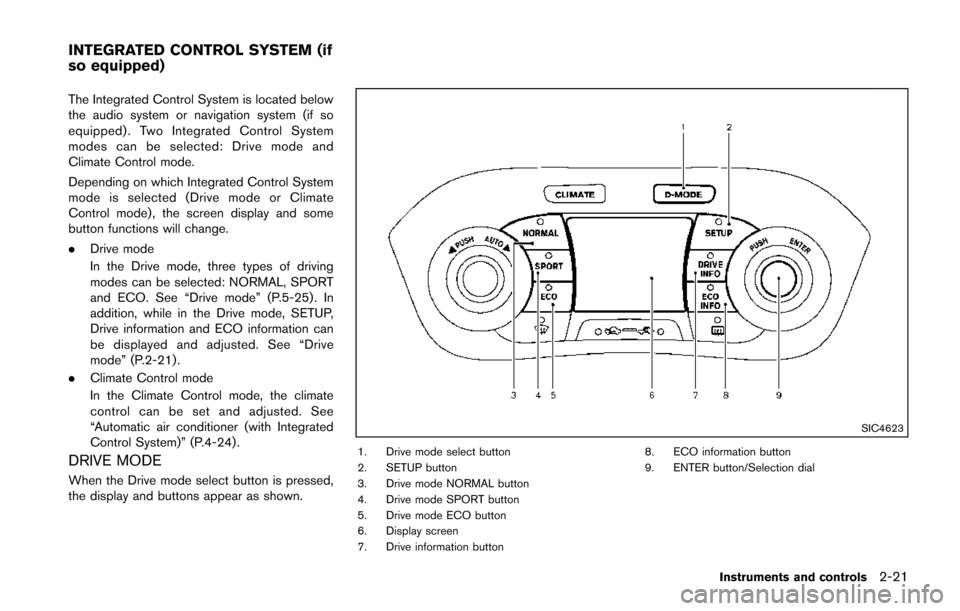
DRIVE MODE
When the Drive mode select button is pressed,
the display and buttons appear as shown.
SIC4623
1. Drive mode select button
2. SETUP button
3. Drive mode NORMAL button
4. Drive mode SPORT button
5. Drive mode ECO button
6. Display screen
7. Drive information button 8. ECO information button
9. ENTER button/Selection dial
Instruments and controls2-21
INTEGRATED CONTROL SYSTEM (if
so equipped)
Page 97 of 402
2-22Instruments and controls
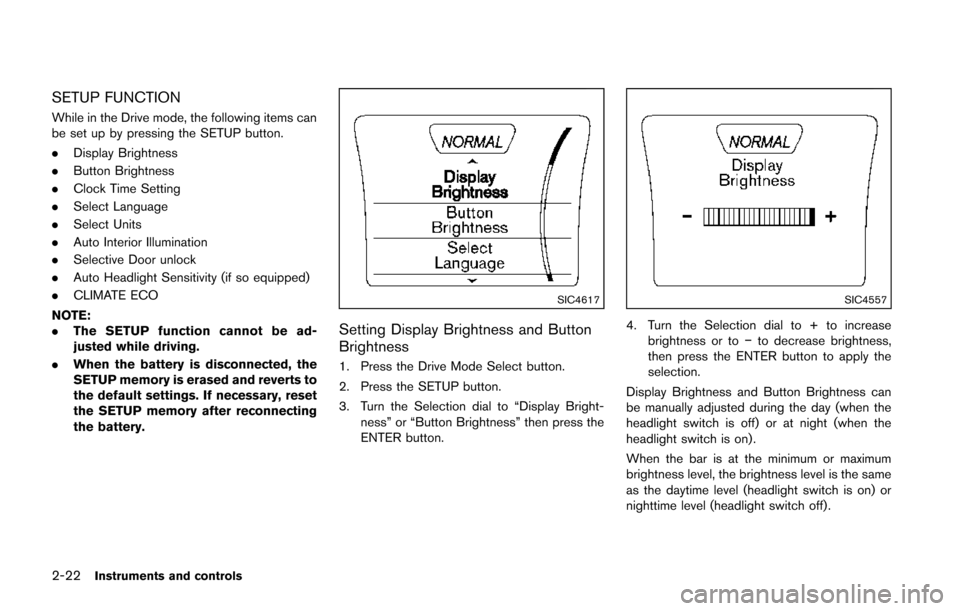
SETUP FUNCTION
While in the Drive mode, the following items can
be set up by pressing the SETUP button.
.Display Brightness
. Button Brightness
. Clock Time Setting
. Select Language
. Select Units
. Auto Interior Illumination
. Selective Door unlock
. Auto Headlight Sensitivity (if so equipped)
. CLIMATE ECO
NOTE:
. The SETUP function cannot be ad-
justed while driving.
. When the battery is disconnected, the
SETUP memory is erased and reverts to
the default settings. If necessary, reset
the SETUP memory after reconnecting
the battery.
SIC4617
Setting Display Brightness and Button
Brightness
1. Press the Drive Mode Select button.
2. Press the SETUP button.
3. Turn the Selection dial to “Display Bright-
ness” or “Button Brightness” then press the
ENTER button.
SIC4557
4. Turn the Selection dial to + to increasebrightness or to −to decrease brightness,
then press the ENTER button to apply the
selection.
Display Brightness and Button Brightness can
be manually adjusted during the day (when the
headlight switch is off) or at night (when the
headlight switch is on) .
When the bar is at the minimum or maximum
brightness level, the brightness level is the same
as the daytime level (headlight switch is on) or
nighttime level (headlight switch off) .
Page 98 of 402
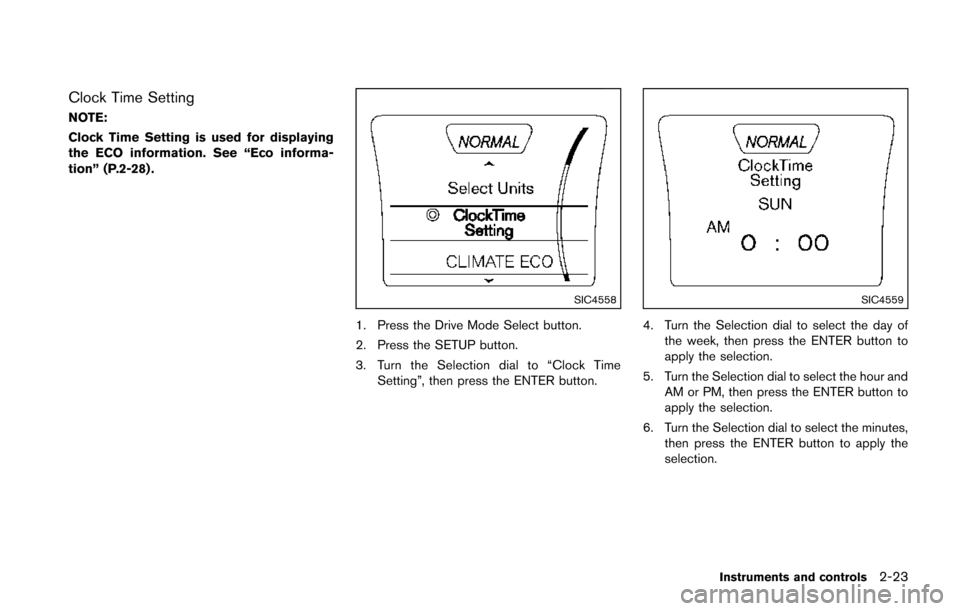
Clock Time Setting
NOTE:
Clock Time Setting is used for displaying
the ECO information. See “Eco informa-
tion” (P.2-28) .
SIC4558
1. Press the Drive Mode Select button.
2. Press the SETUP button.
3. Turn the Selection dial to “Clock TimeSetting”, then press the ENTER button.
SIC4559
4. Turn the Selection dial to select the day of
the week, then press the ENTER button to
apply the selection.
5. Turn the Selection dial to select the hour and AM or PM, then press the ENTER button to
apply the selection.
6. Turn the Selection dial to select the minutes, then press the ENTER button to apply the
selection.
Instruments and controls2-23
Page 102 of 402
JVI0324X
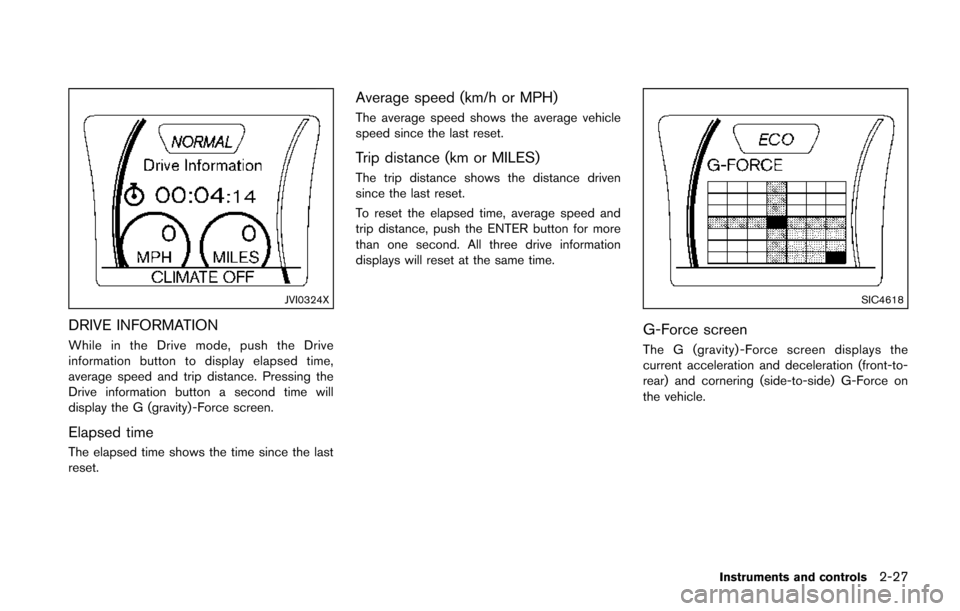
DRIVE INFORMATION
While in the Drive mode, push the Drive
information button to display elapsed time,
average speed and trip distance. Pressing the
Drive information button a second time will
display the G (gravity) -Force screen.
Elapsed time
The elapsed time shows the time since the last
reset.
Average speed (km/h or MPH)
The average speed shows the average vehicle
speed since the last reset.
Trip distance (km or MILES)
The trip distance shows the distance driven
since the last reset.
To reset the elapsed time, average speed and
trip distance, push the ENTER button for more
than one second. All three drive information
displays will reset at the same time.
SIC4618
G-Force screen
The G (gravity) -Force screen displays the
current acceleration and deceleration (front-to-
rear) and cornering (side-to-side) G-Force on
the vehicle.
Instruments and controls2-27
Page 103 of 402
2-28Instruments and controls
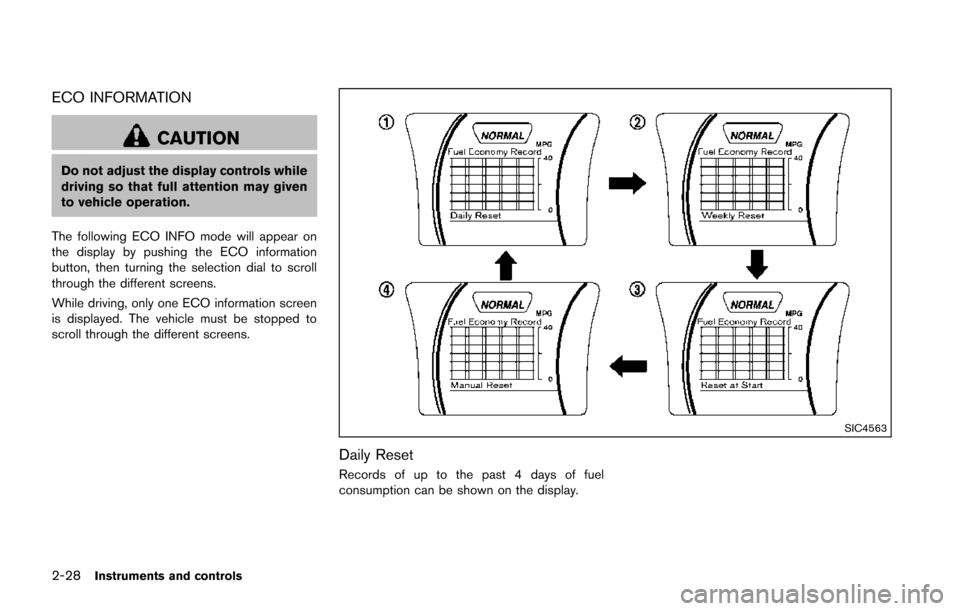
ECO INFORMATION
CAUTION
Do not adjust the display controls while
driving so that full attention may given
to vehicle operation.
The following ECO INFO mode will appear on
the display by pushing the ECO information
button, then turning the selection dial to scroll
through the different screens.
While driving, only one ECO information screen
is displayed. The vehicle must be stopped to
scroll through the different screens.
SIC4563
Daily Reset
Records of up to the past 4 days of fuel
consumption can be shown on the display.