2014 NISSAN JUKE display
[x] Cancel search: displayPage 104 of 402
Weekly Reset
Records of up to the past 4 weeks of each
week’s fuel consumption can be shown on the
display.
NOTE:
When the clock is not set, the ECO
information (daily and weekly) cannot be
used.
Reset at Start
Records of up to the past 4 times of each time of
ignition switch ON fuel consumption can be
shown on the display.
Manual Reset
Records of up to the past 4 times of resetting
fuel consumption can be shown on the display.
The displayed ECO INFO can be reset by
pushing the ENTER button for longer than 1
second.
SIC4543
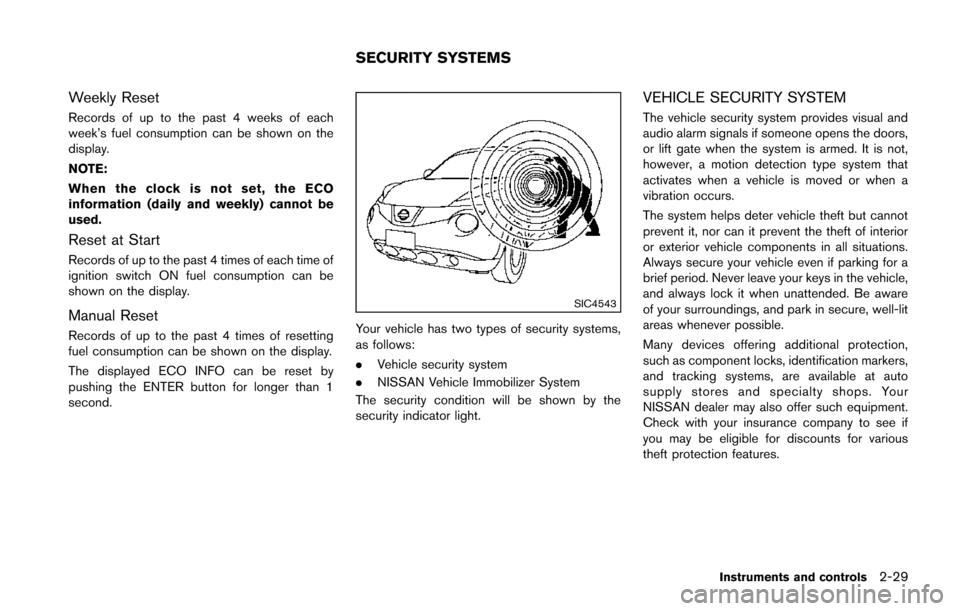
Your vehicle has two types of security systems,
as follows:
.Vehicle security system
. NISSAN Vehicle Immobilizer System
The security condition will be shown by the
security indicator light.
VEHICLE SECURITY SYSTEM
The vehicle security system provides visual and
audio alarm signals if someone opens the doors,
or lift gate when the system is armed. It is not,
however, a motion detection type system that
activates when a vehicle is moved or when a
vibration occurs.
The system helps deter vehicle theft but cannot
prevent it, nor can it prevent the theft of interior
or exterior vehicle components in all situations.
Always secure your vehicle even if parking for a
brief period. Never leave your keys in the vehicle,
and always lock it when unattended. Be aware
of your surroundings, and park in secure, well-lit
areas whenever possible.
Many devices offering additional protection,
such as component locks, identification markers,
and tracking systems, are available at auto
supply stores and specialty shops. Your
NISSAN dealer may also offer such equipment.
Check with your insurance company to see if
you may be eligible for discounts for various
theft protection features.
Instruments and controls2-29
SECURITY SYSTEMS
Page 113 of 402
2-38Instruments and controls
SIC4517
SIC4129
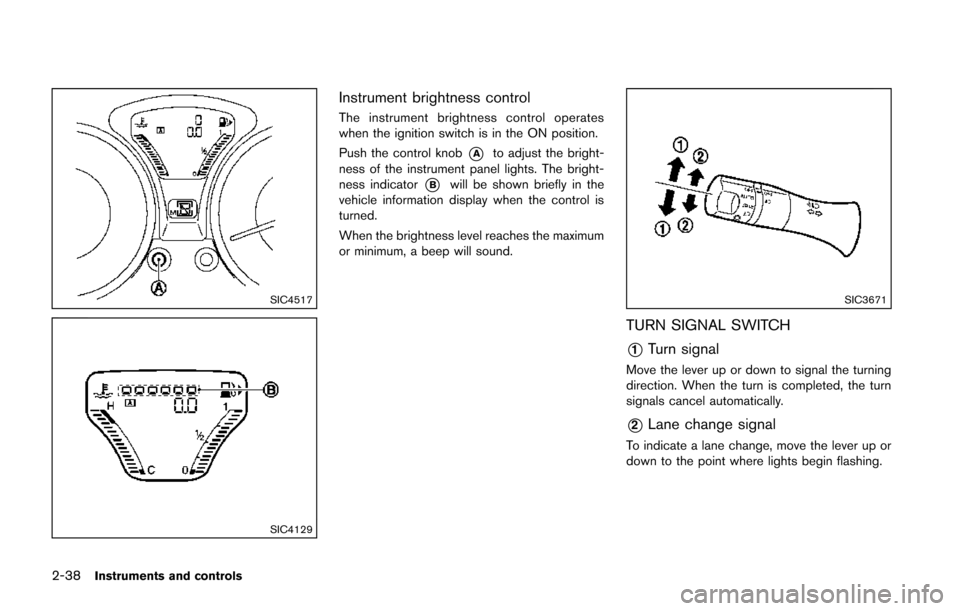
Instrument brightness control
The instrument brightness control operates
when the ignition switch is in the ON position.
Push the control knob
*Ato adjust the bright-
ness of the instrument panel lights. The bright-
ness indicator
*Bwill be shown briefly in the
vehicle information display when the control is
turned.
When the brightness level reaches the maximum
or minimum, a beep will sound.
SIC3671
TURN SIGNAL SWITCH
*1Turn signal
Move the lever up or down to signal the turning
direction. When the turn is completed, the turn
signals cancel automatically.
*2Lane change signal
To indicate a lane change, move the lever up or
down to the point where lights begin flashing.
Page 116 of 402
The heater is controlled by a thermostat,
automatically turning the heater on and off.
The indicator light will remain on as long as
the switch is on.
When the vehicle’s interior is warmed, or
before you leave the vehicle, be sure to turn
off the switch.The digital clock (in the audio unit) displays time
when the ignition switch is in the ACC or ON
position. The clock ON or OFF mode can be
selected. For details of the digital clock in the
NAVIGATION SYSTEM, refer to “Clock” (P.4-8) .
If the power supply is disconnected, the
clock will not indicate the correct time.
Readjust the time.
SIC4131
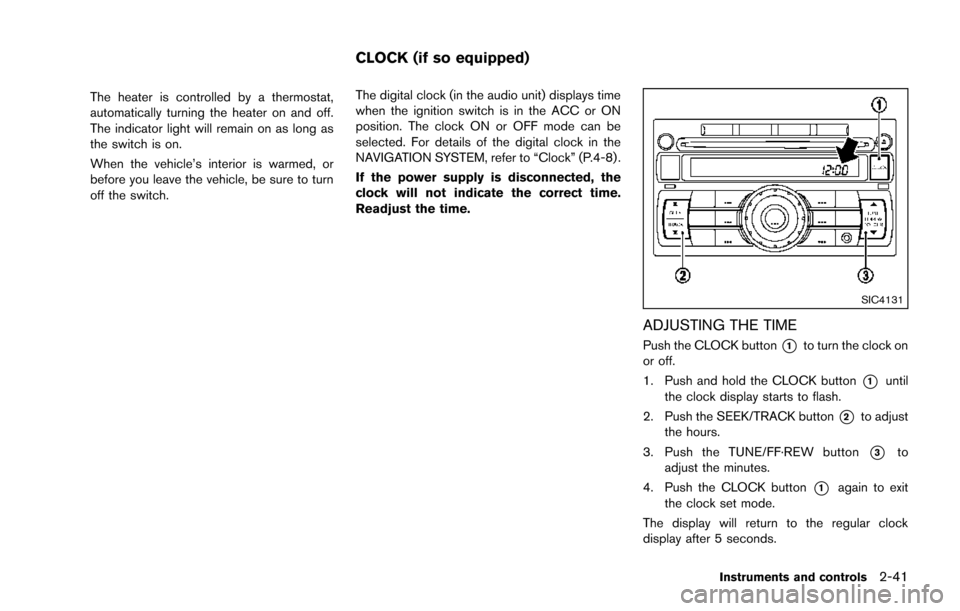
ADJUSTING THE TIME
Push the CLOCK button*1to turn the clock on
or off.
1. Push and hold the CLOCK button
*1until
the clock display starts to flash.
2. Push the SEEK/TRACK button
*2to adjust
the hours.
3. Push the TUNE/FF·REW button
*3to
adjust the minutes.
4. Push the CLOCK button
*1again to exit
the clock set mode.
The display will return to the regular clock
display after 5 seconds.
Instruments and controls2-41
CLOCK (if so equipped)
Page 149 of 402
3-22Pre-driving checks and adjustments
WARNING
.Gasoline is extremely flammable
and highly explosive under certain
conditions. You could be burned or
seriously injured if it is misused or
mishandled. Always stop engine
and do not smoke or allow open
flames or sparks near the vehicle
when refueling.
. Do not attempt to top off the fuel
tank after the fuel pump nozzle
shuts off automatically. Continued
refueling may cause fuel overflow,
resulting in fuel spray and possibly
a fire.
. Use only an original equipment type
fuel-filler cap as a replacement. It
has a built-in safety valve needed
for proper operation of the fuel
system and emission control sys-
tem. An incorrect cap can result in a
serious malfunction and possible
injury. It could also cause the mal-
function indicator light to come on.
. Never pour fuel into the throttle
body to attempt to start your vehi-
cle. .
Do not fill a portable fuel container
in the vehicle or trailer. Static elec-
tricity can cause an explosion of
flammable liquid, vapor or gas in
any vehicle or trailer. To reduce the
risk of serious injury or death when
filling portable fuel containers:
— Always place the container on
the ground when filling.
— Do not use electronic devices when filling.
— Keep the pump nozzle in contact with the container while you are
filling it.
— Use only approved portable fuel containers for flammable liquid.
CAUTION
. If fuel is spilled on the vehicle body,
flush it away with water to avoid
paint damage.
. Insert the cap straight into the fuel-
filler tube, then tighten until the
fuel-filler cap clicks. Failure to tight-
en the fuel-filler cap properly may cause the
malfunction indicator
light (MIL) to illuminate. If the
light illuminates because the fuel-
filler cap is loose or missing, tighten
or install the cap and continue to
drive the vehicle. The
light
should turn off after a few driving
trips. If the
light does not turn
off after a few driving trips, have the
vehicle inspected by a NISSAN deal-
er.
For additional information, see
“Malfunction Indicator Light (MIL)”
(P.2-18) .
. The LOOSE FUEL CAP warning
message will be displayed if the
fuel-filler cap is not properly tigh-
tened. It may take a few driving trips
for the message to be displayed.
Failure to tighten the fuel-filler cap
properly after the LOOSE FUEL CAP
warning message is displayed may
cause the
Malfunction Indicator
Light (MIL) to illuminate.
Page 150 of 402
SPA2809
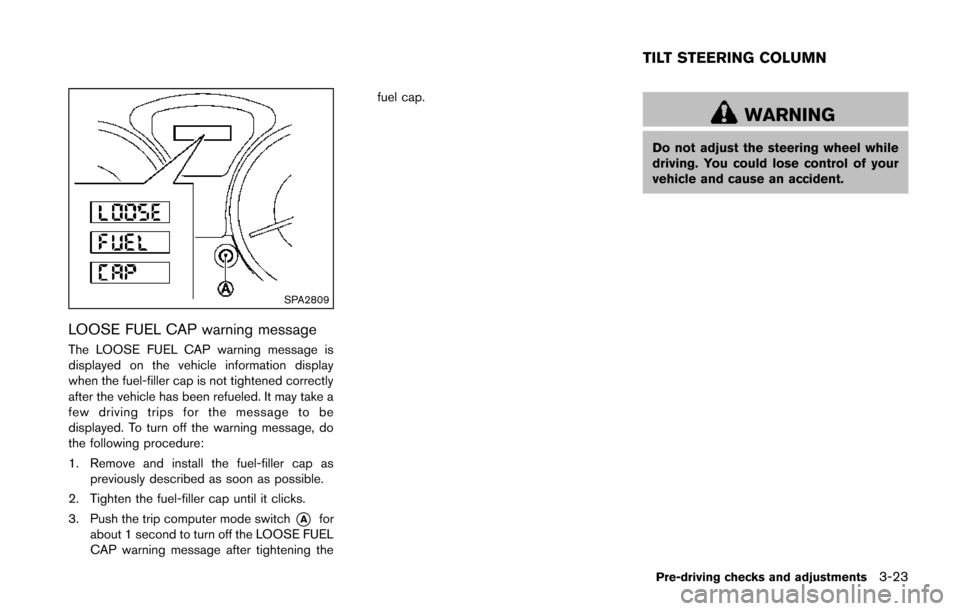
LOOSE FUEL CAP warning message
The LOOSE FUEL CAP warning message is
displayed on the vehicle information display
when the fuel-filler cap is not tightened correctly
after the vehicle has been refueled. It may take a
few driving trips for the message to be
displayed. To turn off the warning message, do
the following procedure:
1. Remove and install the fuel-filler cap aspreviously described as soon as possible.
2. Tighten the fuel-filler cap until it clicks.
3. Push the trip computer mode switch
*Afor
about 1 second to turn off the LOOSE FUEL
CAP warning message after tightening the fuel cap.
WARNING
Do not adjust the steering wheel while
driving. You could lose control of your
vehicle and cause an accident.
Pre-driving checks and adjustments3-23
TILT STEERING COLUMN
Page 156 of 402
")
4 Heater, air conditioner, audio and phone sys-tems
Safety note ........................................................................\
.......... 4-3
Control panel buttons — color screen (Type A) ............... 4-3
How to use touch screen ................................................. 4-4
How to use the BACK button ......................................... 4-6
How to use brightness control and display
ON/OFF button ................................................................... 4-6
How to use the SETUP button ....................................... 4-6
Control panel buttons — color screen (Type B) ........... 4-10 How to use touch screen .............................................. 4-10
How to use the BACK button ...................................... 4-11
How to use the APPS·i button ..................................... 4-12
How to use brightness control button ........................ 4-15
How to use the ON·OFF button/Volume
control knob ....................................................................... 4-15
How to use the CAMERA button ................................ 4-15
RearView monitor (if so equipped) ................................... 4-15
How to read the displayed lines .................................. 4-16
Difference between predictive and
actual distances ................................................................ 4-17
Adjusting the screen (if so equipped) ........................ 4-19
Operating tips ................................................................... 4-19
Ventilators ........................................................................\
......... 4-19 Center ventilators ............................................................. 4-19
Side ventilators ................................................................. 4-20 Heater and air conditioner .................................................. 4-20
Manual air conditioner (if so equipped) ................... 4-21
Automatic air conditioner (with Integrated
Control System) ............................................................. 4-24
Operating tips (for automatic air conditioner) ........ 4-27
In-cabin microfilter ......................................................... 4-27
Servicing air conditioner .............................................. 4-27
Audio system ........................................................................\
.. 4-28 Audio operation precautions ....................................... 4-28
FM-AM-SAT radio with Compact Disc (CD) player
(Type A) ........................................................................\
.... 4-41
FM-AM-SAT radio with Compact Disc (CD) player
(Type B) ........................................................................\
.... 4-48
FM-AM-SAT radio with Compact Disc (CD) player
(Type C) ........................................................................\
... 4-57
CD/USB memory care and cleaning ........................ 4-68
Steering wheel switch for audio control .................. 4-69
Antenna ........................................................................\
.... 4-70
NissanConnect
TMApp smartphone integration (if
so equipped) ........................................................................\
.. 4-71
Registering with NissanConnect
TMApp .................. 4-71
Connect phone ............................................................... 4-71
Application download ................................................... 4-71
Car phone or CB radio ........................................................ 4-71
Page 158 of 402
WARNING
.Do not disassemble or modify this
system. If you do, it may result in
accidents, fire, or electric shock.
. Do not use this system if you notice
any abnormality, such as a frozen
screen or lack of sound. Continued
use of the system may result in
accident, fire or electric shock.
. In case you notice any foreign
object in the system hardware, spill
liquid on it, or notice smoke or smell
coming from it, stop using the
system immediately and contact
your nearest NISSAN dealer. Ignor-
ing such conditions may lead to
accidents, fire, or electric shock.
Do not attempt to operate the system in
extreme temperature conditions [below
− 48F( −208 C) and above 1588 F (708C)].
Operating this system under these condi-
tions may result in system malfunctions.
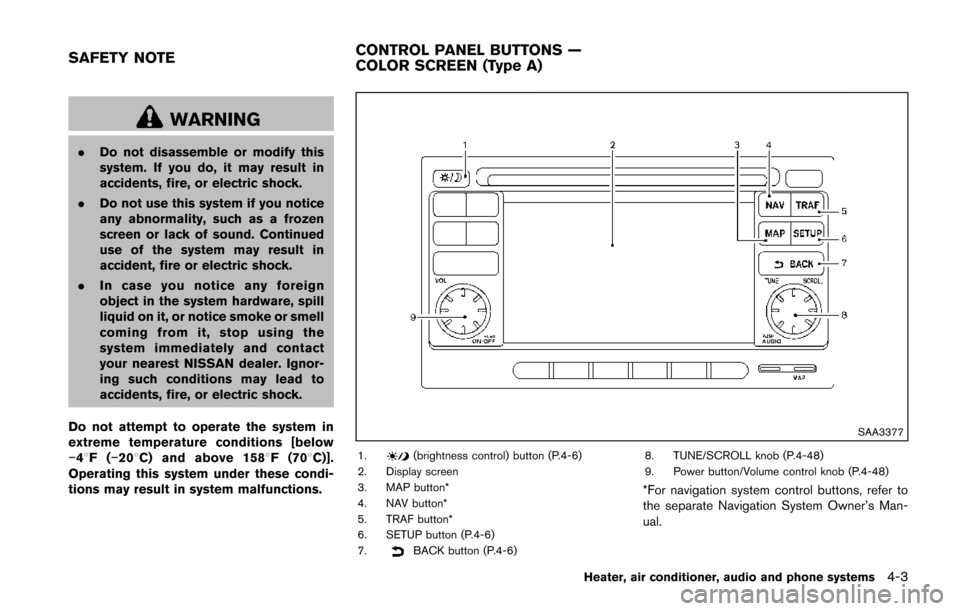
SAA3377
1.(brightness control) button (P.4-6)
2. Display screen
3. MAP button*
4. NAV button*
5. TRAF button*
6. SETUP button (P.4-6)
7.
BACK button (P.4-6) 8. TUNE/SCROLL knob (P.4-48)
9. Power button/Volume control knob (P.4-48)
*For navigation system control buttons, refer to
the separate Navigation System Owner’s Man-
ual.
Heater, air conditioner, audio and phone systems4-3
SAFETY NOTE
CONTROL PANEL BUTTONS —
COLOR SCREEN (Type A)
Page 159 of 402
4-4Heater, air conditioner, audio and phone systems
When you use this system, make sure the
engine is running.
If you use the system with the engine not
running (ignition ON or ACC) for a long
time, it will discharge the battery, and the
engine will not start.
Reference symbols:
“Example” — Words marked in quotes refer to a
key shown only on the display. These keys can
be selected by touching the screen.
HOW TO USE TOUCH SCREEN
CAUTION
.The glass screen on the liquid
crystal display may break if it is hit
with a hard or sharp object. If the
glass screen breaks, do not touch it.
Doing so could result in an injury.
. To clean the display, never use a
rough cloth, alcohol, benzine, thin-
ner or any kind of solvent or paper
towel with a chemical cleaning
agent. They will scratch or deterio-
rate the panel.
. Do not splash any liquid such as
water or car fragrance on the dis-
play. Contact with liquid will cause the system to malfunction.
To help ensure safe driving, some functions
cannot be operated while driving.
The on-screen functions that are not available
while driving will be “grayed out” or muted.
Park the vehicle in a safe location and then
operate the navigation system.
WARNING
. ALWAYS give your full attention to
driving.
. Avoid using vehicle features that
could distract you. If distracted,
you could lose control of your
vehicle and cause an accident.SAA3422
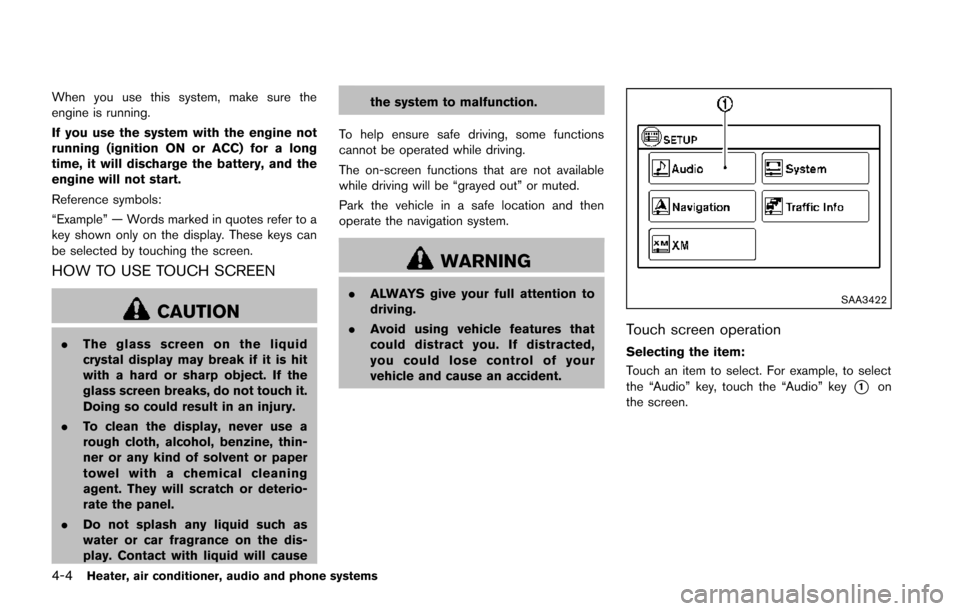
Touch screen operation
Selecting the item:
Touch an item to select. For example, to select
the “Audio” key, touch the “Audio” key
*1on
the screen.