2014 MITSUBISHI OUTLANDER SPORT phone
[x] Cancel search: phonePage 6 of 388
Interior
Overview 1-4
1
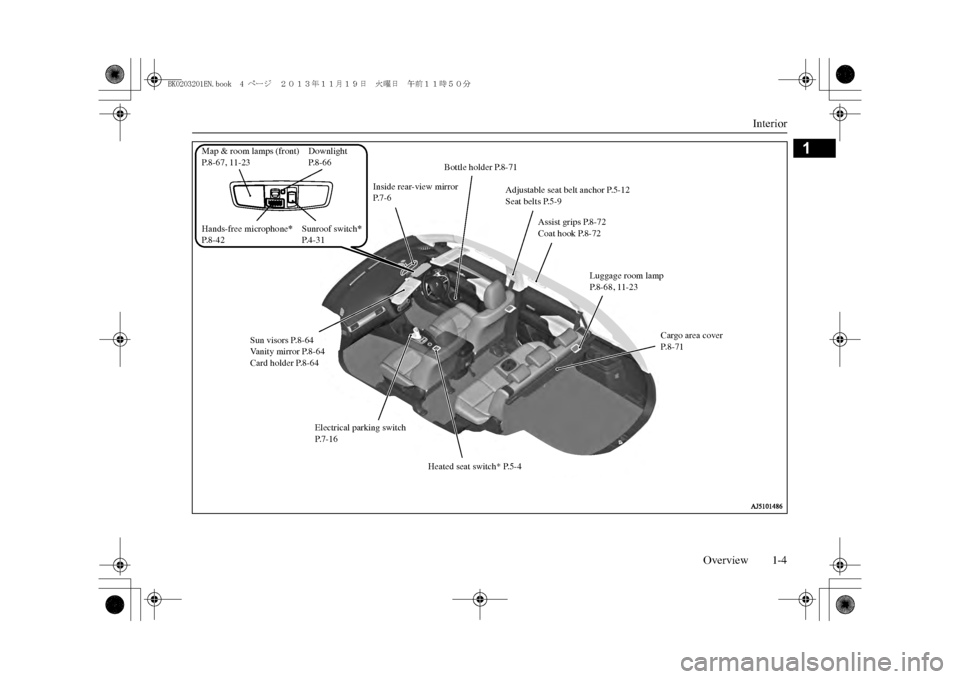
Sun visors P.8-64Vanity mirror P.8-64Card holder P.8-64
Inside rear-view mirror P.7-6
Bottle holder P.8-71
Assist grips P.8-72Coat hook P.8-72
Adjustable seat belt anchor P.5-12Seat belts P.5-9
Luggage room lamp P. 8 - 6 8 , 1 1 - 2 3
Heated seat switch* P.5-4
Electrical parking switch P. 7 - 1 6
Cargo area coverP. 8 - 7 1
Sunroof switch
*
P. 4 - 3 1
Map & room lamps (front)P.8-67, 11-23Hands-free microphone
*
P.8-42
DownlightP. 8 - 6 6
BK0203201EN.book 4 ページ 2013年11月19日 火曜日 午前11時50分
Page 23 of 388
Installation of accessories2-14 General information
2
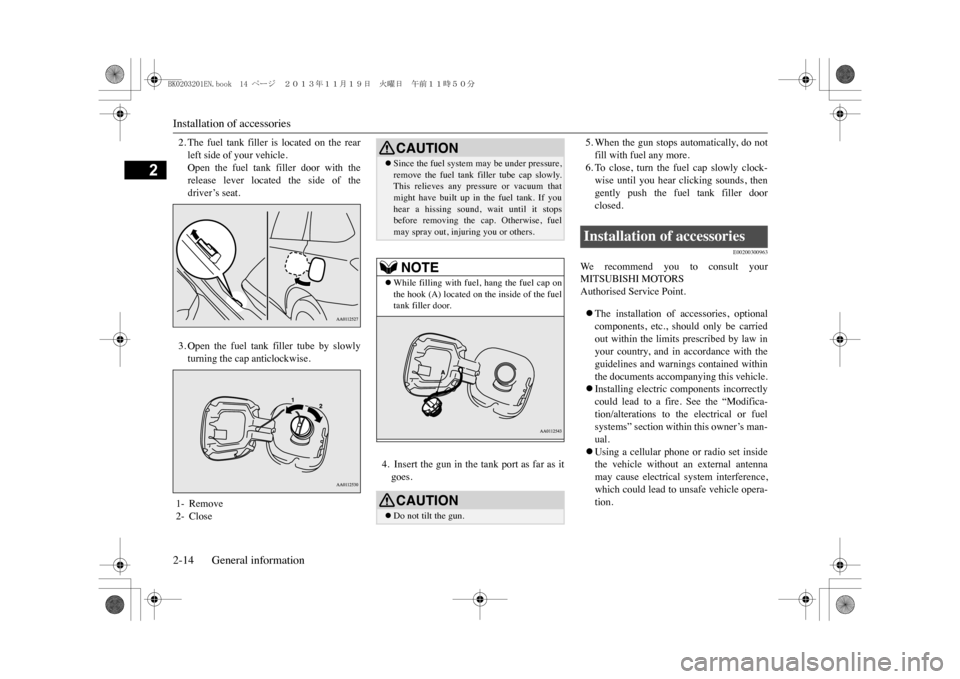
2. The fuel tank filler is located on the rearleft side of your vehicle.Open the fuel tank filler door with therelease lever located the side of thedriver’s seat.3. Open the fuel tank filler tube by slowlyturning the cap anticlockwise.
4. Insert the gun in the tank port as far as itgoes.
5. When the gun stops automatically, do notfill with fuel any more.6. To close, turn the fuel cap slowly clock-wise until you hear clicking sounds, thengently push the fuel tank filler doorclosed.
E00200300963
We r e c o m m e n d y o u t o c o n s u l t y o u rMITSUBISHI MOTORSAuthorised Service Point.zThe installation of accessories, optionalcomponents, etc., should only be carriedout within the limits prescribed by law inyour country, and in accordance with theguidelines and warnings contained withinthe documents accompanying this vehicle.zInstalling electric components incorrectlycould lead to a fire. See the “Modifica-tion/alterations to the electrical or fuelsystems” section within this owner’s man-ual.zUsing a cellular phone or radio set insidethe vehicle without an external antennamay cause electrical system interference,which could lead to unsafe vehicle opera-tion.
1- Remove2- Close
CAUTIONzSince the fuel system
may be under pressure,
remove the fuel tank filler tube cap slowly.This relieves any pressure or vacuum thatmight have built up in the fuel tank. If youhear a hissing sound, wait until it stopsbefore removing the cap. Otherwise, fuelmay spray out, injuring you or others.NOTE
zWhile filling with fuel, hang the fuel cap onthe hook (A) located on the inside of the fueltank filler door.CAUTIONzDo not tilt the gun.
Installation of accessories
BK0203201EN.book 14 ページ 2013年11月19日 火曜日 午前11時50分
Page 44 of 388

MITSUBISHI Remote Control*
Charging 3-19
3
•Due to the characteristics of radio waves,communication speed tends to decrease asthe communication distance increases. Useyour wireless LAN devi
ce at a short dis-
tance from the vehicle for better response.•When a microwave oven or ISM (indus-trial, scientific and medical) equipment isbeing used, the communication speed andrange of wireless
LAN devices may
decrease. Use your wireless LAN deviceaway from these appliances and equipment.•If a wireless LAN de
vice and Bluetooth
(registered trademark of Bluetooth SIG,Inc.) are used simultaneously, the commu-nication speed and range of each devicemay decrease. Use your wireless LANdevice away from Bluetooth devices.
zWireless LAN de
vices may not communicate
with the vehicle, or may not operate nor-mally or stably in the following environmentor situations. Check th
at the device can com-
municate with your vehicle before use.•There is an obstructi
on such as a concrete
or metal wall between the vehicle and wire-less LAN device.•The vehicle is surrounded by tall vehiclesin a parking lot.•There are facilities nearby that emit strongradio waves, such as a TV tower, trans-former substation, br
oadcasting station or
airport.NOTE
•There is a communication device such as amobile phone or radio, or an electric devicesuch as a personal computer near the wire-less LAN device.•The wireless
LAN device is in contact with
or covered by a metal object.•The battery of the wireless LAN device hasrun down.
zThe MITSUBISHI Remote Control cannotbe used under the following conditions:•The wireless LAN device is turned off.•The MITSUBISHI Re
mote Control appli-
cation software is not installed.•The MITSUBISHI Re
mote Control appli-
cation software is not running.•The wireless LAN devi
ce is not registered
on the vehicle or it is not connected to thevehicle.•The wireless LAN devi
ce is out of the com-
munication range.•The wireless
LAN device is
connected to
other wirele
ss LAN device.
•The wireless LAN devi
ce has failed, or its
battery has run out.
zSome charging facilities have a timer func-tion that turns the power on or off at a spe-cific time of the day. When charging at afacility with a timer function, make sure thatthe charging timer is set within the timeperiod when the power in the charging facil-ity is on.NOTE
zThe auxiliary battery is automatically andperiodically charged using electrical powerstored in the drive battery.zWhile the remote climate control is operatingor the charging, the cooling fan or air condi-tioner compressor may start operating and itssound may be heard.
This is normal.
zThe remote climate control operates in itsown mode based on the mode selected on thewireless LAN device,
regardless of the
switch setting of the vehicle’s air condi-tioner.zAir conditioning perform
ance may deterio-
rate or the remaining quantity of the drivebattery may decrease under the followingconditions:•In extremely hot weather.•In hot sunshine.•In extremely cold weather.zIf the remote climate control is started duringcharging, the time until full charge mayextend or the charging rate may decrease.zWhen the remaining quantity of the drivebattery is decreased, the remote climate con-trol does not operate
or it may stop on the
way.NOTE
BK0203201EN.book 19 ページ 2013年11月19日 火曜日 午前11時50分
Page 47 of 388
Keys4-2 Locking and unlocking
4
E00300103572
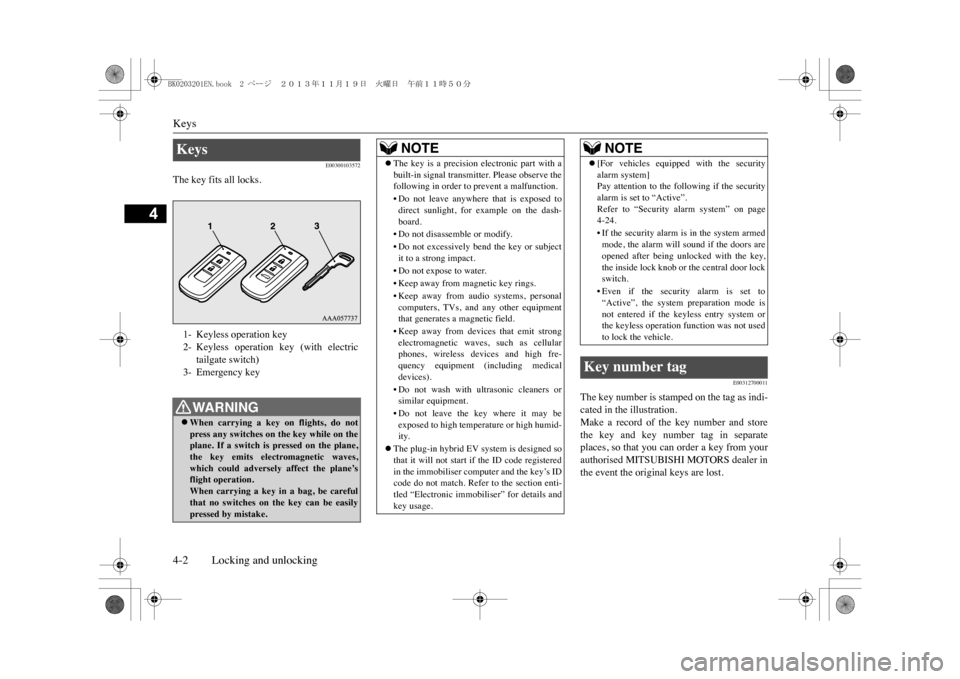
The key fits all locks.
E00312700011
The key number is stamped on the tag as indi-cated in the illustration.Make a record of the key number and storethe key and key number tag in separateplaces, so that you can order a key from yourauthorised MITSUBISHI MOTORS dealer inthe event the original keys are lost.
Keys 1- Keyless operation key2- Keyless operation key (with electric
tailgate switch)
3- Emergency keyWA R N I N GzWhen carrying a key on flights, do notpress any switches on
the key while on the
plane. If a switch is pressed on the plane,the key emits electromagnetic waves,which could adversely affect the plane’sflight operation.When carrying a key in
a bag, be careful
that no switches on
the key can be easily
pressed by mistake.
NOTE
zThe key is a precision electronic part with abuilt-in signal transmitter. Please observe thefollowing in order to prevent a malfunction.•Do not leave anywhere
that is exposed to
direct sunlight, for example on the dash-board.•Do not disassem
ble or modify.
•Do not excessively bend the key or subjectit to a strong impact.•Do not expose to water.•Keep away from magnetic key rings.•Keep away from audio systems, personalcomputers, TVs, and any other equipmentthat generates a magnetic field.•Keep away from devices that emit strongelectromagnetic waves, such as cellularphones, wireless de
vices and high fre-
quency equipment (i
ncluding medical
devices).• Do not wash with ultrasonic cleaners orsimilar equipment.•Do not leave the key where it may beexposed to high temperature or high humid-ity.
zThe plug-in hybrid EV system is designed sothat it will not start if the ID code registeredin the immobiliser computer and the key’s IDcode do not match. Refer to the section enti-tled “Electronic immobiliser” for details andkey usage.
z[For vehicles equipped with the securityalarm system]Pay attention to the following if the securityalarm is set to “Active”.Refer to “Security alarm system” on page4-24.•If the security alarm is in the system armedmode, the alarm will
sound if the doors are
opened after being unl
ocked with the key,
the inside lock knob or the central door lockswitch.•Even if the security alarm is set to“Active”, the system preparation mode isnot entered if the keyless entry system orthe keyless operation
function was not used
to lock the vehicle.
Key number tag
NOTE
BK0203201EN.book 2 ページ 2013年11月19日 火曜日 午前11時50分
Page 52 of 388
Keyless operation system
Locking and unlocking 4-7
4
Yo u c a n l i m i t t h e p o s s i b l e o p e r a t i o n s o fthe keyless operation system in the fol-lowing ways. (The keyless operation sys-tem can be used as a keyless entrysystem.) Please consult a MITSUBISHIMOTORS Authorised Service Point.
•You can limit operations to locking andunlocking the doors and tailgate.•You can limit operations to starting theengine.• The keyless operation system can be dis-abled.When keyless operation system opera-tions are modified, the transmitters oper-ate as follows.•Only locking and unlocking doors ortailgate: exterior transmitter and interiortransmitter•Only starting the engine: interior trans-mitter
E00305700556
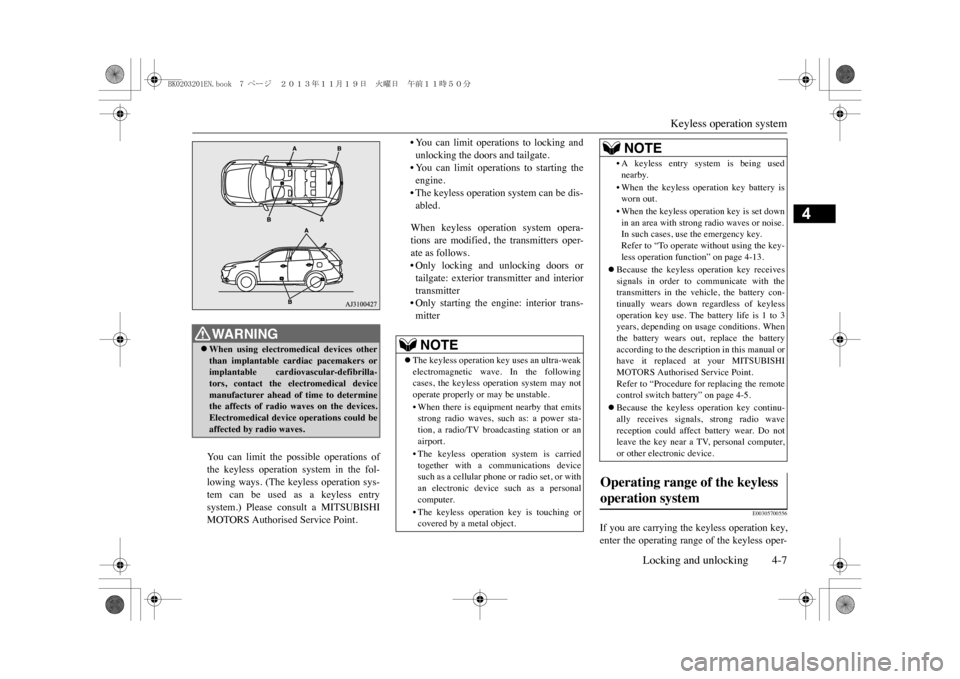
If you are carrying the keyless operation key,enter the operating range of the keyless oper-
WA R N I N GzWhen using electromedical devices otherthan implantable cardiac pacemakers orimplantable cardiovascular-defibrilla-tors, contact the electromedical devicemanufacturer ahead of time to determinethe affects of radio waves on the devices.Electromedical device operations could beaffected by radio waves.
NOTE
zThe keyless operation ke
y uses an ultra-weak
electromagnetic wave. In the followingcases, the keyless ope
ration system may not
operate properly or
may be unstable.
•When there is equipment nearby that emitsstrong radio waves, such as: a power sta-tion, a radio/TV broa
dcasting station or an
airport.•The keyless operation system is carriedtogether with a communications devicesuch as a cellular phone
or radio set, or with
an electronic device such as a personalcomputer.•The keyless operati
on key is touching or
covered by a metal object.
•A keyless entry system is being usednearby.•When the keyless operation key battery isworn out.•When the keyless operation key is set downin an area with strong radio waves or noise.In such cases, use the emergency key.Refer to “To operate
without using the key-
less operation functi
on” on page 4-13.
zBecause the keyless operation key receivessignals in order to communicate with thetransmitters in the vehicle, the battery con-tinually wears down regardless of keylessoperation key use. The battery life is 1 to 3years, depending on usage conditions. Whenthe battery wears out, replace the batteryaccording to the description in this manual orhave it replaced at your MITSUBISHIMOTORS Authorised Service Point.Refer to “Procedure for replacing the remotecontrol switch battery” on page 4-5.zBecause the keyless
operation key continu-
ally receives signals, strong radio wavereception could affect battery wear. Do notleave the key near a TV, personal computer,or other electronic device.
Operating range of the keyless operation system
NOTE
BK0203201EN.book 7 ページ 2013年11月19日 火曜日 午前11時50分
Page 108 of 388
Supplemental restraint system (SRS)-airbag
Seat and seat belts 5-29
5
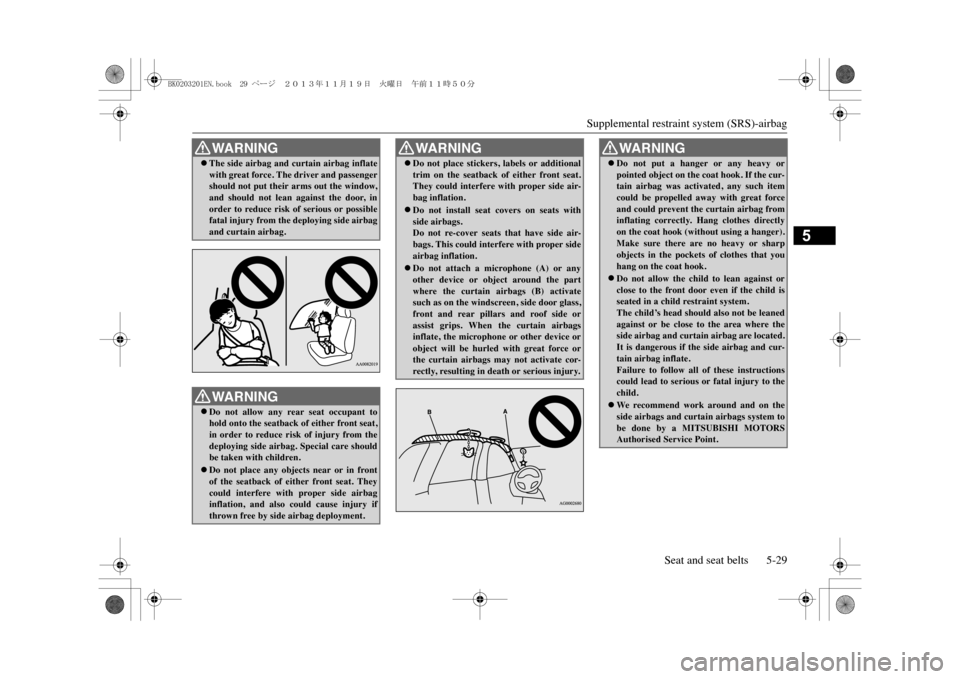
zThe side airbag and cu
rtain airbag inflate
with great force. The driver and passengershould not put their arms out the window,and should not lean against the door, inorder to reduce risk of serious or possiblefatal injury from the
deploying side airbag
and curtain airbag.WA R N I N GzDo not allow any rear seat occupant tohold onto the seatback
of either front seat,
in order to reduce risk of injury from thedeploying side airbag. Special care shouldbe taken with children.zDo not place any objects near or in frontof the seatback of either front seat. Theycould interfere with proper side airbaginflation, and also could cause injury ifthrown free by side airbag deployment.WA R N I N G
zDo not place stickers, labels or additionaltrim on the seatback of either front seat.They could interfere with proper side air-bag inflation.zDo not install seat covers on seats withside airbags.Do not re-cover seats
that have side air-
bags. This could interfere with proper sideairbag inflation.zDo not attach a microphone (A) or anyother device or object around the partwhere the curtain airbags (B) activatesuch as on the windsc
reen, side door glass,
front and rear pillars and roof side orassist grips. When
the curtain airbags
inflate, the microphone or other device orobject will be hurled with great force orthe curtain airbags may not activate cor-rectly, resulting in death or serious injury.WA R N I N G
WA R N I N GzDo not put a hanger or any heavy orpointed object on the
coat hook. If the cur-
tain airbag was activated, any such itemcould be propelled away with great forceand could prevent the curtain airbag frominflating correctly. Hang clothes directlyon the coat hook (without using a hanger).Make sure there are no heavy or sharpobjects in the pockets of clothes that youhang on the coat hook.zDo not allow the child
to lean against or
close to the front door even if the child isseated in a child restraint system.The child’s head should
also not be leaned
against or be close to the area where theside airbag and curtai
n airbag are located.
It is dangerous if the side airbag and cur-tain airbag inflate.Failure to follow all of these instructionscould lead to serious or fatal injury to thechild.zWe rec ommend wor k around and on theside airbags and curtain airbags system tobe done by a MITSUBISHI MOTORSAuthorised Service Point.
BK0203201EN.book 29 ページ 2013年11月19日 火曜日 午前11時50分
Page 249 of 388
Air purifier8-12 For pleasant driving
8
Use of any other refrigerant or lubricant willcause severe damage which will result in theneed to replace your vehicle’s entire air con-ditioning system. New regulations in supportof the Australian Government’s Ozone Pro-tection and Synthetic Greenhouse Gas Man-agement Act 1989 became effective inJanuary 2005. To ensure your vehicle servic-ing and repairs conform with requirements,the air conditioning system should beinspected and maintained by a MITSUBISHIMOTORS Authorised Service Point.The air conditioner should be operated for atleast five minutes each week, even in coldweather. This is to prevent poor lubrication ofthe compressor internal parts and to maintainthe air conditioner in the best operating con-dition.
E00708400718
An air filter has been incorporated into thisair conditioner so that dirt and dust arecleaned from the air.Replace the air filter periodically as its abilityto clean the air will be reduced as it collectspollen and dirt. For the maintenance interval,refer to the “SERVICE BOOKLET”.
E00735401045
Yo u c a n r u n t h e a i r c o n d i t i o n e r i n a d v a n c e o fusing the vehicle.For details, refer to “Remote Climate Con-trol” on page 3-17.
E00733901059
When heating, the engine starts runningbecause the heating system uses the heat ofengine coolant.On vehicles with electric heater, it candecrease the number of times engine startingbecause electrical power stored in the drivebattery is also used when heating.
E00708503390
The audio system can only be used when theoperation mode of the power switch is in ONor ACC.
During a long period of disuse Air purifier
NOTE
zOperation in certain c
onditions such as driv-
ing on a dusty road and frequent use of theair conditioner can lead to reduction of ser-vice life of the filter. When you feel that theairflow is lower than normal or when thewindscreen or windows start to fog up easily,replace the air filter.We r e c o m m e n d y o u t o h a v e i t c h e c k e d .
Remote Climate Control Heating
AM/FM radio/CD player
*
NOTE
zTo l i s t e n t o t h e a u d i o s y s t e m w h i l e t h e P l u g -in Hybrid EV system is
not operating, put the
operation mode of the power switch in ACC.If the operation mode of the power switch isleft in ACC, the accessory power will auto-matically turn off after a certain period oftime and you will no longer be able to usethe audio system. The accessory powercomes on again if the operation mode of thepower switch is operated with is in the ACC.Refer to “ACC power auto-cutout function”on page 7-11.zIf a cellular phone is used inside the vehicle,it may create noise from the audio equip-ment. This does not mean that anything iswrong with your audio equipment. In such acase, use the cellular phone at a place as faraway as possible from the audio equipment.zIf foreign objects or wate
r get into the audio
equipment, or if smoke or a strange odourcomes from it, immediately turn off theaudio system. We recommend you to have itchecked. Never try to repair it by yourself.Av o i d c o n t i n u o u s u s a g e w i t h o u t i n s p e c t i o nby a qualified person.
BK0203201EN.book 12 ページ 2013年11月19日 火曜日 午前11時50分
Page 250 of 388
AM/FM radio/CD player*For pleasant driving 8-13
8
E00735500023
zThis product supports audio playbackfrom iPod/iPhone devices, however dif-fering versions mean that playback cannotbe guaranteed.zPlease be aware that depending on theiPod/iPhone model or version, operationmay differ.
E00735700025
zIf the product becomes dirty, wipe with asoft cloth.zIf very dirty, use a soft cloth dipped inneutral detergent diluted in water, andthen wrung out. Do not use benzene, thin-ners, or other chemical wipes. This mayharm the surface.
E00735801049
zProduct names and other proper namesare the trademarks or registered trade-marks of their respective owners.
zFurthermore, even if there is no specificdenotation of trademarks or registeredtrademarks, these are to be observed intheir entirety.“Made for iPod”, “Made for iPhone”mean that an electronic accessory hasbeen designed to connect specifically toiPod or iPhone, respectively, and has beencertified by the developer to meet Appleperformance standards.iPhone, iPod, iPod classic, iPod nano, andiPod touch are trademarks of Apple Inc.,registered in the U.S. and other countries.Apple is not responsible for the operationof this device or its compliance withsafety and regulatory standards.
Important Points on Usage
iPod/iPhone Playback Function
*
How to Clean
Tr a d e m a r k s
NOTE
ziPod and iTunes licensing allows individualusers to privately reproduce and play backnon- copyrighted material
as well as material
that may be legally copied and reproduced.Infringement of copyright is prohibited.zSupported models for equipment by type willvary. For details, see the Johnson Controls,Inc. website.
BK0203201EN.book 13 ページ 2013年11月19日 火曜日 午前11時50分