Listen to Radio
For pleasant driving 8-25
8
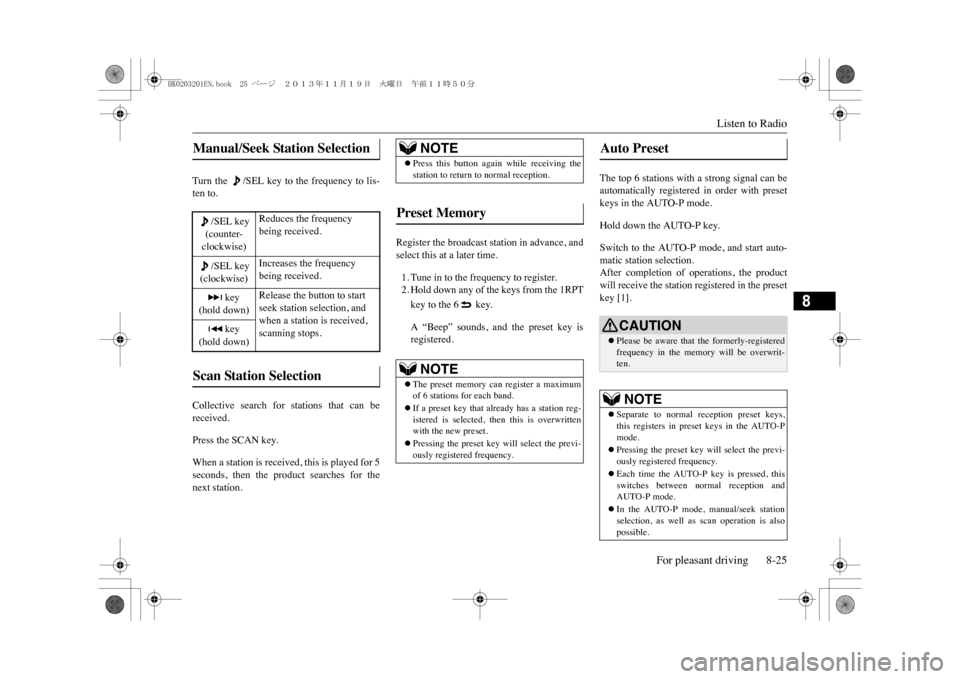
Turn the /SEL key to the frequency to lis-ten to.Collective search for stations that can bereceived.Press the SCAN key.When a station is received, this is played for 5seconds, then the product searches for thenext station.
Register the broadcast station in advance, andselect this at a later time.1. Tune in to the frequency to register.2. Hold down any of the keys from the 1RPTkey to the 6 key.A “Beep” sounds, and the preset key isregistered.
The top 6 stations with a strong signal can beautomatically registered in order with presetkeys in the AUTO-P mode.Hold down the AUTO-P key.Switch to the AUTO-P mode, and start auto-matic station selection.After completion of operations, the productwill receive the station registered in the presetkey [1].
Manual/Seek Station Selection
/SEL key(counter-clockwise)
Reduces the frequency being received.
/SEL key(clockwise)
Increases the frequency being received.
key
(hold down)
Release the button to start seek station selection, and when a station is received, scanning stops.
key
(hold down)Scan Station Selection
NOTE
zPress this button again while receiving thestation to return to normal reception.
Preset Memory
NOTE
zThe preset memory can register a maximumof 6 stations for each band.zIf a preset key that al
ready has a station reg-
istered is selected, then this is overwrittenwith the new preset.zPressing the preset key will select the previ-ously registered frequency.
Auto Preset
CAUTIONzPlease be aware that the formerly-registeredfrequency in the memory will be overwrit-ten.NOTE
zSeparate to normal re
ception preset keys,
this registers in preset keys in the AUTO-Pmode.zPressing the preset key will select the previ-ously registered frequency.zEach time the AUTO-P key is pressed, thisswitches between normal reception andAUTO-P mode.zIn the AUTO-P mode, manual/seek stationselection, as well as scan operation is alsopossible.
BK0203201EN.book 25 ページ 2013年11月19日 火曜日 午前11時50分
System Settings8-36 For pleasant driving
8
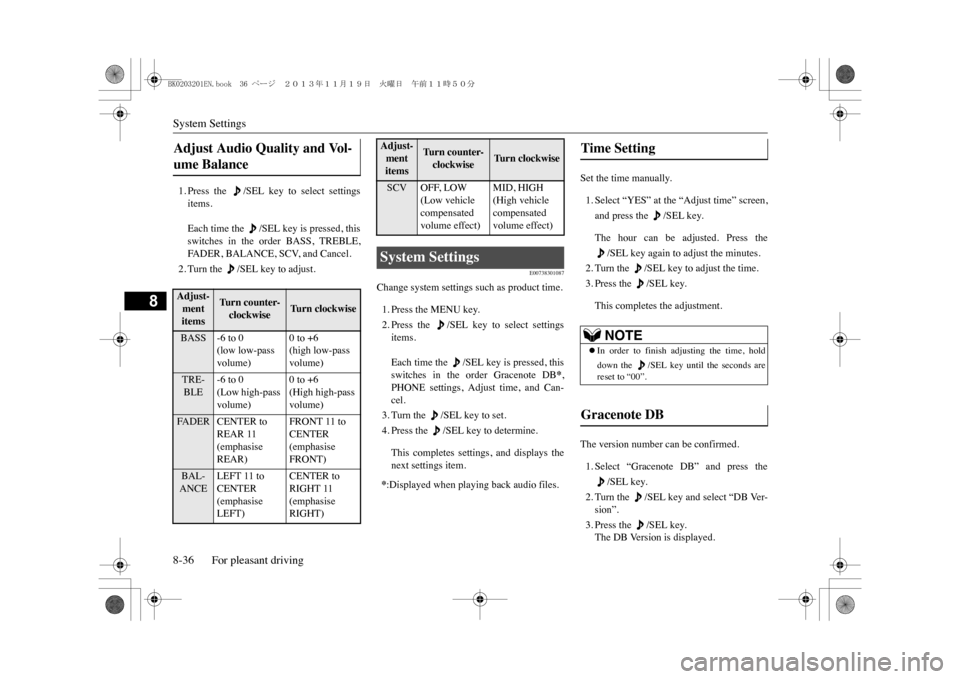
1. Press the /SEL key to select settingsitems.Each time the /SEL key is pressed, thisswitches in the order BASS, TREBLE,FA D E R , B A L A N C E , S C V, a n d C a n c e l .2. Turn the /SEL key to adjust.
E00738301087
Change system settings such as product time.1. Press the MENU key.2. Press the /SEL key to select settingsitems.Each time the /SEL key is pressed, thisswitches in the order Gracenote DB
*,
PHONE settings, Adjust time, and Can-cel.3. Turn the /SEL key to set.4. Press the /SEL key to determine.This completes settings, and displays thenext settings item.
Set the time manually.1. Select “YES” at the “Adjust time” screen,and press the /SEL key.The hour can be adjusted. Press the
/SEL key again to adjust the minutes.
2. Turn the /SEL key to adjust the time.3. Press the /SEL key.This completes the adjustment.
The version number can be confirmed.1. Select “Gracenote DB” and press the
/SEL key.
2. Turn the /SEL key and select “DB Ver-sion”.3. Press the /SEL key.The DB Version is displayed.
Adjust Audio Quality and Vol-ume Balance Adjust-ment items
Turn counter-clockwise
Tu r n c l o c k w i s e
BASS -6 to 0
(low low-pass volume)
0 to +6(high low-pass volume)
TRE-BLE
-6 to 0(Low high-pass volume)
0 to +6(High high-pass volume)
FA D E R C E N T E R t o
REAR 11 (emphasise REAR)
FRONT 11 to CENTER (emphasise FRONT)
BAL-ANCE
LEFT 11 to CENTER (emphasise LEFT)
CENTER to RIGHT 11 (emphasise RIGHT)
SCV OFF, LOW
(Low vehicle compensated volume effect)
MID, HIGH(High vehicle compensated volume effect)
System Settings *:Displayed when playing back audio files.Adjust-ment items
Tu r n c o u n t e r -clockwise
Tu r n c l o c k w i s e
Time Setting
NOTE
zIn order to finish adjusting the time, holddown the /SEL key un
til the seconds are
reset to “00”.
Gracenote DB
BK0203201EN.book 36 ページ 2013年11月19日 火曜日 午前11時50分