2014 MITSUBISHI OUTLANDER PHEV change time
[x] Cancel search: change timePage 151 of 442

Operating sound under charg-ing or remote climate control
E000204600023
Even if the operation mode of the power
switch is OFF, you may hear the operating
sound such as cooling fan for cooling the
drive battery during charging, the air condi- tioning compressor and for remote climate control (if so equipped).
But this is not a malfunction.
Refer to “Remote Climate Control” on page
3-23.
Changing the time until “REST
REMINDER” is displayed
E00523501702
The time until the display appears can be changed. 1. Press and hold the multi information dis-
play switch for about 2 seconds or moreto switch from the setting mode screen
to the menu screen.
Refer to “Changing the function set-
tings” on page 6-16.
2. Lightly press the multi information dis-
play switch to select “ALARM” (rest
time setting).
3. Press and hold the multi information dis-
play switch for about 2 seconds or moreto display “ALARM”.
4. Lightly press the multi information dis-
play switch to select the time until the display.
5. Press and hold the multi information dis-
play switch for about 2 seconds or more,the setting is changed to the selected
time.NOTEl The drive time is reset when the operation
mode of the power switch is put in OFF.Changing the turn-signal sound
E00529100396
It is possible to change the turn-signal sound.
1. Press and hold the multi information dis-
play switch for about 2 seconds or more to switch from the setting mode screen
to the menu screen.
Refer to “Changing the function set- tings” on page 6-16.
2. Lightly press the multi information dis-
play switch to select
(changing the
turn-signal sound).
3. Press and hold the multi information dis-
play switch for about 2 seconds or moreto switch from 1 (turn-signal sound 1) to
2 (turn-signal sound 2), or from 2 to 1.
The setting changes to the selected turn-
signal sound.
Returning to the factory set-
tings
E00523601921
Many of the function settings can be returned
to their factory settings. 1. Press and hold the multi information dis-
play switch for about 2 seconds or more to switch from the setting mode screen
to the menu screen.
Refer to “Changing the function set- tings” on page 6-16.
2. Lightly press the multi information dis-
play switch to select “RESET” (return- ing to the factory settings).
3. When you press and hold the multi in-
formation display switch for about 5 sec-
onds or more, the buzzer sounds and all of the function settings are returned to
the factory settings.
NOTEl The factory settings are as follows.
• Average fuel consumption reset mode: A
(Auto reset)
• Fuel consumption display unit: L/100 km
• Temperature unit: °C (Celsius)
• Display language: ENGLISH or RUSSI-
AN
• Cooperative language setting: A (lan-
guage cooperation enabled)
Multi information display
6-21OGGE14E5Instruments and controls6
Page 171 of 442

The setting for rest interval can be changed.ScreenSolutionStop the vehicle in a safe place, stop the Plug-in Hybrid EV system, and take a rest.
Use this display as rough guide for taking rests during a long drive.
The interval from the start of your trip until this message is displayed can be set. Refer to “Changing the time until “REST REMINDER” is displayed” on page 6-21.The display and buzzer alert the driver when the set time is reached. If you continue
to drive without having a rest, the buzzer sounds about every 5 minutes to encourage
you to take a rest.
l In the following cases, the time driven is reset and the display returns to the pre-
vious display screen. After this, when the set time is reached again, the buzzer
and display encourage you to take a rest. • The buzzer sounds 3 times.
• Put the operation mode in OFF.
• The multi information display switch is held for about 2 seconds or more.
Indication lamps
E00501600100Turn-signal indication lamps/
Hazard warning indication lamps
E00501701427
These indication lamps blink
in the following situations.
l When the turn-signal
lever is moved to acti-
vate a turn-signal lamp.
Refer to “Turn-signal
lever” on page 6-50.
l When the hazard warning flasher switch
is pressed to activate the hazard warning
lamps.
Refer to “Hazard warning flasher switch” on page 6-50.
l When the hazard warning lamps auto-
matically activate due to sudden braking
while driving. (Vehicle equipped with emergency stop signal system)
Refer to “Emergency stop signal sys-
tem” on page 7-27.High-beam indication lamp
E00501800173
This indication lamp illumi-
nates when the high-beam is used.
Indication lamps
6-41OGGE14E5Instruments and controls6
Page 177 of 442

NOTElIf the lamps do not turn on or off with the
switch in the “AUTO” position, manually
operate the switch and we recommend you
to have your vehicle checked.
Lamps (headlamps, fog lamp,
etc.) auto-cutout function
l If the operation mode of the power
switch is put in OFF or ACC while the
lamp switch is in the “
” position, the
lamps will turn off automatically when the driver’s door is opened.
l If the operation mode of the power
switch is put in OFF or ACC while the
lamp switch is in the “
” position, the
lamps will remain on for about 3 mi-
nutes while the driver’s door is shut and will then automatically turn off.
NOTEl The lamp auto-cutout will not function when
the lamp switch is in the “” position.NOTEl The lamp auto-cutout function can also be
disabled.
For further information, we recommend you
to consult a MITSUBISHI MOTORS Au-
thorized Service Point.
On vehicles equipped with MITSUBISHI
Multi-Communication System (MMCS), screen operations can be used to make theadjustment. Refer to the separate owner’s
manual for details.
When you want to keep the
lamps on:
1. Turn the lamp switch in the “OFF” posi-
tion while the operation mode of the power switch is in OFF or ACC.
2. Turn on the lamps with the switch in the
“
” or “” position again, then the
lamps will remain on.
Lamp monitor buzzer
E00506101631
If the driver’s door is opened when the opera- tion mode of the power switch is put in ACCor OFF with the lamps illuminated, a buzzer
will sound to remind the driver to turn off the
lamps.
The buzzer will automatically stop if the au- to-cutoff function is activated, the lamp switch is turned off, or the door is closed.
Daytime running lamp*
E00530601040
The daytime running lamps comes on when
the Plug-in Hybrid EV System is operatingand the lamp switch is in the “OFF” or “AU-
TO” position and the tail lamps are off.
Dipper (High/Low beam
change)
E00506201557
When the lamp switch is in the “” posi-
tion, the beam changes from high to low (or
low to high) each time the lever is pulled fully (1). While the high-beam is on, the
high-beam indication lamp in the instrument
cluster will also illuminate.
Headlamp flasher
E00506300199
The high-beams flash when the lever is
pulled slightly (2), and will go off when it is
released.
Combination headlamps and dipper switch
6-47OGGE14E5Instruments and controls6
Page 179 of 442

NOTElWhile the coming home light function is op-
erating, perform one of the following opera-
tions to cancel the function.
• Pull the lever towards you.
• Turn the combination headlamps and dip-
per switch to the “
” or “” position.
• Put the operation mode in ON.
l It is possible to modify functions as follows:
• The time that the headlamps remain on
can be changed.
• The coming home light function can be
deactivated.
For further information, please contact your
MITSUBISHI MOTORS Authorized Serv-
ice Point.
On vehicles equipped with MITSUBISHI
Multi-Communication System (MMCS),
screen operations can be used to make the adjustment. Refer to the separate owner’s
manual for details.
Headlamp levelling
E00517400031Headlamp levelling switch (ex-
cept for vehicles with dischargeheadlamps)
E00517501752
The angle of the headlamp beam varies de-
pending on the load carried by the vehicle.
The headlamp levelling switch can be used to
adjust the headlamp illumination distance(when the lower beam is illuminated) so that the headlamps’ glare does not distract other
drivers.
Set the switch according to the following ta- ble.CAUTIONl Always perform adjustments before driving.
Do not attempt to adjust while driving, as it could cause an accident.
5 - person seat
Vehicle conditionSwitch position“0”Vehicle conditionSwitch position“0”“1”“2”“2”
●:1 person
:Full luggage loading
Switch position
0-Driver only/Driver + 1
front passengerSwitch position 1-5 passengers (including
driver)Switch position 2-5 passengers (including
driver) + Full luggage loading/Driver + full lug-
gage loading
Headlamp levelling
6-49OGGE14E5Instruments and controls6
Page 180 of 442

Automatic headlamp levelling(vehicles with discharge head- lamps)
E00517601564
This mechanism automatically adjusts the di-
rection of the headlamps (beam position) de-
pending on changes in the condition of the
vehicle, such as the number of occupants or luggage weight. When the headlamps are il-luminated with the operation mode of the
power switch in ON, the beam position of the headlamps is automatically adjusted when thevehicle stops.
Turn-signal lever
E00506502658
1- Turn-signalsWhen making a normal turn, use posi-
tion (1). The lever will return automati-
cally when cornering is completed.
2- Lane-change signals When moving the lever to (2) slightly to
change a lane, the turn-signal lamps and
indication lamp in the instrument cluster
will only flash while the lever is operat-
ed.
Also, when you move the lever to (2)
slightly then release it, the turn-signal
lamps and indication lamp in the instru-
ment cluster will flash 3 times.
NOTEl If the lamp flashes unusually quickly, the
bulb in a turn-signal lamp may have burned out. We recommend you to have the vehicle
inspected.
l It is possible to activate the following func-
tions.
• Flashing of the turn-signal lamps when
the lever is operated with the operation
mode is in ACC.
• Deactivate the turn-signal lamp 3-flash
function for lane changes
• The time required to operate the lever for
the 3-flash function can be adjusted.
For further information, we recommend you
to consult a MITSUBISHI MOTORS Au-
thorized Service Point.
On vehicles equipped with MITSUBISHI
Multi-Communication System (MMCS), screen operations can be used to make theadjustment. Refer to the separate owner’s
manual for details.
l It is possible to change the tone of a sound-
ing buzzer as the turn-signal lamps flash.
Refer to “Changing the turn-signal sound”
on page 6-21.Hazard warning flasher
switch E00506602037
Use the hazard warning flasher switch when
the vehicle has to be parked on the road for
any emergency.
Turn-signal lever
6-50OGGE14E5Instruments and controls6
Page 189 of 442
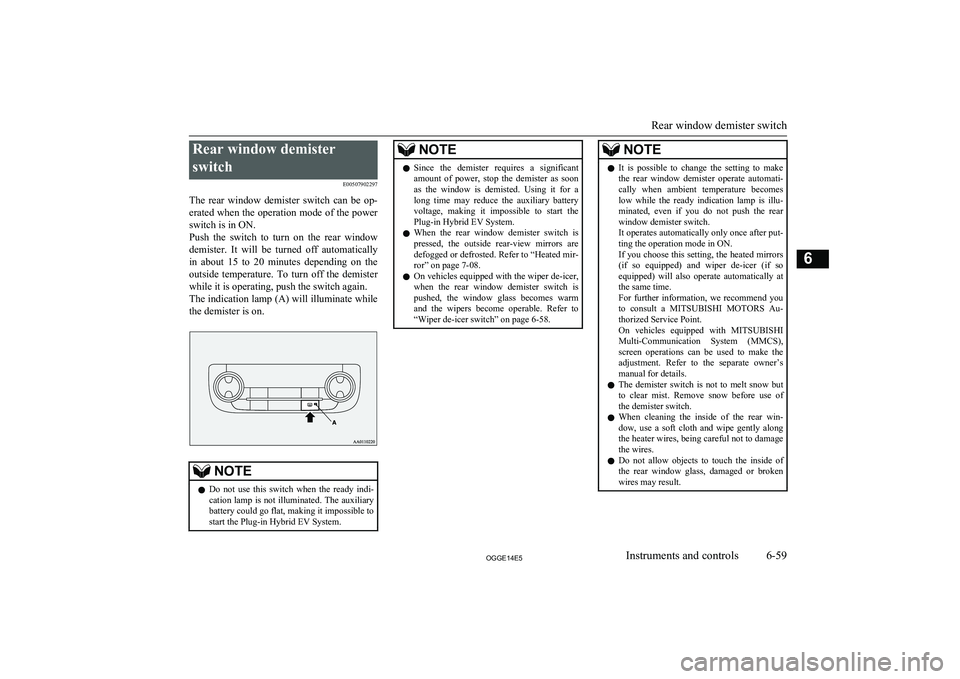
Rear window demisterswitch E00507902297
The rear window demister switch can be op- erated when the operation mode of the power
switch is in ON.
Push the switch to turn on the rear window
demister. It will be turned off automatically
in about 15 to 20 minutes depending on the outside temperature. To turn off the demister
while it is operating, push the switch again. The indication lamp (A) will illuminate while the demister is on.NOTEl Do not use this switch when the ready indi-
cation lamp is not illuminated. The auxiliary battery could go flat, making it impossible to
start the Plug-in Hybrid EV System.NOTEl Since the demister requires a significant
amount of power, stop the demister as soonas the window is demisted. Using it for along time may reduce the auxiliary battery
voltage, making it impossible to start the Plug-in Hybrid EV System.
l When the rear window demister switch is
pressed, the outside rear-view mirrors are defogged or defrosted. Refer to “Heated mir-
ror” on page 7-08.
l On vehicles equipped with the wiper de-icer,
when the rear window demister switch is pushed, the window glass becomes warm and the wipers become operable. Refer to
“Wiper de-icer switch” on page 6-58.NOTEl It is possible to change the setting to make
the rear window demister operate automati-
cally when ambient temperature becomes
low while the ready indication lamp is illu- minated, even if you do not push the rear
window demister switch.
It operates automatically only once after put-
ting the operation mode in ON.
If you choose this setting, the heated mirrors (if so equipped) and wiper de-icer (if so
equipped) will also operate automatically at the same time.
For further information, we recommend you
to consult a MITSUBISHI MOTORS Au-
thorized Service Point.
On vehicles equipped with MITSUBISHI
Multi-Communication System (MMCS), screen operations can be used to make theadjustment. Refer to the separate owner’s
manual for details.
l The demister switch is not to melt snow but
to clear mist. Remove snow before use of
the demister switch.
l When cleaning the inside of the rear win-
dow, use a soft cloth and wipe gently along the heater wires, being careful not to damage
the wires.
l Do not allow objects to touch the inside of
the rear window glass, damaged or broken wires may result.
Rear window demister switch
6-59OGGE14E5Instruments and controls6
Page 199 of 442

NOTElWhen operating the power switch, press the
switch all the way in. If the switch is not
fully pressed, the Plug-in Hybrid EV System
may not start or the operation mode may not change. If the power switch is pressed cor-
rectly, there is no need to hold the power switch down.
l When the battery in the keyless operation
key has worn out, or the keyless operationkey is out of the vehicle, a warning lamp
will blink for 5 seconds or a warning display will appear.
Operation mode of the power
switch and its function
OFF
The indication lamp on the power switch
turns off.
The operation mode cannot be put in OFF unless the electrical parking switch is press-
ed.
ACC
Electrical devices such as the audio and ac-
cessory socket can be operated. Can be used when the Ready indicator is off.
The indication lamp on the power switch illu- minates orange.
ON
All vehicle’s electrical devices can be operat-
ed.
The indication lamp on the power switch illu- minates blue. The indication lamp turns off
when the Plug-in Hybrid EV System is oper- ating.
NOTEl Your vehicle is equipped with an electronic
immobilizer.
To start the Plug-in Hybrid EV System, the ID code which the transponder inside the
key sends, must match the one registered in the immobilizer computer. Refer to “Elec-
tronic immobilizer (Anti-theft starting sys-
tem)” on page 4-03.Changing the operation mode
E00631901041
If you press the power switch without de-
pressing the brake pedal, you can change the
operation mode in the order of OFF, ACC,
ON, OFF.
CAUTIONl When the Plug-in Hybrid EV System is not
operating, put the operation mode in OFF.
Leaving the operation mode in ON or ACC for a long time when the Plug-in Hybrid EV
System is not operating may cause the auxil- iary battery to discharge, making it impossi-
ble to start the Plug-in Hybrid EV System.
Power switch
7-09OGGE14E5Starting and driving7
Page 200 of 442

CAUTIONlWhen the auxiliary battery is disconnected,
the current operation mode is memorized. After reconnecting the auxiliary battery, thememorized mode is selected automatically.
Before disconnecting the auxiliary battery
for repair or replacement, make sure to put the operation mode in OFF.
Be careful if you are not sure which opera-
tion mode the vehicle is in when the auxili-
ary battery is run down.
l The operation mode cannot be changed from
OFF to ACC or ON if the keyless operation key is not detected to be in the vehicle. Refer
to “Keyless operation system: operating
range for starting the Plug-in Hybrid EV System and changing the operation mode”on page 4-08.ACC power auto-cutout func-
tion
E00632801034
After about 30 minutes has elapsed with the operation mode in ACC, the function auto-
matically cuts out the power for the audio system and other electric devices that can be
operated with that position.
When the power switch operates again, the
power is supplied again.
NOTEl It is possible to modify functions as follows:
• The time until the power cuts out can be
changed to approximately 60 minutes.
• The ACC power auto-cutout function can
be deactivated.
For details, we recommend you to consult
a MITSUBISHI MOTORS Authorized
Service Point.
On vehicles equipped with MITSUBISHI
Multi-Communication System (MMCS), screen operations can be used to make theadjustment.
Refer to the separate owner’s manual for
details.Operation mode OFF reminder
system
E00632201041
When the operation mode is in any mode oth- er than OFF; if you close all the doors and the tailgate, and then try to lock the doors and
tailgate by pressing the driver’s or front pas- senger’s door lock/unlock switch, or the tail-
gate LOCK switch, a warning lamp will blink or warning display will appear, and the outer
buzzer will sound preventing you from lock-
ing the doors and tailgate.Operation mode ON reminder
system
E00632301068
If the driver’s door is opened while the Plug- in Hybrid EV System is stopped and the op-
eration mode in any mode other than OFF, the operation mode ON reminder inner buz-
zer sounds intermittently to remind you to put
the operation mode in OFF.
Power switch
7-10OGGE14E5Starting and driving7