2014 MITSUBISHI OUTLANDER PHEV change time
[x] Cancel search: change timePage 250 of 442

When the switch is held pressed, theON/OFF state of the FCM changes from ON
to OFF and vice versa. If you give the switch
a short press with FCM in the ON state, you can change the collision alarm timing.
To turn on/off the system
You can switch the system from OFF to ONor ON to OFF if you hold the FCM ON/OFF
switch pressed when the operation mode is set to “ON”.
Once the system is turned on, a buzzer sounds, the information screen of the multi-
information display shows the collision alarm
timing currently selected, and the “FCM OFF” indicator on the screen goes out.
When you turn off the system, a buzzer
sound and, at the same time, the “FCM OFF”message appears on the screen and the “FCM
OFF” indicator comes on.
Switching the operation mode to ON will set
the FCM back ON.
To change alarm timing
Give a short press to the FCM ON/OFFswitch to change the timing at which the
frontal collision alarm is triggered. Every time you press the switch, the alarm timingchanges alternately between “FAR” (earlier
alarming) and “NEAR” (later alarming).
As you make a selection, the selected alarm timing is displayed on the information screen
of the multi-information display. Even after turning off FCM or setting the operationmode to “OFF”, the system retains your last
selected alarm timing in memory.
When “NEAR” is selectedWhen “FAR” is selectedCAUTIONl For the FCM brake prefill, the FCM brake
assist and the FCM braking functions, the function triggering timing cannot be changed.
Forward Collision Mitigation System (FCM)*
7-60OGGE14E5Starting and driving7
Page 258 of 442

1.Operate the multi-information display
switch to switch the information screen
to the menu screen.
Refer to “Multi information display switch” on page 6-04.
Refer to “Changing the function set- tings” on page 6-16.
2. Lightly press the multi-information dis-
play switch to select “
” (reset
of low tyre pressure warning threshold).
3. Hold down the multi-information dis-
play switch for about 3 seconds or more, the buzzer sounds.
4. The warning lamp start flashing slowly.
5. Drive for a while. The reset is completed
if the warning lamp goes out.
NOTEl The reset function should be executed every
time when the tyre pressure or tyre rotationis adjusted.
l The reset function should be executed when
the tyre is cold. If it is executed when the
tyre is warm (e.g. after driving), there may be a low tyre pressure warning earlier than
usual.Tyre ID set change
E00637600072
In case that 2 sets of tyre inflation pressure
sensor ID are registered in the receiver, the
valid tyre ID set can be changed by following
procedure. 1. Operate the multi-information display
switch to switch the information screen
to the menu screen.
Refer to “Multi information display switch” on page 6-04.
Refer to “Changing the function set- tings” on page 6-16.
2. Lightly press the multi-information dis-
play switch to select “
” (tyre
ID set change).
3. Hold down the multi-information dis-
play switch for about 3 seconds or more. The setting changes the selected tyre ID set.
4. The valid tyre ID set is changed, and the
number of the tyre pressure monitoring
system (TPMS) SET indicator is changed.
NOTEl Each time this procedure is done, the tyre ID
set is changed. (1 - 2 - 1 - 2 …)
l The tyre ID set is NOT changed, in case that
only 1 set of ID is registered.
Tyre pressure monitoring system (TPMS)
7-68OGGE14E5Starting and driving7
Page 259 of 442

NOTElWhen changing the tyre ID set, the reset
function of low tyre pressure warning threshold is automatically started. (The
warning lamp start flashing slowly.) If the
tyre is warm at this time. the reset function should be executed again when the tyre iscold.Reversing sensor system*
E00615500374
This system operates when you are backingthe vehicle. It uses corner and back sensors to detect an obstacle and the information screen
in the multi information display and the buz-
zer to inform you of the approximate distance to the obstacle.
CAUTIONl The reversing sensor system assists you in
determining the approximate distance be-
tween the vehicle and an obstacle located behind the vehicle. It has limitations in terms
of detectable areas and objects, and may not
properly detect some objects. Therefore, do not place excessive confidence in the revers-
ing sensor system and operate the vehicle as carefully as you would do with a vehicle not equipped with this system.CAUTIONl Make sure to check the surroundings with
your own eyes to ensure safety. Do not oper-
ate the vehicle by relying on the reversing sensor system alone.Obstacle detection areas
E00615601457
The detection areas of the corner and back
sensors are limited to those shown in the il-
lustration. Moreover, the sensors are unable to detect low or thin objects or objects nearthe rear bumper. Thus, make sure to check
the surroundings as you operate the vehicle in a safe manner.
Corner and back sensor loca- tions
There are two corner sensors (A) at the cor-ners of the rear bumper, and two back sensors
(B) in the centre of the rear bumper.
Reversing sensor system detec-
tion areas
Depending on whether the vehicle is equip-
ped with a towing bar, you can change the re-
versing sensor system between the standard
mode and the towing bar mode. The towing bar mode changes the system to exclude the
area in which the towing bar is mounted from the detection areas.
Vehicles without a towing bar
The detection areas are within approximately 60 cm (A) from the corner sensors, 150 cm
(B) from the back sensors, and 60 cm (C) or
less from the ground surface, excluding the area approximately 10 cm (D) from the
ground surface.
Reversing sensor system*
7-69OGGE14E5Starting and driving7
Page 260 of 442

Vehicles with a towing bar
The detection areas are within approximately60 cm (A) from the corner sensors, 150 cm
(B) from the back sensors, and 60 cm (C) or less from the ground surface, excluding the
area approximately 10 cm (D) from the
ground surface. The non-detection areas (E) are within approximately 20 cm (F) from thebumper.
NOTEl If the rear bumper has been exposed to an
impact, the corner or back sensors may failand prevent the system from functioning
properly. Have the vehicle inspected at a
MITSUBISHI MOTORS Authorized Serv-
ice Point.NOTEl The sensors do not detect objects located in
the area directly below or near the bumper. If the height of an object is lower than the
mounted position of the corner or back sen-
sors, the sensors may not continue detecting it even if they detected it initially.
For information on how to change the detec-
tion areas, please refer to “Changing the de- tection areas” on page 7-72.
CAUTIONl The reversing sensor system may not operate
properly under the following conditions:
• The sensors or surroundings are covered
with ice, snow, or mud.
• The sensors are frozen.
• The system receives ultrasonic noise from
other sources (the horns of other vehicles, motorcycle engines, brakes, radios, pour-
ing rain, splashing water, snow traction device (tyre chains), etc.).
• The sensors are extremely hot or cold
(while the vehicle is parked for a long pe- riod of time under a blazing sun or in coldweather).
• The vehicle tilts significantly.
• The vehicle is driven on a rough road
(with a bumpy, gravel, hilly, or grassy
surface).
• The vehicle is too close to an obstacle.CAUTION•The sensors or surroundings have been
wiped by hand, or stickers or accessorieshave been attached.
l The reversing sensor system may not proper-
ly detect the following:
• Objects that are thin, such as wire nets or
ropes.
• Objects that absorb sound waves, such as
snow.
• Objects that are shaped with a sharp an-
gle.
• Objects with a smooth surface, such as
glass.
• Objects that are low, such as kerbstones.NOTEl The buzzer may sound lower than the nor-
mal warning sound when the reversing sen-sor system is receiving ultrasonic noise from
other sources, but this is not a malfunction.
The buzzer will stop sounding and the sys- tem will return to normal operation after thenoise is no longer received.
Reversing sensor system*
7-70OGGE14E5Starting and driving7
Page 262 of 442
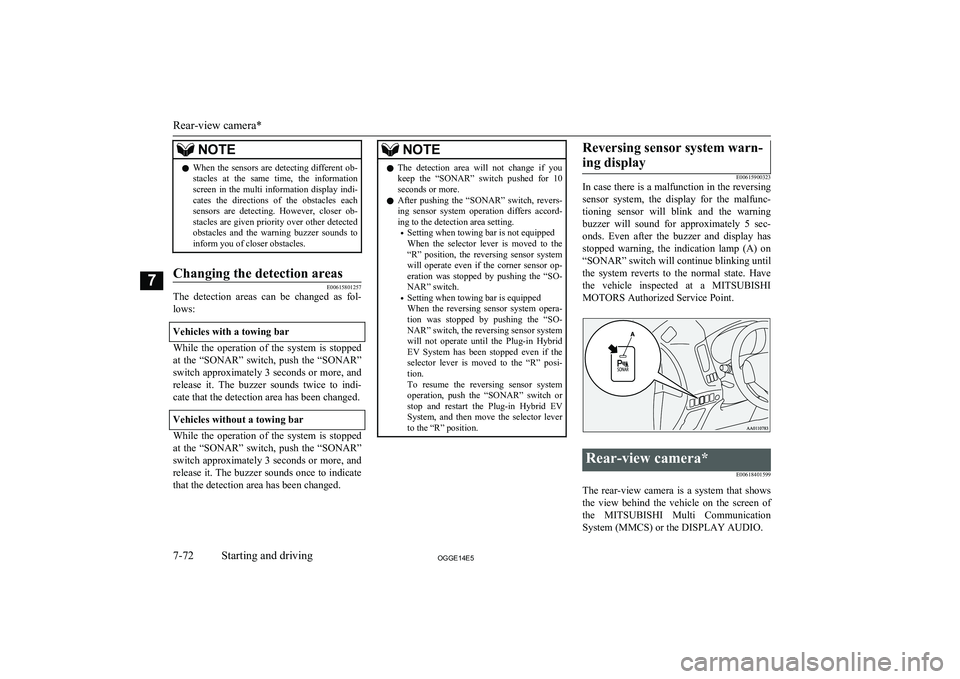
NOTElWhen the sensors are detecting different ob-
stacles at the same time, the information screen in the multi information display indi-
cates the directions of the obstacles each sensors are detecting. However, closer ob-
stacles are given priority over other detected obstacles and the warning buzzer sounds to
inform you of closer obstacles.Changing the detection areas
E00615801257
The detection areas can be changed as fol-
lows:
Vehicles with a towing bar
While the operation of the system is stopped
at the “SONAR” switch, push the “SONAR”
switch approximately 3 seconds or more, and release it. The buzzer sounds twice to indi-
cate that the detection area has been changed.
Vehicles without a towing bar
While the operation of the system is stopped at the “SONAR” switch, push the “SONAR”
switch approximately 3 seconds or more, and
release it. The buzzer sounds once to indicate that the detection area has been changed.
NOTEl The detection area will not change if you
keep the “SONAR” switch pushed for 10
seconds or more.
l After pushing the “SONAR” switch, revers-
ing sensor system operation differs accord- ing to the detection area setting.
• Setting when towing bar is not equipped
When the selector lever is moved to the
“R” position, the reversing sensor system will operate even if the corner sensor op-
eration was stopped by pushing the “SO- NAR” switch.
• Setting when towing bar is equipped
When the reversing sensor system opera-
tion was stopped by pushing the “SO- NAR” switch, the reversing sensor system
will not operate until the Plug-in Hybrid EV System has been stopped even if the selector lever is moved to the “R” posi-tion.
To resume the reversing sensor system operation, push the “SONAR” switch or
stop and restart the Plug-in Hybrid EV System, and then move the selector lever to the “R” position.Reversing sensor system warn-
ing display
E00615900323
In case there is a malfunction in the reversing
sensor system, the display for the malfunc-
tioning sensor will blink and the warning buzzer will sound for approximately 5 sec-
onds. Even after the buzzer and display has stopped warning, the indication lamp (A) on
“SONAR” switch will continue blinking until the system reverts to the normal state. Havethe vehicle inspected at a MITSUBISHI
MOTORS Authorized Service Point.
Rear-view camera*
E00618401599
The rear-view camera is a system that showsthe view behind the vehicle on the screen of
the MITSUBISHI Multi Communication
System (MMCS) or the DISPLAY AUDIO.
Rear-view camera*
7-72OGGE14E5Starting and driving7
Page 264 of 442
NOTElBecause the rear-view camera has a special
lens, the lines on the ground between park-
ing spaces may not look parallel on the screen.
l In the following situations, the screen indi-
cation may be difficult to see. There is no abnormality.
• Low light (nighttime)
• When the light of the sun or the light from
a vehicle’s headlamps shines directly into the lens
l If the camera is hot and is then cooled by
rain or a car wash, the lens can mist up. This phenomenon does not indicate a malfunc-
tion.
l It is not possible to fully see obstacles when
the lens is dirty. If the lens becomes conta-
minated by water droplets, snow, mud or oil, wipe off the contamination, taking care not
to scratch the lens.
l Please observe the following cautions. Ig-
noring them could lead to a camera malfunc-tion.
• Do not subject the camera to physical
shock.
• Do not apply wax to the camera.
• Do not splash the camera with boiling wa-
ter.
• Do not disassemble the camera.
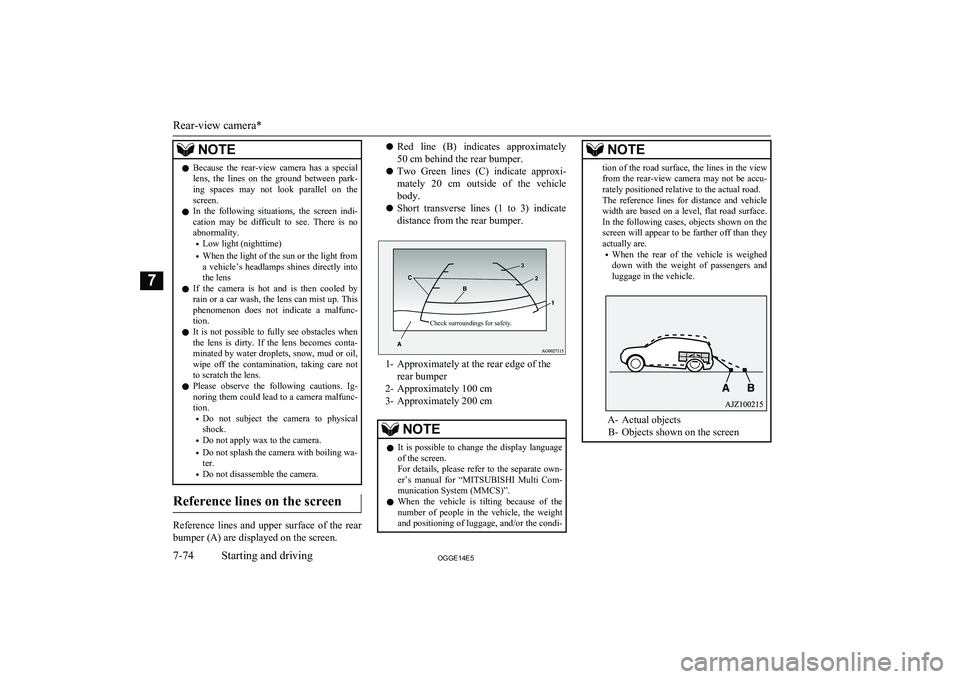
Reference lines on the screen
Reference lines and upper surface of the rear
bumper (A) are displayed on the screen.
l Red line (B) indicates approximately
50 cm behind the rear bumper.
l Two Green lines (C) indicate approxi-
mately 20 cm outside of the vehicle body.
l Short transverse lines (1 to 3) indicate
distance from the rear bumper.Check surroundings for safety.
1- Approximately at the rear edge of the rear bumper
2- Approximately 100 cm
3- Approximately 200 cm
NOTEl It is possible to change the display language
of the screen.
For details, please refer to the separate own- er’s manual for “ MITSUBISHI Multi Com-
munication System (MMCS)”.
l When the vehicle is tilting because of the
number of people in the vehicle, the weight
and positioning of luggage, and/or the condi-NOTEtion of the road surface, the lines in the view from the rear-view camera may not be accu-
rately positioned relative to the actual road.
The reference lines for distance and vehicle
width are based on a level, flat road surface. In the following cases, objects shown on the
screen will appear to be farther off than they actually are.
• When the rear of the vehicle is weighed
down with the weight of passengers and
luggage in the vehicle.
A- Actual objects
B- Objects shown on the screen
Rear-view camera*
7-74OGGE14E5Starting and driving7
Page 274 of 442

NOTElThere is an interior air temperature sensor (A) in the illustrated position.
Never place anything on top of the sensor, since doing so will prevent it from functioning properly.
l Since the air conditioning operation is controlled while the ECO mode is operating, you may feel that effectiveness of the air conditioner is weak.
Also, on vehicles without electric heater, the heating performance cannot be obtained while the ECO mode is operating since engine starting is controlled. In such case, cancel ECO mode.
→ “ECO mode switch” on page 6-51
l Even if the ECO mode is operating, you can select normal operation of the air conditioner.
On vehicles equipped with MITSUBISHI Multi-Communication System (MMCS), screen operations can be used to change the setting. Refer to the separate
owner’s manual for details.
l In extreme cold, the air conditioning control panel screen may operate sluggishly. This does not indicate a problem.
It will disappear when the vehicle interior temperature rises to a normal temperature.
l A sound will be made every time you push all the switches.
Blower speed selection switch
E00702801371
Press of the blower speed selection
switch to increase the blower speed.
Press
of the blower speed selection
switch to decrease the blower speed.
Automatic climate control air conditioner
8-06OGGE14E5For pleasant driving8
Page 276 of 442

The air selection and air conditioningswitches can be customized (function setting
changed), and the automatic switching of out-
side air and the air conditioner according to operating conditions can be changed as de-
sired.
For further information, we recommend you to consult a MITSUBISHI MOTORS Au-
thorized Service Point.
Refer to “Customizing the air conditioning
switch” on page 8-10.
Refer to “Customizing the air selection” on page 8-08.
Synchronized mode and dual mode
The driver’s side and the passenger’s side
temperature can be controlled independently. At this time, the “DUAL” indicator will be shown in the display (A).
l Synchronized mode
If the driver’s side temperature control switch is pressed, the passenger’s side temperature will also be controlled to the
same setting temperature as the driver’s
side.
l Dual mode
If the passenger’s side temperature con-
trol switch is pressed under synchron- ized mode, the system will switch to du-
al mode. In dual mode, the driver’s side
and the passenger’s side temperature can
be set separately by using each tempera-
ture control switch.
Press the AUTO switch to return to
synchronized mode.Air selection switch
E00703401808
To change the air selection, simply press the air selection switch.
l Outside air: Indication lamp (A) is OFF
Outside air is introduced into the passen- ger compartment.
l Recirculated air: Indication lamp (A) is
ON
Air is recirculated inside the passenger
compartment.CAUTIONl Use of the recirculation position for exten-
ded time may cause the windows to fog up.NOTEl Normally, use the outside position to keep
the windscreen and side windows clear and
quickly remove fog or frost from the wind- screen.
If high cooling performance is desired, or if
the outside air is dusty or otherwise contami- nated use the recirculation position. Switch
to the outside position periodically to in- crease ventilation so that the windows do notbecome fogged up.
Automatic climate control air conditioner
8-08OGGE14E5For pleasant driving8