2014 MITSUBISHI OUTLANDER PHEV change time
[x] Cancel search: change timePage 201 of 442

Starting and stopping thePlug-in Hybrid EV System E00620601295Starting the Plug-in Hybrid EV
System
E00620701528
CAUTIONl When the Plug-in Hybrid EV System warn-
ing lamp comes on while the READY indi- cator is on, avoid high-speed driving and
have your vehicle inspected by a
MITSUBISHI MOTORS Authorized Serv-
ice Point as soon as possible. (Refer to “Plug-in Hybrid EV System warning lamp” on page 6-44.)
l Never attempt to start the engine by pushing
or pulling the vehicle.
1. Check that the EV charging cable is not
connected to your vehicle.
2. Fasten the seat belt.
3. Make sure the parking brake is applied.
4. When you press the power switch while
depressing the brake pedal with your
right foot, the READY indicator in the meter blinks and the activation of Plug-
in Hybrid EV System starts.
NOTEl After the Plug-in Hybrid EV System has not
started for a while, the brake pedal effort
needed to start the Plug-in Hybrid EV Sys- tem may become greater. If this occurs, de- press the brake pedal more firmly than usual.
5. When the READY indicator changes
from blinking to staying on, the startup of Plug-in Hybrid EV System is activa-ted and the vehicle is now ready to drive.
CAUTIONl Do not press the power switch while holding
the select lever at the operated position.NOTEl Continue to depress the brake pedal until the
READY indicator in the meter stays on.
l You can drive your vehicle even if the en-
gine is stopped.
l The Plug-in Hybrid EV System can be star-
ted in any operation mode.
l If the READY indicator does not come on,
check the select position indicator. If the in-
dicator does not indicate “P”, press the elec- trical parking switch to display “P” position.
l If the READY indicator does not come on,
turn the power switch to OFF once and, aftera while, press the power switch to start Plu-
gin Hybrid EV System.Stopping the Plug-in Hybrid
EV System
E00620801268
1. Stop your vehicle completely.
2. Apply the parking brake firmly while
depressing the brake pedal.
3. After pressing the electrical parking
switch, press the power switch to stop Plug-in Hybrid EV System. (Refer to
“Electrical Parking switch” on page 7-14.)
WARNINGl Never stop Plug-in Hybrid EV System
during running except in emergency. The effectiveness of the brake becomes very
poor and the steering wheel becomes very
heavy, which can easily lead to an acci- dent.NOTEl Do not operate the power switch during run-
ning except in emergency. If you have tostop Plug-in Hybrid EV System in emergen-cy during running, continue to press the power switch for three seconds or longer or
press the power switch three times or more
quickly. Plug-in Hybrid EV System stops, the operation mode turns to ACC, and the
selector lever position shifts to the “P” posi- tion at very slow speed.
Starting and stopping the Plug-in Hybrid EV System
7-11OGGE14E5Starting and driving7
Page 205 of 442

CAUTIONlIf you operate the electrical parking switch
and the select lever repeatedly within a short
time, the shifting from the “P” position or to the “P” position is restrained for a certainperiod for the system protection. In such a
case, wait for a while and then perform the operation.
l If the parking lock mechanism is faulty, a
warning is displayed on the information
screen in the multi-information display.
When this warning is displayed, park on a flat place with the parking brake securely
applied. Have your vehicle inspected by a MITSUBISHI MOTORS Authorized Serv-
ice Point.CAUTIONl If you press the electrical parking switch be-
fore your vehicle stops completely, the vehi- cle makes a sudden stop, which may cause
injury to passengers. This also can be a cause of failure of the vehicle.
l Do not place an object around the electrical
parking switch. The electrical parking switch
may be pressed by the object when you place it there or when you somehow touch it.This will cause unintentional shifting to “P”
or “N” position, which may lead to an acci- dent.
l Be careful not to spill beverages, etc. around
the electrical parking switch. The electrical
parking switch may be stuck to the pressed
position when it is pressed.NOTEl When the selector lever is shifted from the
“P” position or to the “P” position, operatingnoise and vibration of the parking lock are felt, but this is normal.
Electrical Parking switch re-
minder buzzer
If the driver’s door is opened with the select
position other than “P” when the vehicle is at a stop, the buzzer sounds to warn to press the
electrical parking switch.
Regenerative braking level
selector (paddle)* E00636700021
Regenerative braking level selector (paddle)
can quickly change the regenerative brake force while keeping your hand on the steering
wheel when you release your foot from the
accelerator pedal while driving.
By pulling the regenerative braking level se- lector, the brake force (amount of electricalenergy to charge the drive battery) can be ad-
justed according to the driving condition such as before a curve or a downhill.
Regenerative braking level selector (paddle)*
7-15OGGE14E5Starting and driving7
Page 206 of 442
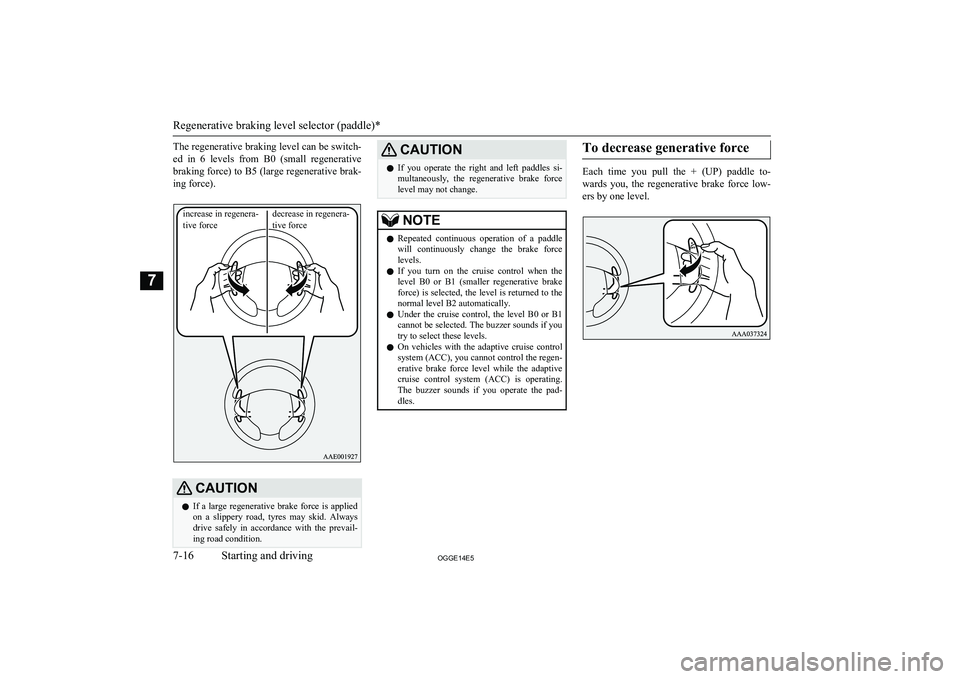
The regenerative braking level can be switch-
ed in 6 levels from B0 (small regenerative braking force) to B5 (large regenerative brak-ing force).CAUTIONl If a large regenerative brake force is applied
on a slippery road, tyres may skid. Always
drive safely in accordance with the prevail- ing road condition.CAUTIONl If you operate the right and left paddles si-
multaneously, the regenerative brake force
level may not change.NOTEl Repeated continuous operation of a paddle
will continuously change the brake forcelevels.
l If you turn on the cruise control when the
level B0 or B1 (smaller regenerative brake
force) is selected, the level is returned to the
normal level B2 automatically.
l Under the cruise control, the level B0 or B1
cannot be selected. The buzzer sounds if you
try to select these levels.
l On vehicles with the adaptive cruise control
system (ACC), you cannot control the regen- erative brake force level while the adaptive
cruise control system (ACC) is operating. The buzzer sounds if you operate the pad-
dles.To decrease generative force
Each time you pull the + (UP) paddle to-
wards you, the regenerative brake force low- ers by one level.Regenerative braking level selector (paddle)*
7-16OGGE14E5Starting and driving7increase in regenera- tive forcedecrease in regenera-tive force
Page 213 of 442

NOTElIt is recommended to use the battery charg-
ing switch at least 20 minutes before you
climb towards the speed of more than
100 km/h (62 mph) or when a long slope
(gradient of more than 4 %) is expected.
(According to a towing weight, it may not be able to continue the speed.)
l When using the battery charge switch with a
vehicle that has been parked in the heath a
long time, it may not charge.
l The charging time close to the full charging
of the drive battery becomes longer depend- ing on the condition of the drive battery, a
driving condition or an environment.
l The engine may stop near full charge.
l If you press the battery charge switch in or-
der to generate electricity while using gaso-
line, the fuel consumption will suffer. We recommend you to consider the environ- ment.
l When the engine is started while parking,
there is a risk of receiving a penalty due to
idling stop ordinances.
You should use the battery charge switch that conforms to the relevant municipality.
If you press the battery charge switch in or-
der to generate electricity using gasoline, the fuel consumption will suffer.When the Battery save switch
is ON
When the battery save switch is turned on while driving in the battery charge mode, the
mode changes to the battery save mode.
If the battery charge switch is pressed, the
mode is returned to the battery charge mode.
Acoustic Vehicle Alerting
System (AVAS) E00631601051
The Acoustic Vehicle Alerting System(AVAS) is a device that uses sound to alert
pedestrians of the presence of the vehicle. The system operates when the vehicle speed
is about 35 km/h (22 mph) or less and the en-
gine is not running.
The sound starts when the AVAS is operated
in the following conditions.
l When the vehicle speed is about 3 km/h
(2 mph) or less with engine not runningand the brake pedal is not depressed.
l When the vehicle speed is about 3 km/h
(2 mph) to 35 km/h (22 mph) and engine
is not running.
The sound does not start in the following ca-
ses.
l When the vehicle speed is about 3 km/h
(2 mph) or less and the brake pedal is depressed.
l When the vehicle speed is about 35 km/h
(22 mph) or more.
l When the select position is in “P”
(PARK) position.
l When the AVAS OFF indicator in the
meter is illuminating.
l When the engine is running.
When the operation mode is set to “ON”, the
AVAS OFF indicator comes on and goes out after a few seconds.
Acoustic Vehicle Alerting System (AVAS)
7-23OGGE14E5Starting and driving7
Page 240 of 442
NOTE•While the brake pedal is being depressed.
• When the parking brake is engaged.
• When the system determines that its per-
formance has been degraded due to con- taminants adhered to the sensor.
• When there is any abnormality in the sys-
tem.
To increase the set speed
There are two ways to increase the set speed.
By using the “RES +” switch:
The set speed increases by 1 km/h (1 mph) every time you push up the “RES +” switch
while the ACC control is working. If you hold the switch pushed up, the set speed in-creases in 5 km/h (3 mph) increments.
NOTEl There is some time lag between the setting
to a new speed and actually accelerating tothat speed.
l Speed setting operation is possible even in
presence of a vehicle in front. In this case, however, the set speed alone increases with-
out actual acceleration taking place.
l When the switch is held pushed, a buzzer
sounds every time the set speed changes.CAUTIONl The setting speed should be set up the suita-
ble speed according to a situation.
By using the accelerator pedal:
When the accelerator pedal is depressed
while driving with the ACC control working,you can accelerate the vehicle temporarily
beyond the presently set speed.
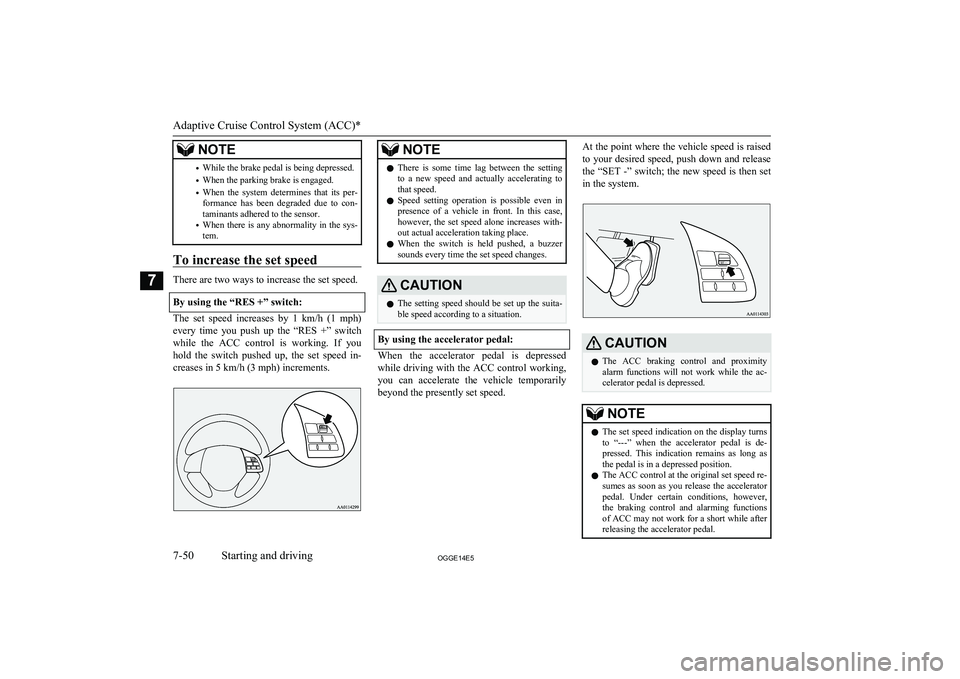
At the point where the vehicle speed is raised
to your desired speed, push down and release
the “SET -” switch; the new speed is then set in the system.CAUTIONl The ACC braking control and proximity
alarm functions will not work while the ac- celerator pedal is depressed.NOTEl The set speed indication on the display turns
to “---” when the accelerator pedal is de- pressed. This indication remains as long as
the pedal is in a depressed position.
l The ACC control at the original set speed re-
sumes as soon as you release the accelerator
pedal. Under certain conditions, however,
the braking control and alarming functions of ACC may not work for a short while afterreleasing the accelerator pedal.
Adaptive Cruise Control System (ACC)*
7-50OGGE14E5Starting and driving7
Page 241 of 442

NOTElSet speed adjustment is impossible while the
accelerator pedal is in a depressed position.
To decrease the set speed
There are two ways to decrease the set speed.
By using the “SET -” switch:
The set speed decreases by 1 km/h (1 mph) every time you push down the “SET -”switch while the ACC control is working. If
you hold the switch pushed down, the set
speed decreases in increments of 5 km/h (3 mph).
NOTEl There is some time lag between setting to a
new speed and actually decelerating to that
speed.NOTEl If there is a vehicle in front and your vehicle
is following that vehicle at a speed lower
than the set speed, the set speed alone de- creases with no actual deceleration taking
place.
l When the switch is held pushed, a buzzer
sounds every time the set speed changes.CAUTIONl The setting speed should be set up the suita-
ble speed according to a situation.
By using the brake pedal:
If you depress the brake pedal while the ACC
control is working, the control is cancelled,allowing you to decelerate the vehicle.
At the point where the vehicle slows down to
your desired speed, push down the “SET -” switch; the new speed is then set in the sys-tem.
NOTEl The ACC control is cancelled if you depress
the brake pedal and the ACC control does
not resume even when you release the pedal.
To temporarily accelerate the
vehicle
Simply depress the accelerator pedal to tem- porarily accelerate the vehicle. Releasing the
pedal automatically slows down the vehicle to the set speed and ACC restarts its control.
CAUTIONl The ACC braking control and proximity
alarm functions will not work while the ac- celerator pedal is depressed.
l The setting speed should be set up the suita-
ble speed according to a situation.
Adaptive Cruise Control System (ACC)*
7-51OGGE14E5Starting and driving7
Page 244 of 442

NOTElPressing the switch turns off the ACC even
if it is engaged.
l The set speed is cancelled when the ACC is
turned off or the operation mode is set to
“OFF”.
l If the ACC is in the ‘ON state’ when the op-
eration mode is set to “OFF”, the system is set to the ‘OFF state’ when the operation
mode is set to “ON” next time.
To resume the control
After cancelling the ACC control (i.e. placing
the system in the ‘standby state’) by pressing the “CANCEL” switch or depressing the
brake pedal, you can resume the ACC control
at the originally set speed if you push up the “RES +” switch.
NOTEl The conditions to be met before the ACC
control can be resumed are the same as those for starting the ACC control.
To change the following dis-
tance setting
Every time you press the following distance
setting switch, the setting changes sequential- ly through three options “Long”, “Middle”
and “Short”, cycling back to “Long” after “Short”. The distance setting is reset when
the operation mode is set to “OFF” or when the ACC is set to “OFF,” and is automatically
set to “long” when you set the ACC to “ON”
next time.
NOTEl The following distance varies as a function
of the speed; the faster the set speed, the lon- ger the following distance.Following distance setting: “Long”Following distance setting: “Middle”Following distance setting: “Short”
To activate cruise control (auto-
matic speed control)
If you hold the “ACC ON/OFF” switch
pressed with the operation mode set to “ON” and the ACC in the ‘OFF state’, the cruisecontrol is activated. The information screen
of the multi-information display then changes to the cruise control screen and a buzzersounds at the same time.
Cruise control is turned off if you set the op-
eration mode to “OFF”.
Adaptive Cruise Control System (ACC)*
7-54OGGE14E5Starting and driving7
Page 248 of 442

CAUTION•When a road surface is surging, and there
is unevenness.
• When being driven in a tunnel.
• When your vehicle changed lanes, and
your vehicle approached immediately be- hind the vehicle in front.
• During a certain time after your vehicle
turns left or right.
• When you are carrying extremely heavy
loads in the rear seats or luggage area.
• After the Plug-in Hybrid EV System has
been running for an extended period of time.
• Under adverse weather conditions (rain,
snow, sand storms, etc.)*
• When the cover part in front of the sensor
and the sensor become dirty or have snow and ice* adhering to it.
• When water, snow or sand on the road are
extorted by the vehicle in front or an on- coming vehicle*.
*: When judging the state that detection per-
formance deterioration and the FCM can’t operate temporarily by these situations auto-
matically,“FCM TEMPORARILY NOT AVAILABLE” message is indicated, and a
“FCM OFF” indicator lights up.
Additionally, it may be indicated in the fol-
lowing situations.
• When the brake is overheating.
• When you are driving in light traffic with
few vehicles and obstacles in front.CAUTIONWhen the FCM will be in the state which can operate, indication is released automati-
cally. When the indication keeps going out,
there is an abnormality in the system. Please contact a MITSUBISHI MOTORS Author-
ized Service Point.
l Factors such as the positional relationship
between your vehicle and a vehicle in front,
driver’s own technique of steering the vehi-
cle and irregularly moving traffic due to ac-
cidents or vehicle trouble may deter the
FCM control and alarm from functioning.
l When the system recognizes the driver’s
steering or accelerating actions as evasive actions to avoid collision, FCM control and
alarm functions may be cancelled.
l The FCM control and alarm functions may
be triggered in the following situations.
CAUTION• When there is a structure (B) beside the
entrance of a curve and intersection.
• When running on a narrow iron bridge.
• When passing through a gate with small
head or side clearances.
• When there are metallic objects, steps or
projections on the road surface.
• When quickly approaching a vehicle in
front to overtake it.
• When passing an electronic toll collection
gate.
• When running under an overpass, a pe-
destrian overpass or a small tunnel.
• When running in Multi-storey car park.
• When the road gradiently and suddenly
changes while running.
• When stopping very close to a wall or a
vehicle in front.
Forward Collision Mitigation System (FCM)*
7-58OGGE14E5Starting and driving7