2014 MERCEDES-BENZ B-CLASS SPORTS phone
[x] Cancel search: phonePage 14 of 360
Switching the surround lighting
on/of
f(on -board computer) ..........204
Turn signals ................................... 106
see Interior lighting
see Replacing bulbs
Light sensor (display message) .......223
Loading guidelines ............................250
Locking see Centra llocking
Locking (doors)
Automatic ........................................ 80
Emergency locking ........................... 81
From insid e(central locking
button) ............................................. 80
Locking centrally
see Centra llocking
Locking verification signal (on-
board computer) ............................... 205
Low-beam headlamps Changing bulbs .............................. 113
Display message ............................ 220
Setting for driving abroad
(symmetrical) ................................. 104
Switching on/off ........................... 105
Lumbar support
Adjusting the 4-way lumbar
support ............................................ 96M
M+S tires ............................................ 314
Malfunction message see Display messages
Matte finish (cleaning instructions) 288
mbrace Call priority .................................... 269
Display message ............................ 214
Downloading destinations
(COMAND) ..................................... 269
Downloading route s....................... 272
Emergency call .............................. 266
General notes ................................ 265
Geo fencing ................................... 273
Locating astolen vehicl e............... 271
MB info call button ........................268
Remote vehicle locking ..................271
Roadside Assistance button ..........267
Search &Send ............................... 270Self-test
......................................... 266
Speed alert .................................... 273
System .......................................... 266
Triggering the vehicle alarm ........... 273
Vehicle remote malfunction
diagnosi s....................................... 271
Vehicle remote unlocking ..............270
Mechanical key
Function/notes ................................ 75
Locking vehicle ................................ 81
Unlocking the driver's door ..............81
Memory card (audio) .........................197
Memory function ............................... 101
Message memory (on-board
computer) .......................................... 207
Messages see Display messages
Mirrors
see Exterior mirrors
see Rear-view mirror
see Vanity mirror (in the sun visor)
Mobile phone
Menu (on-board computer) ............197
Modifying the programming
(SmartKey) ........................................... 75
MOExtende dtires .............................. 295
Mounting wheels Lowerin gthe vehicle ...................... 339
Mounting anew wheel ................... 339
Preparing the vehicle .....................337
Raising the vehicle .........................337
Removing awheel .......................... 339
Securing the vehicle against
rolling away ................................... 337
MP3
Operation ....................................... 197
see separate operating instructions
Multifunctio ndisplay
Function/notes ............................. 192
Permanent displa y......................... 203
Multifunctio nsteering wheel
Operating the on-board computer .191
Overview .......................................... 3312
Index
Page 15 of 360
N
Navigation Menu (on-boar dcomputer) ............195
see separate operating instructions
Notes on breaking-i nanew vehicle 136 O
Occupant Classification System
(OCS) Fault s............................................... 51
Operation ........................................ .47
System self-test ............................... 50
Occupant safety
Childre ninthe vehicle ..................... 56
Important safety notes ....................40
OCS
Faults ............................................... 51
Operation ........................................ .47
System self-test ............................... 50
Oil
see Engine oil
On-board computer
Assistance menu ........................... 199
Audi omenu ................................... 196
Convenience submenu ..................206
Displaying aservice message ........285
Display messages ..........................207
DISTRONI CPLUS ........................... 168
Factory settings submenu .............206
Important safety notes ..................190
Instrument cluster submenu ..........202
Lighting submenu .......................... 203
Menu overview .............................. 193
Message memory .......................... 207
Navigation menu ............................ 195
Operation ....................................... 191
Service menu ................................. 202
Settings menu ............................... 202
Standard displa y............................ 193
Telephone menu ............................ 197
Trip menu ...................................... 193
Vehicle submenu ........................... 205
Video DVD operatio n..................... 197
Opening and closing the side trim
panels ................................................. 114Operatin
gsafety
Declaratio nofconformity ................ 24
Important safety notes ....................23
Operatin gsystem
see On-board computer
Operator's Manual
Vehicle equipment ...........................22
Outside temperature display ...........191
Overhead control panel ......................36
Override feature Rea rside windows ........................... 62 P
Pain tcode number ............................ 346
Paintwork (cleaning instructions) ...287
Pani calarm .......................................... 40
Panorama roof with power tilt/
sliding panel
Opening/closing the roller
sunblind ........................................... 88
Problem (malfunction) .....................88
Resetting ......................................... 88
Panorama sliding sunroof
Important safety notes ....................86
Parce lnet ........................................... 253
Parking ............................................... 152
Important safety notes ..................152
Parking brake ................................ 153
Position of exterio rmirror, front-
passenger sid e............................... 100
Rea rview camera .......................... 179
see Active Parking Assist
see PARKTRONIC
Parking aid
Active Parking Assist .....................175
see Exterior mirrors
see PARKTRONIC
Parking brake
Display message ............................ 211
Electric parking brake ....................153
Warning lamp ................................. 244
Parking lamps
Switching on/off ........................... 106
Parking lamps (changing bulbs) ......113
PARKTRONIC Deactivating/activating .................174
Driving system ............................... 172 Index
13
Page 19 of 360
Technical data
Capacities ...................................... 347
Emergency spare wheel .................343
Information .................................... 346
Tires/wheels ................................. 340
Vehicle data ................................... 353
TELEAID
Call priority .................................... 269
Downloading destinations
(COMAND) ..................................... 269
Downloading route s....................... 272
Emergency call .............................. 266
Geo fencing ................................... 273
Locating astolen vehicl e............... 271
MB info call button ........................268
Remote vehicle locking ..................271
Roadside Assistance button ..........267
Search &Send ............................... 270
Self-test ......................................... 266
Speed alert .................................... 273
System .......................................... 266
Triggering the vehicle alarm ........... 273
Vehicle remote malfunction
diagnosi s....................................... 271
Vehicle remote unlocking ..............270
Tele Aid
General notes ................................ 265
Telephone
Accepting acall............................. 198
Display message ............................ 236
Menu (on-board computer) ............197
Number from the phone book ....... .198
Redialing ........................................ 198
Rejecting/ending acall................. 198
Temperature
Coolant .......................................... 190
Outside temperature ..................... .191
Setting (climate control) ................128
Theft deterren tsystems
ATA (Anti-Theft Alarm system) .........70
Immobilize r...................................... 70
Through-loading ................................ 253
Time see separate operating instructions
TIREFIT kit .......................................... 296
Tire pressure Calling up (on-board computer) .....320
Checking manually ........................319Display message
............................ 231
Important safety notes ..................320
Maximum ....................................... 318
Notes ............................................. 317
Not reached (TIREFIT) ....................298
Reached (TIREFIT) ..........................298
Recommended ............................... 315
Tire pressure los swarning
system General notes ................................ 319
Important safety notes ..................319
Restarting ...................................... 319
Tire pressure monitoring system
Checking the tire pressure
electronically ................................. 322
Function/notes ............................. 320
General notes ................................ 320
Important safety notes ..................320
Restarting ...................................... 322
Warning lamp ................................. 248
Warning message .......................... 322
Tires
Aspect ratio (definition) .................335
Averag eweight of the vehicle
occupants (definition) ....................333
Bar (definition) ............................... 333
Changing awheel .......................... 336
Characteristics .............................. 333
Checking ........................................ 313
Definition of terms .........................333
Direction of rotatio n...................... 336
Display message ............................ 231
Distributio nofthe vehicle
occupants (definition) ....................335
DOT, Tire Identification Number
(TIN) .............................................. .332
DOT (Department of
Transportation) (definition) ............333
GAWR (Gross Axle Weight Rating)
(definition) ..................................... 334
GVW (Gross Vehicle Weight)
(definition) ..................................... 334
GVW R(Gross Vehicle Weight
Rating) (definition) .........................334
Important safety notes ..................312
Increase dvehicle weight due to
optional equipment (definition) ......333
Kilopascal (kPa )(definition) ...........334 Index
17
Page 35 of 360
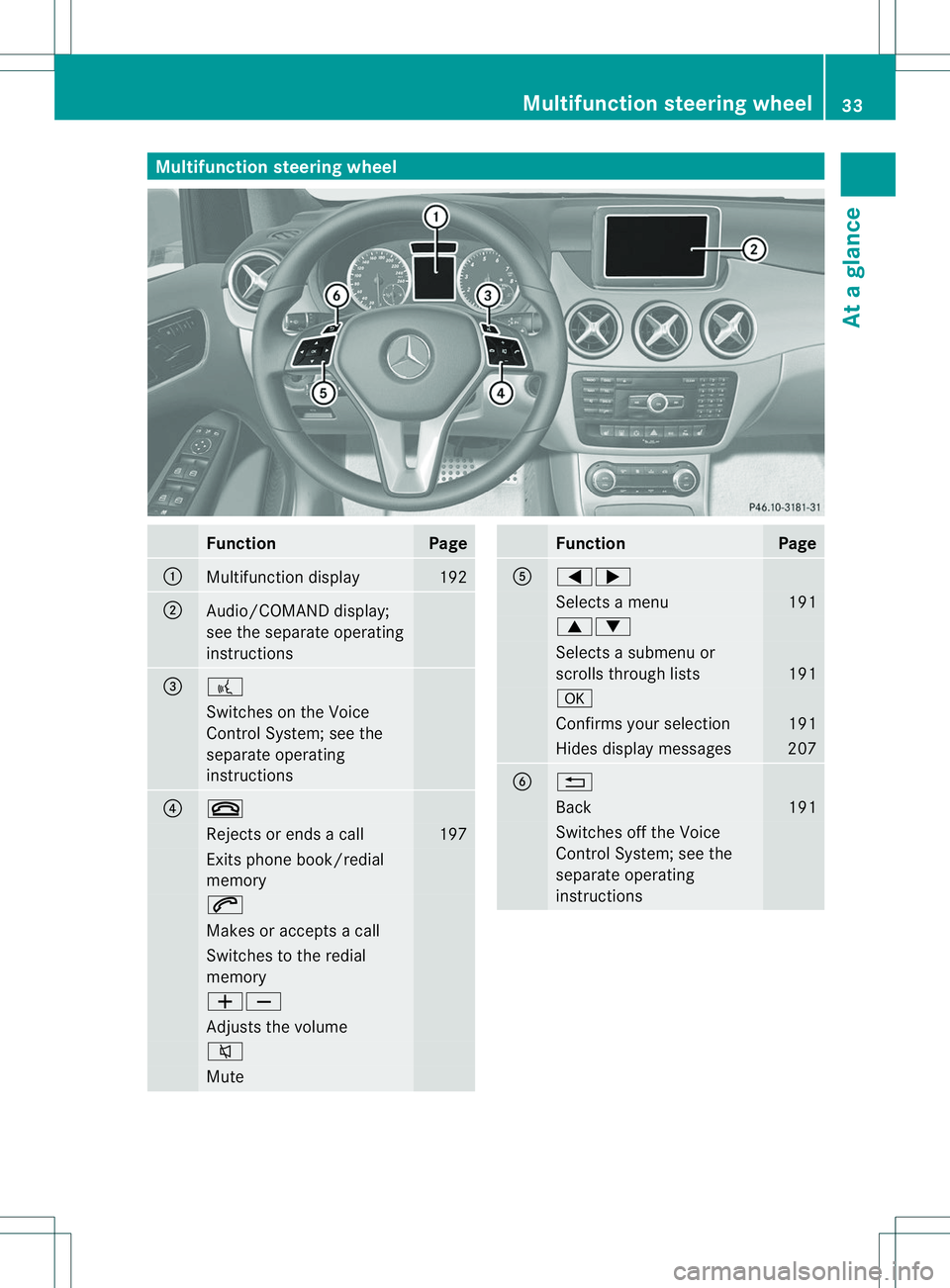
Multifunction steering wheel
Function Page
001A
Multifunction display 192
0010
Audio/COMAND display;
see the separate operating
instructions
0023
0007
Switches on the Voice
Control System; see the
separate operating
instructions
0021
0008
Rejects or ends
acall 197
Exits phone book/redial
memory
0006
Makes or accepts
acall Switches to the redial
memory
00080009
Adjusts the volume
0001
Mute Function Page
001E
000A0004
Selects
amenu 191
00060005
Selects
asubmenu or
scroll sthrough lists 191
000C
Confirm
syours election 191
Hides display messages 207
0024
0002
Back 191
Switches off the Voice
Control System
;see the
separate operating
instructions Multifunction steering wheel
33Atag lance
Page 73 of 360
i
If the alarm stays on for more than
30 seconds, the mbrace emergency call
system automaticall ysends amessage to
the Customer Assistance Center by text
message or data connection .The
emergency call system sends the message
provided that:
R you have subscribed to the mbrace
service.
R the mbrace service has been activated
properly.
R the necessary mobile phone network is
available. Theft deterrent locking system
71Safety Z
Page 76 of 360
Useful information
i This Operator's Manual describes all
models and all standard and optional
equipment of your vehicle available at the
time of publication of the Operator's
Manual. Country-specific differences are
possible. Please not ethat your vehicle may
not be equipped with all features
described. This also applies to safety-
related system sand functions.
i Read the information on qualified
specialist workshops: (Y page 25).SmartKey
Important safet
ynotes G
WARNING
If children are left unsupervised in the vehicle,
they could:
R open the doors, thus endangering other
people or road users.
R get out and disrupt traffic.
R operate the vehicle' sequipment.
Additionally, children could set the vehicle in
motion if, for example, they:
R release the parkin gbrake.
R shifting the automatic transmission out of
park position P
R Start the engine.
There is arisk of an acciden tand injury.
When leaving the vehicle, always tak ethe
SmartKey with you and lock the vehicle. Never
leave children or animals unattended in the
vehicle. Always keep the SmartKey out of
reach of children. G
WARNING
If persons, particularly children are subjected
to prolonged exposur etoextreme heat or
cold, ther eisarisk of injury, possibly even
fatal. Never leave children unattended in the
vehicle. G
WARNING
If you attach heavy or large objects to the
SmartKey, the SmartKey could be
unintentionally turned in the ignition lock .This
could cause the engine to be switched off.
There is arisk of an accident.
Do not attach any heavy or large objectsto
the SmartKey. Remove any bulky key rings
before inserting the SmartKey into the
ignition lock.
! Keep the SmartKey away from strong
magnetic fields. Otherwise, the remote
control function could be affected.
Strong magnetic fields can occur in the
vicinity of powerful electrical installations.
Do not keep the SmartKey:
R with electronic devices, e.g. amobile
phone or another SmartKey
R with metallic objects, e.g. coins or metal
foil
R inside metallic objects, e.g. ametal case SmartKey functions
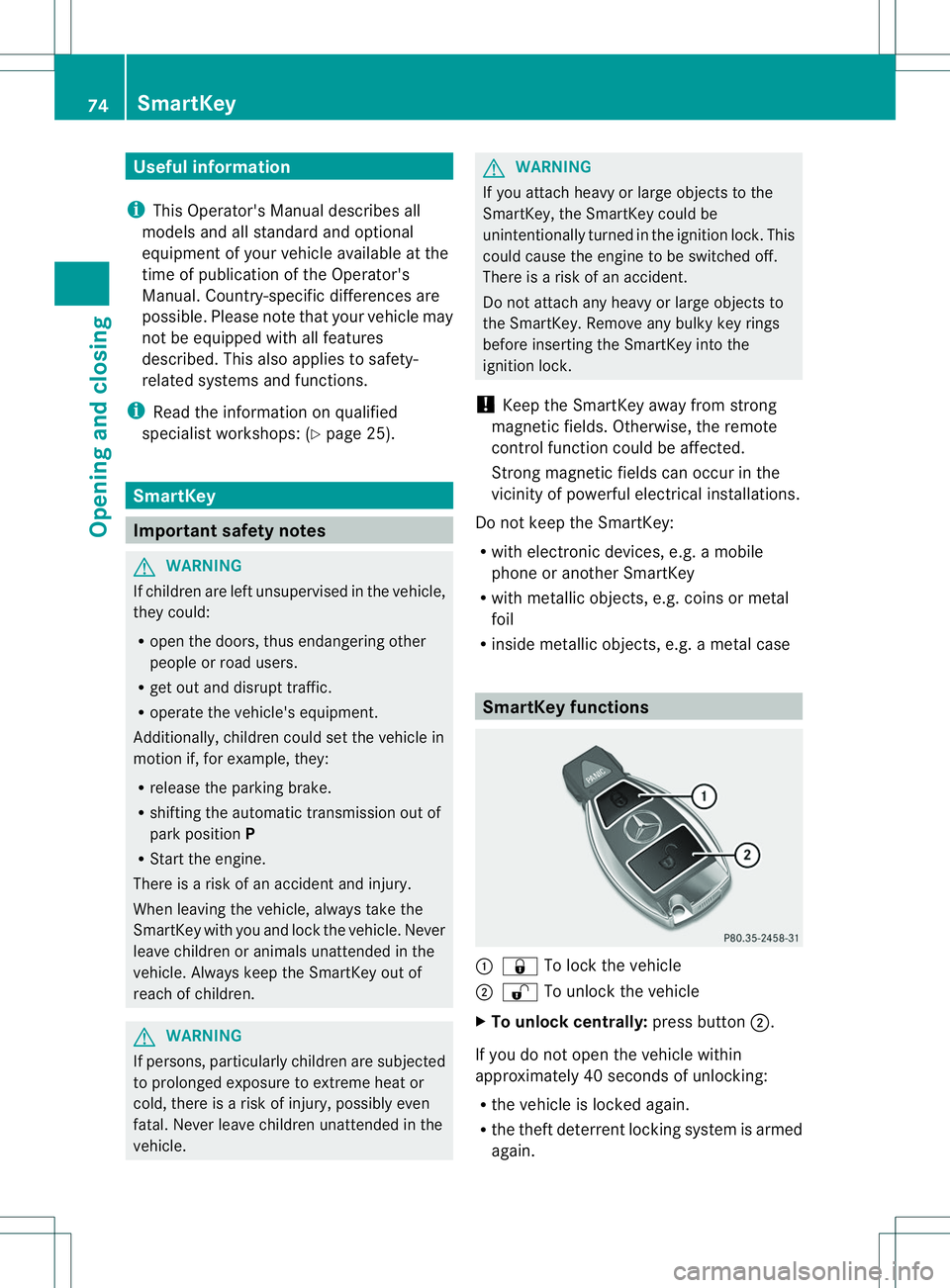
001A
0010 To lock the vehicle
0010 0009 To unlock the vehicle
X To unlock centrally: press button0010.
If you do not open the vehicle within
approximately 40 seconds of unlocking:
R the vehicle is locked again.
R the theft deterrent locking system is armed
again. 74
SmartKeyOpening and closing
Page 157 of 360
Parking the vehicle for
along period
If you leave th evehicle parked for longer than
four weeks, th ebattery may be damage dby
exhaustive discharging.
If you leave th evehicle parked for longer than
six weeks, th evehicle may suffer damage as
ar esult of lack of use.
X Visit aqualifie dspecialist workshop and
seek advice.
i You can obtain informatio nabout trickle
chargers from aqualifie dspecialist
workshop. Driving tips
General notes
Important safety notes G
WARNING
If you switch off th eignitio nwhile driving,
safety-relevant functions are only available
with limitations, or not at all. This could affect,
for example, the power steering and the brake
boosting effect.Y ou will require considerably
more effort to steer and brake. There is arisk
of an accident.
Do not switch off the ignition while driving. G
WARNING
If you operate mobile communication
equipment while driving, you will be
distracted from traffic conditions. You could
also lose control of the vehicle. There is arisk
of an accident.
Only operate this equipment when the vehicle
is stationary.
Observe the legal requirements for the
country in which you are driving. Some
jurisdiction sprohibit the driver from using a
mobile phone while driving avehicle.
If you make acall while driving, always use
hands-free mode. Only operate the telephone
when the traffic situation permits. If you are unsure, pull over to
asafe location and stop
before operating the telephone.
Bear in mind that at aspeed of only 30 mph
(approximately 50 km/h) ,the vehicle covers
ad istance of 44 ft (approximately 14 m) per
second.
Drive sensibly –save fuel Observe the following tips to save fuel:
R The tires should always be inflated to the
recommended tire pressure.
R Remove unnecessary loads.
R Remove roof racks whe nthey are not
needed.
R Warm up the engine at low engine speeds.
R Avoid frequent acceleration or braking.
R Have all maintenancew ork carried out as
indicated by the service intervals in the
MaintenanceB ooklet or by the service
interval display.
Fuel consumption also increases when
driving in cold weather, in stop-start traffic
and in hilly terrain.
Drinking and driving G
WARNING
Drinking and driving and/or taking drugs and
driving are very dangerous combinations.
Even asmall amount of alcohol or drugs can
affect your reflexes, perceptions and
judgment.
The possibility of aserious or even fatal
accident is greatly increased when you drink
or take drugs and drive.
Do not drink or take drugs and drive or allow
anyone to drive who has been drinking or
taking drugs.
Emission control G
WARNING
Combustion engines emit poisonous exhaust
gases such as carbon monoxide. Inhaling
these exhaust gases leads to poisoning. There Driving tips
155Driving and parking
Z
Page 185 of 360
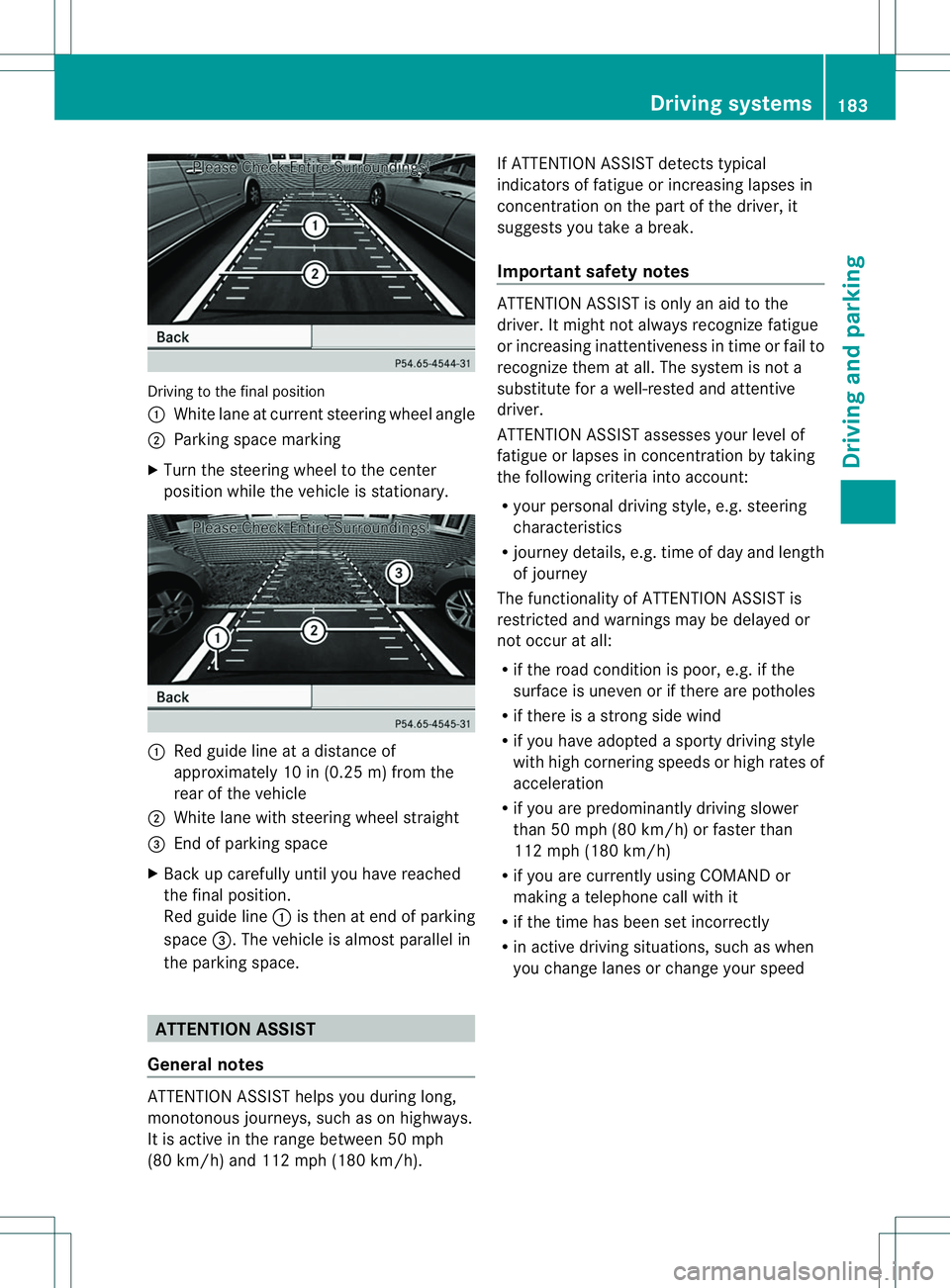
Driving to the fina
lposit ion
001A White lane at current steering whee langle
0010 Parking space marking
X Turn the steering whee ltothe center
positio nwhile the vehicle is stationary. 001A
Red guide line at adistance of
approximately 10 in (0.25 m) from the
rear of the vehicle
0010 White lane with steering wheel straight
0023 End of parking space
X Back up carefully until you have reached
the final position.
Red guide line 001Ais then at end of parking
space 0023.The vehicle is almost parallel in
the parking space. ATTENTION ASSIST
General notes ATTENTION ASSIST helps you during long,
monotonous journeys, such as on highways.
It is active in the range between 50 mph
(80 km/h) and 112 mph (180 km/h). If ATTENTION ASSIST detectst
ypical
indicators of fatigue or increasing lapses in
concentration on the part of the driver, it
suggests you take abreak.
Important safety notes ATTENTION ASSIST is only an aid to the
driver. It might not always recognizef atigue
or increasing inattentiveness in time or fail to
recognizet hem at all. The system is not a
substitute for awell-rested and attentive
driver.
ATTENTION ASSIST assesses your level of
fatigue or lapses in concentration by taking
the following criteria into account:
R your personal driving style, e.g. steering
characteristics
R journey details, e.g. time of day and length
of journey
The functionality of ATTENTION ASSIST is
restricted and warnings may be delayed or
not occur at all:
R if the road condition is poor, e.g. if the
surface is uneven or if there are potholes
R if there is astrongs ide wind
R if you have adopted asporty driving style
with high cornering speeds or high rates of
acceleration
R if you are predominantly driving slower
than 50 mph (80 km/h) or faster than
112 mph (180 km/h)
R if you are currently using COMAND or
making atelephone call with it
R if the time has been set incorrectly
R in active driving situations, such as when
you change lanes or change your speed Driving systems
183Driving and parking Z