2014 FORD FUSION (AMERICAS) light
[x] Cancel search: lightPage 78 of 458
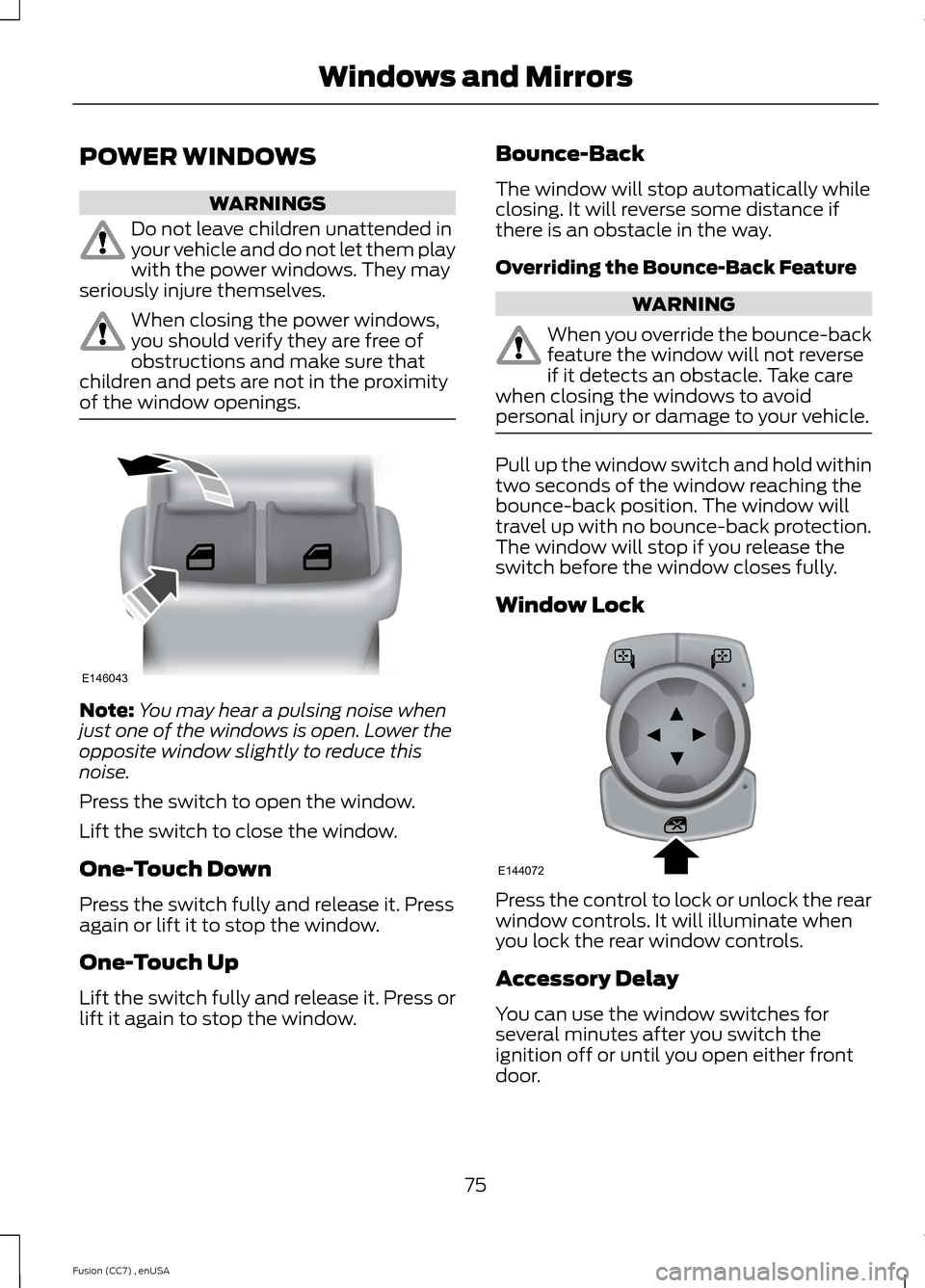
POWER WINDOWS
WARNINGS
Do not leave children unattended inyour vehicle and do not let them playwith the power windows. They mayseriously injure themselves.
When closing the power windows,you should verify they are free ofobstructions and make sure thatchildren and pets are not in the proximityof the window openings.
Note:You may hear a pulsing noise whenjust one of the windows is open. Lower theopposite window slightly to reduce thisnoise.
Press the switch to open the window.
Lift the switch to close the window.
One-Touch Down
Press the switch fully and release it. Pressagain or lift it to stop the window.
One-Touch Up
Lift the switch fully and release it. Press orlift it again to stop the window.
Bounce-Back
The window will stop automatically whileclosing. It will reverse some distance ifthere is an obstacle in the way.
Overriding the Bounce-Back Feature
WARNING
When you override the bounce-backfeature the window will not reverseif it detects an obstacle. Take carewhen closing the windows to avoidpersonal injury or damage to your vehicle.
Pull up the window switch and hold withintwo seconds of the window reaching thebounce-back position. The window willtravel up with no bounce-back protection.The window will stop if you release theswitch before the window closes fully.
Window Lock
Press the control to lock or unlock the rearwindow controls. It will illuminate whenyou lock the rear window controls.
Accessory Delay
You can use the window switches forseveral minutes after you switch theignition off or until you open either frontdoor.
75Fusion (CC7) , enUSAWindows and MirrorsE146043 E144072
Page 81 of 458

Note:Do not clean the housing or glass ofany mirror with harsh abrasives, fuel or otherpetroleum or ammonia-based cleaningproducts.
You can adjust the interior mirror to yourpreference. Some mirrors also have asecond pivot point. This lets you move themirror head up or down and from side toside.
Pull the tab below the mirror toward youto reduce glare at night.
Auto-Dimming Mirror (If Equipped)
Note:Do not block the sensors on the frontand back of the mirror. Mirror performancemay be affected. A rear center passenger orraised rear center head restraint may alsoblock light from reaching the sensor.
The mirror will dim automatically to reduceglare when bright lights are detected frombehind your vehicle. It will automaticallyreturn to normal reflection when you selectreverse gear to make sure you have a clearview when backing up.
SUN VISORS
Rotate the sun visor toward the sidewindow and extend it rearward for extrashade.
Illuminated Vanity Mirror
Lift the cover to switch the lamp on.
MOONROOF (IF EQUIPPED)
WARNINGS
Do not let children play with themoonroof or leave them unattendedin the vehicle. They may seriouslyhurt themselves.
When closing the moonroof, youshould verify that it is free ofobstructions and make sure thatchildren and pets are not in the proximityof the roof opening.
The sliding shade can be manually openedor closed when the moonroof is closed.Pull the shade toward the front of thevehicle to close it.
The moonroof controls are located on theoverhead console and have a one-touchopen and close feature. To stop it duringone-touch operation, touch the control asecond time.
78Fusion (CC7) , enUSAWindows and MirrorsE138666 E162197
Page 84 of 458

Vehicle Settings and Personalization
See General Information (page 87).
Engine Coolant TemperatureGauge
Shows the temperature of the enginecoolant. At normal operating temperature,the needle will remain in the center section.If the needle enters the red section, theengine is overheating. Stop the engine,switch the ignition off and determine thecause once the engine has cooled down.
Note:Do not restart the engine until thecause of overheating has been resolved.
WARNING
Never remove the coolant reservoircap while the engine is running or hot.
Fuel Gauge
Note:The fuel gauge may vary slightlywhen your vehicle is moving or on a gradient.
Switch the ignition on. The fuel gauge willindicate approximately how much fuel isleft in the fuel tank. The arrow adjacent tothe fuel pump symbol indicates on whichside of your vehicle the fuel filler door islocated.
The needle should move toward F whenyou refuel your vehicle. If the needle pointsto E after adding fuel, this indicates yourvehicle needs service soon.
After refueling some variability in needleposition is normal:
•It may take a short time for the needleto reach F after leaving the gas station.This is normal and depends upon theslope of pavement at the gas station.
•The fuel amount dispensed into thetank is a little less or more than thegauge indicated. This is normal anddepends upon the slope of pavementat the gas station.
•If the gas station nozzle shuts offbefore the tank is full, try a differentgas pump nozzle.
Low Fuel Reminder
A low fuel reminder triggers when the fuelgauge needle is at 1/16th.
Variations:
Distance-to-emptyFuel gauge positionDriving type (fuel economyconditions)
35 miles to 80 miles (56 kmto 129 km)1/16thHighway driving
35 miles (56km)1/16thSevere duty driving (trailertowing, extended idle)
81Fusion (CC7) , enUSAInstrument Cluster
Page 86 of 458
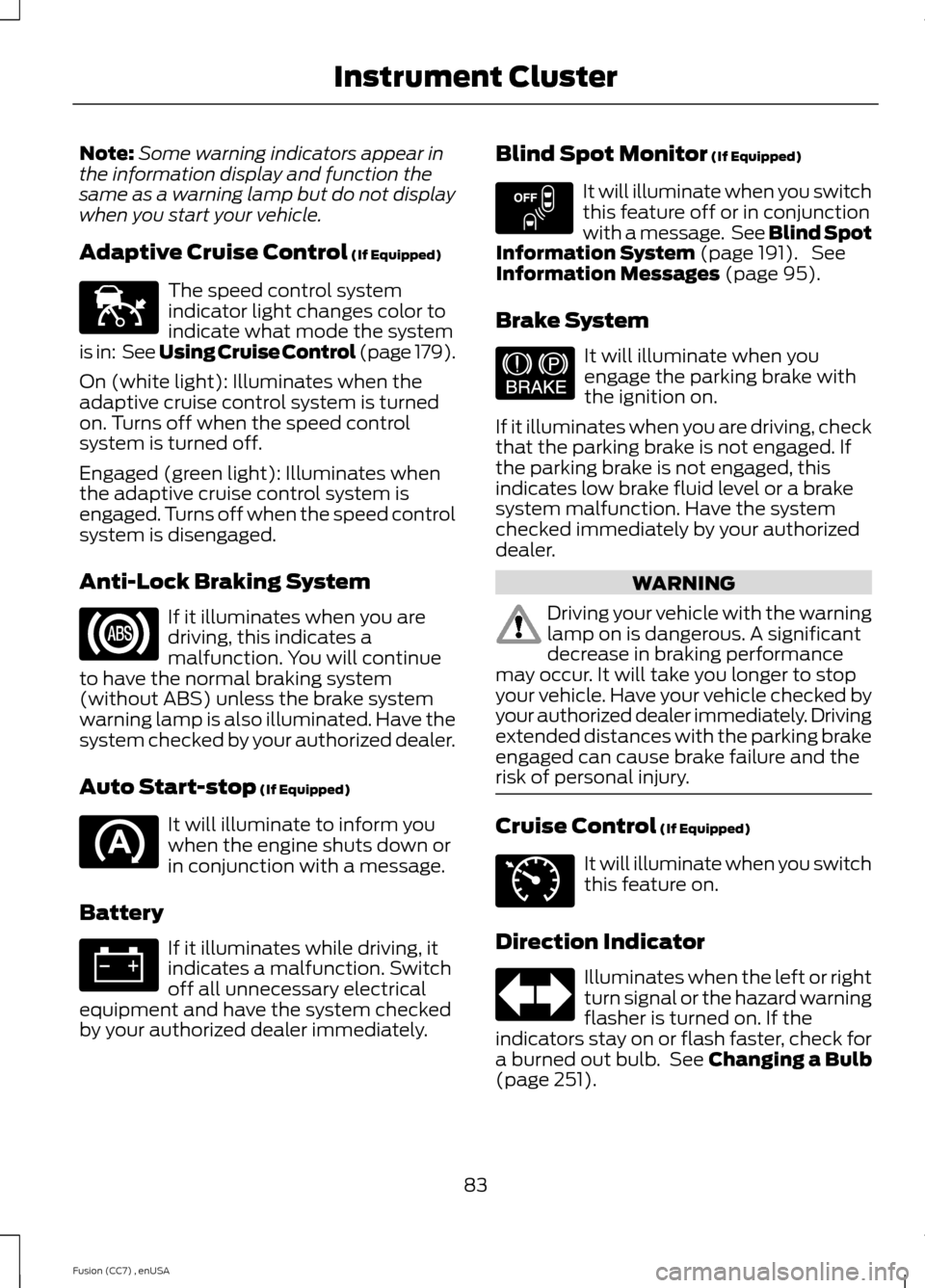
Note:Some warning indicators appear inthe information display and function thesame as a warning lamp but do not displaywhen you start your vehicle.
Adaptive Cruise Control (If Equipped)
The speed control systemindicator light changes color toindicate what mode the systemis in: See Using Cruise Control (page 179).
On (white light): Illuminates when theadaptive cruise control system is turnedon. Turns off when the speed controlsystem is turned off.
Engaged (green light): Illuminates whenthe adaptive cruise control system isengaged. Turns off when the speed controlsystem is disengaged.
Anti-Lock Braking System
If it illuminates when you aredriving, this indicates amalfunction. You will continueto have the normal braking system(without ABS) unless the brake systemwarning lamp is also illuminated. Have thesystem checked by your authorized dealer.
Auto Start-stop (If Equipped)
It will illuminate to inform youwhen the engine shuts down orin conjunction with a message.
Battery
If it illuminates while driving, itindicates a malfunction. Switchoff all unnecessary electricalequipment and have the system checkedby your authorized dealer immediately.
Blind Spot Monitor (If Equipped)
It will illuminate when you switchthis feature off or in conjunctionwith a message. See Blind SpotInformation System (page 191). SeeInformation Messages (page 95).
Brake System
It will illuminate when youengage the parking brake withthe ignition on.
If it illuminates when you are driving, checkthat the parking brake is not engaged. Ifthe parking brake is not engaged, thisindicates low brake fluid level or a brakesystem malfunction. Have the systemchecked immediately by your authorizeddealer.
WARNING
Driving your vehicle with the warninglamp on is dangerous. A significantdecrease in braking performancemay occur. It will take you longer to stopyour vehicle. Have your vehicle checked byyour authorized dealer immediately. Drivingextended distances with the parking brakeengaged can cause brake failure and therisk of personal injury.
Cruise Control (If Equipped)
It will illuminate when you switchthis feature on.
Direction Indicator
Illuminates when the left or rightturn signal or the hazard warningflasher is turned on. If theindicators stay on or flash faster, check fora burned out bulb. See Changing a Bulb(page 251).
83Fusion (CC7) , enUSAInstrument ClusterE144524 E151262 E144522 E71340
Page 87 of 458

Door Ajar
Displays when the ignition is onand any door is not completelyclosed.
Electric Park Brake
It will illuminate when theelectric parking brake has amalfunction.
Engine Coolant Temperature
Illuminates when the enginecoolant temperature is high.Stop the vehicle as soon aspossible, switch off the engine and let cool.
Engine Oil
If it illuminates with the enginerunning or when you are driving,this indicates a malfunction.Stop your vehicle as soon as it is safe todo so and switch the engine off. Check theengine oil level. See Engine Oil Check(page 241).
Note:Do not resume your journey if itilluminates despite the level being correct.Have the system checked by your authorizeddealer immediately.
Fasten Safety Belt
It will illuminate and a chime willsound to remind you to fastenyour safety belt. See SafetyBelt Minder (page 31).
Front Airbag
If it fails to illuminate when youstart your vehicle, continues toflash or remains on, it indicatesa malfunction. Have the system checkedby your authorized dealer.
Front Fog Lamps (If Equipped)
It will illuminate when you switchthe front fog lamps on.
Heads Up Display (If Equipped)
A red beam of lights willilluminate on the windshield incertain instances when usingadaptive cruise control and/or the collisionwarning system. It will also illuminatemomentarily when you start your vehicleto make sure the display works.
High Beam
It will illuminate when you switchthe high beam headlamps on. Itwill flash when you use theheadlamp flasher.
Hood Ajar
Displays when the ignition is onand the hood is not completelyclosed.
Lane Keeping Aid (If Equipped)
Illuminates when the lanekeeping system is activated.
Low Fuel Level
It will illuminate when the fuellevel is low or the fuel tank isnearly empty. Refuel as soon aspossible.
Low Tire Pressure Warning
It will illuminate when your tirepressure is low. If the lampremains on with the enginerunning or when driving, checkyour tire pressure as soon as possible.
84Fusion (CC7) , enUSAInstrument Cluster E146190 E156133 E159324 E144813
Page 88 of 458

It will also illuminate momentarily whenyou switch the ignition on to confirm thelamp is functional. If it does not illuminatewhen you switch the ignition on, or beginsto flash at any time, have the systemchecked by your authorized dealer.
Parking Lamps
It will illuminate when you switchthe parking lamps on.
Powertrain Fault
Illuminates when a powertrainor an AWD fault has beendetected. Contact yourauthorized dealer as soon as possible.
Service Engine Soon
If the service engine soonindicator light stays illuminatedafter the engine is started, itindicates that the On Board Diagnosticssystem (OBD) has detected a malfunctionof the vehicle emissions control system.Refer to On board diagnostics (OBD) inthe Fuel and Refueling chapter for moreinformation about having your vehicleserviced. See Emission Control System(page 150).
If the light is blinking, engine misfire isoccurring which could damage yourcatalytic converter. Drive in a moderatefashion (avoid heavy acceleration anddeceleration) and have your vehicleserviced immediately.
Note:Under engine misfire conditions,excessive exhaust temperatures coulddamage the catalytic converter or othervehicle components.
The service engine soon indicator lightilluminates when the ignition is first turnedon prior to engine start to check the bulband to indicate whether the vehicle is readyfor Inspection/Maintenance (I/M) testing.
Normally, the service engine soon light willstay on until the engine is cranked, thenturn itself off if no malfunctions arepresent. However, if after 15 seconds theservice engine soon light blinks eight times,it means that the vehicle is not ready forI/M testing. See Emission ControlSystem (page 150).
Stability Control
It will flash when the system isactive. If it remains illuminatedor does not illuminate when youswitch the ignition on, this indicates amalfunction. During a malfunction thesystem will switch off. Have the systemchecked by your authorized dealerimmediately. See Using StabilityControl (page 169).
Stability Control Off
It will illuminate when you switchthe system off. It will go outwhen you switch the systemback on or when you switch the ignitionoff. See Using Stability Control (page169).
Trunk Ajar
Displays when the ignition is onand the trunk is not completelyclosed.
85Fusion (CC7) , enUSAInstrument Cluster E138639 E159323
Page 90 of 458

GENERAL INFORMATION
WARNING
Driving while distracted can result inloss of vehicle control, crash andinjury. We strongly recommend thatyou use extreme caution when using anydevice that may take your focus off theroad. Your primary responsibility is the safeoperation of your vehicle. We recommendagainst the use of any handheld devicewhile driving and encourage the use ofvoice-operated systems when possible.Make sure you are aware of all applicablelocal laws that may affect the use ofelectronic devices while driving.
Note:Your vehicle may or may not beequipped with all the messages listed in thischapter. Your vehicle will not displaymessages of systems it is not equipped with.
Various systems on your vehicle can becontrolled using the information displaycontrols on the steering wheel.Corresponding information is displayed inthe information display.
Information Display Controls(Type 1 and Type 2)
•Press the up and down arrow buttonsto scroll through and highlight theoptions within a menu.
•Press the right arrow button to enter asub-menu.
•Press the left arrow button to exit amenu.
•Press and hold the left arrow button atany time to return to the main menudisplay (escape button).
•Press the OK button to choose andconfirm settings or messages.
Menu
You can access the menu using theinformation display control.
Note:Some options may appear slightlydifferent or not at all if the items areoptional.
Trip 1 and 2
Trip Odometer
Trip Timer
Fuel Used
Average Fuel
87Fusion (CC7) , enUSAInformation DisplaysE144637
Page 92 of 458
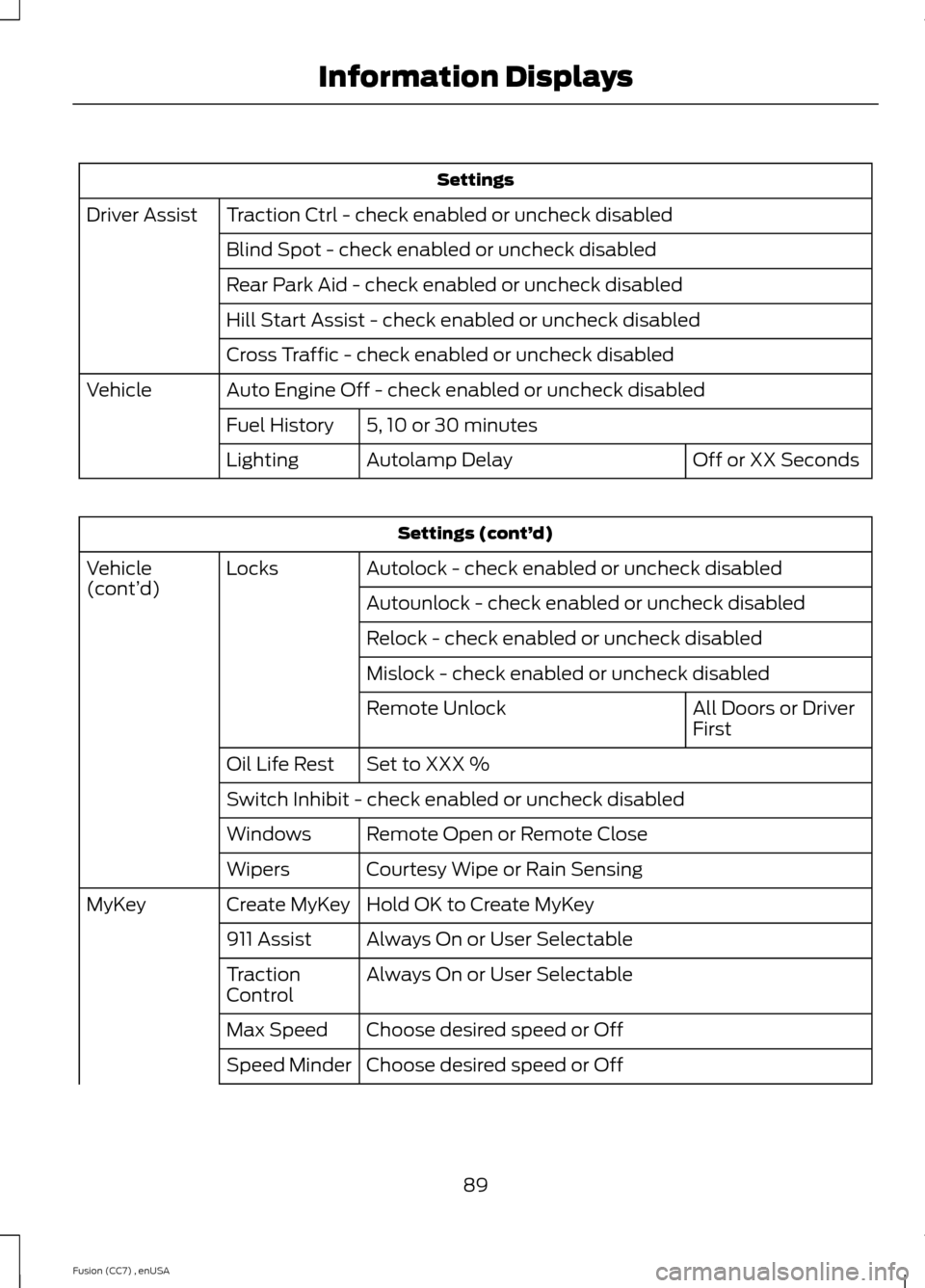
Settings
Traction Ctrl - check enabled or uncheck disabledDriver Assist
Blind Spot - check enabled or uncheck disabled
Rear Park Aid - check enabled or uncheck disabled
Hill Start Assist - check enabled or uncheck disabled
Cross Traffic - check enabled or uncheck disabled
Auto Engine Off - check enabled or uncheck disabledVehicle
5, 10 or 30 minutesFuel History
Off or XX SecondsAutolamp DelayLighting
Settings (cont’d)
Autolock - check enabled or uncheck disabledLocksVehicle(cont’d)Autounlock - check enabled or uncheck disabled
Relock - check enabled or uncheck disabled
Mislock - check enabled or uncheck disabled
All Doors or DriverFirstRemote Unlock
Set to XXX %Oil Life Rest
Switch Inhibit - check enabled or uncheck disabled
Remote Open or Remote CloseWindows
Courtesy Wipe or Rain SensingWipers
Hold OK to Create MyKeyCreate MyKeyMyKey
Always On or User Selectable911 Assist
Always On or User SelectableTractionControl
Choose desired speed or OffMax Speed
Choose desired speed or OffSpeed Minder
89Fusion (CC7) , enUSAInformation Displays