2014 AUDI RS7 SPORTBACK instrument cluster
[x] Cancel search: instrument clusterPage 29 of 292

Instrument s and warning /indicator lights 2 7
You can set the time and the date display in
the MMI. Refer to the MMI owner's manua l
for instructions.
When you open the drive r's door, the date and
time appear in the inst rument cluste r display
for 30 seconds .
Service interval display
Th e service int erval display r eminds you when
your next service is due.
F ig . 13 Inst ru m en t cl uste r: Service inte rva l d is pl ay
The schedule for the next oil change or inspec
tion is calculated automatically and displayed
according ly . The display works in two stages :
Serv ice reminder
30 days before the next service is due, a serv ice reminder appears in the display when yo u
switch the ignition on
c::;, fig. 13 .
Afte r abo ut 5 seconds the display sw itches
back to normal. The d istance and time re
maining are updated each time the ignition is
switched on un til the date due for service is
reac hed .
Service due
W hen the due date for service is reached, the
message
Service due! appears in the instru
ment cluster immediately after you switch the
ignit io n on . Additionally, a warn ing tone
sounds. After about 5 seconds the display
switches back to normal.
Calli ng up the service schedules
If or when an oil change or inspection is due,
can be shown in the MMI d isplay by select ing
the service interva l disp lay in the car menu . Se
lect the
ICAR I function button > (Car )* sys
tems
control button > Ser vicing & checks >
Service interval d isp lays. In new ve hicles, the
schedule can only be called up after approxi
mately 500 km.
Resetting the service interval display
Your a uthorized Audi dea le r will reset the cor
responding service sc hedule after pe rforming
the appropriate service on your veh icle . You
also have the possib ility to reset the oil
c h ange schedule after hav ing performed an
o il change according to Aud i specifications.
Se lect the
ICA RI function button> (Car )* sys
tems
control button > S ervicing & checks >
Servi ce Interval s > Reset oil change interval.
(D Note
If you discon nect t he batt ery te rminals, no
ca lculatio ns can b e ma de fo r the s ervic e
i nte rva l di sp lay dur ing th is time and n o
se rv ice re minder will ap pea r. R emem ber
that o bserving t he prop er servi ce inte rva ls
i s vitally important to extending the life of
your vehicle, pa rtic ularly the engine, and
maintain ing its val ue. Eve n if the mileage
driven is low, the max imum per iod of one
year from one service t o the next must not
b e exceeded .
(D Tips
- Do not reset the display betwee n oil
changes, otherwise the disp lay will be in
co rrect.
- The info rmation in t he Service Reminder
remains st ored eve n w hen t he ve hicle
bat tery is disco nnec ted .
Page 30 of 292
28 Instruments and warning/indicator lights
Head-up Display
Applies to vehicles: with Head-up Display
Fig. 14 Example: indicators in the Head-up Disp lay
Fig. 15 Instrument panel: knob fo r the Head -up Dis
p lay
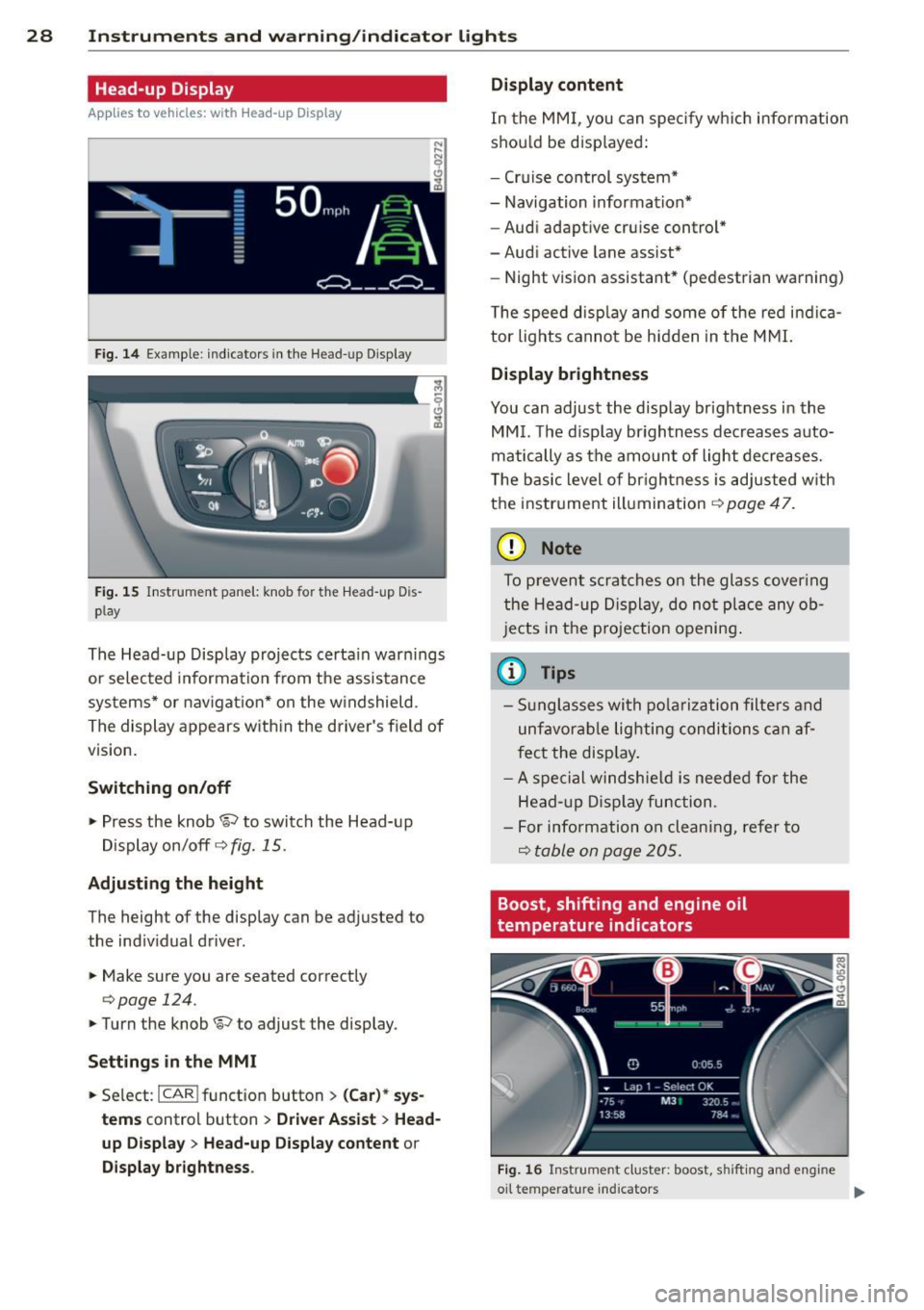
The Head-up Display projects certain warnings
or selected information from the assistance
systems* or navigation* on the windshield .
The display appears with in the driver's field of
vision.
Switching on/off
,.. Press the knob~ to switch the Head-up
Display on/off
c::> fig. 15.
Adjusting the height
The height of the display can be adjusted to
the indiv idual driver .
,.. Make sure you are seated correctly
c:> page 124.
,. Turn the knob ~ to adjust the display .
Settings in the MMI
,.. Se lect : I CAR ! funct ion button > (Car)* sys
tems
control button > Driver Assist > Head
up Display
> Head-up Display content or
Display brightness . Display content
In
the MMI, you can spec ify which information
shou ld be disp layed:
- Cruise control system*
- Navigation information*
- Audi adaptive cruise control*
-Audi active lane assist*
- Night vision assistant* (pedestrian warning)
The speed disp lay and some of the red indica
tor lights cannot be hidden in the MMI.
Display brightness
You can adjust the display brightness in the
MMI. The d isp lay brightness decreases auto
matically as the amount of light decreases.
T he basic level of brigh tness is adjusted with
the instrument illumination
c::> page 47.
(D Note
To prevent scratches on the glass cover ing
the Head-up Display, do not place any ob
jects in the projection opening.
(D Tips
-Sunglasses with polarization filters and
unfavorable lighting conditions can af
fect the disp lay.
- A spe cial windshie ld is needed for the
Head- up Display function .
- For info rmat ion on clean ing, refer to
Q table on page 205.
Boost, shifting and engine oil
temperature indicators
Fig. 16 Instrumen t cluster: boost, shi fti ng and eng ine
oil te mp erat ure in dicators .,..
Page 31 of 292

Instrument s and warning /indicator lights 29
.. Turn the menu thumbwheel on the steering
whee l until
Lap time r appears in the instru
ment cluster disp lay .
@ Boost pressure indicator
The current engine load (meaning the current
boost p ressure) is indicated by a bar.
@ Shifting indicator
The shifting i ndicator is only visib le when
shifting gears with the selector lever in tip
tronic mode
c> page 108. Green LEDs turn on
as the engine RPMs increase. The LEDS flash
red at speeds near the RPM lim it.
I n vehicles with a head-up d isplay, the shifting
indicator is shown in the head-up display in
stead of the instr ument cluster. The head-up
display must be switched on in orde r to do
this
c> page 28.
© Engine oil temperature indicator
I f the engine oil temperature is below 60 °(,
the G¥J symbol followed by three hyphens" --
-" and the °C unit is shown.
The engine has reached its operating temper
ature when the engine o il temperature is be
tween 60
· c and 120 °C under normal driv ing
conditions. The eng ine oi l temperature may
be h igher if there is heavy engine load and
high temperatures outside. This is not a cause
for concern as long as the. ~
page 17 or
l!I c> page 17 warning light in the display
does not flash.
Lap timer
Introduction
You can record and eva luate lap times with
the lap timer in the display
c> page 29,
fig. 17 . The time is measured in minutes, sec
onds and 1/10 seconds . The hours are also
shown when the lap time exceeds 60 minutes.
The maximum individual measurement is
99
hours . A maximum of 50 laps may be record
ed .
A WARNING
Please devote your full attention to driv
ing . As the driver, you have complete re
sponsib ility for safety in traffic. Only use
the functions in such a way that you always
maintain complete control over your vehi
cle in all traffic situations.
(D Tips
When the lap timer stopwatch is running,
you can call up the on-board computer in
formation.
Calling up the lap timer and timing
Fig. 17 Display: Lap t imer
Calling up the lap timer
.. Turn the thumbwheel until the lap timer ap-
pears.
Timing laps
.. To start t iming, press the thumbwhee l.
.. To stop t iming for this lap, press the thumb
wheel again . This also starts timing the next
round. The previous timing always moves
one line up. The lap number that corre
sponds to the timing is displayed in front of
the individual tim ings .
Displaying intermediate time and paus ing
timing
.,. To display an intermediate time, press the
thumbwheel. The timing continues to run in
the backg round.
.. To pause timing, press the thumbwheel.
.. To continue timing, press the thumbwheel
again.
Page 32 of 292
30 Instruments and warning/indicator lights
If timing is paused, you can continue it late r
even if you sw itch the ignition off .
Evaluating times and continuing or
resetting timing
You can evaluate the fastest, slowest and
average lap times.
Fig. 18 Dis play : lap time eva luat ion
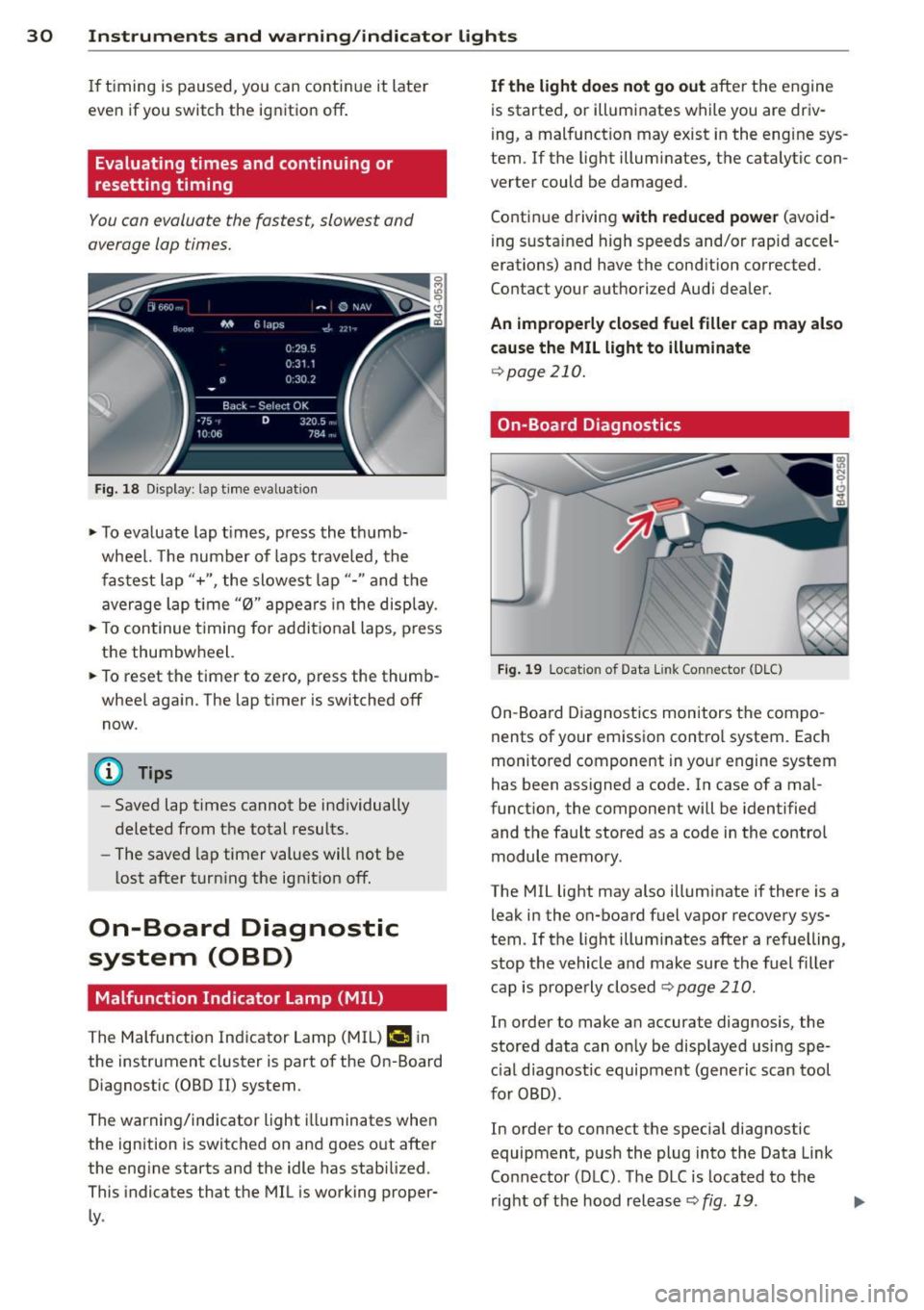
.,. To evaluate lap times, press the thumb
wheel. The number of laps traveled, the
fastest lap"+", the slowest lap"- " and the
average lap t ime "0" appears in the display .
.,. To continue t iming for addit ional laps , press
the thumbwheel.
.,. To reset the timer to zero, press the thumb
wheel again. The lap timer is switched off now.
@ Tips
- Saved lap times cannot be individually
deleted from the total results.
- The saved lap timer values will not be
lost after turning the ignit ion off.
On-Board Diagnostic
system (OBD)
Malfunction Indicator Lamp (MIL)
The Malfunction Indicator Lamp (MIL) ¢4 in
the instrument cluster is part of the On-Board Diagnostic (OBD
II) system.
The warning/indicator light illuminates when
the ignition is switched on and goes out after
the engine starts and the idle has stabilized .
This indicates that the MIL is working proper
ly .
If the light does not go out after the engine
is started, or illuminates while you are driv
ing, a malfunction may exist in the eng ine sys
tem . If the light illuminates, the catalytic con
verter could be damaged .
Continue driving
with reduced power (avoid
ing sustained high speeds and/or rapid accel
erations) and have the condition corrected.
Contact your authorized Audi dealer.
An improperly closed fuel filler cap may also
cause the MIL light to illuminate
¢page 210.
On-Board Diagnostics
Fig. 19 Locat io n of Data Link Co nnector (D LC)
On-Board Diagnostics monitors the compo
nents of your emission control system . Each
monitored component in your engine system
has been assigned a code. In case of a mal
function, the component will be identified
and the fault stored as a code in the control
module memory.
The MIL light may also illuminate if there is a leak in the on-board fuel vapor recovery sys
tem. If the light illuminates after a refuelling,
stop the vehicle and make sure the fuel filler
cap is properly closed
Q page 210 .
In order to make an accurate diagnosis, the
stored data can only be displayed using spe
c ial d iagnostic equipment (generic scan tool
for OBD) .
In order to connect the special diagnostic
equipment, push the plug into the Data Link
Connector (DLC). The DLC is located to the
right of the hood release
Q fig . 19 . liJJ,
Page 35 of 292

Removing the mechanical key
Fig. 21 Remote control maste r key : re mov ing the me
c han ical key
• Press the release button @ c:> fig. 21.
• Pull the mechanica l key @ out of the master
key.
Using the mechan ica l key, you can:
- lock and unlock the storage compartment
on the passenger's side
c::> page 61.
- lock and unlock the vehicle manually
c::>page 37 .
-lock the front and rear passenger doors me
chanically
c:> page 38.
Master key battery replacement
Fig . 22 Remote master key : Re mov ing the ba ttery
holde r
Check light in the master key
The check light @ in the master key provides
information about different cond itions .
• The check light comes on briefly once when
a button is pressed, and during an "inquiry"
by the conven ience key system .
• If the check light does not come on, the bat
tery is dead and has to be replaced . In add i
t ion, when the battery is dead the
I!! sym
bol appears in the instrument cluster dis-
Opening and closing 33
play as well as the message : Please change
key battery .
Master key battery replacement
• Pull the mechanical key out of the master
key
c::> page 33.
• Press the release button @ on the battery
holder and at the same time pull the battery
holder out of the master key in the direction
of the arrow.
• Install the new battery CR 2032 with the
"+ " sign facing down.
• Push the battery holder carefully into the
maste r key .
• Install the mechanical key.
@ For the sake of the environment
Dispose of dead batteries properly so as
not to poll ute the environment .
(D Tips
The replacement battery must be the
same specification as the original.
, Electronic immobilizer
The immobilizer helps to prevent unauthor
ized use of your vehicle .
A computer chip inside your key automatically
deactivates the electronic immobilizer when
the key is inside the vehicle. When you remove
the key from the vehicle, the electronic immo
bilizer is automatically activated once again .
A WARNING
-
Always take the key with you when you
leave the vehicle. The key can disarm the
e lectronic engine immobilizer and permit
an unauthorized person to start the engine
and enable operation of the vehicle sys
tems such as power window or power sun
roof leading to serious personal injury.
(D Tips
- Th e veh icle cannot be started if an unau
thorized key is used. The vehicle may not
start if another radio device such as a key .,.
Page 44 of 292
42 Opening and clo sing
• Re lease the switch and then pu ll it again for
at least one second.
Valet parking
T he valet parking feature protects the lug
gage comportment from unauthorized access from the outside.
Fig . 35 Lu ggage compartment : valet park ing bu tton
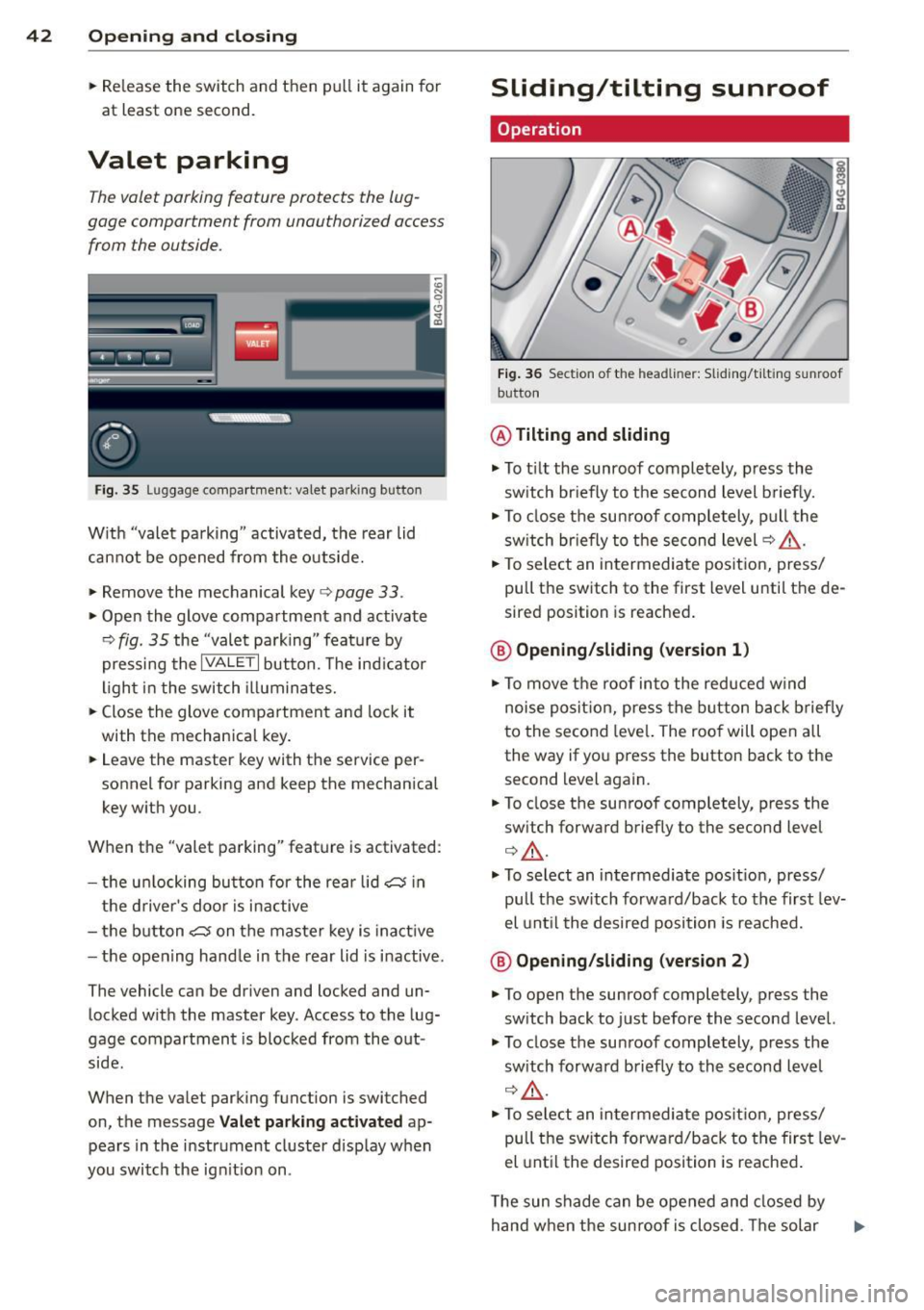
W ith "valet pa rking" activated, the rear lid
cannot be opened from the outside.
• Remove the mechanical key
c> page 33 .
• Open the glove compartment and activate
c> fig . 35 the "valet parking " feature by
pressing the
I VA LE T I button. The ind icator
light i n the switch illuminates.
• Close the glove compartment and lock it
with the mechanical key .
• Leave the master key with the service per
sonnel for parking and keep the mechanical
key w ith you.
When the "valet parking" feature is activated :
- the un locking bu tton for the rea r lid~ in
the d river 's doo r is i nactive
- the button~ on the maste r key is inactive
- the open ing hand le in the rear lid is i nactive.
The vehicle can be driven and locked and un locked with the master key . Access to the lug
gage compartment is blocked from the out
side.
When the valet parking function is switched
on, the message
V al et parking a ctivated ap
pears in the instrument cluster disp lay when
you switch the ign it io n on .
Sliding/tilting sunroof
Operation
Fig . 36 Section o f th e head line r: Sliding/t ilti ng sunroof
button
@ Tilting and sliding
• To t ilt the sunroof completely, press the
sw itch br iefly to the second level briefly.
• To close the sun roof comp letely, pull the
sw itch br iefly to the second level
c> A_ .
• To select an intermediate pos it ion, press/
pull the switch to the first level unti l the de
sired position is reached .
@ Opening /sliding (version 1 )
• To move the roof into the reduced w ind
noise posit ion, press the button back briefly
to the second leve l. The roo f will open all
the way if you press the button back to the
second level again.
• To close the sunroof comp letely, press the
sw itch forward briefly to the second level
Q A_ .
• To se lect an intermediate pos it ion, press/
pull the sw itch forward/back to the first lev
el unt il the desired position is reached.
@ Op ening /sliding (version 2 )
• To open the sunroof completely, press the
sw itch back to just before the seco nd level.
• To close the su nroof completely, press the
sw itch forwa rd briefly to the second level
c> ,& .
• To select an in termediate pos it ion, press/
pull the sw itch forward/back to the first lev
el unt il the desired position is reached .
T he sun shade can be opened and closed by
hand when the sunroof is closed . T he solar
Page 47 of 292

visibility conditions. For example, fog cannot be detected by the light sensors.
So always switch on the headlights 1§.D under these weather conditions and
when driving in the dark.
- Crashes can happen when you cannot see
the road ahead and when you cannot be
seen by other motorists . Always turn on
the headlights so that you can see ahead
and so that others can see your car from
the back.
- Please observe legal regulations when
using the light ing systems descr ibed .
(D Note
The rear fog lights should only be turned
on in accordance with traffic regulation, as
the lights are bright for following traffic.
@ Tips
- The light sensor* for automatic head light range control* is located in the rear
view mirror mount. You should therefore not apply any stickers to the windshield
in this area in order to prevent malfunc
tions or failures.
- In the event of a light sensor malfunc
tion, the driver is notified in the instru
ment cluster display
¢ page 22 .
-You will hear a warning tone if you open
the driver door when the exterior lights
are switched on .
- In cool or damp weather, the inside of
the headlights, turn signals and tail
lights can fog over due to the tempera
ture difference between the inside and
outside. They will clear shortly after
switching them on. This does not affect
the service life of the lighting .
Clear vision 45
Emergency flasher
The emergency flasher makes other motorists
aware that you or your vehicle are in an emer
gency situation .
Fig. 38 Ce nt er co nsol e: em erge ncy flash er sw itc h
.,. Press the switch & ¢ fig. 38 to turn the
emergency flashers on or off.
When the emergency flasher is on, all four
turn signals blink at the same time . The turn
signal indicator lights
II Nin the instrument
cluster, as well as the light in the emergency
flasher switch
& blink likewise. The emergen
cy flashers also work when the ignition is
turned off.
The emergency flashers will turn on automati
cally if you are in an accident where the airbag has deployed.
@ Tips
You should turn on the emergency flashers
when:
- you a re the last vehicle standing in a traf
fic jam so that any other vehicles coming
can see you, or when
- your vehicle has broken down or you are
in an emergency situation, or when
- your vehicle is being towed by a tow
truck or if you are towing another vehicle
behind you.
Adjusting the exterior lighting
The settings are adjusted in the MMI .
.,. Select: !CAR ! function button> (Car)* sys
tem s
control button > Vehicle settings > Ex-
terior lighting. ..,.
Page 48 of 292
46 Clear vision
Automatic headlights
You can adjust the following settings in the
Automatic headlights menu:
Headlights a ctivation time -You can adjust if
the head lights switch on
Early , Med. or Late
according to the sensitivity of the light sensor.
Audi adaptive light* -You can switch adaptive
light
On and Off.
Daytime running lights
USA models :
You can switc h the dayt ime run
ning lights
on and off .
Canada models:
The function cannot be
turned off . It is activated automatica lly each
time the ign ition is switched on. This menu
item is shown "greyed out".
Coming home, Leaving home
The coming home function illuminates the
area outside the vehicle when yo u switch the
ignition off and open the driver's door. To turn
the function on, select
Lights when leaving
car > On .
The leaving home function illuminates the
area outside the vehicle when you un lock the
vehicle. To turn the funct ion on, select
Lights
when unlocking car > On .
The coming home and leaving home functions
only operate when it is dark and the light
switch is in the
AUTO pos ition.
Turn signals and high beam lever
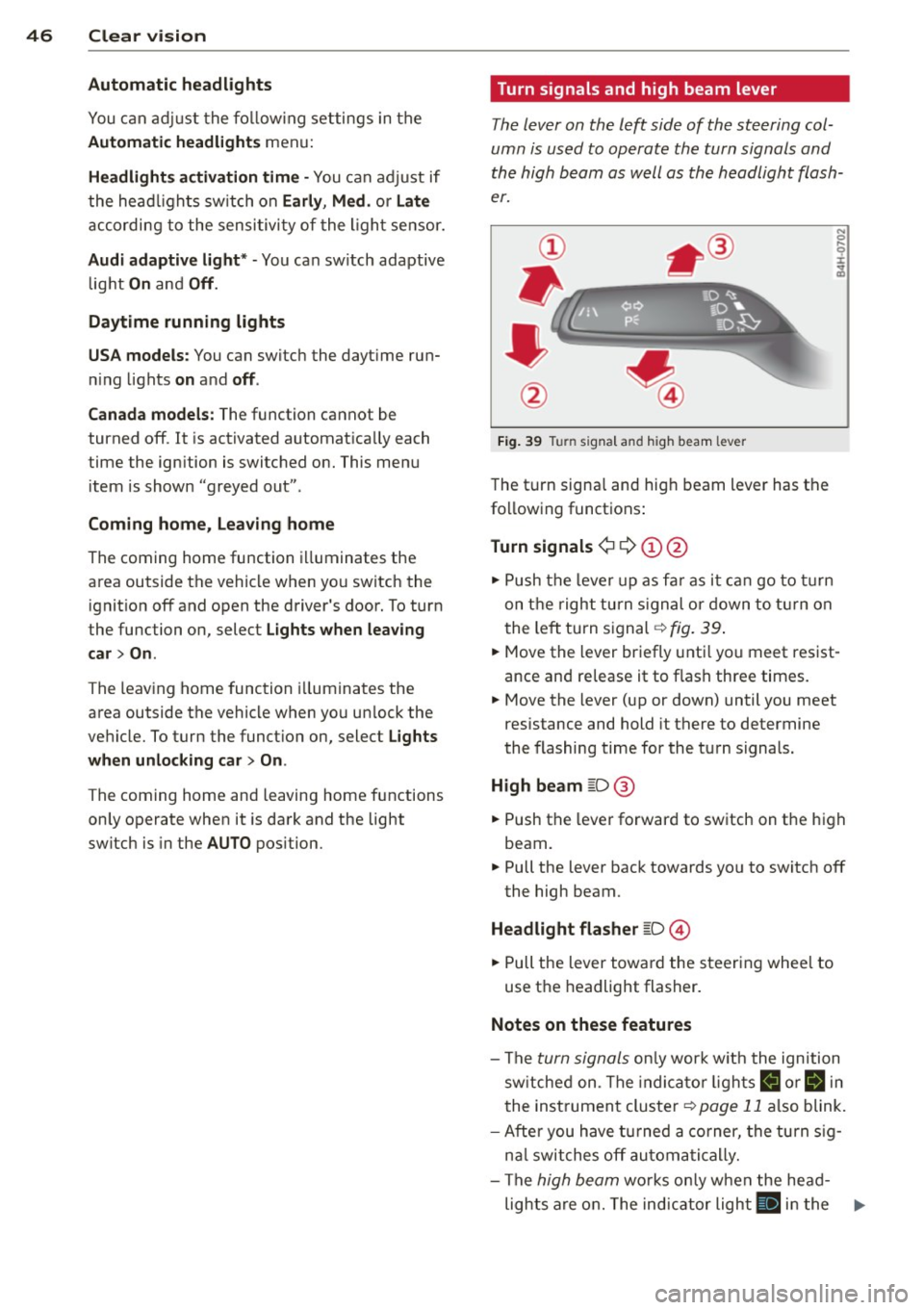
The lever on the left side of the steering col
umn is used to operate the turn signals and
the high beam as well as the headlight flash
er.
Fig. 39 Turn signal and high beam lever
The turn signa l and hig h beam lever has the
following functions:
Turn signals ¢ 9 (D@
.. Push the lever up as far as it can go to turn
on the right turn signal or down to turn on
t he left turn signal ¢
fig. 39.
N 0 ... 'i' :r
~
.. Move the lever briefly until you meet res ist
ance and re lease it to flash three times.
.. Move the lever (up or down) until you meet
resistance and hold it there to determine
the flashing time for the turn signals.
High beam [D @
.. Push the lever forward to switch on the high
beam.
.. Pull the lever back towards yo u to switch off
the high beam.
Headlight flasher [D ©
.. Pull the lever toward the steering whee l to
use the headlight flasher.
Notes on these features
-The turn signals only work w ith the ignition
switched on. The indicato r lights
B or ii in
the instrument cluster¢
page 11 also blink.
- After you have turned a corner, the turn sig-
nal switches off automatically.
- The
high beam works only when the head-
lights are on. The indicator light
II in the ...