2014 AUDI Q5 warning lights
[x] Cancel search: warning lightsPage 37 of 316

the filter . T he symbol wi ll switch off when the
cleaning is successfu l. After a succ essful
clean ing, there is no need to br ing the car to
an author iz ed deale r or qualif ied workshop
because this is par t of normal vehicle opera
tion .
If the symbo l
II does not switch off, see
your author iz ed dealer or other qualif ied
workshop to have the prob lem corrected.
F or mo re information on the diesel particu
l ate filter, refer to
¢ page 206.
A WARNING
Always adapt yo ur speed to the current
weather, road and traffic condit ions. You
should never disobey traffic laws in order
t o follow driv ing recommendations .
(0 Headlight range control defective
II Headlight range control d efective!
-
If the symbol II illum inates, the dynam ic
h eadlight range control is no longer working
properly . Have the system checked and re
pa ired at your author ized Audi dealer .
§0 Adaptive light defective
Applies to vehicles: with adaptive light
rJII Audi adaptive light: defective
When t his symbo l rJII illuminates, it means
that adaptive light is defective . Go to a n au
thor ized Audi deal er to have the headlights o r
the cont rol uni t fo r the adapt ive lig ht re
pair ed.
@-Steering malfunction
Ila Steering lock: Contact dealer!
If the l!Jla symbol in the display comes on,
the re is an electron ic s teeri ng col umn loc k
mal funct ion.
D rive to you r autho rized Aud i dea le r immedi
ately to have t he mal function cor re cted.
Dri ver information di spla y 35
A WARNING
-
Your veh icle must not be towed in the
event of a malfunction in the electronic
st eering column lock because it cannot be
steered due to the loc ked steeri ng. If it is
towed wit h the steering lo cke d, there is
the r is k of an accident.
~ Ignition lock malfunction
II! Ig nition lo ck defe ctive
If the m symbo l in the d isplay comes on,
t h ere is a ma lfunction in the e lectronic igni
ti on loc k. P lease go to a n author ized A udi
dealer or o ther qualified workshop to have the
malfunction repaired .
g Adaptive dampers
Applies to vehicles: with Audi drive select
B Suspension: System fault!
If the B symbol in the disp lay comes on, there
is a ma lfunction in the adaptive dampe rs.
Please go to an authorized A udi dealer or ot h
er qualified wo rkshop to have the malfunctio n
repaired.
~ Windshield wipers faulty
£-..$ 111/indshield wipers defective
When this symbol £!I ill uminates, it means
that the electronics for th e windsh ie ld wipers
are defective . Please go to an authorized A udi
dealer or qualified wo rkshop to have the
winds hield wiper system repaired .
Page 46 of 316

44 Opening and closing
Automatic rear lid/
trunk lid operation
App lies to vehicles: with automat ic rear l id/trunk lid oper ·
ation
The trunk lid con be opened and closed auto
matically.
Fig. 36 Driver's doo r: Unlock ing the rear lid
Fig. 37 Locking switch in the rear lid
Opening the luggage compartment lid
.,. Press the button c::5 on the master key for at
least one second, or
.,. Pull the release button
c::5 in the dr iver's
door ~
fig. 36, or
.,. Press the handle in the lu ggage compart
ment lid~
page 43, fig . 35 .
Closing the luggage compartment lid
.,. Press the button in the luggage compart
ment lid
~ fig . 3 7 . The lid will automat ica lly
close and lock ¢.&, .
Setting the luggage compartment lid
open position
.,. Bring the luggage compartment lid into the
desired open position. The position can be
stored at only one specific height.
.,. Press and ho ld the ¢
fig. 3 7 button for at
least four seconds until the lights blink to
store the desired open position. .,.
Push the luggage compartment lid by hand
against the resistance if you want to set a
higher open posit ion .
.,. Press and hold the¢
fig. 37 button again for
at least four seconds and this will store the
new open position .
Opening will be stopped immediately when:
- You press the
c::5 button on the remote key
for at least of one second, or
- press the unlock button
c::5 in the dr iver
door, or
- press the lock button the in the luggage
compartment lid, or
- push the hand le in the luggage compart
ment lid, or
- when something blocks the rear lid or
makes it d ifficul t for the lid to move.
By pressing one of the button
c::5 repeatedly ,
you can stop or continue the opening process .
The pressing the lock button or the handle re
peatedly, you can open/stop the lid ¢
,&..
Opening will be stopped immediately when:
- press the lock button the in the luggage
compartment lid, or
- push the handle in the luggage compart
ment lid, or
- when something blocks the rear lid or
makes it difficult for the lid to move .
The pressing the lock button or the handle re
peatedly, you can open/stop the lid ¢
& .
You can manua lly stop the automatic open
ing/closing of the luggage compartment lid.
In this situation, the lid can be manually
opened. Press down on the lid and the auto
matic closing will resume once again.
A WARNING
-- Never close the rear lid inattentively or
without checking first . Al though the
clos ing force of the rear lid is limited,
you can still seriously injure yourself or
others .
-
Page 48 of 316

46 Opening and clo sing
Child safety locks
Child safety locks in the rear doors
The child safety locks t prevent the rear
doors from opening from the inside .
Fig. 39 Child safety locks on th e rear doors
I ti:: 00 (0
The rear doors are equipped with c hild safety
l ocks . The lock is only v is ible when the door is
open . Take the mechan ica l key out of the mas
ter key ¢
page 3 7.
Switching the child safety locks on
.,. Turn the key i n the direction of the ar row
Qfig. 39.
Switching the child safet y locks off
.. Turn the key in the opposite d irection of the
arrow .
When the child safety locks are activated, the
i n side door handles do not work and the doors
can only be opened from the outside .
Power windows
Controls
The driver can control all power windows.
Fig . 40 Sect io n of the driver's door: Controls
All power window switches are provided with
a two-position fun ction :
Opening the windows
.. Press the switc h to the fir st stop and ho ld it
until the window re aches the desired posi
tion.
.. Press the switch briefly to the
second stop
to automatically open the window .
Closing the windows
.,. Pull the sw itch to the fir st stop and hold it
until the window reaches the desired posi
tion .
.. Pull the switch briefly to the
s e cond stop to
automatically close the windo w.
Power window switches
@ Driver's door
® Passenger's door
© Left rear door
@ Right rear door
® Safety button
Child safety locks
When the safety button® Q fig. 40 is p ress
ed, the@symbo l in the button lights up. The
power window switches in the rear doors are
switched off.
A WARNING
-
-When you leave your vehicle -even if on-
ly br iefly -always remove the ignition
key . T his app lies pa rticularly when chil
dren remain i n th e vehicle . Othe rwis e the
children could start the eng ine or ope r
a te elec trical eq uipment (e.g. power win
dows) . The power w indows are func tion
al until the dr iver's door or passenge r's
door has bee n opened .
- Pay close attention when closing the win
dows to p revent pinching of hands or
lim bs.
- When locking the vehicle from outside ,
the vehicle must be unoccupied since the
windows can no longer be opened in an
emergency.
Page 51 of 316
Clear vision Lights
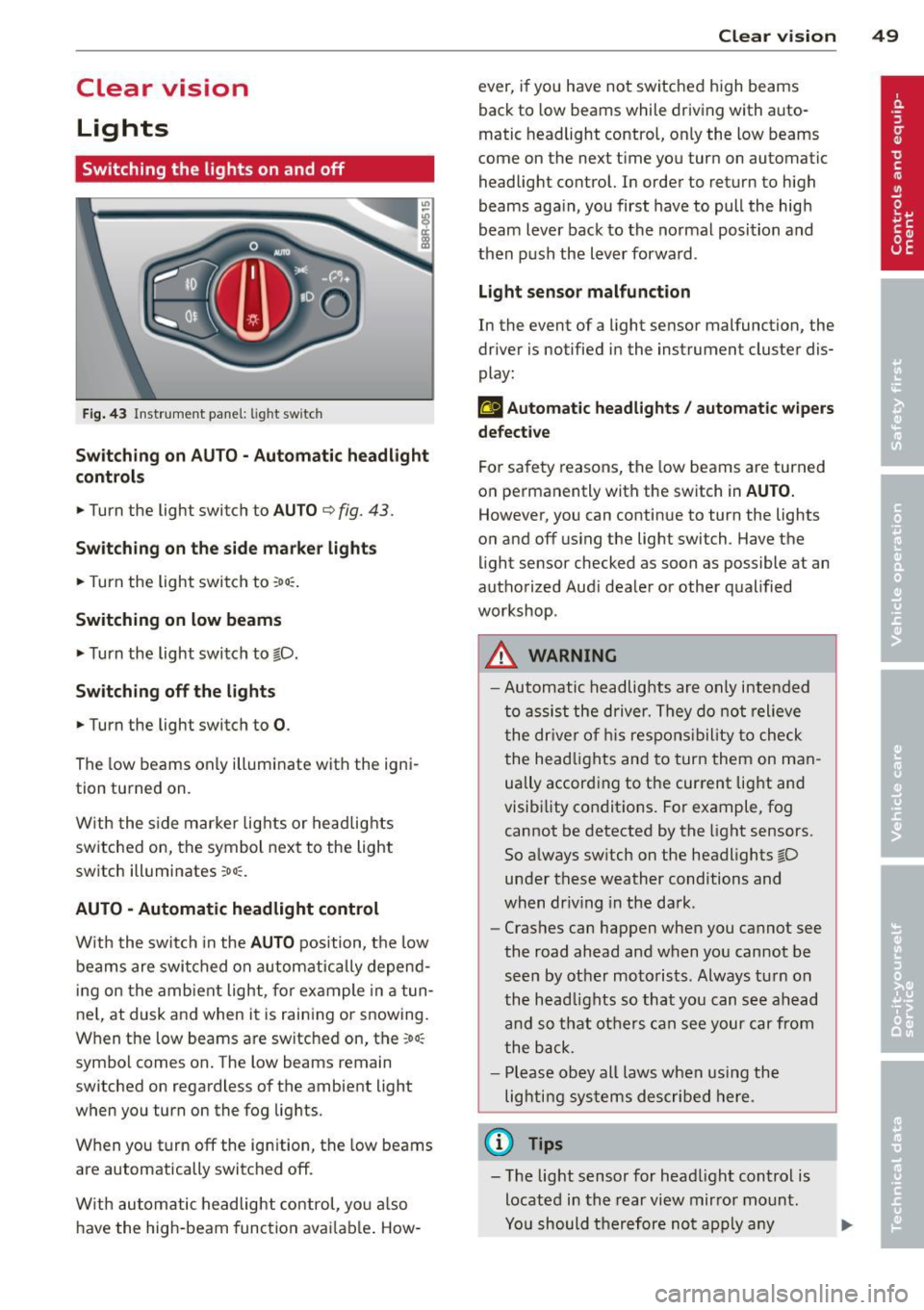
Switching the lights on and off
F ig . 43 Instrument pane l: light sw itch
Sw itching on AUTO - Automatic headlight
contr ols
• Turn the light switch to AUTO ¢ fig. 43.
Switchin g on the side m arker light s
• Turn the light switch to :oo:.
Switching on low beams
• Turn the light switch to @.D.
Swi tching off the lights
• Turn the light switch to 0 .
The low beams only illuminate with the igni
tion turned on.
With the s ide marker lights or headlights
switched on, the symbol next to the light
switch illuminates
:oo:.
AUTO -Automatic headlight control
With the switch in the AUTO position, the low
beams are swi tched on a utomatica lly depend
ing on the amb ient light, for example in a tun
ne l, at dusk and when it is raining or snowing.
When the low beams are switched on, the
:oo:
symbol comes on. The low beams remain
switched on regardless of the ambient light
when you turn on the fog lights.
When you turn
off the ign ition, the low beams
are automatically switched
off.
W ith automatic headlight control, yo u also
have the high-beam function avai lab le . How -
Clear vi sion 49
ever, if you have not switched high beams
back to low beams while driving with auto
matic headlight control, only the low beams
come on the next time you turn on automatic
headlight control. In order to return to high
beams aga in, you first have to pull the high
beam lever back to the normal position and
then push the lever forward .
Light sen so r malfunct ion
In the event of a light sensor malfunction, the
driver is notified in the instrument cluster dis
play :
fal Autom atic he adlights / autom ati c wi pers
defecti ve
For safety reasons, the low beams are turned
on permanently with the switch in
AUTO.
However, you can continue to turn the lights
on and
off us ing the light switch . Have the
light sensor checked as soon as possible at an
authorized Audi dealer or other qualified
workshop.
A WARNING
- Automatic headlights are only intended
to assist the driver. They do not relieve
the dr iver of h is respons ibility to check
the head lights and to turn them on man
ually accord ing to the current light and
visibility conditions. For example, fog cannot be detected by the light sensors.
So always sw itch on the headlights @.D
under these weather conditions and
when dr iv ing in the da rk .
- Crashes can happen when you cannot see
the road ahead and when you cannot be
seen by other motorists. Always tu rn on
the head lights so that you can see ahead
and so that others can see your car from
the back.
- Please obey all laws when using the
lighting systems described here.
(l'} Tips
- T he light sensor for head light control is
located in the rear view mirror mount.
Yo u should therefore not apply any
Page 55 of 316

Notes o n these featur es
-The turn signals only work with the ignition
turned on. The indicator lights
II or Ill in
the instrument cluster
¢page 14 also b link.
- After you have turned a corner, the turn sig-
nal switches off automatica lly.
- The
high beam works only when the head
lights are on. The indicator light
II in th e
instrument cluster illuminates when the
high beams are on.
- The
headlight flasher wo rks only as long as
you hold the lever -even if there are no
lights turned on. The indicator light
II in
the instrument cluster illuminates when you
use the headlight flasher.
A WARNING
Do not use the high beam or headlight
flasher if you know that thes e cou ld blind
oncoming traffic.
Interior lights
Front interior lights
-
The front interior lights also contain reading
lights for the driver and passenger .
r ,,,,, , 11111
~8 ,~
G) Gl
,o . . o
I
Fig. 49 Headliner: Fro nt inte rior/rea ding lights
The rocker switch @¢ fig. 49 for operating
the interior lighting has the following func
tions :
Door cont act swi tch
.,. Place the switch @ in the midd le position.
Interior light switched on
.,. Pla ce the switch @ in position I.
Clear vision 5 3
Interior light swit ch ed off
.,. Place the switch @ in position 0 .
Front read ing lights ~
.,. Press one of the switches@ to turn the
r ight or left reading light on or off .
With the door contact switch turned on, the
interior lights turn on as soon as you unlock
the vehicle or open the doors. The lighting is
also turned on when the ignition key is re
moved. The lights go out about 30 seconds af
ter the doors are closed. When the vehicle is locked or when the ignition is turned on, the
interior lights are turned off.
When a doo r is open, the interior lights are
tu rned off after about 10 minutes to prevent
draining of the battery .
The brightness of the lights is controlled au
tomat ica lly by a d immer when they are
swi tched on and off.
Rear interior lights
There are reading lights in the rear for the
passengers .
Fig . 50 Headliner: Rear read ing lig hts
The read ing l ights are switched on and off us
ing the buttons ~-
Depending on your model, the appearance
and the location of the reading lights may be
different .
Page 57 of 316

while driving. You can switch this function off by moving the lever to position ® within 10
seconds of the afterwipe operation. The after
wipe function is reactivated the next time the ignit ion is switched on.
The rear wiper automatically switches on
when the reverse gear is engaged and the
front w indshield wipers are on and in opera
tion .
C lea ning the headlights *. The headlight wash
er system * operates on ly when the headlights
are on. If you move the lever to pos ition ®,
the headlights are washed in interva ls .
® -Wipe the rear window. The rear wiper
moves about every 4 seconds .
0-Clean the rear window. The number of
wiping operations depends on how long the l ever is held in positio n 7.
A WARNING
-The ra in sensor is only intended to assist
the driver. The driver is still responsible
for man ually sw itching the w ipers on ac
cording to the v is ibility conditions.
- The windshie ld may not be treated w ith
water-repe lling windshie ld coat ing
agents. Unfavorable conditions, such as
wetness, darkness, low sun, can res ult in
increased glare. W iper b lade chatter is
also possible .
- Proper ly functioning w indshie ld w iper
blade s are required fo r a clear view and
sa fe dr iv ing .
(D Note
-In the case of frost, check whether the
windsh ield wiper b lades a re fro zen to
t h e windshie ld. Swit ching on the wind
s h ield wipers can d amage t he wipe r
blades!
- Prior to using a car w ash, the windshield
wipe r system m ust be swit ched off (lever
i n position 0) . This helps to prevent unin
tentiona l switching on and damage to
the windshie ld w iper system.
Clear v is ion 5 5
(D Tips
- The windshie ld w ipers are switched off
when the ign it ion is tu rned off . Act ivate
the windsh ield wipers after the ignition
is switc hed back on by moving t he wind
shield wipe r lever to any position .
- Worn or d irty windshield wiper blades
result in streaking. This ca n affect the
rai n sensor function. Check your wind
shield w iper blades regularly.
- The washer fluid nozz les of the wind
shield washe r system a re heated at low
tempe rat ures whe n the ignition is on .
- When stopping temporarily, e .g. at a
t raffic light, the set spe ed of the wind
shield wiper s is automatically reduced by
one speed.
Cleaning windshield wiper blades
C lean the w indsh ie ld w iper blades when t hey
begin to leave st reaks.
.,. Place t he w indshie ld w iper arms in the serv
ice pos ition. Re fer to ~
page 56.
.,. Lift the wiper a rm away from the rea r win
dow .
.. Use a soft cloth and glass cleane r to clean
the windshield wiper b lades.
A WARNING
Dirty windsh ield wiper b lades can impair
your view . This can lead to accidents .
Replacing windshield wiper blades
Fig. 55 Remov ing the w iper blad e
Page 60 of 316

58 Clear vis ion
@ Tips
If there shou ld be a malfunction in the
electrical system, you can still adjust the
exterior mirrors by pressing the edge of
the mirror .
Dimming the mirrors
N
..
-
" ~==============~ l8
Fig. 58 A ut oma tic d imm ing re arview mirror*
Manual anti -glar e adju stm ent
.. Move the small lever (located on the bottom
edge of the mirror) to the rear .
Automatically dimming mirrors*
.. To d im the rearv iew mirror and both exterior
mirrors*, press the @button. The diode ®
turns o n. The rearview and exterior m irrors*
dim automatically when light shines on
them, for example from headlights on ave
hicle to the rear.
A WARNING
Electrolyte flu id can leak from automatic
dimming mirrors if the glass is broken.
Electrolyte fluid can irritate skin, eyes and
respiratory system .
- Repeated or prolonged exposure to elec
trolyte can cause irritation to the resp ira
tory system, espec ially among people
with asthma or other respiratory cond i
t ions. Get fres h air immedia tely by leav
ing t he vehicle or, if that is not possible,
open windows and doors all the way.
- If electrolyte gets in to the eyes, flush
them thoro ughly with large amounts of
clean water for at least 15 minutes;
medica l attention is recommended .
-If electrolyte contacts skin, flush affect
ed area with clean water for at least 15 minutes and then wash affected area
with soap and water; medical attention is recommended . Thoroughly wash af
fected clothing and shoes before reuse.
- If swallowed and person is conscious,
rinse mouth with water for at least 15
minutes. Do not induc e vomiting unless
instructed to do so by medi cal professio
na l. Get medical attention immediately .
(D Note
Liquid electrolyte leaking from b roken m ir
ror glass w ill damage any plastic surfaces
i t comes in contac t with. Clean up spilled
electrolyte imme diately with clean water
and a sponge .
(D Tips
-Switching off the dimming function of
the inside rear view mirror also deacti
vates the automatic dimming func tion of
the exterior mirrors * .
- The automatic dimming m irrors do not
dim when the interior lighting is turned
on or the reverse gear is selected .
- Au toma tic d imm ing for the mirror on ly
operates properly if the light striking the
inside mirror is not hindered by othe r ob
jects .
Page 65 of 316

Seat memory
Memory for driver's seat
Applies to vehicles: with seat memory
The seat adjustment settings for two drivers
can be stored using the memory buttons in
the driver's door.
Fig. 62 Driver's door: Seat memory
In addition to the setting for the driver's seat,
the exterior rear view mirror setting can be
stored and recalled through seat memory if
the vehicle is properly equipped.
Storing and recalling settings
With the help of the memory buttons 1 and 2
c::> fig. 62 the settings for two different dr ivers
can be stored and recalled
c::> page 63.
The current settings are also automatically as
signed to the remote control key being used
when the vehicle is locked . When the vehicle
is unlocked, the settings assigned to the re
mote contro l key being used are automatically
recalled.
Turning seat memory on and off
If the IOFFI switch is depressed, the seat
memory is inope rative. When the Memory
function is off , the LED in the button lights up.
A ll the stored settings are retained. We rec
ommend using the
I OFFI switch and deactivat
ing the seat memory if the vehicle is only go
ing to be used
temporarily by a driver whose
settings are not going to be stored.
Seats and storage 63
Storing and recalling settings
Applies to vehicles: wit h seat memory
Storing settings
.,. Adjust the driver's seat.
.,. Adjust the two exterior mirrors.
.,. Press the
ISET I button. The light in the but
ton will come on .
.,. Now press a memory button
<[II or m). If
the storing procedure is correct, a confirma
tion tone will sound.
Recalling settings
.,. If the driver's door is open, tap the corre
sponding memory button briefly .
.,. If the driver's door is closed, press the ap
propriate memory button until the stored
position is reached.
Successful storage is confirmed audibly and
by the light in the
ISETI button i lluminating
c::> page 63, fig. 62 .
When the vehicle is locked , the current set
tings are stored and assigned to the remote
control key. But the settings stored on
memo
ry buttons 1 to 2 are not deleted. They can be
recalled at any time. When the vehicle is
un
locked ,
the settings assigned to the remote
control key are restored.
If your vehicle is driven by other persons using
your remote control key, you should save your
individual seat position on one of the memory
buttons. You can recall your settings again
s imply and conveniently by press ing the corre
sponding memory button . When the vehicle is
locked, these settings are automatically re-as
signed to the remote control key and stored.
A WARNING
- For safety reasons, the seat setting can
only be recalled when the vehicle is sta
tionary -otherwise yo u risk having an ac
cident.
- In an emergency the recall p rocedure can
be cancelled by pressing the
IOFFI switch
or by tapping of the memory buttons.