2013 VOLVO V60 warning
[x] Cancel search: warningPage 85 of 422
03 Your driving environment
Seats
03
83
WARNING
The head restraints must be in locked posi-
tion after being raised.
Lowering the rear seat backrest
IMPORTANT
There must be no objects on the rear seat
when the backrest is to be folded down. The
seat belts must not be connected either.
Otherwise there is a risk of damaging the
rear seat upholstery.
The triple-section backrest can be folded in
different ways.
NOTE
The front seats may need to be pushed for-
wards, and/or the backrests adjusted
upwards, in order that the rear backrests
can be folded forward fully.
•The left-hand section can be folded sepa-
rately.
•The centre section can be folded sepa-
rately.
•The right-hand section can only be folded
together with the centre section.
•If the entire backrest is to be folded then
the different sections should be folded
separately.
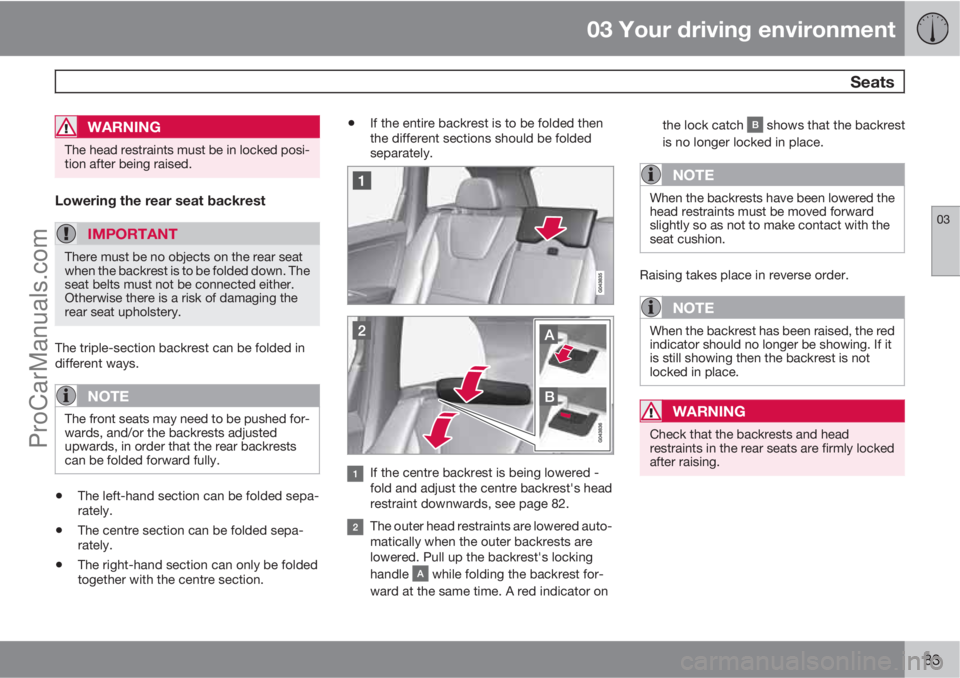
If the centre backrest is being lowered -
fold and adjust the centre backrest's head
restraint downwards, see page 82.
The outer head restraints are lowered auto-
matically when the outer backrests are
lowered. Pull up the backrest's locking
handle
while folding the backrest for-
ward at the same time. A red indicator onthe lock catch
shows that the backrest
is no longer locked in place.
NOTE
When the backrests have been lowered the
head restraints must be moved forward
slightly so as not to make contact with the
seat cushion.
Raising takes place in reverse order.
NOTE
When the backrest has been raised, the red
indicator should no longer be showing. If it
is still showing then the backrest is not
locked in place.
WARNING
Check that the backrests and head
restraints in the rear seats are firmly locked
after raising.
ProCarManuals.com
Page 86 of 422
03 Your driving environment
Seats
03
84* Option/accessory, for more information, see Introduction.
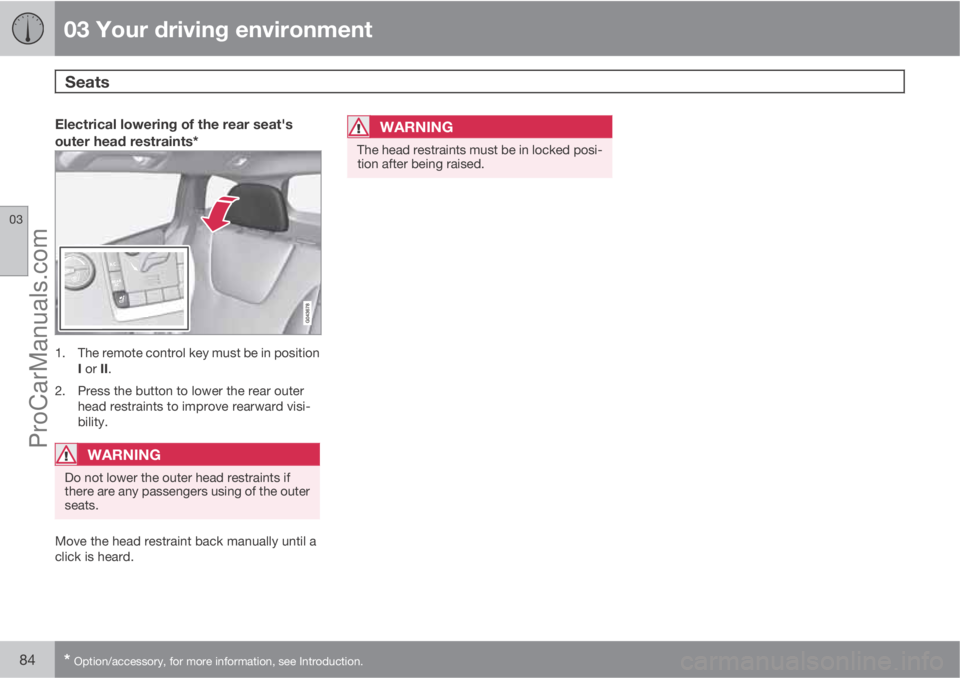
Electrical lowering of the rear seat's
outer head restraints*
1. The remote control key must be in position
I or II.
2. Press the button to lower the rear outer
head restraints to improve rearward visi-
bility.
WARNING
Do not lower the outer head restraints if
there are any passengers using of the outer
seats.
Move the head restraint back manually until a
click is heard.
WARNING
The head restraints must be in locked posi-
tion after being raised.
ProCarManuals.com
Page 87 of 422
03 Your driving environment
Steering wheel
03
* Option/accessory, for more information, see Introduction.85 Adjusting
G021138
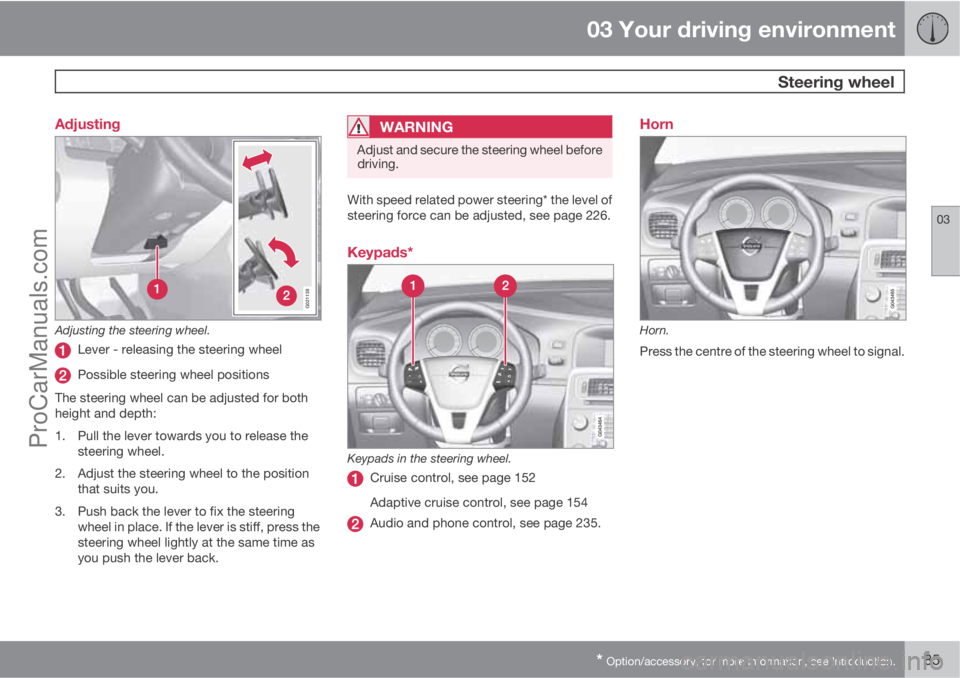
Adjusting the steering wheel.
Lever - releasing the steering wheel
Possible steering wheel positions
The steering wheel can be adjusted for both
height and depth:
1. Pull the lever towards you to release the
steering wheel.
2. Adjust the steering wheel to the position
that suits you.
3. Push back the lever to fix the steering
wheel in place. If the lever is stiff, press the
steering wheel lightly at the same time as
you push the lever back.
WARNING
Adjust and secure the steering wheel before
driving.
With speed related power steering* the level of
steering force can be adjusted, see page 226.
Keypads*
Keypads in the steering wheel.
Cruise control, see page 152
Adaptive cruise control, see page 154
Audio and phone control, see page 235.
Horn
Horn.
Press the centre of the steering wheel to signal.
ProCarManuals.com
Page 91 of 422

03 Your driving environment
Lighting
03
89
Light switch in position AUTO.
Activate/deactivate AHB by moving the left-
hand stalk switch towards the steering wheel
to the end position and release. Deactivation
when main beam is on means that the lights
switch directly to dipped beam.
Headlamp control and stalk switch.
When AHB has been activated the symbol
illuminates in the combined instru-
ment panel's display. When main beam has
been activated the
symbol also illumi-
nates in the combined instrument panel.
NOTE
Keep the windscreen surface in front of the
camera sensor clean from ice, snow, mist
and dirt.
Do not attach or fit anything to the wind-
screen in front of the camera sensor, as this
could reduce or prevent the function of one
or more camera-dependent systems.
If the message AHB temporary unavailableis shown in the combined instrument panel's
display then you have to switch manually
between main and dipped beam. However, the
headlamp control may nevertheless be in posi-
tion
. The same applies if the message
Windscreen Sensors blocked and the
symbol are shown. The sym-
bol goes out when these messages are shown.
AHB may be temporarily unavailable e.g. in sit-
uations with dense fog or heavy rain. When
AHB becomes available again, or the wind-
screen sensors are no longer covered, themessage goes out and the
symbol illu-
minates.
WARNING
AHB is an aid for using optimum light com-
position when conditions are favourable.
The driver always bears responsibility for
manually switching between main and
dipped beam when traffic situations or
weather conditions so require.
ProCarManuals.com
Page 93 of 422

03 Your driving environment
Lighting
03
* Option/accessory, for more information, see Introduction.91
Active Bending Lights or under Settings
Car settingsLight settingsActive
Bending Lights. For a description of the menu
system, see page 203.
For headlamp pattern adjustment, see
page 94.
Auxiliary lamps*If the car has auxiliary lamps, the driver can use
the MY CAR menu system to choose whether
they should be deactivated or switched on/off
simultaneously with the main beam
4, see
page 204.
Position/parking lamps
Headlamp control in position for position/parking
lamps.
Turn the headlamp control to the position for
position/parking lamps (number plate lighting
is illuminated at the same time).
When it is dark outside and the tailgate is
opened the rear position lamps illuminate to
alert traffic behind. This takes place irrespec-
tive of what position the headlamp control is in
or what key position the car's electrical system
is in.
Brake lights
The brake light automatically comes on during
braking. For information on the Emergency
brake lights and automatic hazard warning
flashers, see page 135.
Rear fog lamp
Button for rear fog lamp.
The rear fog lamp consists of one rear lamp and
can only be switched on in combination with
main/dipped beam.
Press the button for On/Off. The rear fog lamp
indicator symbol
on the combined
instrument panel and the light in the button illu-
minate when the rear fog lamp is switched on.
The rear fog lamp is switched off automatically
when the engine is switched off.
NOTE
Regulations for using rear fog lamps vary
between different countries.
4Auxiliary lamps must be connected to the electrical system by a workshop. Volvo recommends that you contact an authorised Volvo workshop.
ProCarManuals.com
Page 94 of 422
03 Your driving environment
Lighting
03
92
Hazard warning flashers
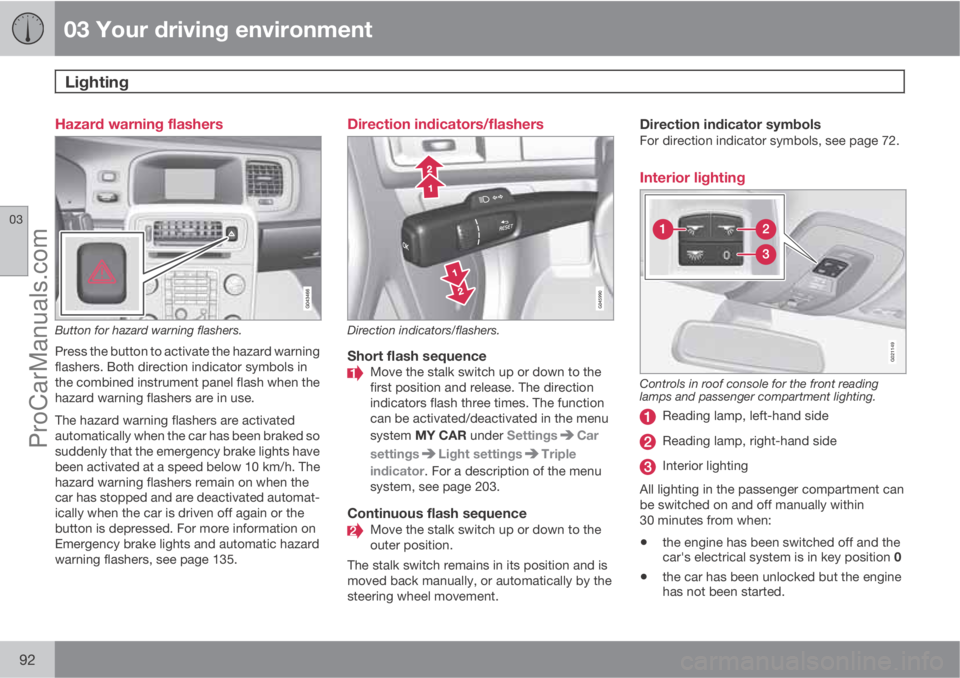
Button for hazard warning flashers.
Press the button to activate the hazard warning
flashers. Both direction indicator symbols in
the combined instrument panel flash when the
hazard warning flashers are in use.
The hazard warning flashers are activated
automatically when the car has been braked so
suddenly that the emergency brake lights have
been activated at a speed below 10 km/h. The
hazard warning flashers remain on when the
car has stopped and are deactivated automat-
ically when the car is driven off again or the
button is depressed. For more information on
Emergency brake lights and automatic hazard
warning flashers, see page 135.
Direction indicators/flashers
Direction indicators/flashers.
Short flash sequenceMove the stalk switch up or down to the
first position and release. The direction
indicators flash three times. The function
can be activated/deactivated in the menu
system MY CAR under Settings
Car
settings
Light settingsTriple
indicator. For a description of the menu
system, see page 203.
Continuous flash sequenceMove the stalk switch up or down to the
outer position.
The stalk switch remains in its position and is
moved back manually, or automatically by the
steering wheel movement.
Direction indicator symbolsFor direction indicator symbols, see page 72.
Interior lighting
G021149
Controls in roof console for the front reading
lamps and passenger compartment lighting.
Reading lamp, left-hand side
Reading lamp, right-hand side
Interior lighting
All lighting in the passenger compartment can
be switched on and off manually within
30 minutes from when:
•the engine has been switched off and the
car's electrical system is in key position 0
•the car has been unlocked but the engine
has not been started.
ProCarManuals.com
Page 103 of 422

03 Your driving environment
Windows, rearview and door mirrors
03
* Option/accessory, for more information, see Introduction.101 General
Laminated glassThe glass is reinforced which pro-
vides better protection against
break-ins and improved sound insu-
lation in the passenger compartment.
The windscreen and other windows* have lami-
nated glass.
Water and dirt-repellent coating*Windows are treated with a coating
that improves the view in difficult
weather conditions. Maintenance, see
page 362.
IMPORTANT
Do not use a metal ice scraper to remove ice
from the windows. Use the defroster to
remove ice from the mirrors, see page 104.
Heat-reflecting windscreen*
Areas where IR film is not applied.
Dimensions
A40 mm
B80 mm
The windscreen is equipped with a heat-
reflecting film (IR) that reduces the solar heat
radiation into the passenger compartment.
The positioning of electronic equipment, such
as a transponder, behind a glass surface with
heat-reflecting film may affect its function and
performance.
For the optimal function of electronic equip-
ment, it should be positioned on the part of thewindscreen with no heat-reflecting film (see the
highlighted area in the above illustration).
Power windows
Driver's door control panel.
Switch for electric child safety locks* and
disengaging rear power window buttons,
see page 62.
Rear window controls
Front window controls
WARNING
Check that none of the rear seat passengers
is in danger of becoming trapped in any way
when closing the windows from the driver's
door.
ProCarManuals.com
Page 104 of 422

03 Your driving environment
Windows, rearview and door mirrors
03
102
WARNING
Make sure that children or other passengers
are not in danger of becoming trapped in
any way when closing the windows, in par-
ticular when the remote control key is used.
WARNING
If there are children in the car - remember to
always switch off the power supply to the
power windows by selecting key position 0
and then take the remote control key with
you when leaving the car. For information on
key positions - see page 79.
Operating
Operating the power windows.
Operating without auto
Operating with auto
All power windows can be operated using the
control panel for the driver's door - the control
panels for the other doors can only each oper-
ate their respective power window. Only one
control panel can be operated at a time.
In order for the power windows to be used the
key position must be at least I - see page 78.
The power windows can be operated for a few
minutes after the engine has been switched off
and after the remote control key has been
removed - although not after a door has been
opened.Closing of the windows is stopped and the
window is opened if anything prevents its
movement. It is possible to override the pinch
protection when closing has been interrupted,
e.g. if there is ice forming. After two successive
closing interruptions the pinch protection will
be forced and the automatic function deacti-
vated for a short while, now it is possible to
close by continually holding the button pulled
up.
NOTE
One way to reduce the pulsating wind noise
when the rear windows are open is to also
open the front windows slightly.
Operating without autoMove one of the controls up/down gently. The
power windows move up/down as long as the
control is held in position.
Operating with autoMove one of the controls up/down to the end
position and release it. The window runs auto-
matically to its end position.
Operating with the remote control key
and central locking
To remotely operate the power windows from
the outside with the remote control key or from
inside with central locking, see pages 46 and
58.
ProCarManuals.com