2013 VOLVO V60 warning
[x] Cancel search: warningPage 105 of 422

03 Your driving environment
Windows, rearview and door mirrors
03
103
ResettingIf the battery is disconnected then the function
for automatic opening must be reset so that it
can work correctly.
1. Gently raise the front section of the button
to raise the window to its end position and
hold it there for one second.
2. Release the button briefly.
3. Raise the front section of the button again
for one second.
WARNING
Resetting must be carried out to ensure that
pinch protection works.
Door mirrors
Door mirror controls.
Adjusting1.
Press the L button for the left-hand door
mirror or the R button for the right-hand
door mirror. The light in the button illumi-
nates.
2. Adjust the position with the joystick in the
centre.
3.
Press the L or R button again. The light
should no longer be illuminated.
WARNING
The mirror on the driver's side is the wide-
angle type to provide optimal vision.
Objects may appear further away than they
actually are.
Storing the position1
The mirror positions are stored in the key mem-
ory when the car has been locked with the
remote control key. When the car is unlocked
with the same remote control key the mirrors
and the driver's seat adopt the stored positions
when the driver's door is opened.
The function can be activated/deactivated in
the menu system MY CAR under Settings
Car settingsCar key memoryPersonal
settings in key memory. For a description of
the menu system, see page 203.
Angling the door mirror when parking1
The door mirror can be angled down for the
driver to view the side of the road when parking
for example.
–
Engage reverse gear and press the L or R
button.
When reverse gear is disengaged the mirror
automatically returns to its original position
1Only in combination with power seat with memory, see page 81.
ProCarManuals.com
Page 109 of 422
03 Your driving environment
Power sunroof*
03
* Option/accessory, for more information, see Introduction.107 General
The sunroof controls are located in the roof
panel. The sunroof can be opened vertically at
the rear edge and horizontally. Key position I or
II is required for the sunroof to be opened.
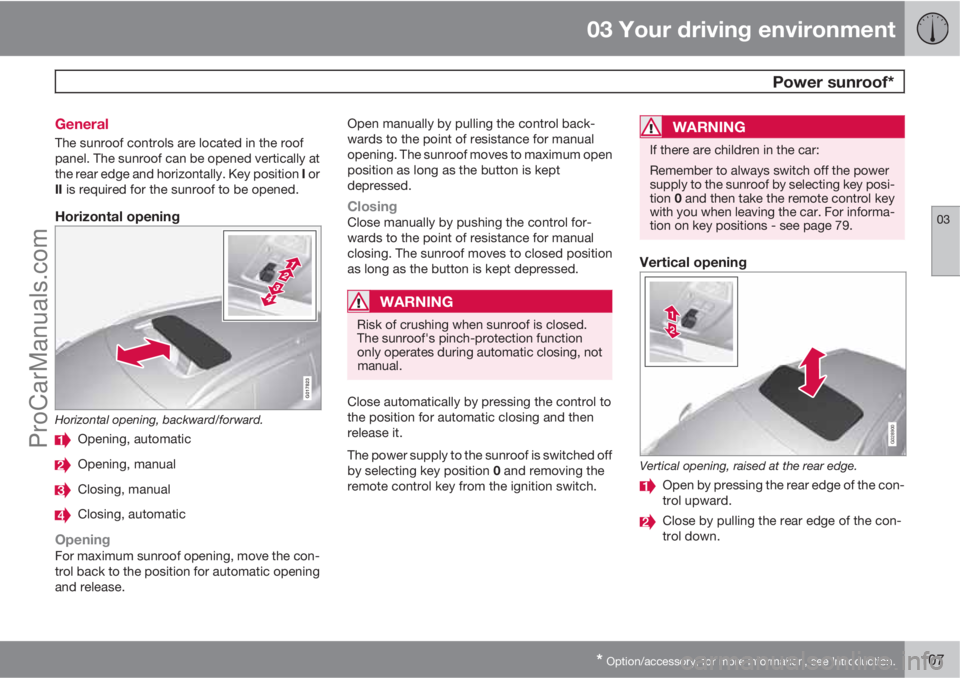
Horizontal opening
G017823
Horizontal opening, backward/forward.
Opening, automatic
Opening, manual
Closing, manual
Closing, automatic
OpeningFor maximum sunroof opening, move the con-
trol back to the position for automatic opening
and release.Open manually by pulling the control back-
wards to the point of resistance for manual
opening. The sunroof moves to maximum open
position as long as the button is kept
depressed.
ClosingClose manually by pushing the control for-
wards to the point of resistance for manual
closing. The sunroof moves to closed position
as long as the button is kept depressed.
WARNING
Risk of crushing when sunroof is closed.
The sunroof's pinch-protection function
only operates during automatic closing, not
manual.
Close automatically by pressing the control to
the position for automatic closing and then
release it.
The power supply to the sunroof is switched off
by selecting key position 0 and removing the
remote control key from the ignition switch.
WARNING
If there are children in the car:
Remember to always switch off the power
supply to the sunroof by selecting key posi-
tion 0 and then take the remote control key
with you when leaving the car. For informa-
tion on key positions - see page 79.
Vertical opening
G028900
Vertical opening, raised at the rear edge.
Open by pressing the rear edge of the con-
trol upward.
Close by pulling the rear edge of the con-
trol down.
ProCarManuals.com
Page 110 of 422
03 Your driving environment
Power sunroof*
03
108* Option/accessory, for more information, see Introduction.
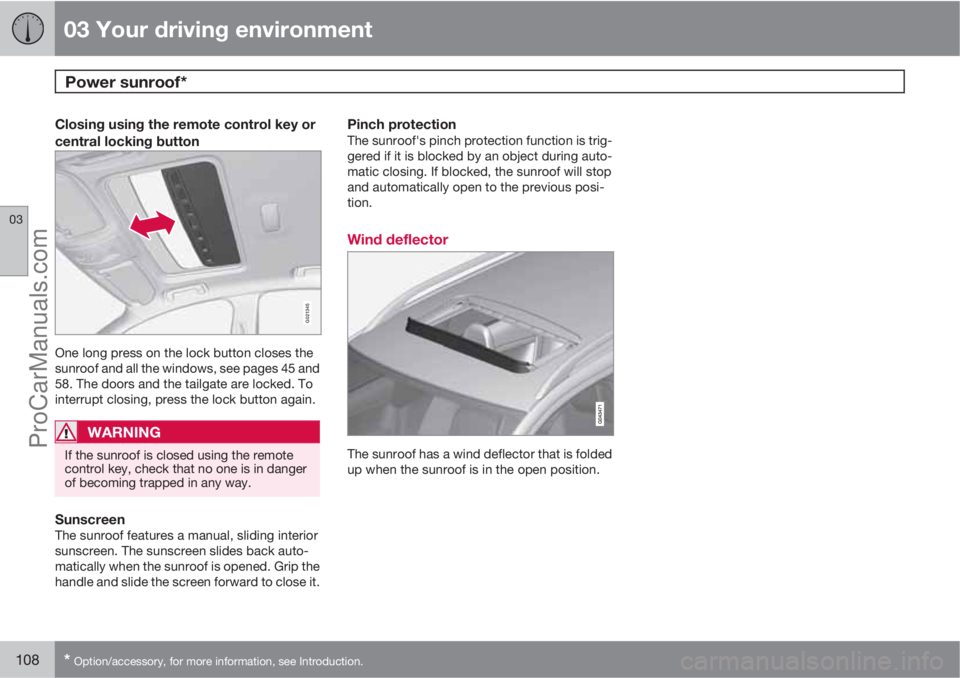
Closing using the remote control key or
central locking button
G021345
One long press on the lock button closes the
sunroof and all the windows, see pages 45 and
58. The doors and the tailgate are locked. To
interrupt closing, press the lock button again.
WARNING
If the sunroof is closed using the remote
control key, check that no one is in danger
of becoming trapped in any way.
SunscreenThe sunroof features a manual, sliding interior
sunscreen. The sunscreen slides back auto-
matically when the sunroof is opened. Grip the
handle and slide the screen forward to close it.
Pinch protectionThe sunroof's pinch protection function is trig-
gered if it is blocked by an object during auto-
matic closing. If blocked, the sunroof will stop
and automatically open to the previous posi-
tion.
Wind deflector
The sunroof has a wind deflector that is folded
up when the sunroof is in the open position.
ProCarManuals.com
Page 111 of 422
03 Your driving environment
Alcolock*
03
* Option/accessory, for more information, see Introduction.109 General information on the alcolock
The alcolock's1 function is to prevent the car
from being driven by individuals under the
influence of alcohol. Before the engine can be
started the driver must take a breath test that
verifies that he/she is not under the influence
of alcohol. Alcolock calibration takes place in
accordance with each market's limit value in
force for driving legally.
WARNING
The Alcolock is an aid and does not exempt
the driver from responsibility. It is always the
responsibility of the driver to be sober and
to drive the car safely.
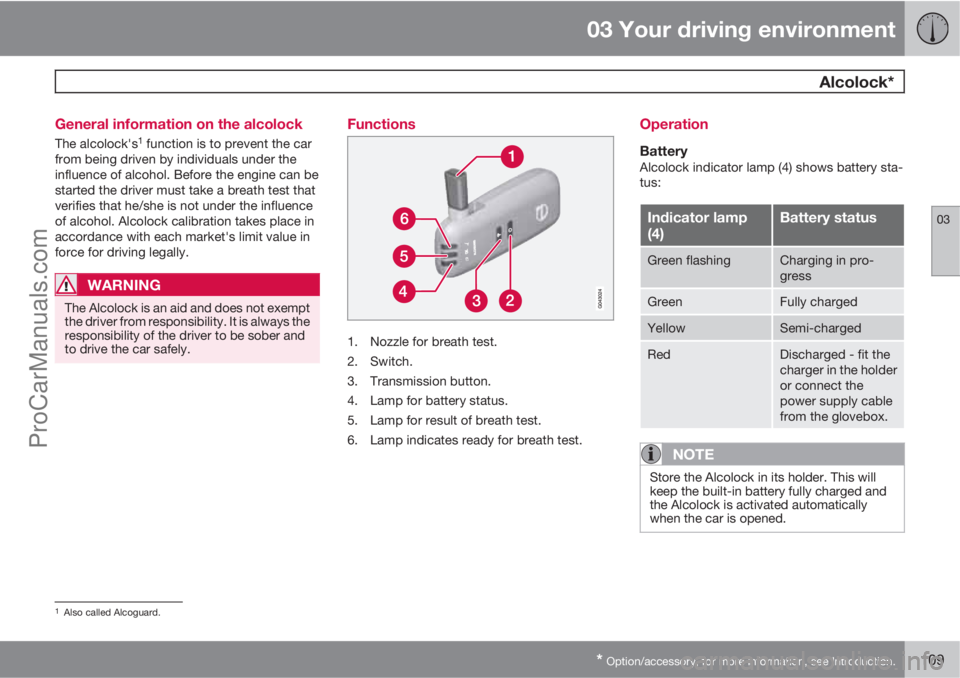
Functions
1. Nozzle for breath test.
2. Switch.
3. Transmission button.
4. Lamp for battery status.
5. Lamp for result of breath test.
6. Lamp indicates ready for breath test.
Operation
BatteryAlcolock indicator lamp (4) shows battery sta-
tus:
Indicator lamp
(4)Battery status
Green flashingCharging in pro-
gress
GreenFully charged
YellowSemi-charged
RedDischarged - fit the
charger in the holder
or connect the
power supply cable
from the glovebox.
NOTE
Store the Alcolock in its holder. This will
keep the built-in battery fully charged and
the Alcolock is activated automatically
when the car is opened.
1Also called Alcoguard.
ProCarManuals.com
Page 114 of 422
03 Your driving environment
Alcolock*
03
112* Option/accessory, for more information, see Introduction.
Activating the Bypass function
•Depress and hold the left-hand stalk
switch OK button and the button for haz-
ard warning flashers simultaneously for
approx. 5 seconds - the display first shows
Bypass activated Wait 1 minute and
then Alcoguard Bypass enabled - after
which the engine can be started.
This function can be activated several times.
The error message shown during driving can
only be cleared at a workshop
2.
Activating the Emergency function
•Depress and hold the left-hand stalk
switch OK button and the button for haz-
ard warning flashers simultaneously for
approx. 5 seconds - the display shows
Alcoguard Bypass enabled and the
engine can be started.
This function can be used once, after which a
reset must be made at a workshop
2.
Symbols and display messages
In addition to the previously described mes-
sages, the combined instrument panel's dis-
play can also show the following:
Display textMeaning/Action
Alcoguard Restart
possibleThe engine has been
switched off for less
than 30 minutes -
engine starting pos-
sible without new
test.
Alcoguard Service
requiredContact a work-
shop2.
Alcoguard No sig-
nalTransmission failed -
send manually with
button (3) or take a
new breath test.
Alcoguard Invalid
testTest failed - take a
new breath test.
Alcoguard Blow
longerBlowing too short -
blow for longer.
Alcoguard Blow
softerBlowing too hard -
blow more gently.
Display textMeaning/Action
Alcoguard Blow
harderBlowing too weak -
blow harder.
Alcoguard wait
PreheatingHeating not finished
- wait for text Alco-
guard Blow 5 sec-
onds
.
2An authorised Volvo workshop is recommended.
ProCarManuals.com
Page 115 of 422

03 Your driving environment
Starting the engine
03
* Option/accessory, for more information, see Introduction.113 Petrol and diesel engines
Ignition switch with remote control key extracted/
inserted. and START/STOP ENGINE button.
IMPORTANT
Do not press in the remote control key incor-
rectly turned - Hold the end with the detach-
able key blade, see page 48.
1. Insert the remote control key in the ignition
switch and press it in to its end position.
Note that if the car is equipped with an
alcolock then a breath test must first be
approved before the engine can be started
- see page 109.2.
Hold the clutch pedal fully depressed
1. (For
cars with automatic gearbox - Depress the
brake pedal.)
3.
Press the START/STOP ENGINE button
and then release it.
The starter motor works until the engine starts
or until its overheating protection triggers.
IMPORTANT
If the engine fails to start after 3 attempts -
wait for 3 minutes before making a further
attempt. Starting capacity increases if the
battery is allowed to recover.
WARNING
Never remove the remote control key from
the ignition switch after starting the engine
or when the car is being towed.
WARNING
Always remove the remote control key from
the ignition switch when leaving the car, and
make sure that the key position is 0 - in par-
ticular if there are children in the car. For
information on how this works - see
page 79.
NOTE
The idling speed can be noticeably higher
than normal for certain engine types during
cold starting. This is so that the emissions
system can reach normal operating tem-
perature as quickly as possible, which min-
imises exhaust emissions and protects the
environment.
Keyless drive*Follow steps 2–3 for starting petrol and diesel
engines. For more information on Keyless drive
- see page 53.
NOTE
A prerequisite for the car to start is that one
of the car's remote control keys with the
Keyless drive* function is in the passenger
compartment or cargo area.
WARNING
Never remove the remote control key from
the car while driving or during towing.
Stop the engineTo switch off the engine:
•Press START/STOP ENGINE - the engine
stops.
1If the car is moving then it is enough to press the START/STOP ENGINE button to start the car.
ProCarManuals.com
Page 116 of 422
03 Your driving environment
Starting the engine
03
114* Option/accessory, for more information, see Introduction.
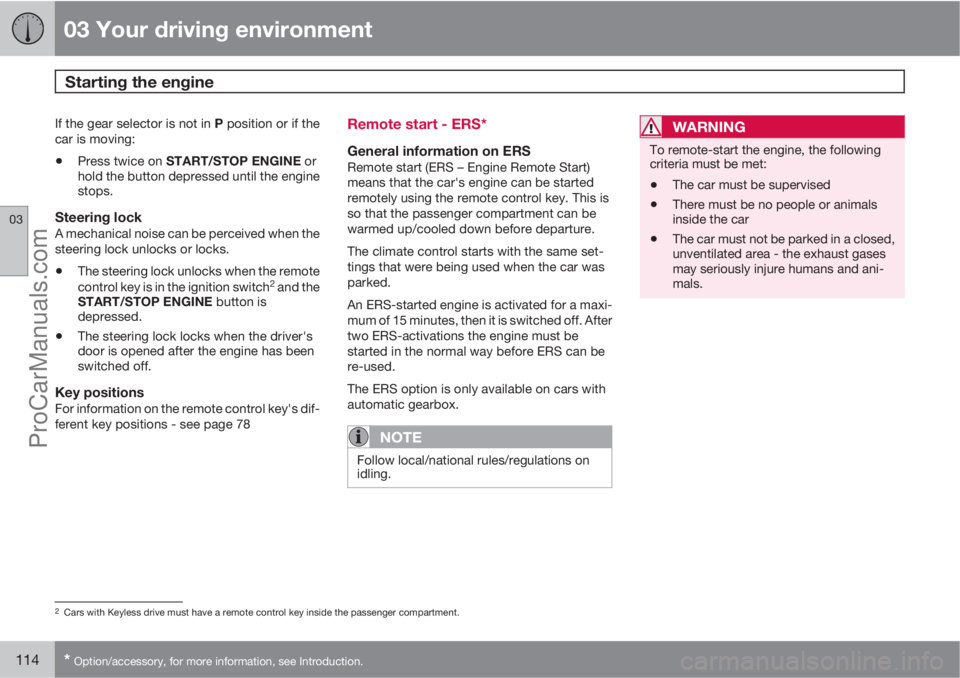
If the gear selector is not in P position or if the
car is moving:
•Press twice on START/STOP ENGINE or
hold the button depressed until the engine
stops.
Steering lockA mechanical noise can be perceived when the
steering lock unlocks or locks.
•The steering lock unlocks when the remote
control key is in the ignition switch2 and the
START/STOP ENGINE button is
depressed.
•The steering lock locks when the driver's
door is opened after the engine has been
switched off.
Key positionsFor information on the remote control key's dif-
ferent key positions - see page 78
Remote start - ERS*
General information on ERSRemote start (ERS – Engine Remote Start)
means that the car's engine can be started
remotely using the remote control key. This is
so that the passenger compartment can be
warmed up/cooled down before departure.
The climate control starts with the same set-
tings that were being used when the car was
parked.
An ERS-started engine is activated for a maxi-
mum of 15 minutes, then it is switched off. After
two ERS-activations the engine must be
started in the normal way before ERS can be
re-used.
The ERS option is only available on cars with
automatic gearbox.
NOTE
Follow local/national rules/regulations on
idling.
WARNING
To remote-start the engine, the following
criteria must be met:
•The car must be supervised
•There must be no people or animals
inside the car
•The car must not be parked in a closed,
unventilated area - the exhaust gases
may seriously injure humans and ani-
mals.
2Cars with Keyless drive must have a remote control key inside the passenger compartment.
ProCarManuals.com
Page 118 of 422
03 Your driving environment
Starting the engine
03
116
•Accelerator pedal or brake pedal is
depressed
•The gear selector is moved out of P posi-
tion
•There is less than approx.10 litres left in the
fuel tank
•Active ERS time passes 15 minutes.
When an ERS-started engine is switched off,
all direction indicators illuminate with a con-
stant glow for 3 seconds.
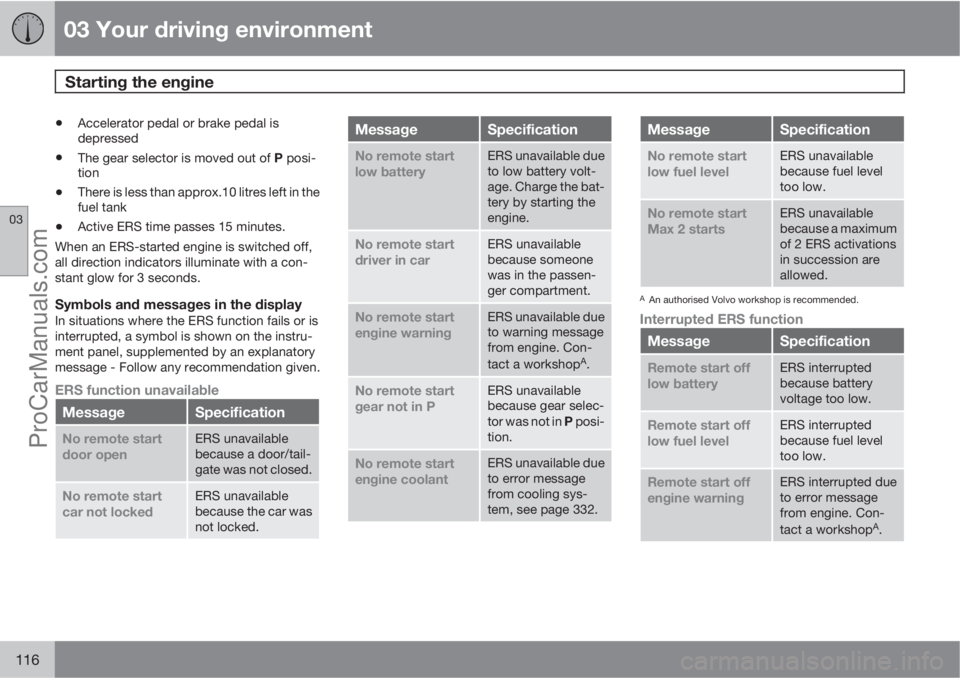
Symbols and messages in the displayIn situations where the ERS function fails or is
interrupted, a symbol is shown on the instru-
ment panel, supplemented by an explanatory
message - Follow any recommendation given.
ERS function unavailable
MessageSpecification
No remote start
door openERS unavailable
because a door/tail-
gate was not closed.
No remote start
car not lockedERS unavailable
because the car was
not locked.
MessageSpecification
No remote start
low batteryERS unavailable due
to low battery volt-
age. Charge the bat-
tery by starting the
engine.
No remote start
driver in carERS unavailable
because someone
was in the passen-
ger compartment.
No remote start
engine warningERS unavailable due
to warning message
from engine. Con-
tact a workshop
A.
No remote start
gear not in PERS unavailable
because gear selec-
tor was not in P posi-
tion.
No remote start
engine coolantERS unavailable due
to error message
from cooling sys-
tem, see page 332.
MessageSpecification
No remote start
low fuel levelERS unavailable
because fuel level
too low.
No remote start
Max 2 startsERS unavailable
because a maximum
of 2 ERS activations
in succession are
allowed.
AAn authorised Volvo workshop is recommended.
Interrupted ERS function
MessageSpecification
Remote start off
low batteryERS interrupted
because battery
voltage too low.
Remote start off
low fuel levelERS interrupted
because fuel level
too low.
Remote start off
engine warningERS interrupted due
to error message
from engine. Con-
tact a workshop
A.
ProCarManuals.com