2013 MERCEDES-BENZ SL-CLASS ROADSTER language
[x] Cancel search: languagePage 295 of 572

X
Select the language by turning cVd the
COMAND controller and press W to
confirm.
COMAND loads
the selected language and
sets it. Assigning a favorites button
X To assign a favorites button: press the
W button.
X Select Settings by
sliding VÆ and turning
cVd the COMAND controller and press
W to confirm.
X Select Assign as Favorite and press
W to confirm.
The list of predefined functions appears.
The dot
#
indicates the currently selected
function.
X Select the function by turning cVd the
COMAND controller and press W to
confirm.
The favorites button is assigned the
selected function.
X Example: to call up a favorite: press the
g favorites button.
This calls up the predefined function.
You can select the following predefined
functions in a menu:
R Display On/Off: you can switch the
display off or on.
R Full Screen: 'Clock': you can call up
the full screen with clock.
R Full Screen: 'Map' : you
can call up the
full screen with map.
R Spoken Driving Tip : you can call up the
current driving recommendation.
R Display Traffic Messages : you can call
up traffic reports.
R Navigate Home: you can start route
guidance to your home address if you have
already entered and saved the address
(Y page 304). R
Detour Menu: you can call up the Detour
menu and
then avoid a section of the route
and recalculate the route ( Y page 326).
R Compass Screen: you can call up the
compass.
R Driver’s Seat Massage, Front-
Passenger's Seat Massage or
Massage: Both Front Seats: you can
start the massage function, depending on
which seats are selected (Y page 288). Importing/exporting data
! Never remove the stick or card when
writing data
to the USB stick or the memory
card. You may otherwise lose data.
Using this function, you can:
R transfer your personal COMAND data from
one system/vehicle to another
R make a backup copy of your personal data
(export data) and load it again (import
data).
You can either use an SD memory card or a
USB storage device (e.g. a USB stick) as
temporary storage. System settings
293
COMAND Z
Page 328 of 572
Announcing street names
If
the
function is switched on, the name of the
street which you are turning into is
announced.
Announcements are not made in the chosen
language in all countries. They are made when
relevant street names for the selected
language are available in the database.
X To switch on navigation mode: press
the
Ø function button.
X To show the menu:
press W
the COMAND
controller.
X Select Navi in the main function bar by
sliding ZV the COMAND controller and
press W to confirm.
X Select Announce Street
Names and press
W to confirm.
The function is switched on O or off ª,
depending on the previous status.
Ending route guidance Canceling or continuing route guidance
X
To switch on navigation mode: press
the
Ø function button.
X To show the menu: press W
the COMAND
controller.
X Select Destination in the navigation
system menu bar by turning cVd the
COMAND controller and pressing W to
confirm.
X To cancel route guidance: select
Cancel
Route Guidance
and press W to confirm.
or
X To continue route guidance: select
Continue Route Guidance and press W
to confirm.
COMAND calculates the route. Destination or area of destination
reached
When you reach your destination, COMAND
displays
a
checkered flag and route guidance
is automatically ended.
If the destination is not in close proximity to
a digitized street, the Area of
destination reached message appears
when the destination is reached.
Influencing route guidance Avoiding a section of the route blocked by
a traffic jam
This function blocks a section of the route
ahead of you. You can set the length of the
blocked route section. If possible, COMAND
calculates a detour around the blocked
section of the route.
X
To switch on navigation mode: press
the
Ø function button.
X To show the menu:
press W
the COMAND
controller.
X Select Route in the navigation system
menu bar by turning cVd the COMAND
controller and press W to confirm.
X Select Detour and press W to confirm.
X To block a section of the route: select
Longer or
Shorter
repeatedly and confirm
using W until the desired section has been
selected.
i The total
length of the section that can be
blocked is defined by the digital map. The
menu items are available accordingly.
X To start route calculation: select Start
and press W to confirm.
X To delete the blocked section: select
Delete while the message is shown and
press W to confirm.
COMAND calculates the route without the
block. 326
Navigation
COMAND
Page 338 of 572
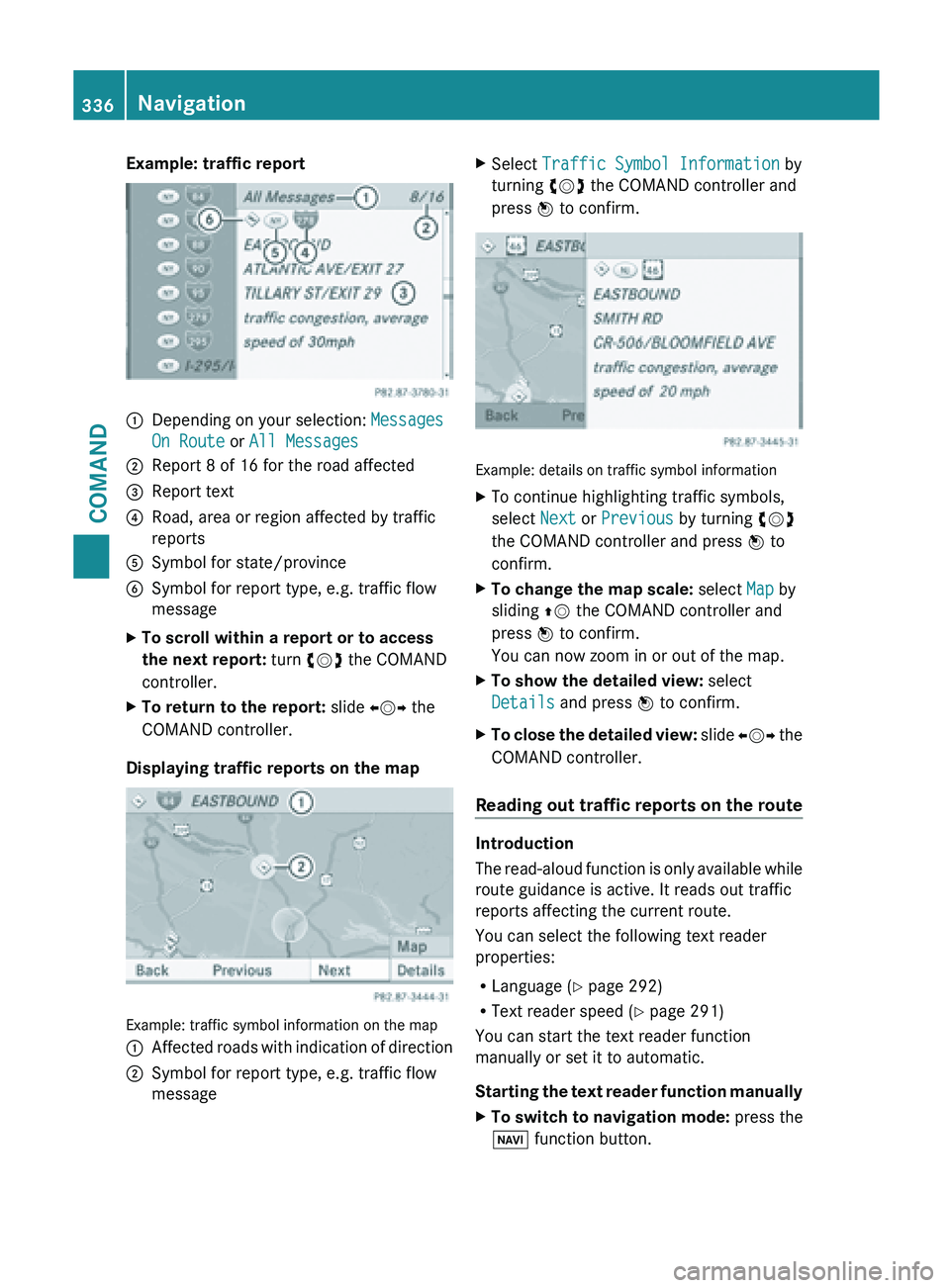
Example: traffic report
:
Depending on your selection: Messages
On Route or All Messages
; Report 8 of 16 for the road affected
= Report text
? Road, area or region affected by traffic
reports
A Symbol for state/province
B Symbol for report type, e.g. traffic flow
message
X To scroll within a report or to access
the next report: turn cVd the COMAND
controller.
X To return to the report: slide XVY the
COMAND controller.
Displaying traffic reports on the map Example: traffic symbol information on the map
:
Affected roads with indication of direction
; Symbol for report type, e.g. traffic flow
message X
Select Traffic Symbol Information by
turning cVd the COMAND controller and
press W to confirm. Example: details on traffic symbol information
X
To continue highlighting traffic symbols,
select Next or Previous by turning cVd
the COMAND controller and press W to
confirm.
X To change the map scale: select Map by
sliding ZV the COMAND controller and
press W to confirm.
You can now zoom in or out of the map.
X To show the detailed view: select
Details and press W to confirm.
X To close the detailed view: slide
XVY the
COMAND controller.
Reading out traffic reports on the route Introduction
The
read-aloud
function is only available while
route guidance is active. It reads out traffic
reports affecting the current route.
You can select the following text reader
properties:
R Language (Y page 292)
R Text reader speed ( Y page 291)
You can start the text reader function
manually or set it to automatic.
Starting the text reader function manually
X To switch to navigation mode: press the
Ø function button. 336
Navigation
COMAND
Page 378 of 572
This may occur in exceptional cases, for
example when using certain mobile
phones/brackets and if the mobile phone
inbox holds a large number of text
messages.
i In order to be able to use the text
message function, the Bluetooth ®
mobile
phone has to support Bluetooth ®
MAP
(Message Access Profile).
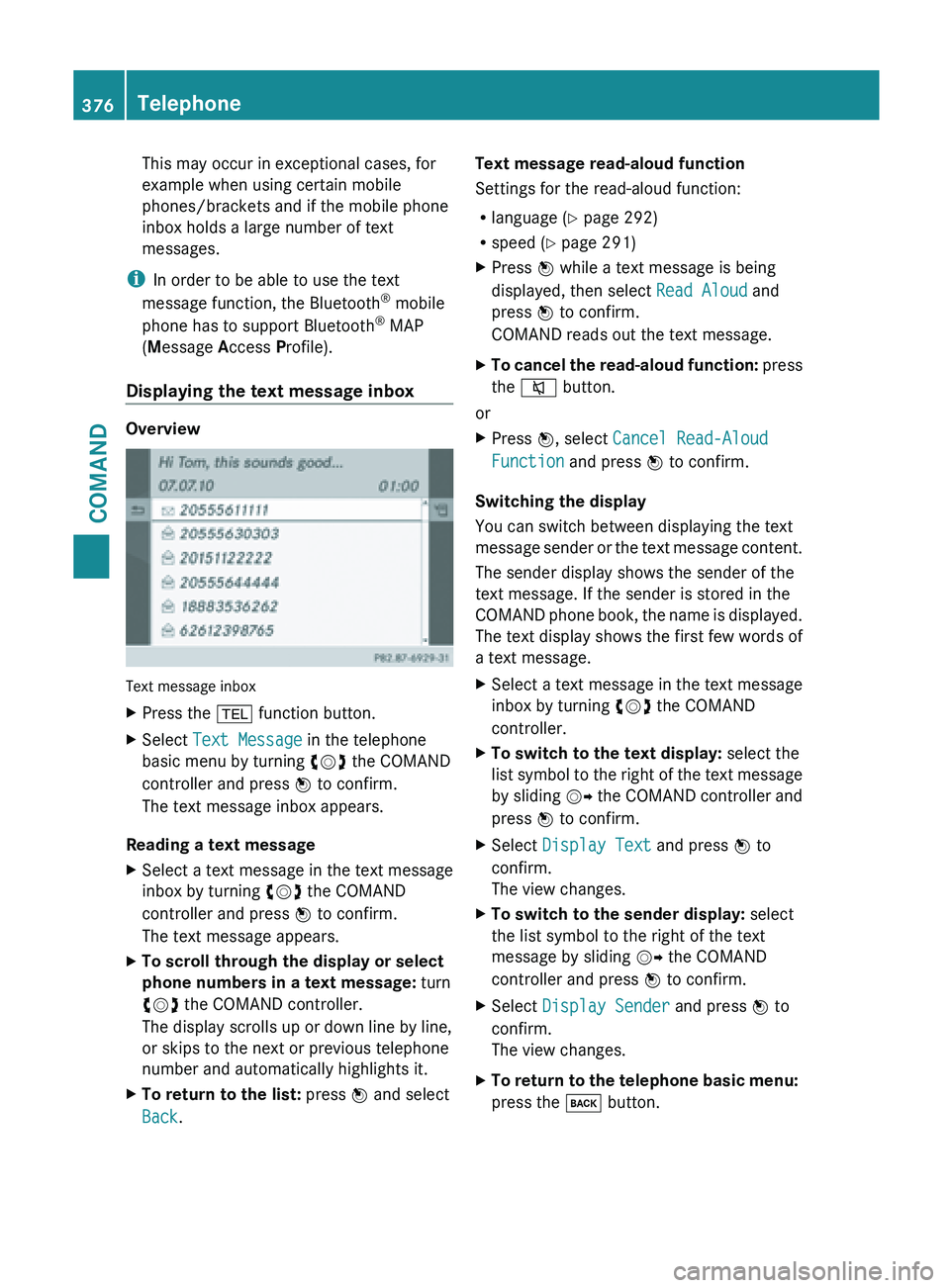
Displaying the text message inbox Overview
Text message inbox
X
Press the % function button.
X Select Text Message in the telephone
basic menu by turning cVd the COMAND
controller and press W to confirm.
The text message inbox appears.
Reading a text message
X Select a text message in the text message
inbox by turning cVd the COMAND
controller and press W to confirm.
The text message appears.
X To scroll through the display or select
phone numbers in a text message: turn
cVd the COMAND controller.
The display scrolls up or down line by line,
or skips to the next or previous telephone
number and automatically highlights it.
X To return to the list: press W and select
Back. Text message read-aloud function
Settings for the read-aloud function:
R
language (
Y
page 292)
R speed ( Y page 291)
X Press W while a text message is being
displayed, then select Read Aloud and
press W to confirm.
COMAND reads out the text message.
X To cancel the read-aloud function: press
the
8 button.
or
X Press W, select Cancel Read-Aloud
Function and press W to confirm.
Switching the display
You can switch between displaying the text
message sender
or the text message content.
The sender display shows the sender of the
text message. If the sender is stored in the
COMAND phone book, the name is displayed.
The text display shows the first few words of
a text message.
X Select a text message in the text message
inbox by turning cVd the COMAND
controller.
X To switch to the text display: select the
list symbol
to the right of the text message
by sliding VY the COMAND controller and
press W to confirm.
X Select Display Text and press W to
confirm.
The view changes.
X To switch to the sender display: select
the list symbol to the right of the text
message by sliding VY the COMAND
controller and press W to confirm.
X Select Display Sender and press W to
confirm.
The view changes.
X To return to the telephone basic menu:
press the k button.376
Telephone
COMAND
Page 452 of 572
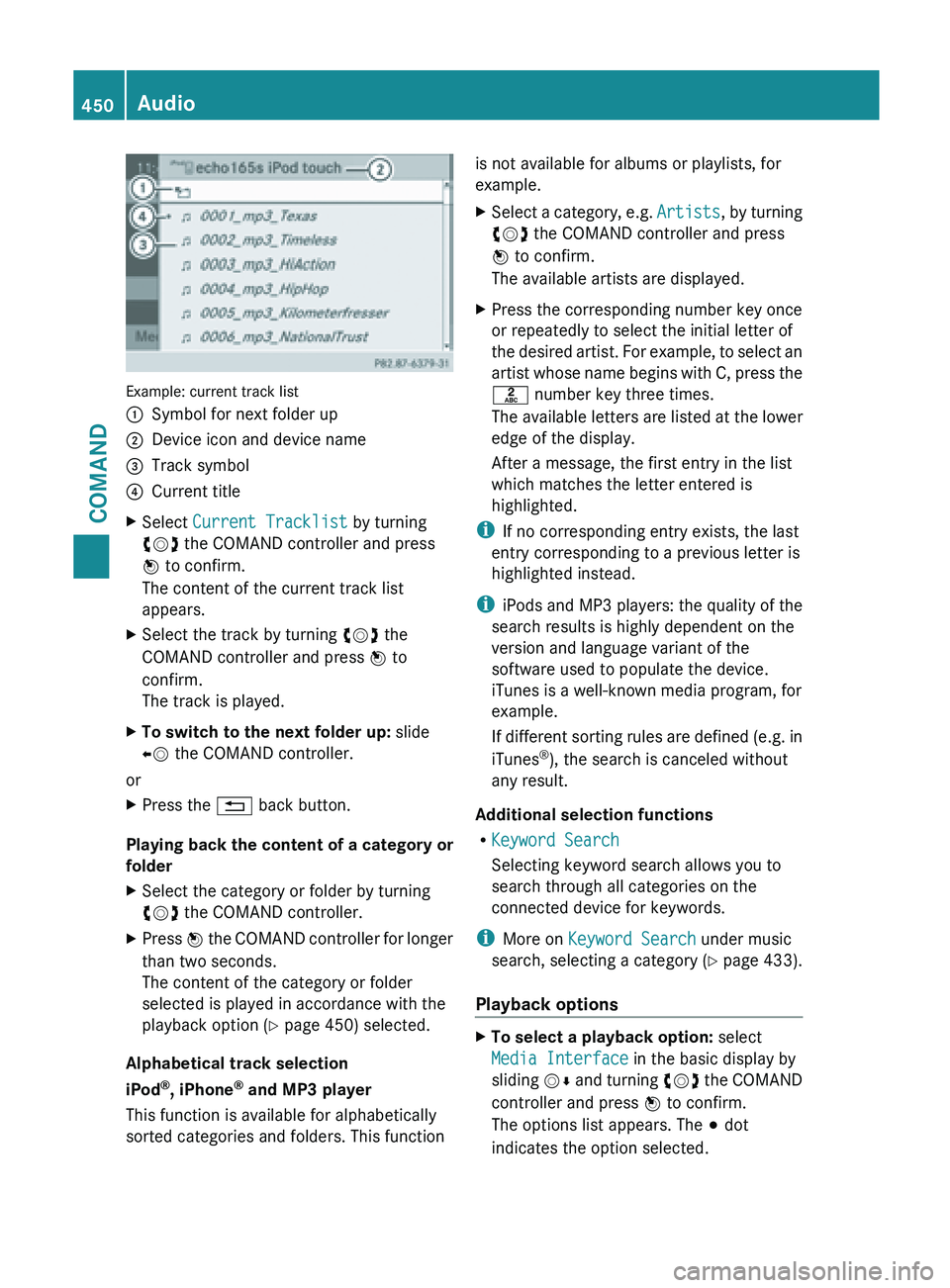
Example: current track list
:
Symbol for next folder up
; Device icon and device name
= Track symbol
? Current title
X Select Current Tracklist by turning
cVd the COMAND controller and press
W to confirm.
The content of the current track list
appears.
X Select the track by turning cVd the
COMAND controller and press W to
confirm.
The track is played.
X To switch to the next folder up: slide
XV the COMAND controller.
or
X Press the % back button.
Playing back the content of a category or
folder
X Select the category or folder by turning
cVd the COMAND controller.
X Press W the COMAND controller for longer
than two seconds.
The content of the category or folder
selected is played in accordance with the
playback option
(Y page 450) selected.
Alphabetical track selection
iPod ®
, iPhone ®
and MP3 player
This function is available for alphabetically
sorted categories and folders. This function is not available for albums or playlists, for
example.
X
Select a category, e.g. Artists, by
turning
cVd the COMAND controller and press
W to confirm.
The available artists are displayed.
X Press the corresponding number key once
or repeatedly to select the initial letter of
the desired
artist. For example, to select an
artist whose name begins with C, press the
l number key three times.
The available letters are listed at the lower
edge of the display.
After a message, the first entry in the list
which matches the letter entered is
highlighted.
i If no corresponding entry exists, the last
entry corresponding to a previous letter is
highlighted instead.
i iPods and
MP3 players: the quality of the
search results is highly dependent on the
version and language variant of the
software used to populate the device.
iTunes is a well-known media program, for
example.
If different sorting rules are defined (e.g. in
iTunes ®
), the search is canceled without
any result.
Additional selection functions
R Keyword Search
Selecting keyword search allows you to
search through all categories on the
connected device for keywords.
i More on Keyword Search under music
search, selecting a category ( Y page 433).
Playback options X
To select a playback option: select
Media Interface in the basic display by
sliding VÆ
and
turning cVd the COMAND
controller and press W to confirm.
The options list appears. The # dot
indicates the option selected. 450
Audio
COMAND
Page 459 of 572
X
Equipped with a DVD changer: press W
the COMAND controller to display all
magazine trays.
X Select a video DVD by turning cVd the
COMAND controller and press W to
confirm.
COMAND loads the video DVD and begins
playing it.
i If you select a CD, an audio DVD or an
MP3 medium,
you switch to the respective
audio mode. Further information about the
media list on ( Y page 426).
DVD menu Calling up the DVD menu
The
DVD
menu is the menu stored on the DVD
itself. It is structured in various ways
according to the individual DVD and permits
certain actions and settings.
In the case of multi-language DVDs, for
example, you can change the DVD language
in the DVD menu.
X Show the menu (Y page 455).
X Select DVD-Video in the menu by turning
cVd the COMAND controller and press
W to confirm.
X Select DVD Functions and press W to
confirm.
X Select Menu and press W to confirm.
The DVD menu appears.
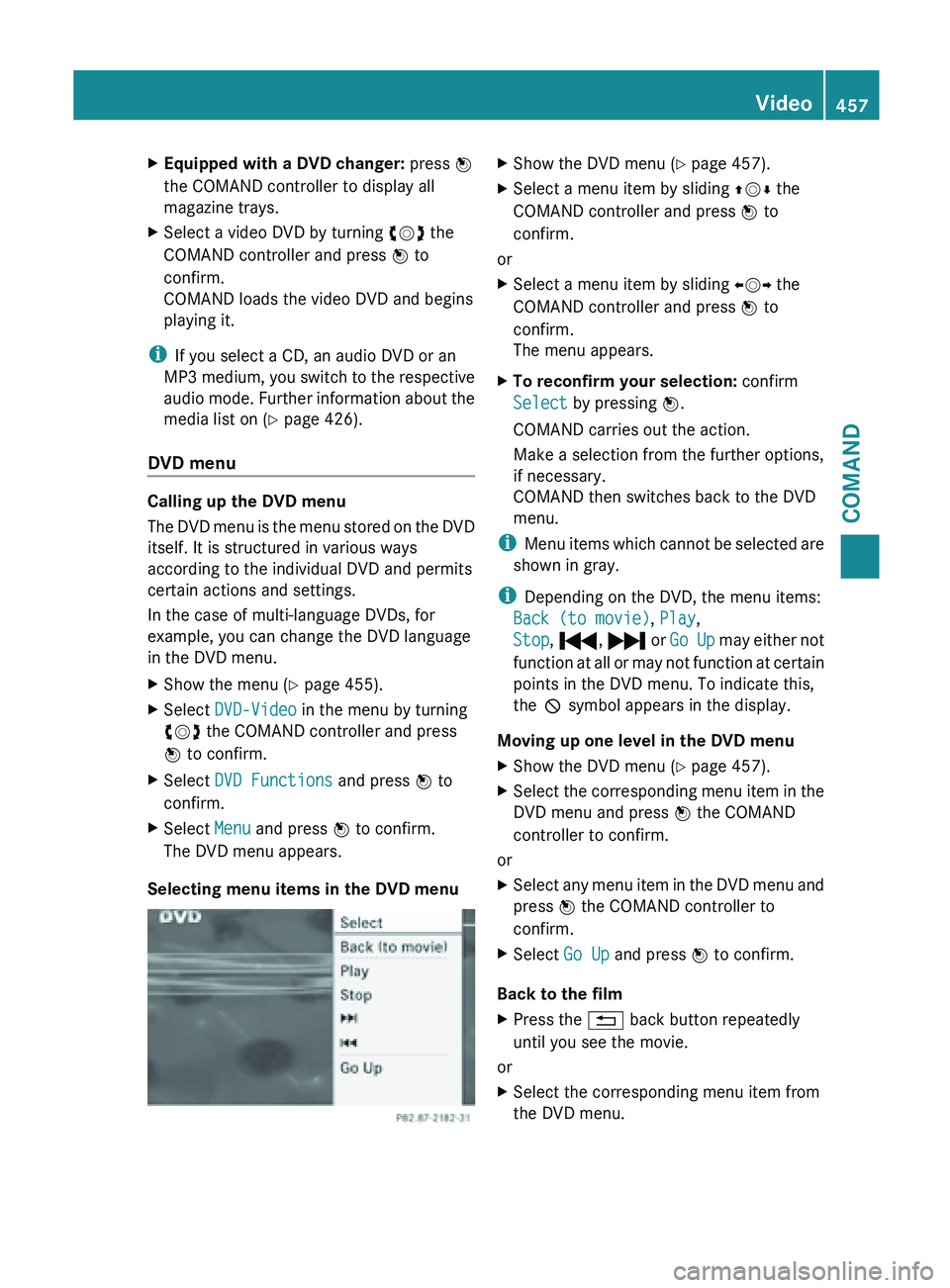
Selecting menu items in the DVD menu X
Show the DVD menu (Y page 457).
X Select a menu item by sliding ZVÆ the
COMAND controller and press W to
confirm.
or
X Select a menu item by sliding XVY the
COMAND controller and press W to
confirm.
The menu appears.
X To reconfirm your selection: confirm
Select by pressing W.
COMAND carries out the action.
Make a selection from the further options,
if necessary.
COMAND then switches back to the DVD
menu.
i Menu items
which cannot be selected are
shown in gray.
i Depending on the DVD, the menu items:
Back (to movie), Play,
Stop, ., / or Go Up may either not
function at all or may not function at certain
points in the DVD menu. To indicate this,
the K symbol appears in the display.
Moving up one level in the DVD menu
X Show the DVD menu (Y page 457).
X Select the corresponding menu item in the
DVD menu and press W the COMAND
controller to confirm.
or
X Select any menu item in the DVD menu and
press W the COMAND controller to
confirm.
X Select Go Up and press W to confirm.
Back to the film
X Press the % back button repeatedly
until you see the movie.
or
X Select the corresponding menu item from
the DVD menu. Video
457
COMAND Z
Page 460 of 572
X
Select the Back (to movie) menu item in
the menu and press W to confirm.
Setting the language and audio format This function is not available on all DVDs. If it
is available, you can set the DVD menu
language, the audio language or the audio
format.
The
number of settings is determined
by the DVD content. It is possible that the
settings may also be accessed in the DVD
menu (Y page 457).
X Show the DVD menu (Y page 457).
X In full-screen mode, press W the
COMAND
controller to show the menu.
X Select DVD-Video in the menu by turning
cVd the COMAND controller and press
W to confirm.
X Select DVD Functions and press W to
confirm.
X Select Menu Language or Audio
Language and press W to confirm.
In both cases, a menu appears after a few
seconds. The # dot in front of an entry
indicates the currently selected language.
X Select a setting by turning cVd the
COMAND controller and press W to
confirm.
Subtitles and camera angle These functions are not available on all DVDs.
The
number
of subtitle languages and camera
angles available depends on the content of
the DVD. It is possible that the settings may
also be accessed in the DVD menu
(Y page 457).
X Activate the DVD menu (Y page 457).
X Select DVD-Video in the menu by turning
cVd the COMAND controller and press
W to confirm.
X Select DVD Functions and press W to
confirm. X
Select Subtitles or Camera Angle and
press W to confirm.
In both
cases, a menu appears. The # dot
in front of an entry indicates the current
setting.
X Select a setting by turning cVd the
COMAND controller and press W to
confirm.
Interactive content DVDs can contain interactive content (e.g. a
video game). In a video game, for example,
you may be able to influence events by
selecting
and
triggering actions. The type and
number of actions depend on the DVD.
X Select an action by sliding ZVÆ or XVY
the
COMAND controller and press W to
execute it.
A menu appears and the first entry,
Select, is highlighted.
X Press W the COMAND controller. AUX video mode
Connecting external video sources G
WARNING
External video sources may have different
volumes, which can mean that system
messages such
as traffic announcements and
navigation system announcements are much
louder. If necessary, please deactivate the
system messages or adjust their volume
manually.
If your vehicle is equipped with Media
Interface, you can connect an external video
source (AUX video) ( Y page 445).
The 1/8 inch audio/video jacks are in the
center console stowage compartment.
i In vehicles with a rear view camera, the
AUX video jack cannot be used for external
video sources. 458
Video
COMAND