2013 MERCEDES-BENZ B-CLASS SPORTS snow chains
[x] Cancel search: snow chainsPage 11 of 336
Display message
............................ 211
Displays in the multifunction
display. .......................................... 155
Driving tips .................................... 158
Function/notes ............................. 153
Important safety notes ..................152
Setting the specified minimum
distance ......................................... 157
Warning lamp ................................. 228
Doors
Automatic locking (on-board
computer) ...................................... 191
Automatic locking (switch) .............. .74
Central locking/unlocking
(SmartKey) ...................................... .68
Control panel ................................... 33
Display message ............................ 217
Emergency locking ........................... 75
Emergency unlocking .......................75
Important safety notes ....................73
Opening (from inside) ......................74
Drinking and driving .........................144
Drinks holder see Cuph older
Drive program
Automatic ...................................... 136
Display (DIRECT SELECT lever) ......133
Manual .......................................... .136
Driver's door
see Doors
Driving abroad
Mercedes-Benz Service .................265
Symmetrical low bea m.................... 96
Driving lamps
see Daytime running lamps
Driving on flooded roads ..................149
Driving safety systems ABS (Anti-lock Braking System) .......59
ADAPTIVE BRAKE ............................. 64
Adaptive Brake Assist ......................61
Adaptive brake lamps ......................63
BAS (Brake Assist System) ..............60
COLLISION PREVENTION ASSIST ....60
Distance warning function ...............60
Electronic brake force distribution ...64
ESP ®
(Electronic Stability
Program) .......................................... 63ETS (Electronic Traction System)
.....63
Important safety information ...........59
Overview .......................................... 59
STEER CONTROL ............................. 64
Driving systems
Active Parking Assist .....................164
ATTENTION ASSIST ........................171
Blind Spot Assist ............................ 173
Cruise control ................................ 150
Display message ............................ 209
DISTRONI CPLUS ........................... 152
HOLD function ............................... 160
Lane Keeping Assist ......................174
Lane Tracking package ..................173
PARKTRONI C................................. 161
Rea rview camera .......................... 168
Driving tips
Automatic transmission .................135
Brakes ........................................... 146
Break-in period .............................. 126
Checking brake lining thickness ....148
DISTRONI CPLUS ........................... 158
Downhill gradient ........................... 146
Drinking and driving .......................144
Driving abroad ................................. 96
Driving in winter ............................ .149
Driving on flooded road s................ 149
Driving on wet road s...................... 149
Exhaus tcheck ............................... 145
Fuel ................................................ 144
General .......................................... 144
Hydroplaning ................................. 149
Icy road surfaces ........................... 149
Limited braking efficiency on
salted roads. .................................. 147
Snow chains .................................. 295
Symmetrical low beam. ...................96
Wet road surface ........................... 147
DVD audio (on-board computer) ......185
DVD video (on-board computer) ......186 8
Index
Page 18 of 336

Adjusting the 4-way lumbar
support
............................................ 88
Adjusting the head restraint ............87
Cleaning the cover .........................270
Correct driver's seat position ........... 84
Important safety notes ....................85
Seat heating problem ......................89
Storing settings (memory
function) .......................................... 93
Switching sea theating on/off .........89
Sensors (cleaning instructions) .......269
Service see ASSYST PLUS
Service menu (on-board computer) .189
Service products Brake fluid ..................................... 327
Coolant (engine) ............................ 327
Engine oil ....................................... 326
Fuel ................................................ 324
Important safety notes ..................324
Washer fluid .................................. .328
Service work
see ASSYST PLUS
Settings
Factory (on-board computer) .........192
On-board computer .......................189
Setting the air distribution ...............120
Setting the airflow ............................120
Side impact air bag .............................42
Side marker lamp (display
message) ............................................ 205
Side windows Cleaning ......................................... 268
Convenience closing feature ............78
Convenience opening feature ..........78
Important safety information ...........77
Opening/closing .............................. 78
Problem (malfunction) .....................79
Resetting ......................................... 79
Sliding sunroof
see Panorama roof with power
tilt/sliding panel
SmartKey
Changing the battery .......................70
Changing the programming .............69
Checking the battery .......................70
Convenience closing feature ............78
Convenience opening feature ..........78 Display message
............................ 218
Door central locking/unlocking .......68
Important safety notes ....................68
Loss ................................................. 72
Mechanical key ................................ 69
Positions (ignition lock) .................127
Problem (malfunction) .....................72
Starting the engine ........................127
SmartKey positions (ignition lock) ..127
Snow chains ...................................... 295
Sockets Center console .............................. 244
Luggage compartment ...................245
Points to observe before use .........244
Rea rcompartmen t......................... 245
Specialist workshop ............................ 23
Speed, controlling see Cruise control
Speedometer
Activating/deactivating the
additional speedometer .................189
Digita l............................................ 183
In the Instrument cluster .................27
Segments ...................................... 179
Selecting the unit of
measurement ................................ 189
see Instrument cluster
SRS (Supplemental Restraint
System)
Display message ............................ 201
Introduction ..................................... 37
Warning lamp ................................. 225
Warning lamp (function) ................... 37
Standing lamps
Changing bulbs .............................. 105
Display message ............................ 204
Switching on/off .............................. 98
Starting (engine) ................................ 127
STEE RCONTROL .................................. 64
Steering (display message) ..............217
Steering wheel Adjusting (manually). .......................89
Button overview ............................... 29
Buttons (on-board computer) ......... 180
Cleaning ......................................... 270
Important safety notes ....................89
Paddle shifters ............................... 136
Steering wheel paddle shifters ........136 Index
15
Page 22 of 336
Windshield
Defrosting ...................................... 121
Windshiel dwasher fluid
see Windshield washer system
Windshiel dwasher system
Adding washer fluid .......................263
Filling capacity ............................... 329
Notes ............................................. 328
Windshiel dwipers
Problem (malfunction) ...................111
Rea rwindow wiper ........................ 110
Replacing the wiper blades ............110
Switching on/off ........................... 109
Winte rdriving
Slippery roa dsurface s................... 149
Snow chains .................................. 295
Winter operation
General notes ................................ 294
Winter tires
M+S tires ....................................... 294
Wiper blades
Cleaning ......................................... 268
Important safety notes ..................110
Replacing (rea rwindow) ................ 111
Replacing (windshield). ..................110
Wooden trim (cleaning
instructions) ...................................... 270
Workshops see Qualified specialist workshop Index
19
Page 62 of 336
Operation is only possible using the
switches in the driver's door. If the
indicator lamp is off, operation is possible
using the switches in the rear
compartment.
Driving safety systems
Driving safety systems overview
In this section, you will find information about
the following driving safety systems:
R ABS ( Anti-lock BrakingSystem)
R BAS ( Brake Assist System)
R COLLISION PREVENTION ASSIST (adaptive
Brake Assist and distance warning signal)
R Adaptive brake lamps
R ESP ®
(Electronic StabilityProgram)
R EBD ( Electronic Brake force Distribution)
R ADAPTIVE BRAKE (Y page 64)
R STEER CONTROL Important safety notes
If you fail to adapty our driving style or
become distracted, the driving safety
systems can neither reduce the risk of
accident nor override the laws of physics.
Driving safety systems are merely aids
designed to assist driving. You are
responsible for the distance to the vehicle in
front, for vehicle speed and for braking in
good time. Always adapt your driving style to
suit the prevailing road, weather and traffic
conditions and maintain asafe distance from
the vehicle in front. Drive carefully.
i The driving safety systems described only
work as effectively as possible when there
is adequate contact between the tires and
the road surface. Pay particular attention
to the informatio nregarding tires,
recommended minimum tire tread depths
etc.int he "Wheels and tires" section
(Y page 292). In wintry driving conditions, always use
winter tires (M+S tires) and if necessary,
snow chains. Only in this way will the
driving safety systems described in this
section work as effectively as possible.
ABS (Anti-lockB
raking System)
Important safety notes i
Observe the "Important safety notes"
sectio n(Ypage 59). G
WARNING
If ABSi s faulty, the wheels could lock when
braking. The steerability and braking
characteristics may be severely impaired.
Additionally, further driving safety systems
are deactivated. There is an increased danger
of skidding and accidents.
Drive on carefully. Have ABS checked
immediately at a qualified specialist
workshop.
When ABS is malfunctioning, other systems,
including driving safety systems, will also
become inoperative. Observe the information
on the ABS warning lamp (Y page 220) and
display messages which may be shown in the
instrument cluster (Y page 194).
ABS regulates brake pressure in such a way
that the wheels do not lock when you brake.
This allows you to continue steering the
vehicle when braking.
ABS works from a speed of about 5 mph
(8 km/h) upwards, regardless of road-surface
conditions. ABS works on slippery roads,
even if you only brake gently.
The yellow !ABS warning lamp in the
instrument cluster lights up when the ignition
is switched on. It goes out when the engine is
running. Driving safety systems
59Safety Z
Page 67 of 336
Traction control remains active if you
deactivate ESP
®
.
Deactivating/activating ESP ®i
Observe the "Importan tsafety notes"
sectio n(Ypage 59). G
WARNING
If you deactivate ESP ®
, ESP ®
no longer
stabilizes the vehicle. There is an increased
risk of skidding and an accident.
Only deactivate ESP ®
in the situations
described in the following.
! Avoid spinning the driven wheels for an
extended period with ESP ®
deactivated.
You could otherwise damage the drivetrain.
ESP ®
is activated automatically when the
engine is started.
If ESP ®
is deactivated and one or more wheels
start to spin, the ÷ESP®
warning lamp in
the instrument cluster flashes. In such
situations, ESP ®
will not stabilize the vehicle.
X To deactivate:(Y page 187).
The å ESP®
OFF warning lamp in the
instrument cluster lights up.
X To activate: (Ypage 187).
The å ESP®
OFF warning lamp in the
instrument cluster goes out.
It may be best to deactivate ESP ®
in the
following situations:
R when using snow chains
R in deep snow
R on sand or gravel
If you deactivate ESP ®
:
R ESP ®
no longer improves driving stability.
R traction control is still activated.
R ESP ®
still provides support when you
brake.
R the engine's torque is no longer limited and
the drive wheels can spin. The spinning of
the wheels results in a cutting action, which
provides better grip. EBD (electronic brake force
distribution)
i Observe the "Important safety notes"
section (Y page 59). G
WARNING
If EBDh as malfunctioned, the rear wheels can
still lock, e.g .unde rfull braking .This
increases the risk of skidding and an accident.
You should therefore adapt your driving style
to the different handling characteristics. Have
the brake system checked at a qualified
specialist workshop.
Observe information regarding indicator and
warning lamps (Y page 220) as well as
display messages (Y page 196).
EBD monitors and controls the brake
pressure on the rear wheels to improve
driving stability while braking. ADAPTIVE BRAKE
ADAPTIVE BRAKE enhances braking safety
and offers increased braking comfort. In
addition to the braking function, ADAPTIVE
BRAKE also has the HOLD function
(Y page 160) and hill start assist
(Y page 128). For further information, see
Driving tips (Y page 146). STEER CONTROL
STEER CONTROL helps you by transmitting a
noticeable steering force to the steering
wheel in the direction required for vehicle
stabilization.
This steering assistance is provided in
particular if:
R both right wheels or both left wheels are on
a wet or slippery road surface when you
brake
R the vehicle starts to skid
If ESP ®
is malfunctioning, you will not receive
steering support from STEER CONTROL. 64
Driving safety systemsSafety
Page 153 of 336
and braking maneuvers. Do no
tuse the cruise
control or DISTRONIC PLUS.
i For more information on driving with
snow chains, see (Y page 295).Driving systems
Cruise control
Important safety notes If you fail to adapty
our driving style, cruise
control can neither reduce the risk of an
accident nor override the laws of physics.
Cruise control cannot take into account the
road, traffic and weather conditions. Cruise
control is only an aid. You are responsible for
the distance to the vehicle in front, for vehicle
speed, for braking in good time and for
staying in lane.
Do not use cruise control:
R in road and traffic conditions which do not
allow you to maintain a constant speed e.g.
in heavy traffic or on winding roads
R on slippery road surfaces. Braking or
accelerating could cause the drive wheels
to lose traction and the vehicle could then
skid
R when there is poor visibility, e.g. due to fog,
heavy rain or snow
If there is a change of drivers, advise the new
driver of the speed stored.
General notes Cruise control maintains a constant road
speed for you. It brakes automatically in order
to avoid exceeding the set speed. On long and
steep downhill gradients, especially if the
vehicle is laden, you must select a low gear in
good time. For this, you will need to have
selected manual drive program
M(Y
page 146). By doing so, you will make
use of the braking effect of the engine, which
relieves the load on the brake system and
prevents the brakes from overheating and
wearing too quickly. Use cruise control only if road and traffic
conditions make it appropriate to maintain a
steady speed for a prolonged period. You can
store any road speed above 20 mph
(30 km/h).
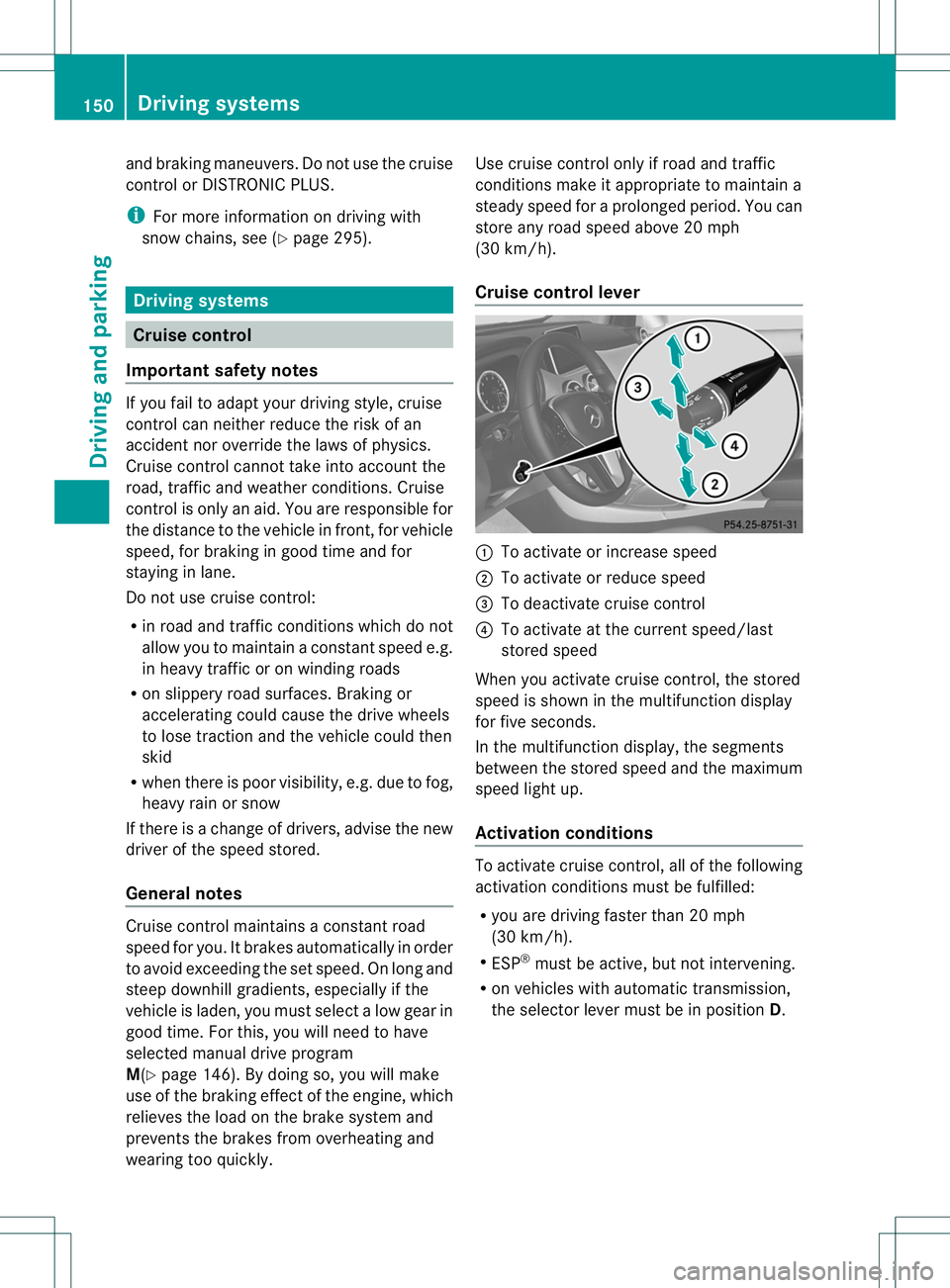
Cruise control lever
:
To activate or increase speed
; To activate or reduce speed
= To deactivate cruise control
? To activate at the current speed/last
stored speed
When you activate cruise control, the stored
speed is shown in the multifunction display
for five seconds.
In the multifunction display, the segments
between the stored speed and the maximum
speed light up.
Activation conditions To activate cruise control, all of the following
activation conditions must be fulfilled:
R
you are driving faster than 20 mph
(30 km/h).
R ESP ®
must be active, but not intervening.
R on vehicles with automatic transmission,
the selector lever must be in position D.150
Driving systemsDriving and parking
Page 168 of 336
Parking tips:
R
on narrow roads, drive past the parking
space as close as possible.
R parking spaces that are littered, overgrown
or partially occupied by trailer drawbars
might be identified incorrectly or not at all.
R snowfall or heavy rain may lead to a parking
space being measured inaccurately.
R pay attention to the PARKTRONIC
(Y page 162) warning messages during the
parking procedure.
R you can intervene in the steering procedure
to correct it at any time. Active Parking
Assist will then be canceled.
R when transporting a load which protrudes
from your vehicle, you should not use
Active Parking Assist.
R never use Active Parking Assist when snow
chains are installed.
R make sure that the tire pressures are
always correct. This has adirec tinfluence
on the parking characteristics of the
vehicle.
R the way your vehicle is positioned in the
parking space after parking is dependent
on various factors .These include the
position and shape of the vehicles parked
in front and behind it and the conditions of
the location. In some cases, Active Parking
Assist may guide you too far into a parking
space, or not far enough into it. In some
cases, it may also lead you across or onto
the curb. If necessary, you should abort the
parking procedure with Active Parking
Assist.
R you can also engage forward gear
prematurely. The vehicle redirects and
does not drive as far into the parking space.
Should the gear change occur too soon to
achieve a sensible parking position, the
parking procedure will be aborted. General notes Active Parking Assist is an electronic parking
aid with ultrasound. Ultrasound is used to
measure the road on both sides of the vehicle.
As
uitable parking space is indicated by the
parking symbol. Active steering intervention
can assis tyou during parking.
You may also use PARKTRONIC
(Y page 161). When PARKTRONIC is switched
off, Active Parking Assist is also unavailable.
Use Active Parking Assist for parking spaces:
R that are parallel to the direction of travel
R that are on straight roads, not bends
R that are on the same level as the road, e.g.
not on the pavement
Detecting aparking space Objects located above the height range of
Active Parking Assist will not be detected
whe
nthe parking space is measured. These
are not taken into account when the parking
procedure is calculated, e.g. overhanging
loads, tail sections or loading ramps of goods
vehicles. In some circumstances, Active
Parking Assist may therefore guide you into
the parking space too early. G
WARNING
If there are objects above the detection range,
Active Parking Assist may turn prematurely.
You may cause a collision as a result. There is
a risk of an accident.
If there are objects above the detection range,
stop and deactivate Active Parking Assist.
Active Parking Assist is automatically
activated when driving forwards. The system
is operational at speeds of up to
approximately 22 mph (35 km/h). While in
operation, the system independently locates
and measures parking spaces on both sides
of the vehicle. When driving at speeds below
19 mph (30 km/h), you will see the parking
symbol as a status indicator in the instrument
cluster. By default, Active Parking Assist only
displays parking spaces on the front- Driving systems
165Driving and parking Z
Page 298 of 336
For more information on driving with the
emergency spare wheel, see (Y
page 318).Snow chains
G
WARNING
If snow chains are mounted on the rear
wheels, the snow chains could cause abrasion
to the vehicle body or to chassis components.
This could cause damage to the vehicle or the
tires. There is a risk of an accident.
To avoid hazardous situations:
R never mount snow chains on the rear
wheels
R only mount snow chains in pairs on the
front wheels.
! On some tire sizes there is not enough
space for snow chains. To avoid damage to
the vehicle or tires, observe the "Wheel and
tire combinations" section under "Tires and
wheels".
For safety reasons, Mercedes-Benz
recommends that you only use snow chains
that have beens pecially approved for your
vehicle by Mercedes-Benz, or are of a
corresponding standard of quality.
If you intend to mount snow chains, please
bear the following points in mind:
R Snow chains may not be mounted on all
wheel/tire combinations .Permissible
wheel-tire combinations (Y page 316).
R Only use snow chains when driving on
roads completely covered by snow.
Remove the snow chains as soon as
possible when you come to aroad that is
not snow-covered.
R Local regulations may restrict the use of
snow chains. Observe the appropriate
regulations if you wish to mount snow
chains.
R Do not exceed the maximum permissible
speed of 30 mph (50 km/h).
R If snow chains are mounted, you cannot
use Active Parking Assist (Y page 164).i
You can deactivate ESP ®
(Y page 63)
when pulling away with snow chains
installed. This way you can allow the wheels
to spin in a controlled manner, achieving an
increased driving force (cutting action).
For more information on driving with the
emergency spare wheel, see (Y page 318). Tire pressure
Tire pressure specifications
G
WARNING
Tires with tire pressures that are too low or
too high are associated with the following
hazards:
R they can burst, in particular if the vehicle is
heavily laden or when driven at high
speeds.
R the tires can wear excessively and/or
unevenly, which can severely impair tire
traction.
R the driving, steering and braking
characteristics may be severely impaired.
There is a risk of accident.
Follow recommended tire inflation pressures
and check the pressure of all the tires
including the spare wheel:
R monthly, at least
R if the load changes
R before beginning a long journey
R under different operating conditions, e.g.
off-road driving
If necessary, correct the tire pressure.
The recommended tire pressures for the tires
mounted at the factory can be found on the
labels described here.
Option 1) Tire and Loading Information
placard on the B-pillar on the driver's side of
the vehicle (Y page 300).
The Tire and Loading Information placard
contains the recommended tire pressures for
cold tires. The recommended tire pressures Tire pressure
295Wheels and tires Z