2013 FORD ESCAPE lock
[x] Cancel search: lockPage 108 of 423
SIRIUS
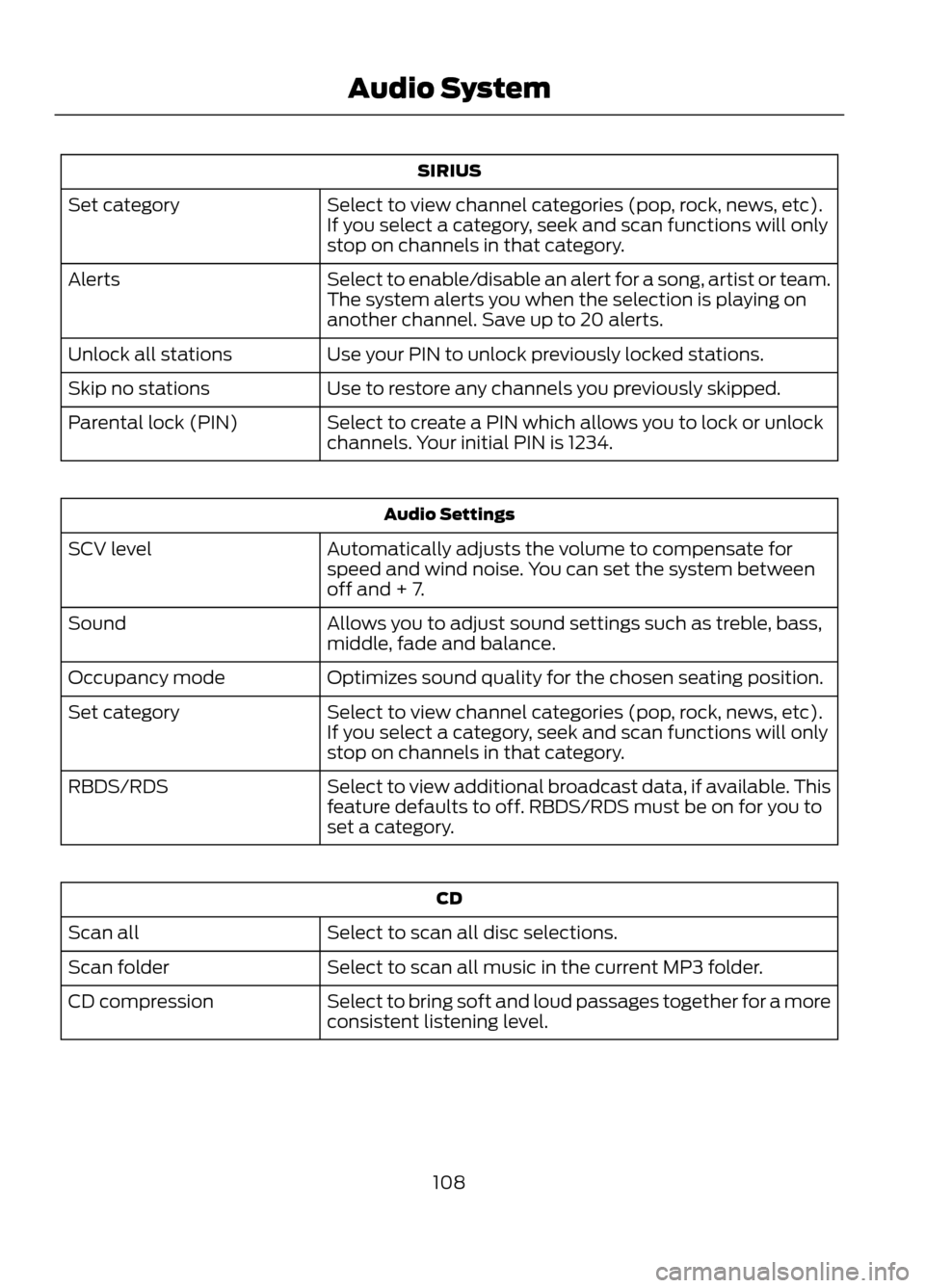
Select to view channel categories (pop, rock, news, etc).
If you select a category, seek and scan functions will only
stop on channels in that category.
Set category
Select to enable/disable an alert for a song, artist or team.
The system alerts you when the selection is playing on
another channel. Save up to 20 alerts.
Alerts
Use your PIN to unlock previously locked stations.
Unlock all stations
Use to restore any channels you previously skipped.
Skip no stations
Select to create a PIN which allows you to lock or unlock
channels. Your initial PIN is 1234.
Parental lock (PIN)
Audio Settings
Automatically adjusts the volume to compensate for
speed and wind noise. You can set the system between
off and + 7.
SCV level
Allows you to adjust sound settings such as treble, bass,
middle, fade and balance.
Sound
Optimizes sound quality for the chosen seating position.
Occupancy mode
Select to view channel categories (pop, rock, news, etc).
If you select a category, seek and scan functions will only
stop on channels in that category.
Set category
Select to view additional broadcast data, if available. This
feature defaults to off. RBDS/RDS must be on for you to
set a category.
RBDS/RDS
CD
Select to scan all disc selections.
Scan all
Select to scan all music in the current MP3 folder.
Scan folder
Select to bring soft and loud passages together for a more
consistent listening level.
CD compression
108
Audio System
Page 109 of 423

Display Settings
Select to change display brightness.
Dimming
Select to display the language in English, French or
Spanish.
Language
Select to display the outside temperature in Fahrenheit
or Celsius.
Temp setting
Clock Settings
Select to set the time.
Set time
Select to set the calendar date.
Set date
Select to view clock time in a 12-hour mode or 24-hour
mode.
12/24 hour
AUXILIARY INPUT JACK
WARNINGS
Driving while distracted can result in
loss of vehicle control, accident and
injury. Ford strongly recommends
that you use extreme caution when using
any device or feature that may take your
focus off the road. Your primary
responsibility is the safe operation of the
vehicle. We recommend against the use
of any handheld device while driving,
encourage the use of voice-operated
systems when possible and that you
become aware of applicable state and
local laws that may affect use of electronic
devices while driving.
For safety reasons, do not connect
or adjust the settings on your
portable music player while the
vehicle is moving.
WARNINGS
Store the portable music player in a
secure location, such as the center
console or the glove box, when the
vehicle is in motion. Hard objects may
become projectiles in a collision or sudden
stop, which may increase the risk of serious
injury. The audio extension cable must be
long enough to allow the portable music
player to be safely stored while the vehicle
is in motion.
109
Audio System
E142603
Page 112 of 423

Troubleshooting
Possible Action
Condition
Radio Display
No action required. This
message should disappear
shortly.
Radio requires more than
two seconds to produce
audio for the selected
channel.
Acquiring
If this message does not
clear shortly, or with an igni-
tion key cycle, your receiver
may have a fault. See your
authorized dealer for service.
Internal module or system
failure present.
Sat Fault/SIRIUS system
failure
Tune to another channel or
choose another preset.
Channel is no longer avail-
able.
Invalid Channel
Contact SIRIUS at 1-888-
539-7474 to subscribe to
the channel, or tune to
another channel.
Subscription not available
for this channel.
Unsubscribed Channel
The signal is currently being
blocked. When you move
into an open area, the signal
should return.
Loss of signal from the
SIRIUS satellite or SIRIUS
tower to the vehicle
antenna.
No Signal
No action required. The
process may take up to
three minutes.
Update of channel
programming in progress.
Updating
Contact SIRIUS at 1-888-
539-7474 to reactivate or
resolve subscription issues.
Satellite service has been
deactivated by SIRIUS
Satellite Radio.
Call SIRIUS 1-888-539-7474
Using the channel guide,
unlock or unskip the chan-
nels.
All the channels in the
selected category are
skipped or locked.
No Channels Available
No action required.
SIRIUS has updated the
channels available for your
vehicle.
Subscription Updated
112
Audio System
Page 122 of 423
WARNINGS
Install the head restraint properly to
help minimize the risk of neck injury
in the event of a collision.
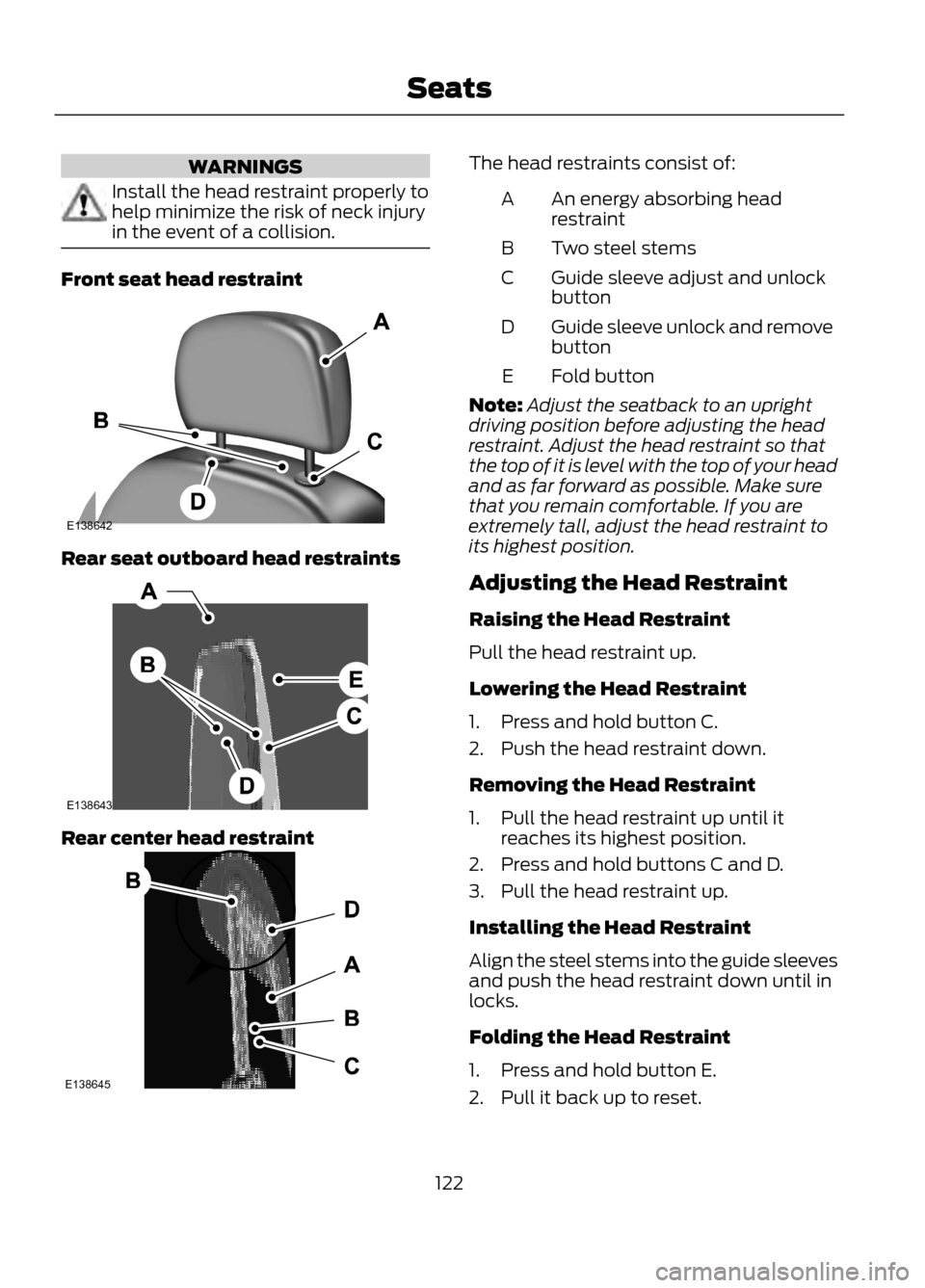
Front seat head restraint
Rear seat outboard head restraints
Rear center head restraint
The head restraints consist of:An energy absorbing head
restraint
A
Two steel stems
B
Guide sleeve adjust and unlock
button
C
Guide sleeve unlock and remove
button
D
Fold button
E
Note: Adjust the seatback to an upright
driving position before adjusting the head
restraint. Adjust the head restraint so that
the top of it is level with the top of your head
and as far forward as possible. Make sure
that you remain comfortable. If you are
extremely tall, adjust the head restraint to
its highest position.
Adjusting the Head Restraint
Raising the Head Restraint
Pull the head restraint up.
Lowering the Head Restraint
1. Press and hold button C.
2. Push the head restraint down.
Removing the Head Restraint
1. Pull the head restraint up until it reaches its highest position.
2. Press and hold buttons C and D.
3. Pull the head restraint up.
Installing the Head Restraint
Align the steel stems into the guide sleeves
and push the head restraint down until in
locks.
Folding the Head Restraint
1. Press and hold button E.
2. Pull it back up to reset.
122
Seats
E138642
E138643
E138645
Page 126 of 423

Saving a Pre-Set Position
1. Switch the ignition on.
2. Adjust the seat and exterior mirrors toyour desired position.
3. Press and hold the desired pre-set button until you hear a single chime.
Recalling a Pre-Set Position
Press the pre-set button associated with
your desired driving position. The seat and
mirrors will move to the position stored for
that pre-set.
Saving a Passive Setting
The vehicle stores the seating and mirror
positions for up to three remote controls
or passive keys. Next time the vehicle is
unlocked, the position of the seat and
mirrors will adjust to the last used position.
Each time you turn the ignition off, the
current seat and mirror settings are stored
on the remote control or passive key used.
Recalling a Stored Seat Position
Note: Press any driver seat adjustment
control, any of the memory buttons or any
mirror control switch, to stop seat
movement during a recall. Seat movement
will also stop if you move the vehicle. Passive Recall
Note:
If more than one passive key is in
range, the memory function will move to the
settings of the first key stored.
When you unlock the vehicle with the
remote control or pull the driver door
handle with a passive key in range, the seat
and mirrors will move to the position stored
on that remote control or passive key.
REAR SEATS
Recline Adjustment (If Equipped)
With the seat occupied, pull the lever up
to recline the seatback.
Folding the Seatback
With the seat empty, pull the lever up to
fold the seatback forward. You may need
to fold the outboard head restraints and
lower the center head restraint first.
Unfolding the Seatback
Pull the lever up and pull the seatback
upward.
126
Seats
E142554
E138650
Page 128 of 423
Homelink® Wireless Control
System (If Equipped)
WARNINGS
Make sure that the garage door and
security device are free from
obstruction when you are
programming. Do not program the system
with the vehicle in the garage.
Do not use the system with any
garage door opener that does not
have the safety stop and reverse
feature as required by U.S. Federal Safety
Standards (this includes any garage door
opener manufactured before April 1, 1982).
Note: Make sure you keep the original
remote control transmitter for use in other
vehicles as well as for future system
programming.
Note: We recommend that upon the sale
or lease termination of your vehicle, you
erase the programmed function buttons for
security reasons. See Erasing the function
button codes later in this section.
Note: You can program a maximum of
three devices. To change or replace any of
the three devices after it has been initially
programmed, you must first erase the
current settings. See Erasing the function
button codes later in this section.
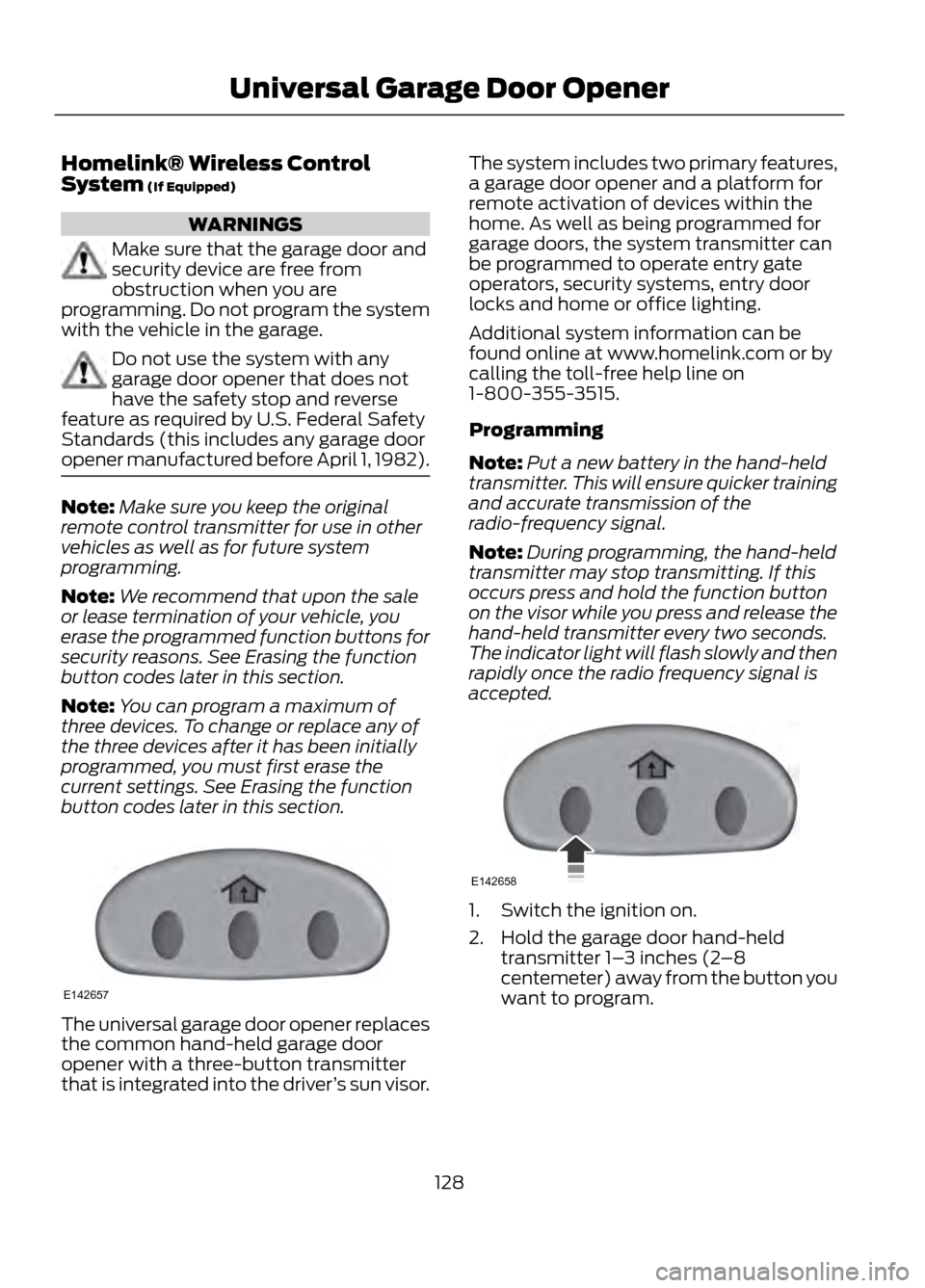
The universal garage door opener replaces
the common hand-held garage door
opener with a three-button transmitter
that is integrated into the driver ’s sun visor. The system includes two primary features,
a garage door opener and a platform for
remote activation of devices within the
home. As well as being programmed for
garage doors, the system transmitter can
be programmed to operate entry gate
operators, security systems, entry door
locks and home or office lighting.
Additional system information can be
found online at www.homelink.com or by
calling the toll-free help line on
1-800-355-3515.
Programming
Note:
Put a new battery in the hand-held
transmitter. This will ensure quicker training
and accurate transmission of the
radio-frequency signal.
Note: During programming, the hand-held
transmitter may stop transmitting. If this
occurs press and hold the function button
on the visor while you press and release the
hand-held transmitter every two seconds.
The indicator light will flash slowly and then
rapidly once the radio frequency signal is
accepted.
1. Switch the ignition on.
2. Hold the garage door hand-held transmitter 1– 3 inches (2–8
centemeter) away from the button you
want to program.
128
Universal Garage Door Opener
E142657
E142658
Page 136 of 423

WARNINGS
Always check that the steering wheel
lock is deactivated before
attempting to move your vehicle.
Note:A valid key must be located inside
your vehicle to switch the ignition on and
start the engine.
Switching the Ignition On (Accessory
Mode)
Press the START button once without your
foot on the brake pedal. The button is
located on the instrument panel near the
steering wheel. All electrical circuits and
accessories are operational and the
warning lamps and indicators illuminate.
Press the START button again without your
foot on the brake pedal to turn the vehicle
off completely.
Starting Your Vehicle
Carry out the following steps to start your
vehicle:
1. Move the transmission selector lever to position P.
2. Fully press the brake pedal.
3. Press the START button.
The system does not function if:
• The key frequencies are jammed.
• The key battery has no charge.
If you are unable to start your vehicle, do
the following. 5-button remote
3-button remote
1.
Hold the key next to the symbol on the
steering column.
2. With the key in this position, you can use the start button to switch the
ignition on and start your vehicle.
Stopping the Engine When Your
Vehicle is Stationary
1. Move the transmission selector lever to position P.
2. Press the START button.
Note: The ignition, all electrical circuits
warning lamps and indicators will be
switched off.
136
Starting and Stopping the Engine
E142555
E142874
E145988
Page 137 of 423

Stopping the Engine When Your
Vehicle is Moving
1. Press and hold the START button fora moment, or press it three times within
two seconds.
2. Move the transmission selector lever to position N and use the brakes to
bring your vehicle to a safe stop.
3. When your vehicle has stopped, move the transmission selector lever to
position P and switch the ignition off.
WARNING
Switching off the engine when the
vehicle is still moving will result in a
loss of brake and steering assistance.
The steering will not lock, but higher effort
will be required. When the ignition is
switched off, some electrical circuits,
warning lamps and indicators may also be
off.
Fast Restart
The fast restart feature allows you to
restart your vehicle within 20 seconds of
switching it off, even if a valid key is not
present.
Within 20 seconds of switching your
vehicle off, press the brake pedal and press
the start button. After 20 seconds have
expired, you can no longer start your
vehicle without the key present inside the
vehicle.
Once your vehicle has started, it remains
running until you press the start button,
even if a valid key has not been detected.
If you open and close a door while your
vehicle is running, the system searches for
a valid key. You cannot start your vehicle
if a valid key is not detected within 20
seconds. STARTING A GASOLINE
ENGINE
When you start the engine the idle speed
will be increased to warm up the engine. If
the engine idle speed does not slow down
automatically, have your vehicle checked
by your authorized dealer.
Before starting the engine check the
following:
•
Make sure all occupants have fastened
their safety belts.
• Make sure the headlamps and
electrical accessories are off.
• Make sure the parking brake is on.
• Move the transmission selector lever
to position P.
• Turn the ignition key to position II.
Note: Do not touch the accelerator pedal.
1. Move the transmission selector lever to position P or N.
2. Fully press the brake pedal.
3. Start the engine. The engine may continue cranking for up to 15 seconds
or until it starts.
Note: If you cannot start the engine on the
first try, wait for a short period of time and
try again.
If you have difficulty starting the engine
when the temperature is below -13°F
(-25°C), press the accelerator pedal
slightly and try again.
If you cannot start the engine after three
attempts, wait 10 seconds and follow this
procedure.
1. Move the transmission selector lever to position P.
2. Fully press the accelerator pedal and hold it there.
3. Fully press the brake pedal.
4. Start the engine.
137
Starting and Stopping the Engine