2013 FORD ESCAPE lock
[x] Cancel search: lockPage 165 of 423
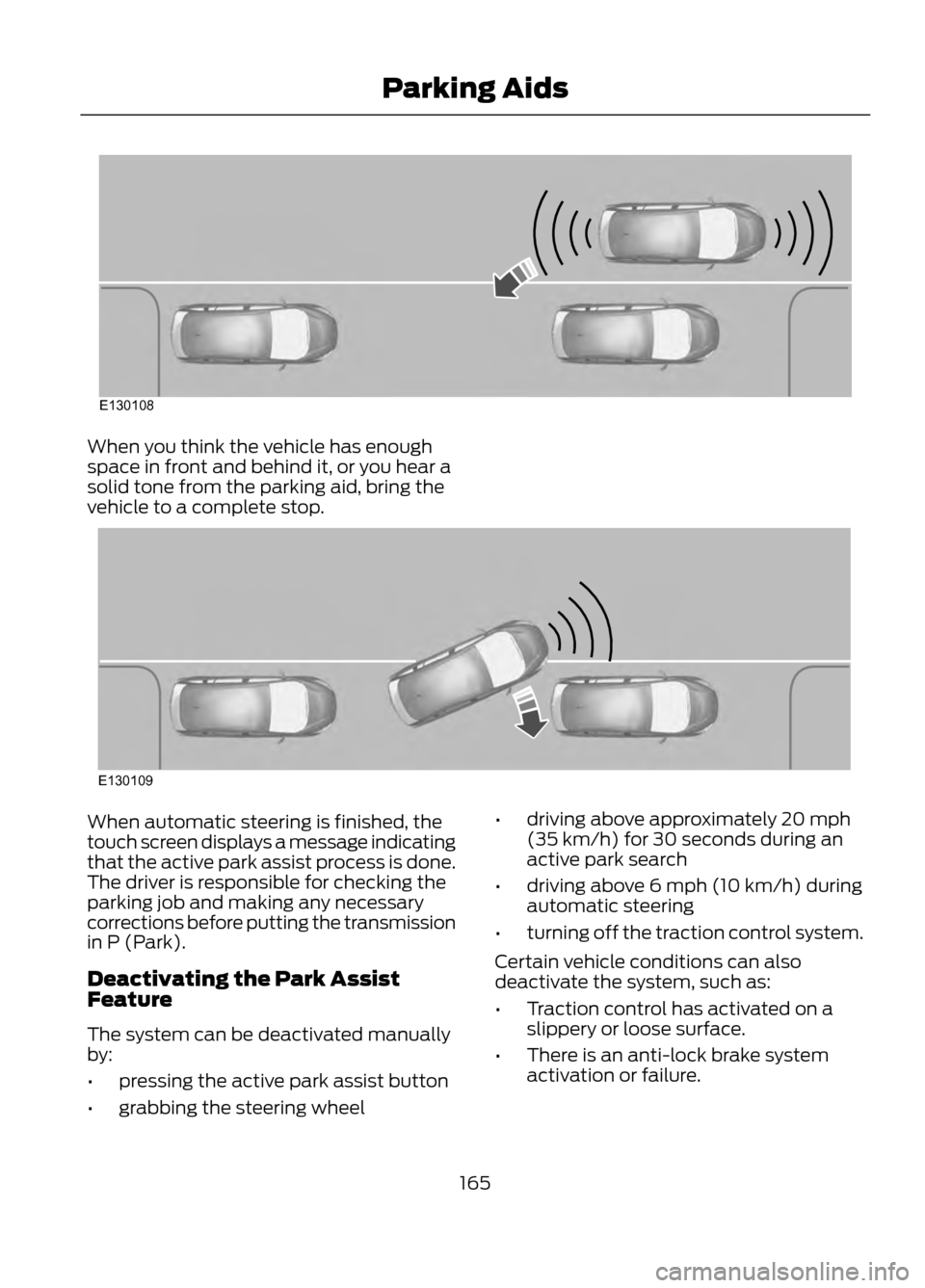
When you think the vehicle has enough
space in front and behind it, or you hear a
solid tone from the parking aid, bring the
vehicle to a complete stop.
When automatic steering is finished, the
touch screen displays a message indicating
that the active park assist process is done.
The driver is responsible for checking the
parking job and making any necessary
corrections before putting the transmission
in P (Park).
Deactivating the Park Assist
Feature
The system can be deactivated manually
by:
•pressing the active park assist button
• grabbing the steering wheel •
driving above approximately 20 mph
(35 km/h) for 30 seconds during an
active park search
• driving above 6 mph (10 km/h) during
automatic steering
• turning off the traction control system.
Certain vehicle conditions can also
deactivate the system, such as:
• Traction control has activated on a
slippery or loose surface.
• There is an anti-lock brake system
activation or failure.
165
Parking Aids
E130108
E130109
Page 171 of 423

BLIND SPOT MONITOR
Blind Spot Information System
(BLIS®) with Cross Traffic Alert (If
Equipped)
WARNING
To help avoid injuries, NEVER use the
BLIS as a replacement for using the
interior and exterior mirrors and
looking over your shoulder before changing
lanes. BLIS is not a replacement for careful
driving and only an assist.
BLIS aids you in detecting vehicles that
may have entered the blind spot zone (A).
The detection area is on both sides of the
vehicle, extending rearward from the
exterior mirrors to approximately 10 feet
(3 meters) beyond the bumper. The
system alerts you if certain vehicles enter
the blind spot zone while driving.
Cross traffic alert warns you of vehicles
approaching from the sides when the
transmission is in R (Reverse). Note:
BLIS is not designed to prevent
contact with other vehicles or objects; or to
detect parked vehicles, people, animals or
infrastructure (fences, guardrails, trees,
etc.). It is designed to alert the driver to
vehicles in the blind zones.
Note: When a vehicle passes quickly
through the blind zone, typically fewer than
two seconds, the system does not trigger.
Using the Systems
BLIS turns on when the engine is started
and the vehicle is driven forward above 3
mph (5 km/h); it remains on while the
transmission is in D (Drive) and N
(Neutral). If shifted out of D (Drive) or N
(Neutral), the system enters cross traffic
alert mode. Once shifted back into D
(Drive), BLIS turns back on when the
vehicle is driven above 3 mph (5 km/h).
Note: BLIS does not function in R (Reverse)
or P (Park) or provide any additional
warning when a turn signal is on.
Cross traffic alert detects approaching
vehicles from up to 45 feet (14 meters)
away though coverage decreases when the
sensors are blocked. Reversing slowly helps
increase the coverage area and
effectiveness.
WARNING
To help avoid personal injury, NEVER
use the cross traffic alert system as
a replacement for using the interior
and exterior mirrors and looking over your
shoulder before backing out of a parking
space. Cross traffic alert is not a
replacement for careful driving and only
an assist.
171
Driving Aids
A
A
E124788
Page 173 of 423
System Lights and Messages
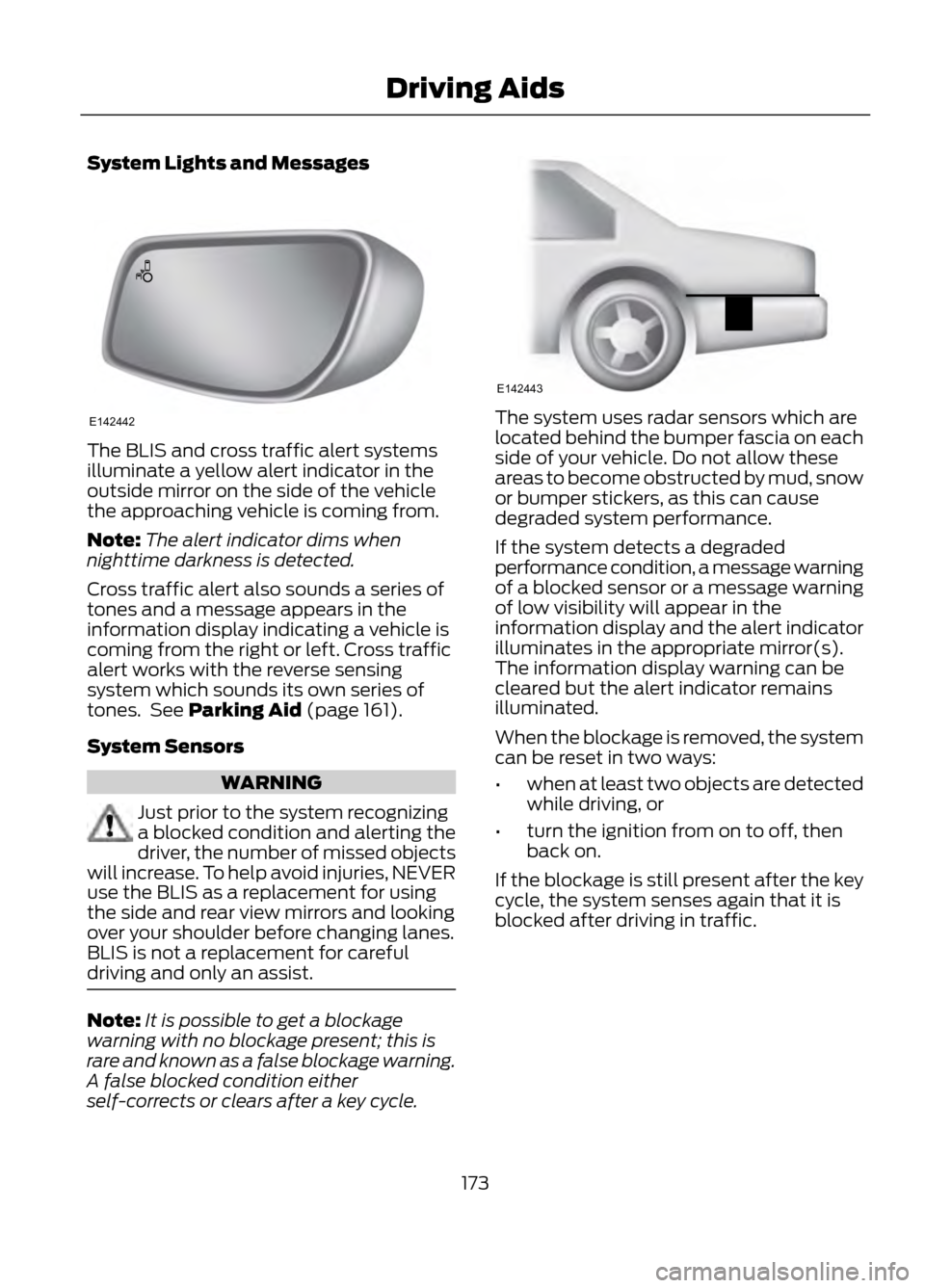
The BLIS and cross traffic alert systems
illuminate a yellow alert indicator in the
outside mirror on the side of the vehicle
the approaching vehicle is coming from.
Note:The alert indicator dims when
nighttime darkness is detected.
Cross traffic alert also sounds a series of
tones and a message appears in the
information display indicating a vehicle is
coming from the right or left. Cross traffic
alert works with the reverse sensing
system which sounds its own series of
tones. See Parking Aid (page 161).
System Sensors
WARNING
Just prior to the system recognizing
a blocked condition and alerting the
driver, the number of missed objects
will increase. To help avoid injuries, NEVER
use the BLIS as a replacement for using
the side and rear view mirrors and looking
over your shoulder before changing lanes.
BLIS is not a replacement for careful
driving and only an assist.
Note: It is possible to get a blockage
warning with no blockage present; this is
rare and known as a false blockage warning.
A false blocked condition either
self-corrects or clears after a key cycle.
The system uses radar sensors which are
located behind the bumper fascia on each
side of your vehicle. Do not allow these
areas to become obstructed by mud, snow
or bumper stickers, as this can cause
degraded system performance.
If the system detects a degraded
performance condition, a message warning
of a blocked sensor or a message warning
of low visibility will appear in the
information display and the alert indicator
illuminates in the appropriate mirror(s).
The information display warning can be
cleared but the alert indicator remains
illuminated.
When the blockage is removed, the system
can be reset in two ways:
• when at least two objects are detected
while driving, or
• turn the ignition from on to off, then
back on.
If the blockage is still present after the key
cycle, the system senses again that it is
blocked after driving in traffic.
173
Driving Aids
E142442
E142443
Page 174 of 423

Reasons for messages being displayedClean the fascia area in
front of the radar or remove the obstruction.
The radar
surface is dirty or
obstructed
Drive normally in traffic for
a few minutes to allow the radar to detect passing
vehicles so it can clear the blocked state.
The radar
surface is
not dirty or
obstructed
No action required. Thesystem automatically
resets to an unblocked
state once the rainfall or
snowfall rate decreases or stops. Do not use BLIS or
cross traffic alert in these conditions.
Heavy rain-
fall/snow- fall inter-
feres with the radar signals
System Limitations
The BLIS and cross traffic alert systems
do have their limitations; situations such
as severe weather conditions or debris
build-up on the sensor area may limit
vehicle detection.
The following are other situations that may
limit the BLIS:
• Certain maneuvering of vehicles
entering and exiting the blind zone.
• Vehicles passing through the blind zone
at very fast rates.
• When several vehicles forming a
convoy pass through the blind zone.
The following are other situations that may
limit the cross traffic alert system:
• Adjacently parked vehicles or objects
obstructing the sensors.
• Approaching vehicles passing at
speeds greater than 15 mph (24 km/h). •
Driving in reverse faster than 3 mph (5
km/h).
• Backing out of an angled parking spot.
False Alerts
Note: If the vehicle has a factory equipped
tow bar, and it is towing a trailer, the sensors
will detect the trailer and turn the BLIS off
to avoid false alerts. For non-factory
equipped tow bars you may want to turn
the BLIS off manually.
There may be certain instances when
either the BLIS or cross traffic alert
systems illuminate the alert indicator with
no vehicle in the coverage zone; this is
known as a false alert. Some amount of
false alerts are normal; they are temporary
and self-correct.
System Errors
If either system senses a problem with the
left or right sensor, the BLIS telltale
illuminates and remains on and the
following will appear in the information
display:
• BLIS: X sensor fault Service req’ d or
• Cross Traffic malfunction Service req’ d
When problems that may cause the left or
right indicator not to illuminate, only the
information display faults appear.
Switching the Systems Off and On
One or both systems can be switched off
temporarily by using the information
display control. See General Information
(page 84). When the BLIS is switched off,
you will not receive alerts and a telltale
illuminates in the information display. The
system switches back on whenever the
ignition is switched on.
174
Driving Aids
Page 179 of 423

1.Remove the crossbar thumbwheels at
both sides of the front crossbar by
turning them counterclockwise.
Note: A small screwdriver or similar tool
can be used to loosen the thumbwheel.
Apply to the fastener head on the top of the
thumbwheel or insert the shaft between the
two paddles of the thumbwheel and rotate
it loose.
2. Remove the crossbar by sliding the ends off of the shoulder bolts in the
side rails.
3. Move the crossbar to the new side rail position and slide the crossbar onto
the shoulder bolt at that position.
4. Replace and tighten the thumbwheels
at both sides of the crossbar by turning
them clockwise until tight. A small
screwdriver or similar tool can be used
to tighten if necessary.
Make sure to check that the thumbwheels
are tight each time load is added or
removed from the roof rack, and
periodically while traveling. Make sure that
the load is secure before traveling. LOAD LIMIT
Vehicle loading - with and without
a trailer
This section will guide you in the proper
loading of your vehicle, trailer or both, to
keep your loaded vehicle weight within its
design rating capability, with or without a
trailer. Properly loading your vehicle will
provide maximum return of vehicle design
performance. Before loading your vehicle,
familiarize yourself with the following
terms for determining your vehicle
’s weight
ratings, with or without a trailer, from the
vehicle ’s Tire Label or Safety Compliance
Certification Label:
Base Curb Weight - is the weight of the
vehicle including a full tank of fuel and all
standard equipment. It does not include
passengers, cargo, or optional equipment.
Vehicle Curb Weight - is the weight of
your new vehicle when you picked it up
from your authorized dealer plus any
aftermarket equipment.
179
Load Carrying
E142513
Page 191 of 423

When Towing a Trailer
•Do not drive faster than 70 mph (113
km/h) during the first 500 miles (800
kilometers) and do not make
full-throttle starts.
• Check your hitch, electrical connections
and trailer wheel lug nuts thoroughly
after you have traveled 50 miles (80
km).
• Place the gearshift lever in position P
to aid in engine and transmission
cooling and A/C efficiency during hot
weather while stopped in traffic.
• Turn off the speed control. The speed
control may turn off automatically
when you are towing on long, steep
grades.
• Shift to a lower gear when driving down
a long or steep hill. Do not apply the
brakes continuously, as they may
overheat and become less effective.
• If your transmission is equipped with
the grade assist feature, use this
feature when towing. This provides
engine braking and helps eliminate
excessive transmission shifting for
optimum fuel economy and
transmission cooling.
• Allow more distance for stopping with
a trailer attached; anticipate stops and
brake gradually.
• Avoid parking on a grade. However, if
you must park on a grade, place wheel
chocks under the trailer's wheels.
TOWING POINTS (IF EQUIPPED)
Towing Eye Location
The screw-in towing eye is located in the
spare wheel well.
The towing eye must always be carried in
the vehicle. Installing the Towing Eye
The screw-in towing eye has a left-hand
thread. Turn it counterclockwise to install
it. Make sure that the towing eye is fully
tightened.
Insert a suitable object to pry open the
cover (1). Use recessed/notched portion
of the cover. Screw in the towing eye (2).
Towing the Vehicle on Four Wheels
Switch the ignition to the on position.
Failure to do so results in steering lock and
non-function of indicator and brake lamps.
Braking and steering efforts are high if the
engine is not running. Maintain increased
stopping distances.
191
Towing
E146284
Page 196 of 423
WARNINGS
Failure to properly follow floor mat
installation or attachment
instructions can potentially cause
interference with pedal operation causing
loss of control of vehicle.
To install floor mats, position the
floor mat so that the eyelet is over
the retention post and press down
to lock in.
To remove the floor mat, reverse the
installation procedure.
196
Driving Hints
Page 197 of 423

ROADSIDE ASSISTANCE
Vehicles Sold In The U.S.: Getting
Roadside Assistance
To fully assist you should you have a
vehicle concern Ford Motor Company
offers a complimentary roadside
assistance program. This program is
separate from the New Vehicle Limited
Warranty. The service is available:
•24-hours, seven days a week.
• for the coverage period listed on the
Roadside Assistance Card included in
your Owner's Manual portfolio.
Roadside assistance will cover:
• a flat tire change with a good spare
(except vehicles that have been
supplied with a tire inflation kit).
• battery jump start.
• lock-out assistance (key replacement
cost is the customer's responsibility).
• fuel delivery — Independent Service
Contractors, if not prohibited by state,
local or municipal law shall deliver up
to 2.0 gallons (7.5L) of gasoline or 5.0
gallons (18.9L) of diesel fuel to a
disabled vehicle. Fuel delivery service
is limited to two no-charge occurrences
within a 12-month period.
• winch out — available within 100 feet
(30.5 meters) of a paved or county
maintained road, no recoveries.
• towing — Ford and Lincoln eligible
vehicles towed to an authorized dealer
within 35 miles (56 km) of the
disablement location or to the nearest
authorized dealer. If a member
requests to be towed to an authorized
dealer more than 35 miles (56 km)
from the disablement location, the
member shall be responsible for any
mileage costs in excess of 35 miles (56
km). Trailers shall be covered up to $200 if the
disabled eligible vehicle requires service at
the nearest authorized dealer. If the trailer
is disabled, but the towing vehicle is
operational, the trailer does not qualify for
any roadside services.
Vehicles Sold In The U.S. : Using
Roadside Assistance
Complete the roadside assistance
identification card and place it in your
wallet for quick reference. This card is
found in the owner's information portfolio
in the glove compartment.
U.S. Ford vehicle customers who require
Roadside Assistance, call 1-800-241-3673.
If you need to arrange roadside assistance
for yourself, Ford Motor Company will
reimburse a reasonable amount for towing
to the nearest dealership within 35 miles
(56 km). To obtain reimbursement
information, U.S. Ford vehicle customers
call 1-800-241-3673. Customers will be
asked to submit their original receipts.
Vehicles Sold In Canada : Getting
Roadside Assistance
Canadian customers who require roadside
assistance, call 1-800-665-2006.
Vehicles Sold In Canada : Using
Roadside Assistance
Complete the roadside assistance
identification card and place it in your
wallet for quick reference. In Canada, the
card is found in the Warranty Guide in the
glove box.
Canadian Roadside coverage and benefits
may differ from the U.S. coverage. Please
refer to your Warranty Guide or visit our
website at www.ford.ca for information on
Canadian services and benefits.
197
Roadside Emergencies