2013 AUDI Q5 door lock
[x] Cancel search: door lockPage 4 of 316

2 Table of contents Vehicle literature .. .. .. .. .. ... .
About this Owner's Manual ...
Controls and equipment .. ... .
Ins truments and controls .. . .
General illus tration .... ... .. .. ... .
Instruments and warning /
indicator lights ........ .. .. .. . .
Ins truments . .. .. ..... ... .. .. ... .
War ning/ indi cator lights ... .. ... .. .
Driver information d isplay .. . .
Introduct ion . .. .. ..... ... .. .. ... .
Trip computer .. .. ..... ... .. .. ... .
Efficiency program ........ .. .. ... .
On-Board Diagnostic system (OBD) .. .
Elect ronic speed limiter ........ .. . .
Auto Check Control ........ .... .. .
Opening and closing .... .. .. . .
Keys .. .. .. ... .... ...... .. .. .. . .
P owe r locking system ............ .
Opening an d clos ing rear lid .. .. .. . .
Automatic rear lid/t runk lid ope rat io n
E mergency unloc king of the lug gage
compartment lid . ..... ... .. .. ... .
C hil d safety locks . ..... ... .. .. ... .
Power win dows .. ..... ... .. .. ... .
Panoramic slid ing sun roof .. .. .. ... .
Clear vision .. .. ..... ... .. .. ... .
Lights ... .. .. . .......... .. .. ... .
Inter ior lights ................ ... .
V 1s 1on . ...... ........... .... ... .
W iper and washer system . ... .. .. . .
Mi rrors .. .. ................ ... . .
D ig ita l compass ................. .
5
6
8
8
8
10
10
14
20
20
23
25
26
27
27
36
36
38
4 3
44
45
46
46
47
49
49
53
54
54
57
59
Seats and storage . . . . . . . . . . . . . 61
Ge ne ral recomme ndat ions ... .. .. . .
Fr ont sea ts . ... .......... .. .. .. . .
Se at memo ry ............ .... ... .
Rear seats .. .. . .. ..... ... .. .. ... .
Head res traints .. ..... ... .. .. ... .
Ce nte r arm rest ... ..... ... .. .. ... .
Luggage compartment ........... . 61
6 2
63
6 4
65
66
67
R oo f rack ..... .. ... .. ..... .... . .
Beverage holders ... ... ..... ... .. .
Climatized cupholders .. ..... ... .. .
( upholders in the door pockets ... .. .
Ashtray ... .... .. ............. .. .
Cigarette lighter/Socket .......... .
Storage ..... .. .. .. ... ....... ... .
Warm and cold .......... ..... .
Climate co ntrol
On the road ................ .. .
Steering ......... .... .......... .
Ig nitio n loc k .. ... ............... .
Co nvenience key .. ... ... .... ... .. .
Dr ive r messages ................. .
El ectromec hani cal p arking br ake . .. .
S tar t-Sto p-System . .... ..... ... .. .
S peed warning system ... .... ... .. .
Cruise cont ro l .. .. ... .. ..... .... . .
Hybrid ... .... .. .. ... ..... ... .. .
Hyb rid drive ..... .. ... ..... ... .. .
Audi adaptive cruise control
and braking guard ...... ... .. .
Introduction ..... .. .... .... ... .. .
Genera l information ........... .. .
Audi adaptive cruise control ..... .. .
Audi braking guard .............. .
Messages ........ .... .......... .
Audi side assist ... ...... ..... .
Lane change ass ista nt
Audi dr ive select ........... .. .
Driving settings .. ... .. ....... ... .
Automatic transmission ..... .
tipt ron ic ..... .... .... .......... .
70
73
74
74
75
75
76
79
79
83
83
83
86
88
88
91
93
95
97
97
107
107
107
109
113
114
116
116
120
120
123
123
Parking system . . . . . . . . . . . . . . . . 129
Audi park ing system plus with
r earv1ew camera . . . . . . . . . . . . . . . . . .
129
Adjust ing the d isplay a nd warn ing
tones. . . . . . . . . . . . . . . . . . . . . . . . . . .
133
Page 11 of 316

(!) Memory buttons (driver's seat)
@ Door handle
@ Power locking switch ........ .
© Side assist button ....... ... .
® A ir outlets .... .. ... ... .. .. .
@ Tu rn signa l and high beam . .. .
(j) Multifunction steering wheel
with:
- Horn
- Driver's airbag ............ .
- Audio/video, telephone, navi-
gation and vo ice recognition
buttons
- Rocker switches for tiptron ic
operation ................ .
@ ISETI button ... ..... ... ... . .
® Instrument cluster .......... .
@ Reset button for trip odometer .
@ Switches for:
- Windsh ield wiper/washer . .. .
- Trip computer ............ .
@ Ign ition lock ............... .
@ Adjustable steering column
€3J Control lever for:
- Cru ise contro l ........ .. .. .
- Adaptive cruise contro l .. .. .
@ Data Link Connector for On
Board Diagnostics (OBD II) . .. .
@ Release lever for the engine
hood .. .. .... ............. .
@ Instrument lighting .. ... .. .. .
@ Light switch ... .. ... ... .. .. .
@ Sw itch for un loc king the trunk
lid .... .. .. .... .. .... ... .. .
@ Adjuster control for outside mir-
63
42
116
80
52
16 1
127 11
10
1 3
54
23
83
83
95
107
26
233
51
49
43
rors . . . . . . . . . . . . . . . . . . . . . . . 57
@ Power wi ndow switches . . . . . . . 46
@ Radio system or Audi mu ltime-
d ia (see separate manual)
@ Radio or M MI display (see sepa
rate manual)
@ Button/Indicator light for:
- Emergency flasher . . . . . . . . . 52
- PASSENGER AIR BAG OFF
Instrument s and control s 9
@) Glove compartment (lockab le)
@
@
Front passenger's airbag ..... .
Depend ing o n options:
- Audi drive select button
- Start -Stop-System button or
- 1.cl •I butto n (hybrid drive) ... .
- Par king system button ..... .
- Electron ic Stabilization Con-
trol (ESC) button .......... .
- Hill descent ass ist button ... .
@ Climate control .... ........ .
@ Shift lever for automatic trans-
mission . .. .. .. .... ........ .
@ Asht ray with ciga rette lighter
@ Coin storage
@ Depend ing on options:
- MMI cont ro l conso le or
- Park ing system button ..... .
- Electron ic Stabilization Con-
trol ( ESC) button .......... .
- Hill descent ass ist button ... .
- Aud i drive select button .... .
-Start-Stop-System button .. .
@) I S T ART ENGI NE STOPI button
§) Electromechanical parking brake
{!) Tips
76
161
120
91
100
129
197
199
79
123
75, 75
129
19 7
199
120
91
86
88
Some of the equipment or features shown
in the general illustration may be standa rd
equipment on yo ur vehicle or may be op
tiona l equipment depending o n your mod
e l. Always ask your authorized Audi dealer
i f you have a quest ion about your vehicle.
Page 14 of 316

12 Instruments and warning/indicator lights
button. You can perform an Auto-Check se
quence when the vehicle is stationary and the
ignition is turned on or when the vehicle is
moving s lower than 3 mph (5 km/h).
The number of keys programmed to the vehi
cle is also displayed. The disp lay
L2 3/3 indi
cates that three keys have been programmed.
This allows you to make sure you have re
ceived all of the keys when you purchase a
used vehicle .
For examp le, if you on ly receive two keys, you
should take those keys to your authori zed
Audi dealer to have the missing key deactivat
ed so it cannot be used . You should also re
port the m issing key to your insurance compa
ny.
Calling up the driver information
A yellow or red symbol appears in the instru
ment cluster display, usually with a driver
message . The driver message display disap
pears after about
5 seconds. The driver mes
sage can be displayed aga in by briefly press
ing the
! SET i button.
Setting the speed warning
By pressing the I SETI button briefly, you can
set threshold 1 of the speed warning while
you are dr iv ing
c:> page 94 . By ma inta in ing
p ressu re on the
ISETI button, you de lete the
warn ing threshold.
Digital clock with date display
Fig . 5 Instrument cl uste r: t im e an d date
M N
9 a:
l:l
Depending on the vehicle equipment level,
you may choose between the quartz clock or the GPS contro lled clock*
(!i in the radio or in the
MMI*. You can learn more about this in
the MMI manual or in the radio user's manual.
(D Tips
-When you switch off the ignition or open
the drive r door, the time, date, odome
ter and temperature are displayed for an
add itiona l
30 seconds .
- Yo u can also call up the display with the
!SET i button r=> page 11 wh ile the igni
tion is switched off.
Fuel gauge
The fuel gauge works only when the ignition is
on.
When the needle reaches the reserve mark,
the
c:> page 33 1] symbol appears in the in
strument cluster d isplay as well as the mes
sage
Please refuel. This message is meant to
remind you to
refuel.
The total tank capacity of your vehicle is listed
in
r=> page 292.
(D Note
Never run the tank completely dry! An ir
regular supply of f uel can cause engine
misfiring and fuel could enter into the ex
haust system. The catalytic converter
could then overheat and be damaged .
Page 22 of 316
20 Driver information display
Driver information
display
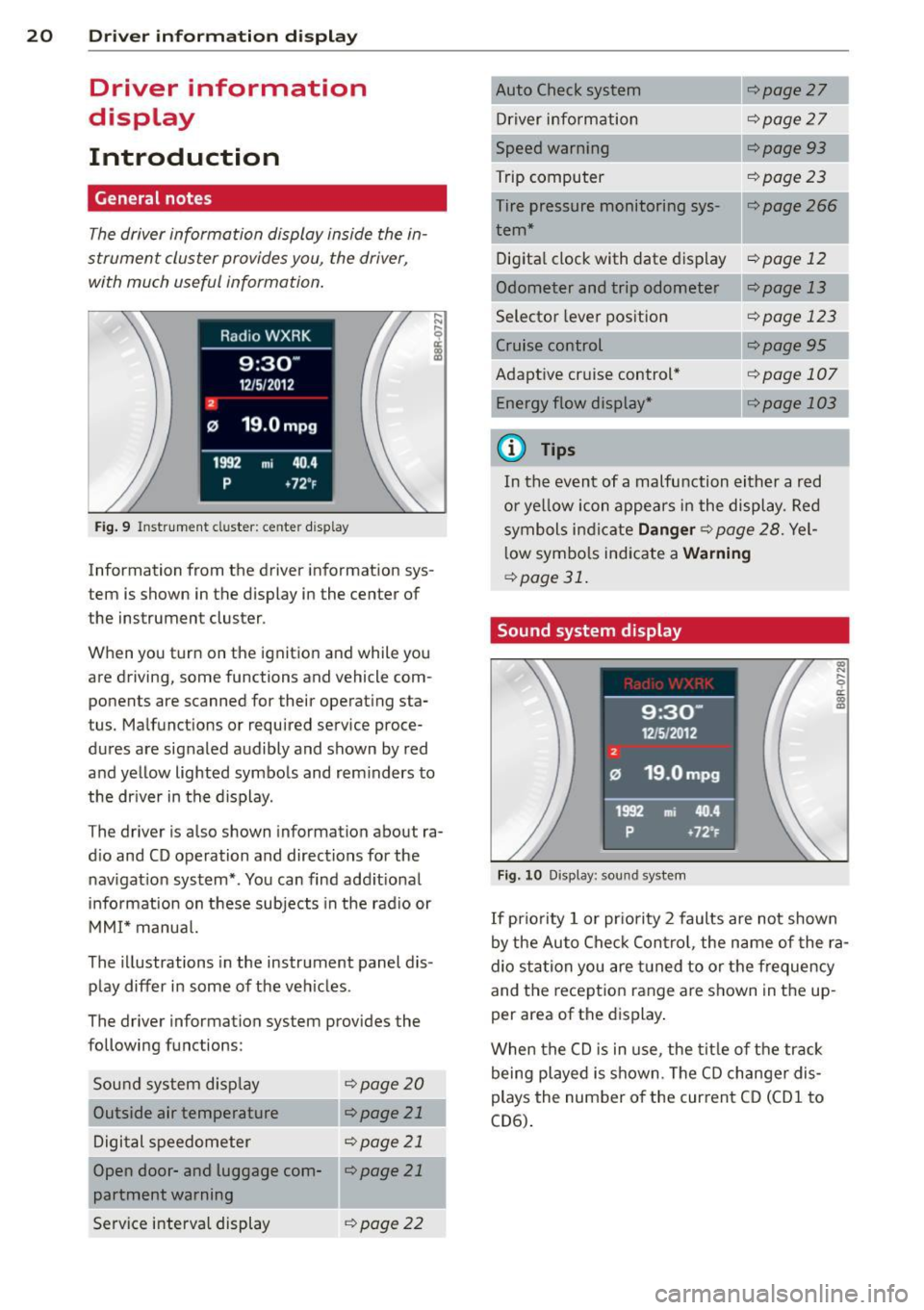
Introduction
General notes
The driver information display inside the in
strument cluster provides you, the driver,
with much useful information.
Fig. 9 Instrument cluster: center display
Information from the driver information sys
tem is shown in the display in the center of
the instrument cluster.
When you turn on the ignition and while you
are driving, some functions and vehicle com
ponents are scanned for their operat ing sta
tus. Malfunctions or required service proce
dures are signaled audibly and shown by red
and yellow lighted symbols and reminders to
the driver in the display.
The driver is also shown information about ra
dio and CD operation and directions for the
navigation system*. You can find additional
information on these subjects in the radio or
MMI* manual.
The illustr ations in the instrument panel dis
play differ in some of the vehicles .
The driver information system provides the
following functions:
Sound system display
¢page20
Outside air temperature r:::;, page 21
Digital speedometer r:::;, page 21
Open door- and luggage com-llr:::;, page 21
partment warning
Service interval display
¢page 22 r:::;,page
27
Driver information r:::;,page 27
Speed warning r:::;,page93
Trip computer r:::;, page 23
Tire pressure monitoring sys-r:::;, page 266 1
tern*
Digital clock with date dis play
r:::;, page 12
Odometer and trip odometer ¢page 13
Selector lever position r:::;, page 123
¢page95
Adaptive cruise control* Energy flow display* ¢page 107
---,.--
r:=;,page 103
¢j) Tips
In the event of a malfunction either a red
or yellow icon appears in the display. Red
symbols indicate
Danger r:::;, page 28. Yel
low symbols indicate a
Warning
¢page 31.
Sound system display
Fig. 10 Display: sound system
(0
"' .... 9 a:
~
If priority 1 or priority 2 faults are not shown
by the Auto Check Control, the name of the ra
dio station you are tuned to or the frequency
and the reception range are shown in the up
per area of the displ ay.
When the CD is in use , the title of the track
being played is shown. The CD changer dis
plays the number of the current CD (CD
1 to
CD6).
Page 29 of 316

Electronic speed
limiter
Your vehicle may be factory equipped with
tires that are rated for a maximum speed of
130 mph (210 km/h) . This is less than the
maximum speed of your vehicle . To reduce the
risk of sudden tire failure and loss of control if
the vehicle is ope rated at excessive speeds,
your veh icle also has an elect ronic speed limit
er. The electronic speed limiter prevents your
ve hicle from going faster than the tire speed
rating. For more information
c::> page 259 .
If the engine control unit rece ives fau lty vehi
cle road speed signals, the Malfunction Ind i
cator Lamp (MIU¢• will illuminate . If this
occurs, contact the nearest authorized Audi
dea ler for assistance.
A WARNING
Always observe the posted speed limits
and adjust your speed to suit prevailing
road, traff ic and weather conditions. Never
drive your vehicle faster than the maxi
mum speed ra ting of the tires insta lled.
Auto Check Control
Introduction
The Auto-Check control monitors the function
of certain veh icle features and components. It
simply makes sure these features and compo
nents are work ing properly . The Auto-Check
control wo rks as long as the ignition is on, as
well as whenever the vehicle is driven .
If a component is malfunctioning or if the need for an urgent repair has been detected,
this wi ll appear in the instrument cluster dis
p lay. You will a lso hear a n aud ible warn ing
tone. The d isplays are color coded in either
red or yellow depending on their level of prior
ity.
A red symbo l means
Dang er, a ye llow symbo l
indi cates
W arning . In certain s ituations, in
formation message for the dr iver appear in
additio n to the red and yellow symbols .
Driver inform ation di spl ay 2 7
Note about autom atic transmi ssion
T he Au to-Che ck Con trol wi ll automa tically
perform a test each t ime you sw itch on the ig
nition. With the selecto r lever in P or N, the
following message appears in the display:
When stationar y appl y brake pedal while se
lect ing gear
When you se lect a d iffe ren t gear (for exam
ple: R, D, etc.), t he mes sage will disappea r
and the Auto-Check f unct ion is displayed .
If there is a malfunct ion, then the malfu nc·
tion message will appear about 15 seconds af
te r you start the vehicle. At the same time you
will hear a wa rning tone.
Driver information messages
Driver information messages are shown in the
instrument cluster display in addition to sym
bols .
Fig . 2 2 Instrument cluster: SET b utto n
For example, if the transmission selector lever
is not in the P position when the engine is
turned off, the follow ing message appears :
Shift to P otherwise vehicle can roll away.
Door s do not lock if le ver is not in P .
The ign ition key can only be removed with the
selector in this position. This and other mes
sages are bro ught up if a function cannot be
carr ied out .
Driver messages and red s ymbols
If a red symbol appears in the display, a driver
message is also displayed au toma tically . ..,..
Page 38 of 316

36 Opening and closing
Opening and closing
Keys
Key set
Fig. 25 Key set
@ Master key with remote control and
integrated mechanical key
You can centrally lock and unlock your vehicle
and start the engine with the master key with remote control. A mechanical key is integrat
ed in the master key
c::;, page 3 7.
@ Emergency key
The emergency key is not intended for con
stant use.
It should only be used in an emer
gency. Keep it in a safe place and do not carry
it on your key ring.
Key replacement
If you lose a key, contact your authorized Audi
dealer immediately to have the
lost key disa
bled. Be sure to bring all your keys with you.
Number of keys
You can inquire about the number of assigned
keys to your vehicle
c::;, page 11. This allows
you to make sure you have received all of the
keys when you purchase a used vehicle. De
pending on the vehicle equ ipment level, this
function may also be performed in the MM!* .
To do this, select:
ICARI funct ion button> Car
systems * control button > Servicing & checks
> Programmed keys .
Data in the master key
During driving, serv ice and maintenance-rele
vant data is continuously stored on your mas
ter key. Your Audi serv ice adv iser can read out this data and
tell you about the work your ve
hicle needs . This applies also to vehicles with
Convenience key *.
Personal comfort settings
If two people use one vehicle, it is recom
mended that each person always uses "their
own" master key. When the ignition is turned
off or when the vehicle is locked, personal
convenience settings for the following sys
tems are stored and assigned to the remote
master key.
- Climate control
- Central locking system
- Sea t memory*
- Parking system*
- Adaptive cruise control*
- Audi side assist*
-Audi drive select*
T he stored settings are automatically recalled
when you unlock the vehicle, when yo u open
the doors or when you turn on the ignit ion .
A WARNING ......... -
- Do not leave your vehicle unattended
wit h the key in the ignition lock. Entry by
unauthorized persons could endanger
you or result in theft or damage the vehi
cle. A lways lock all doors and take the
key.
- Do not leave children unattended in the
veh icle, especially with access to vehicle
keys. Unguarded access to the keys pro
vides children the opportunity to start
the engine and/or activate vehicle sys
tems such as the power windows etc. Un
supervised operation of any vehicle sys
tem by children can result in serious in
jury.
- Do not remove the key from the ignition
lock until the veh icle has come to a com
plete stop. Otherwise the steering col
umn lock could suddenly engage -caus
ing the r isk of an accident.
Page 39 of 316

@ Tips
-The operation of the remote contro l key
can be temporarily disrupted by interfer
ence from transmitters in the vicinity of
the veh icle work ing in the same frequen
cy range (e .g . a cell phone, radio equip
ment) .
- If you open the dr iver's door with the key
left in the ign ition lock, a chime will
sound . This is your reminder to remove
the key and lock the door .
- For security reasons , replacement keys
are only available from Aud i dea lers .
- For Decla rat ion of Compliance to United
States FCC and Industry Canada regula
tions
c::;, page 298 .
Check light and battery in the master
key
Fig. 26 Remote master key
Check light in the master key
"' 0 N ,;, (0 a:,
The check light@¢ fig. 26 in the master key
prov ides information about different cond i
tions.
.. The check light comes on briefly once when
a button is pressed, and during an "inquiry"
by the conven ience key system .
.. If the check light does not come on, the
battery is dead and has to be replaced. I n
addition, when the battery is dead the
!I
symbol appears in the instrument cluster
display as well as the message:
Please
change key battery.
Master key battery replacement
.. Pull the mechanical key out of the master
key
¢ page 37.
Opening and closing 3 7
.. Press the release button @ c::;, fig. 26 on the
battery holder and at the same time pull the
battery holder out of the master key in the
direction of the arrow.
.. Install the new battery CR 2032 with the
"+" sign facing down.
.. Push the battery holder carefully into the
master key.
.. Install the mechanica l key.
@) For the sake of the environment
Dispose of dead batteries prope rly so as
not to pollute the environment.
(j) Tips
The replacement battery must be the
same specification as the origina l.
Removing the mechanical key
Fig. 27 Remote maste r key : Removing the mec han ical
key
.. Press the release button@¢ fig. 27.
.. Pull the mechanical key@ out of the mas
ter key.
Using the mechanical key, you can:
- lock and unlock the glove compartment
c::;, page 76 .
-lock and unlock the vehicle manually
c::;, page 41 if this should not be possible
w it h the master key .
Page 40 of 316

38 Openin g and clo sing
Emergency unlocking of the ignition key
In the event of malfunc tions in the electrical
system, it may happen that you cannot re
move the ignition key.
Fi g. 28 Ig nit io n swi tc h with igni tio n key
If you are unable to remove the ignit ion key,
for example because the vehicle battery is dis
charg ed, proceed as follows :
• Press the release button @
c::> fig. 28 and
pull the mechanical key ® out of the master
key .
• Lock the vehicle using th e m echanical key
c::> page 41.
• Have the elect ric al system inspected by an
au thor ized Audi dealership .
Electronic immobilizer
The immobilizer helps to prevent unauthor
ized use of your vehicle.
Inside th e key th ere is a compute r chip . This
chip automatically deactiv ates the elect roni c
immobili zer when you insert the key in the ig
n ition lock. When you remove the key from
the ign ition lock, the e lectronic immob ilizer is
automatically activated once again .
@ Tips
-The vehicle cannot be started if an unau
thorized key is used . The vehicle may not
start if another radio device such as a key
fo r another vehicle o r a tra nsponder is
l oca ted on the key ring .
- For Decla rat ion of Compliance to United
States FCC and Indus try Canada regula
tions
c::> page 298.
Power locking system
General description
The power locking system locks or unlocks all
doors and the rear lid simultaneously .
You can lock and unlock the vehicle cen trally .
You have the following choices :
- Remote master key
c::> page 40
-Door hand les with Convenience key *
c::>page40,
- Lock cylinder at the driver 's doo r
c::>page 41, or
- Powe r locking switch inside
c::> page 42.
Selective unlocking
When you lock the vehicle, the power locki ng
system will lock the doo rs and the rear l id .
When unloc king, you can set in the radio or in
t h e MMI* whethe r
only the dr iver's door or
t h e enti re veh icle should be unlocked
c::> page 3 9.
Automat ic lock ing
The automatic locking feature locks a ll the ve
hicle doors and the rear li d w hen you dr ive
f as ter than 9 mph (15 km/ h).
The car is unlocked again once the ign ition key
is removed . In add ition, the vehicle ca n be un
locked if the open ing fun ct ion in the power
locki ng sy stem switch or at one of the door
levers is actua ted .
Additionally , in the event of a crash with air
bag deployment the doo rs a re automatically
u nlocked to allow access to the vehicle.
Anti-theft alarm warning system
If the anti -theft ala rm warn ing system de
tects a b reak-in in to the vehicle, acoustic and
visual war ning s ignals are tr iggered .
The anti-theft warning system is activated au
tomat ically when you lock t he vehicle . It is de
activated when unlocki ng using the
remote
key , with the mechanical key , and when you
swit ch on the ignition .
IJII,