Page 316 of 860
316 2-4. Using other driving systems
SIENNA_U (OM45477U)
The distance display and buzzerWhen a sensor detects an obstacle, the direction of and the approxi-
mate distance to the obstacle are displayed and the buzzer sounds.
■ Corner sensor operation and distance to an obstacle
The system operates when the ve hicle approaches within the fol-
lowing distances to an obstacle. The indicator flashes and the
buzzer sounds when the system is operating.
Front (if equipped)
Rear
Approximate distance to obstacleIndicator and buzzer / Color
2.0 to 1.2 ft. (60 to 37.5 cm) Intermittent / yellow
1.2 to 0.8 ft. (37.5 to 25 cm) Fast intermittent / yellow
0.8 ft. (25 cm) or less Continuous / red
Approximate distance to obstacleIndicator and buzzer / Color
2.8 to 1.2 ft. (85 to 37.5 cm) Intermittent / yellow
1.2 to 0.8 ft. (37.5 to 25 cm) Fast intermittent / yellow
0.8 ft. (25 cm) or less Continuous / red
Page 320 of 860
320 2-4. Using other driving systems
SIENNA_U (OM45477U)
■If the display flashes and a message is displayed
P. 744
■ Certification (Canada only)
This ISM device complies with Canadian ICES-001.
■ When there is a malfunction
In the following cases, have the vehicle inspected by your Toyota dealer.
● If the bumper is damaged.
● If the intuitive parking assist indicator light remains on without a beep
sounds.
CAUTION
■Caution when using the Intuitive parking assist-sensor
Observe the following precautions.
Failure to do so may result in the vehicle being unable to be driven safely
and possibly cause an accident.
● Do not use the sensor at speeds in excess of 6 mph (10 km/h).
● Do not attach any accessories within the sensor range.
NOTICE
■Notes when washing the vehicle
Do not apply intensive bursts of water or steam to the sensor area.
Doing so may result in the sensor malfunctioning.
Page 321 of 860
321
2-4. Using other driving systems
2
When driving
SIENNA_U (OM45477U)
Rear view monitor system
: If equipped
The rear view monitor system assists the driver by displaying an
image of the area behind the vehicle while reversing. The image is
displayed in reverse on the screen. This reversed image is a similar
image to the one on the inside rear view mirror.
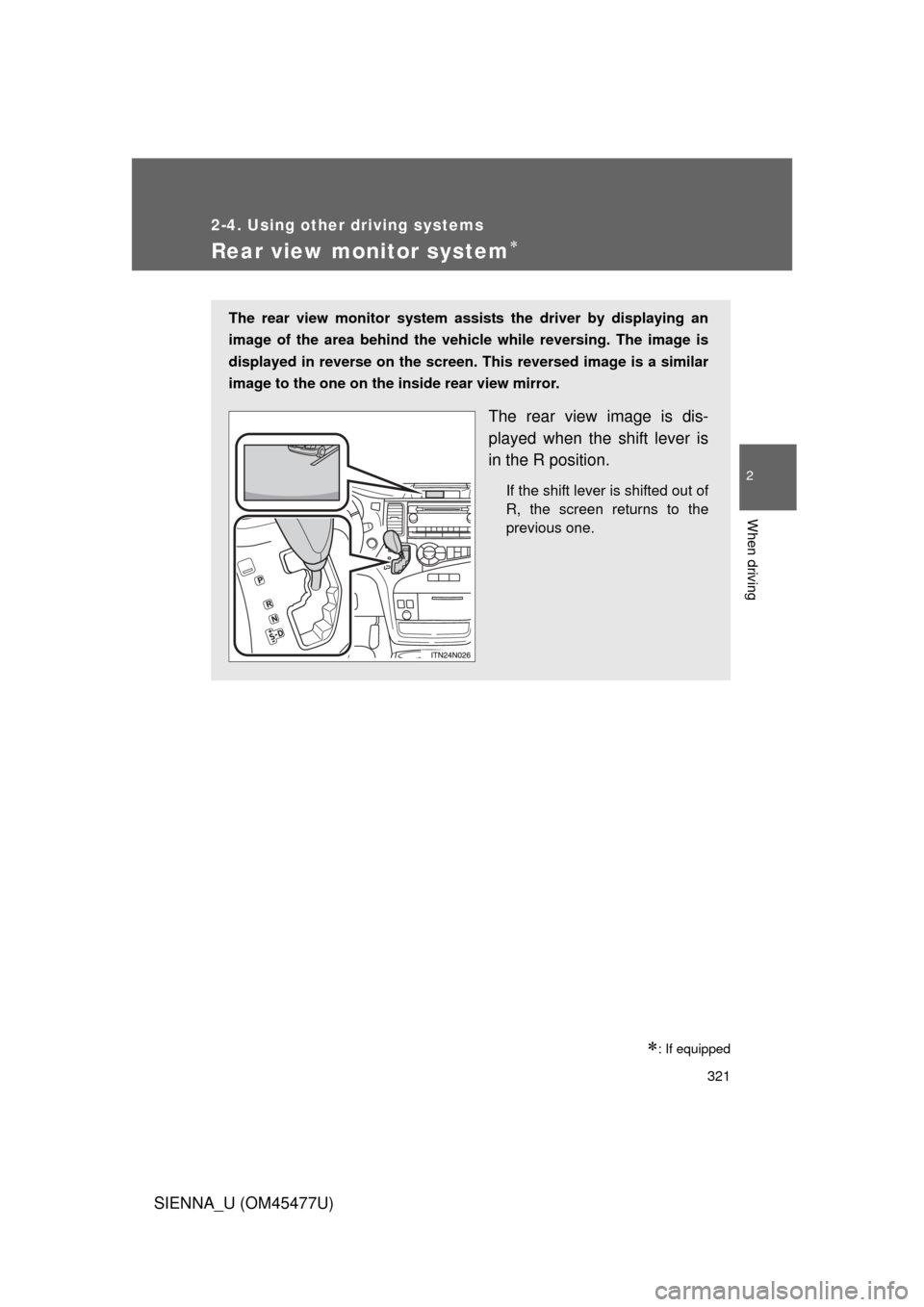
The rear view image is dis-
played when the shift lever is
in the R position.
If the shift lever is shifted out of
R, the screen returns to the
previous one.
Page 322 of 860
322 2-4. Using other driving systems
SIENNA_U (OM45477U)
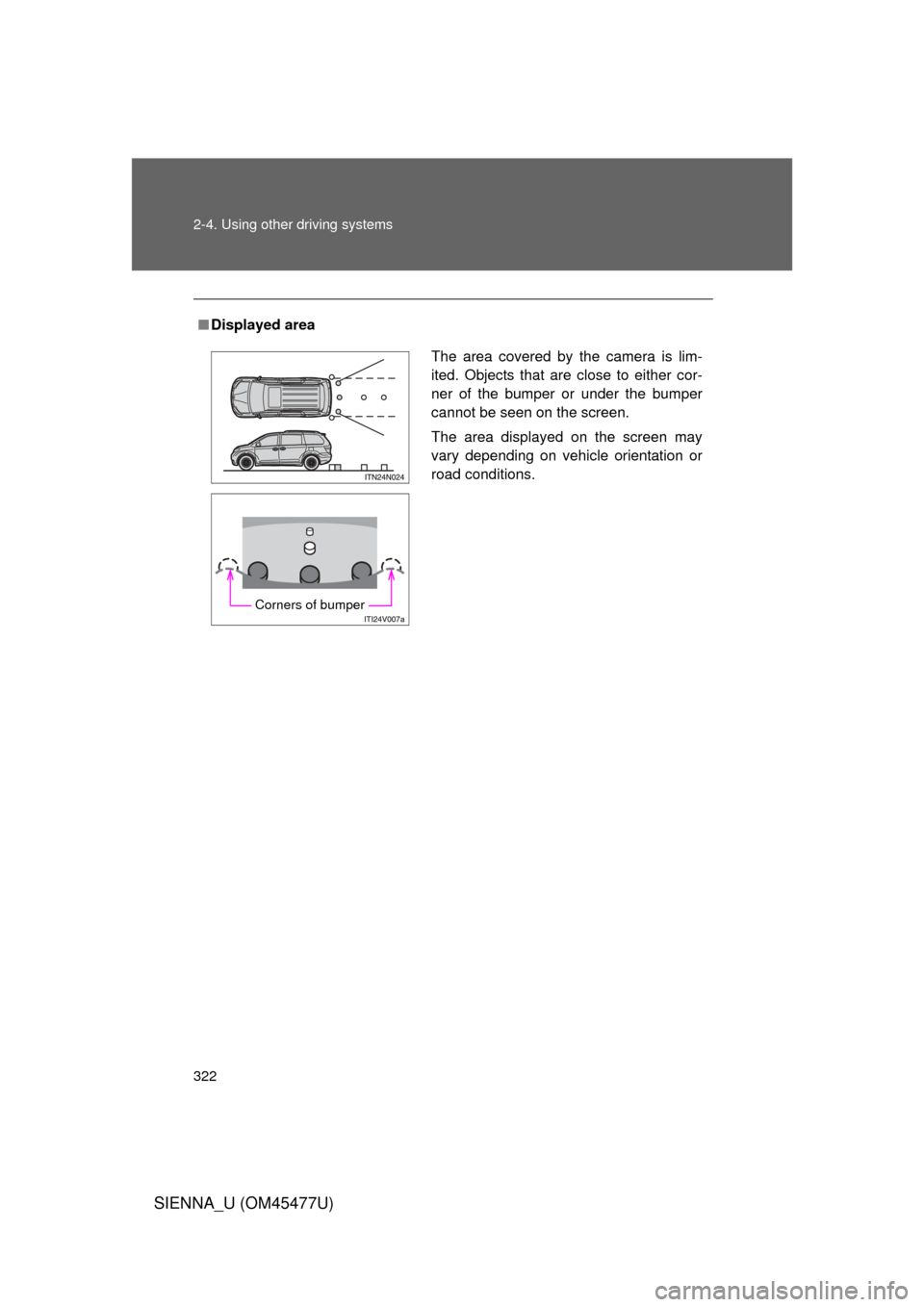
■Displayed area
The area covered by the camera is lim-
ited. Objects that are close to either cor-
ner of the bumper or under the bumper
cannot be seen on the screen.
The area displayed on the screen may
vary depending on vehicle orientation or
road conditions.
Corners of bumper
Page 325 of 860
325
2-4. Using other
driving systems
2
When driving
SIENNA_U (OM45477U)
■Setting the rear view monitor system displays
Vehicles with navigation system
“NAVIGATION SYSTEM OWNER’S MANUAL”
Vehicles without navigation system
P. 259
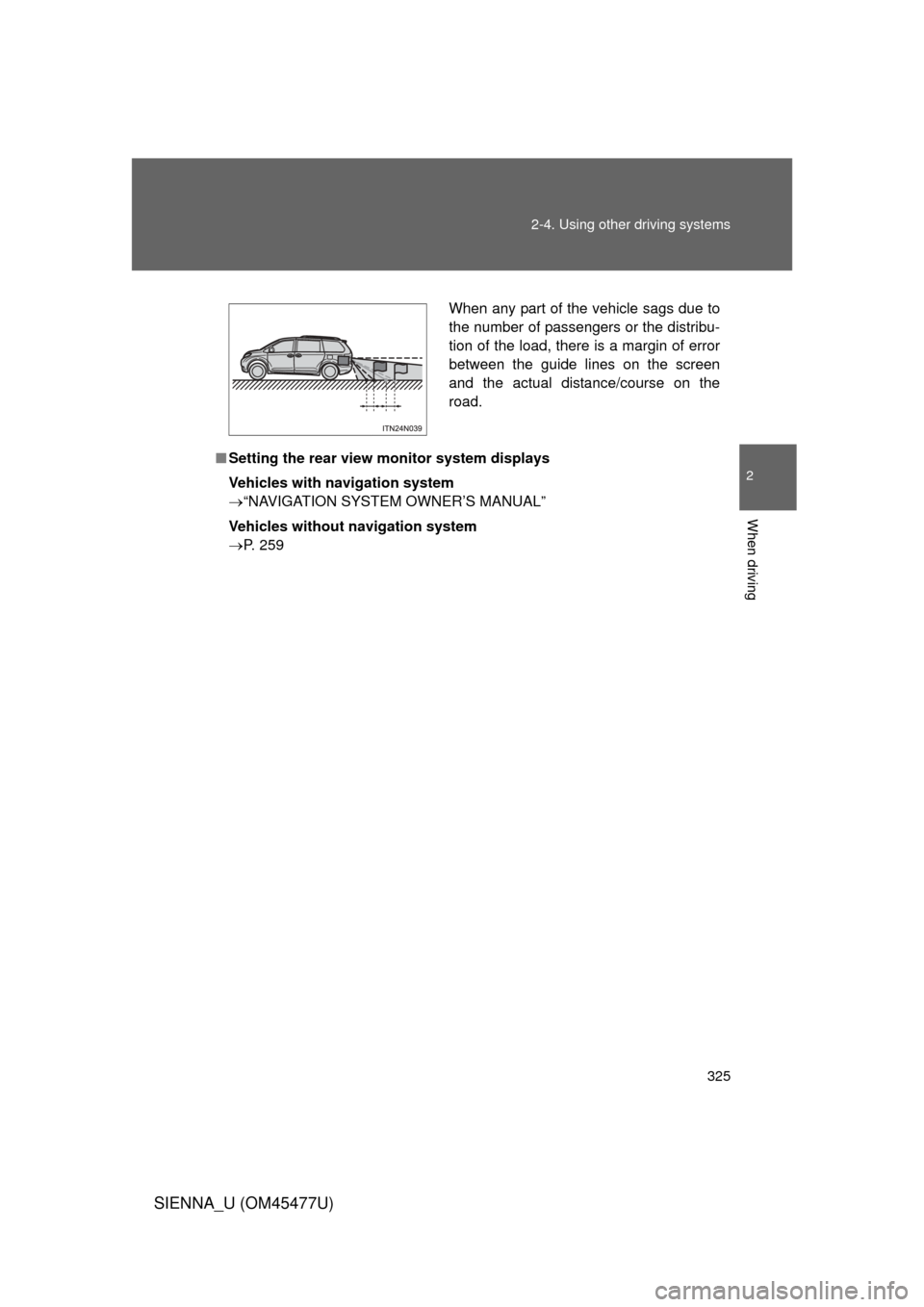
When any part of the vehicle sags due to
the number of passengers or the distribu-
tion of the load, there is a margin of error
between the guide lines on the screen
and the actual distance/course on the
road.
Page 326 of 860
326 2-4. Using other driving systems
SIENNA_U (OM45477U)
CAUTION
■When using the rear view monitor system
Observe the following precautions to avoid an accident that could result in
death or serious injuries:
● Never depend solely on the monitor system when reversing.
● Always check visually and with the mirrors to confirm your intended path is
clear.
● Depicted distances between objects and flat surfaces differ from actual
distances.
● Do not use the system if the back door is open.
■ Conditions which may affect the rear view monitor system
● If the back of the vehicle has been hit, the camera’s position and mounting
angle may have changed. Have the vehicle inspected by your Toyota
dealer.
● Rapid temperature changes, such as when hot water is poured on the
vehicle in cold weather, may cause the system to function abnormally.
● If the camera lens is dirty, it cannot transmit a clear image. Rinse with
water and wipe with a soft cloth. If the camera lens is extremely dirty, wash
with a mild cleanser and rinse.
● The displayed image may be darker and moving images may be slightly
distorted when the system is cold.
● When washing the vehicle, do not apply intensive bursts of water to the
camera or camera area. Doing so may result in the camera malfunction.
● Do not scrub the lens strongly or polish the lens using stiff brushes or
abrasive cleansers. Doing so could scratch the lens and affect the image.
● Do not allow organic solvent, car wax, window cleaner or glass coat to
adhere to the camera. If this happens, wipe it off as soon as possible.
Page 389 of 860
389
3-1. Using the air conditioning system
and defogger
3
Interior features
SIENNA_U (OM45477U)
Using the automatic mode
Press .
The air conditioning system will begin to operate. In outside air or
recirculated air mode, air outlets, fan speed and air conditioning on/
off are automatically adjusted according to the temperature setting.
“AUTO” will be displayed on the multi-information display.
Turn the temperature control dial clockwise (warm) or coun-
terclockwise (cool).
The temperature for the driver and passenger seat can be set sepa-
rately.
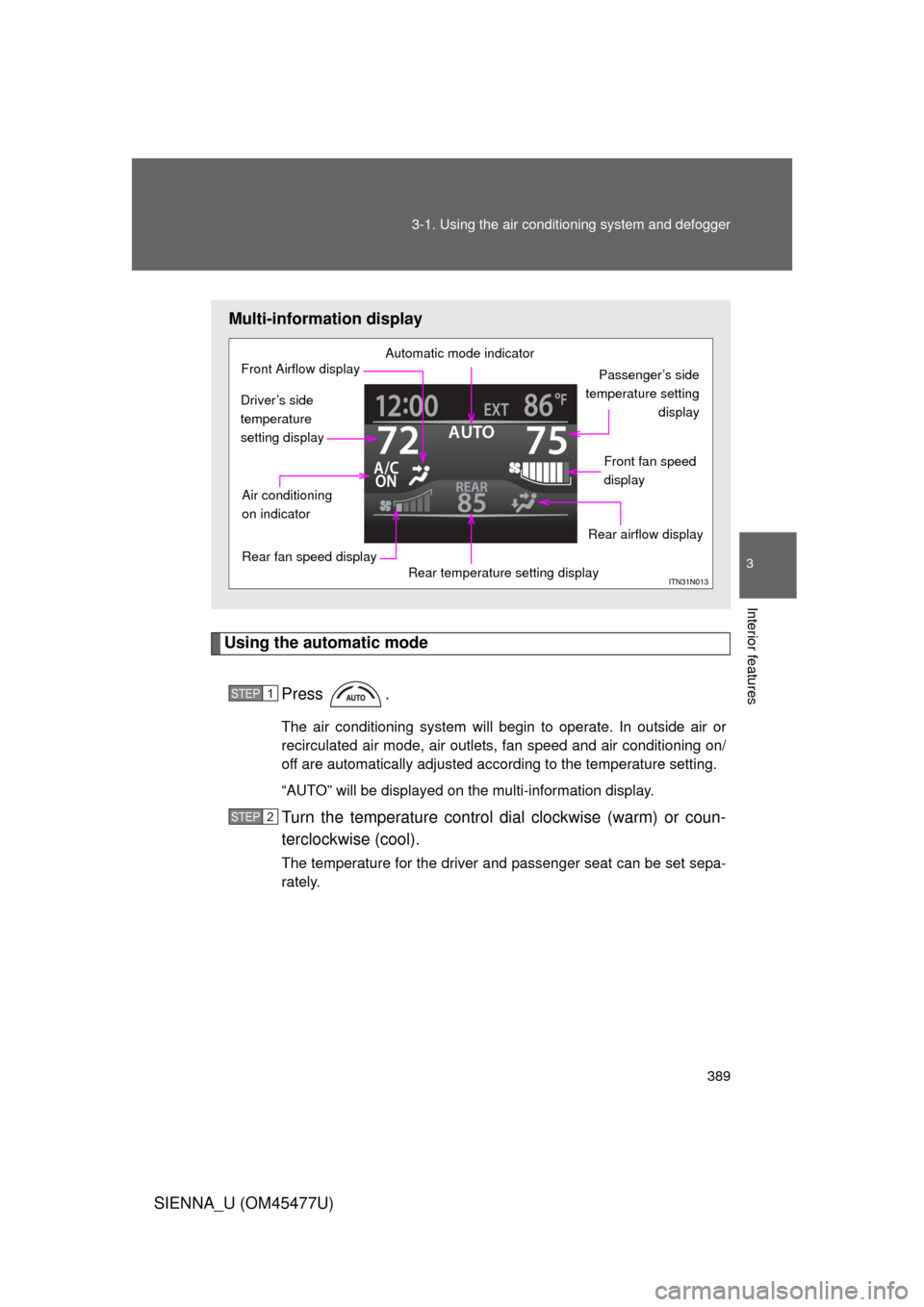
Multi-information display
Automatic mode indicator
Passenger’s side
temperature setting display
Front fan speed
display
Rear airflow display
Rear temperature setting display
Rear fan speed display
Air conditioning
on indicator
Front Airflow display
Driver’s side
temperature
setting display
STEP1
STEP2
Page 390 of 860
390 3-1. Using the air conditioning system and defogger
SIENNA_U (OM45477U)
Adjusting the settings
■ Adjusting the temperature setting
Turn the temperature control dial clockwise (warm) or counter-
clockwise (cool).
The air conditioning system switch es between individual and simulta-
neous modes each time is pressed.
Individual mode: The temperature for the driver’s, passenger’s and rear seats can be set separately. Operating the passenger’s
side or rear temperature control will enter individual
mode.
Simultaneous mode: Only the temperature control dial (driver’s side) can be used to adjust the temperature for all seats.
■Adjusting the fan speed
Press “ ” (increase) or “ ” (decrease) on .
The fan speed is shown on the display. (7 levels)
Press to turn the fan off.