Page 265 of 860
265
2-2. Instrument cluster and information display
2
When driving
SIENNA_U (OM45477U)
■
System check display
Vehicles without a smart key system
After switching the engine switch to the “ON” position, “SIENNA” is dis-
played while system operation is checked. When the system check is
complete, the normal screen will return.
Vehicles with a smart key system After switching the “ENGINE START STOP” switch to IGNITION ON
mode, “SIENNA” is displayed while system operation is checked. When
the system check is complete, the normal screen will return.
■ When “--”, “E” or “F” is displayed on the outside temperature display
The system may be malfunctioning. Take your vehicle to your Toyota dealer.
■ Outside temperature display
In the following situations, the correct outside temperature may not be dis-
played, or the display may take longer than normal to change.
● When stopped, or driving at low speeds (less than 12 mph [20 km/h])
● When the outside temperature has changed suddenly (at the entrance/
exit of a garage, tunnel, etc.)
NOTICE
■The multi-information disp lay at low temperatures
Allow the interior of the vehicle to warm up before using the liquid crystal
information display. At extremely low temperatures, the information display
monitor may respond slowly, and display changes may be delayed.
Page 272 of 860
272 2-3. Operating the lights and wipers
SIENNA_U (OM45477U)
■Customization that can be configured at Toyota dealer or by the multi-
information display
Settings (e.g. light sensor sensitivity) can be changed.
(Customizable features P. 815)
NOTICE
■To prevent battery discharge
Do not leave the lights on longer than necessary when the engine is not run-
ning.
Page 278 of 860
278 2-3. Operating the lights and wipers
SIENNA_U (OM45477U)
■If the Automatic High Beam indicator flashes...
It may indicate a malfunction in the system. Contact your Toyota dealer.
■ Customization that can be configured at Toyota dealer or by the multi-
information display
The Automatic High Beam can be turned off.
(Customizable features P. 815)
■ Temporary lowering sensor sensitivity
The sensitivity of the sensor can be temporarily lowered.
To lower the sensitivity, push and hold on the inside rear view mirror
for 15 to 20 seconds, and release. The indicator light on the inside rear view
mirror will flash to indicate that the sensitivity has been lowered.
Vehicles without a smart key system:
When the engine switch is turned to the “LOCK” position, the sensitivity will
be returned to its normal level.
Vehicles with a smart key system:
When the “ENGINE START STOP” switch is turned off, the sensitivity will be
returned to its normal level.
Page 298 of 860
298
2-4. Using other driving systems
SIENNA_U (OM45477U)
Dynamic radar cruise control
: If equipped
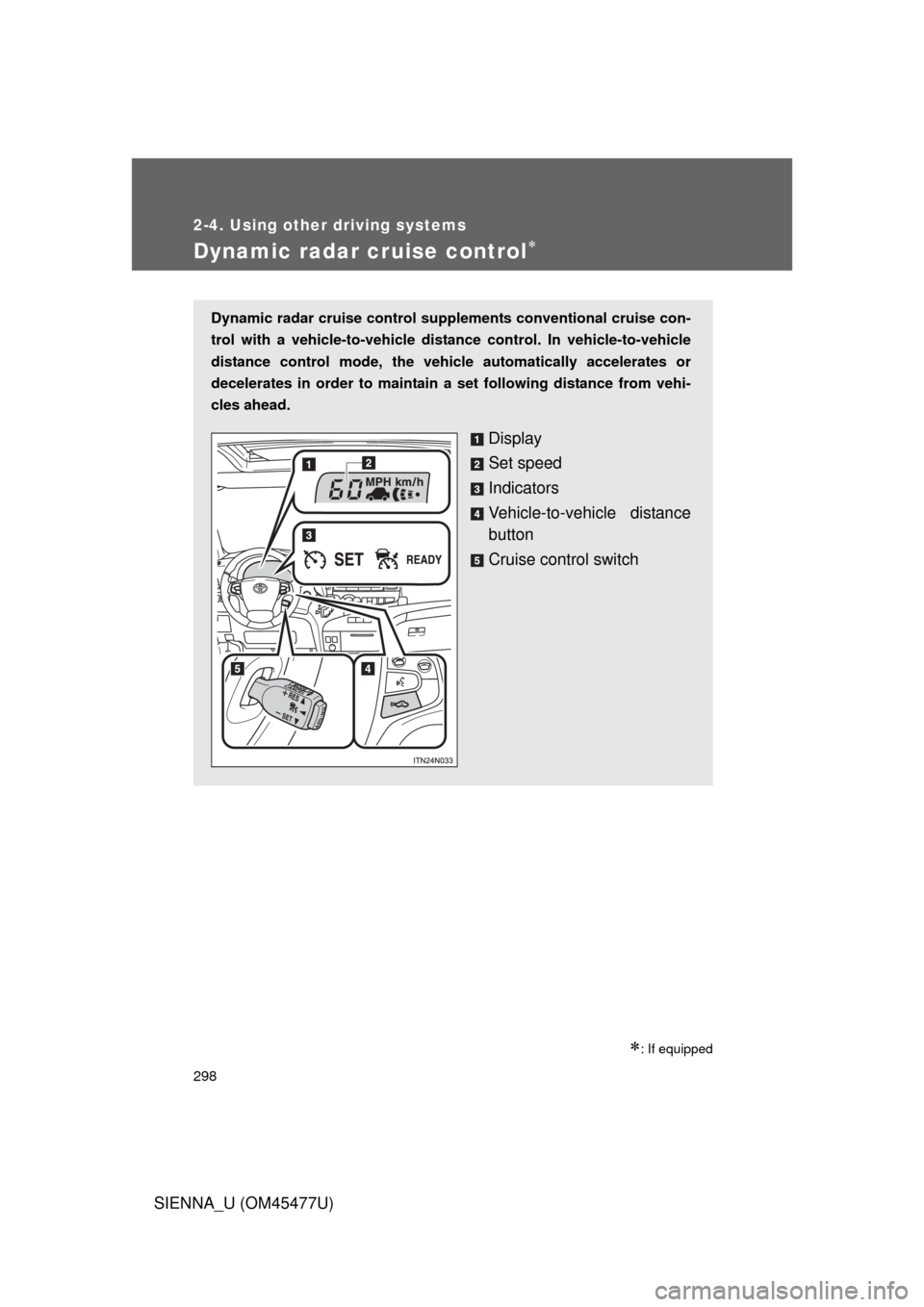
Dynamic radar cruise control supplements conventional cruise con-
trol with a vehicle-to-vehicle dist ance control. In vehicle-to-vehicle
distance control mode, the vehicle automatically accelerates or
decelerates in order to maintain a set following distance from vehi-
cles ahead.
Display
Set speed
Indicators
Vehicle-to-vehicle distance
button
Cruise control switch
Page 300 of 860
300 2-4. Using other driving systems
SIENNA_U (OM45477U)
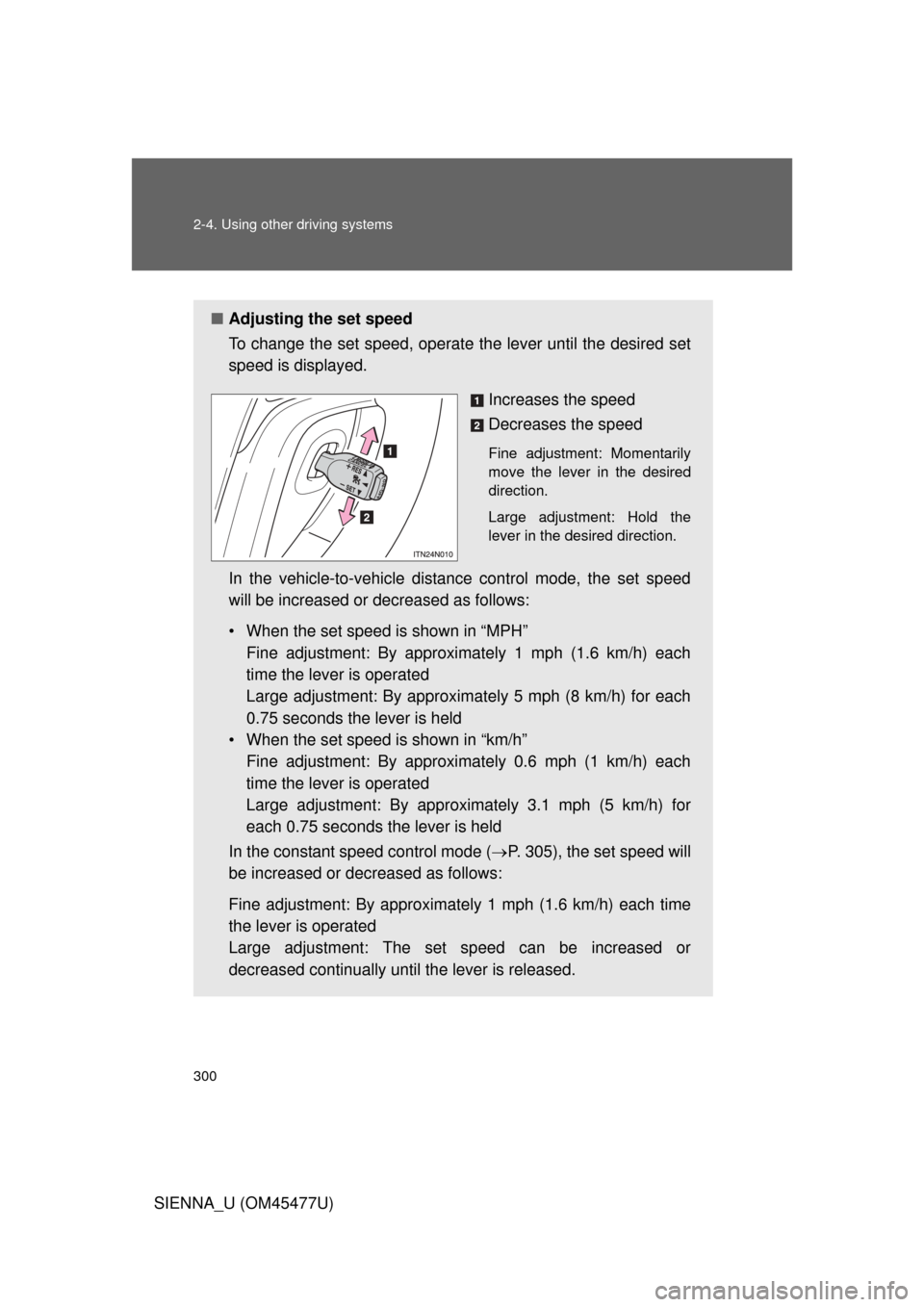
■Adjusting the set speed
To change the set speed, operate the lever until the desired set
speed is displayed.
Increases the speed
Decreases the speed
Fine adjustment: Momentarily
move the lever in the desired
direction.
Large adjustment: Hold the
lever in the desired direction.
In the vehicle-to-vehicle distance control mode, the set speed
will be increased or decreased as follows:
• When the set speed is shown in “MPH”Fine adjustment: By approximately 1 mph (1.6 km/h) each
time the lever is operated
Large adjustment: By approximat ely 5 mph (8 km/h) for each
0.75 seconds the lever is held
• When the set speed is shown in “km/h” Fine adjustment: By approximately 0.6 mph (1 km/h) each
time the lever is operated
Large adjustment: By approximately 3.1 mph (5 km/h) for
each 0.75 seconds the lever is held
In the constant speed control mode ( P. 305), the set speed will
be increased or decreased as follows:
Fine adjustment: By approximat ely 1 mph (1.6 km/h) each time
the lever is operated
Large adjustment: The set speed can be increased or
decreased continually until the lever is released.
Page 301 of 860
301
2-4. Using other
driving systems
2
When driving
SIENNA_U (OM45477U)
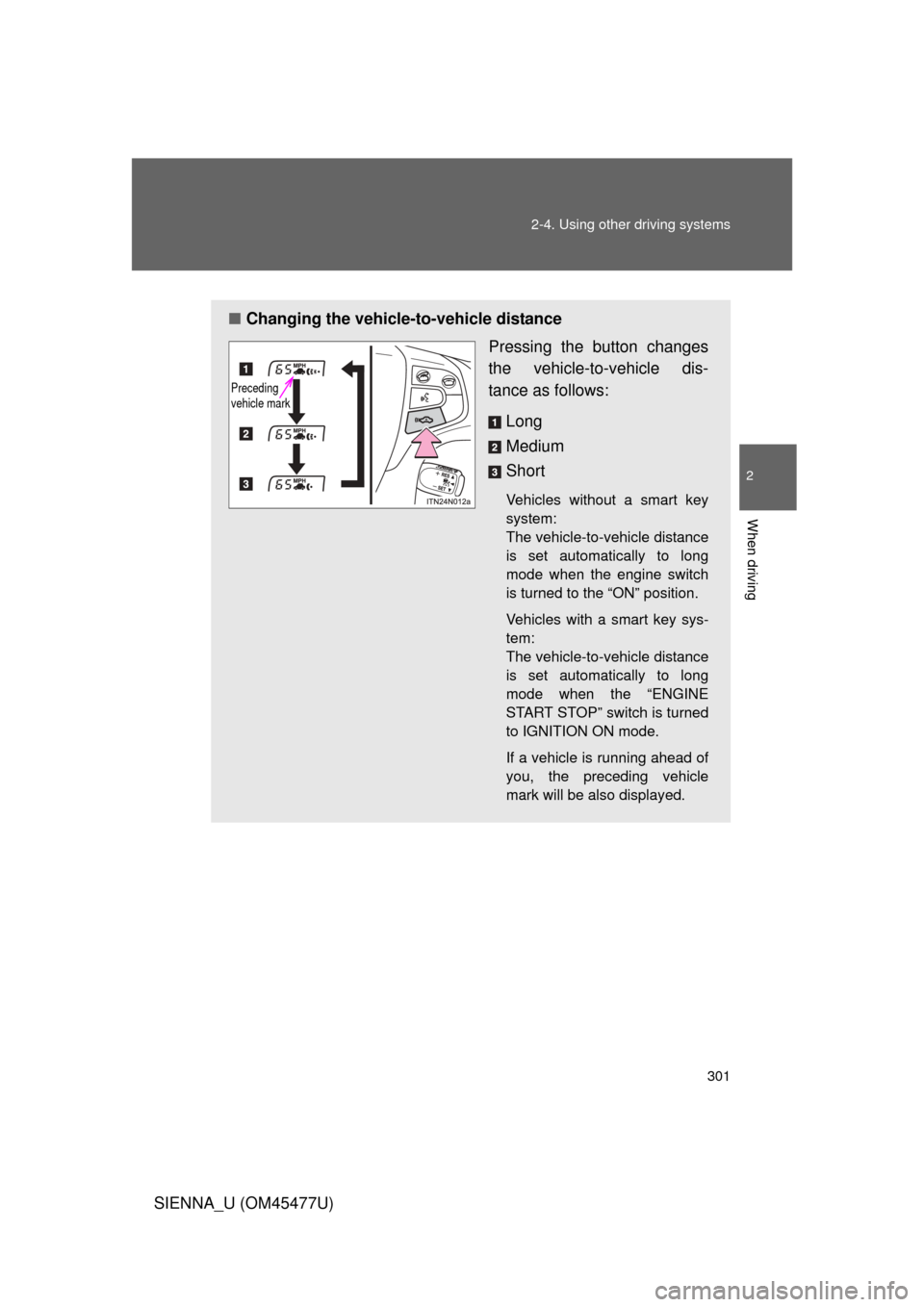
■Changing the vehicle -to-vehicle distance
Pressing the button changes
the vehicle-to-vehicle dis-
tance as follows:
Long
Medium
Short
Vehicles without a smart key
system:
The vehicle-to-vehicle distance
is set automatically to long
mode when the engine switch
is turned to the “ON” position.
Vehicles with a smart key sys-
tem:
The vehicle-to-vehicle distance
is set automatically to long
mode when the “ENGINE
START STOP” switch is turned
to IGNITION ON mode.
If a vehicle is running ahead of
you, the preceding vehicle
mark will be also displayed.
Preceding
vehicle mark
Page 314 of 860
314
2-4. Using other driving systems
SIENNA_U (OM45477U)
Intuitive parking assist
: If equipped
The distance from your vehicle to nearby obstacles when parallel
parking or maneuvering into a garage is measured by the sensors
and communicated via the multi- information display, the touch
screen and a buzzer. Always check the surrounding area when using
this system.
■ Types of sensors
Front corner sensors (if
equipped)
Rear corner sensors
Rear center sensors
■ Intuitive parking assist switch
Turns the intuitive parking
assist on/off
When on, the indicator light
comes on and the buzzer
sounds to inform the driver
that the system is operational.
Page 315 of 860
315
2-4. Using other
driving systems
2
When driving
SIENNA_U (OM45477U)
Display
When the sensors detect an obstacle, a graphic is shown on the multi
information display or touch screen depending on the position and
distance to the obstacle.
Multi-information display
Touch screen (with navigation system)
*
*
: Depending on the type of navigation system.