Page 3 of 860

1
2
3
4
5
6
7
3
SIENNA_U (OM45477U)
2-1. Driving proceduresDriving the vehicle............... 212
Engine (ignition) switch (vehicles without smart
key system)....................... 226
Engine (ignition) switch (vehicles with smart key
system) ............................. 229
Automatic transaxle ............ 236
Turn signal lever ................. 241
Parking brake ...................... 242
Horn .................................... 243
2-2. Inst rument cluster and
information display
Gauges and meters ............ 244
Indicators and warning lights ................................. 247
Multi-information display ..... 252 2-3. Operating the li
ghts and
wipers
Headlight switch ................. 266
Automatic High Beam......... 273
Fog light switch................... 280
Windshield wipers and washer.............................. 282
Rear window wiper and washer.............................. 290
2-4. Using other driving systems Cruise control ..................... 293
Dynamic radar cruise control .............................. 298
Intuitive parking assist ........ 314
Rear view monitor system .............................. 321
Driving assist systems ........ 327
Hill-start assist control ........ 333
PCS (Pre-Collision System) ..... 336
2-5. Driving information Cargo and luggage ............. 343
Vehicle load limits............... 351
Winter driving tips ............... 352
Trailer towing (with towing package) ...... 356
Dinghy towing ..................... 376
2When driving
Page 17 of 860
SIENNA_U (OM45477U)
17
A
: If equipped
*: Refer to “NAVIGATION SYSTEM OWNER’S MANUAL”.
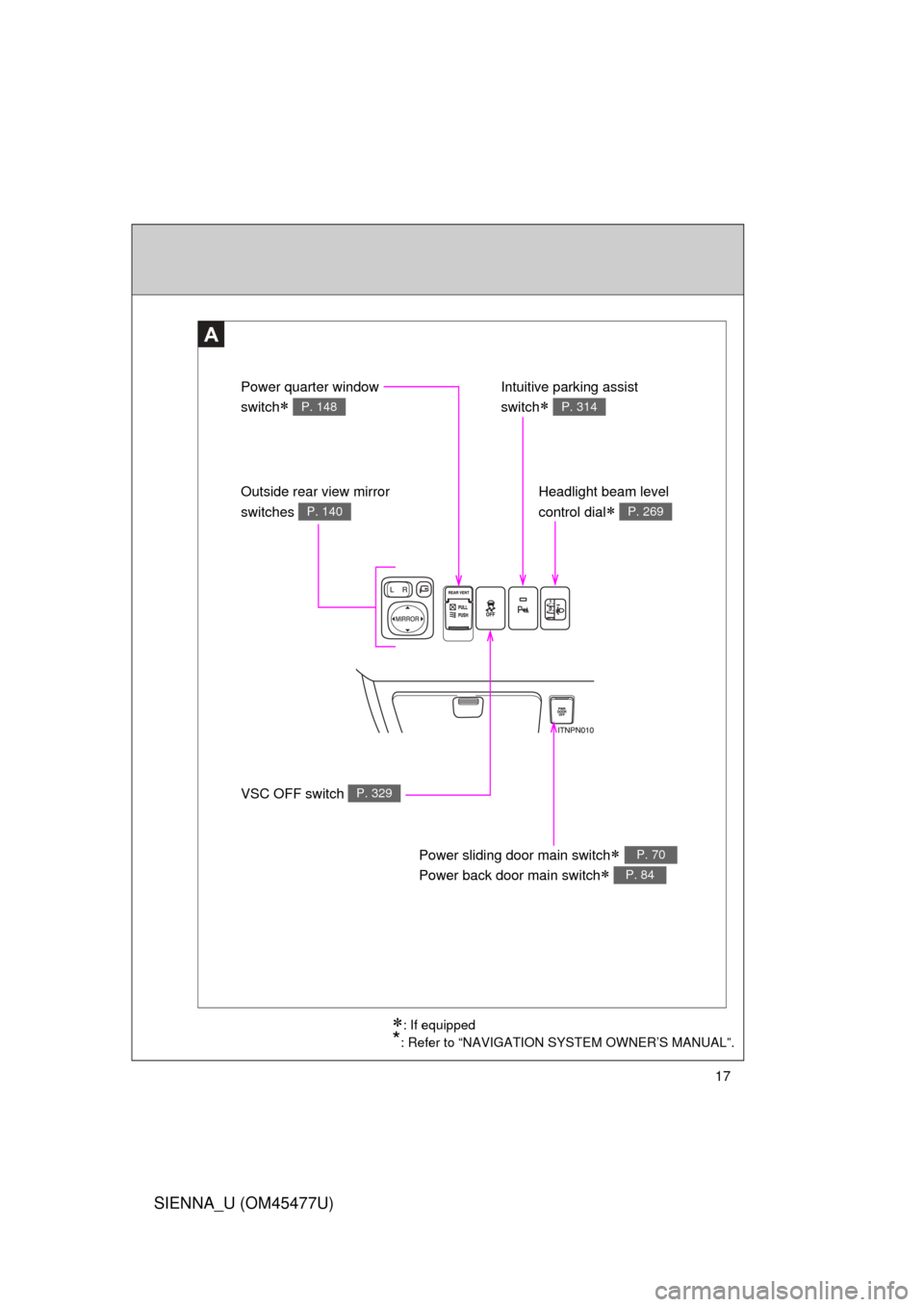
VSC OFF switch P. 329
Outside rear view mirror
switches
P. 140
Power quarter window
switch
P. 148
Intuitive parking assist
switch
P. 314
Headlight beam level
control dial
P. 269
Power sliding door main switch
Power back door main switch
P. 70
P. 84
Page 211 of 860
When driving2
211
SIENNA_U (OM45477U)
2-1. Driving proceduresDriving the vehicle............ 212
Engine (ignition) switch (vehicles without smart
key system).................... 226
Engine (ignition) switch (vehicles with smart key
system) .......................... 229
Automatic transaxle ......... 236
Turn signal lever .............. 241
Parking brake ................... 242
Horn ................................. 243
2-2. Instrument cluster and information display
Gauges and meters ......... 244
Indicators and warning lights .............................. 247
Multi-information display............................ 252
2-3. Operating the lights and wipers
Headlight switch ............... 266
Automatic High Beam ...... 273
Fog light switch ................ 280
Windshield wipers and washer ........................... 282
Rear window wiper and washer ........................... 290 2-4. Using other driving systems
Cruise control ................... 293
Dynamic radar cruise control ............................ 298
Intuitive parking assist...... 314
Rear view monitor system ........................... 321
Driving assist systems ..... 327
Hill-start assist control ...... 333
PCS (Pre-Collision System) ... 336
2-5. Driving information Cargo and luggage .......... 343
Vehicle load limits ............ 351
Winter driving tips ............ 352
Trailer towing (with towing package) .... 356
Dinghy towing .................. 376
Page 223 of 860
223
2-1. Driving procedures
2
When driving
SIENNA_U (OM45477U)
CAUTION
■
When taking a nap in the vehicle
Always turn the engine off. Otherwise, if you accidentally move the shift lever
or depress the accelerator pedal, this could cause an accident or fire due to
engine overheating. Additionally, if the vehicle is parked in a poorly venti-
lated area, exhaust gases may collect and enter the vehicle, leading to
death or a serious health hazard.
■ When braking
● When the brakes are wet, drive more cautiously.
Braking distance increases when the brakes are wet, and this may cause
one side of the vehicle to brake differently than the other side. Also the
parking brake may not securely hold the vehicle.
● If the power brake assist function does not operate, do not follow other
vehicles closely and avoid hills or sharp turns that require braking.
In this case, braking is still possible, but the brake pedal should be
depressed more firmly than usual. Also, the braking distance will increase.
● Do not pump the brake pedal if the engine stalls.
Each push on the brake pedal uses up the reserve for the power-assisted
brakes.
● The brake system consists of 2 individual hydraulic systems: If one of the
systems fails, the other will still operate. In this case, the brake pedal
should be depressed more firmly than usual and braking distance will
increase.
If this happens, do not continue to drive the vehicle. Have your brakes
fixed immediately.
■ If the vehicle becomes stuck (AWD models)
Do not spin the wheels excessively when any of the tires is up in the air, or
the vehicle is stuck in sand or mud, etc. This may damage the driveline com-
ponents or unexpectedly propel the vehicle forward or backward, causing an
accident.
Page 252 of 860
252
2-2. Instrument cluster and information display
SIENNA_U (OM45477U)
Multi-information display
: If equipped
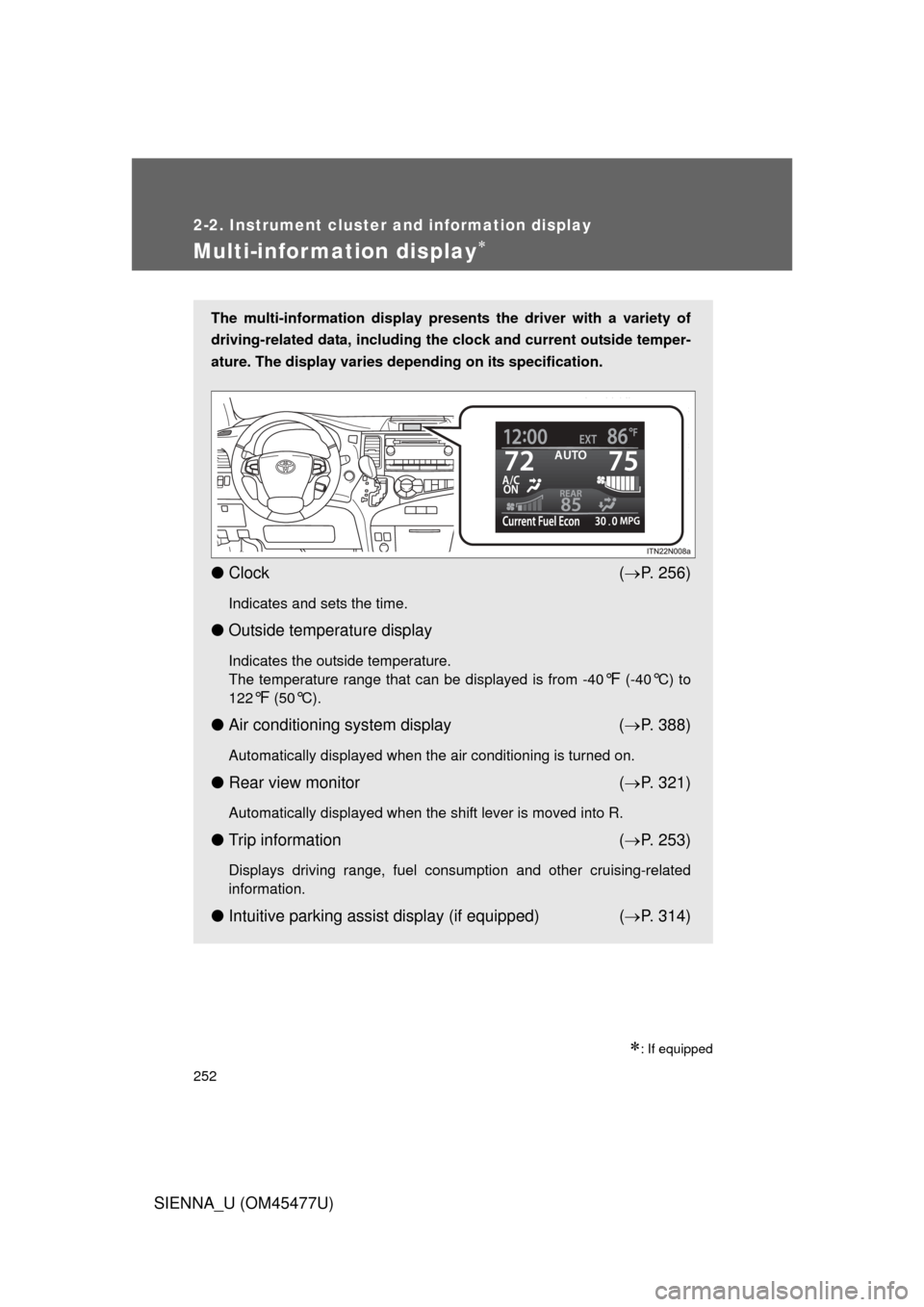
The multi-information display presents the driver with a variety of
driving-related data, including the clock and current outside temper-
ature. The display varies depending on its specification.
● Clock ( P. 256)
Indicates and sets the time.
● Outside temperature display
Indicates the outside temperature.
The temperature range that can be displayed is from -40
°F (-40°C) to
122
°F (50°C).
● Air conditioning system display ( P. 388)
Automatically displayed when the air conditioning is turned on.
● Rear view monitor ( P. 321)
Automatically displayed when the shift lever is moved into R.
● Trip information ( P. 253)
Displays driving range, fuel consumption and other cruising-related
information.
● Intuitive parking assist display (if equipped) ( P. 314)
Page 314 of 860
314
2-4. Using other driving systems
SIENNA_U (OM45477U)
Intuitive parking assist
: If equipped
The distance from your vehicle to nearby obstacles when parallel
parking or maneuvering into a garage is measured by the sensors
and communicated via the multi- information display, the touch
screen and a buzzer. Always check the surrounding area when using
this system.
■ Types of sensors
Front corner sensors (if
equipped)
Rear corner sensors
Rear center sensors
■ Intuitive parking assist switch
Turns the intuitive parking
assist on/off
When on, the indicator light
comes on and the buzzer
sounds to inform the driver
that the system is operational.
Page 318 of 860
318 2-4. Using other driving systems
SIENNA_U (OM45477U)
Detection range of the sensorsApproximately 2.0 ft. (60 cm)
Approximately 2.8 ft. (85 cm)
Approximately 5.9 ft. (180 cm)
The diagram shows the detection
range of the sensors. Note that
the sensors cannot detect obsta-
cles that are extremely close to
the vehicle.
The range of the sensors may
change depending on the shape
of the object etc.
*: if equipped
*
■Intuitive parking assist can be operated when
Vehicles without a smart key system: The engine switch is in the “ON” posi-
tion.
Vehicles with a smart key system: The “ENGINE START STOP” switch is in
IGNITION ON mode.
● Front corner sensors:
• The shift lever is not in P.
• The vehicle speed is approximately 6 mph (10 km/h) or less.
● Rear corner and back sensors:
The shift lever is in R.
Page 319 of 860

319
2-4. Using other
driving systems
2
When driving
SIENNA_U (OM45477U)
■Sensor detection information
● Certain vehicle conditions and the surrounding environment may affect
the ability of the sensor to correctly detect obstacles. Particular instances
where this may occur are listed below.
• There is dirt, snow or ice on the sensor.
• The sensor is frozen.
• The sensor is covered in any way.
• The vehicle is leaning considerably to one side.
• On an extremely bumpy road, on an incline, on gravel, or on grass
• The vicinity of the vehicle is noisy due to vehicle horns, motorcycle
engines, air brakes of large vehicles, or other loud noises producing
ultrasonic waves.
• There is another vehicle equipped with parking assist sensors in the vicinity.
• A sensor is coated with a sheet of spray or heavy rain.
• The vehicle is equipped with a fender pole or radio antenna.
• A bumper or sensor receives a strong impact.
• The vehicle is approaching a tall or right-angled curb.
• In harsh sunlight or intense cold weather
In addition to the examples above, there are instances in which, because of
their shapes, signs and other objects may be judged by the sensor to be
closer than they are.
● The shape of the obstacle may prevent the sensor from detecting it. Pay
particular attention to the following obstacles:
• Wires, fences, ropes etc.
• Cotton, snow and other materials that absorb sound waves
• Sharply-angled objects
• Low obstacles
• Tall obstacles with upper sections projecting outwards in the direction
of your vehicle