Page 3 of 860

1
2
3
4
5
6
7
3
SIENNA_U (OM45477U)
2-1. Driving proceduresDriving the vehicle............... 212
Engine (ignition) switch (vehicles without smart
key system)....................... 226
Engine (ignition) switch (vehicles with smart key
system) ............................. 229
Automatic transaxle ............ 236
Turn signal lever ................. 241
Parking brake ...................... 242
Horn .................................... 243
2-2. Inst rument cluster and
information display
Gauges and meters ............ 244
Indicators and warning lights ................................. 247
Multi-information display ..... 252 2-3. Operating the li
ghts and
wipers
Headlight switch ................. 266
Automatic High Beam......... 273
Fog light switch................... 280
Windshield wipers and washer.............................. 282
Rear window wiper and washer.............................. 290
2-4. Using other driving systems Cruise control ..................... 293
Dynamic radar cruise control .............................. 298
Intuitive parking assist ........ 314
Rear view monitor system .............................. 321
Driving assist systems ........ 327
Hill-start assist control ........ 333
PCS (Pre-Collision System) ..... 336
2-5. Driving information Cargo and luggage ............. 343
Vehicle load limits............... 351
Winter driving tips ............... 352
Trailer towing (with towing package) ...... 356
Dinghy towing ..................... 376
2When driving
Page 41 of 860

41
1-2. Opening, closing and locking the doors
1
Before driving
SIENNA_U (OM45477U)
■
Alarms and warning indicators
A combination of exterior and interior alarms as well as warnings shown on
the multi-information display are used to prevent theft of the vehicle and
unforeseeable accidents resulting from erroneous operation. Perform the
appropriate correction procedure described in the following table.
AlarmSituationCorrection procedure
Interior alarm
pings once and
exterior alarm
sounds once for
10 seconds An attempt was made to
lock the doors using the
entry function while the
electronic key was still
inside the passenger com-
partment
Retrieve the elec-
tronic key from the
passenger compart-
ment and lock the
doors again
An attempt was made to
exit the vehicle and lock
the doors without first turn-
ing the “ENGINE START
STOP” switch off Turn the “ENGINE
START STOP” switch
off and lock the doors
again
Exterior alarm
sounds once for
10 seconds An attempt was made to
lock the vehicle while a
door is open Close all of the doors
and lock the doors
again
Page 211 of 860
When driving2
211
SIENNA_U (OM45477U)
2-1. Driving proceduresDriving the vehicle............ 212
Engine (ignition) switch (vehicles without smart
key system).................... 226
Engine (ignition) switch (vehicles with smart key
system) .......................... 229
Automatic transaxle ......... 236
Turn signal lever .............. 241
Parking brake ................... 242
Horn ................................. 243
2-2. Instrument cluster and information display
Gauges and meters ......... 244
Indicators and warning lights .............................. 247
Multi-information display............................ 252
2-3. Operating the lights and wipers
Headlight switch ............... 266
Automatic High Beam ...... 273
Fog light switch ................ 280
Windshield wipers and washer ........................... 282
Rear window wiper and washer ........................... 290 2-4. Using other driving systems
Cruise control ................... 293
Dynamic radar cruise control ............................ 298
Intuitive parking assist...... 314
Rear view monitor system ........................... 321
Driving assist systems ..... 327
Hill-start assist control ...... 333
PCS (Pre-Collision System) ... 336
2-5. Driving information Cargo and luggage .......... 343
Vehicle load limits ............ 351
Winter driving tips ............ 352
Trailer towing (with towing package) .... 356
Dinghy towing .................. 376
Page 247 of 860
247
2-2. Instrument cluster and information display
2
When driving
SIENNA_U (OM45477U)
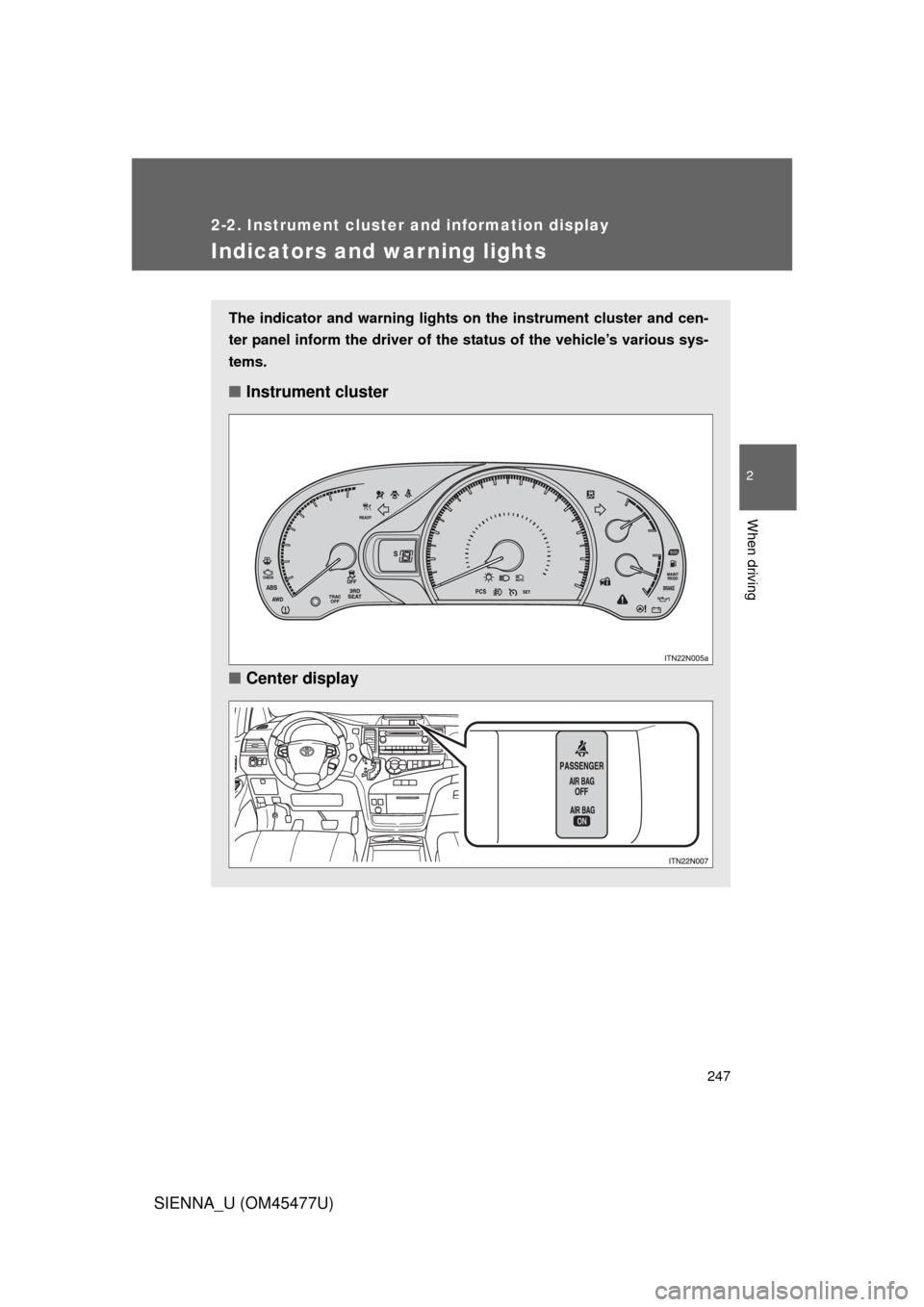
Indicators and warning lights
The indicator and warning lights on the instrument cluster and cen-
ter panel inform the driver of the status of the vehicle’s various sys-
tems.
■ Instrument cluster
■ Center display
Page 248 of 860
248 2-2. Instrument cluster and information display
SIENNA_U (OM45477U)
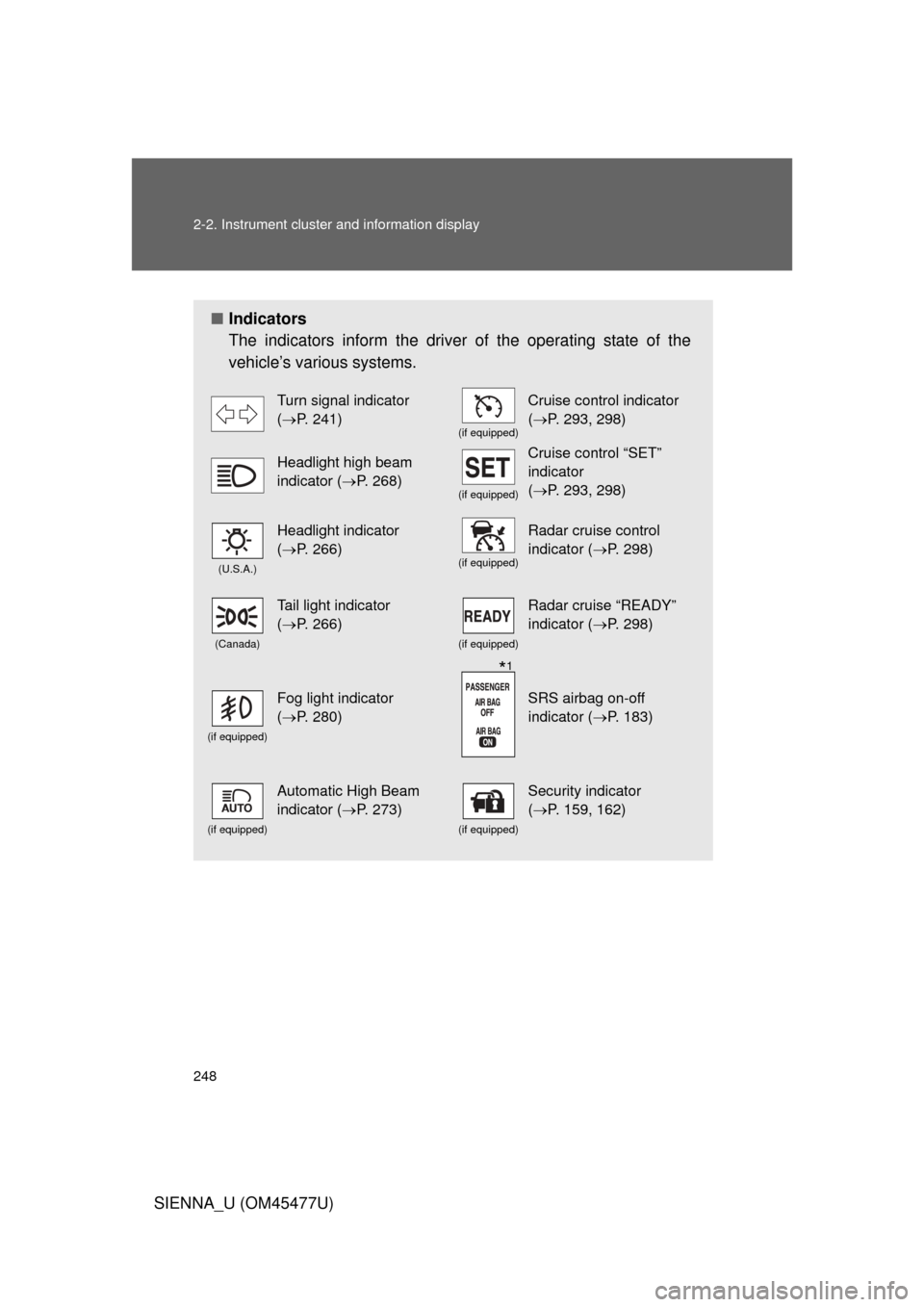
■Indicators
The indicators inform the driver of the operating state of the
vehicle’s various systems.
Turn signal indicator
(P. 241)
(if equipped)
Cruise control indicator
(P. 293, 298)
Headlight high beam
indicator ( P. 268)
(if equipped)
Cruise control “SET”
indicator
(P. 293, 298)
(U.S.A.)
Headlight indicator
(P. 266)
(if equipped)
Radar cruise control
indicator ( P. 298)
(Canada)
Tail light indicator
(P. 266)
(if equipped)
Radar cruise “READY”
indicator ( P. 298)
(if equipped)
Fog light indicator
(P. 280)SRS airbag on-off
indicator ( P. 183)
(if equipped)
Automatic High Beam
indicator (P. 273)
(if equipped)
Security indicator
(P. 159, 162)
*1
Page 249 of 860
249
2-2. Instrument cluster and information display
2
When driving
SIENNA_U (OM45477U)
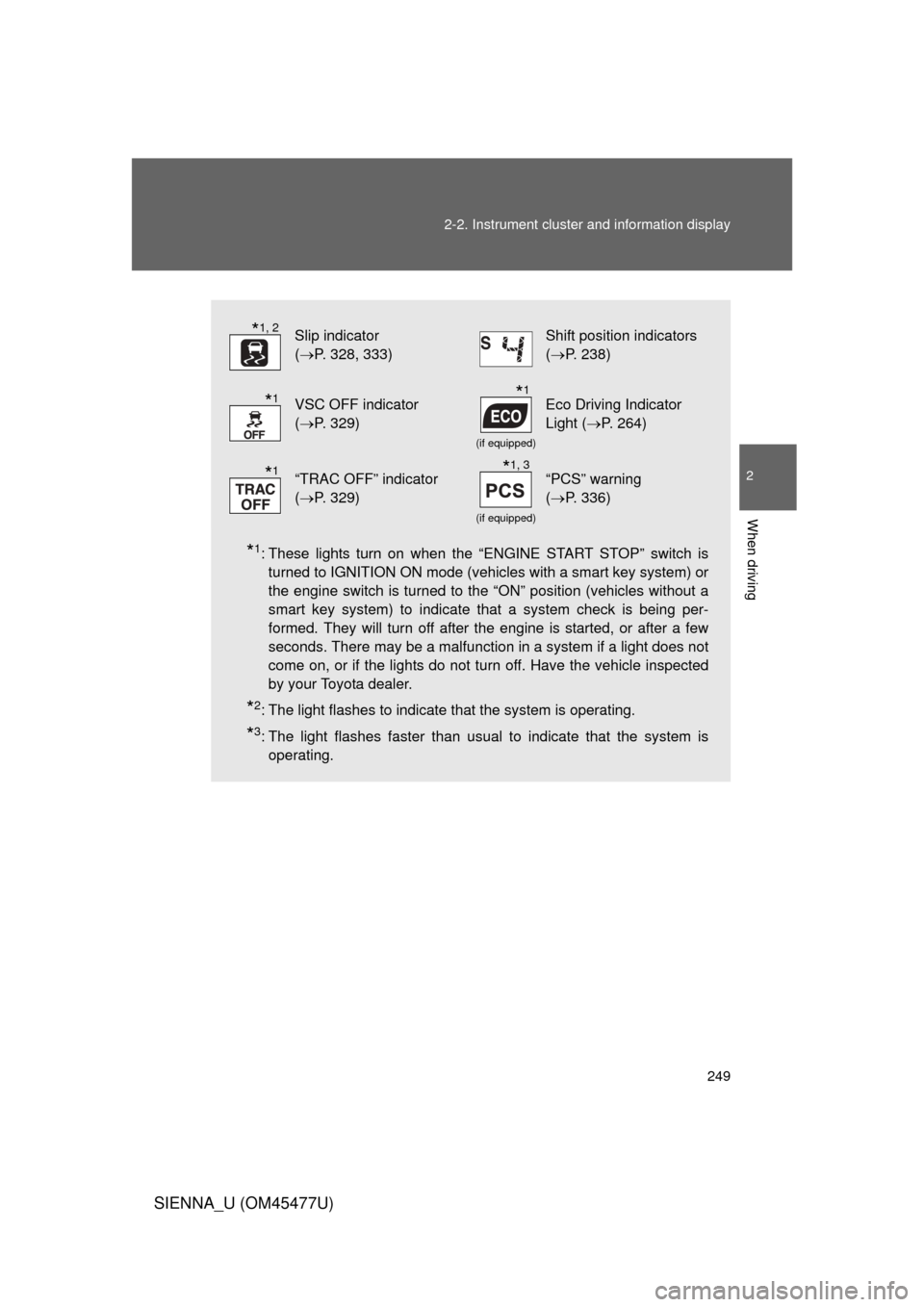
*1: These lights turn on when the “ENGINE START STOP” switch is
turned to IGNITION ON mode (vehicles with a smart key system) or
the engine switch is turned to the “ON” position (vehicles without a
smart key system) to indicate that a system check is being per-
formed. They will turn off after the engine is started, or after a few
seconds. There may be a malfunction in a system if a light does not
come on, or if the lights do not turn off. Have the vehicle inspected
by your Toyota dealer.
*2: The light flashes to indicate that the system is operating.
*3: The light flashes faster than usual to indicate that the system isoperating.
Slip indicator
(P. 328, 333)Shift position indicators
(P. 238)
VSC OFF indicator
(P. 329)
(if equipped)
Eco Driving Indicator
Light ( P. 264)
“TRAC OFF” indicator
(P. 329)
(if equipped)
“PCS” warning
(P. 336)
*1, 2
*1*1
*1*1, 3
Page 293 of 860
293
2
When driving
SIENNA_U (OM45477U)
2-4. Using other driving systems
Cruise control
: If equipped
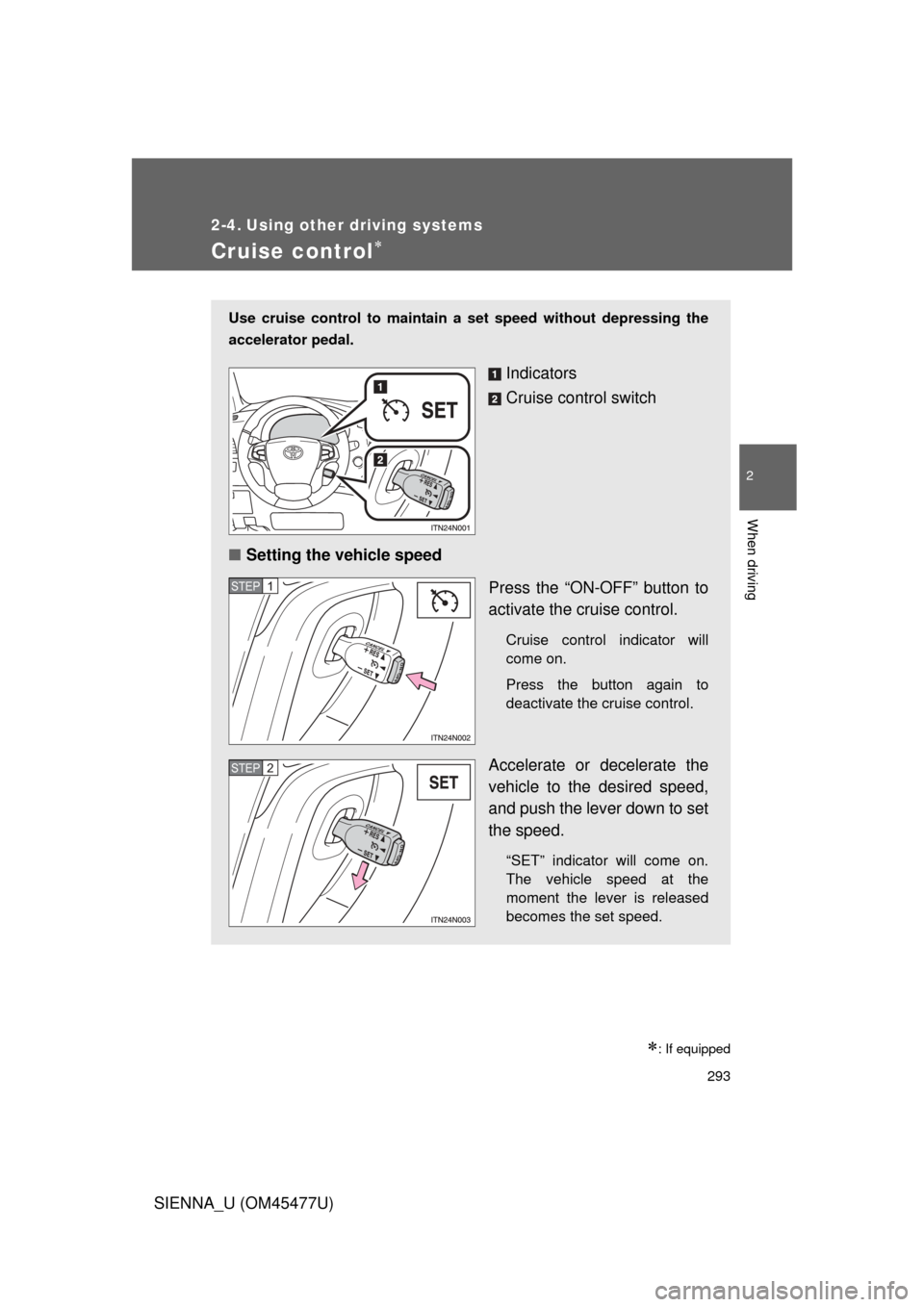
Use cruise control to maintain a set speed without depressing the
accelerator pedal.
Indicators
Cruise control switch
■ Setting the vehicle speed
Press the “ON-OFF” button to
activate the cruise control.
Cruise control indicator will
come on.
Press the button again to
deactivate the cruise control.
Accelerate or decelerate the
vehicle to the desired speed,
and push the lever down to set
the speed.
“SET” indicator will come on.
The vehicle speed at the
moment the lever is released
becomes the set speed.
STEP1
STEP2
Page 298 of 860
298
2-4. Using other driving systems
SIENNA_U (OM45477U)
Dynamic radar cruise control
: If equipped
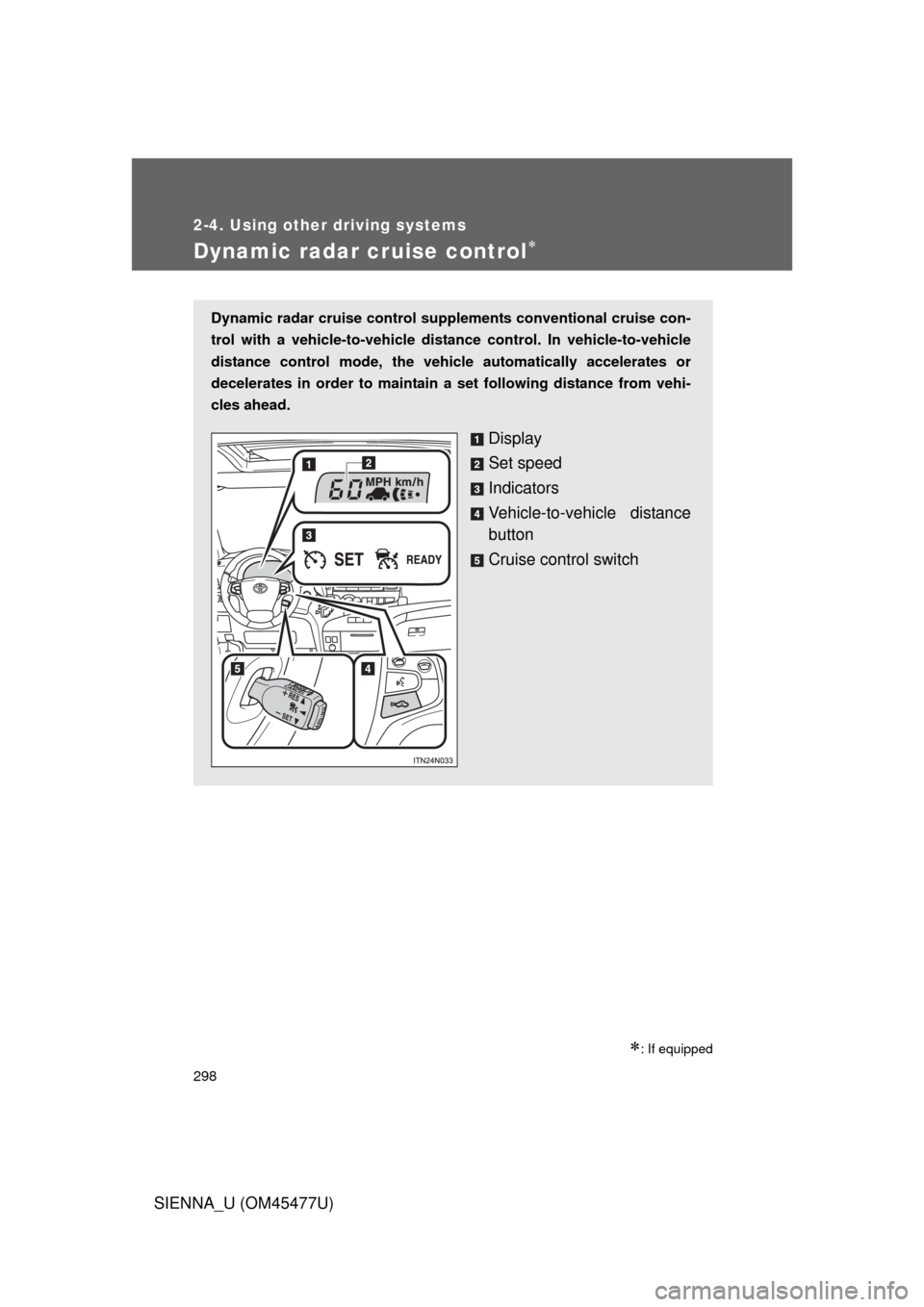
Dynamic radar cruise control supplements conventional cruise con-
trol with a vehicle-to-vehicle dist ance control. In vehicle-to-vehicle
distance control mode, the vehicle automatically accelerates or
decelerates in order to maintain a set following distance from vehi-
cles ahead.
Display
Set speed
Indicators
Vehicle-to-vehicle distance
button
Cruise control switch