Page 291 of 860
291
2-3. Operating the lights and wipers
2
When driving
SIENNA_U (OM45477U)
■
The rear window wiper and w asher can be operated when
Vehicles without a smart key system:
The engine switch is in the “ON” position.
Vehicles with a smart key system:
The “ENGINE START STOP” switch is in IGNITION ON mode.
■ If no windshield washer fluid sprays
Check that the washer nozzles are not blocked if there is washer fluid in the
windshield washer fluid reservoir.
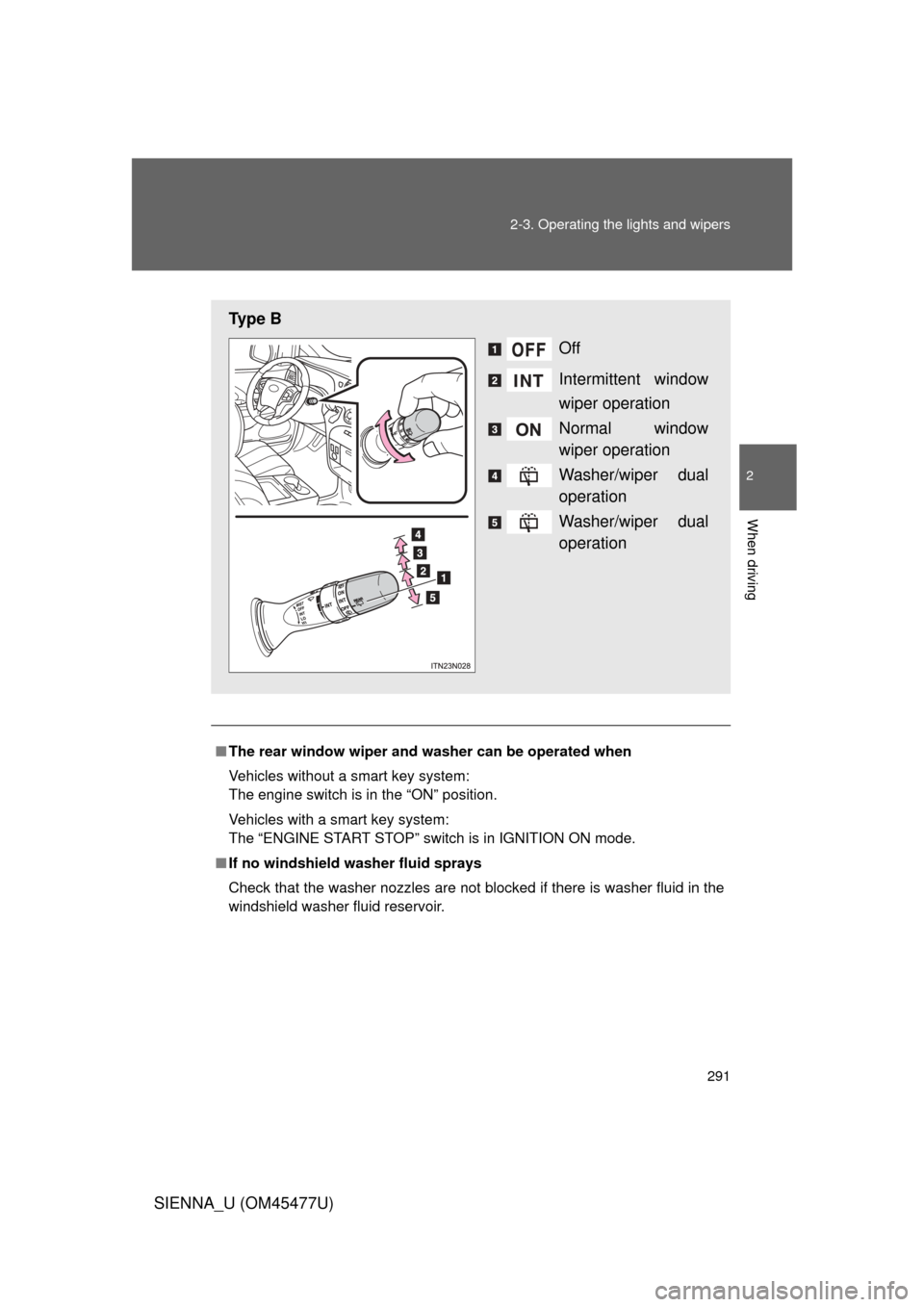
Ty p e B
Off
Intermittent window
wiper operation
Normal window
wiper operation
Washer/wiper dual
operation
Washer/wiper dual
operation
Page 292 of 860
292 2-3. Operating the lights and wipers
SIENNA_U (OM45477U)
NOTICE
■When the rear window is dry
Do not use the wiper, as it may damage the rear window.
■ When the washer fluid tank is empty
Do not operate the switch continually as the washer fluid pump may over-
heat.
Page 296 of 860

296 2-4. Using other driving systems
SIENNA_U (OM45477U)
■Cruise control can be set when
● The shift lever is in D or more than range 4 of S has been selected.
● Vehicle speed is above approximately 25 mph (40 km/h).
■ Accelerating after setting the vehicle speed
● The vehicle can be accelerated normally. After acceleration, the set
speed resumes.
● Even without canceling the cruise control, the set speed can be
increased by first accelerating the vehicle to the desired speed and then
pushing the lever down to set the new speed.
■ Automatic cruise control cancelation
Cruise control will stop maintaining the vehicle speed in any of the following
situations.
● Actual vehicle speed falls more than approximately 10 mph (16 km/h)
below the preset vehicle speed.
At this time, the memorized set speed is not retained.
● Actual vehicle speed is below approximately 25 mph (40 km/h).
● Enhanced VSC is activated.
■ If the cruise control indicator light flashes
Press the “ON-OFF” button once to deactivate the system, and then press
the button again to reactivate the system.
If the cruise control speed cannot be set or if the cruise control cancels
immediately after being activated, there may be a malfunction in the cruise
control system. Have the vehicle inspected by your Toyota dealer.
Page 308 of 860
308 2-4. Using other driving systems
SIENNA_U (OM45477U)
■Automatic cancelation of constant speed control
The cruise control will stop maintaining the vehicle speed in the following sit-
uations.
● Actual vehicle speed is more than approximately 10 mph (16 km/h)
below the set vehicle speed.
At this time, the memorized set speed is not retained.
● Vehicle speed falls below appr oximately 25 mph (40 km/h).
● Enhanced VSC is activated.
■ Radar sensor and grille cover
Always keep the sensor and grille cover clean to ensure that the vehicle\
-to-
vehicle distance control operates pr operly. (Some obstructions, such as
snow, ice and plastic objects, cannot be detected by the obstruction sensor.)
Dynamic radar cruise control is canceled if an obstruction is detected.
■ Warning lights for dynamic radar cruise control
Warning light is used to indicate a system malfunction or to inform the driver
of the need for caution while driving. ( P. 729)
Grille cover
Radar sensor
Page 313 of 860
313
2-4. Using other
driving systems
2
When driving
SIENNA_U (OM45477U)
CAUTION
■Handling the radar sensor
Observe the following to ensure the cruise control system can function effec-
tively:
Otherwise, the system may not function correctly and could result in an acci-
dent.
● Keep the sensor and grille cover clean at all times.
Clean the sensor and grille cover with a soft cloth so you do not mark or
damage them.
● Do not subject the sensor or surrounding area to a strong impact.
If the sensor moves even slightly off position, the system may malfunction.
If the sensor or surrounding area is subject to a strong impact, always
have the area inspected and adjusted by a Toyota dealer.
● Do not disassemble the sensor.
● Do not attach accessories or stickers to the sensor, grille cover or sur-
rounding area.
● Do not modify or paint the sensor and grille cover.
● Do not replace them with non-genuine parts.
Page 314 of 860
314
2-4. Using other driving systems
SIENNA_U (OM45477U)
Intuitive parking assist
: If equipped
The distance from your vehicle to nearby obstacles when parallel
parking or maneuvering into a garage is measured by the sensors
and communicated via the multi- information display, the touch
screen and a buzzer. Always check the surrounding area when using
this system.
■ Types of sensors
Front corner sensors (if
equipped)
Rear corner sensors
Rear center sensors
■ Intuitive parking assist switch
Turns the intuitive parking
assist on/off
When on, the indicator light
comes on and the buzzer
sounds to inform the driver
that the system is operational.
Page 319 of 860

319
2-4. Using other
driving systems
2
When driving
SIENNA_U (OM45477U)
■Sensor detection information
● Certain vehicle conditions and the surrounding environment may affect
the ability of the sensor to correctly detect obstacles. Particular instances
where this may occur are listed below.
• There is dirt, snow or ice on the sensor.
• The sensor is frozen.
• The sensor is covered in any way.
• The vehicle is leaning considerably to one side.
• On an extremely bumpy road, on an incline, on gravel, or on grass
• The vicinity of the vehicle is noisy due to vehicle horns, motorcycle
engines, air brakes of large vehicles, or other loud noises producing
ultrasonic waves.
• There is another vehicle equipped with parking assist sensors in the vicinity.
• A sensor is coated with a sheet of spray or heavy rain.
• The vehicle is equipped with a fender pole or radio antenna.
• A bumper or sensor receives a strong impact.
• The vehicle is approaching a tall or right-angled curb.
• In harsh sunlight or intense cold weather
In addition to the examples above, there are instances in which, because of
their shapes, signs and other objects may be judged by the sensor to be
closer than they are.
● The shape of the obstacle may prevent the sensor from detecting it. Pay
particular attention to the following obstacles:
• Wires, fences, ropes etc.
• Cotton, snow and other materials that absorb sound waves
• Sharply-angled objects
• Low obstacles
• Tall obstacles with upper sections projecting outwards in the direction
of your vehicle
Page 320 of 860
320 2-4. Using other driving systems
SIENNA_U (OM45477U)
■If the display flashes and a message is displayed
P. 744
■ Certification (Canada only)
This ISM device complies with Canadian ICES-001.
■ When there is a malfunction
In the following cases, have the vehicle inspected by your Toyota dealer.
● If the bumper is damaged.
● If the intuitive parking assist indicator light remains on without a beep
sounds.
CAUTION
■Caution when using the Intuitive parking assist-sensor
Observe the following precautions.
Failure to do so may result in the vehicle being unable to be driven safely
and possibly cause an accident.
● Do not use the sensor at speeds in excess of 6 mph (10 km/h).
● Do not attach any accessories within the sensor range.
NOTICE
■Notes when washing the vehicle
Do not apply intensive bursts of water or steam to the sensor area.
Doing so may result in the sensor malfunctioning.