Page 323 of 860
323
2-4. Using other
driving systems
2
When driving
SIENNA_U (OM45477U)
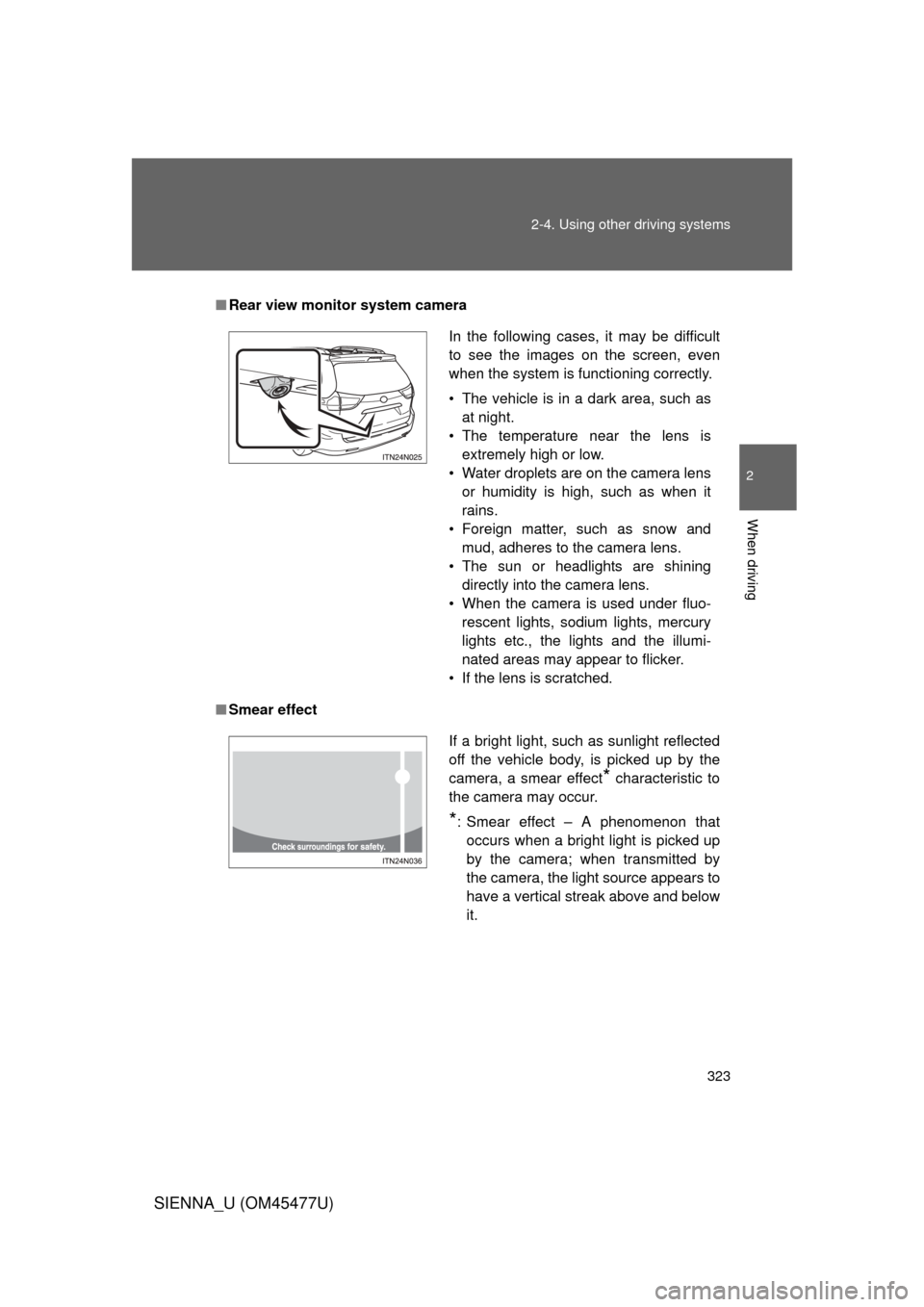
■Rear view monitor system camera
■ Smear effect
In the following cases, it may be difficult
to see the images on the screen, even
when the system is functioning correctly.
• The vehicle is in a dark area, such as
at night.
• The temperature near the lens is extremely high or low.
• Water droplets are on the camera lens or humidity is high, such as when it
rains.
• Foreign matter, such as snow and mud, adheres to the camera lens.
• The sun or headlights are shining directly into the camera lens.
• When the camera is used under fluo- rescent lights, sodium lights, mercury
lights etc., the lights and the illumi-
nated areas may appear to flicker.
• If the lens is scratched.
If a bright light, such as sunlight reflected
off the vehicle body, is picked up by the
camera, a smear effect
* characteristic to
the camera may occur.
*: Smear effect – A phenomenon that occurs when a bright light is picked up
by the camera; when transmitted by
the camera, the light source appears to
have a vertical streak above and below
it.
Page 326 of 860
326 2-4. Using other driving systems
SIENNA_U (OM45477U)
CAUTION
■When using the rear view monitor system
Observe the following precautions to avoid an accident that could result in
death or serious injuries:
● Never depend solely on the monitor system when reversing.
● Always check visually and with the mirrors to confirm your intended path is
clear.
● Depicted distances between objects and flat surfaces differ from actual
distances.
● Do not use the system if the back door is open.
■ Conditions which may affect the rear view monitor system
● If the back of the vehicle has been hit, the camera’s position and mounting
angle may have changed. Have the vehicle inspected by your Toyota
dealer.
● Rapid temperature changes, such as when hot water is poured on the
vehicle in cold weather, may cause the system to function abnormally.
● If the camera lens is dirty, it cannot transmit a clear image. Rinse with
water and wipe with a soft cloth. If the camera lens is extremely dirty, wash
with a mild cleanser and rinse.
● The displayed image may be darker and moving images may be slightly
distorted when the system is cold.
● When washing the vehicle, do not apply intensive bursts of water to the
camera or camera area. Doing so may result in the camera malfunction.
● Do not scrub the lens strongly or polish the lens using stiff brushes or
abrasive cleansers. Doing so could scratch the lens and affect the image.
● Do not allow organic solvent, car wax, window cleaner or glass coat to
adhere to the camera. If this happens, wipe it off as soon as possible.
Page 328 of 860
328 2-4. Using other driving systems
SIENNA_U (OM45477U)
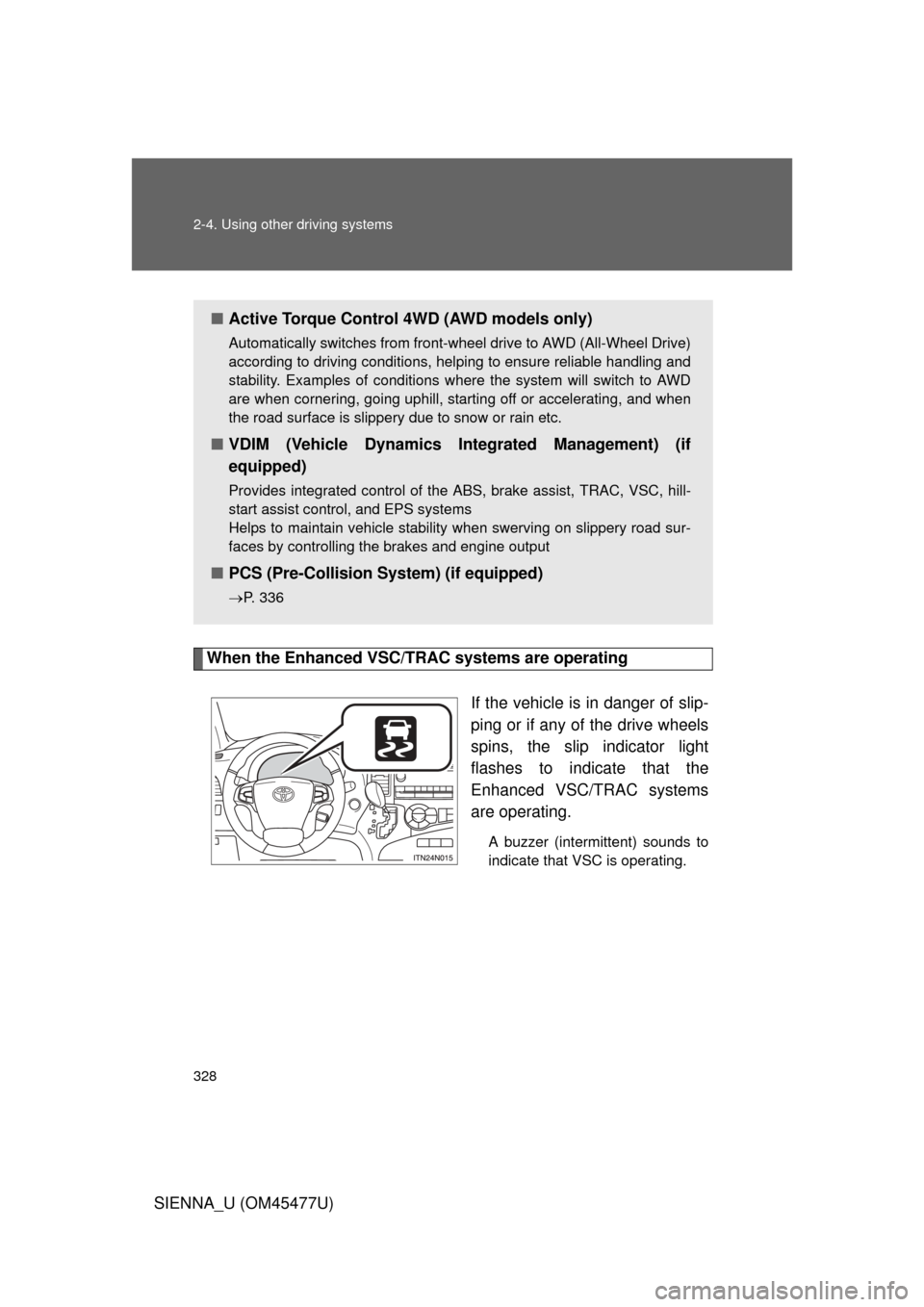
When the Enhanced VSC/TRAC systems are operatingIf the vehicle is in danger of slip-
ping or if any of the drive wheels
spins, the slip indicator light
flashes to indicate that the
Enhanced VSC/TRAC systems
are operating.
A buzzer (intermittent) sounds to
indicate that VSC is operating.
■Active Torque Control 4WD (AWD models only)
Automatically switches from front-wheel drive to AWD (All-Wheel Drive)
according to driving conditions, helping to ensure reliable handling and
stability. Examples of conditions where the system will switch to AWD
are when cornering, going uphill, star ting off or accelerating, and when
the road surface is slippery due to snow or rain etc.
■ VDIM (Vehicle Dynamics In tegrated Management) (if
equipped)
Provides integrated control of the ABS, brake assist, TRAC, VSC, hill-
start assist control, and EPS systems
Helps to maintain vehicle stability when swerving on slippery road sur-
faces by controlling the brakes and engine output
■ PCS (Pre-Collision System) (if equipped)
P. 336
Page 329 of 860
329
2-4. Using other
driving systems
2
When driving
SIENNA_U (OM45477U)
Disabling TRAC and VSC system
If the vehicle gets stuck in fresh snow or mud, TRAC and VSC may
reduce power from the engine to the wheels. You may need to turn
the system off to enable you to rock the vehicle in order to free it.
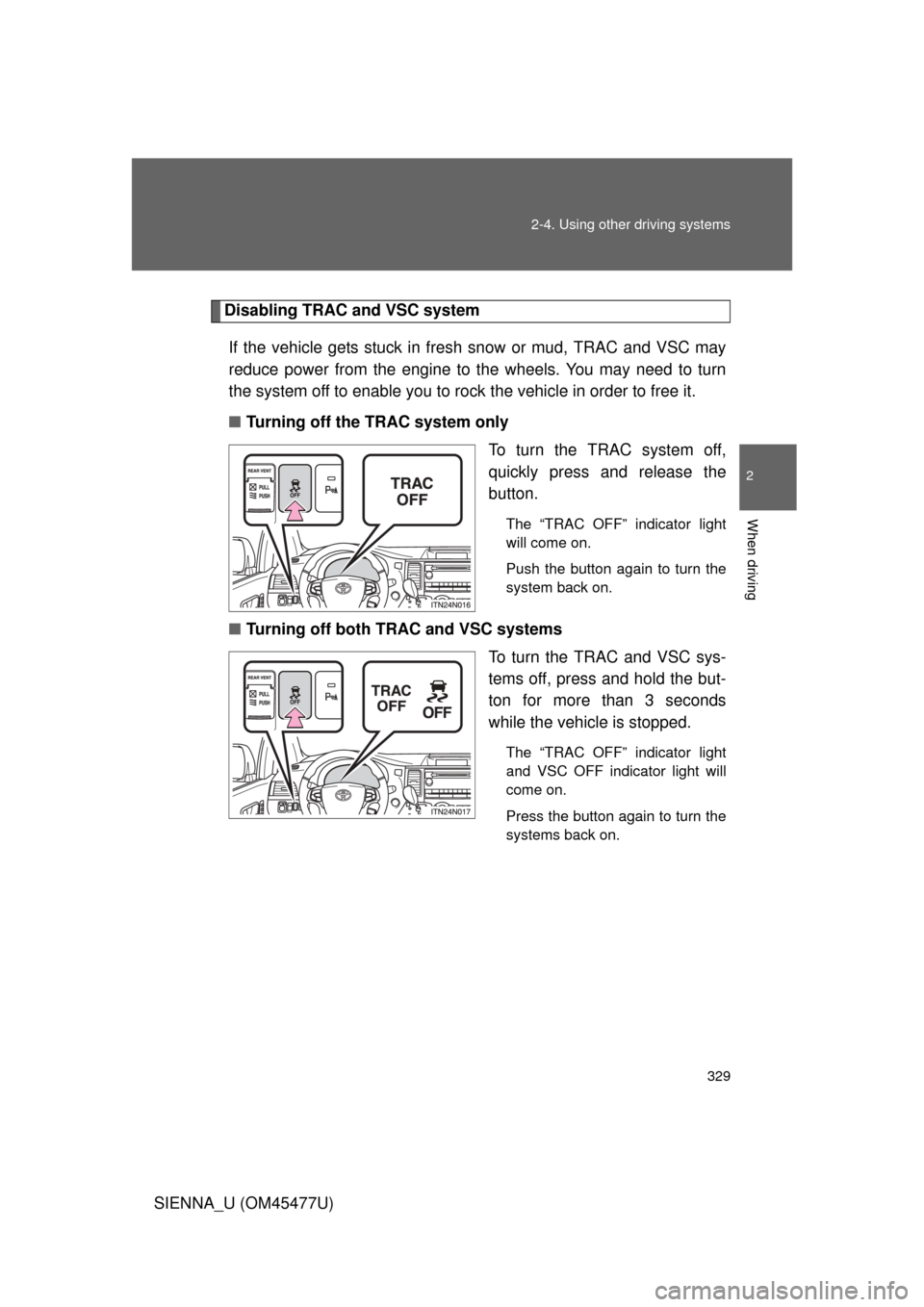
■ Turning off the TRAC system only
To turn the TRAC system off,
quickly press and release the
button.
The “TRAC OFF” indicator light
will come on.
Push the button again to turn the
system back on.
■Turning off both TRAC and VSC systems
To turn the TRAC and VSC sys-
tems off, press and hold the but-
ton for more than 3 seconds
while the vehicle is stopped.
The “TRAC OFF” indicator light
and VSC OFF indicator light will
come on.
Press the button again to turn the
systems back on.
Page 330 of 860

330 2-4. Using other driving systems
SIENNA_U (OM45477U)
■When the “TRAC OFF” indicator light comes on even if the VSC OFF
switch has not been pressed
TRAC and hill-start assist control cannot be operated. Contact your Toyota
dealer.
■ Sounds and vibrations caused by ABS, brake assist, Enhanced VSC
and TRAC
● A sound may be heard from the engine compartment when the engine is
started or just after the vehicle begins to move. This sound does not indi-
cate that a malfunction has occurred in any of these systems.
● Any of the following conditions may occur when the above systems are
operating. None of these indicates that a malfunction has occurred.
• Vibrations may be felt through the vehicle body and steering.
• A motor sound may be heard after the vehicle comes to a stop.
• The brake pedal may pulsate slightly after ABS is activated.
• The brake pedal may move down slightly after ABS is activated.
■ EPS operation sound
When the steering wheel is operated, a motor sound (whirring sound) may
be heard. This does not indicate a malfunction.
■ Reactivation of the TRAC and VSC systems after turning off the engine
Turning off the engine after turning off the TRAC and VSC systems will auto-
matically reactivate them.
■ Reactivation of the TRAC system linked to vehicle speed
When only the TRAC system is turned off, the TRAC system will turn on
when vehicle speed increases. However, when both TRAC and VSC sys-
tems are turned off, the systems will not turn on even when vehicle speed
increases.
Page 332 of 860
332 2-4. Using other driving systems
SIENNA_U (OM45477U)
CAUTION
■When Enhanced VSC is activated
The slip indicator light flashes and a warning buzzer sounds. Always drive
carefully. Reckless driving may cause an accident. Exercise particular care
when the indicator light flashes and a buzzer sounds.
■ When TRAC and VSC systems are turned off
Be especially careful and drive at a speed appropriate to the road condi-
tions. As these are the systems to ensure vehicle stability and driving force,
do not turn the TRAC and VSC systems off unless necessary.
■ Replacing tires
Make sure that all tires are of the specified size and of the same brand, tread
pattern and total load capacity. In addition, make sure that the tires are
inflated to the recommended tire pressure level.
The ABS and Enhanced VSC systems will not function correctly if different
tires are installed on the vehicle.
Contact your Toyota dealer for further information when replacing tires or
wheels.
■ Handling of tires and suspension
Using tires with any kind of problem or modifying the suspension will affect
the driving assist systems, and may cause the system to malfunction.
■ Active Torque Control 4WD system
● The AWD system of this vehicle is intended to ensure driving stability on
normal roads. It is not designed for use in demanding situations such as
rally driving.
● Take care when driving on slippery road surfaces.
Page 334 of 860

334 2-4. Using other driving systems
SIENNA_U (OM45477U)
■Hill-start assist control can be operated when
• The shift lever is in a position other than P.
• The parking brake is not applied.
• The accelerator pedal is not depressed.
■ Hill-start assist control
● While hill-start assist control is operating, the brakes remain automati-
cally applied after the driver releases the brake pedal. The stop lights and
the high mounted stoplight turn on.
● Hill-start assist control operates for about 2 seconds after the brake pedal
is released.
● If the slip indicator does not flash and the buzzer does not sound when
the brake pedal is further depressed, slightly reduce the pressure on the
brake pedal (do not allow the vehicl e to roll backward) and then firmly
depress it again. If the system still does not operate, check if the operat-
ing conditions explained above have been met.
■ Hill-start assist control buzzer
● When hill-start assist control is activated, the buzzer will sound once.
● In the following situations, hill-start assist control will be canceled and the
buzzer will sound twice.
• No attempt is made to drive the vehicle within approximately 2 seconds
of releasing the brake pedal.
• The shift lever is moved to P.
• The parking brake is applied.
• The brake pedal is depressed again.
• The brake pedal has been depressed for more than approximately 3 minutes.
■ If the slip indicator comes on...
It may indicate a malfunction in the system. Contact your Toyota dealer.
Page 336 of 860

336
2-4. Using other driving systems
SIENNA_U (OM45477U)
PCS (Pre-Collision System)
: If equipped
When the radar sensor detects that a frontal collision is highly likely
or even unavoidable, the systems such as the brakes and seat
belts are automatically engaged to lessen impact to occupants as
well as vehicle damage.
■ Pre-collision seat belts (front seat belts only)
If the pre-collision s ensor detects that a co llision is unavoidable,
the pre-collision system will retract the seat belt before the colli-
sion occurs. The same will happen if the driver makes an emer-
gency braking or loses co ntrol of the vehicle. (P. 131)
However, when the VSC system is disabled, the system will not
operate in the event of skidding.
■ Pre-collision brake assist
When there is a high possibility of a frontal collision, the system
applies greater braking force in relation to how strongly the
brake pedal is depressed.
■ Pre-collision braking
When there is a high possibility of a frontal collision, the system
warns the driver using a warning light and buzzer. If the system
determines that a collision is un avoidable, the brakes are auto-
matically applied to reduce th e collision speed. Pre-collision
braking can be disabled usi ng the pre-collision braking off
switch.