2012 Seat Exeo format
[x] Cancel search: formatPage 148 of 167
INFO (Traffic information)147
Operating
RADIO, MEDIA (audiovisual
systems)
NAME, TEL
NAV, INFO
CAR, SETUP
You will receive a message in the display if no traffic announcements are
stored.
Traffic announcements are cancelled when you change to another main func-
tion.
You can also specify times for recording traffic announcements using the
TP
memo timer function ⇒page 148.
Note
A traffic announcement will not be recorded if you use the Cancel function
while it is playing. This means you will not be able to access the announce-
ment using the TP memo function.Source function buttonPreferred TMC
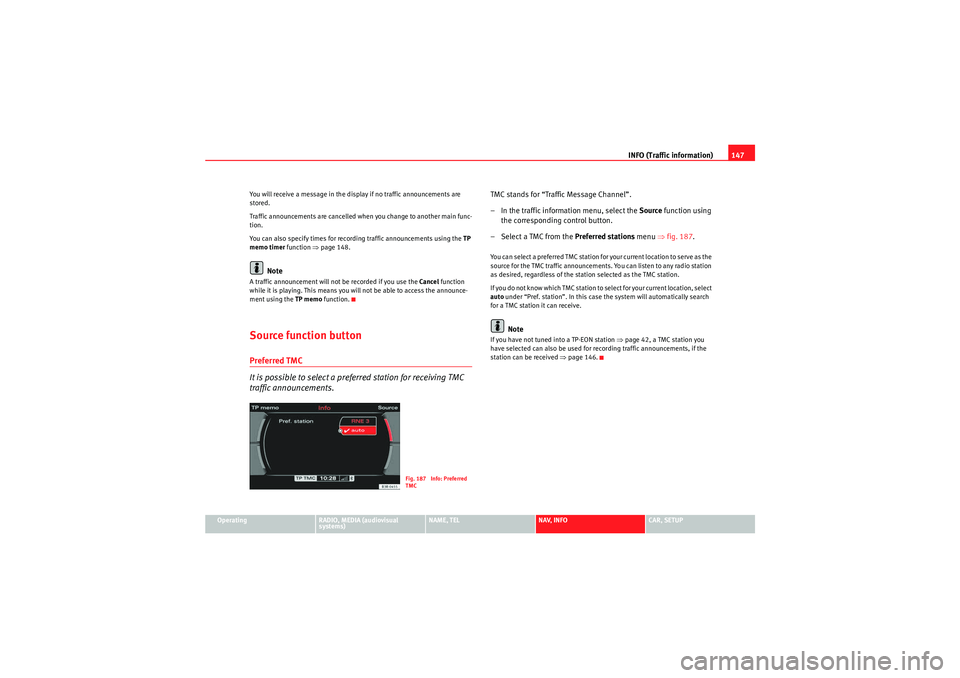
It is possible to select a preferred station for receiving TMC
traffic announcements.
TMC stands for “Traffic Message Channel”.
– In the traffic information menu, select the Source function using
the corresponding control button.
– Select a TMC from the Preferred stations menu ⇒fig. 187 .You can select a preferred TMC station for your current location to serve as the
source for the TMC traffic announcements. You can listen to any radio station
as desired, regardless of the station selected as the TMC station.
If you do not know which TMC station to select for your current location, select
auto under “Pref. station”. In this case the system will automatically search
for a TMC station it can receive.
Note
If you have not tuned into a TP-EON station ⇒page 42, a TMC station you
have selected can also be used for recording traffic announcements, if the
station can be received ⇒page 146.
Fig. 187 Info: Preferred
TMC
media_systemE_EN.book Seite 147 Montag, 21. September 2009 1:48 13
Page 149 of 167
INFO (Traffic information)
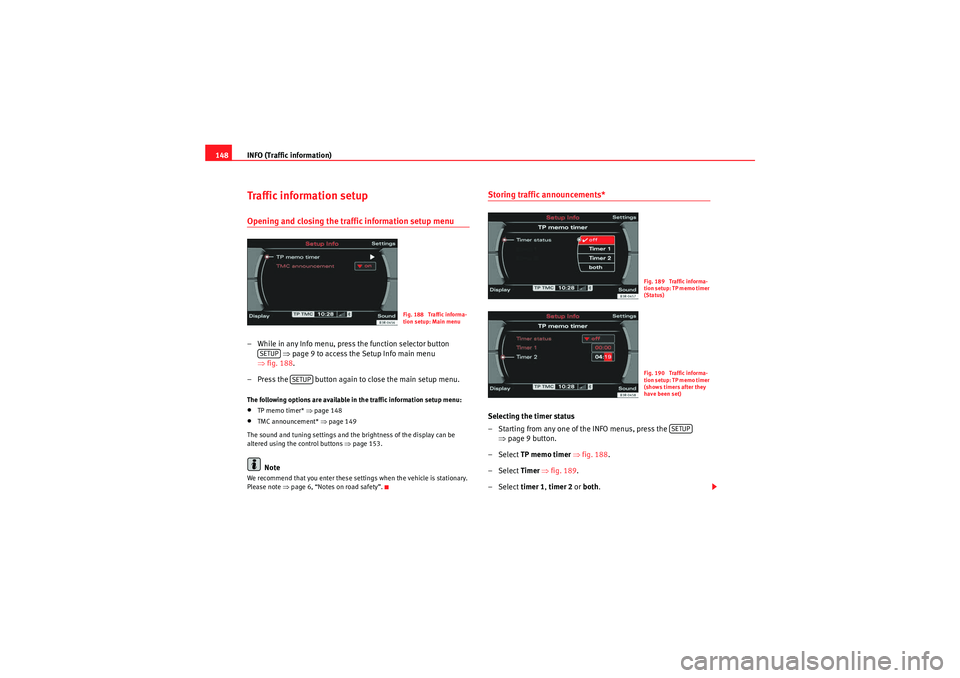
148Traffic information setupOpening and closing the traffic information setup menu– While in any Info menu, press the function selector button
⇒ page 9 to access the Setup Info main menu
⇒ fig. 188 .
– Press the button again to close the main setup menu.The following options are available in the traffic information setup menu:•TP memo timer* ⇒ page 148•TMC announcement* ⇒ page 149
The sound and tuning settings and the brightness of the display can be
altered using the control buttons ⇒page 153.Note
We recommend that you enter these settings when the vehicle is stationary.
Please note ⇒ page 6, “Notes on road safety”.
Storing traffic announcements*Selecting the timer status
– Starting from any one of the INFO menus, press the
⇒page 9 button.
– Select TP memo timer ⇒ fig. 188 .
– Select Timer ⇒ fig. 189.
– Select timer 1, timer 2 or both .
Fig. 188 Traffic informa-
tion setup: Main menu
SETUP
SETUP
Fig. 189 Traffic informa-
tion setup: TP memo timer
(Status)Fig. 190 Traffic informa-
tion setup: TP memo timer
(shows timers after they
have been set)
SETUP
media_systemE_EN.book Seite 148 Montag, 21. September 2009 1:48 13
Page 150 of 167
INFO (Traffic information)149
Operating
RADIO, MEDIA (audiovisual
systems)
NAME, TEL
NAV, INFO
CAR, SETUP
Setting timer start time
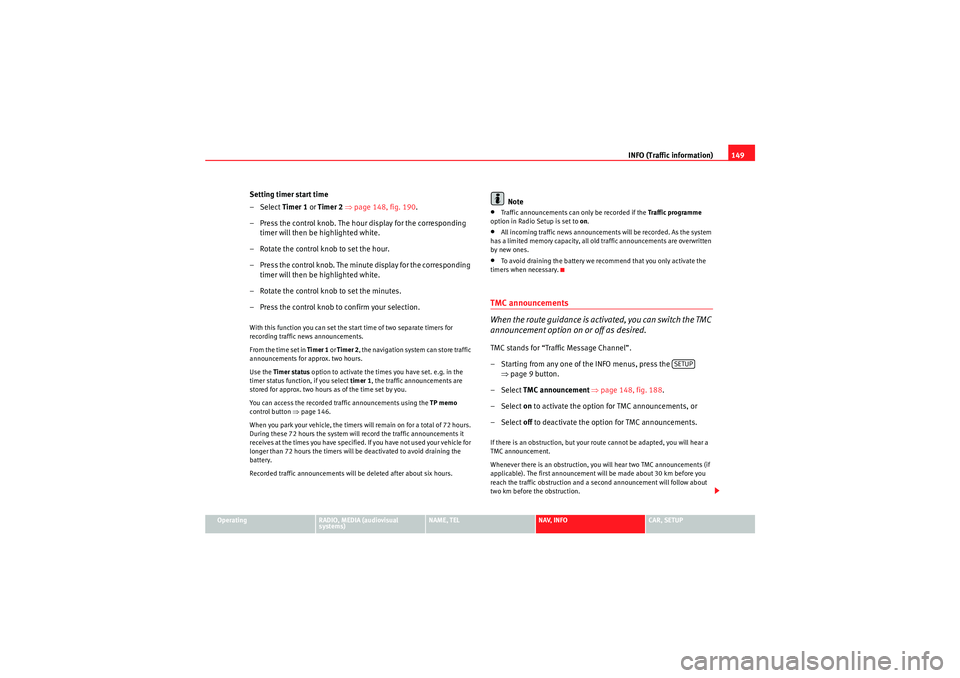
–Select Timer 1 or Timer 2 ⇒ page 148, fig. 190 .
– Press the control knob. The hour display for the corresponding timer will then be highlighted white.
– Rotate the control knob to set the hour.
– Press the control knob. The minute display for the corresponding timer will then be highlighted white.
– Rotate the control knob to set the minutes.
– Press the control knob to confirm your selection.With this function you can set the start time of two separate timers for
recording traffic news announcements.
From the time set in Timer 1 or Timer 2 , the navigation system can store traffic
announcements for approx. two hours.
Use the Timer status option to activate the times you have set. e.g. in the
timer status function, if you select timer 1, the traffic announcements are
stored for approx. two hours as of the time set by you.
You can access the recorded traffic announcements using the TP memo
control button ⇒ page 146.
When you park your vehicle, the timers will remain on for a total of 72 hours.
During these 72 hours the system will record the traffic announcements it
receives at the times you have specified. If you have not used your vehicle for
longer than 72 hours the timers will be deactivated to avoid draining the
battery.
Recorded traffic announcements will be deleted after about six hours.
Note
•Traffic announcements can only be recorded if the Traffic programme
option in Radio Setup is set to on.•All incoming traffic news announcements will be recorded. As the system
has a limited memory capacity, all old traffic announcements are overwritten
by new ones.•To avoid draining the battery we recommend that you only activate the
timers when necessary.TMC announcements
When the route guidance is activated, you can switch the TMC
announcement option on or off as desired.TMC stands for “Traffic Message Channel”.
– Starting from any one of the INFO menus, press the ⇒page 9 button.
– Select TMC announcement ⇒ page 148, fig. 188 .
– Select on to activate the option for TMC announcements, or
– Select off to deactivate the option for TMC announcements.If there is an obstruction, but your route cannot be adapted, you will hear a
TMC announcement.
Whenever there is an obstruction, you will hear two TMC announcements (if
applicable). The first announcement will be made about 30 km before you
reach the traffic obstruction and a second announcement will follow about
two km before the obstruction.
SETUP
media_systemE_EN.book Seite 149 Montag, 21. September 2009 1:48 13
Page 151 of 167

INFO (Traffic information)
150
NoteImportant announcements (e.g. car travelling in wrong direction) are put
through even if the TMC announcement function is not on.
media_systemE_EN.book Seite 150 Montag, 21. September 2009 1:48 13
Page 156 of 167
SETUP155
Operating
RADIO, MEDIA (audiovisual
systems)
NAME, TEL
NAV, INFO
CAR, SETUP
•Spanish•PortugueseNote
•You can only select the menu language when the vehicle is stationary. The
option is greyed out when driving and cannot be selected.Setting the distance unit (km/miles)– Press the Settings control button in the Setup menu.
–Select Distance unit .
– Select either km or miles .Setting the time
Time of date and date can be adjusted through this function.
Setting the time format
–Press the Settings control button in the Setup menu.
– Select Time settings ⇒page 154, fig. 194 .
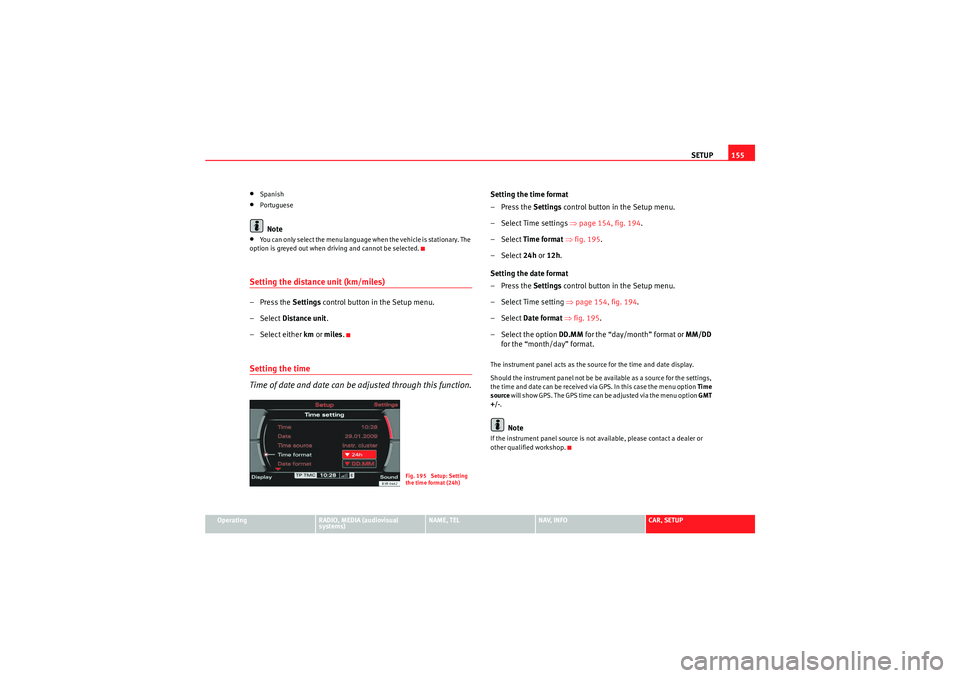
– Select Time format ⇒ fig. 195 .
– Select 24h or 12h .
Setting the date format
–Press the Settings control button in the Setup menu.
– Select Time setting ⇒page 154, fig. 194 .
– Select Date format ⇒ fig. 195 .
– Select the option DD.MM for the “day/month” format or MM/DD
for the “month/day” format.The instrument panel acts as the source for the time and date display.
Should the instrument panel not be be available as a source for the settings,
the time and date can be received via GPS. In this case the menu option Time
source will show GPS. The GPS time can be adjusted via the menu option GMT
+/- .
Note
If the instrument panel source is not available, please contact a dealer or
other qualified workshop.
Fig. 195 Setup: Setting
the time format (24h)
media_systemE_EN.book Seite 155 Montag, 21. September 2009 1:48 13
Page 158 of 167

SETUP157
Operating
RADIO, MEDIA (audiovisual
systems)
NAME, TEL
NAV, INFO
CAR, SETUP
Brightness
You can set display brightness manually.– Press the Display control button in the Setup menu.
–Select Brightness ⇒ page 156, fig. 196.
– Rotate the control knob to change the brightness of the display ⇒fig. 197 .The brightness of the display adjusts automatically to ambient light. In addi-
tion, the brightness of the display can be adjusted with the general instru-
ment lighting settings and the Brightness function in the navigation system.
Note
For further information on how to adjust the instrument lighting settings,
please refer to the Owner's Manual.
Fig. 197 Setup:
Adjusting the brightness
of the display
media_systemE_EN.book Seite 157 Montag, 21. September 2009 1:48 13
Page 163 of 167

Index
162SETUP (system setup) . . . . . . . . . . . . . . . . . 153
TEL (phone) . . . . . . . . . . . . . . . . . . . . . . . . . . 72
Functions AudioPilot® . . . . . . . . . . . . . . . . . . . . . . . . . . 60
DSP ("Digital Signal Processing") . . . . . . . . 60
GALA (speed-dependant volume adjustment) .60
HISTORY . . . . . . . . . . . . . . . . . . . . . . . . . . . . . 11
HOME . . . . . . . . . . . . . . . . . . . . . . . . . . . . . . . 10
INFO (MP3) . . . . . . . . . . . . . . . . . . . . . . . . . . . 56
MUTE . . . . . . . . . . . . . . . . . . . . . . . . . . . . . . . 10
PTY filter (radio programmes) . . . . . . . . . . . . 45
RPT (CD) . . . . . . . . . . . . . . . . . . . . . . . . . . . . . 53
RPT (MP3) . . . . . . . . . . . . . . . . . . . . . . . . . . . . 57
SCAN . . . . . . . . . . . . . . . . . . . . . . . . . . . . . . . 41
SCAN (CD) . . . . . . . . . . . . . . . . . . . . . . . . . . . 53
SCAN (MP3) . . . . . . . . . . . . . . . . . . . . . . . . . . 56
STORE . . . . . . . . . . . . . . . . . . . . . . . . . . . . . . . 40
TP (traffic programme) . . . . . . . . . . . . . . . . . 42GGALA (speed-dependant volume adjustment) . 60HHands free . . . . . . . . . . . . . . . . . . . . . . . . . . . . . . 76
Hanging up . . . . . . . . . . . . . . . . . . . . . . . . . . . . . 76
HISTORY . . . . . . . . . . . . . . . . . . . . . . . . . . . . . . . . 11
HOME . . . . . . . . . . . . . . . . . . . . . . . . . . . . . . . . . . 10
IINFO (MP3) . . . . . . . . . . . . . . . . . . . . . . . . . . . . . . 56
INFO (traffic information) Function button . . . . . . . . . . . . . . . . . . . . . . 142
Instrument panel Navigation system . . . . . . . . . . . . . . . . . . . 101
Phone status messages . . . . . . . . . . . . . . . . 82
Intersection map . . . . . . . . . . . . . . . . . . . . . . . . 137
iPod Adapters . . . . . . . . . . . . . . . . . . . . . . . . . . . . 29
Functions . . . . . . . . . . . . . . . . . . . . . . . . . . . . 30
Inserting . . . . . . . . . . . . . . . . . . . . . . . . . . . . . 30
Interface . . . . . . . . . . . . . . . . . . . . . . . . . . . . . 28
Tips . . . . . . . . . . . . . . . . . . . . . . . . . . . . . . . . . 30LList info (MP3) . . . . . . . . . . . . . . . . . . . . . . . . . . . 58MMaking calls . . . . . . . . . . . . . . . . . . . . . . . . . . . . 74
Manual tuning . . . . . . . . . . . . . . . . . . . . . . . . . . . 39
MEDIA (function button)See "Compact discs" . . . . . . . . . . . . . . . 48, 51
See "Compact discs" or "MP3" . . . . . . . . . . . 48
See "MP3" . . . . . . . . . . . . . . . . . . . . . . . . . . . 49
Memory cards See MP3 . . . . . . . . . . . . . . . . . . . . . . . . . . . . . 28 Mobile
Adapter: removing and installing . . . . . . . . 69
Inserting/Removing the mobile phone . . . . 70
Phone status messages . . . . . . . . . . . . . . . . 82
Mobile phone "Missed calls" list . . . . . . . . . . . . . . . . . . . . . 80
"Numbers dialled" list . . . . . . . . . . . . . . . . . 77
"Received calls" list . . . . . . . . . . . . . . . . . . . 80
Bluetooth® . . . . . . . . . . . . . . . . . . . . . . . . . . 71
Directory . . . . . . . . . . . . . . . . . . . . . . . . . . . . 78
Functions: "hands free" . . . . . . . . . . . . . . . . 76
Functions: call . . . . . . . . . . . . . . . . . . . . . . . . 74
Functions: hanging up . . . . . . . . . . . . . . 75, 76
Functions: redialling . . . . . . . . . . . . . . . . . . . 91
Functions: rejecting calls . . . . . . . . . . . . . . . 75
Main menu . . . . . . . . . . . . . . . . . . . . . . . . . . . 74
Menu: "Memory" . . . . . . . . . . . . . . . . . . . . . . 77
Phone book . . . . . . . . . . . . . . . . . . . . . . . . . . 79
PIN Code . . . . . . . . . . . . . . . . . . . . . . . . . . . . 73
Settings . . . . . . . . . . . . . . . . . . . . . . . . . . . . . 84
Setup menu . . . . . . . . . . . . . . . . . . . . . . . . . . 83
Storing number in directory . . . . . . . . . . . . . 81
Switching off speech control system . . . . . . 88
Switching on speech control system . . . . . . 88
Voice mailbox . . . . . . . . . . . . . . . . . . . . . . . . 78
Mobile phone adapter . . . . . . . . . . . . . . . . . . . . 69 Call options . . . . . . . . . . . . . . . . . . . . . . . . . . 84
Mobile phone system Introduction . . . . . . . . . . . . . . . . . . . . . . . . . . 68
Motorway info . . . . . . . . . . . . . . . . . . . . . . . . . . 136
media_systemE_EN.book Seite 162 Montag, 21. September 2009 1:48 13
Page 164 of 167

Index163
MP3
Basic settings . . . . . . . . . . . . . . . . . . . . . . . . 54
Information . . . . . . . . . . . . . . . . . . . . . . . 56, 57
List info . . . . . . . . . . . . . . . . . . . . . . . . . . . . . . 58
Main menu . . . . . . . . . . . . . . . . . . . . . . . . . . . 54
Removing a card . . . . . . . . . . . . . . . . . . . . . . 26
Scan . . . . . . . . . . . . . . . . . . . . . . . . . . . . . . . . 56
SD/MMC Formats . . . . . . . . . . . . . . . . . . . . . . 28
Selecting a track . . . . . . . . . . . . . . . . . . . . . . 54
Settings menu . . . . . . . . . . . . . . . . . . . . . . . . 57
Track info . . . . . . . . . . . . . . . . . . . . . . . . . . . . 58
MP3 sound See Sound . . . . . . . . . . . . . . . . . . . . . . . . . . . 59
Multi-function steering wheel CD Mode . . . . . . . . . . . . . . . . . . . . . . . . . . . . . 13
Introduction . . . . . . . . . . . . . . . . . . . . . . . . . . 12
MP3 Mode . . . . . . . . . . . . . . . . . . . . . . . . . . . 13
Radio mode . . . . . . . . . . . . . . . . . . . . . . . . . . 13
Telephone mode . . . . . . . . . . . . . . . . . . . . . . 13
MUTE . . . . . . . . . . . . . . . . . . . . . . . . . . . . . . . . . . . 10
Mute . . . . . . . . . . . . . . . . . . . . . . . . . . . . . . . . . . . 10NNAME (directory) Setting a destination . . . . . . . . . . . . . . . . . . . 66
NAME (function button) See "Directory" . . . . . . . . . . . . . . . . . . . . . . . . 63
NAV (function button) See "Navigation system" . . . . . . . . . . . . . . . 102 NAV SETUP
Auto intersection zoom . . . . . . . . . . . . . . . . 137
Intersection map . . . . . . . . . . . . . . . . . . . . . 137
Navigation Map presentation . . . . . . . . . . . . . . . . . . . . 101
Menu: "Memory" . . . . . . . . . . . . . . . . . . . . . 116
Navigation - Route guidance Start . . . . . . . . . . . . . . . . . . . . . . . . . . . . . . . 112
Navigation maps . . . . . . . . . . . . . . . . . . . . . . . . 124
Navigation system . . . . . . . . . . . . . . . . . . . . . . . 113 Avoiding route sections . . . . . . . . . . . . . . . 123
Changing/Interrupting route guidance . . . 115
Compass . . . . . . . . . . . . . . . . . . . . . . . . . . . 138
Delete last destinations . . . . . . . . . . . . . . . 135
Demo mode . . . . . . . . . . . . . . . . . . . . . . . . . 139
Destinations: loading . . . . . . . . . . . . . . . . . 118
Destinations: store in directory . . . . . . . . . 117
Dynamic navigation . . . . . . . . . . . . . . . . . . . 100
Entering a destination . . . . . . . . . . . . . . . . . 104
How does the navigation system work? . . . . 98
Last destinations . . . . . . . . . . . . . . . . . . . . . 116
Main menu . . . . . . . . . . . . . . . . . . . . . . . . . . 104
Map content . . . . . . . . . . . . . . . . . . . . . . . . . 134
Map control button . . . . . . . . . . . . . . . . . . . 123
Map display with side menu . . . . . . . . . . . . 125
Map orientation . . . . . . . . . . . . . . . . . 126, 132
Map position . . . . . . . . . . . . . . . . . . . . . . . . 128
Map type . . . . . . . . . . . . . . . . . . . . . . . . . . . 133
Motorway info . . . . . . . . . . . . . . . . . . . . . . . 136
Moving the cursor over the map . . . . . . . . . 129
Navigation DVDs . . . . . . . . . . . . . . . . . . . . . . 98
Navigation maps . . . . . . . . . . . . . . . . . . . . . 124 Nav-Info menu . . . . . . . . . . . . . . . . . . . . . . . 130
Opening and closing the display . . . . . . . . . . 5
Route control button . . . . . . . . . . . . . . . . . . 120
Route guidance . . . . . . . . . . . . . . . . . . . . . . 113
Route plan information before starting route
guidance . . . . . . . . . . . . . . . . . . . . . . . . . . 114
Route with stopover . . . . . . . . . . . . . . . . . . 106
Routes: criteria . . . . . . . . . . . . . . . . . . . . . . . 121
Routes: deleting . . . . . . . . . . . . . . . . . . . . . 120
Routes: loading . . . . . . . . . . . . . . . . . . . . . . 119
Routes: route . . . . . . . . . . . . . . . . . . . . . . . . 121
Routes: storing . . . . . . . . . . . . . . . . . . . . . . 118
Routes: with/without stopover . . . . . . . . . . 120
Safety . . . . . . . . . . . . . . . . . . . . . . . . . . . . . . . 97
Scroll . . . . . . . . . . . . . . . . . . . . . . . . . . . . . . 129
Settings menu . . . . . . . . . . . . . . . . . . . . . . . 131
Single destination . . . . . . . . . . . . . . . . . . . . 104
Switch on . . . . . . . . . . . . . . . . . . . . . . . . . . . 102
Top categories . . . . . . . . . . . . . . . . . . . . . . . 116
Top destinations . . . . . . . . . . . . . . . . . . . . . 115
Turn list . . . . . . . . . . . . . . . . . . . . . . . . . . . . 135
Voice guidance . . . . . . . . . . . . . . . . . . . . . . 100
Zoom map . . . . . . . . . . . . . . . . . . . . . . . . . . 126
navigation system (fault) . . . . . . . . . . . . . . . . . . 11
Navigation system voice guidance . . . . . . . . . 100
Navigation systems Cleaning and care . . . . . . . . . . . . . . . . . . . . . . 6
PPhone book . . . . . . . . . . . . . . . . . . . . . . . . . . . . . 79
PIN . . . . . . . . . . . . . . . . . . . . . . . . . . . . . . . . . . . . 73
media_systemE_EN.book Seite 163 Montag, 21. September 2009 1:48 13