Page 104 of 267

2.22
ENG_UD20372_1
Système antipatinage : A.S.R. (X81 - J81 - Renault)
ENG_NU_932-3_X81ph3_Renault_2
TRAcTION cONTROL: ASR (2/2)
Disabling the function
In some situations (driving on very wet
ground: snow, mud, etc. or driving with
snow chains fitted), the system may
reduce the engine output to limit wheel -
spin. If this is not required, it is possible
to deactivate the function by pressing
switch 1.
The message “‘ESP deactivated” ap -
pears to inform you, accompanied by
warning light A.
Disabling the function also disables the
ESP function.
Correct this as soon as possible by
pressing switch 1 again.
Traction control is automatically reacti-
vated when the ignition is switched on.
Operating faults
If the system detects an operating fault,
the message “Check ESP” is displayed
on the instrument panel display along
with the
ú warning light and warn-
ing light A.
Consult an approved dealer.
If the warning light comes on accom -
panied by the “ESP deactivated” mes -
sage when the engine is started, turn
the steering wheel from lock to lock to
reinitialise the system.
1
A
Page 105 of 267

ABS ...................................................... (up to the end of the DU)
anti-lock braking system: ABS ..............(up to the end of the DU)
driving ................................................... (up to the end of the DU)
2.23
ENG_UD20373_1
Système antiblocage des roues (ABS) (X81 - J81 - Renault)
ENG_NU_932-3_X81ph3_Renault_2
Anti-lock braking system: ABS
ANTI-LOcK BRAKING SYSTEM: ABS
Under heavy braking, the essential re-
quirements are to limit the stopping
distance and keep your vehicle under
control. However, there is a risk that
roadholding and directional control
may be lost and the wheels may lock
under braking, depending on the nature
of the ground, weather conditions and
your reactions. The Anti-lock Braking
System (ABS) has been designed to
combat this danger.
The safety enhancement is that the
brake control system prevents the
wheels from locking, even if the brakes
are applied too sharply, and allows the
vehicle to be steered and thus its direc-
tion to be controlled. Under these cir -
cumstances it is quite possible for the
driver to steer the vehicle and to avoid
an obstacle whilst at the same time ap-
plying the brake. This system also allows you to optimise
stopping distances when the grip of one
or more wheels may be lost (wet roads,
slippery or varying road surfaces).
Although this system allows you to ben-
efit from optimum stopping distances,
even with the ABS you must still take
account of the actual condition of the
road surface. It is still essential to follow
the rules of good driving practice (such
as driving at a safe distance from the
vehicle in front).
The fact that the ve-
hicle’s safety has been increased
should not encourage you to take
risks.You will feel pulsing through the brake
pedal each time the system is activated.
These tangible signs will warn you that
the adhesion between the tyres and the
ground has reached its limit and enable
you to adapt your driving style to suit
the road conditions.
Page 106 of 267

2.24
ENG_UD20373_1
Système antiblocage des roues (ABS) (X81 - J81 - Renault)
ENG_NU_932-3_X81ph3_Renault_2
ANTI-LOcK BRAKING SYSTEM: ABS (continued)
One of two situations may arise if there
is a fault in the ABS system:
1 – Orange warning light
x is lit
on the instrument panel.
Braking is still performed, but without
the ABS system. Contact an approved
Dealer as soon as possible.
2 – Orange warning light
x and red brake cir -
c u i t i n c i d e n t w a r n i n g
light
D are lit on the instru -
ment panel.
This indicates that both the brak -
ing system and the ABS system
are faulty. Your braking systems are
only partially operational. However,
it is dangerous to brake suddenly
and it is essential to stop immedi -
ately, as soon as traffic conditions
allow. Contact an approved Dealer.
Also, on equipped vehicles, the mes -
sage “Check ABS” appears on the dis-
play A.
The braking modulation provided by
the ABS is independent of the effort
applied to the brake pedal. In an
emergency, apply firm and contin-
uous pressure to the brake pedal
There is no need to pump it repeat-
edly.
A
Page 119 of 267

automatic gearbox (use) ....................... (up to the end of the DU)
driving ................................................... (up to the end of the DU)
automatic gearbox selector lever ..........(up to the end of the DU)
2.37
ENG_UD24090_2
Boîte automatique (X81 - J81 - Renault)
ENG_NU_932-3_X81ph3_Renault_2
Using the automatic gearbox
AUTOMATIc GEARBOX
Selector lever 1
Information display strip A indicates the
position of the lever 1.
P: park
R: reverse
N: neutral
D: automatic mode
3: display of gear engaged in manual
mode
c warning light indicating that the
brake pedal should be depressed
so that the lever can be moved out
of position P
2
1A
3
Operation
With the selector lever 1 in position P or
N, turn the ignition.
To move out of position P, you must de-
press the brake pedal before pressing
unlocking button 2.
With the foot on the brake pedal (warn-
ing light
c on the display 3 goes out),
move the lever out of position P.
Only engage D or R when the vehi -
cle is stopped, with your foot on the
brake and the accelerator pedal re -
leased.
Page 121 of 267

JauneNoirNoir texte
2.39
ENG_UD24090_2
Boîte automatique (X81 - J81 - Renault)
ENG_NU_932-3_X81ph3_Renault_2
AUTOMATIc GEARBOX (continued)
Special circumstances
– If the bends and road surface do
not allow you to stay in automatic
mode (e.g. in the mountains), we
recommend that you change to
manual mode.
This will prevent the automatic gear-
box from changing gear repeatedly
when climbing, and permit engine
braking on long descents.
– In cold weather, start the engine
and wait a few seconds before
moving the selector lever from posi-
tion P or N and engaging it in D or R
to prevent the engine stalling.
– v ehicles not fitted with traction
control: on a slippery surface or
surface with a low level of adhesion,
change to manual mode and select
second gear (or even third) before
starting the engine to avoid wheel -
spin when starting.
Parking the vehicle
When the vehicle is stopped, move the
lever to position P while keeping your
foot on the brake pedal: the gearbox is
in neutral and the drive wheels are me-
chanically locked by the driveshaft.
check that the parking brake is prop-
erly applied (refer to the information on
the “Parking brake” in Section 2).
Page 122 of 267
2.40
ENG_UD24090_2
Boîte automatique (X81 - J81 - Renault)
ENG_NU_932-3_X81ph3_Renault_2
AUTOMATIc GEARBOX (continued)
When setting off, if the lever is locked
in position P even though you are de -
pressing the brake pedal and pressing
unlocking button 2, the lever can be re-
leased manually.
To do this, unclip the upper section of
the gaiter 3.Push unlocking button 2 and button 4
under the gaiter at the same time to
move the lever from position P.
4
2
3
Operating faults
– When driving , if the message
“ Check auto gearbox ” appears on
the instrument panel, this indicates
there is a fault.
Contact your approved Dealer as
soon as possible.
– When driving, if the message “Auto
gearbox overheating” appears on the
instrument panel, stop the vehicle to
allow the gearbox to cool down.
Contact your approved Dealer as
soon as possible.
– If a vehicle with an automatic
gearbox breaks down, refer to the
information on “Towing” in Section 5.
Page 126 of 267
3.4
ENG_UD20380_1
Aérateurs (X81 - J81 - Renault)
ENG_NU_932-3_X81ph3_Renault_3
AIR VENTS: air outlets (3/3)
Rear air vents 3
To open, press on the air vent. To direct, take hold of the air vent and
turn it to the required position.
Rear seat air vents
Air vent
4 distributes air to the first row
rear seats. Air vent 5 distributes air to
the second row rear seats.
Avoid blocking these vents when there
are passengers in the rear seats.
3
4
4
4
Page 148 of 267
electric windows ................................... (up to the end of the DU)
3.26
ENG_UD11568_2
Lève-vitres électriques (X81 - Renault)
ENG_NU_932-3_X81ph3_Renault_3
Jaune NoirNoir texte
Electric windows
ELECTRIC WINDOWS
With the ignition on
– Press the switch to open the window
to the desired height (note: the rear
windows do not open fully);
– lift the switch for the window con -
cerned to raise it to the desired
height.
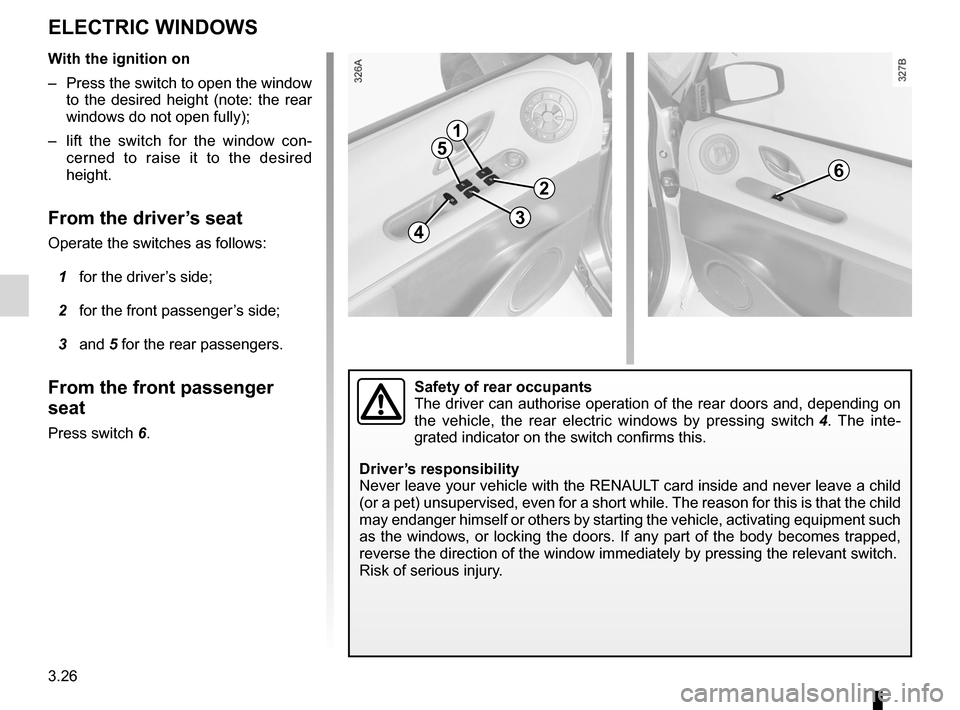
From the driver’s seat
Operate the switches as follows:
1 for the driver’s side;
2 for the front passenger’s side;
3 and 5 for the rear passengers.
From the front passenger
seat
Press switch 6.
1
5
43
2
6
Safety of rear occupants
The driver can authorise operation of the rear doors and, depending on
the vehicle, the rear electric windows by pressing switch 4 . The inte -
grated indicator on the switch confirms this.
Driver’s responsibility
Never leave your vehicle with the RENAULT card inside and never leave a child
(or a pet) unsupervised, even for a short while. The reason for this is that the child
may endanger himself or others by starting the vehicle, activating equipment such
as the windows, or locking the doors. If any part of the body becomes trapped,
reverse the direction of the window immediately by pressing the relevant\
switch.
Risk of serious injury.

