2012 RENAULT ESPACE lock
[x] Cancel search: lockPage 85 of 267

engine start/stop button ........................ (up to the end of the DU)
ignition switch ....................................... (up to the end of the DU)
starting the engine ................................ (up to the end of the DU)
driving ................................................... (up to the end of the DU)
2.3
ENG_UD25550_3
Démarrage/arrêt moteur avec carte RENAULT mains libres (X81 - J81 - Renault)
ENG_NU_932-3_X81ph3_Renault_2
Starting/stopping the engine
STARTING/STOPPING THE ENGINE (1/3)
“Stop”, “Accessories” and “+
After ignition feed” positions
With the engine switched off and
without touching the pedals (brake and
clutch), press button 1 successively to
enable these positions to be selected
one after another.
Starting the engineWith the RENAULT card inside the ve-
hicle (area A) but not in high-up areas
such as the sun visor, glasses holder,
etc.:
– depress the clutch pedal and press
button 1;
or
– shift the gear lever to neutral (vehicle
with a manual gearbox) or position P
or N (vehicle with an automatic gear-
box), depress the brake pedal and
press button 1.
Note: in both cases, the pedal must be
depressed throughout while the engine
is started.
Stopping the engine
When the vehicle is stationary, press
button 1 ; any accessories such as
audio equipment in use at that time will
continue to operate.
When the driver’s door is opened, the
accessories are switched off and the
steering column is locked.
If there is a child (or a
pet) in the vehicle, never
leave it unattended with
the RENAULT card in the
reader. Otherwise, the child could
start the engine or operate electrical
equipment such as the electric win-
dows and there is a risk that he or
she may be injured (by trapping his
or her neck, arm, hand, etc.). Risk of
serious injury.
Never switch off the ignition before
the vehicle has stopped completely.
Once the engine has stopped, the
brake servo, power-assisted steer -
ing, etc. and the passive safety de-
vices such as air bags and preten -
sioners will no longer operate.
A
1
Page 86 of 267

2.4
ENG_UD25550_3
Démarrage/arrêt moteur avec carte RENAULT mains libres (X81 - J81 - Renault)
ENG_NU_932-3_X81ph3_Renault_2
Jaune NoirNoir texte
STARTING/STOPPING THE ENGINE (2/3)
Limited use
– When the engine is running, a ve -
hicle door is open and the card is
outside the vehicle (for example
when the driver gets out to open the
garage door): the engine continues
to run.
– When the engine is running, the ve-
hicle doors are closed and the card
is outside the vehicle (for example
when a passenger leaves the ve -
hicle and takes the RENAULT card
with them): the message “card not
detected” appears on the instrument
panel. The warning light flashes on
emergency card reader 3 and a beep
sounds when the vehicle is restarted
to warn you.
– The RENAULT card's operation
may be affected by interference
from nearby devices, such as exte -
rior installations or equipment oper -
ating on the same frequency as the
RENAULT card.
When you leave your vehi -
cle, especially if you have
your RENAULT card with
you, check that the engine
is completely switched off.
Hands-Free mode operating
fault
Warning light 2 and card reader 3 flash.
With the RENAULT card fully inserted in
card reader 3 (until the steering column
is heard to unlock), button 1 lights up
to confirm the engine is authorised to
start: press button 1 briefly to start the
vehicle. Note: button
1 is off if you are not in a
position to start (e.g. diesel preheating,
gear selected etc.).
In both cases, the pedal must be de -
pressed throughout the engine starting
phase.
Special circumstances
In some cases it will be necessary to
move the steering wheel while pressing
button 1 to unlock the steering column.
23
1
Page 87 of 267

JauneNoirNoir texte
2.5
ENG_UD25550_3
Démarrage/arrêt moteur avec carte RENAULT mains libres (X81 - J81 - Renault)
ENG_NU_932-3_X81ph3_Renault_2
3
1
STARTING/STOPPING THE ENGINE (3/3)
“Engine start” position
(continued)
For diesel versions, wait for the pre -
heating warning light
É to go out
on the instrument panel before press -
ing button 1.
Once the engine starts, light 1 goes
out (the RENAULT is then locked in the
card reader, whose light goes out).
Stopping the engine
With the vehicle stationary , briefly
press button 1 : the ignition will switch
off.
For certain vehicles with automatic
gearboxes, shift the lever to park posi-
tion P.
Remove the card from card reader 3.Withdrawing the Card results in the
courtesy light coming on (when it is in
“automatic lighting” position), the steer-
ing column locking and the accessories
switching off.
Note:
a beep will remind you if you
have left the card in the reader when
you open the driver’s door, and the card
reader will also flash.
When you leave your vehi -
cle, especially if you have
your RENAULT card with
you, check that the engine
is completely switched off.
If there is a child (or a
pet) in the vehicle, never
leave it unattended with
the RENAULT card in the
reader. Otherwise, the child could
start the engine or operate electrical
equipment such as the electric win-
dows and there is a risk that he or
she may be injured (by trapping his
or her neck, arm, hand, etc.). Risk of
serious injury.
Never switch off the ignition before
the vehicle has stopped completely.
Once the engine has stopped, the
brake servo, power-assisted steer -
ing, etc. and the passive safety de-
vices such as air bags and preten -
sioners will no longer operate.
Page 90 of 267

parking brake ........................................ (up to the end of the DU)
driving ................................................... (up to the end of the DU)
2.8
ENG_UD20366_1
Frein de parking assisté (X81 - J81 - Renault)
ENG_NU_932-3_X81ph3_Renault_2
Jaune NoirNoir texte
Electronic parking brake
ASSISTED PARKING BRAKE
Applying the assisted
parking brake
Manual mode
Pull out and release handle 1.
Automatic mode
(depending on country)
The electronic parking brake ensures
automatic vehicle immobilisation when
the engine is stopped by pressing
the engine start/stop button.
In all other instances, e.g. engine stall-
ing, the assisted parking brake is not
applied automatically. Manual mode
must be used.
Indicator light 2 on the dashboard and
indicator light 3 on the instrument panel
light up to confirm that the assisted
parking brake is applied. Indicator
lights 3 and 2 go out when the doors
are locked. Depending on the vehicle,
the “parking brake applied” message
may appear on the instrument panel.
Note:
When the driver’s door is opened, if the
assisted parking brake is not applied,
a beep will sound and, depending on
the vehicle, the message “apply park -
ing brake” appears on the instrument
panel, in this case, to immobilise the ve-
hicle; you must then release handle 1.
For some country-specific versions, the
automatic application function is not
activated. Refer to the information on
“manual mode”.
Releasing the assisted
parking brake
Manual mode
To release the assisted parking brake:
with the engine running, pull handle 1
while pressing unlocking button 4 and
release. Indicator lights 3 and 2 go out.
Automatic mode
The brake will be released automati -
cally as soon as the vehicle starts and
accelerates.
Before leaving the vehi -
cle, check that the assisted
parking brake is fully ap -
plied.
Indicator lights 2 on the dashboard
and 3 on the instrument panel light
up to confirm that it has been ap -
plied.
1
22
4
3
Page 91 of 267
JauneNoirNoir texte
2.9
ENG_UD20366_1
Frein de parking assisté (X81 - J81 - Renault)
ENG_NU_932-3_X81ph3_Renault_2
ASSISTED PARKING BRAKE (continued)
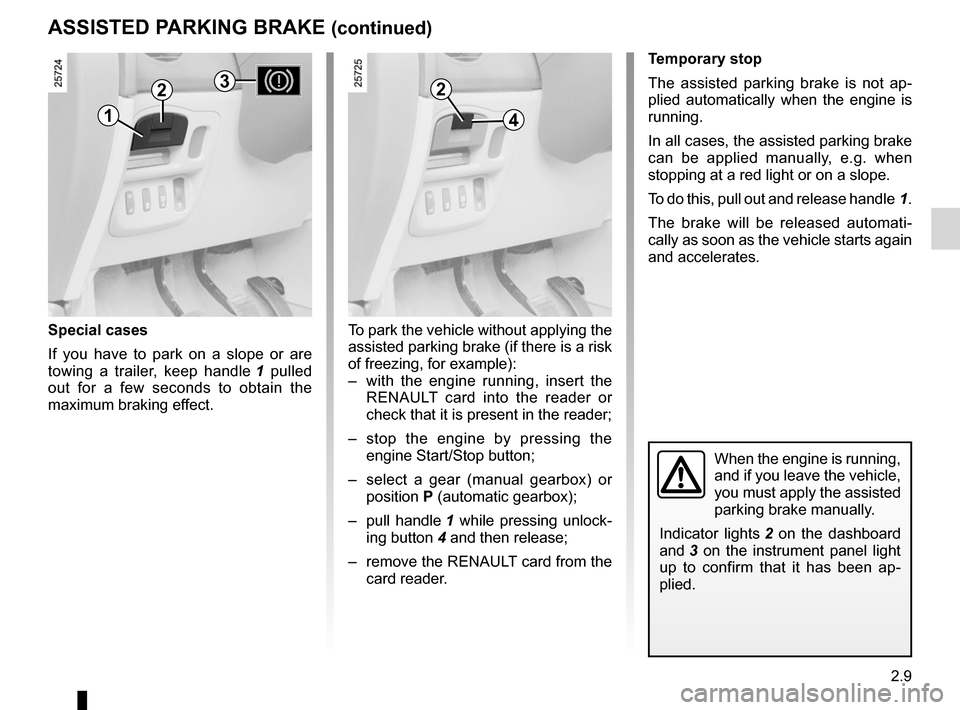
Special cases
If you have to park on a slope or are
towing a trailer, keep handle 1 pulled
out for a few seconds to obtain the
maximum braking effect.
Temporary stop
The assisted parking brake is not ap -
plied automatically when the engine is
running.
In all cases, the assisted parking brake
can be applied manually, e.g. when
stopping at a red light or on a slope.
To do this, pull out and release handle 1.
The brake will be released automati -
cally as soon as the vehicle starts again
and accelerates.
When the engine is running,
and if you leave the vehicle,
you must apply the assisted
parking brake manually.
Indicator lights 2 on the dashboard
and 3 on the instrument panel light
up to confirm that it has been ap -
plied.
To park the vehicle without applying the
assisted parking brake (if there is a risk
of freezing, for example):
– with the engine running, insert the
RENAULT card into the reader or
check that it is present in the reader;
– stop the engine by pressing the
engine Start/Stop button;
– select a gear (manual gearbox) or
position P (automatic gearbox);
– pull handle 1 while pressing unlock-
ing button 4 and then release;
– remove the RENAULT card from the
card reader.
2
41
23
Page 92 of 267

2.10
ENG_UD20366_1
Frein de parking assisté (X81 - J81 - Renault)
ENG_NU_932-3_X81ph3_Renault_2
ASSISTED PARKING BRAKE (continued)
v ersions with an automatic
gearbox
Never leave your vehicle without
moving the selector lever to position N
or P.
For safety reasons, if the lever is not in
one of these positions and the driver’s
door is open or incorrectly shut, the au-
tomatic release function is deactivated.
Emergency unlocking(battery fault or system failure).
To release the assisted parking brake:
lift cover 7 and pull handle 6 until the
unlocking noise can be heard.
This control cannot be used to reap-
ply the parking brake.
After having replaced the battery, the
system will be operational from the first
manual release command.
Operating faults
– In the event of a fault, a warning
message appears on the display
(depending on the vehicle) and de -
pending on the case, warning light 2
flashes and warning light 5 lights up.
– If the assisted parking brake cannot
be used, indicator light 3 flashes for
approximately 10 seconds when the
engine is started, then goes out.
Each time handle 1 is used and
each time the engine is switched off
indicator lights 2 and 3 will flash for
10 seconds.
Contact an approved dealer as soon as
possible.
Never leave a child (or a
pet) in the vehicle with the
RENAULT card in the card
reader or passenger com -
partment. They could release the
parking brake and cause the vehicle
to move off unintentionally.
1
2
6
7
35
Page 93 of 267

power-assisted steering......................................... (current page)
reverse gear selecting ........................................................... (current page)
power-assisted steering ........................(up to the end of the DU)
driving ................................................... (up to the end of the DU)
gear lever .............................................. (up to the end of the DU)
2.11
ENG_UD15398_2
Levier de vitesses/Direction assistée (X81 - Renault)
ENG_NU_932-3_X81ph3_Renault_2
Gear lever
Power-assisted steering
GEAR LEvER/POWER-ASSISTED STEERING
Gear lever
Selecting reverse gear
With the vehicle stationary, shift the
gear lever into neutral then into reverse.
Vehicle with manual gearbox: follow the
gate drawn on the knob, and depend -
ing on the vehicle, lift ring 1 against the
gear lever knob to select reverse.
The reversing lights will come on as
soon as reverse gear is selected with
the ignition on.
Vehicles fitted with parking distance
control: refer to the information on the
“Parking distance control” in Section 2
for details of the special features.Power-assisted steering
If you have power-assisted steering
fitted, do not leave the steering wheel
at full lock while stationary as this may
damage the pump.
v ariable power-assisted
steering
The variable power-assisted steering
system is equipped with an electronic
control system which alters the level of
assistance to suit the vehicle speed.
Steering is made easier during parking
manoeuvres (for added comfort) whilst
the force needed to steer increases
progressively as the speed rises (for
enhanced safety at high speeds).
Never switch off the igni -
tion when travelling down -
hill, and avoid doing so in
normal driving (assistance
is not provided).
1
An impact to the underside
of the vehicle (e.g.: striking
a post, raised kerb or other
street furniture) may result
in damage to the vehicle (e.g.: de -
formation of an axle).
To avoid any risk of accident, have
your vehicle checked by an ap -
proved Dealer.
Page 102 of 267

Electronic Stability Program: ESP ........ (up to the end of the DU)
ESP: Electronic Stability Program ........ (up to the end of the DU)
2.20
ENG_UD20371_1
Contrôle dynamique de conduite : E.S.P. avec contrôle de sous-virage (X81 - J81 - Renault)
ENG_NU_932-3_X81ph3_Renault_2
Electronic Stability Program: ESP
ELEcTRONIc STABILITY PROGRAM: ESP
This system helps to keep control of
the vehicle in critical driving situations
(avoiding an obstacle, loss of grip when
cornering, etc.) and works in conjunc -
tion with the understeer control system.
This function is an addi -
tional aid in the event of
critical driving conditions,
enabling the vehicle behav -
iour to be adapted to suit the driving
conditions.
However, the function does not take
the place of the driver. It does not
increase the vehicle’s limits and
should not encourage you to
drive more quickly.
Therefore, it can under no circum -
stances replace the vigilance or re-
sponsibility of the driver when ma -
noeuvring the vehicle (the driver
must always be ready for sudden in-
cidents which may occur when driv-
ing).
Operating principle
A sensor in the steering wheel detects
the direction selected by the driver.
Other sensors throughout the vehicle
measure the actual direction.
The system compares the direction se-
lected by the driver and the actual di -
rection of the vehicle and corrects this
as necessary by applying the brakes
selectively and/or acting on the engine
power. When the function begins to operate,
warning light
A flashes to warn you.
If the warning light comes on accom -
panied by the “ESP deactivated” mes -
sage when the engine is started, turn
the steering wheel from lock to lock to
reinitialise the system.
Understeer control
This system optimises the action of the
ESP in the case of pronounced unders-
teering (loss of front axle road holding).
Operating faults
When the system detects an operat -
ing fault the message “Check ESP” ap-
pears on the instrument panel along
with the
ú warning light and warn-
ing light A.
Consult an approved dealer.
A