2012 MINI COUPE ROADSTER CONVERTIBLE engine
[x] Cancel search: enginePage 243 of 283

MOBILITYReplacing components
242
Starting-aid terminals
Only charge the battery in the vehicle when the
engine is off. Connections, refer to Jump-start-
ing on page 243.
Charger
The use of a charger ensures that the battery has
a sufficient charge even when it is used for fre-
quent short-distance driv es, for example. Charg-
ers that have been developed especially for the
vehicle and adapted to the vehicle electrical
system are available at your MINI dealer.
Disposal
After replacing old batteries, return the
used batteries to your MINI dealer or to a
recycling center. Maintain the battery in an
upright position for transport and storage.
Always secure the battery against tipping over
during transport. <
Power failure
After a temporary power loss, some equipment
may not be fully functional and may require
initialization. Individual se ttings are also lost and
must be reprogrammed:
> Time and date
These values must be updated, page 76.
> Onboard monitor
Operability must be waited for, page124.
Indicator and warning lamps
Lights up in red:
Battery is no longer being charged.
Alternator malfunction.
Switch off all unnecessary electrical consumers.
Have the battery checked without delay. Lights up in yellow:
Battery charge level very low, battery
aged, or battery not securely con-
nected.
Charge it by taking a long er drive or by using an
external charger. If the display appears again,
have the battery checked as soon as possible.
Fuses
Do not attempt to repair a blown fuse or
replace it with a fuse of a different color or
Ampere rating. To do this could cause a fire in
the vehicle resulting from a circuit overload.
Have fuses replaced by your MINI dealer. <
A fuse assignment diag ram is located on the
inside of the fuse box cover panels.
In the engine compartment
Opening the cover
Press the latch.
In the vehicle interior
On the right side of the footwell.
Opening the cover
Press out at the recess.
00320051004F004C00510048000300280047004C0057004C005200510003
Page 244 of 283
Giving and receiving assistanceMOBILITY
243
Giving and receiving assistance
Vehicle equipment
In this chapter, all production, country, and
optional equipment that is offered in the model
range is described. Equipment is also described
that is not available because of, for example,
selected options or count ry version. This also
applies to safety related functions and systems.
Roadside Assistance
Roadside Assistance is available by phone
24 hours a day in many countries. You can
receive assistance there in the event of an
emergency.
First aid pouch
Some of the articles co ntained in the first aid
pouch have a limited se rvice life. Therefore,
check the expiration dates of the contents
regularly and replace any items in good time, if
necessary.
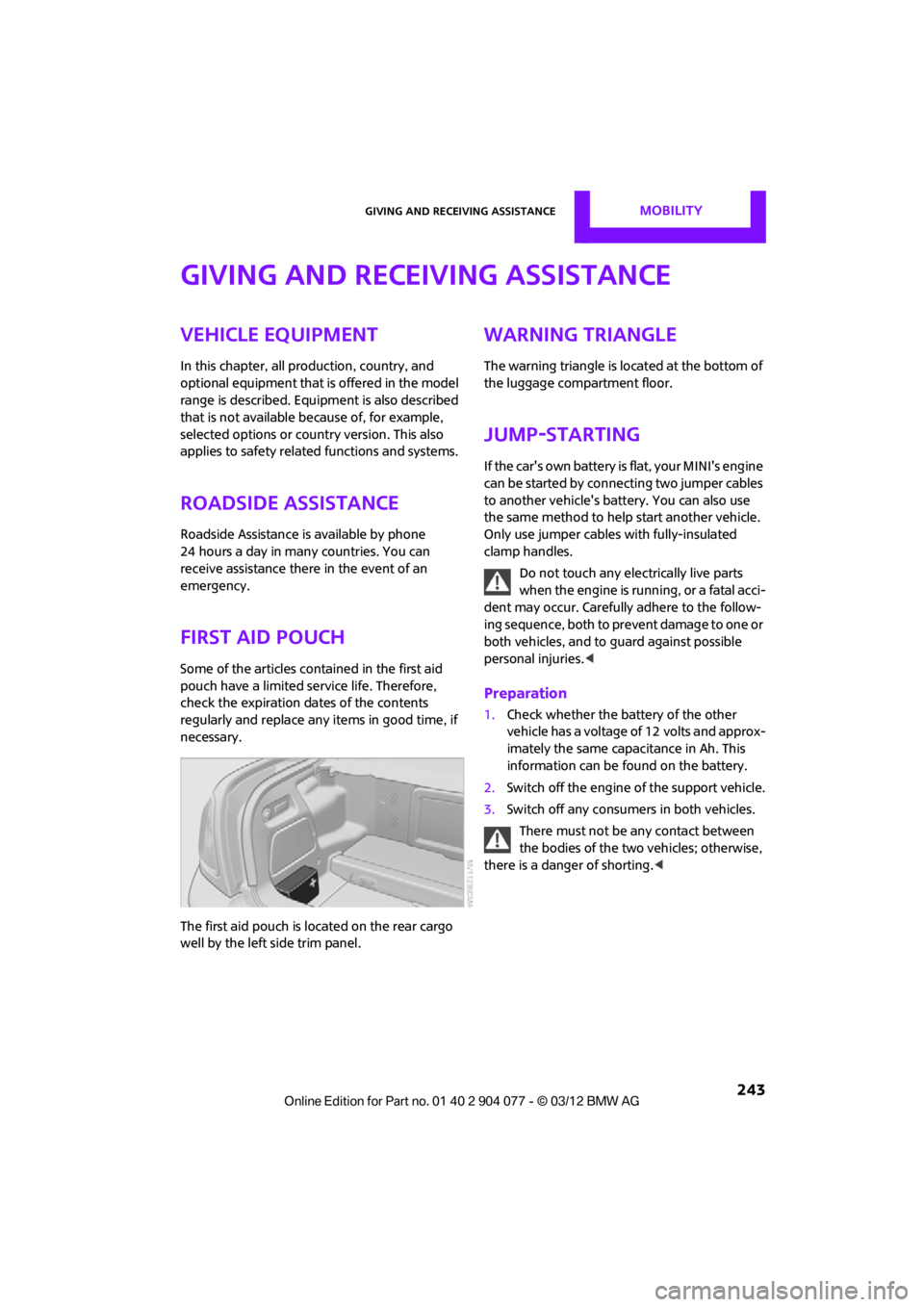
The first aid pouch is located on the rear cargo
well by the left side trim panel.
Warning triangle
The warning triangle is located at the bottom of
the luggage compartment floor.
Jump-starting
If the car's own battery is flat, your MINI's engine
can be started by connecting two jumper cables
to another vehicle's battery. You can also use
the same method to help start another vehicle.
Only use jumper cables with fully-insulated
clamp handles.
Do not touch any electrically live parts
w hen the e ngin e is run ning, or a fatal acci-
dent may occur. Carefully adhere to the follow-
ing sequence, both to prevent damage to one or
both vehicles, and to guard against possible
personal injuries. <
Preparation
1.Check whether the battery of the other
vehicle has a voltage of 12 volts and approx-
imately the same capacitance in Ah. This
information can be found on the battery.
2. Switch off the engine of the support vehicle.
3. Switch off any consumers in both vehicles.
There must not be any contact between
the bodies of the two vehicles; otherwise,
there is a danger of shorting. <
00320051004F004C00510048000300280047004C0057004C005200510003
Page 245 of 283
MOBILITYGiving and receiving assistance
244
Connecting jumper cables
Connect the jumper cables in the correct
order, so that no sparks which could cause
injury occur.<
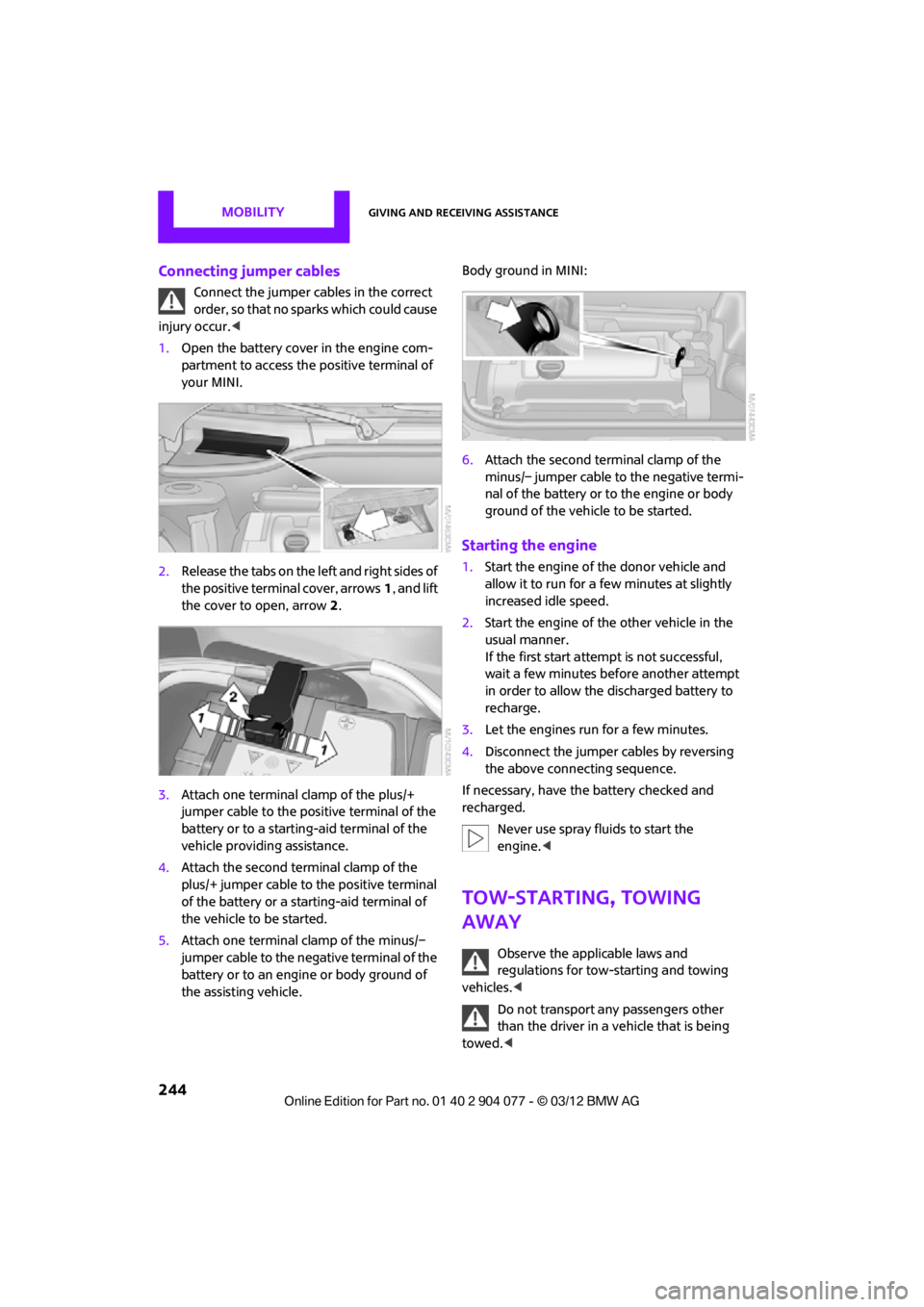
1. Open the battery cover in the engine com-
partment to access the positive terminal of
your MINI.
2. Release the tabs on the left and right sides of
the positive terminal cover, arrows 1, and lift
the cover to open, arrow 2.
3. Attach one terminal clamp of the plus/+
jumper cable to the positive terminal of the
battery or to a starting-aid terminal of the
vehicle providing assistance.
4. Attach the second terminal clamp of the
plus/+ jumper cable to the positive terminal
of the battery or a starting-aid terminal of
the vehicle to be started.
5. Attach one terminal clamp of the minus/–
jumper cable to the negative terminal of the
battery or to an engine or body ground of
the assisting vehicle. Body ground in MINI:
6.
Attach the second te rminal clamp of the
minus/– jumper cable to the negative termi-
nal of the battery or to the engine or body
ground of the vehicle to be started.
Starting the engine
1. Start the engine of the donor vehicle and
allow it to run for a few minutes at slightly
increased idle speed.
2. Start the engine of the other vehicle in the
usual manner.
If the first start attempt is not successful,
wait a few minutes before another attempt
in order to allow the discharged battery to
recharge.
3. Let the engines run for a few minutes.
4. Disconnect the jumper cables by reversing
the above connecting sequence.
If necessary, have the battery checked and
recharged. Never use spray fluids to start the
engine. <
Tow-starting, towing
away
Observe the applicable laws and
regulations for tow-starting and towing
vehicles. <
Do not transport any passengers other
than the driver in a vehicle that is being
towed. <
00320051004F004C00510048000300280047004C0057004C005200510003
Page 246 of 283
Giving and receiving assistanceMOBILITY
245
Using a tow fitting
The screw-in tow fitting must always be carried
in the car. It can be screwed in at the front or
rear of the MINI.
It is stored in the toolkit in the cargo area
underneath the cover on the right-hand side,
page231.
Use only the tow fitting provided with the
vehicle and screw it all the way in. Use the
tow fitting for towing on paved roads only. Avoid
lateral loading of the tow fitting, e.g. do not lift
the vehicle by the tow fitting. Otherwise, the tow
fitting and the vehicle could be damaged. <
Access to screw thread
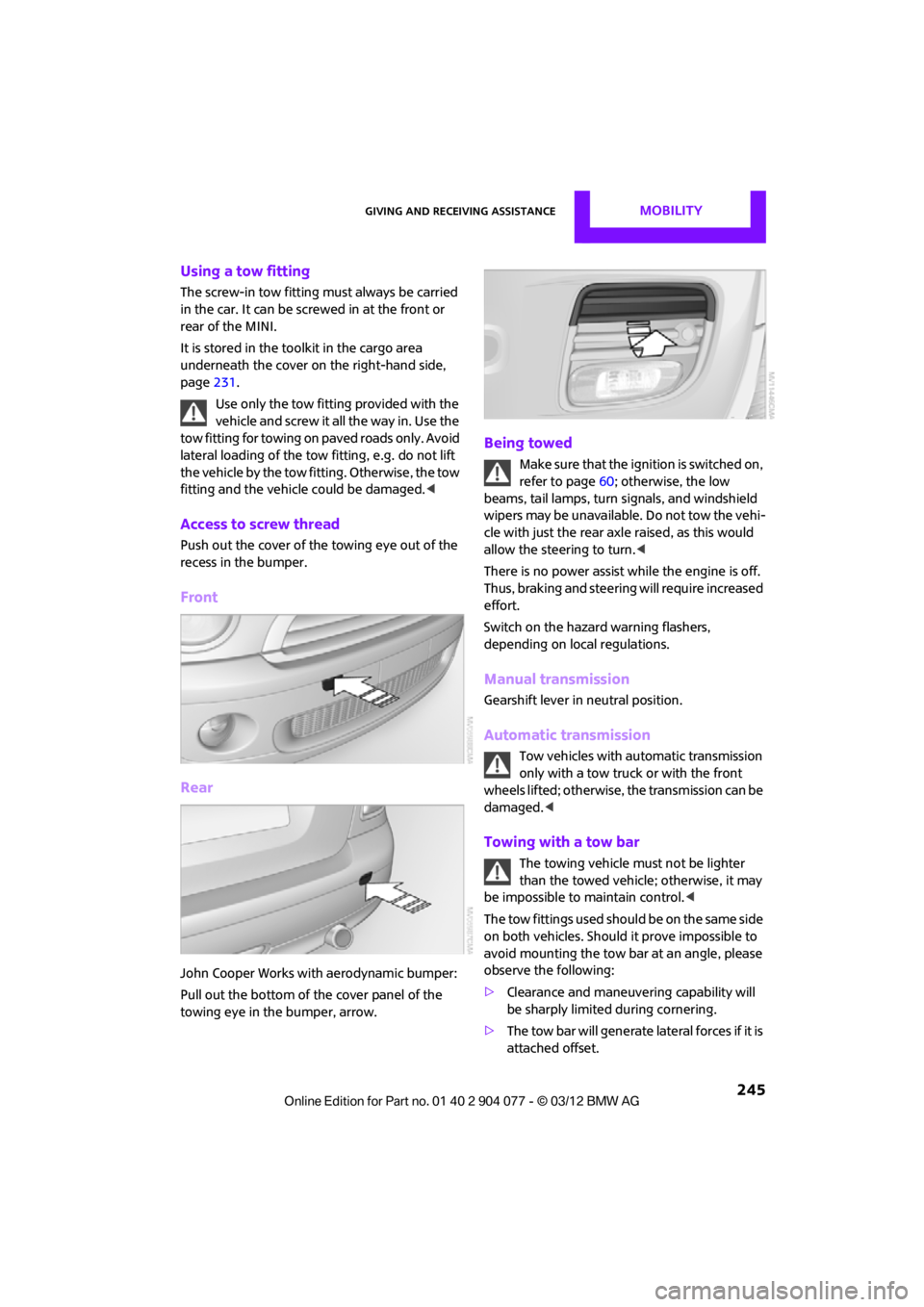
Push out the cover of the towing eye out of the
recess in the bumper.
Front
Rear
John Cooper Works with aerodynamic bumper:
Pull out the bottom of the cover panel of the
towing eye in the bumper, arrow.
Being towed
Make sure that the ignition is switched on,
refer to page60; otherwise, the low
beams, tail lamps, turn signals, and windshield
wipers may be unavailable. Do not tow the vehi-
cle with just the rear ax le raised, as this would
allow the steering to turn. <
There is no power assist while the engine is off.
Thus, braking and steering will require increased
effort.
Switch on the hazard warning flashers,
depending on local regulations.
Manual transmission
Gearshift lever in neutral position.
Automatic transmission
Tow vehicles with automatic transmission
only with a tow truck or with the front
wheels lifted; otherwise, the transmission can be
damaged. <
Towing with a tow bar
The towing vehicle must not be lighter
than the towed vehicle; otherwise, it may
be impossible to maintain control. <
The tow fittings used should be on the same side
on both vehicles. Should it prove impossible to
avoid mounting the tow bar at an angle, please
observe the following:
> Clearance and maneuvering capability will
be sharply limited during cornering.
> The tow bar will generate lateral forces if it is
attached offset.
00320051004F004C00510048000300280047004C0057004C005200510003
Page 247 of 283
MOBILITYGiving and receiving assistance
246
Only attach the tow bar to the tow fittings,
as attachment to other vehicle parts can
lead to damage. <
Towing with a tow rope
When starting off in the towing vehicle, make
sure that the tow rope is taut.
To avoid jerking and the associated
stresses on vehicle components when
towing, always use nylon ropes or nylon straps.
Attach the tow rope to the tow fittings only, as
attaching it to other pa rts of the vehicle could
result in damage. <
Towing with a tow truck
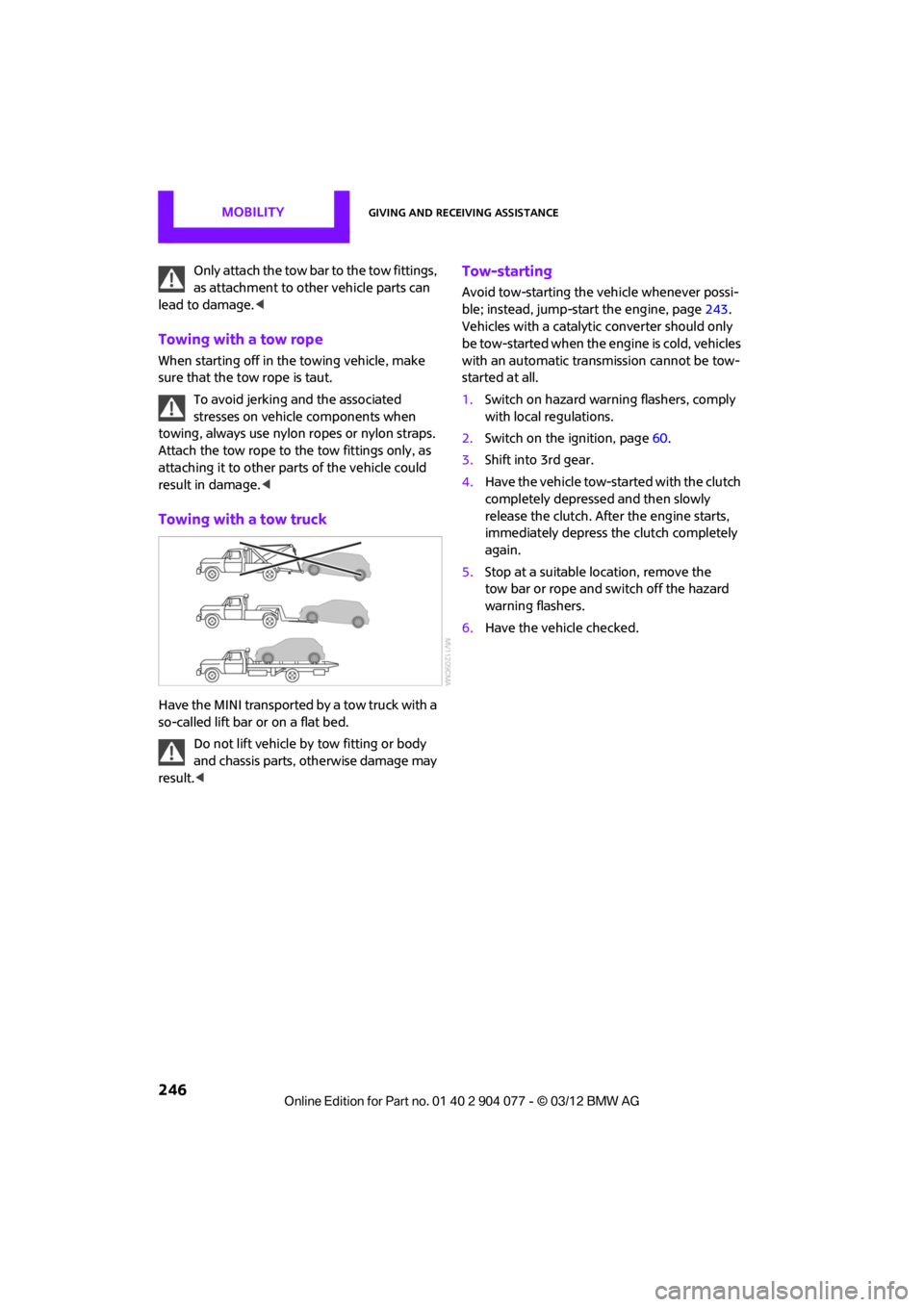
Have the MINI transported by a tow truck with a
so-called lift bar or on a flat bed.
Do not lift vehicle by tow fitting or body
and chassis parts, otherwise damage may
result. <
Tow-starting
Avoid tow-starting the vehicle whenever possi-
ble; instead, jump-start the engine, page 243.
Vehicles with a catalyti c converter should only
be tow-started when the engine is cold, vehicles
with an automatic transmission cannot be tow-
started at all.
1. Switch on hazard warning flashers, comply
with local regulations.
2. Switch on the ignition, page 60.
3. Shift into 3rd gear.
4. Have the vehicle tow-started with the clutch
completely depressed and then slowly
release the clutch. After the engine starts,
immediately depress the clutch completely
again.
5. Stop at a suitable location, remove the
tow bar or rope and switch off the hazard
warning flashers.
6. Have the vehicle checked.
00320051004F004C00510048000300280047004C0057004C005200510003
Page 251 of 283

REFERENCETechnical data
250
Technical data
Vehicle equipment
In this chapter, all production, country, and
optional equipment that is offered in the model
range is described. Equipment is also described
that is not available, for example due to the selected options or national-market version.
This also applies to safety related functions and
systems.
Engine data
Cooper Cooper SJohn Cooper Works
Displacement
cu in/
cmμ 97.5/
1,598 97.5/
1,598 97.5/
1,598
Number of cylinders 44 4
Maximum power
output hp
121181 208
At engine speed rpm 6,0005,500 6,000
Maximum torque
with overboost lb ft/
Nm
114/155
– 177/240
192/260 192/260
207/280
At engine speed
with overboost rpm
4,250
– 1,600-5,000
1,730-4,500 1,850-5,600
2,000-5,100
Overboost briefly raises the maximum torque at high rates of acceleration, e. g. when passing.
00320051004F004C00510048000300280047004C0057004C005200510003
Page 269 of 283

268
REFERENCEEverything from A to Z
Everything from A to Z
Index
A
ABS Antilock Brake System83
Accessories, see Vehicle equipment 4
Acknowledgment signals for
locking/unlocking vehicle 30
Activated-charcoa l filter for
automatic climate
control 105
Adaptive Light Control 97
Adding engine oil 223
Additives
– coolant 224
– engine oil 223
Address, entering 132
Address for navigation
– entering 126,132
Adjusting temperature inside the car, refer to Air
conditioner 102
Adjusting temperature inside the car, refer to Automatic
climate control 103
Adjusting the tone during audio operation, refer to
Tone control 147
Airbags 93
– sitting safely 50
– warning lamp 94
Air conditioner 101
Air conditioning mode
– air conditioner 102
– automatic climate control 103
– ventilation 106
Air distribution
– automatic 104
– individual 103
– manual 103 Air flow rate
102,104
– air conditioning system 102
– automatic climate
control 104
– heating, ventilation 102
Airing, refer to Ventilation106
Air outlets, refer to Air vents 101
Air pressure, checking, refer to
Tire inflation pressure 209
Air recirculation, refer to Recirculated-air
mode 102,104
Air supply
– air conditioner 102
– automatic climate control 103
– ventilation 106
Air vents 101
AKI, refer to Fuel grade 207
Alarm system 34
All-season tires, refer to Winter
tire
s220
Always Open Timer 72
AM, wa
veband 149
Ambient air, refer to
Recirculated-air
mode 102,104
Ambient lighting 100
Antenna, care 227
Antifreeze
– coolant 224
– washer fluid 67
Antilock Brake System ABS 83
Anti-theft alarm system, refer
to Alarm system 34
Anti-theft system 29
Approved axle loads, refer to
Weights 257 Approved engine oils
223
Approved gross vehicle weight, refer to Weights257
Armrest, refer to Center armrest 108
Arrival time
– computer 73
– route guidance 135
Ashtray 109
Assistant systems, refer to
– Dynamic Stability Control DSC 83
Audio 146
– controls 146
– switching on/off 146
– tone control 147
– volume 147
Audio device, external 108
Automatic
– air distribution 104
– air flow rate 104
– cruise control 68
– headlamp control 96
Automatic climate control 101
– automatic air distribution 104
Automatic rear spoiler 85
Automatic transmission with Steptronic 62
– Interlock 63
– overriding selector lever lock 64
– Shiftlock 63
– sport program 64
AUTO program for automatic
climate control 104
Auxiliary phone 182
AUX-In, refer to External audio
device 108
AUX-In connection 159
00320051004F004C00510048000300280047004C0057004C005200510003
Page 270 of 283

Everything from A to ZREFERENCE
269
Average fuel consumption72
– setting the units 74
Average speed 72
Avoiding highways for
navigation 135
Axle loads, refer to Weights 257
B
Background ligh ting, refer to
Ambient lighting 100
Backrests, refer to Seats 51
Backup lamps
– replacing bulb 235
Band-aids, refer to First aid
pouch 243
Bar, refer to Tow-starting, towing away 245
Base plate for telephone or mobile phone
– refer to Snap-in adapter 191
Bass sounds, refer to Tone control 147
Battery 241
– disposal 38,242
– jump-starting 243
– temporary power failure 242
Battery renewal
– remote control 38
Being towed 245
Belts, refer to Safety belts 53
Belt tensioner, refer to Safety
belts 53
Beverage holders, refer to Cupholders 109
Black ice, refer to External temperature warning 71
Blower, refer to Air flow
rate 102,104
Bluetooth, activating/ deactivating 171,181 Bluetooth audio
163
– device pairing 163
– disconnecting an audio connection 165
– playback 164
– unpairing device 165
– what to do if... 166
Bottle holders, refer to Cupholders 109
Brake Assist 83
Brake fluid, refer to Service requirements 75
Brake lamps
– replacing bulbs 235
Brake pads, breaking in 114
Brake rotors 116
– brakes 114
– breaking in 114
Brakes
– ABS 83
– breaking in 114
– MINI Maintenance
System 225
– parking brake 62
– service requirements 75
Br akes,
refer to Braking
safely 115
Brake system 114
– breaking in 114
– disc brakes 116
– MINI Maintenance System 225
Breakdown service, refer to
Roadside Assistance 243
Breaking in the clutch 114
Break-in period 114
Bulb changing, refer to Lamps and bulbs 232
Button for starting the
engine 60
Buttons on the steering wheel 11
C
Calendar 197
– displaying appointment 197
– selecting calendar day 197
California Proposition 65 warning 5
Call
– accepting 173,185
– ending 174,186
– muting the microphone 187
Calling, refer to Phone numbers, dialing 174,186
Calling, refer to Telephone 108
Can holders, refer to Cupholders 109
Capacities 259
Car battery, refer to Vehicle battery 241
Car care 227
Care 227
– car-care products 227
– car washes 227
– CD/DVD drives 230
– high-pressure washers 228
– leather 230
– manual washing 228
– upholstery and fabrics 229
– windows 228
– wiper blades 228
Cargo, securing 119
Cargo area 116
– capacity 257
– Comfort Access 37
– lamp 99
– opening from outside 33
Cargo area lamp 99
Cargo area lid, refer to Tailgate 33
Cargo loading 118
– securing cargo 119
– stowing cargo 119
– vehicle 116
Car key, refer to Keys/remote controls 28
00320051004F004C00510048000300280047004C0057004C005200510003