2012 FORD FOCUS ELECTRIC alarm
[x] Cancel search: alarmPage 15 of 380
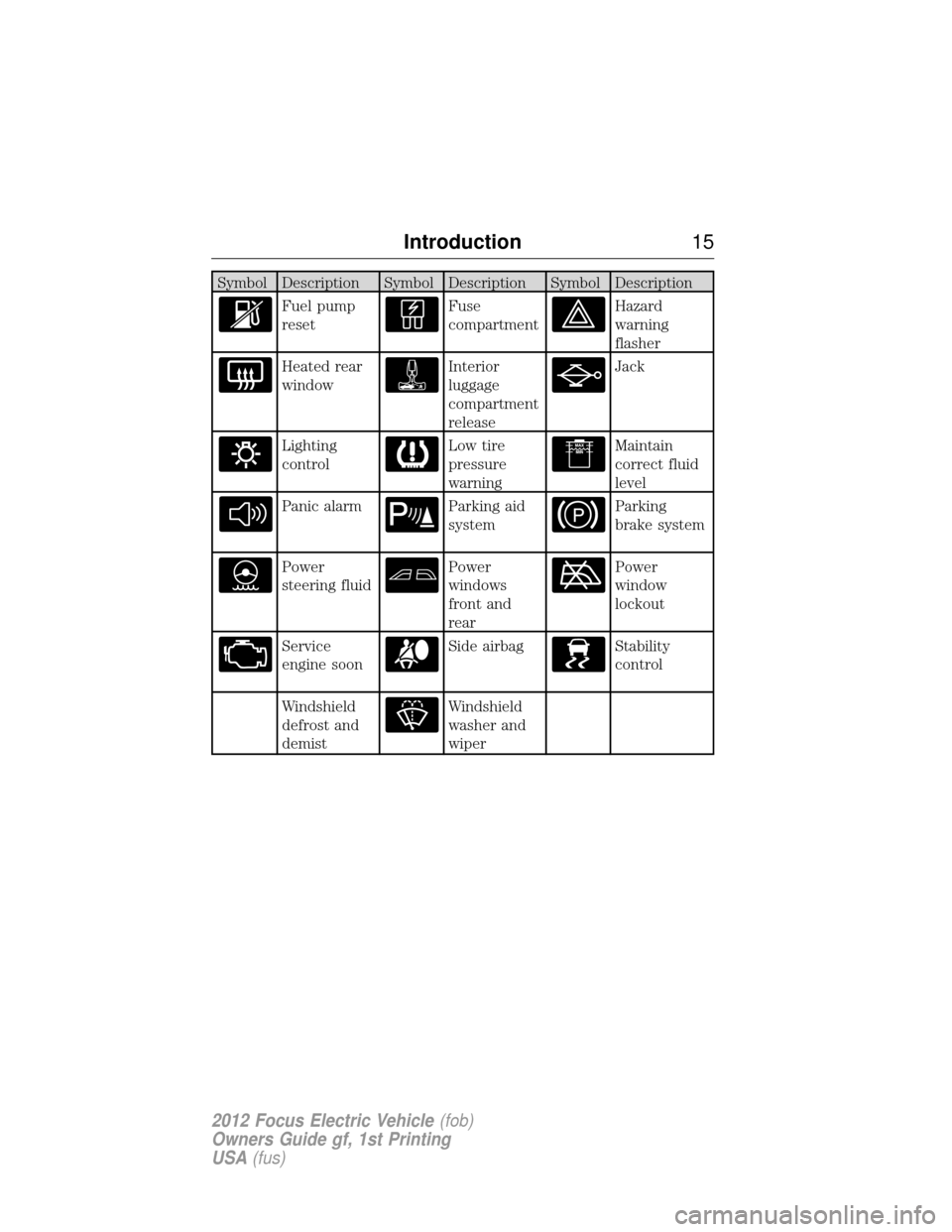
Symbol Description Symbol Description Symbol Description
Fuel pump
resetFuse
compartmentHazard
warning
flasher
Heated rear
windowInterior
luggage
compartment
releaseJack
Lighting
controlLow tire
pressure
warningMaintain
correct fluid
level
Panic alarmParking aid
systemParking
brake system
Power
steering fluidPower
windows
front and
rearPower
window
lockout
Service
engine soonSide airbagStability
control
Windshield
defrost and
demistWindshield
washer and
wiper
Introduction15
2012 Focus Electric Vehicle(fob)
Owners Guide gf, 1st Printing
USA (fus)
Page 29 of 380
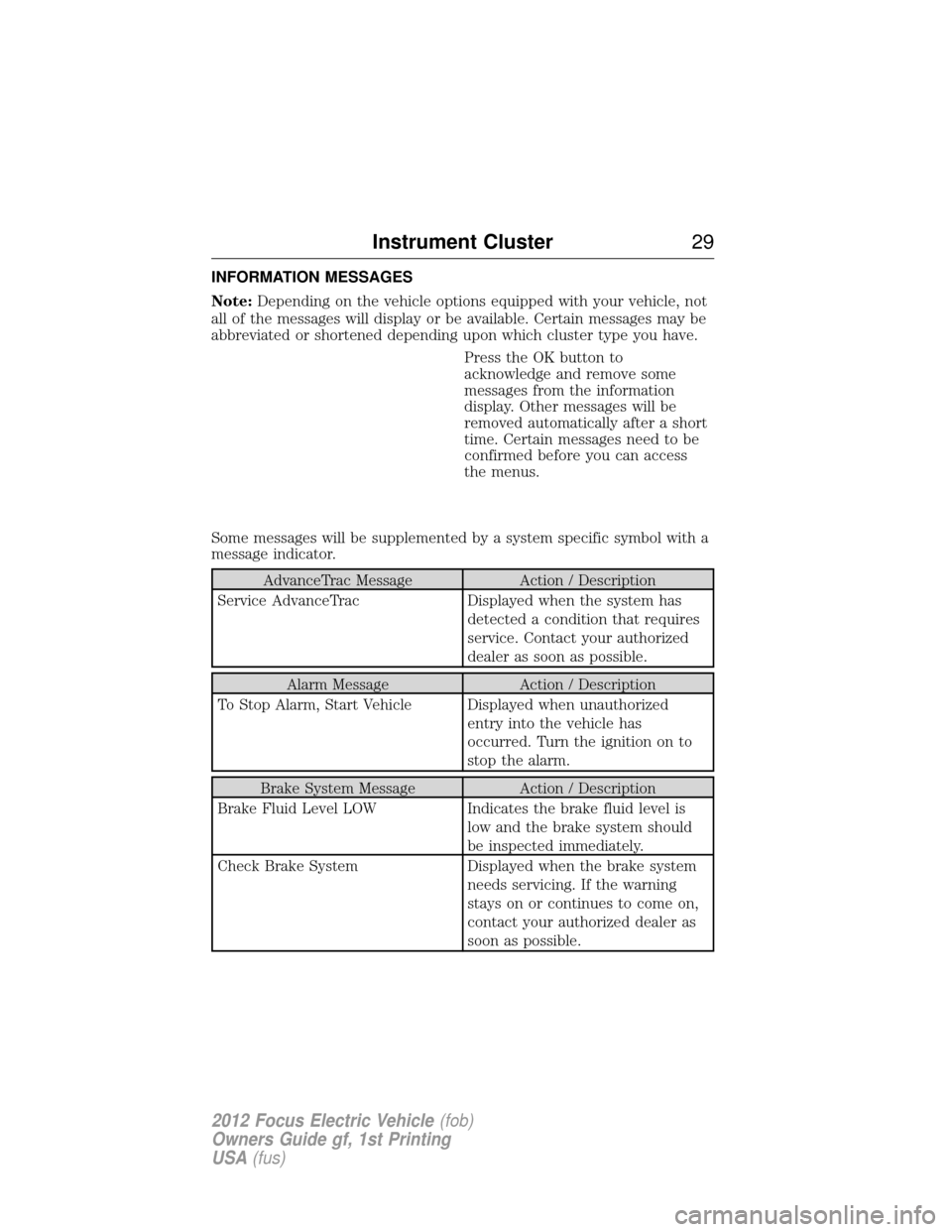
INFORMATION MESSAGES
Note:Depending on the vehicle options equipped with your vehicle, not
all of the messages will display or be available. Certain messages may be
abbreviated or shortened depending upon which cluster type you have.
Press the OK button to
acknowledge and remove some
messages from the information
display. Other messages will be
removed automatically after a short
time. Certain messages need to be
confirmed before you can access
the menus.
Some messages will be supplemented by a system specific symbol with a
message indicator.
AdvanceTrac Message Action / Description
Service AdvanceTrac Displayed when the system has
detected a condition that requires
service. Contact your authorized
dealer as soon as possible.
Alarm Message Action / Description
To Stop Alarm, Start Vehicle Displayed when unauthorized entry into the vehicle has
occurred. Turn the ignition on to
stop the alarm.
Brake System Message Action / Description
Brake Fluid Level LOW Indicates the brake fluid level is
low and the brake system should
be inspected immediately.
Check Brake System Displayed when the brake system
needs servicing. If the warning
stays on or continues to come on,
contact your authorized dealer as
soon as possible.
Instrument Cluster 29
2012 Focus Electric Vehicle(fob)
Owners Guide gf, 1st Printing
USA (fus)
Page 164 of 380
•arm and disarm the perimeter anti-theft system.
• activate the panic alarm.
• operate the illuminated entry feature.
• remotely start the vehicle.
The remote entry lock/unlock feature operates in any power mode
except when the vehicle is running and vehicle speed is more than
4 mph (7 km/h).
If there are problems with the remote entry system, make sure to take
ALL intelligent access keys with you to the authorized dealer in order
to aid in troubleshooting the problem.
Intelligent access
The intelligent access system uses a radio frequency (RF) signal to
communicate with your vehicle and authorize your vehicle to unlock
when commanded (either by touching the inside of any exterior door
handle, the luggage compartment handle, or a button on the transmitter
itself). If excessive RF interference is present in the area, or if your
vehicle battery is low, it may be necessary to mechanically unlock your
door. The mechanical key blade in your IA key can be used to open the
driver’s door in this situation (refer to Intelligent access keyin this
chapter for more information on the location and use of the mechanical
key blade).
Your vehicle will allow you to unlock and enter your vehicle without
actively using a key or transmitter. You can use the intelligent access
feature at any door or at the liftgate. You can activate the intelligent
access feature as long as you have one of your IA keys within range of
the front doors or the liftgate.
Activating intelligent access at
the doors:If your IA key is within
3 feet (1 meter) of the doors you can
activate your intelligent access
system by touching the inside of any
exterior door handle. The door(s) will
automatically unlock and the door
can be opened.
164 Locks and Security
2012 Focus Electric Vehicle (fob)
Owners Guide gf, 1st Printing
USA (fus)
Page 166 of 380
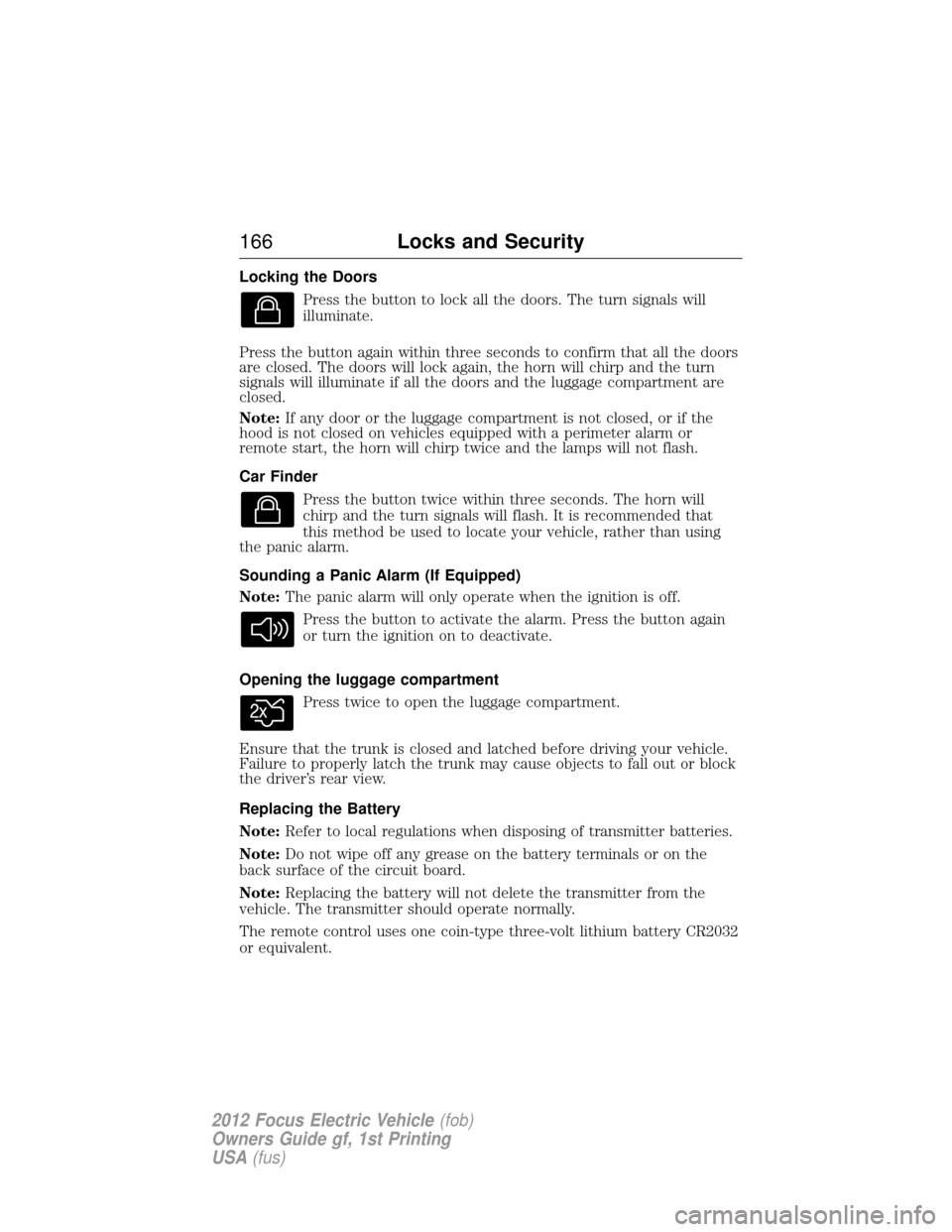
Locking the DoorsPress the button to lock all the doors. The turn signals will
illuminate.
Press the button again within three seconds to confirm that all the doors
are closed. The doors will lock again, the horn will chirp and the turn
signals will illuminate if all the doors and the luggage compartment are
closed.
Note: If any door or the luggage compartment is not closed, or if the
hood is not closed on vehicles equipped with a perimeter alarm or
remote start, the horn will chirp twice and the lamps will not flash.
Car Finder
Press the button twice within three seconds. The horn will
chirp and the turn signals will flash. It is recommended that
this method be used to locate your vehicle, rather than using
the panic alarm.
Sounding a Panic Alarm (If Equipped)
Note: The panic alarm will only operate when the ignition is off.
Press the button to activate the alarm. Press the button again
or turn the ignition on to deactivate.
Opening the luggage compartment Press twice to open the luggage compartment.
Ensure that the trunk is closed and latched before driving your vehicle.
Failure to properly latch the trunk may cause objects to fall out or block
the driver’s rear view.
Replacing the Battery
Note: Refer to local regulations when disposing of transmitter batteries.
Note: Do not wipe off any grease on the battery terminals or on the
back surface of the circuit board.
Note: Replacing the battery will not delete the transmitter from the
vehicle. The transmitter should operate normally.
The remote control uses one coin-type three-volt lithium battery CR2032
or equivalent.
166 Locks and Security
2012 Focus Electric Vehicle (fob)
Owners Guide gf, 1st Printing
USA (fus)
Page 169 of 380
The remote start system will not work if:
•the vehicle is on
• the alarm system is triggered
• the feature has been disabled
• the hood is not closed
• two remote vehicle starts have already been attempted within the last
hour
• the vehicle is not in P (Park)
• the vehicle battery voltage is too low
• the powertrain malfunction/reduced power indicator was on the last
time the vehicle was driven.
Remote Starting the Vehicle
Note: Each button press must be done within three seconds of each
other. The vehicle will not remote start if this sequence is not followed
and the horn will not chirp.
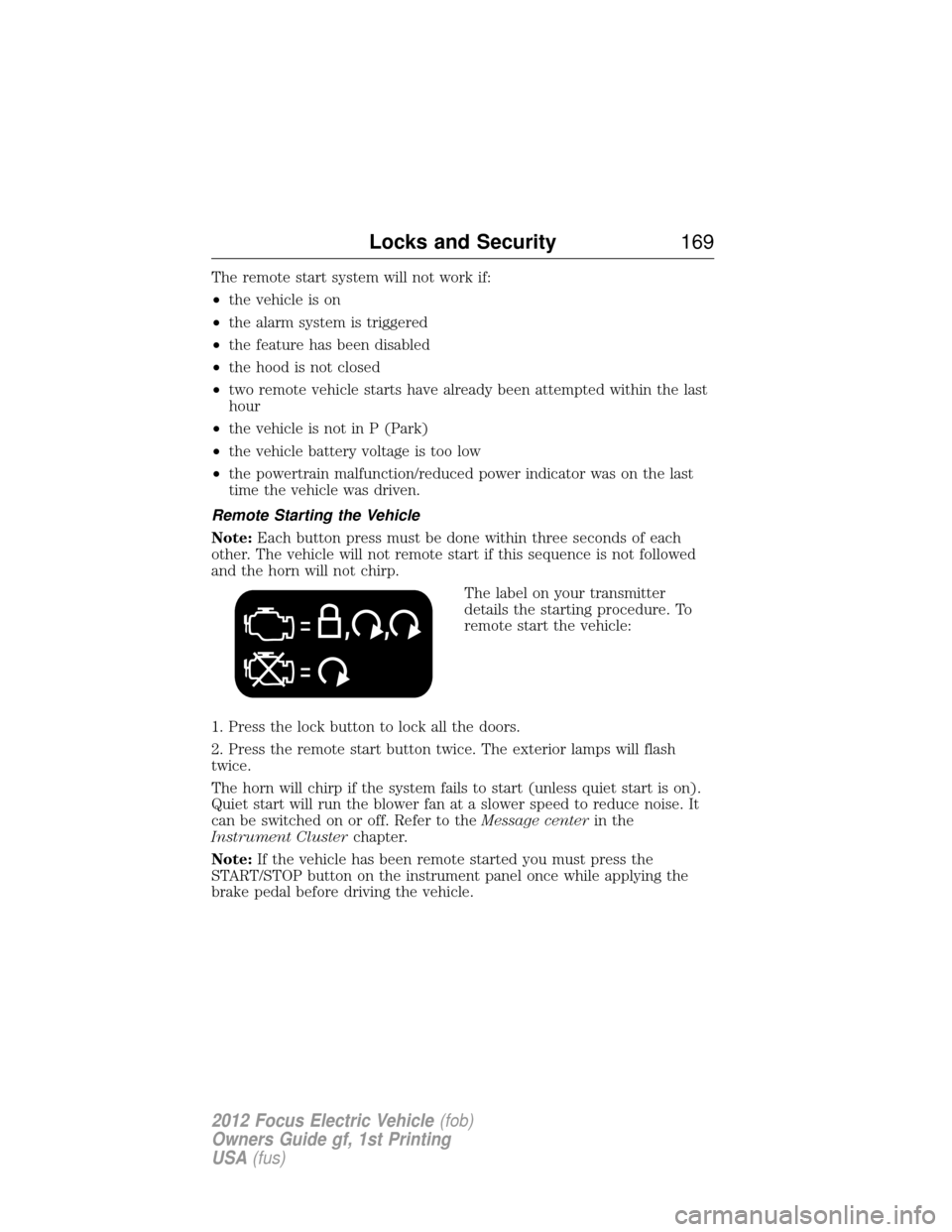
The label on your transmitter
details the starting procedure. To
remote start the vehicle:
1. Press the lock button to lock all the doors.
2. Press the remote start button twice. The exterior lamps will flash
twice.
The horn will chirp if the system fails to start (unless quiet start is on).
Quiet start will run the blower fan at a slower speed to reduce noise. It
can be switched on or off. Refer to the Message centerin the
Instrument Cluster chapter.
Note: If the vehicle has been remote started you must press the
START/STOP button on the instrument panel once while applying the
brake pedal before driving the vehicle.
Locks and Security 169
2012 Focus Electric Vehicle(fob)
Owners Guide gf, 1st Printing
USA (fus)
Page 172 of 380
PERIMETER ALARM SYSTEM
The perimeter anti-theft system will warn you in the event of an
unauthorized entry to your vehicle.
If there is any potential perimeter anti-theft problem with your vehicle,
ensureALL remote entry transmitters are taken to the authorized
dealer to aid in troubleshooting.
Arming the system
When armed, this system will respond if unauthorized entry is
attempted. When unauthorized entry occurs, the system will flash the
park/turn lamps and will sound the horn.
The system is ready to arm whenever the key is removed from the
ignition. Either of the following actions will prearm the alarm system:
• Press the lock control on the remote entry transmitter.
• Open a door and press the power door lock control to lock all the
doors, and then close the door.
Disarming the system
You can disarm the system by any of the following actions:
• Unlock the doors by pressing the
control on your remote entry
transmitter.
• Turn the ignition on or start the vehicle.
• If using a key in the driver’s door to unlock the vehicle, a chime will
sound when you open the door and you will have 12 seconds to
disarm the alarm system using any of the actions above, otherwise the
alarm will trigger.
Pressing the power door unlock control within the 11 second prearmed
mode will return the vehicle to a disarmed state.
Triggering the anti-theft system
The armed system will be triggered if any door, trunk or the hood is
opened without using the key or the remote entry transmitter.
172 Locks and Security
2012 Focus Electric Vehicle (fob)
Owners Guide gf, 1st Printing
USA (fus)
Page 267 of 380
WARNING:Certain add-on devices such as large trailer hitches,
bike or surfboard racks and any device that may block the normal
detection zone of the forward and reverse sensing system may create
false beeps.
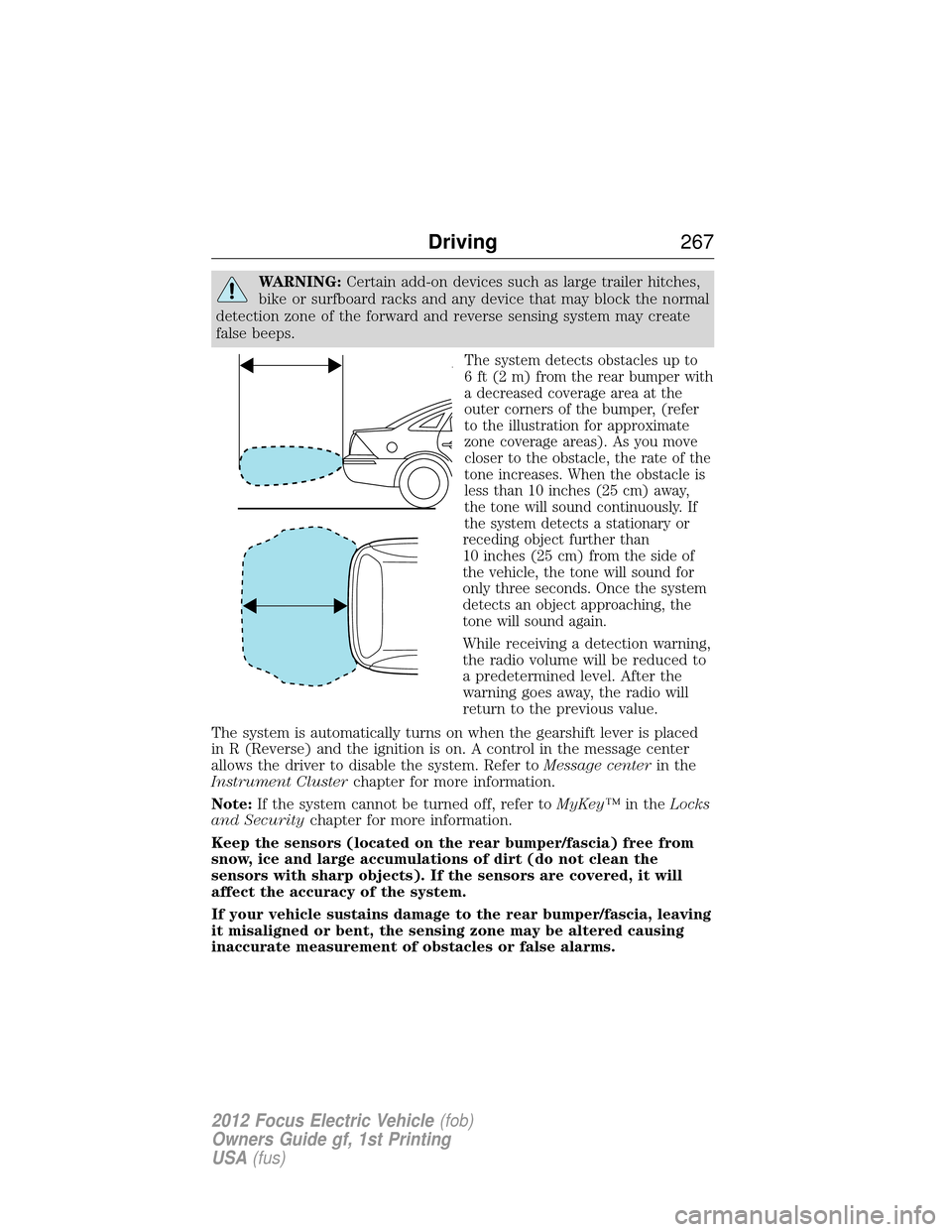
The system detects obstacles up to
6 ft (2 m) from the rear bumper with
a decreased coverage area at the
outer corners of the bumper, (refer
to the illustration for approximate
zone coverage areas). As you move
closer to the obstacle, the rate of the
tone increases. When the obstacle is
less than 10 inches (25 cm) away,
the tone will sound continuously. If
the system detects a stationary or
receding object further than
10 inches (25 cm) from the side of
the vehicle, the tone will sound for
only three seconds. Once the system
detects an object approaching, the
tone will sound again.
While receiving a detection warning,
the radio volume will be reduced to
a predetermined level. After the
warning goes away, the radio will
return to the previous value.
The system is automatically turns on when the gearshift lever is placed
in R (Reverse) and the ignition is on. A control in the message center
allows the driver to disable the system. Refer to Message centerin the
Instrument Cluster chapter for more information.
Note: If the system cannot be turned off, refer to MyKey™in theLocks
and Security chapter for more information.
Keep the sensors (located on the rear bumper/fascia) free from
snow, ice and large accumulations of dirt (do not clean the
sensors with sharp objects). If the sensors are covered, it will
affect the accuracy of the system.
If your vehicle sustains damage to the rear bumper/fascia, leaving
it misaligned or bent, the sensing zone may be altered causing
inaccurate measurement of obstacles or false alarms.
Driving 267
2012 Focus Electric Vehicle (fob)
Owners Guide gf, 1st Printing
USA (fus)
Page 340 of 380
ACCESSORIES
For a complete listing of the accessories that are available for your
vehicle, please contact your dealer or visit our online store at:
Accessories.Ford.com(U.S. only).
Ford Custom Accessories are available for your vehicle through your
local Ford or Ford of Canada dealer. Ford Motor Company will repair or
replace any properly dealer-installed Ford Custom Accessories found to
be defective in factory-supplied materials or workmanship during the
warranty period, as well as any component damaged by the defective
accessories. The accessories will be warranted for whichever provides
you the greatest benefit:
• 12 months or 12,000 miles (20,000 km) (whichever occurs first), or
• the remainder of your new vehicle limited warranty.
Contact your dealer for details and a copy of the warranty.
*Ford Licensed Accessories (FLA) are warranted by the accessory
manufacturer’s warranty. Ford Licensed Accessories are fully designed
and developed by the accessory manufacturer and have not been
designed or tested to Ford Motor Company engineering requirements.
Contact your Ford dealer for details regarding the manufacturer’s limited
warranty and/or a copy of the FLA product limited warranty offered by
the accessory manufacturer.
For maximum vehicle performance, keep the following information in
mind when adding accessories or equipment to your vehicle:
• When adding accessories, equipment, passengers and luggage to your
vehicle, do not exceed the total weight capacity of the vehicle or of
the front or rear axle (GVWR or GAWR as indicated on the Safety
Compliance Certification label). Consult your authorized dealer for
specific weight information.
• The Federal Communications Commission (FCC) and Canadian Radio
Telecommunications Commission (CRTC) regulate the use of mobile
communications systems — such as two-way radios, telephones and
theft alarms - that are equipped with radio transmitters. Any such
equipment installed in your vehicle should comply with FCC or CRTC
regulations and should be installed only by a qualified service
technician.
340 Accessories
2012 Focus Electric Vehicle (fob)
Owners Guide gf, 1st Printing
USA (fus)